This uses the default collation which is at its core based on a character-by-character comparison, which almost always matches what humans would consider to be the “right” order – unless decimal numbers are found, in which case this will sort strings like ‘abc-2000’ before ‘abc-30’.
Natural Sort, on the other hand, compares strings using a more complex algorithm that finds embedded decimal numbers and sorts them according to their numeric value.
create or replace type natural_sort as object (
    v varchar2(32767),
    order member function compare(p_other natural_sort) return integer
);
/

create or replace type body natural_sort as

    order member function compare(p_other natural_sort) return integer is

        function is_whitespace(a in char) return boolean is
        begin
            return a is not null and ascii(a) <= 32;
        end is_whitespace;

        function is_digit(a in char) return boolean is
        begin
            return a is not null and ascii(a) between 48 and 57;
        end is_digit;

        function compare_right(a in varchar2, b in varchar2) return number is
            bias number := 0;
            ia   number := 0;
            ib   number := 0;
            ca   char(1 char);
            cb   char(1 char);
        begin
            -- The longest run of digits wins.  That aside, the greatest
            -- value wins, but we can't know that it will until we've scanned
            -- both numbers to know that they have the same magnitude, so we
            -- remember it in bias.
            loop
                ca := substr(a, ia, 1);
                cb := substr(b, ib, 1);
                pragma inline (is_digit, 'yes');
                if not is_digit(ca) and not is_digit(cb) then
                    return bias;
                pragma inline (is_digit, 'yes');
                elsif not is_digit(ca) then
                    return -1;
                pragma inline (is_digit, 'yes');
                elsif not is_digit(cb) then
                    return 1;
                elsif ca < cb then
                    if bias = 0 then
                        bias := -1;
                    end if;
                elsif ca > cb then
                    if bias = 0 then
                        bias := 1;
                    end if;
                elsif ca = 0 and cb = 0 then
                    return bias;
                end if;
                ia := ia + 1;
                ib := ib + 1;
            end loop;
        end compare_right;

        function natcompare(a in varchar2, b in varchar2) return number is
            ia  number := 0;
            ib  number := 0;
            nza number;
            nzb number;
            ca  char(1 char);
            cb  char(1 char);
            ret number;
        begin
            loop
                -- only count the number of zeroes leading the last number compared
                nza := 0;
                nzb := 0;

                ca := substr(a, ia, 1);
                cb := substr(b, ib, 1);

                -- skip over leading spaces or zeros
                pragma inline (is_whitespace, 'yes');
                while is_whitespace( ca ) or ca = '0' loop
                    if ca = '0' then
                        nza := nza + 1;
                    else
                        -- only count consecutive zeroes
                        nza := 0;
                    end if;
                    ia := ia + 1;
                    ca := substr(a, ia, 1);
                end loop;

                pragma inline (is_whitespace, 'yes');
                while is_whitespace( cb ) or cb = '0' loop
                    if cb = '0' then
                        nzb := nzb + 1;
                    else
                        -- only count consecutive zeroes
                        nzb := 0;
                    end if;
                    ib := ib + 1;
                    cb := substr(b, ib, 1);
                end loop;

                if ca is null and cb is null then
                    -- The strings compare the same. Break the tie with the
                    -- default comparison.
                    if a < b then
                        return -1;
                    elsif a > b then
                        return 1;
                    end if;
                end if;

                -- process run of digits
                pragma inline (is_digit, 'yes');
                if is_digit(ca) and is_digit(cb) then
                    ret := compare_right(substr(a, ia), substr(b, ib));
                    if ret != 0 then
                        return ret;
                    end if;
                end if;

                if ca < cb then
                    return -1;
                elsif ca > cb then
                    return 1;
                end if;

                ia := ia + 1;
                ib := ib + 1;
            end loop;
        end natcompare;

    begin
        if v is null and p_other.v is null then
            return 0;
        elsif v is null and p_other.v is not null then
            return 1;
        elsif v is not null and p_other.v is null then
            return -1;
        elsif v = p_other.v then
            return 0;
        end if;
        return natcompare(v, p_other.v);
    end compare;

end;
/
This creates a type in the schema called natural_sort which can be used in SQL and PL/SQL very simply, e.g.:
select * from my_table order by natural_sort(name);
Warning: this will be slower than the built-in sorting by Oracle, and will not get any benefit from an index on the column; therefore it’s only really suitable when sorting a relatively small number of records, e.g. for display of a small set of records to a user.
Every typical database stores important strings like place names that are then displayed in reports and charts. Most of the time these strings are relatively short (e.g. 30-40 characters) and the reports and charts look fine, but occasionally some records happen to require a much longer string (e.g. 500+ characters) and these strings might cause the reports and charts to become a bit less visually pleasing. In some cases you can get rendering errors where the title or some attribute in a chart is just too long.
Most of the time, the most important information in such a long name is at the start and/or the end of the string; to compromise and show as much as we can fit on the page, we can truncate the middle of the string and replace it with “..” to show that some text has been removed.
The simplest way to do this without a complex expression involving some combination of LENGTH, CASE and SUBSTR is with a single REGEXP_REPLACE using backreferences to retain the start and end of the string:
select REGEXP_REPLACE(
    'My very very very long string abcdefghijklmnopqrstuvwxyz hello world wow this string is really very very very long.',
    '^(.{50}).{3,}(.{50})$', -- get the first and last 50 characters
    '\1..\2',                -- replace the middle with ".."
    1, 1, 'n'                -- treat entire string including newlines
) from dual;
I’ve chosen to keep the first 50 and the last 50 characters in this example. The result:
My very very very long string abcdefghijklmnopqrst..rld wow this string is really very very very long.
If you want to use this trick, you can adjust the length of the resulting string to whatever maximum length you want: choose how many characters to take from the start of the string and the end of the string by changing the two numbers (e.g. 50) in the regular expression.
Testing with a shorter string, we expect it to return the string unmodified:
select REGEXP_REPLACE(
    'This is a nice shorter string with <= 102 characters; the entire string should be returned unmodified.',
    '^(.{50}).{3,}(.{50})$', '\1..\2', 1, 1, 'n'
) from dual;
This is a nice shorter string with <= 102 characters; the entire string should be returned unmodified.
If the incoming string is already 102 characters or shorter, no replacement is done. In every case, we have guaranteed the resulting string will never be longer than 102 characters.
We have a number of utility packages that deal with dates and timestamps and we create automated unit tests for them using utPLSQL which is an excellent unit test framework for PL/SQL. These unit tests are executed by our automated scripts whenever we merge changes into our git repository; this gives us early warning if something we’ve changed may have caused regressions.
(we were driving in a fairly remote area of our state recently and was lucky enough to happen upon a certain blue box on the side of the road – we were whisked away on a wild adventure through time and space which I might recount at a later, or perhaps earlier, time)
An issue I’ve encountered just a few times has been that some of these unit tests, extremely rarely, fail with “off-by-one” errors; e.g. a function was expected to return a string like “2 days ago” but instead it returned “3 days ago”. In another test, a function that accepted a string like “Today” returned the date “7 July 2025” but the unit test expected it to return “8 July 2025”.
declare
    c_now constant timestamp with local time zone := localtimestamp;
begin
    ut.expect(
        util_report.get_since( c_now - numtodsinterval(2, 'day') )
    ).to_equal( '2 days ago' );
end;
/

FAILURE
  Actual: '3 days ago' (varchar2) was expected to equal: '2 days ago' (varchar2)
These test failures were always rare, seemingly unpredictable, apparently unrelated to any recent changes, and rerunning the same test would never reproduce the failure. In fact, the automated unit test system would succeed the next time it ran, with no intervention. Also, each time it would be a different unit test that failed; sometimes two extremely similar unit tests (e.g. ones that were “opposite” of each other) would have conflicting success/failure results.
Diagnosis
It was not difficult to guess what was causing these test failures due to the nature of the failure: the expected value was always 1 unit earlier or 1 unit later than the actual value returned; where the “unit” here might be a day, a month, or a second, depending on what was being tested and the nature of the test. The unit test calculates the expected value based on the current date/time and either stores this value somewhere, or passes it directly to the relevant UT procedure; the unit test executes the test, which itself internally also retrieves the current date/time. Most of the time, the execution time is very quick and the two dates or timestamps are either identical or at most a fraction of a second apart; when a feature being tested only needs them to be the same day, or month, this will “always” be true.
Except, of course, it will not always be true; if the unit test happens to be executed right about the time the clock ticks over from one day to the next, or one month to the next, the two “TODAYs” will still be very close to each other but their day or month will be different. This difference would cause various unit tests to fail.
How did we resolve this issue? My first approach was a bit of a hack; for each unit test, instead of saying “I expect the result to be X”, I modified each unit test to say “I expect the result to be X or X+1” or something like that. It would compare the values, allow the test to succeed if it was off by one, and call it a day.
Unfortunately trying to work out what “X+1” really means in every scenario became rather complex for some of our functions; sometimes the direction might be negative, and might be a different unit than expected. Ultimately the hack was unsatisfactory because it introduced an uncertainty that a real bug might still pass the unit test, if the bug itself introduced an off-by-one error.
Solution
Instead, what we needed was for the unit tests to be run in an artificial environment where today’s date and time are fixed and known, so that our expected values can be predictable.
Now if we were using SYSDATE throughout our code to get the current date/time, we might consider using the Oracle database’s FIXED_DATE feature to set the return value of SYSDATE to a known value. In our case, however, we use CURRENT_DATE and LOCALTIMESTAMP (and sometimes SYSTIMESTAMP) throughout our codebase, and these internal functions ignore FIXED_DATE.
The approach we took was to replace the critical calls to CURRENT_DATE, LOCALTIMESTAMP and SYSTIMESTAMP with our own wrapper functions. These are only needed in the specific PL/SQL packages that need this level of unit testing and where the unit tests actually need to test what they return with respect to today’s date and time, so we didn’t replace all the references throughout our codebase.
Our wrapper functions use the context value that the utPLSQL framework sets to determine whether the current code is being executed in a unit test (including within any setup/teardown procedures in a unit test package); if the context value is not set, we return the real date/time as normal.
CREATE OR REPLACE PACKAGE util IS

    -------------------------------------------------------------------------
    -- Wrapper for current_date to allow unit testing
    -------------------------------------------------------------------------
    function current_date return date;

    -------------------------------------------------------------------------
    -- Wrapper for localtimestamp to allow unit testing
    -------------------------------------------------------------------------
    function localtimestamp return timestamp;

    -------------------------------------------------------------------------
    -- Wrapper for systimestamp to allow unit testing
    -------------------------------------------------------------------------
    function systimestamp return timestamp with time zone;

END util;
/

CREATE OR REPLACE PACKAGE BODY util IS

    c_ut_owner       constant varchar2(30) := 'UT';
    c_test_timestamp constant timestamp := timestamp'2025-01-01 12:00:00.000';

    -------------------------------------------------------------------------
    -- Wrapper for current_date to allow unit testing
    -------------------------------------------------------------------------
    function current_date return date is
    begin
        -- if we're in a utPLSQL unit test, return a static known value
        if sys_context(c_ut_owner || '_INFO', 'CURRENT_EXECUTABLE_NAME') is not null then
            return cast(c_test_timestamp as date);
        end if;
        return standard.current_date;
    end current_date;

    -------------------------------------------------------------------------
    -- Wrapper for localtimestamp to allow unit testing
    -------------------------------------------------------------------------
    function localtimestamp return timestamp is
    begin
        -- if we're in a utPLSQL unit test, return a static known value
        if sys_context(c_ut_owner || '_INFO', 'CURRENT_EXECUTABLE_NAME') is not null then
            return c_test_timestamp;
        end if;
        return standard.localtimestamp;
    end localtimestamp;

    -------------------------------------------------------------------------
    -- Wrapper for systimestamp to allow unit testing
    -------------------------------------------------------------------------
    function systimestamp return timestamp with time zone is
    begin
        -- if we're in a utPLSQL unit test, return a static known value
        if sys_context(c_ut_owner || '_INFO', 'CURRENT_EXECUTABLE_NAME') is not null then
            return c_test_timestamp at time zone 'GMT';
        end if;
        return standard.systimestamp;
    end systimestamp;

END util;
/
In the PL/SQL packages and in the unit tests for those packages, we just needed to replace all references to current_date, localtimestamp, or systimestamp with util.current_date, util.localtimestamp, and util.systimestamp. This means the unit tests will always get the same value from these functions regardless of what today’s date and time actually is.
Note that this approach did not require adding any extra setup or teardown code to the unit tests, so it was quite simple to implement.
If you are using utPLSQL and are considering using this approach, remember to set c_ut_owner to the schema owner for where you have installed utPLSQL (UT, in the sample code above).
This approach is, however, not universal; in other packages with unit tests that actually need to test the amount of time that passes between two events, we would not call these utility functions; those unit tests don’t depend on a particular date or time, but they do depend on the dates/times being different. Therefore we must take care to consider in each case whether we should use these wrapper functions.
Alternative Approaches
If our situation was more complex, and we needed some unit tests to execute with the “real” dates and times, we would use a slightly different approach; i.e. allow the unit test setup code to enable or disable this behaviour, and/or instead of using a single constant value, allow unit tests to set any particular date/time to suit the specific requirements of the unit test (e.g. by setting a private global in the UTIL package).
Got a lot of APEX applications, and/or a schema with lots of objects?
Not sure exactly what database objects are used by which application?
Not sure dropping a particular schema object might break something in your application?
Not sure if all the SQL and PL/SQL in every page of your application still runs without error?
If your answer to any of the above is “Yes”, you may be interested in a new API that has been added in APEX 24.1 and updated in 24.2.
You can use this API to scan your application for any references to any schema objects, whether it refers to objects in a region, SQL queries, PL/SQL processes, and even plugins. Run this in your workspace, giving it the ID of an application you want to scan:
begin
  apex_app_object_dependency.scan(p_application_id => :app_id);
end;
This scans through the whole application by generating a small temporary procedure that tests each schema object name, SQL, or PL/SQL. As it goes, it checks that the code compiles without error, and if it compiles, it saves a list of dependencies detected by the database including tables, views, stored functions and procedures, packages, and synonyms. It drops the temporary procedure at the end.
Depending on how big your application is, the scan may take some time to complete (e.g. 30 to 60 seconds) due to the time required to compile and analyze each temporary procedure. If you find it gets stopped prematurely due to a timeout error, you can run it in the background (for example, I like to use an “Execution Chain” process in an APEX application with “Run in Background” enabled).
Note that none of your application code is actually executed, so there should be no side effects of running the scan. However, if your database has any DDL triggers, they may fire as the temporary procedure is created and dropped.
Viewing the Scan Results
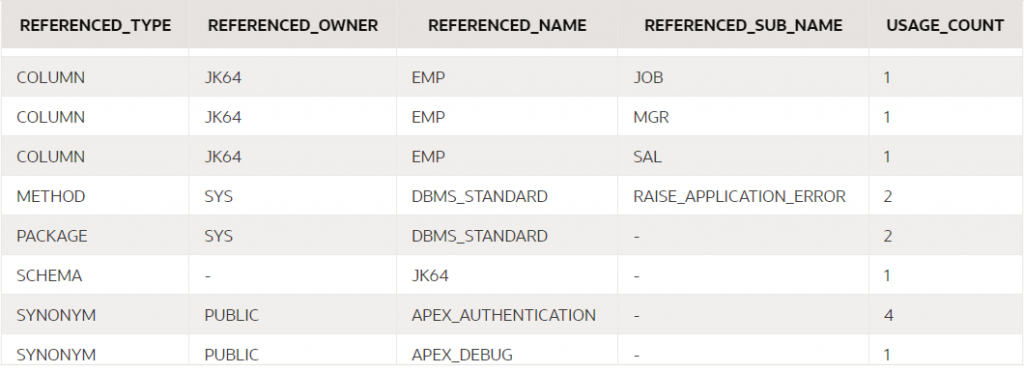
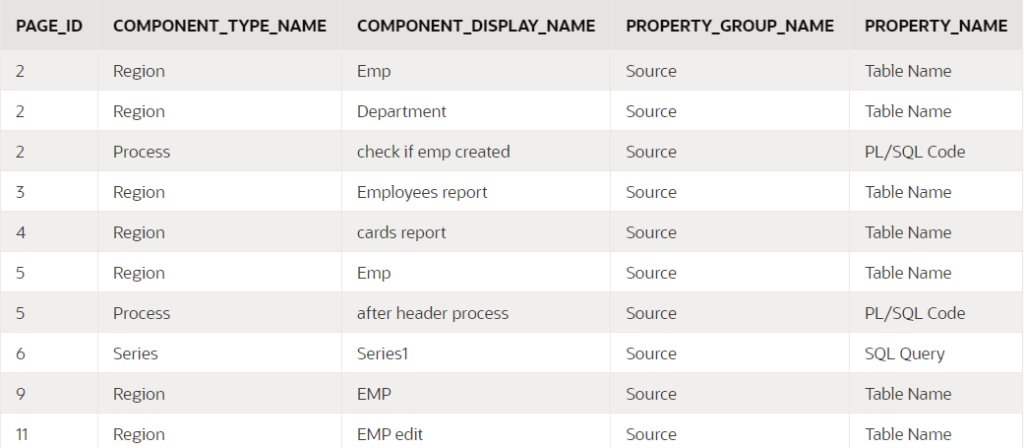
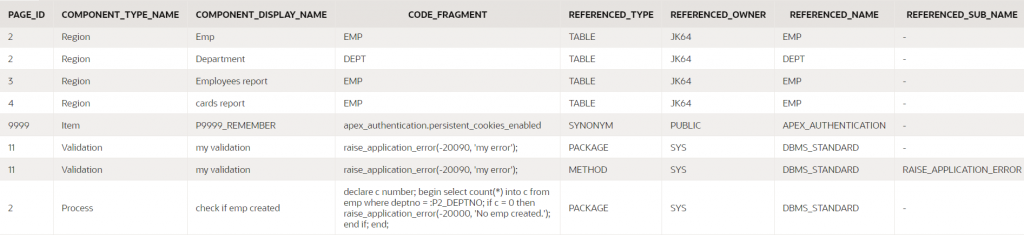
Once the scan is complete, you can query the results at your leisure by querying these views:
APEX_USED_DB_OBJECTS
APEX_USED_DB_OBJECT_COMP_PROPS
APEX_USED_DB_OBJ_DEPENDENCIES
APEX_USED_DB_OBJECTS
This lists each schema object that is used at least once in your application.
select
    referenced_type, referenced_owner,
    referenced_name, referenced_sub_name,
    usage_count
from apex_used_db_objects
where application_id = :app_id;
Note that “USAGE_COUNT” is the number of distinct component properties that refer to the schema object; if a single component (e.g. a Process) refers to an object multiple times, it will only count as one usage.
If your database package is compiled with PL/Scope enabled, the dependency analysis will also report fine-grained dependencies on the functions, procedures, and other components within the database package.
APEX_USED_DB_OBJECT_COMP_PROPS
This lists each component property in your application that references at least one schema object.
select
    page_id,
    component_type_name, component_display_name,
    property_group_name, property_name
from apex_used_db_object_comp_props
where application_id = :app_id;
You can also include the column CODE_FRAGMENT to show the object name, SQL or PL/SQL that was analyzed.
If a component property cannot be analyzed due to a compile error (e.g. if an expected database object is missing) the same view will tell you what the compile error was, which may help you to determine what’s gone wrong.
select
    page_id,
    component_type_name, component_display_name,
    property_group_name, property_name,
    code_fragment, error_message
from apex_used_db_object_comp_props
where application_id = :app_id
and error_message is not null;
APEX_USED_DB_OBJ_DEPENDENCIES
This is the complete report showing for each component property, all the database objects it refers to.
select
    page_id,
    component_type_name, component_display_name,
    property_group_name, property_name,
    code_fragment,
    referenced_type, referenced_owner,
    referenced_name, referenced_sub_name
from apex_used_db_obj_dependencies
where application_id = :app_id;
(some columns were removed from this screenshot)
Using the API
The results of a scan will be retained until the application is re-scanned. You can scan any number of applications in your workspace and analyze the results all together if you need. If an application is modified, you can re-scan it to refresh the report.
You may find it useful, so I encourage you to give it a try. If you do, please note a few caveats:
When APEX is upgraded to a new version, all report results are wiped. You can then re-scan your applications to get up-to-date results.
The reports do not include recursive dependencies – e.g. if your application refers to a view, the report will not list the underlying tables of the view.
If the application includes any plugins, the dependencies report will include references to some internal plugin-related APIs even if your code doesn’t directly reference them.
If your application executes any dynamic SQL or PL/SQL (e.g. using “execute immediate”), any dependencies arising from the dynamic code will not be reported.
There are some component properties that are not included in the scan, such as the column names in a report (however, the data source for the region is scanned). UPDATE: coverage has been greatly improved in APEX 24.2.
In spite of the caveats, I’m sure there are quite a few ways this new API will prove useful. We expect it will be further improved in future releases, including being integrated into the APEX Application Builder.
Wherein I natter on about gear and how I choose what to buy. Perhaps with a point to make about software development.
Bilung Pool, Murchison
At least once a year we pack the Prado with a tent, gear and food and go camping with a group of friends. For a few days to a week or so we’d unplug, relax and enjoy God’s creation somewhere in our vast state of Western Australia.
I’m a frugal person so at first we only collected the bare essentials, got a tent on special for $100 big enough to fit the whole family. Every time we’d go camping we’d think about what worked well last time, and what could be improved, and perhaps get some extra gear or replace something to make things a bit easier. Got a 4WD vehicle so we could go to more places. Got a fast frame tent to reduce the time to set up (this makes a huge difference when we rock up to the site with 5 minutes of light left and three hungry kids). Bought a collapsible basin and bucket which allowed us to fit more gear in. Got some hardy camping boxes for gear. A waterproof rooftop bag for the car which fits all our clothing, pillows and sleeping bags. Ditched the self-inflating mattress that got all warped and took up heaps of space, for some cheap inflatable ones that would only last a year or so but pack down very tightly.
Improvements to the car have also been made. Instead of spending thousands of dollars getting a custom set up done, while not really knowing exactly how we want it set up, we have gradually added small upgrades a bit at a time. Auxiliary battery installed with an isolator so that our fridge and chargers would run without draining the starter battery. My friend installed some power points in the boot so I could run the fridge there, as well as some USB points for charging phones. This year he upgraded my setup to a DC/DC charger which has improved things a lot, and I got a folding solar panel so that I can keep things running (as long as there’s sunlight). Ran two fridges, one as a freezer and one as a fridge – and learned that my aux battery doesn’t have the capacity to keep them both running well, especially in high temperatures. So now I have an idea of what sort of fridge/freezer combo I’d like, and what sort of power usage efficiency I need to be looking for in such a unit.
Early on we were short on funds and we did everything “on the cheap”. This required being very selective about what things we bought, looking for bargains, and buying some things secondhand. Over time we got better at managing our finances, got our spending under control – and so were able to afford the occasional big upgrade when it seemed worthwhile. Instead of just buying cheap gear that frustrates us for a couple of years before they break, we can invest in higher quality products that last many years. Our spending is reasonable and intentional.
Cattle Pool, East Lyons River
Software development works well when done this way, as well. Sometimes it’s a good idea to quickly throw together a rough solution to get the job done. It only costs a small amount of time and gives us the opportunity to see if it really works, where are the rough edges, what areas need work, what features were never really needed in the first place. Later, we can throw part of it out and replace it with a more expensive component (expensive, as in taking a longer period of time and perhaps more manpower to build).
The “big bang” approach never really works in my opinion. It’s so tempting to want to divert down the “tear it all down and rebuild from scratch” road, especially when in the depths of trying to analyse and understand some complex behaviour arising from code that some developer (probably myself) wrote many months ago. You want to throw it all out and start again because that’s a lot more fun. Don’t believe it!
Any non-trivial project will have complexity that, whether you are on your own or are in a team, will have many issues that are difficult to resolve, many of which would have been resolved early on if a small prototype had been built first. This complexity is a simple consequence of the fact that every non-trivial system will be comprised of multiple smaller systems which need to work together; there are exponentially more ways for these mini-systems to interact and fail than you have consciously considered or tested.
Temple Gorge, Kennedy Ranges
I’m currently several years into a large project that is currently being used in production but still has a long list of features yet to be built. It originally started with a small prototype, that itself was an adaptation of a much older, smaller application. The prototype involved a few changes, improvements and refactorings but it was still recognizable from its progenitor. This prototype became a system that was used worldwide with great success, but not without some issues internally that made it difficult to extend and adapt.
These were architectural design issues that required a major redesign – but instead of building a whole new system “from scratch”, we designed the new system with the prototype as a basis. The new data model was an evolution of the original rather than being completely new. In some ways it might have been nicer to start with a completely new data model, but the approach we took meant that a lot of the code from the original simply needed to be adapted to the changes, and meant that we could get our beta version out for testing and evaluation quicker.
Several years later, we had gone back and rewritten, refactored, or even completely replaced large portions of the code; now, I suspect that there are very few, if any, lines of code that have survived from the original source. We’ve changed approaches, technologies and frameworks gradually, replacing one thing at a time. This has not always been smooth; sometimes edge cases and smaller features are forgotten or lost in a rewrite. On the whole, however, we have maintained continuity and releasing the product in small(ish) releases has been successful and generally been received positively.
Recently we went on a 4WD trip in my home state, Western Australia. The photos in this post were from that trip.
This would be a very rare requirement, as most of the time when you are designing an ORDS REST service you should know what query parameters your service supports. However, in the case where your users are allowed to supply an arbitrary list of additional parameters to your service, you won’t know what the keys will be for these parameters.
Since you can’t define the user-defined query parameters in your ORDS endpoint, they won’t be supplied via bind variables. Instead, in your PL/SQL handler you need to get the original query string using owa_util.get_cgi_env('QUERY_STRING'), then parse it to find the query parameters.
Here’s what I’ve used:
function query_string_map
return apex_application_global.vc_map
is
l_plist apex_t_varchar2;
l_map apex_application_global.vc_map;
begin
-- query string may be like:
-- param1=abc¶m2=def¶m3=ghi
-- or blanks may be included like:
-- param1=abc¶m2=¶m3=ghi
-- or the = symbol may be omitted:
-- param1=abc¶m2¶m3=ghi
l_plist := apex_string.split(owa_util.get_cgi_env('QUERY_STRING'), '&');
for i in 1..l_plist.count loop
declare
l_offset pls_integer;
l_key varchar2(255);
l_value varchar2(32767);
begin
l_offset := instr(l_plist(i), '=');
if l_offset > 0 then
l_key := substr(l_plist(i), 1, l_offset - 1);
l_value := substr(l_plist(i), l_offset + 1);
else
l_key := l_plist(i);
-- the value is null
end if;
-- ORDS may encode %20 as '+', but this is not detected by utl_url
l_key := replace(l_key, '+', ' ');
l_key := sys.utl_url.unescape(l_key, 'UTF-8');
if l_value is not null then
l_value := replace(l_value, '+', ' ')
l_value := sys.utl_url.unescape(l_value, 'UTF-8');
end if;
-- add the key/value to the map
l_map(l_key) := l_value;
end;
end loop;
return l_map;
end query_string_map;
This takes the query string and splits it on each occurrence of the & symbol. Each parsed part is expected to take the form key=value, key= or just key (with no = symbol). It converts any escaped URL characters and builds a map of key/value pairs and returns it.
The calling process can then use the map to process each key/value in turn, e.g.
declare
    l_map apex_application_global.vc_map;
    l_key varchar2(255);
begin

    l_map := query_string_map;

    l_key := l_map.first;
    while l_key is not null loop

        -- do something with the key/value
        dbms_output.put_line(l_key || ' : ' || l_map(l_key));

        l_key := l_map.next(l_key);
    end loop;

end;
The Oracle JSON functions are very useful for generating JSON from a query, and developing using these functions requires understanding the limitations of the string data types they return.
Unless otherwise specified, they return a VARCHAR2 with a maximum of 4000 bytes. If your query might return more than this, you must either specify a larger length, e.g. RETURNING VARCHAR2(32767), or request a CLOB, e.g. RETURNING CLOB.
If the data exceeds the limit, calls to JSON_OBJECT, JSON_OBJECTAGG, JSON_ARRAYAGG, and JSON_TRANSFORM will fail at runtime with the following exception:
select
    json_object(
        'name-is-twenty-chars' : rpad('x',3974,'x')
    )
from dual;

ORA-40478: output value too large (maximum: 4000)
The error occurs here because the representation of the entire JSON object requires more than 4000 bytes. No-one likes to see errors, but it’s better than the alternative because it is more likely to alert you to the problem so you can fix it.
You may have noticed I missed one of the JSON functions from the list above – JSON_MERGEPATCH. By default, this function does not raise an exception if the size limit is exceeded. Instead, it merely returns NULL at runtime. This behaviour can cause confusion when debugging a complex query, so it’s something to be aware of.
Note that even though both the JSON objects specified RETURNING CLOB, this was missed for JSON_MERGEPATCH; which means it is limited to the default 4000 bytes, causing it to return NULL. The fix is to add RETURNING CLOB to the JSON_MERGEPATCH:
If you wish to remove a NOT NULL constraint from a column, normally you would execute this:
alter table t modify module null;
The other day a colleague trying to execute this on one of our tables encountered this error instead:
ORA-01451: column to be modified to NULL cannot be modified to NULL
*Cause:    the column may already allow NULL values, the NOT NULL constraint
           is part of a primary key or check constraint.
*Action:   if a primary key or check constraint is enforcing the NOT NULL
           constraint, then drop that constraint.
Most of the time when you see this error, it will be because of a primary key constraint on the column. This wasn’t the case for my colleague, however.
This particular column had a NOT NULL constraint. This constraint was not added deliberately by us; it had been applied automatically because the column has a default expression using the DEFAULT ON NULL option. For example:
create table t (
    ...
    module varchar2(64) default on null sys_context('userenv','module'),
    ...
);
A column defined with the DEFAULT ON NULL option means that if anything tries to insert a row where the column is null, or not included in the insert statement, the default expression will be used to set the column’s value. This is very convenient in cases where we always want the default value applied, even if some code tries to insert NULL into that column.
One would normally expect that a DEFAULT ON NULL implies that the column will never be NULL, so it makes sense that Oracle would automatically add a NOT NULL constraint on the column.
An edge case where this assumption does not hold true is when the default expression may itself evaluate to NULL; when that occurs, the insert will fail with ORA-01400: cannot insert NULL into ("SAMPLE"."T"."MODULE").
Therefore, my colleague wanted to remove the NOT NULL constraint, but their attempt failed with the ORA-01451 exception noted at the start of this article.
Unfortunately for us, the DEFAULT ON NULL option is not compatible with allowing NULLs for the column; so we had to remove the DEFAULT ON NULL option. If necessary, we could add a trigger on the table to set the column’s value if the inserted value is null.
The way to remove the DEFAULT ON NULL option is to simply re-apply the default, omitting the ON NULL option, e.g.:
alter table t modify module default sys_context('userenv','module');
Here’s a transcript illustrating the problem and its solution:
create table t (
    dummy number,
    module varchar2(64) default on null sys_context('userenv','module')
);

Table T created.

exec dbms_application_info.set_module('SQL Developer',null);

insert into t (dummy) values (1);

1 row inserted.

select * from t;

     DUMMY MODULE
---------- -----------------------------------------------------------
         1 SQL Developer


exec dbms_application_info.set_module(null,null);

insert into t (dummy) values (2);

Error report -
ORA-01400: cannot insert NULL into ("SAMPLE"."T"."MODULE")


alter table t modify module null;

ORA-01451: column to be modified to NULL cannot be modified to NULL


alter table t modify module default sys_context('userenv','module');

Table T altered.

insert into t (dummy) values (3);

1 row inserted.

select * from t;

     DUMMY MODULE
---------- -----------------------------------------------------------
         1 SQL Developer
         3
Quite often I will need to export some data from one system, such as system setup metadata, preferences, etc. that need to be included in a repository and imported when the application is installed elsewhere.
I might export the data in JSON or CSV or some other text format as a CLOB (character large object) variable. I then need to wrap this in suitable commands so that it will execute as a SQL script when installed in the target system. To do this I use a simple script that takes advantage of the APEX_STRING API to split the CLOB into chunks and generate a SQL script that will re-assemble those chunks back into a CLOB on the target database, then call a procedure that will process the data (e.g. it might parse the JSON and insert metadata into the target tables).
This will work even if the incoming CLOB has lines that exceed 32K in length, e.g. a JSON document that includes embedded image data encoded in base 64, or documents with multibyte characters.
This is clob_to_sql_script:
function clob_to_sql_script (
    p_clob           in varchar2,
    p_procedure_name in varchar2,
    p_chunk_size     in integer := 8191
) return clob is

-- Takes a CLOB, returns a SQL script that will call the given procedure
-- with that clob as its parameter.

    l_strings apex_t_varchar2;
    l_chunk   varchar2(32767);
    l_offset  integer;

begin

    apex_string.push(
        l_strings,
        q'[
declare
l_strings apex_t_varchar2;
procedure p (p_string in varchar2) is
begin
    apex_string.push(l_strings, p_string);
end p;
begin
]');

    while apex_string.next_chunk (
        p_str    => p_clob,
        p_chunk  => l_chunk,
        p_offset => l_offset,
        p_amount => p_chunk_size )
    loop
        apex_string.push(
            l_strings,
            q'[p(q'~]'
            || l_chunk
            || q'[~');]');
    end loop;

    apex_string.push(
        l_strings,
        replace(q'[
    #PROC#(apex_string.join_clob(l_strings));
end;
]',
            '#PROC#', p_procedure_name)
        || '/');

    return apex_string.join_clob(l_strings);
end clob_to_sql_script;
Note that the default chunk size is 8,191 characters which is the safe limit for multi-byte characters. You can choose a smaller chunk size if you want, although if the incoming CLOB is very large, the smaller the chunk size the bigger the expanded SQL script will be.
A simple test case will demonstrate what it will do:
declare
    l_input  clob;
    l_output clob;
begin
    l_input := q'[
{
    "data": "Lorem ipsum dolor sit amet, consectetur adipiscing elit, sed do eiusmod tempor incididunt ut labore et dolore magna aliqua. Ut enim ad minim veniam, quis nostrud exercitation ullamco laboris nisi ut aliquip ex ea commodo consequat. Duis aute irure dolor in reprehenderit in voluptate velit esse cillum dolore eu fugiat nulla pariatur. Excepteur sint occaecat cupidatat non proident, sunt in culpa qui officia deserunt mollit anim id est laborum."
}
]';
    l_output := clob_to_sql_script(
        p_clob           => l_input,
        p_procedure_name => 'mypackage.import',
        p_chunk_size     => 60 );
    dbms_output.put_line( l_output );
end;
/
The above script would output this:
declare
l_strings apex_t_varchar2;
procedure p (p_string in varchar2) is
begin
    apex_string.push(l_strings, p_string);
end p;
begin

p(q'~
{
    "data": "Lorem ipsum dolor sit amet, consectetur adip~');
p(q'~iscing elit, sed do eiusmod tempor incididunt ut labore et d~');
p(q'~olore magna aliqua. Ut enim ad minim veniam, quis nostrud ex~');
p(q'~ercitation ullamco laboris nisi ut aliquip ex ea commodo con~');
p(q'~sequat. Duis aute irure dolor in reprehenderit in voluptate ~');
p(q'~velit esse cillum dolore eu fugiat nulla pariatur. Excepteur~');
p(q'~ sint occaecat cupidatat non proident, sunt in culpa qui off~');
p(q'~icia deserunt mollit anim id est laborum."
}
~');

    mypackage.import(apex_string.join_clob(l_strings));
end;
/
Recently I’ve been reviewing and updating my knowledge of APEX security, especially protection from URL tampering. I’ve read the documentation, a number of blogs, and heard from people with experience in the field such as Lino. By default, when you create a new application in APEX you get the following security settings set automatically, which is a good start:
Application Session State Protection is Enabled.
Each page has Page Access Protection set to Arguments Must Have Checksum.
Each Application Item has Protection Level set to Restricted – May not be set from browser.
Each Primary Key Item* created by a wizard has Protection Level set to Checksum Required – Session Level.
(* that is, any item mapped from a table column that is, or forms part of, a Primary Key constraint).
These default settings are considered best practice. If you change these, it becomes your responsibility to ensure that your application is protected against security vulnerabilities from URL tampering.
For page items, however, the Protection Level defaults to Unrestricted. This is ok for Form items because the page fetch process will set their values on page load, rendering any attempt at URL tampering ineffective.
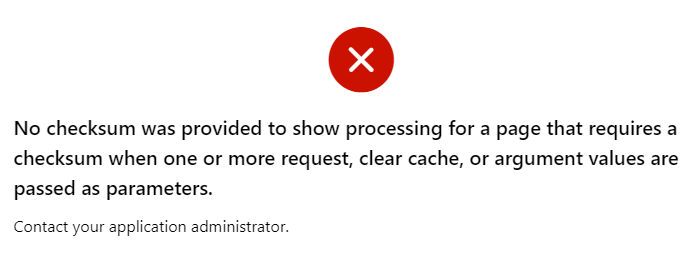
For non-form page items, unless the Page Access Protection is relaxed (Unrestricted), leaving items unrestricted is safe since URL tampering is blocked for the entire page anyway. At runtime, if a malicious visitor tries to modify the item value via the URL, they will get the error “No checksum was provided to show processing for a page that requires a checksum when one or more request, clear cache, or argument values are passed as parameters.“
However, what if a developer later needs to change the page to Unrestricted? They may unwittingly introduce a potential URL tampering issue because one or more items were not protected.
UPDATE: in fact, this applies even if it’s a different page in the same application. As Martin D’Souza pointed out a decade ago, URL tampering for any item in the application is possible from any page in the application that is Unrestricted.
The majority of these items are editable input items, so the fact that someone may input a value via the URL is not a big deal. However, for Hidden and Display Only items, it is common for application logic to depend on their values; this logic may be adversely affected by malicious values supplied via the URL.
In some cases, this default is needed in order for the application to work. Some examples when an item must be left Unrestricted are:
An item is changed by a Dynamic Action (whether via a Set Item Value, via the Items to Return of a Execute Server-side Code action, or in some custom JavaScript), and cannot have Value Protected set because the page may be submitted.
We do actually intend the item to be set via the URL, e.g. when an external web page has a link that sets the item’s value.
In all these cases, the application must be designed to ensure it does not “trust” the value of these items; it should apply suitable checks to ensure the values are valid.
In most cases, it is best practice to set the item Protection Level to Checksum Required – Session Level (or Restricted – May not be set from browser where supported).
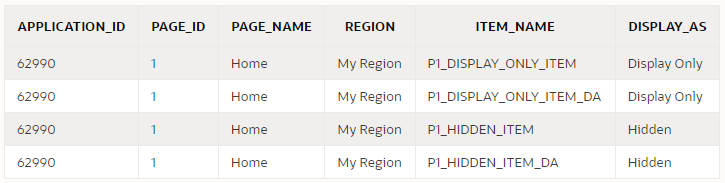
You can use a query like this to discover all items that may need to be reviewed:
select
    i.application_id,
    i.page_id,
    i.page_name,
    i.region,
    i.item_name,
    i.display_as
from apex_application_page_items i
where i.application_id = :app_id
and i.item_protection_level = 'Unrestricted'
and i.display_as_code in ('NATIVE_HIDDEN','NATIVE_DISPLAY_ONLY')
order by i.application_id, i.page_id, i.region, i.item_name;
Other excellent options are using third-party security scanners such as APEXSec and APEX-SERT to alert you to potential issues in your application. We mandate the use of tools like these internally at Oracle for our own applications and they are a great help.
Using the Session State Protection Wizard
One easy step you can take right now is to use the Session State Protection wizard. It gives you a quick overview of what level of protection your application has against URL tampering, and gives an easy way of fixing the relevant attributes in bulk.
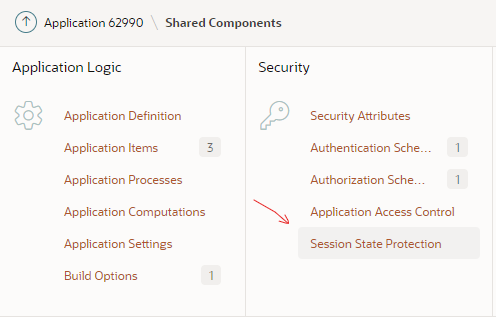
You can access the wizard via Shared Components > Session State Protection
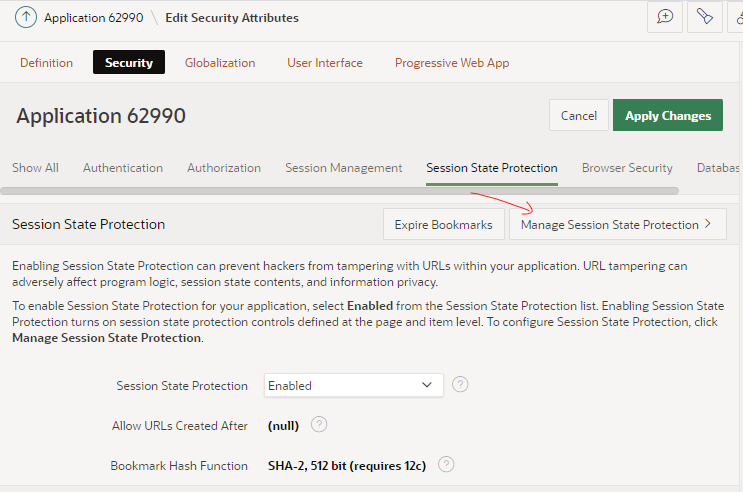
Alternatively, you can access the wizard via Edit Application Definition > Security > Session State Protection > Manage Session State Protection
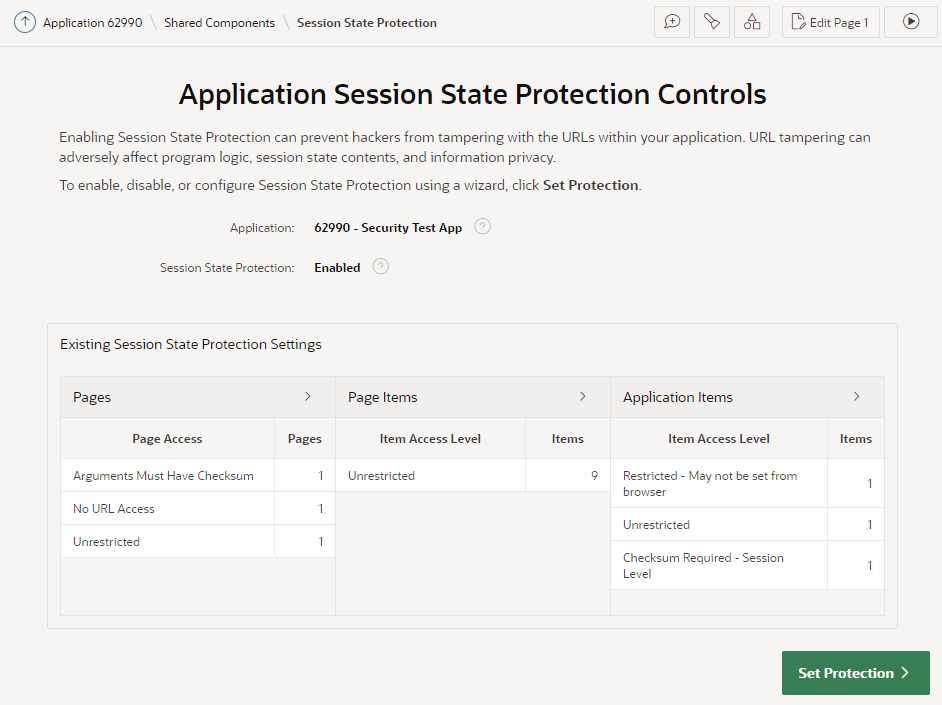
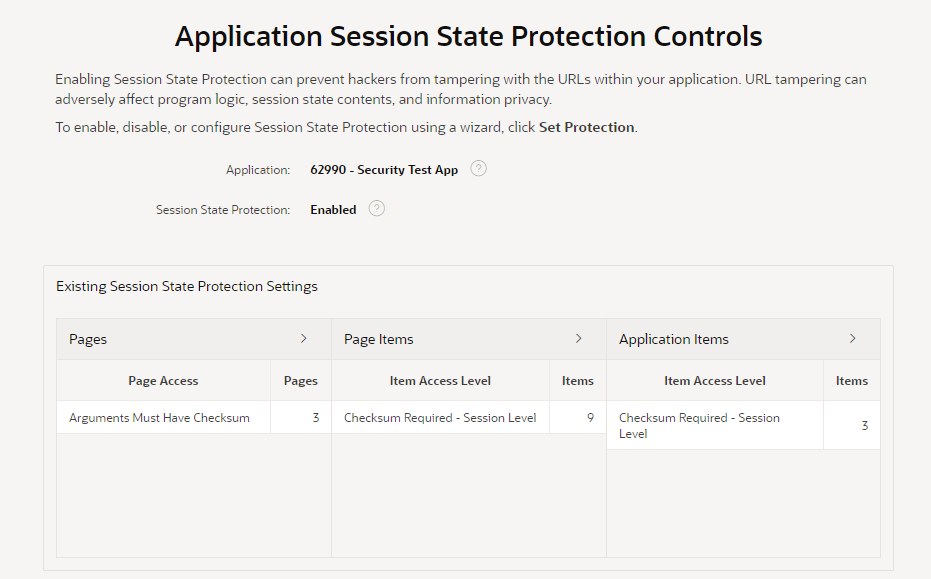
The wizard starts by showing an overview of the current state of your application’s protection against URL tampering.
You can see if your application has Session State Protection enabled (which it should, really), and if any pages, page items, and/or application items are unprotected. In my sample app here, it’s obvious that there are some potential security issues that need to be reviewed.
You can click the > buttons next to each category to list all the pages and items that need to be reviewed.
The main things to watch out for are Pages, Page Items, and Application Items that are set to Unrestricted. Other values are generally fine.
If you see any Items which are set to Checksum Required but not at the Session Level, you may find that a developer has simply set them incorrectly and you should consider changing them to Session Level. However, there are some scenarios where the other levels (Application Level, or User Level) are required.
Now, I might now go through the application page-by-page and set the protection level on each page and item as appropriate. This could be a laborious process for a large application.
A good alternative is to use this wizard to set the protection level in bulk. In this case, I’m going to click Set Protection.
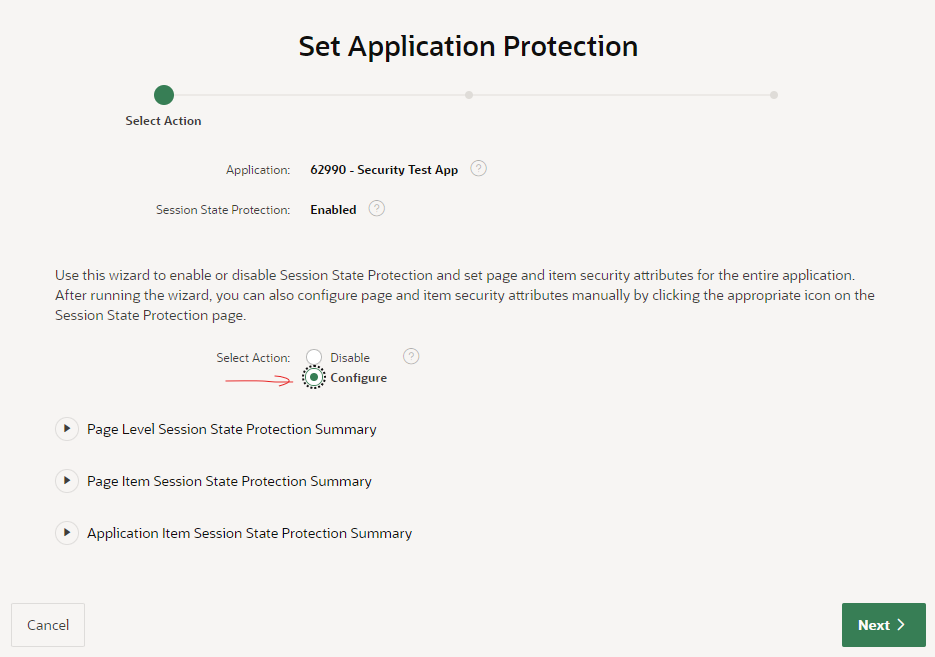
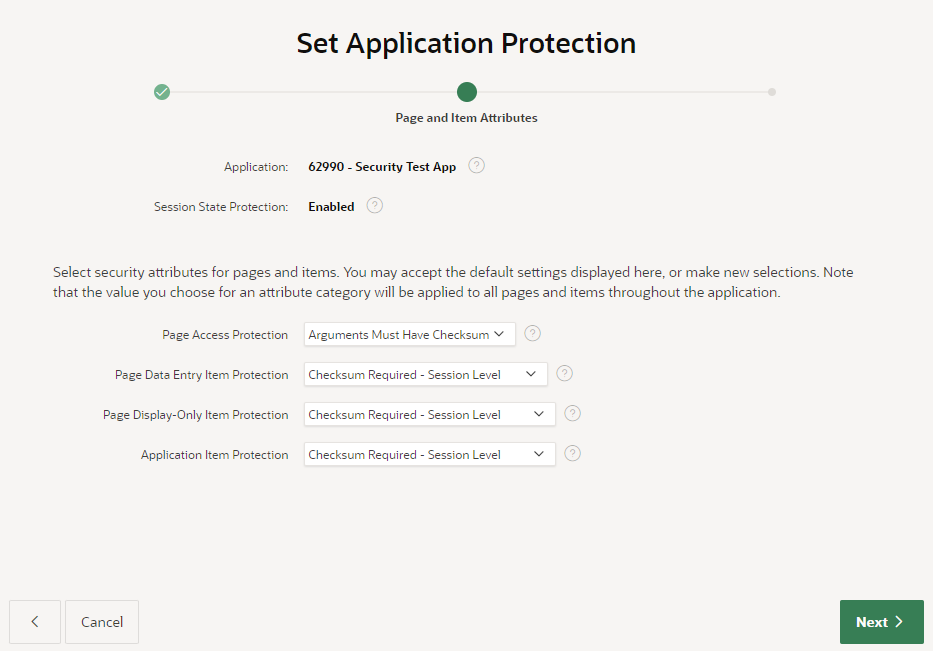
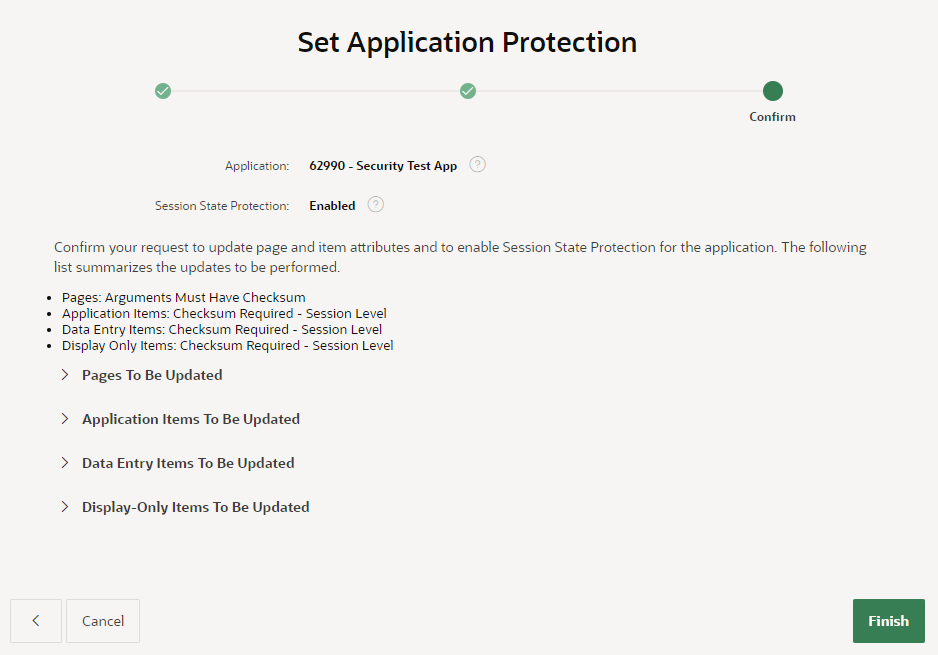
I’ve selected the action Configure, then click Next.The wizard now gives me the opportunity to modify the protection level on my pages and items in bulk. I’m going to accept the defaults (Arguments Must Have Checksum / Checksum Required – Session Level) because they are appropriate for most cases in my application.After reviewing the summaries of the changes that the wizard will make, I click Finish.
Perfect!
Final Steps
Now, I need to check for hidden page items that are now restricted that might need to be returned to Unrestricted. Otherwise, users will see the error “Session state protection violation” when they submit the page, if a dynamic action has changed them.
The following query will alert me to any Hidden items that have Value Protected switched off (e.g. because they need to be submitted):
select
    i.application_id,
    i.page_id,
    i.page_name,
    i.region,
    i.item_name,
    i.display_as
from apex_application_page_items i
where i.application_id = :app_id
and i.item_protection_level != 'Unrestricted'
and i.display_as_code = 'NATIVE_HIDDEN'
and i.attribute_01 = 'N' -- Value Protected
order by i.application_id, i.page_id, i.region, i.item_name;
Now I can review this item to check if Value Protected really needed to be switched off. If the page is never submitted, or the item is never changed by any dynamic actions, this could be switched On. Otherwise, I need to set the item protection to Unrestricted in order for the page to work.
Having made changes to the application, I need to test to ensure I haven’t introduced any issues. My focus will be mainly on the following areas:
Navigation – e.g. do the View or Edit buttons in all reports still work?
Dynamic actions – e.g. do all the dynamic actions and custom javascript still work on all pages that set item values?
For #1, I’m looking for any links that include item values that were not correctly built. If the application generates any links using just string concatenation, it will fail if the target page expects a checksum. The application should build these links using declarative link attributes if possible, or by calling apex_page.get_url (or apex_util.prepare_url at least).
For #2, I would test to ensure that after triggering a dynamic action or javascript code that modifies an item’s value, that the form is still submitted (saved) without error.