Sponsored
Currently unavailable.
We don't know when or if this item will be back in stock.
Added to

Sorry, there was a problem.

There was an error retrieving your Wish Lists. Please try again.

Sorry, there was a problem.

List unavailable.
Sponsored
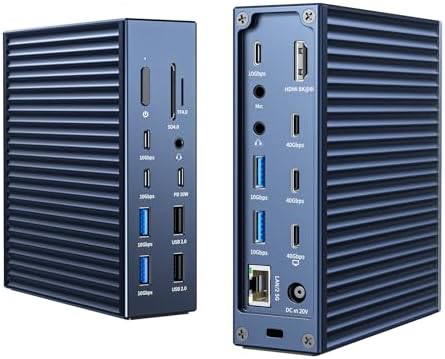
  • ACASIS Thunderbolt 4 Dock - 21 Ports,MacBook Pro Docking Station Dual Monitor,8K60Hz HDMI, 2.5 GbE Ethernet, SD/TF 4.0, 10Gbps USB C/A 3.2 Gen2, 3.5mm Audio, 40Gbps Dock for Mac M1/M2/M3 Pro/Max

ACASIS Thunderbolt 4 Dock - 21 Ports,MacBook Pro Docking Station Dual Monitor,8K60Hz HDMI, 2.5 GbE Ethernet, SD/TF 4.0, 10Gbps USB C/A 3.2 Gen2, 3.5mm Audio, 40Gbps Dock for Mac M1/M2/M3 Pro/Max

3.3 out of 5 stars (73)

Currently unavailable.
We don't know when or if this item will be back in stock.

About this item

  • Acasis 21 PORTS- THUNDERBOLT 4 DOCK FOR MAC: This Thunderbolt docking station has a computer logo next to the HOST port.Featuring a 8K60Hz HDMI, 2.5 GbE Ethernet, SD/TF 4.0, 3x Thunderbolt 4 (40Gb/s) ports, 8x USB C/A 3.2 Gen2 ports with full 10gbp/s performance, 2* USB 2.0 ports for mouse and keyboard, 3*3.5mm Audio, this acasis thunderbolt 4 macbook Pro docking station 21 ports basically
  • UNIVERSAL COMPATIBILITY Acasis Thunderbolt 4 Dock 21 Ports: This Thunderbolt 4 macbook laptop docking station dual monitor works with Thunderbolt 4, Thunderbolt 3, USB 4, and USB-C computers, including Apple M2, M1, M1 Pro, M1 Max, M1 Ultra, Intel based Macs, Windows, and Chrome OS devices. It is also compatible with tablets including iPads and Windows tablets that feature Thunderbolt 4 dock or USB-C.
  • SINGLE 8K60Hz OR DUAL 4K60 DISPLAY: Extend 2 monitors for you, improve you work effiency and elevate your movie or gaming experience with acasis macbook thunderbolt 4 docking station dual monitor for mac.
  • CHARGING YOUR DEVICE EASILY USB C DOCK for MACS: This Acasis macbook thunderbolt 4 docking station features a 240W power adapter, enabling fast charging of laptops up to 90W, 20W maxmium charging for your phone,ipad and powerbank.This Thunderbolt docking station supports up to MAX 90W charging, So the maximum charging power of your device should not exceed 90W.Note: If your device is a separate configuration of the power supply of the game book, the requirement of input 100W or more power supply PC, there will be unstable charging as well as charging can not be charged!
  • NEXT GEN DATA TRANSFER: With 3*40Gbps USB-C ports and 8x USB C/A 3.2 Gen2 ports, you can upstream and downstream any data in a flash.The thunderbolt 4 dock usb c is very useful.

Check Compatibility

Choose your brand
Sponsored

From the brand

Product Description

ACASIS Thunderbolt 4 Dock - 21 Ports,MacBook Pro Docking Station Dual Monitor,8K60Hz HDMI, 2.5 GbE Ethernet, SD/TF 4.0, 10Gbps USB C/A 3.2 Gen2, 3.5mm Audio, , 40Gbps Dock for Mac M1/M2/M3 Pro/Max

Product information

Warranty & Support

Amazon.com Return Policy:Amazon.com Voluntary 30-Day Return Guarantee: You can return many items you have purchased within 30 days following delivery of the item to you. Our Voluntary 30-Day Return Guarantee does not affect your legal right of withdrawal in any way. You can find out more about the exceptions and conditions here.

Feedback

ACASIS Thunderbolt 4 Dock - 21 Ports,MacBook Pro Docking Station Dual Monitor,8K60Hz HDMI, 2.5 GbE Ethernet, SD/TF 4.0, 10Gbps USB C/A 3.2 Gen2, 3.5mm Audio, 40Gbps Dock for Mac M1/M2/M3 Pro/Max


Found a lower price? Let us know. Although we can't match every price reported, we'll use your feedback to ensure that our prices remain competitive.

Where did you see a lower price?

Price Availability
/
/
/
/
Please sign in to provide feedback.
Sponsored

Customer reviews

3.3 out of 5 stars
73 global ratings
Sponsored

Customers say

Customers praise the docking station's heat dissipation, with one noting it keeps the unit slightly above room temperature, and appreciate its power capabilities, with one mentioning it provides enough power to charge the MacBook. The port availability and data transfer speed receive mixed feedback, while build quality and value for money are also mixed, with some finding it solid while others report instability and consider it expensive. The connectivity receives negative feedback, with customers reporting occasional connection dropouts.
AI Generated from the text of customer reviews

Select to learn more

7 customers mention heat dissipation, 5 positive, 2 negative
Customers appreciate the docking station's heat dissipation, with one customer noting that the constant air flow keeps the unit slightly above room temperature.
...I've had it for about 1.2 years now. It runs warm, but not hot. It's good quality. Not bad but not Apple quality either....Read more
...It is solid feeling aluminum so the entire box is the heat sink....Read more
...One thing I did was put a fan beneath the dock. I found it normally runs quite warm. Warmer than i like....Read more
...The enclosure for this dock is aluminum, which will help with heat dissipation....Read more
7 customers mention power, 5 positive, 2 negative
Customers appreciate the docking station's power capabilities, with one mentioning it provides enough power to charge the MacBook.
...When I can get it to work, it functions perfectly (provides power, links the devices connected to the dock with the laptop, etc.)....Read more
...The dock provides enough power to charge the MacBook, and the same cable feeds video and IO into the dock....Read more
...while, then started disconnecting devices claiming they were using too much power. First, every now and then; later, more and more frequently....Read more
...This is really stable, fast, Charging my MacBook Pro and Pd charge for iPhone.Read more
6 customers mention quality, 5 positive, 1 negative
Customers find the docking station to be of good quality, with one customer noting it meets all their office needs, though some mention it doesn't reach Apple standards.
It is best Thunderbolt 4 Dock so far on 2024!Read more
...featuring 21 ports, including 2.5 GbE LAN, which is impressive for a Thunderbolt 4 dock....Read more
...I've had it for about 1.2 years now. It runs warm, but not hot. It's good quality. Not bad but not Apple quality either....Read more
...and features, making it a highly versatile solution that meets all my office needs. It is precisely the kind of product I have been searching for....Read more
11 customers mention port availability, 7 positive, 4 negative
Customers have mixed opinions about the docking station's port availability, with some appreciating the comprehensive range of 21 ports that support seamless multitasking, while others report issues with HDMI functionality.
...station has plenty of power to keep my laptop charged and all the peripherals connected with a single 1m Thunderbolt 4 cable, which comes in the...Read more
...While the design and port options are appealing, it ultimately didn’t meet my needs.Read more
...The comprehensive range of ports supports seamless multitasking, from connecting multiple displays to high-speed data transfers and charging devices....Read more
The ACASIS Thunderbolt 4 Dock offers robust connectivity, featuring 21 ports, including 2.5 GbE LAN, which is impressive for a Thunderbolt 4 dock....Read more
8 customers mention data transfer speed, 5 positive, 3 negative
Customers have mixed experiences with the docking station's data transfer speed, with some reporting high-speed performance while others experience issues, with one customer noting that the refresh rate is stuck at 120Hz.
...use a Type-C to either HDMI or DisplayPort and gain access to high refresh rates and GSYNC/Freesync....Read more
...Second time, it went down to 4K 30hz and was never able to get it back to 144hz. Did complete reset and even reinstallation of drivers....Read more
...After lot of devices from OWC, This is really stable, fast, Charging my MacBook Pro and Pd charge for iPhone.Read more
While I mainly used it on the M1 Mac, and while it stayed connected it was fine speeds were good. Yet thats where it all stopped....Read more
6 customers mention build quality, 4 positive, 2 negative
Customers have mixed opinions about the build quality of the docking station, with some finding it solid while others report instability.
...weight might be noticeable, it is a reasonable trade-off for its solid build and powerful features....Read more
...Device would constantly disconnect and cause system instability. I Tried using different cables to no ovale....Read more
...The build quality is nice too. It is solid feeling aluminum so the entire box is the heat sink....Read more
...After lot of devices from OWC, This is really stable, fast, Charging my MacBook Pro and Pd charge for iPhone.Read more
25 customers mention connectivity, 7 positive, 18 negative
Customers report multiple connectivity issues with the docking station, including signal failures that revert, occasional connection dropouts, and display ports that stop working.
...Did complete reset and even reinstallation of drivers. Did not work as intended....Read more
...different methods to get the device to connect to my laptop, no network connectivity, no data transfer, no SIM card reading, nothing....Read more
The ACASIS Thunderbolt 4 Dock offers robust connectivity, featuring 21 ports, including 2.5 GbE LAN, which is impressive for a Thunderbolt 4 dock....Read more
What can I say? I plug in a thumb drive & it receives no power. For something sucking this much juice this is unacceptable. Don't waste your money.Read more
6 customers mention value for money, 0 positive, 6 negative
Customers find the docking station expensive and not worth the investment.
...done through my testing demonstrates that as of 10/18/24, your dock is not worth $239....Read more
...It’s also a little expensive, but it’s worth it to me.Read more
Pair faulty product with no support, not worth buying.Read more
...the dock would bring them both back up to 60Hz, but it's not worth the effort....Read more
A couple hickups when setting up. Rock solid since then.
5 out of 5 stars
A couple hickups when setting up. Rock solid since then.
I'm using this with an M3 Pro Max. Upon first set up I did have a few issues getting the monitors to connect and display in the correct orientation. Once that was done its been fantastic. I have all the ports in the back filled with connections to monitors, hard drives, cameras, and microphones. The front I keep available for plugging in whatever device I need. One thing I did was put a fan beneath the dock. I found it normally runs quite warm. Warmer than i like. so I glued a couple of chop sticks to a 120mm fan, then plugged the fan into one of the USB ports, with an on/off switch in between. As the fan is only using 5 volts it runs dead quiet. And the constant air flow keeps the unit slightly above room temperature. I've had it powered up for 7 months now. very happy with it.
Thank you for your feedback
Sorry, there was an error
Sorry we couldn't load the review

Top reviews from the United States

  • Reviewed in the United States on October 28, 2025
    I'm using this with an M3 Pro Max.

    Upon first set up I did have a few issues getting the monitors to connect and display in the correct orientation. Once that was done its been fantastic. I have all the ports in the back filled with connections to monitors, hard drives, cameras, and microphones. The front I keep available for plugging in whatever device I need.

    One thing I did was put a fan beneath the dock. I found it normally runs quite warm. Warmer than i like. so I glued a couple of chop sticks to a 120mm fan, then plugged the fan into one of the USB ports, with an on/off switch in between. As the fan is only using 5 volts it runs dead quiet. And the constant air flow keeps the unit slightly above room temperature.

    I've had it powered up for 7 months now. very happy with it.
    Customer image
    5.0 out of 5 stars
    A couple hickups when setting up. Rock solid since then.

    Reviewed in the United States on October 28, 2025
    I'm using this with an M3 Pro Max.

    Upon first set up I did have a few issues getting the monitors to connect and display in the correct orientation. Once that was done its been fantastic. I have all the ports in the back filled with connections to monitors, hard drives, cameras, and microphones. The front I keep available for plugging in whatever device I need.

    One thing I did was put a fan beneath the dock. I found it normally runs quite warm. Warmer than i like. so I glued a couple of chop sticks to a 120mm fan, then plugged the fan into one of the USB ports, with an on/off switch in between. As the fan is only using 5 volts it runs dead quiet. And the constant air flow keeps the unit slightly above room temperature.

    I've had it powered up for 7 months now. very happy with it.
    Images in this review

    Customer image
  • Reviewed in the United States on November 29, 2025
    1 year and 5 days after purchasing this unit, it failed completely. No ports visible, 2.5GbE port dead, etc. In the preceding year of use (Nov 2024 - Nov 2025) it had started out working nicely, then I started noticing "hiccups" where the unit would spontaneously reset. It got to the point where I moved all of the important functions I had bought it for (HDMI, network, etc.) off this unit and connected them otherwise.

    Finally, this morning, it stopped working. It would not turn on. I removed it, and put it on my workbench. It appears that the warranty is only 30 days through amazon.

    Note as well, I had looked up how to update unit firmware, and Acasis didn't provide any information on that. I'd assumed the frequent crashing (usually in the middle of a conference call with my camera and speaker attached :( ) was due to buggy firmware. I can deal with this if we have firmware drops that I can load onto the unit.

    Generally speaking the mixture of port types was what interested me at first. After the first few crashes, I thought I was overloading the units power delivery, but my laptop that it was attached to consumes less than 60W as measured by a power meter under heavy use (compiling code, heavy networking, heavy storage). Pulling HDMI and other connected elements didn't stop crashes, but it lessened the impact for me.

    Again, I wanted to like this, but the instability and eventual unit death slightly after 1 year of use doesn't justify the price I paid for it. If it had a 3 year warranty, that would be a different story.

    Unless you like buying a new docking station every year, I'd recommend you look elsewhere.
  • Reviewed in the United States on December 7, 2025
    I use this for my MacBook Pro. I keep it closed while using just one USB-C port to connect it to the dock, which also goes to an external hard drive, monitor, and external speakers. I've had it for about 1.2 years now. It runs warm, but not hot. It's good quality. Not bad but not Apple quality either.

    Just recently it stopped reading from the SD and USB ports on the front panel. All it needed was a restart it seems. Maybe because I keep it on almost all the time or because I updated my OS.

    I'd suggest this for those on a budget, but I am sure there are better, newer options out there. Honestly I don't see myself using this many forward-facing extra ports simultaneously either.
  • Reviewed in the United States on November 22, 2024
    I was hoping to use this to connect two 4k monitors using USB-C cables to the 40gbps downstream ports on an MBP with an M1 Max. This is something one of those infographics says is supported. It absolutely will not provide 60Hz to both monitors from those ports. One gets 60Hz and one gets 30Hz.

    I was able to connect one monitor via HDMI and one via USB-C and get 60Hz on both. However, after rebooting my MBP, I'm back to 30Hz on the second monitor. Fiddling with it by reinserting cables and restarting the dock would bring them both back up to 60Hz, but it's not worth the effort.

    Despite the false claims and underdelivered promises, I'm going to keep this dock because it still has an insane number of ports on it and seems fine when only dealing with non-video-related tasks.
    5 people found this helpful
    Report

Top reviews from other countries

Translate all reviews to English
  • Mike
    1.0 out of 5 stars Not worth to spend 33K ! Also its delivery not amazon fulfilled.. please carefully place order
    Reviewed in India on November 14, 2024
    I have
    1)Legion 5 pro AMD 5800H & 3070 Laptop GPU
    2) Display Monitor Acer VG271U 2560*1440 P 144Hz with HDR
    3) Act Giga Connection : 1 GBPS

    Biggest Drawback after connecting to Dock with thunderbolt cable provided with is, :
    1) LAN speed limited to 250Mbps
    2) Display Refresh rate limited to 120Hz
    3) Unable to switch to HDR
    4) no display port

    Its not worth to spend 33K for me with these many critical limitations

    Also its delivery not amazon fulfilled.. please carefully place order
    1) you only have to return with hassle of refunds/delay in getting refunds etc
  • otimo
    5.0 out of 5 stars Otimo
    Reviewed in Brazil on March 31, 2026
    Otimo
    Report
Sponsored

Product Summary: ACASIS Thunderbolt 4 Dock - 21 Ports,MacBook Pro Docking Station Dual Monitor,8K60Hz HDMI, 2.5 GbE Ethernet, SD/TF 4.0, 10Gbps USB C/A 3.2 Gen2, 3.5mm Audio, 40Gbps Dock for Mac M1/M2/M3 Pro/Max

From ACASIS

3.3 out of 5 stars, 73 ratings

Customer reviews

Price

No featured offers available

Other sellers

Other sellers

About this Item

  • Acasis 21 PORTS- THUNDERBOLT 4 DOCK FOR MAC: This Thunderbolt docking station has a computer logo next to the HOST port.Featuring a 8K60Hz HDMI, 2.5 GbE Ethernet, SD/TF 4.0, 3x Thunderbolt 4 (40Gb/s) ports, 8x USB C/A 3.2 Gen2 ports with full 10gbp/s performance, 2* USB 2.0 ports for mouse and keyboard, 3*3.5mm Audio, this acasis thunderbolt 4 macbook Pro docking station 21 ports basically
  • UNIVERSAL COMPATIBILITY Acasis Thunderbolt 4 Dock 21 Ports: This Thunderbolt 4 macbook laptop docking station dual monitor works with Thunderbolt 4, Thunderbolt 3, USB 4, and USB-C computers, including Apple M2, M1, M1 Pro, M1 Max, M1 Ultra, Intel based Macs, Windows, and Chrome OS devices. It is also compatible with tablets including iPads and Windows tablets that feature Thunderbolt 4 dock or USB-C.
  • SINGLE 8K60Hz OR DUAL 4K60 DISPLAY: Extend 2 monitors for you, improve you work effiency and elevate your movie or gaming experience with acasis macbook thunderbolt 4 docking station dual monitor for mac.
  • CHARGING YOUR DEVICE EASILY USB C DOCK for MACS: This Acasis macbook thunderbolt 4 docking station features a 240W power adapter, enabling fast charging of laptops up to 90W, 20W maxmium charging for your phone,ipad and powerbank.This Thunderbolt docking station supports up to MAX 90W charging, So the maximum charging power of your device should not exceed 90W.Note: If your device is a separate configuration of the power supply of the game book, the requirement of input 100W or more power supply PC, there will be unstable charging as well as charging can not be charged!
  • NEXT GEN DATA TRANSFER: With 3*40Gbps USB-C ports and 8x USB C/A 3.2 Gen2 ports, you can upstream and downstream any data in a flash.The thunderbolt 4 dock usb c is very useful.

Product Description

ACASIS Thunderbolt 4 Dock - 21 Ports,MacBook Pro Docking Station Dual Monitor,8K60Hz HDMI, 2.5 GbE Ethernet, SD/TF 4.0, 10Gbps USB C/A 3.2 Gen2, 3.5mm Audio, , 40Gbps Dock for Mac M1/M2/M3 Pro/Max

Feedback

Did you find this product summary feature useful?

Thank you for your feedback
Thank you for your feedback. You selected "Yes, it is useful"
Thank you for your feedback. You selected "No, it is not useful"
Product summary presents key information. Close to see all product details.