詳細はこちら
「おすすめ出品」の要件を満たす出品はありません
以下のような出品が「カートに入れる」ボタンが付いた「おすすめ出品」として取り扱われます。
- 競争力のある価格設定
- 信頼できる配送オプション
- 満足度の高い顧客サービス
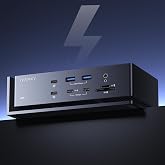
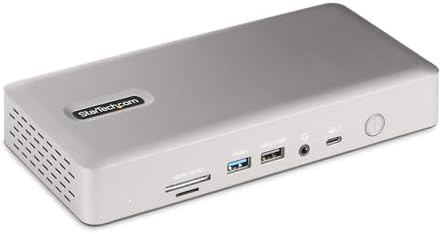
StarTech Thunderbolt 4ドッキングステーション 4K 60Hz HDMI DP 100W 132N-TB4USB4DOCK
| ブランド | StarTech.com(スターテック) |
| 色 | スペースグレー |
| ハードウェアインターフェイス | HDMI, MicroSD, Thunderbolt, USB, USB 2.0 |
| 対応デバイス | HP Spectre x360 13-aw0000/13-df0000/13-af0000/13-ap0000/13-ba0000/14-ea00000/14-df0000/14-cd00000/14-bc0000/14-bc0000/14-bc0000/14-bc0000/14-bc0000/14-bc4-bd00 000/15-df0000/15-eb0000/15-bl0000/15-ds0000/15-ch0000、HP Elite Dragonfly G2 2B5G1AV/2B5G2AV/2B5G3AV、HP Elite Dragonfly G3 3B5G1AV。 /3B5G。 2AV、HP EliteBook 830 G7 Intel/AMD、HP EliteBook 830 G8 Intel/AMD、HP EliteBook 840 G7 Intel/AMD、HP EliteBook 840 G8 Intel/AMD、HP EliteBook 850 G7 Intel/AMD、HP EliteBook 850 G8 Intel/AMD、HP。 Envy 13-ba0000/13-df0000/13-ap0000/14-eb0000/14-df0000/15-df0000/15-cd0000/15-bc0000、HP Envy x360 13-bd0000/13-bd。 dq0000 0/13-cb0000/14-bd0000/14-ce0000/15-ed0000/15-cb0000/15-ee0000、HP Pavilion x360 14-dw00000/14-bb0000/14-db0000 0000/ 15-dw0000/15-cd0000/15-bs0000、HP Pavilion 14-ce0000/14-bb0000/14-dv00000/15-eh0000/15-dw0000/15-cd0000、Dell XPS 13。 93000。 /13 9310/13 9370/13 9380/13 7390/13 7306/13 9315/13 9365/15 9570/15 9560/15 9500/15 9575、Dell Inspiron 13。 70000。 /15 5000/15 7000、Dell Latitude 7310/7320/7330/7340/7400/7410/7420/7430、Dell Precision 3560/3570/3550/7550/7560、Microsoft Surface Pro 7/7+/。 8/9、マイクロソフト Surface Laptop 3/4/5、Microsoft Surface Book 2/3、Microsoft Surface Studio 2、Lenovo ThinkPad X1 Carbon Gen 5/Gen 6/Gen 7/Gen 8/Gen 9/Gen 10、Lenovo ThinkPad X1 Yoga Gen 5/Gen 6/Gen 7/Gen 8、Lenovo ThinkPad T14/T14s/T15/T15p/T16、Lenovo ThinkPad L14。 /L15/ L16、Lenovo ThinkPad E14/E15、Lenovo ThinkPad L13/L13ヨガ、Lenovo ThinkPad X1 Nano、Lenovo ThinkPad X13/X13 Yoga、Lenovo ThinkPad P14s/P15/P15s/P16、Lenovo ThinkPad P1 Gen 4/Gen 5/Gen 6。, ノートパソコン(Windows、macOS、Ubuntu)、モニター、タブレット、スマートフォン、DELL Latitude (E6500、E6400、E4300、E5500、E4200、M4400、E5400、M2400)、HP ProBook、EliteBook Folio 9470m、MacBook Pro、Microsoft Surface (Pro 3、Pro 6、4、 5、7、X。 ), ノートパソコン。 表示を増やす |
| USBポートの総数 | 7 |
| 商品の寸法 | 21長さ x 9.6幅 x 3.4高さ cm |
| ポート数 | 17 |
| 商品の重量 | 0.44 ポンド |
| HDMIポート総数 | 2 |
| ワット数 | 180.0 |
この商品について
- USB4 & Thunderbolt対応ドッキングステーション:WindowsおよびmacOSに対応し、ドライバー不要で開封後すぐに使用可能。Intel、Apple Silicon、AMD、Snapdragon X Copilot+を搭載した多様なPCに対応し、異機種混在環境やノートPCのリニューアル時におすすめの高機能USB-Cハブ
- Windowsでの4画面表示対応:Intel 第 12 世代 CPU (またはそれ以降) およびDP 1.4 (DSC 対応)を搭載した Windowsノートパソコンに接続することで、最大 4 台の 4K60Hz モニターに同時出力が可能。DSC非対応の旧システムでも、3画面または2画面出力に対応
- Macでのデュアル(2画面)ディスプレイ対応:MacBook Air / Pro(M3 または M4 搭載)では、ノートPCの画面を閉じたまま外部モニターを使うクラムシェルモードの使用で、2画面の4K60Hzモニター拡張表示が可能。注意:M1 / M2 搭載のMacBook Proでは、Pro または Max チップモデルに限りデュアル拡張表示に対応します。
- 98W Power Delivery:フルスペックの電源アダプター付属。ノートPCを最大98Wで充電しながら、同時にすべてのポートに電力を供給。ダウンストリーム(下流) USB 2.0 ポートは、スマートフォンなどのモバイル機器にも7.5W(1.5A)で充電
- ITプロからの信頼を獲得:自社イノベーションラボでの徹底検証により、法人利用に求められる高い信頼性と、幅広いシステム環境への対応を実現するドッキングステーション。大規模な展開やWindows 11への移行、AI対応PCへのシフトにも柔軟に対応
この商品をチェックした人はこんな商品もチェックしています
商品情報
| ハードウェアインタフェース | HDMI, MicroSD, Thunderbolt, USB, USB 2.0 |
|---|---|
| 互換デバイス | HP Spectre x360 13-aw0000/13-df0000/13-af0000/13-ap0000/13-ba0000/14-ea00000/14-df0000/14-cd00000/14-bc0000/14-bc0000/14-bc0000/14-bc0000/14-bc0000/14-bc4-bd00 000/15-df0000/15-eb0000/15-bl0000/15-ds0000/15-ch0000、HP Elite Dragonfly G2 2B5G1AV/2B5G2AV/2B5G3AV、HP Elite Dragonfly G3 3B5G1AV。 /3B5G。 2AV、HP EliteBook 830 G7 Intel/AMD、HP EliteBook 830 G8 Intel/AMD、HP EliteBook 840 G7 Intel/AMD、HP EliteBook 840 G8 Intel/AMD、HP EliteBook 850 G7 Intel/AMD、HP EliteBook 850 G8 Intel/AMD、HP。 Envy 13-ba0000/13-df0000/13-ap0000/14-eb0000/14-df0000/15-df0000/15-cd0000/15-bc0000、HP Envy x360 13-bd0000/13-bd。 dq0000 0/13-cb0000/14-bd0000/14-ce0000/15-ed0000/15-cb0000/15-ee0000、HP Pavilion x360 14-dw00000/14-bb0000/14-db0000 0000/ 15-dw0000/15-cd0000/15-bs0000、HP Pavilion 14-ce0000/14-bb0000/14-dv00000/15-eh0000/15-dw0000/15-cd0000、Dell XPS 13。 93000。 /13 9310/13 9370/13 9380/13 7390/13 7306/13 9315/13 9365/15 9570/15 9560/15 9500/15 9575、Dell Inspiron 13。 70000。 /15 5000/15 7000、Dell Latitude 7310/7320/7330/7340/7400/7410/7420/7430、Dell Precision 3560/3570/3550/7550/7560、Microsoft Surface Pro 7/7+/。 8/9、マイクロソフト Surface Laptop 3/4/5、Microsoft Surface Book 2/3、Microsoft Surface Studio 2、Lenovo ThinkPad X1 Carbon Gen 5/Gen 6/Gen 7/Gen 8/Gen 9/Gen 10、Lenovo ThinkPad X1 Yoga Gen 5/Gen 6/Gen 7/Gen 8、Lenovo ThinkPad T14/T14s/T15/T15p/T16、Lenovo ThinkPad L14。 /L15/ L16、Lenovo ThinkPad E14/E15、Lenovo ThinkPad L13/L13ヨガ、Lenovo ThinkPad X1 Nano、Lenovo ThinkPad X13/X13 Yoga、Lenovo ThinkPad P14s/P15/P15s/P16、Lenovo ThinkPad P1 Gen 4/Gen 5/Gen 6。, ノートパソコン(Windows、macOS、Ubuntu)、モニター、タブレット、スマートフォン、DELL Latitude (E6500、E6400、E4300、E5500、E4200、M4400、E5400、M2400)、HP ProBook、EliteBook Folio 9470m、MacBook Pro、Microsoft Surface (Pro 3、Pro 6、4、 5、7、X。 ), ノートパソコン。 |
| USBポート数 | 7 |
| ポート数 | 17 |
| HDMIポート数 | 2 |
| ワット数 | 180.0 |
| 品目寸法(L x W x H) | 21長さ x 9.6幅 x 3.4高さ cm |
|---|---|
| 商品の重量 | 0.44 ポンド |
| カラー | スペースグレー |
|---|
保証とサポート
ご意見ご要望
| メーカー名 | StarTech.com(スターテック) |
|---|---|
| 付属品総数 | 1 |
| UPC | 065030899277 |
| メーカー名 | StarTech.com |
| 型番 | 132N-TB4USB4DOCK |
| メーカー型番 | 132N-TB4USB4DOCK |
| 保証内容 | 3年間のメーカー保証 |
| Amazon 売れ筋ランキング |
|
| ASIN | B0CTTR34K9 |
| おすすめ度 |
5つ星のうち4.6 |
商品の説明
高機能接続ポートと超高解像度ビデオ
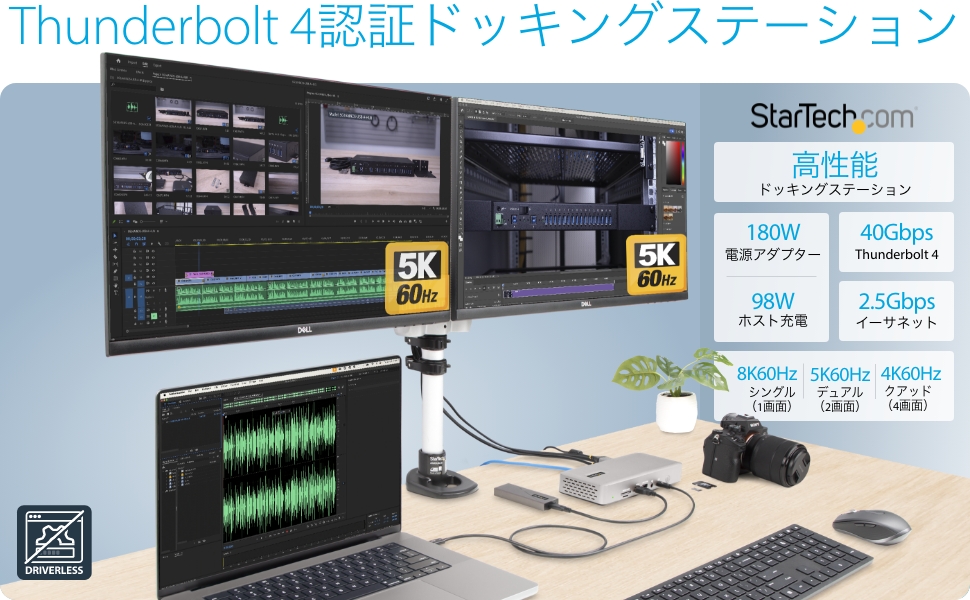
7口のUSBポート、2.5ギガビットイーサネットポート、3.5mmオーディオポート、USB Power Delivery、ダウンストリームデバイス充電、最大4台の4K60Hzモニター出力など、Thunderbolt 4対応ノートPCを高性能マルチモニターワークステーションにアップグレード。
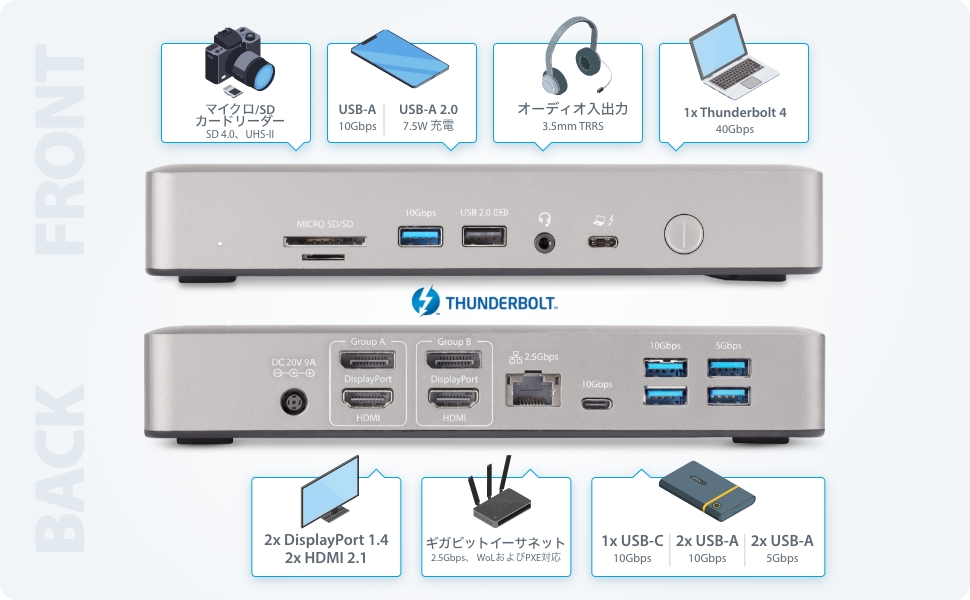
最大4台の4K60Hzモニターをサポートする高性能ビデオ
合計4口のビデオポート(HDMIポートおよびDisplayPortポート 各2口)を備え、ホストパソコンに柔軟性の高いマルチモニター環境を提供
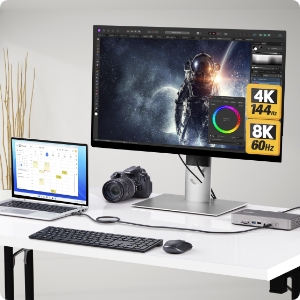
シングル8Kモニター
2口あるHDMIポートのいずれかを使用して、8K60Hz または 4K144Hzで1台のディスプレイに出力
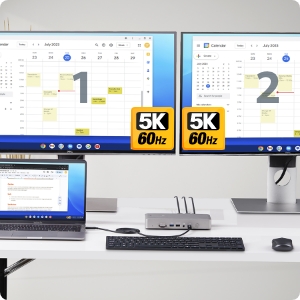
Dual Monitors
デュアル5K60Hz または 1080p144 Hzの高解像度ディスプレイ構成が可能
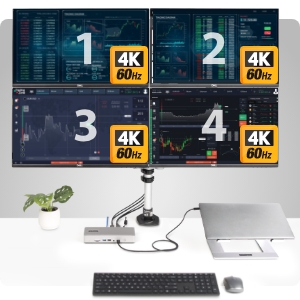
トリプル および クアッド(4画面)モニター
Intel 第12世代以降および DP 1.4を搭載したWindowsノートPCは、最大4K 60Hzのクアッドモニター(4画面)をサポート
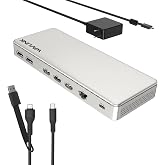
StarTech USB4 Thunderbolt 4ドッキングステーション 4画面 Windows / 2画面 MacBook HDMI DP ...
|
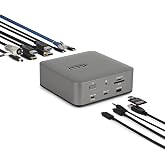
StarTech ドック/USB-C/3画面/4K60Hz HDMI DP/100W PD/6x USB/LAN/SD [並行輸入品]
|
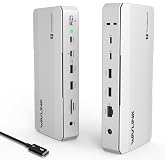
StarTech ドッキングステーション/USB-C/4画面/4K60Hz HDMI & DiplayPort/100W PD/4x USB/LA...
|
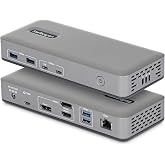
StarTech ドッキングステーション/USB 3.0接続/トリプルモニター/2x 4K DisplayPort & HDMI/5x USB-A...
|
StarTech ドッキングステーション USB-C 3画面 4K HDMI DP 100W 5x USB LAN 多機能Type-Cハブ 116...
|
|
|---|---|---|---|---|---|
|
カートに入れる
|
カートに入れる
|
カートに入れる
|
|||
| カスタマーレビュー |
5つ星のうち4.6 43
|
5つ星のうち4.2 71
|
5つ星のうち4.3 89
|
5つ星のうち4.4 497
|
5つ星のうち4.0 106
|
| 価格 | — no data | USD 161.29USD161.29 | — no data | USD 148.46USD148.46 | USD 223.18USD223.18 |
| ホスト互換性 | TB3/TB4 | USB-C/TB3/TB4 | USB-C/TB3/TB4 | USB-A | USB-C/TB3/TB4 |
| 対応モニター | 4 | 3 | 4 | 3 | 3 |
| ビデオ出力 | DisplayPort/HDMI | DisplayPort/HDMI | DisplayPort/HDMI | DisplayPort/HDMI | DisplayPort/HDMI |
| 最大解像度 | 8K 60Hz | 4K 60Hz | 5K 60Hz | 4K 30Hz | 4K 60Hz |
| USBポート | 6x USB-A 1x USB-C | 4x USB-A 2x USB-C | 3x USB-A 1x USB-C | 5x USB-A | 2x USB-A 2x USB-C |
| 急速充電ポート | ✓ | ✓ | ✓ | ✓ | ✓ |
| 電源供給 | ✓ | ✓ | ✓ | ✓ | ✓ |
| イーサネットポート | 2.5GbE | 1GbE | 1GbE | 1GbE | 1GbE |
| その他のポート | 3.5mm(ヘッドセット)標準ケンジントンスロット マイクロ&SDカード | 3.5mm(ヘッドセット)標準ケンジントンスロット SDカード | 3.5mm(ヘッドセット)標準ケンジントンスロット | 2x 3.5mm(スピーカー/マイク)標準ケンジントンスロット | 3.5mm(ヘッドセット)標準ケンジントンスロット |
| 対応OS | MacOS / Windows | Windows / ChromeOS | MacOS / Windows / ChromeOS | MacOS / Windows / ChromeOS | MacOS / Windows / ChromeOS Ubuntu / Android |
人気のブランド
StarTech.com(スターテック)
88%の高評価を7000人以上から取得
6000人以上が直近3カ月にこのブランドの商品を購入
カスタマーレビュー
日本からのトップレビュー
他の国からのトップレビュー
cac2222星5つ中5つMore money, but only one that can handle heavier set-ups without glitching.
2025年3月23日にカナダでレビュー済みImmediately works without a fuss.
Where my Anker APEX 12in 1 TB4 90W failed (USB failed) or that the Plugable TBT4-UD5 couldn't handle (can't do even 3 screens even with USB-C 10GbPS port) , the Star-Tech 132N-TB4USB4DOCK could do without breaking a sweat.
I load my TB4 hubs to the gills with 3 x 27" monitors and a 4th travel monitor, with keyboard, mouse, webcam, Jabra, Senheiser gaming headset and all, and it connects easily to my Lenovo with the TB 4 cable with ease.
I have always been using high-end hubs all my life and Star-Tech is bland, boring, looks pretty sad design-wise, but at the end of the day, it always delivers.
I shouldn't have spent time with Anker or Plugable and gone direct with StarTech all along. Glad i finally bit the ($$$) bullet. The extra price is worth your sanity.


星5つ中5つMore money, but only one that can handle heavier set-ups without glitching.
2025年3月23日にカナダでレビュー済みImmediately works without a fuss.
Where my Anker APEX 12in 1 TB4 90W failed (USB failed) or that the Plugable TBT4-UD5 couldn't handle (can't do even 3 screens even with USB-C 10GbPS port) , the Star-Tech 132N-TB4USB4DOCK could do without breaking a sweat.
I load my TB4 hubs to the gills with 3 x 27" monitors and a 4th travel monitor, with keyboard, mouse, webcam, Jabra, Senheiser gaming headset and all, and it connects easily to my Lenovo with the TB 4 cable with ease.
I have always been using high-end hubs all my life and Star-Tech is bland, boring, looks pretty sad design-wise, but at the end of the day, it always delivers.
I shouldn't have spent time with Anker or Plugable and gone direct with StarTech all along. Glad i finally bit the ($$$) bullet. The extra price is worth your sanity.
Matt星5つ中5つWorks well, wish it was a bit less plastic.
2026年1月2日にアメリカ合衆国でレビュー済みThis dock does exactly what it claims to do, and functionally I have no real complaints. It runs a dual-monitor, two-PC setup without hiccups, handles Thunderbolt 4 bandwidth properly, and has been stable in daily use. Displays connect cleanly, peripherals behave as expected, and charging works as advertised. From a pure “does the job” standpoint, it’s solid.
The ports are all in good positions, it was obviously well thought out and is easy to populate - nothing is too close to anything else like some of these.
That said, it’s hard to ignore the price relative to the competition. Compared to a lower-priced UGREEN dock I own, this one feels noticeably less premium. The StarTech enclosure is mostly plastic and feels a bit rickety, especially if you’ve handled all-aluminum docks. Nothing is actually broken or unreliable, but the tactile experience does not match the price tag.
I use the UGREEN dock at home and this one at work, and in real-world operation they perform similarly. This StarTech dock works perfectly fine, it just doesn’t feel like a premium piece of hardware. You’re paying more for branding and specs on paper than for build quality.
If you need a Thunderbolt 4 dock that can reliably drive a dual-monitor setup and you care about clean aesthetics on your desk, this will do the job without drama. Just be aware that it’s probably a bit overpriced for what it physically is, even though it performs exactly as it should.
Eric星5つ中5つConvenient and reliable
2026年7月23日にアメリカ合衆国でレビュー済みEverything works great, it's compact with just enough ports and I could set up my cables easily. I use this product to swap between my personal computer and my work laptop at the same desk. Now I only need to swap one cable instead of swapping all my peripherals (monitors, keyboard, mouse, webcam, microphone) every day.
The one issue I have is that the headphone jack has significantly lower audio quality than if it's plugged directly into my device. I think that's unavoidable though because the audio data has to partially travel over USB.
Abdoullah Hajji星5つ中5つExactly what I needed
2025年10月18日にカナダでレビュー済みVery powerful and works just as intended. It got fast ports and display experience is amazing, worth the price.


Very powerful and works just as intended. It got fast ports and display experience is amazing, worth the price.
Anonymous星5つ中5つThunderbolt 4 dock for dual monitors that just works
2026年8月4日にアメリカ合衆国でレビュー済みBought it as a replacement for a Plugable Thunderbolt 3 dock, which worked fine with my old Intel MacBook Pro, but had annoying occasional wake from sleep issues with my newer MacBook Pro M2. This one has almost identical features (importantly the many ways of connecting 2 monitors) and for now, works beautifully. Will update if issues arise. It is plastic, but still looks solid. There is a brand new Thunderbolt 5 version if you have a newer MacBook that supports it. That one has an additional USB-C port on the front, which is the only thing I kind of miss from the Plugable.
商品概要には、主要な商品情報が記載されています
キーボードショートカット
Shift
+
Alt
+
opt
+
D
商品概要: StarTech Thunderbolt 4ドッキングステーション 4K 60Hz HDMI DP 100W 132N-TB4USB4DOCK | Windowsで最大 4画面 4K 60Hz、M3/M4/M5 MacBookでデュアル4K 60Hz、Intel・AMD・Snapdragon X対応、クラムシェルモード対応
StarTech.com(スターテック)から
5つ星のうち4.6, 43 レーティング
カスタマーレビューこの商品について
- USB4 & Thunderbolt対応ドッキングステーション:WindowsおよびmacOSに対応し、ドライバー不要で開封後すぐに使用可能。Intel、Apple Silicon、AMD、Snapdragon X Copilot+を搭載した多様なPCに対応し、異機種混在環境やノートPCのリニューアル時におすすめの高機能USB-Cハブ
- Windowsでの4画面表示対応:Intel 第 12 世代 CPU (またはそれ以降) およびDP 1.4 (DSC 対応)を搭載した Windowsノートパソコンに接続することで、最大 4 台の 4K60Hz モニターに同時出力が可能。DSC非対応の旧システムでも、3画面または2画面出力に対応
- Macでのデュアル(2画面)ディスプレイ対応:MacBook Air / Pro(M3 または M4 搭載)では、ノートPCの画面を閉じたまま外部モニターを使うクラムシェルモードの使用で、2画面の4K60Hzモニター拡張表示が可能。注意:M1 / M2 搭載のMacBook Proでは、Pro または Max チップモデルに限りデュアル拡張表示に対応します。
- 98W Power Delivery:フルスペックの電源アダプター付属。ノートPCを最大98Wで充電しながら、同時にすべてのポートに電力を供給。ダウンストリーム(下流) USB 2.0 ポートは、スマートフォンなどのモバイル機器にも7.5W(1.5A)で充電
- ITプロからの信頼を獲得:自社イノベーションラボでの徹底検証により、法人利用に求められる高い信頼性と、幅広いシステム環境への対応を実現するドッキングステーション。大規模な展開やWindows 11への移行、AI対応PCへのシフトにも柔軟に対応
商品の説明
フィードバック
この商品概要機能は役に立ちましたか?