



网上学习资料一大堆,但如果学到的知识不成体系,遇到问题时只是浅尝辄止,不再深入研究,那么很难做到真正的技术提升。
一个人可以走的很快,但一群人才能走的更远!不论你是正从事IT行业的老鸟或是对IT行业感兴趣的新人,都欢迎加入我们的的圈子(技术交流、学习资源、职场吐槽、大厂内推、面试辅导),让我们一起学习成长!
一、介绍
RPC是Remote Procedure Call的简称,中文叫远程过程调用,简单的说,就是调用远程方法和调用本地方法一样
那么grpc就是由 google开发的一个高性能、通用的开源RPC框架
官网地址:Introduction to gRPC | gRPC
- gRPC是一种现代开源高性能远程过程调用(RPC)框架,可在任何环境中运行。
- 它可以高效地连接数据中心内的服务,并支持负载平衡、跟踪、健康检查和身份验证等插件功能。
- 它适用于分布式计算的最后一英里,以连接设备、移动应用程序和浏览器到后端服务。
- 公司已使用gRPC连接其环境中的多个服务,从连接少数服务到跨多种语言的数据中心内数百种服务。
- gRPC最初由谷歌创建,用于连接在其数据中心内和跨越其数据中心的大量微服务。
二、环境准备
以Golang使用为例,只需要在windows上安装protoc转换工具
官网地址:Go | gRPC
# 下载网址:
https://github.com/protocolbuffers/protobuf/releases/download/v3.9.0/protoc-3.9.0-win64.zip
go语言需要安装的依赖
go get github.com/golang/protobuf/proto
go get google.golang.org/grpc
go install github.com/golang/protobuf/protoc-gen-go
安装好之后,需要将protoc的bin目录添加到环境变量中
还需要将protoc-gen-go.exe的目录添加到环境变量中
刚刚添加之后,可能需要重启电脑或者重启goland,才能在goland的terminal中使用
三、Golang中使用grpc
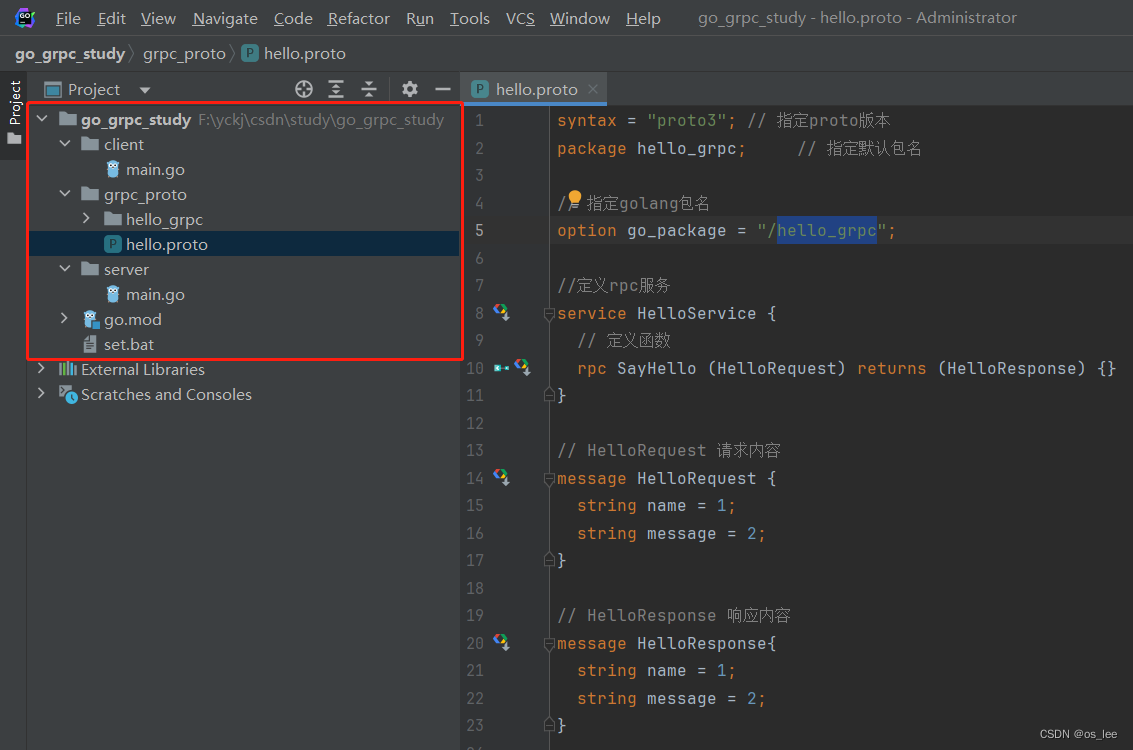
整体结构如图:
1.编写protobuf文件
现在还没有学过怎么编写,不用担心,先复制粘贴就行了,主要是用于测试环境是否正常
创建文件夹 /grpc_proto 在该文件夹中创建文件 hello.proto,编写内容如下:
syntax = "proto3"; // 指定proto版本
package hello_grpc;     // 指定默认包名

// 指定golang包名
option go_package = "/hello_grpc";

//定义rpc服务
service HelloService {
  // 定义函数
  rpc SayHello (HelloRequest) returns (HelloResponse) {}
}

// HelloRequest 请求内容
message HelloRequest {
  string name = 1;
  string message = 2;
}

// HelloResponse 响应内容
message HelloResponse{
  string name = 1;
  string message = 2;
}
在文件夹 /grpc_proto中执行命令:protoc -I . --go_out=plugins=grpc:. .\hello.proto
或者编写set.bat批处理文件,方便使用,内容如下:
protoc -I . --go_out=plugins=grpc:.\grpc_proto .\grpc_proto\hello.proto
2.服务端
package main

import (
	"context"
	"fmt"
	"google.golang.org/grpc"
	"google.golang.org/grpc/grpclog"
	"net"
	"oslee/grpc_study/1base/grpc_proto/hello_grpc"
)

// HelloServer 得有一个结构体,需要实现这个服务的全部方法,叫什么名字不重要
type HelloServer struct {
}

func (HelloServer) SayHello(ctx context.Context, request *hello_grpc.HelloRequest) (*hello_grpc.HelloResponse, error) {
	fmt.Println("入参:", request.Name, request.Message)
	return &hello_grpc.HelloResponse{
		Name:    "server",
		Message: "hello " + request.Name,
	}, nil
}

func main() {
	// 监听端口
	listen, err := net.Listen("tcp", ":8080")
	if err != nil {
		grpclog.Fatalf("Failed to listen: %v", err)
	}

	// 创建一个gRPC服务器实例。
	s := grpc.NewServer()
	server := HelloServer{}
	// 将server结构体注册为gRPC服务。
	hello_grpc.RegisterHelloServiceServer(s, &server)
	fmt.Println("grpc server running :8080")
	// 开始处理客户端请求。
	err = s.Serve(listen)
}
3.客户端
package main

import (
	"context"
	"fmt"
	"google.golang.org/grpc"
	"google.golang.org/grpc/credentials/insecure"
	"log"
	"oslee/grpc_study/1base/grpc_proto/hello_grpc"
)

func main() {
	addr := ":8080"
	// 使用 grpc.Dial 创建一个到指定地址的 gRPC 连接。
	// 此处使用不安全的证书来实现 SSL/TLS 连接
	conn, err := grpc.Dial(addr, grpc.WithTransportCredentials(insecure.NewCredentials()))
	if err != nil {
		log.Fatalf(fmt.Sprintf("grpc connect addr [%s] 连接失败 %s", addr, err))
	}
	defer conn.Close()
	// 初始化客户端
	client := hello_grpc.NewHelloServiceClient(conn)
	result, err := client.SayHello(context.Background(), &hello_grpc.HelloRequest{
		Name:    "client",
		Message: "hello",
	})
	fmt.Println(result, err)
}
调用结果如下:
四、proto文件详解
1.proto语法
- service 对应的就是go里面的接口,可以作为服务端,客户端
- rpc 对应的就是结构体中的方法
- message对应的也是结构体
2.数据类型
基本数据类型
message Request {
double a1 = 1;
float a2 = 2;
int32 a3 = 3;
uint32 a4 = 4;
uint64 a5 = 5;
sint32 a6 = 6;
sint64 a7 = 7;
fixed32 a8 = 8;
fixed64 a9 = 9;
sfixed32 a10 = 10;
sfixed64 a11 = 11;
bool a12 = 12;
string a13 = 13;
bytes a14 = 14;
}
对应go类型
type Request struct {
state protoimpl.MessageState
sizeCache protoimpl.SizeCache
unknownFields protoimpl.UnknownFieldsA1 float64
protobuf:"fixed64,1,opt,name=a1,proto3" json:"a1,omitempty"
A2 float32protobuf:"fixed32,2,opt,name=a2,proto3" json:"a2,omitempty"
A3 int32protobuf:"varint,3,opt,name=a3,proto3" json:"a3,omitempty"
A4 uint32protobuf:"varint,4,opt,name=a4,proto3" json:"a4,omitempty"
A5 uint64protobuf:"varint,5,opt,name=a5,proto3" json:"a5,omitempty"
A6 int32protobuf:"zigzag32,6,opt,name=a6,proto3" json:"a6,omitempty"
A7 int64protobuf:"zigzag64,7,opt,name=a7,proto3" json:"a7,omitempty"
A8 uint32protobuf:"fixed32,8,opt,name=a8,proto3" json:"a8,omitempty"
A9 uint64protobuf:"fixed64,9,opt,name=a9,proto3" json:"a9,omitempty"
A10 int32protobuf:"fixed32,10,opt,name=a10,proto3" json:"a10,omitempty"
A11 int64protobuf:"fixed64,11,opt,name=a11,proto3" json:"a11,omitempty"
A12 boolprotobuf:"varint,12,opt,name=a12,proto3" json:"a12,omitempty"
A13 stringprotobuf:"bytes,13,opt,name=a13,proto3" json:"a13,omitempty"
A14 []byteprotobuf:"bytes,14,opt,name=a14,proto3" json:"a14,omitempty"
}
标量类型
| .proto Type | 解释 | Go Type |
|---|---|---|
| double | float64 | |
| float | float32 | |
| int32 | 使用变长编码,对于负值的效率很低,如果你的域有可能有负值,请使用sint64替代 | int32 |
| uint32 | 使用变长编码 | uint32 |
| uint64 | 使用变长编码 | uint64 |
| sint32 | 使用变长编码,这些编码在负值时比int32高效的多 | int32 |
| sint64 | 使用变长编码,有符号的整型值。编码时比通常的int64高效 | int64 |
| fixed32 | 总是4个字节,如果数值总是比总是比228大的话,这个类型会比uint32高效。 | uint32 |
| fixed64 | 总是8个字节,如果数值总是比总是比256大的话,这个类型会比uint64高效。 | uint64 |
| sfixed32 | 总是4个字节 | int32 |
| sfixed64 | 总是8个字节 | int64 |
| bool | bool | |
| string | 一个字符串必须是UTF-8编码或者7-bit ASCII编码的文本 | string |
| bytes | 可能包含任意顺序的字节数据 | []byte |
标量类型如果没有被赋值,则不会被序列化,解析时,会赋予默认值
- strings:空字符串
- bytes:空序列
- bools:false
- 数值类型:0
数组类型
message ArrayRequest {
repeated int64 a1 = 1;
repeated string a2 = 2;
repeated Request request_list = 3;
}
对应go类型
type ArrayRequest struct {
A1 []int64
A2 []string
RequestList []*Request
}
map类型
键只能是基本类型
message MapRequest {
map<int64, string> m_i_s = 1;
map<string, bool> m_i_b = 2;
map<string, ArrayRequest> m_i_arr = 3;
}
对应go类型
type MapRequest struct {
MIS map[int64]string
MIB map[string]bool
MIArr map[string]*ArrayRequest
}
嵌套类型
message Q1 {
message Q2{
string name2 = 2;
}
string name1 = 1;
Q2 q2 = 2;
}
对应go类型
type Q1 struct {
state protoimpl.MessageState
sizeCache protoimpl.SizeCache
unknownFields protoimpl.UnknownFields
Name1 stringprotobuf:"bytes,1,opt,name=name1,proto3" json:"name1,omitempty"
Q2 *Q1_Q2protobuf:"bytes,2,opt,name=q2,proto3" json:"q2,omitempty"
}
个人习惯不嵌套,分开写
编写风格
- 文件名建议下划线,例如:my_student.proto
- 包名和目录名对应
- 服务名、方法名、消息名均为大驼峰
- 字段名为下划线
3.多服务
proto文件
syntax = "proto3"; // 指定proto版本
// 指定golang包名
option go_package = "/duo_server";

service VideoService {
  rpc Look(Request)returns(Response){}
}

service OrderService {
  rpc Buy(Request)returns(Response){}
}

message Request{
  string name = 1;
}
message Response{
  string name = 1;
网上学习资料一大堆,但如果学到的知识不成体系,遇到问题时只是浅尝辄止,不再深入研究,那么很难做到真正的技术提升。
一个人可以走的很快,但一群人才能走的更远!不论你是正从事IT行业的老鸟或是对IT行业感兴趣的新人,都欢迎加入我们的的圈子(技术交流、学习资源、职场吐槽、大厂内推、面试辅导),让我们一起学习成长!
(Request)returns(Response){}
}
service OrderService {
rpc Buy(Request)returns(Response){}
}message Request{
string name = 1;
}
message Response{
string name = 1;
[外链图片转存中…(img-gPg4D8b0-1715552500010)]
[外链图片转存中…(img-W8nsiuAQ-1715552500011)]
网上学习资料一大堆,但如果学到的知识不成体系,遇到问题时只是浅尝辄止,不再深入研究,那么很难做到真正的技术提升。
一个人可以走的很快,但一群人才能走的更远!不论你是正从事IT行业的老鸟或是对IT行业感兴趣的新人,都欢迎加入我们的的圈子(技术交流、学习资源、职场吐槽、大厂内推、面试辅导),让我们一起学习成长!





 扫一扫
扫一扫


 7736
7736

 被折叠的 条评论
为什么被折叠?
被折叠的 条评论
为什么被折叠?
 到【灌水乐园】发言





