


电力设备图像变电站设备检测数据集
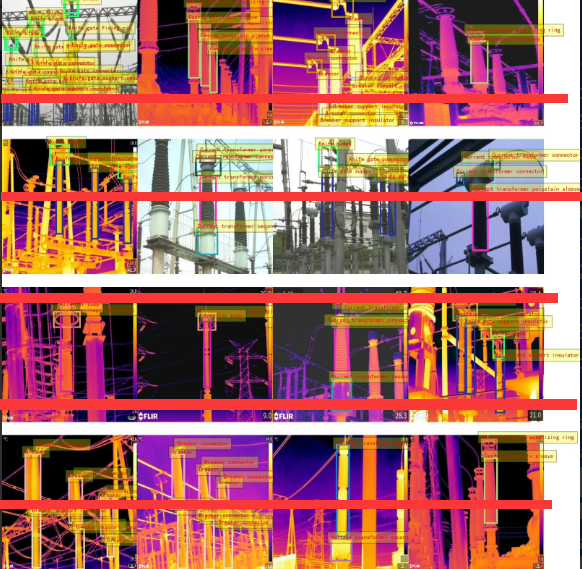
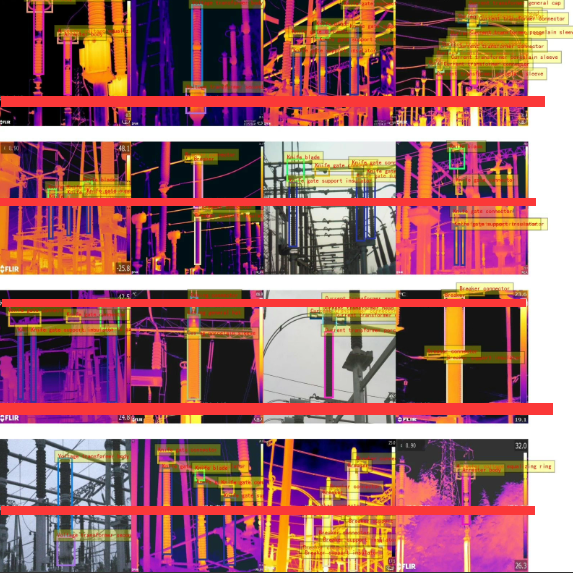
红外可见光多模态(注意没有做一一对应)图像变电站设备检测数据集,10681张,yolo和voc两种标注方式
训练集:9272张,验证集:937张,测试集:472张
21类,图像尺寸640*640
类别名称: 每一类图像数 ,每一类标注数
Arrester voltage equalizing ring - 避雷器均压环:1677,2185
Arrester body - 避雷器本体:1691,2212
Voltage transformer body - 电压互感器本体:2148,2500
Breaker - 断路器:1269,3037
Breaker connector - 断路器连接件:1265,5555
Breaker support insulator - 断路器支柱绝缘子:1260,2822
Casing pressure equalizing ring - 套管均压环:707,1324
Casing porcelain sleeve - 套管瓷套:1378,2227
Casing connector - 套管连接件:615,848
Casing general hat - 套管通用帽:691,927
Current transformer porcelain sleeve - 电流互感器瓷套:2109,3207
Current transformer head - 电流互感器头部:1829,2874
Current transformer connector - 电流互感器连接件:2108,6019
Current transformer general cap - 电流互感器通用帽:644,1295
Current transformer secondary tank - 电流互感器二次油箱:298,342
Current transformer voltage equalizing ring - 电流互感器均压环:4,8
Knife gate connector - 刀闸连接件:2064,6575
Knife gate support insulator - 刀闸支柱绝缘子:2004,6604
Knife blade - 刀闸刀片:2044,3508
Knife gate fixing pin - 刀闸固定销:424,820
Voltage transformer secondary tank - 电压互感器二次油箱:2085,2403
image num: 10681
1
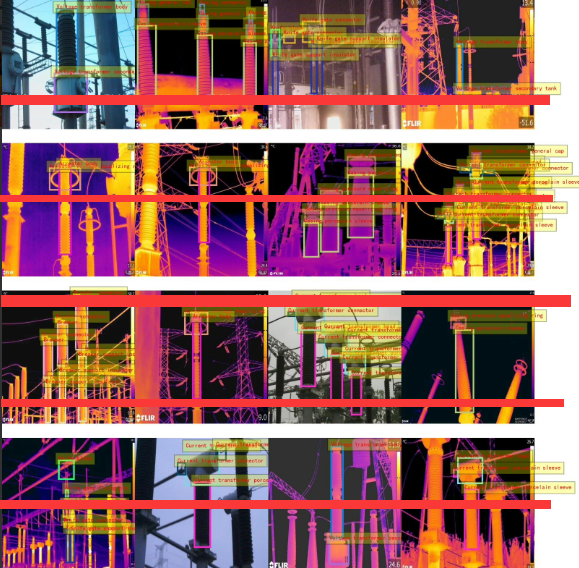
图像变电站设备检测数据集
📊 变电站设备检测数据集统计表
| 序号 | 英文类别名称 | 中文类别名称 | 图像数量 | 标注框数量 |
|---|---|---|---|---|
| 1 | Arrester voltage equalizing ring | 避雷器均压环 | 1,677 | 2,185 |
| 2 | Arrester body | 避雷器本体 | 1,691 | 2,212 |
| 3 | Voltage transformer body | 电压互感器本体 | 2,148 | 2,500 |
| 4 | Breaker | 断路器 | 1,269 | 3,037 |
| 5 | Breaker connector | 断路器连接件 | 1,265 | 5,555 |
| 6 | Breaker support insulator | 断路器支柱绝缘子 | 1,260 | 2,822 |
| 7 | Casing pressure equalizing ring | 套管均压环 | 707 | 1,324 |
| 8 | Casing porcelain sleeve | 套管瓷套 | 1,378 | 2,227 |
| 9 | Casing connector | 套管连接件 | 615 | 848 |
| 10 | Casing general hat | 套管通用帽 | 691 | 927 |
| 11 | Current transformer porcelain sleeve | 电流互感器瓷套 | 2,109 | 3,207 |
| 12 | Current transformer head | 电流互感器头部 | 1,829 | 2,874 |
| 13 | Current transformer connector | 电流互感器连接件 | 2,108 | 6,019 |
| 14 | Current transformer general cap | 电流互感器通用帽 | 644 | 1,295 |
| 15 | Current transformer secondary tank | 电流互感器二次油箱 | 298 | 342 |
| 16 | Current transformer voltage equalizing ring | 电流互感器均压环 | 4 | 8 |
| 17 | Knife gate connector | 刀闸连接件 | 2,064 | 6,575 |
| 18 | Knife gate support insulator | 刀闸支柱绝缘子 | 2,004 | 6,604 |
| 19 | Knife blade | 刀闸刀片 | 2,044 | 3,508 |
| 20 | Knife gate fixing pin | 刀闸固定销 | 424 | 820 |
| 21 | Voltage transformer secondary tank | 电压互感器二次油箱 | 2,085 | 2,403 |
| 总计 | — | — | 10,681 | 65,213 |
✅ 说明:
- 图像总数:10,681 张(训练集 9,272 + 验证集 937 + 测试集 472)
- 标注格式:同时提供 YOLO (.txt) 和 PASCAL VOC (.xml) 两种格式
- 图像尺寸:统一为 640×640
- 模态:包含 红外 与 可见光 图像(未严格一一对应,可分别使用)
电力设备智能巡检、变电站自动化运维、多模态目标检测研究 等场景,是构建高鲁棒性电力视觉系统的优质资源。
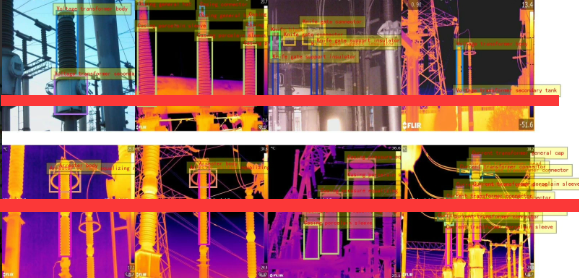
以下是完整的 红外与可见光多模态(非配对)变电站设备检测系统 的代码实现,基于 YOLOv8,支持:
以下文字及代码仅供参考学习使用
✅ 加载红外或可见光图像
✅ YOLOv8 检测(21 类电力设备)
✅ Web 界面上传与可视化(Flask)
✅ 支持 YOLO 和 VOC 格式数据训练(本例使用 YOLO 格式)
📁 一、项目结构
substation_detection_yolov8/
├── data/
│   └── dataset.yaml                 # 数据集配置(21类)
├── models/
│   └── best.pt                      # 训练好的 YOLOv8 模型
├── static/
│   ├── uploads/                     # 用户上传图像
│   └── results/                     # 检测结果图
├── templates/
│   ├── index.html                   # 主页(选择模态+上传)
│   └── result.html                  # 结果展示
├── app.py                           # Flask Web 应用
├── detect.py                        # 核心检测模块
├── requirements.txt
└── README.md
📦 二、环境依赖(requirements.txt)
ultralytics==8.2.0
flask==2.3.3
opencv-python==4.8.0
numpy==1.24.3
Pillow==9.5.0
matplotlib
安装:
pip install -r requirements.txt
🧠 三、类别定义(21类)
# detect.py 中的类别映射
CLASS_NAMES = [
    "避雷器均压环", "避雷器本体", "电压互感器本体", "断路器", "断路器连接件",
    "断路器支柱绝缘子", "套管均压环", "套管瓷套", "套管连接件", "套管通用帽",
    "电流互感器瓷套", "电流互感器头部", "电流互感器连接件", "电流互感器通用帽",
    "电流互感器二次油箱", "电流互感器均压环", "刀闸连接件", "刀闸支柱绝缘子",
    "刀闸刀片", "刀闸固定销", "电压互感器二次油箱"
]
⚠️ 注意:顺序必须与
dataset.yaml中的names严格一致。
📄 四、数据集配置 data/dataset.yaml
train: ../data/images/train
val: ../data/images/val
test: ../data/images/test

nc: 21
names: [
  'Arrester voltage equalizing ring',
  'Arrester body',
  'Voltage transformer body',
  'Breaker',
  'Breaker connector',
  'Breaker support insulator',
  'Casing pressure equalizing ring',
  'Casing porcelain sleeve',
  'Casing connector',
  'Casing general hat',
  'Current transformer porcelain sleeve',
  'Current transformer head',
  'Current transformer connector',
  'Current transformer general cap',
  'Current transformer secondary tank',
  'Current transformer voltage equalizing ring',
  'Knife gate connector',
  'Knife gate support insulator',
  'Knife blade',
  'Knife gate fixing pin',
  'Voltage transformer secondary tank'
]
🔍 五、核心检测模块 detect.py
# detect.py
import cv2
import os
from ultralytics import YOLO

# 中文类别名称(按 ID 顺序)
CLASS_NAMES = [
    "避雷器均压环", "避雷器本体", "电压互感器本体", "断路器", "断路器连接件",
    "断路器支柱绝缘子", "套管均压环", "套管瓷套", "套管连接件", "套管通用帽",
    "电流互感器瓷套", "电流互感器头部", "电流互感器连接件", "电流互感器通用帽",
    "电流互感器二次油箱", "电流互感器均压环", "刀闸连接件", "刀闸支柱绝缘子",
    "刀闸刀片", "刀闸固定销", "电压互感器二次油箱"
]

def run_detection(input_path, output_dir="static/results", model_path="models/best.pt"):
    """
    对单张红外或可见光图像进行变电站设备检测
    """
    model = YOLO(model_path)
    img = cv2.imread(input_path)
    if img is None:
        raise ValueError("无法读取图像")

    results = model(img, conf=0.4)  # 置信度阈值 0.4
    annotated_img = img.copy()
    boxes = results[0].boxes

    class_counts = {name: 0 for name in CLASS_NAMES}

    for box in boxes:
        x1, y1, x2, y2 = map(int, box.xyxy[0])
        conf = float(box.conf[0])
        cls_id = int(box.cls[0])
        if cls_id >= len(CLASS_NAMES):
            continue
        class_name = CLASS_NAMES[cls_id]
        class_counts[class_name] += 1

        # 绘制边界框(颜色可自定义)
        color = (0, 255, 0)
        cv2.rectangle(annotated_img, (x1, y1), (x2, y2), color, 2)
        label = f"{class_name} {conf:.2f}"
        cv2.putText(annotated_img, label, (x1, y1 - 10),
                    cv2.FONT_HERSHEY_SIMPLEX, 0.5, color, 1)

    os.makedirs(output_dir, exist_ok=True)
    filename = os.path.basename(input_path)
    output_path = os.path.join(output_dir, f"det_{filename}")
    cv2.imwrite(output_path, annotated_img)

    return output_path, class_counts
🌐 六、Web 应用 app.py
# app.py
from flask import Flask, render_template, request, redirect, url_for
import os
from detect import run_detection

app = Flask(__name__)
UPLOAD_FOLDER = 'static/uploads'
RESULT_FOLDER = 'static/results'
ALLOWED_EXTENSIONS = {'png', 'jpg', 'jpeg'}

app.config['UPLOAD_FOLDER'] = UPLOAD_FOLDER
app.config['RESULT_FOLDER'] = RESULT_FOLDER

def allowed_file(filename):
    return '.' in filename and filename.rsplit('.', 1)[1].lower() in ALLOWED_EXTENSIONS

@app.route('/')
def index():
    return render_template('index.html')

@app.route('/upload', methods=['POST'])
def upload_file():
    if 'file' not in request.files or 'modality' not in request.form:
        return redirect(request.url)

    file = request.files['file']
    modality = request.form['modality']  # 'infrared' 或 'visible'

    if file.filename == '' or not allowed_file(file.filename):
        return redirect(request.url)

    filename = f"{modality}_{file.filename}"
    filepath = os.path.join(app.config['UPLOAD_FOLDER'], filename)
    os.makedirs(app.config['UPLOAD_FOLDER'], exist_ok=True)
    file.save(filepath)

    try:
        output_path, counts = run_detection(
            filepath,
            output_dir=app.config['RESULT_FOLDER'],
            model_path="models/best.pt"
        )
        result_filename = os.path.basename(output_path)
    except Exception as e:
        return f"<h2>检测失败:{str(e)}</h2>"

    # 过滤掉数量为0的类别
    non_zero_counts = {k: v for k, v in counts.items() if v > 0}

    return render_template('result.html',
                           original=filename,
                           detected=result_filename,
                           counts=non_zero_counts,
                           modality="红外" if modality == "infrared" else "可见光")

if __name__ == '__main__':
    app.run(debug=True, host='0.0.0.0', port=5000)
🖼️ 七、前端模板
templates/index.html
<!DOCTYPE html>
<html>
<head>
    <title>变电站设备检测系统</title>
    <style>
        body { font-family: Arial; text-align: center; margin-top: 40px; }
        .btn { padding: 8px 16px; margin: 5px; background: #007bff; color: white; border: none; cursor: pointer; }
        .btn:hover { background: #0069d9; }
    </style>
</head>
<body>
    <h2>⚡ 变电站设备多模态检测系统</h2>
    <p>支持红外 / 可见光图像(无需配对)</p>

    <form method="post" enctype="multipart/form-data" action="/upload">
        <label><input type="radio" name="modality" value="infrared" required> 红外图像</label>
        <label><input type="radio" name="modality" value="visible" required> 可见光图像</label>
        <br><br>
        <input type="file" name="file" accept="image/*" required>
        <br><br>
        <button type="submit" class="btn">上传并检测</button>
    </form>
</body>
</html>
templates/result.html
<!DOCTYPE html>
<html>
<head>
    <title>检测结果</title>
    <style>
        body { font-family: Arial; margin: 20px; }
        img { max-width: 95%; margin: 10px; border: 1px solid #ddd; }
        .stats { background: #f8f9fa; padding: 15px; border-radius: 5px; margin: 20px 0; }
        .item { display: inline-block; margin-right: 15px; }
    </style>
</head>
<body>
    <h2>📊 {{ modality }}图像检测结果</h2>

    <img src="{{ url_for('static', filename='uploads/' + original) }}" alt="原始图">
    <img src="{{ url_for('static', filename='results/' + detected) }}" alt="检测结果">

    <div class="stats">
        <strong>检测到的设备:</strong>
        {% for name, count in counts.items() %}
            <span class="item">{{ name }}: {{ count }} 处</span>
        {% endfor %}
    </div>

    <a href="/">← 返回上传</a>
</body>
</html>
▶️ 八、运行系统
python app.py
访问:http://localhost:5000
该系统可广泛应用于 智能电网、变电站无人巡检、电力 AI 运维平台,助力实现 “安全、高效、智能” 的电力设备管理。






 扫一扫
扫一扫


 906
906

 被折叠的 条评论
为什么被折叠?
被折叠的 条评论
为什么被折叠?
 到【灌水乐园】发言





