


之前大部分内容在写Qt一些小部件以及基础模块的用法,不成体系,大部分时候还是用什么找什么。随着对Qt的逐渐熟悉,应该做一些项目,这样可以在实际应用的过程中加深对程序的理解。本次要和大家分享的就是高亮语法Python编辑器。
使用Qt编写编辑器项目,可以有两种方式。一种是使用Qt自身的类如Widget、QPlainTextEdit、QSyntaxHighlighter等我们自己根据Qt提供的Api去实现编辑器;另一种可以是使用第三方库QScintilla(是Scintilla 在Qt上的移植)去实现编辑器的各种功能。对于我们自己实现小型的编辑器来讲差别不大。我从另外的角度说下,自己实现了编辑器,可能还会需要添加虚拟键盘的功能。Qt可以通过插件的方式开发虚拟键盘功能,这时候使用QScintilla开发的编辑器在使用虚拟键盘上会受到一些限制。
在网上搜索资料,最后觉得Qt的两篇官方教程比较好,附上链接:
Code Editor Example :
https://doc.qt.io/qt-5/qtwidgets-widgets-codeeditor-example.html
Syntax Highlighter Example :
https://doc.qt.io/qt-5/qtwidgets-richtext-syntaxhighlighter-example.html
本篇文章参考网上资料以及Qt官方文档,又加入了对文件增删改查等功能,已经是一个较为完整的小项目了。先上一张效果图:
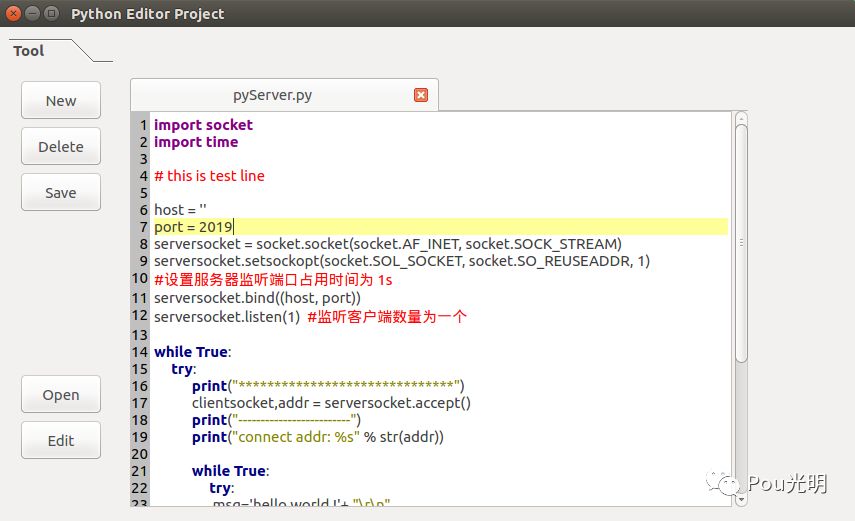
程序环境:ubuntu、Qt 5.5.1
LineNumberArea 类,继承QWidget,实现行号区域的绘制。
CodeEditor 类,继承QPlainTextEdit,更新行号,加载文本,文件操作等。
CodeHighLight 类继承QSyntaxHighlighter,实现关键字、特殊语法等的高亮。
Widget类, UI层操作。
1. 继承 QPlainTextEdit 添加一些功能
行号区域是一个单独的小部件,我们再这个部件上“画”出行号,当文本行数变化时,行号区域的宽度也要发生变化,此时需要重新绘制行号区域。
void CodeEditor::lineNumberAreaPaintEvent(QPaintEvent *event)
{
    QPainter painter(lineNumberArea);
    painter.fillRect(event->rect(), Qt::lightGray);


    QTextBlock block = firstVisibleBlock();
    int blockNumber = block.blockNumber();
    int top = (int) blockBoundingGeometry(block).translated(contentOffset()).top();
    int bottom = top + (int) blockBoundingRect(block).height();


    while (block.isValid() && top <= event->rect().bottom()) {
        if (block.isVisible() && bottom >= event->rect().top()) {
            QString number = QString::number(blockNumber + 1);
            painter.setPen(Qt::black);
            painter.drawText(-2, top, lineNumberArea->width(), fontMetrics().height(),
                             Qt::AlignRight, number);
        }


        block = block.next();
        top = bottom;
        bottom = top + (int) blockBoundingRect(block).height();
        ++blockNumber;
    }
}
高亮光标所在行:
void CodeEditor::highlightCurrentLine()
{
QList<QTextEdit::ExtraSelection> extraSelections;
if (!isReadOnly()) {
QTextEdit::ExtraSelection selection;
QColor lineColor = QColor(Qt::yellow).lighter(160);
selection.format.setBackground(lineColor);
selection.format.setProperty(QTextFormat::FullWidthSelection, true);
selection.cursor = textCursor();
selection.cursor.clearSelection();
extraSelections.append(selection);
}
setExtraSelections(extraSelections);
}2. 高亮关键字
继承QSyntaxHighlighter,突出一些关键字和语法显示。这里面主要是一些正则表达式的应用。我们可以定义多种QTextCharFormat类型的规则,设置他们的颜色,指定他们的格式,再将他们分配给HighlightingRule对象,并将该对象附加到我们的规则列表中。
    singleLineCommentFormat.setForeground(Qt::red);
    rule.pattern = QRegExp("#[^\n]*");
    rule.format = singleLineCommentFormat;
    highlightingRules.append(rule);
3. 文件操作
读取文件
bool CodeEditor::openFile(QString &file)
{
    QFile f(file);


    QTextStream stream(&f);
    QApplication::setOverrideCursor(Qt::WaitCursor);


    this->setPlainText(stream.readAll());
    QApplication::restoreOverrideCursor();
    setCurrentFile(file);
    connect(this, SIGNAL(textChanged()), this, SLOT(setDocumentModified()));
    this->showMaximized();
    return true;
}
保存文件
bool CodeEditor::saveFile(QString &name)
{
    QString filePath = m_filePath;
    QString fileName = QString("%1/%2.py").arg(filePath).arg(name);


    QFile file(fileName);

    QApplication::setOverrideCursor(Qt::WaitCursor);
    QTextStream stream(&file);
    stream << this->toPlainText();
    setCurrentFile(fileName);
    QApplication::restoreOverrideCursor();
    return true;
}
为了可读性,删掉了一些代码。
4. 使用 MDI Area 添加文档窗体
void Widget:: on_pbn_newFile_clicked()
{
    ui->sw_loadFile->hide();
    ui->sw_editor->show();
    ui->mdiArea->show();


    m_pythonCodeEditor = createMdiChild();
    m_codeHighLight = new CodeHighLight(m_pythonCodeEditor->document());


    ui->mdiArea->addSubWindow(m_pythonCodeEditor);
    m_pythonCodeEditor->newFile();
}
公众号:Pou光明
完整工程可在公众号后台留下邮箱等联系方式。
欢迎大家关注公众号。





 扫一扫
扫一扫


 1880
1880

 被折叠的 条评论
为什么被折叠?
被折叠的 条评论
为什么被折叠?
 到【灌水乐园】发言





