


 本文介绍了HTML表单的各个元素,如文本框、密码框、按钮等,并展示了不同类型的输入字段及其应用场景。此外,还详细讲解了CSS样式的引入方式,包括行内样式、内部样式和外部样式,并探讨了选择器的优先级。文中通过实例演示了如何使用Id、class、标签和通配符选择器来控制元素的样式,以及如何实现内容居中和字体设置。
- 表单
格式:
<form >【常用在登录注册页面】
文本框:<input type="text" value=”XXXX”>
密码框:<input type="password">
按钮:<input type="button" value="按钮">
【必须有value值,否则按钮没有提示字】
<input type="submit" value="提交按钮">【默认名字为提交,value可改默认值】
<input type="reset" value="重置按钮">【默认名字为重置,value可改默认值】
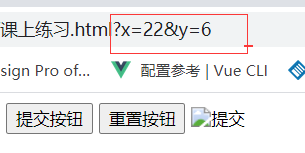
<input type="image" src="../01.jpg">
【x、y为点击图片的坐标,图片按钮与提交按钮的功能一样】
</form>
例子: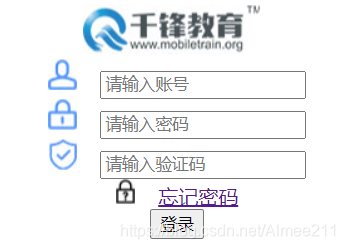
<!-- 表单练习 -->
<center><img src="../千锋教育登录/logo.jpg"></center>
<center>
<form>
<input type="text" placeholder="请输入账号">
<input type="password" placeholder="请输入密码">
<input type="text" placeholder="请输入验证码">
【placeholder为框内初始值,输入文字后初始值消失
Type=”text” value=”xxx”,value中的初始值输入文字后不会消失】
<a href="http://www.baidu.com">忘记密码/a>
<input type="submit" value="登录">
</form>
</center>
<form action="http://www.baidu.com">【action为数据提交的地址】
<input type="text" placeholder="昵称">
<input type="password" placeholder="密码">
<input type="text" name="tellphone" placeholder="电话">
【name属性可以将文本框中的内容提交到相应地址中】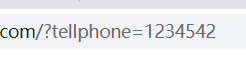
<input type="submit" value="立即注册">
</form>
Label标签的使用:
2、css样式
(1)引入方式
A.行内样式:从标签内添加style属性
<input type="submit" value="立即注册" style="width: 200px;color: white;background-color: skyblue;">

B.内部样式:从head里面加入style标签
<style>
div{
width: 50px;
height: 50px;
background-color: aquamarine;
}
</style>
C.外部引入:从head里加入link标签,
<link rel="stylesheet" href="css/课上练习.css" type=”text/css”>
Rel 为类型 ,stylesheet是样式表
Href为css文件的地址
Css文件:
p{
width: 200px;
height: 200px;
color: azure;
background-color: black;
text-align: center;
display: table-cell;
vertical-align: middle;
}

修饰示例: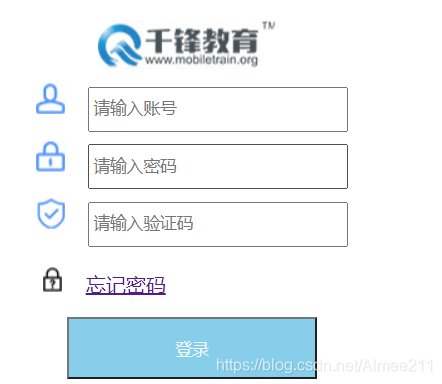
3、选择器的优先顺序
Id>class>标签>通配符
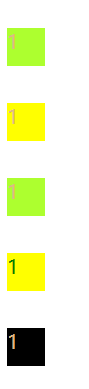
<!DOCTYPE html>
<html lang="en">
<head>
<meta charset="UTF-8">
<title>Document</title>
<style>
*{
width: 30px;
height: 30px;
margin-top: 30px;
color: burlywood;
}
p{
width: 30px;
height: 30px;
background-color: black;
}
.yel_col{
background-color:yellow ;
}
.gre_col{
background-color: greenyellow;
}
#gre_col{
color: green;
}
</style>
</head>
<body>
<p class="yel_col gre_col">1</p> 【用空格间隔开两个类名】
<p class="yel_col">1</p>
<p class="gre_col">1</p>
<p class="yel_col" id="gre_col">1</p>
<p>1</p>
</body>
</html>
4、通配符
*{
Padding:0;
Margin:0;
}【消除因浏览器产生的页边距,通配符可以统一调整样式】
5、群组选择器
Div,p,h5{width:200px;…}
【可以将不同标签设置同一样式,可以减少代码重复】
6、字体样式
height: 60px;
line-height: 60px;
【这两个属性的属性值相同时,内容可居中显示】
font-size: 20px;【控制字号大小】
font-family:楷体【控制字体样式】





 扫一扫
扫一扫


 3804
3804

 被折叠的 条评论
为什么被折叠?
被折叠的 条评论
为什么被折叠?
 到【灌水乐园】发言





