


 本文详细记录了手动搭建一个包含SpringBoot、Mybatis、Redis和Thymeleaf的Web项目的全过程。首先介绍了各技术框架的作用,接着分三部分阐述了SpringBoot基础设置、SpringBoot集成Mybatis实现数据访问、SpringBoot整合Redis进行缓存操作的步骤。项目源码已上传至GitHub和CSDN,可供读者参考学习。
手动搭建了一个springboot+mybatis+redis+thymeleaf的Web后台项目,因此写篇博客记录下搭建的完整过程。文章最后有完整代码地址
首先简单介绍下用到的技术框架及用途:
1.springboot框架 项目主体结构;
2.mybatis 持久层,本次与springboot结合采用的是传统的Xml形式,主要是为了sql语句的书写上更舒服些(个人观点);
3.redis 缓存数据库,为后期app开发做准备。
4.thymeleaf 前台模板引擎
第一部分:Springboot搭建
首先使用eclipse 下载sts插件 help-》Eclipse Marketplace-》选择Popular-》选择STS-》Installed,
完成后 new -》Project 选择Spring Starter Project-》next
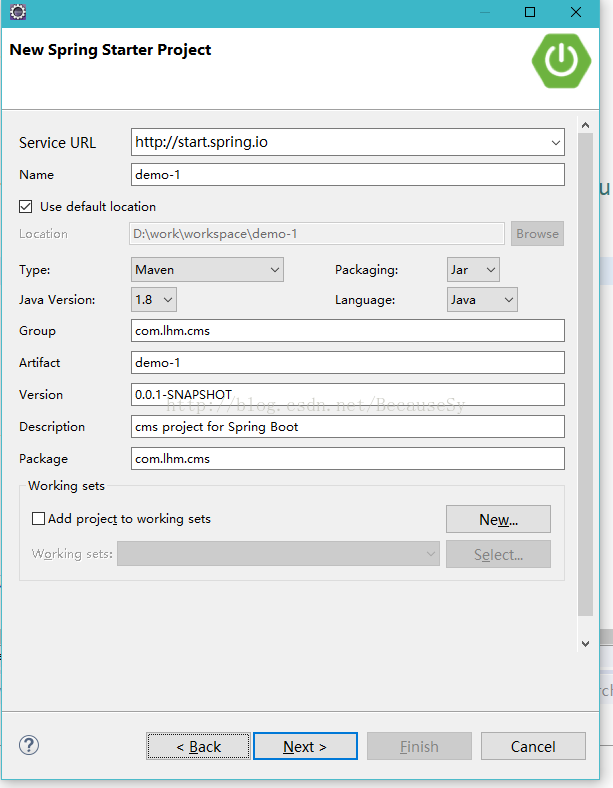
填写项目基本信息 Next
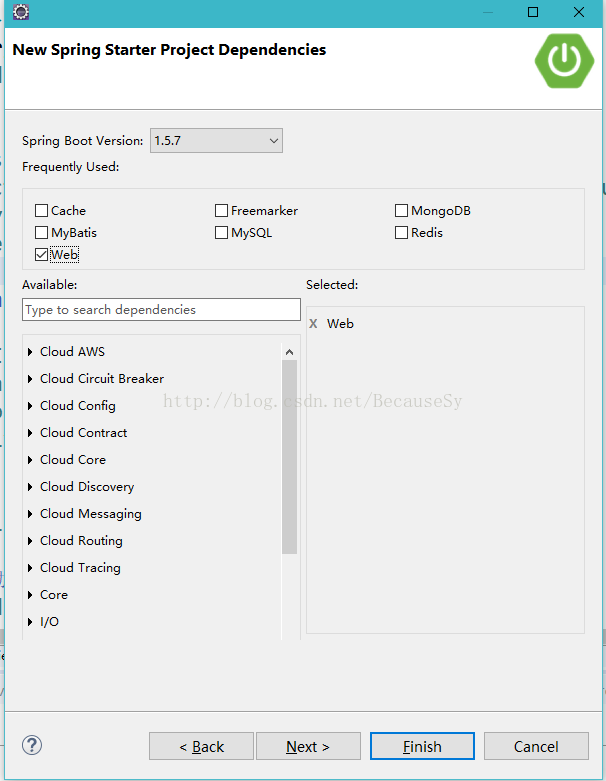
选择web组件 然后Finish 完成后 为项目创建下图样式的目录结构
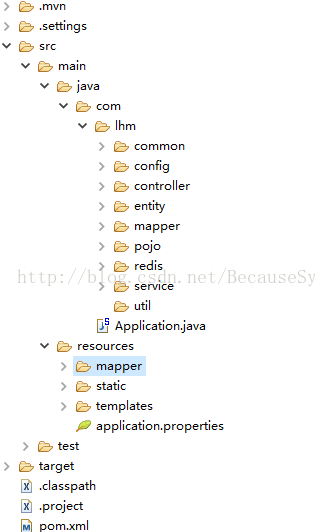
完成后编辑pom.xml
<?xml version="1.0" encoding="UTF-8"?>
<project xmlns="http://maven.apache.org/POM/4.0.0" xmlns:xsi="http://www.w3.org/2001/XMLSchema-instance"
	xsi:schemaLocation="http://maven.apache.org/POM/4.0.0 http://maven.apache.org/xsd/maven-4.0.0.xsd">
	<modelVersion>4.0.0</modelVersion>
	<packaging>jar</packaging>
	<groupId>org.springframework</groupId>
	<artifactId>Springboot_lhm</artifactId>
	<version>0.1.0</version>

	<properties>
		<!-- 指定编码格式UTF-8 -->
		<project.build.sourceEncoding>UTF-8</project.build.sourceEncoding>
		<!-- 指定java版本1.8 -->
		<java.version>1.8</java.version>
	</properties>

	<!--  Spring Boot 1.5 -->
    <parent>
        <groupId>org.springframework.boot</groupId>
        <artifactId>spring-boot-starter-parent</artifactId>
        <version>1.5.4.RELEASE</version>
        <relativePath/>
    </parent>

    <dependencies>

        <!-- 添加springboot web项目源生依赖 -->
        <dependency>
            <groupId>org.springframework.boot</groupId>
            <artifactId>spring-boot-starter-web</artifactId>
        </dependency>
        <!-- 添加单元测试 -->
		<dependency>
        	<groupId>org.springframework.boot</groupId>
        	<artifactId>spring-boot-starter-test</artifactId>
        	<scope>test</scope>
    	</dependency>
	</dependencies>

    <!-- 使用 maven 打jar包 -->
    <build>
        <plugins>
            <plugin>
                <groupId>org.springframework.boot</groupId>
                <artifactId>spring-boot-maven-plugin</artifactId>
            </plugin>
        </plugins>
    </build>


</project>
Springboot的基本结构就搭建完了 我们在Application类中写个方法测试下
import org.springframework.boot.SpringApplication;
import org.springframework.boot.autoconfigure.EnableAutoConfiguration;
import org.springframework.web.bind.annotation.RequestMapping;
import org.springframework.web.bind.annotation.RestController;
@RestController
@EnableAutoConfiguration
public class Application{
@RequestMapping("/test")
String home() {
return "Hello World!";
}
public static void main(String[] args) {
SpringApplication.run(Application.class, args);
}
} 启动项目,在Application类中run as -》java Aplication

打开游览器 输入 localhost:8080/test

这样第一部分的内容就完成了!!!
第二部分:Springboot+mybatis搭建
打开pom.xml,添加
<!-- mybatis -->
        <dependency>
		    <groupId>org.mybatis.spring.boot</groupId>
		    <artifactId>mybatis-spring-boot-starter</artifactId>
		    <version>1.1.1</version>
		</dependency>

        <!-- mysql -->
        <dependency>
        	<groupId>mysql</groupId>
        	<artifactId>mysql-connector-java</artifactId>
    	</dependency>

    	<!--分页插件 -->
		<dependency>
			<groupId>com.github.pagehelper</groupId>
			<artifactId>pagehelper</artifactId>
			<version>4.1.6</version>
		</dependency>
mybatis.type-aliases-package=com.lhm.entity
mybatis.mapper-locations: classpath:mapper/*.xml

spring.datasource.driverClassName = com.mysql.jdbc.Driver
spring.datasource.url = jdbc:mysql://127.0.0.1:3306/springboot_lhm?characterEncoding=utf8&useSSL=false&autoReconnect=true&failOverReadOnly=false&autoReconnectForPools=true
spring.datasource.username = root
spring.datasource.password = 123456789
package com.lhm.config;

import java.util.Properties;

import org.springframework.context.annotation.Bean;
import org.springframework.context.annotation.Configuration;

import com.github.pagehelper.PageHelper;

/*
 * 注册MyBatis分页插件PageHelper
 */

@Configuration
public class MybatisConf {
        @Bean
        public PageHelper pageHelper() {
            PageHelper pageHelper = new PageHelper();
            Properties p = new Properties();
            p.setProperty("offsetAsPageNum", "true");
            p.setProperty("rowBoundsWithCount", "true");
            p.setProperty("reasonable", "true");
            pageHelper.setProperties(p);
            return pageHelper;
        }
}
package com.lhm.pojo;

import java.util.List;

import com.github.pagehelper.Page;

public class MyPage<T> {

	public MyPage(){

	}

	public MyPage(Page<T> page) {
		int pageNum = page.getPageNum();
		int pageSize = page.getPageSize();
		long total = page.getTotal();
		int pages = page.getPages();
		this.pageNo = pageNum;
		this.pageSize = pageSize;
		this.total = total;
		this.totalPage = pages;
		this.list = page.getResult();
	}

	/**
	 *
	 */
	private int pageNo;

	private int pageSize;

	private long total;

	private int totalPage;

	private List<T> list;

	public int getPageNo() {
		return pageNo;
	}

	public void setPageNo(int pageNo) {
		this.pageNo = pageNo;
	}

	public int getPageSize() {
		return pageSize;
	}

	public void setPageSize(int pageSize) {
		this.pageSize = pageSize;
	}

	public long getTotal() {
		return total;
	}

	public void setTotal(long total) {
		this.total = total;
	}

	public int getTotalPage() {
		return totalPage;
	}

	public void setTotalPage(int totalPage) {
		this.totalPage = totalPage;
	}

	public List<T> getList() {
		return list;
	}

	public void setList(List<T> list) {
		this.list = list;
	}

}
这是Springboot+mybatis分页就算完成了,下面我们写一个类测试mybatis的正常使用。
在entity文件夹下新建User.java类
package com.lhm.entity;

import java.io.Serializable;

public class User implements Serializable{
	/**
	* @Fields serialVersionUID : 实体类版本序列化号
	*/
	private static final long serialVersionUID = 1L;
	private int id;
	private String name;
	public int getId() {
		return id;
	}
	public void setId(int id) {
		this.id = id;
	}
	public String getName() {
		return name;
	}
	public void setName(String name) {
		this.name = name;
	}

}
在controller文件夹下 创建类IndexController.java
package com.lhm.controller;

import org.springframework.beans.factory.annotation.Autowired;
import org.springframework.stereotype.Controller;
import org.springframework.web.bind.annotation.RequestMapping;
import org.springframework.web.bind.annotation.RequestParam;
import org.springframework.web.bind.annotation.ResponseBody;

import com.github.pagehelper.Page;
import com.github.pagehelper.PageInfo;
import com.lhm.entity.User;

import com.lhm.service.UserService;


/**
* @ClassName: IndexController
* @Description: springboot web 登陆首页
* @author liuheming
* @date 2017年10月2日 上午10:42:04
*
*/
@Controller
public class IndexController {
@Autowired
private UserService userService;
	/**
	* @Title: PageUserSelect
	* @Description: 分页查询
	* @param pageNum 页数
	* @param Size 单页条数
	* @return PageInfo<User>
	* @throws
	*/
	@RequestMapping("/PageUserSelect")
  	@ResponseBody
  	public PageInfo<User> PageUserSelect(
  				@RequestParam(value="pageNum",defaultValue="1")int pageNum,
			    @RequestParam(value="Size",defaultValue="5")int Size
		    ){
		Page<User> persons = userService.findByPage(pageNum, Size);
		PageInfo<User> pageInfo = new PageInfo<User>(persons);
				return pageInfo;
  	}


}
在service文件夹下新建UserService.java
package com.lhm.service;

import com.github.pagehelper.Page;
import com.lhm.entity.User;

public interface UserService {
	public Page<User> findByPage(int pageNum, int size);
}
在impl文件夹下新建UserServiceImpl.java类并实现UserService
package com.lhm.service.impl;

import org.springframework.beans.factory.annotation.Autowired;
import org.springframework.stereotype.Service;

import com.github.pagehelper.Page;
import com.github.pagehelper.PageHelper;
import com.lhm.entity.User;
import com.lhm.mapper.UserMapper;
import com.lhm.service.UserService;
@Service
public class UserServiceImpl implements UserService{
	@Autowired
	private UserMapper userMapper;

	@Override
	public Page<User> findByPage(int pageNum, int size) {
		PageHelper.startPage(pageNum, size);
		return userMapper.findByPage();
	}

}
在mapper文件夹下新建UserMapper.java类
package com.lhm.mapper;

import org.apache.ibatis.annotations.Param;

import com.github.pagehelper.Page;
import com.lhm.entity.User;

public interface UserMapper {
	public Page<User> findByPage();
}
在resources/mapper下 新建UserMapper.xml
<?xml version="1.0" encoding="UTF-8"?>
<!DOCTYPE mapper PUBLIC "-//mybatis.org//DTD Mapper 3.0//EN" "http://mybatis.org/dtd/mybatis-3-mapper.dtd">
<mapper namespace="com.lhm.mapper.UserMapper">
	<resultMap id="User" type="com.lhm.entity.User" >
        <result property="id" column="id" />
		<result property="name" column="name" />
    </resultMap>
    <select id="findByPage"  resultType="User">
        select * from user
    </select>
</mapper>
自此我们就可以启动项目了,注意一点我们需要在Application类中添加注解@MapperScan
package com;

import org.mybatis.spring.annotation.MapperScan;
import org.springframework.boot.SpringApplication;
import org.springframework.boot.autoconfigure.SpringBootApplication;
import org.springframework.context.ApplicationContext;

import org.springframework.data.redis.core.StringRedisTemplate;

@SpringBootApplication
@MapperScan("com.lhm.mapper")//对mapper包扫描
public class Application {

	public static void main(String[] args) {
		SpringApplication.run(Application.class, args);


	}

}

这样我们就得到了JSon格式的分数据,自此第二部分也就完成了。
第三部分:Springboot+redis搭建
开始前我们需要搭建redis环境,这点不在此介绍了
打开Pom.xml 添加代码
<!-- redis -->
		<dependency>
			<groupId>org.springframework.boot</groupId>
			<artifactId>spring-boot-starter-redis</artifactId>
			<version>1.4.1.RELEASE</version>
</dependency># REDIS (RedisProperties)
# Redis数据库索引(默认为0)
spring.redis.database=0
# Redis服务器地址
spring.redis.host=127.0.0.1
# Redis服务器连接端口
spring.redis.port=6379
# Redis服务器连接密码(默认为空)
spring.redis.password=
# 连接池最大连接数(使用负值表示没有限制)
spring.redis.pool.max-active=8
# 连接池最大阻塞等待时间(使用负值表示没有限制)
spring.redis.pool.max-wait=0
# 连接池中的最大空闲连接
spring.redis.pool.max-idle=8
# 连接池中的最小空闲连接
spring.redis.pool.min-idle=0
# 连接超时时间(毫秒)
spring.redis.timeout=5000 package com.lhm.redis;
import java.lang.reflect.ParameterizedType;
import java.util.HashMap;
import java.util.Iterator;
import java.util.Map;
import java.util.Set;
import org.springframework.data.redis.connection.DefaultStringRedisConnection;
import org.springframework.data.redis.connection.RedisConnection;
import org.springframework.data.redis.connection.RedisConnectionFactory;
import org.springframework.data.redis.core.RedisTemplate;
import org.springframework.data.redis.serializer.Jackson2JsonRedisSerializer;
import org.springframework.data.redis.serializer.RedisSerializer;
import org.springframework.data.redis.serializer.StringRedisSerializer;
/**
* @ClassName: RedisService
* @Description: redis服务
* @author liuheming
* @date 2017年10月9日 下午5:29:29
*
*/
public abstract class BaseRedisTemplate<HV> extends RedisTemplate<String, HV> {
private Class<HV> hvClass;
private String dbname;
@SuppressWarnings("unchecked")
private Class<HV> getHVClass() {
if (hvClass == null) {
hvClass = (Class<HV>) ((ParameterizedType) getClass().getGenericSuperclass()).getActualTypeArguments()[0];
dbname = hvClass.getName() + "_";
}
return hvClass;
}
/**
* Constructs a new <code>StringRedisTemplate</code> instance ready to be
* used.
*
* @param connectionFactory
* connection factory for creating new connections
*/
public BaseRedisTemplate(RedisConnectionFactory connectionFactory) {
if (getHVClass() == null) {
throw new IllegalArgumentException("获取泛型class失败");
}
RedisSerializer<String> stringSerializer = new StringRedisSerializer();
setKeySerializer(stringSerializer);
setValueSerializer(new Jackson2JsonRedisSerializer<HV>(getHVClass()));
setHashKeySerializer(stringSerializer);
setHashValueSerializer(new Jackson2JsonRedisSerializer<HV>(getHVClass()));
setConnectionFactory(connectionFactory);
afterPropertiesSet();
}
protected RedisConnection preProcessConnection(RedisConnection connection, boolean existingConnection) {
return new DefaultStringRedisConnection(connection);
}
/**
* map存放操作
*
* @param table
* @param key
* @param hv
*/
protected void putMap(String table, String key, HV hv) {
this.opsForHash().put(getTable(table), key, hv);
}
/**
* map取操作
*
* @param table
* @param key
* @return
*/
@SuppressWarnings("unchecked")
protected HV getMap(String table, String key) {
return (HV) this.opsForHash().get(getTable(table), key);
}
protected void set(String key, HV hv) {
this.opsForValue().set(getTable(key), hv);
}
protected HV get(String key) {
HV hv = this.opsForValue().get(getTable(key));
return hv;
}
@SuppressWarnings("unchecked")
protected Map<String,HV> entriesMap(String key){
Map<Object, Object> entries = this.opsForHash().entries(getTable(key));
Map<String,HV> entriesMap = new HashMap<String,HV>();
Iterator<Object> iterator = entries.keySet().iterator();
while(iterator.hasNext()){
Object next = iterator.next();
String mapKey = (String)next;
HV hv = (HV)entries.get(next);
entriesMap.put(mapKey, hv);
}
return entriesMap;
}
protected long removeMapKey(String table,Object... keys){
return this.opsForHash().delete(getTable(table), keys);
}
protected long removeMapKeyByStringKey(String key1,String key2){
return this.opsForHash().delete(key1, key2);
}
protected void putAllMap(String table,Map<String,HV> map){
this.opsForHash().putAll(getTable(table), map);
}
protected long leftPush(String key, HV hv) {
return this.opsForList().leftPush(getTable(key), hv);
}
protected long rightPush(String key, HV hv) {
return this.opsForList().rightPush(getTable(key), hv);
}
protected HV leftPop(String key) {
return this.opsForList().leftPop(getTable(key));
}
protected HV rightPop(String key) {
return this.opsForList().rightPop(getTable(key));
}
/**
* 中心轴左侧插入
*
* @param key
* @param pivot
* 中心轴的值, 左侧插入
* @param value
*/
protected long leftPush(String key, HV pivot, HV value) {
return this.opsForList().leftPush(getTable(key), pivot, value);
}
/**
* 中心轴右侧插入
*
* @param key
* @param pivot
* 中心轴的值, 左侧插入
* @param value
*/
protected long rightPush(String key, HV pivot, HV value) {
return this.opsForList().rightPush(getTable(key), pivot, value);
}
/**
* 有序列表 在某个索引值下直接覆盖值
*
* @param key
* @param index
* @param value
*/
protected void setList(String key, long index, HV value) {
this.opsForList().set(getTable(key), index, value);
}
/**
* 获取列表中的地index个索引的值
*
* @param key
* @param index
* @return
*/
protected HV indexList(String key, long index) {
return this.opsForList().index(getTable(key), index);
}
/**
* 列表总长度
*
* @param key
* @return
*/
protected long sizeList(String key) {
return this.opsForList().size(getTable(key));
}
/**
* Removes the first count occurrences of elements equal to value from the
* list stored at key. The count argument influences the operation in the
* following ways:
* count > 0: Remove elements equal to value moving from
* head to tail.
* count < 0: Remove elements equal to value moving from tail
* to head. count = 0:
* Remove all elements equal to value. For example, LREM
* list -2 "hello" will remove the last two occurrences of "hello" in the
* list stored at list. Note that non-existing keys are treated like empty
* lists, so when key does not exist, the command will always return 0.
*
* @param key
* @param count
* @param hv
* @return
*/
protected long removeList(String key, long count, HV hv) {
return this.opsForList().remove(getTable(key), count, hv);
}
protected long addSet(String key, HV[] values){
return this.opsForSet().add(getTable(key), values);
}
protected Set<HV> membersSet(String key){
Set<HV> members = this.opsForSet().members(getTable(key));
return members;
}
protected long sizeSet(String key){
return this.opsForSet().size(getTable(key));
}
protected boolean isMemberSet(String key,HV hv){
return this.opsForSet().isMember(getTable(key), hv);
}
protected long removeSet(String key,HV[] values){
return this.opsForSet().remove(getTable(key), values);
}
/**
* 取一个,少一个
* @param key
* @return
*/
protected HV popSet(String key){
return this.opsForSet().pop(getTable(key));
}
protected Set<HV> distinctRandomMembersSet(String key,long distinctCount){
return this.opsForSet().distinctRandomMembers(getTable(key), distinctCount);
}
private String getTable(String table) {
return dbname + table;
}
}下面我们写个方法测试,在common文件夹下RedisConstants.java类 用于设定公共变量
package com.lhm.common;


public class RedisConstants {
	/**
	 * 用户表 User
	 **/
	public static final String User = "user";

}
在redis文件夹下新建user文件夹及子文件UserRedis.java类
package com.lhm.redis.user;

import org.springframework.beans.factory.annotation.Autowired;
import org.springframework.data.redis.connection.RedisConnectionFactory;
import org.springframework.stereotype.Service;

import com.lhm.common.RedisConstants;
import com.lhm.entity.User;
import com.lhm.redis.BaseRedisTemplate;


@Service
public class UserRedis extends BaseRedisTemplate<User> {

	@Autowired
	public UserRedis(RedisConnectionFactory connectionFactory) {
		super(connectionFactory);
	}


	/**
	 * @param table 表名
	 * @param key	用户id
	 *
	 */
	public void addUser(String key, User User) {
		putMap(RedisConstants.User, key, User);
	}

	/**
	 * @param key	用户id
	 * @return 存在true 不存在false
	 */
	public boolean isExist(String key) {

		User sr = this.getUser(key);

		return sr==null?false:true;
	}

	/**
	 * @param table 表名
	 * @param key 用户id
	 * @return
	 */
	public User getUser(String key){
		return getMap(RedisConstants.User,key);
	}

	/**
	 * @param table 表名
	 */
	public void delUserTable(String table) {
		delete(table);
	}
}
package com.lhm.redis.user;

import org.junit.Test;
import org.junit.runner.RunWith;
import org.springframework.beans.factory.annotation.Autowired;
import org.springframework.boot.test.context.SpringBootTest;

import org.springframework.test.context.junit4.SpringRunner;

import com.lhm.entity.User;
import com.lhm.mapper.UserMapper;
import com.lhm.redis.user.UserRedis;

@RunWith(SpringRunner.class)
@SpringBootTest
public class UserRedisTest {
    @Autowired
    private UserRedis userRedis;
    @Autowired
	private UserMapper userMapper;

    @Test
	public void addUser() {
    	User u=new User();
	u.setId(1);
	u.setName("lhm");
    	userRedis.addUser("1",u);
	}
    @Test
	public void isExist() {
    	boolean b=userRedis.isExist("1");
    	System.out.println(b);
	}
    @Test
	public void getUser() {
    	User user=userRedis.getUser("1");
    	System.out.println(user.getName());
	}
    @Test
    public void delUserTable() {
    	userRedis.delUserTable("user");
	}

}
启动项目 然后依次运行单元测试方法

自此Springboot+reids搭建就完成了。
项目完整代码已经上传git 有兴趣的同学可以结合代码+本文章 自己动手搭建系统 https://github.com/liuheming/springboot_mybatis_redis_thymeleaf.git 或http://download.csdn.net/download/becausesy/10017144





 扫一扫
扫一扫


 被折叠的 条评论
为什么被折叠?
被折叠的 条评论
为什么被折叠?
 到【灌水乐园】发言





