





 这篇博客介绍了如何在Unity编辑器中创建一个自定义窗口,并实现各种GUI控件,如对象选择、数值输入、颜色选择、按钮等。通过示例代码展示了EditorWindow的使用,以及在OnGUI方法中使用GUILayout进行布局和用户交互。此外,还涉及到一些基本的游戏对象操作,如获取当前选中物体。
一些编辑器扩展功能收集:
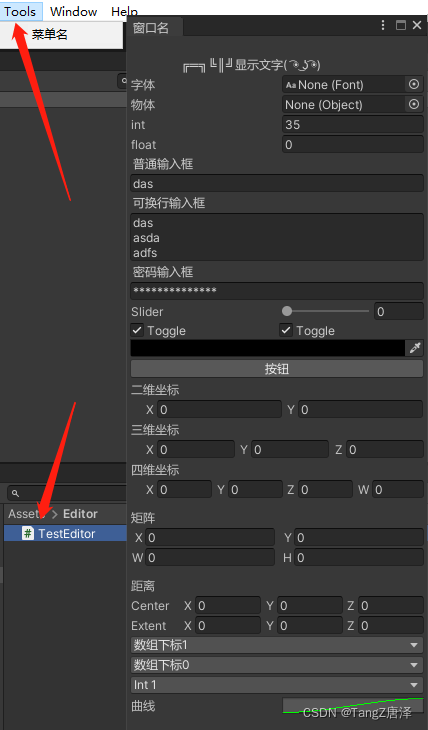
using System.Collections.Generic;
using System.Linq;
using UnityEditor;
using UnityEngine;

public class TestEditor : EditorWindow
{
    private static TestEditor _window;

    private Font font;
    private Object obj;
    private float f;
    private int i;
    private bool isok = true;
    private string str;

    public Vector2 mPos2;

    public Vector3 mPos3;

    public Vector4 mPos4;

    public Rect mRect;

    public Bounds mBounds;

    public int index;
    public EnumTest mEnum;

    public AnimationCurve animationCurve = new AnimationCurve ();

    [ColorUsage(true,true)]
    Color color;

    Transform[] childs = null;


    [MenuItem ("Tools/菜单名")]
    public static void GUIDRefReplaceWin()
    {
        Rect wr = new Rect (0, 0, 300, 1000);//窗口大小
        _window = (TestEditor)GetWindowWithRect (typeof (TestEditor), wr, false, "窗口名");// false 表示不能停靠的
        _window.Show ();

    }
    void OnGUI()
    {
        GUILayout.Space (20);//间隔
        GUILayout.Label ("\t╔═╗╚║╝显示文字(  ͡◉ ͜ʖ ͡◉)");

        childs = Selection.transforms;//当前选中的物体

        font = (Font)EditorGUILayout.ObjectField ("字体", font, typeof (Font), true);
        obj = EditorGUILayout.ObjectField ("物体", obj, typeof (Object), true);
        i=EditorGUILayout.IntField ("int",i);
        f = EditorGUILayout.FloatField ("float", f);
        GUILayout.Label ("普通输入框");
        str = EditorGUILayout.TextField(str);
        GUILayout.Label ("可换行输入框");
        str = EditorGUILayout.TextArea (str);
        GUILayout.Label ("密码输入框");
        str = EditorGUILayout.PasswordField (str);

        f = EditorGUILayout.Slider ("Slider", f, 0, 1);
        EditorGUILayout.BeginHorizontal ();
        isok = GUILayout.Toggle (isok, "Toggle");
        isok = GUILayout.Toggle (isok, "Toggle");
        EditorGUILayout.EndHorizontal ();

        color = EditorGUILayout.ColorField (color); //颜色输入框

        if (GUILayout.Button ("按钮"))
        {
            GameObject go = new GameObject ();
            EditorUtility.SetDirty (go);
            DestroyImmediate (go);//让场景变为未保存状态
        }

        this.mPos2 = EditorGUILayout.Vector2Field ("二维坐标", this.mPos2);

        this.mPos3 = EditorGUILayout.Vector3Field ("三维坐标", this.mPos3);

        this.mPos4 = EditorGUILayout.Vector4Field ("四维坐标", this.mPos4);

        EditorGUILayout.Space ();

        EditorGUILayout.LabelField ("矩阵");
        this.mRect = EditorGUILayout.RectField (this.mRect);

        EditorGUILayout.Space ();

        EditorGUILayout.LabelField ("距离");
        this.mBounds = EditorGUILayout.BoundsField (this.mBounds);

        string[] strs = new[]
        {
            "数组下标0",
            "数组下标1",
            "数组下标2",
        };

        int[] intArr = new[]
        {
            1,
            2,
            3,
        };
        //字符选择,返回选择的字符数组下标
        this.index = EditorGUILayout.Popup (this.index, strs);
        //字符选择,返回对应的整数数组的整数值
        this.index = EditorGUILayout.IntPopup (this.index, strs, intArr);
        //枚举选择
        this.mEnum = (EnumTest)EditorGUILayout.EnumPopup (this.mEnum);

        animationCurve=EditorGUILayout.CurveField ("曲线", animationCurve);
    }
    public enum EnumTest
    {
        Int1,
        Str2,
        Float3,
        Color4
    }
    /// <summary>
    /// 获取场景中所有物体
    /// </summary>
    /// <returns></returns>
    private static List<GameObject> GetAllSceneObjectsWithInactive()
    {
        var allTransforms = Resources.FindObjectsOfTypeAll (typeof (Transform));
        var previousSelection = Selection.objects;
        Selection.objects = allTransforms.Cast<Transform> ()
            .Where (x => x != null)
            .Select (x => x.gameObject)
            //如果你只想获取所有在Hierarchy中被禁用的物体,反注释下面代码
            //.Where(x => x != null && !x.activeInHierarchy)
            .Cast<UnityEngine.Object> ().ToArray ();

        var selectedTransforms = Selection.GetTransforms (SelectionMode.Editable | SelectionMode.ExcludePrefab);
        Selection.objects = previousSelection;

        return selectedTransforms.Select (tr => tr.gameObject).ToList ();
    }
}





 扫一扫
扫一扫


 470
470

 被折叠的 条评论
为什么被折叠?
被折叠的 条评论
为什么被折叠?
 到【灌水乐园】发言





