



本篇会研究一下,异步与多进程、多线程结合使用,异步锁,共享数据等内容
多进程
python的多进程,不受GIL的影响,这是因为每个进程都有独立的解释器,每个解释器有自己的GIL。python也提供了多进程的库,即multiprocessing。可以使用多进程来处理一些CPU密集型的计算。
例如:
from multiprocessing import Process

def count(count_to: int)-> int:
    counter = 0
    while counter < count_to:
        counter += 1

    return counter

if __name__ == "__main__":
    to_one_hundred_million = Process(target=count, args=(100000000,))
    to_two_hundred_million = Process(target=count, args=(200000000,))
    to_one_hundred_million.start()
    to_two_hundred_million.start()
    to_one_hundred_million.join()
    to_two_hundred_million.join()
不过使用多进程,无法在不使用共享内存的情况下获取返回值,也无法知道哪个函数先返回了,而且每个进程都需要start, join才行。
进程池
为了避免使用start,join,我们可以使用进程池:
from multiprocessing import Pool

def say_hello(name: str) -> str:
    return f'Hi there, {name}'

if __name__ == "__main__":
    with Pool() as process_pool:
        hi_jeff = process_pool.apply(say_hello, args=('Jeff',))
        hi_jack = process_pool.apply(say_hello, args=('Jack',))
        print(hi_jeff)
        print(hi_jack)
进程池不需要start和join,但是有个问题,apply是阻塞的,如果say_hello耗时5s,那整个程序就需要10s执行完成。
解决这个问题,我们可以使用apply_async方法,并用get方法获取返回值
from multiprocessing import Pool

def say_hello(name: str) -> str:
    return f'Hi there, {name}'

if __name__ == "__main__":
    with Pool() as process_pool:
        hi_jeff = process_pool.apply_async(say_hello, args=('Jeff',))
        hi_jack = process_pool.apply_async(say_hello, args=('Jack',))
        print(hi_jeff.get())
        print(hi_jack.get())
使用apply_async方法的话,会立刻在后台运行两个任务,但是使用get获取数据是阻塞的。也就是说,如果先get的任务用时更久,后get的任务即使更快完成,也需要等待先get的任务获取到结果后才能获取结果。有没有像asyncio.as_completed这样的方法呢?
异步与多进程
python的concurrent.futures模块中提供了一个进程执行器:ProcessPoolExecutor,可以与asyncio互操作。
concurrent.futures的Executor提供了将任务分配到资源池操作的抽象,而不关系资源是进程还是线程。这个类定义了两个方法:
- submit:它接收一个可调用对象,带参数的,并返回一个future(asyncio的future是concurrent.futures的一部分,与这个future有差异)
- map:这个方法参数是一个可调用对象和一个参数列表,会将列表中每个参数传给可调用对象,并异步调用。
submit示例
from concurrent.futures import ProcessPoolExecutor
def count(count_to: int):
    counter = 0
    while counter < count_to:
        counter += 1

    return counter

if __name__ == "__main__":
    futures = []
    with ProcessPoolExecutor() as pool:
        numbers = [1,2,3,5,22,100000000]
        for num in numbers:
            f = pool.submit(count, num)
            futures.append(s)

    for f in futures:
        print(f.result())
map示例
from concurrent.futures import ProcessPoolExecutor
def count(count_to: int):
    counter = 0
    while counter < count_to:
        counter += 1

    return counter

if __name__ == "__main__":
    futures = []
    with ProcessPoolExecutor() as pool:
        numbers = [1,2,3,5,22,100000000]
        for res in pool.map(count, numbers):
            print(res)
上述的方法与as_completed就类似了,输出是按照参数传入的顺序决定的,如果执行时间长的在前面,则需要等待其执行完成后才会输出。
asyncio接入进程池
我们可以用asyncio的run_in_executor方法,接入进程池。
gather.run_in_executor只接收一个可调用对象,并且不允许提供函数的参数,可以通过使用偏函数来解决
import asyncio
import time

from multiprocessing import Process, Pool
from concurrent.futures import ProcessPoolExecutor
from functools import partial

"""
asyncio优化多线程操作。
前提: 使用线程池操作。
进程执行函数不使用async修饰,因此不能直接使用func(args)的形式,可以使用python提供的偏函数partial,获取函数执行的对象
而函数对象需要再一个进程(线程)池中运行,并且asyncio的事件循环提供了一个run_in_executor方法,将线程执行对象添加的线程池执行器中,
再使用asyncio的gather方法或者as_completed等方法进行并发执行即可

"""

def count(count_to:int)-> int:
    start = time.time()

    counter = 0
    while counter < count_to:
        counter += 1

    end = time.time()
    print(f'Finished counting to {count_to} in {end - start} seconds')
    return count_to

async def main():
    with ProcessPoolExecutor(max_workers=4) as executor:
        loop = asyncio.get_event_loop()
        nums = [1, 3, 4, 5, 66, 100000000]
        calls: list = [partial(count, num) for num in nums]

        call_coros = []

        for call in calls:
            call_coros.append(loop.run_in_executor(executor, call))

        result = asyncio.as_completed(call_coros)

        for res in result:
            print(await res)

if __name__ == '__main__':
    start_time = time.time()
    asyncio.run(main())
    end_time = time.time()
    print(f'Completed in {end_time - start_time} seconds')
其实使用进程池执行器,本质还是通过多进程来运行不同的任务,只不过我们可以通过asyncio的方法,来管理进程和等待结果。
MapReduce问题
Mapreduce 模型是将大型数据划分为较小的块来解决问题
例如要获得下面每个单词出现的概率,可以利用两个字典,一个来记录每一句话中每个单词出现的频率,一个记录总的频率,本质是拆分后归并
sentence_list = [
    'I know what I know',
    'I know that I know',
    "I dont't know that much",
    "they don't know much"
]

import functools
from typing import Dict

def map_frequency(text: str) -> Dict[str, int]:
    words = text.split()
    frequencies = {}
    for word in words:
        if word in frequencies:
            frequencies[word] += 1
        else:
            frequencies[word] = 1

    return frequencies

def merge_dictionaries(first: Dict, second: Dict) -> Dict[str, int]:
    merged = first
    for key in second:
        if key in merged:
            merged[key] = merged[key] + second[key]

        else:
            merged[key] = second[key]
    return merged

mapped_result = [map_frequency(sentence) for sentence in sentence_list]
for result in mapped_result:
    print(result)

print(functools.reduce(merge_dictionaries, mapped_result))
如果上述例子的数据量比较大,我们可以通过利用CPU的多核优势,来提高效率,可以将数据拆分成不同的块,组成一系列字典,最后再对字典进行归并操作。
可以利用上面的进程池和asyncio的管理办法,对大数据进行分块,然后并行计算之后再合并字典即可。
数据共享和锁
我们知道,进程是系统分配资源的最小单位,不同进程的内存是无法直接访问的。因此,在使用多进程的时候,如果进程间有共同的数据访问,就需要用到共享内存。
python的multiprocessiong模块,也为我们提供了一些共享内存使用方法:
Value和Array,一个整数和一个整数数组。
而一旦使用共享数据,我们就需要考虑到竞态条件,即多个进程同时访问数据的情况。这时候就需要使用到锁。
锁能够保证,同一时间只有一个进程访问共享数据,这样能够保证数据操作的正确性。
锁的使用方法,就是在访问共享数据前先获取锁,获取到之后才能对数据进行操作,操作完成之后就要释放锁(让其他进程可以获取锁)。
from multiprocessing import Process, Value, Array

def increment_value(shared_int:Value):
    # shared_int.get_lock().acquire()
    shared_int.value  += 1
    # shared_int.get_lock().release()


def increment_array(shared_array:Array):
    for index, interger in enumerate(shared_array):
        shared_array[index] = interger + 1


if __name__ == '__main__':

    for _ in range(100):
        interger = Value('i', 0)
        # interger_array = Array('i', [0, 0])
        proces = [Process(target=increment_value, args=(interger, )) for _ in range(10)]

        [p.start() for p in proces]
        [p.join() for p in proces]

        print(interger.value)
        # print(interger_array[:])
        assert interger.value == 10
        # assert interger_array[:] == [3, 3]
进程池使用共享数据
多进程间共享数据,可以使用Value, Array,但是使用进程池时,由于提交的进程任务可能不会被马上执行(进程池占用),因此,会将任务参数序列化后放入进程执行队列,等到执行的时候再将参数反序列化,而Value和Array都无法进行序列化,所以无法将共享数据作为参数传递给函数
因此,需要将共享数据放入一个全局变量中,并以某种方式让工作进程知道它的存在,可以使用进程池的初始化器来实现,它是池中每个进程启动时调用的特殊函数,可以利用它创建对父进程共享内存的引用。在创建进程池时传入这个函数
from concurrent.futures import ProcessPoolExecutor
import asyncio
from multiprocessing import Value
import time

shared_counter: Value

def init(counter: Value):
    global shared_counter
    shared_counter = counter


def increment():
    time.sleep(2)
    with shared_counter.get_lock():
        shared_counter.value += 1


async def main():
    start = time.time()
    counter = Value('i', 0)
    loop = asyncio.get_running_loop()
    s = []
    with ProcessPoolExecutor(initializer=init, initargs=(counter,), max_workers=8) as executor:
        s.append(loop.run_in_executor(executor, increment))
        s.append(loop.run_in_executor(executor, increment))
        s.append(loop.run_in_executor(executor, increment))
        s.append(loop.run_in_executor(executor, increment))
        s.append(loop.run_in_executor(executor, increment))
        s.append(loop.run_in_executor(executor, increment))
        s.append(loop.run_in_executor(executor, increment))
        s.append(loop.run_in_executor(executor, increment))

        asyncio.gather(*s)
    print(counter.value)
    ent = time.time()
    print(ent - start)

if __name__ == '__main__':
    asyncio.run(main())
多进程,多事件循环
由于使用多进程,每个进程都有独立的解释器,因此可以在每个进程中创建事件循环,独立地进行操作。
import asyncio
import asyncpg
from typing import List, Dict
from concurrent.futures.process import ProcessPoolExecutor

process_sql = 'select * from some_table'

async def query_sql(pool):
    async with pool.acquire() as connection:
        return await connection.fetchrow(process_sql)

async def query_sql_concurrently(pool, queries):
    queries = [query_sql(pool) for _ in range(queries)]
    return await asyncio.gather(*queries)

def run_in_new_loop(num_queries: int) -> List[Dict]:
    async def run_sql():
        async with asyncpg.create_pool(host, port, user, password, database):
            return await query_sql_concurrently(pool, num_queries)
    results = [dict(result) for result in asyncio.run(run_sql())]
    return results

async def main():
    loop =asyncio.get_running_loop()
    pool = ProcessPoolExecutor()
    tasks=[loop.run_in_executor(pool, run_in_new_loop, 10000) for _ in range(5)]
    all_results = await asyncio.gather(tasks)
    total_queries = sum([len(result) for result in all_results])
    print(f'total queries are: {total_queries}')

if __name__ == "__main__":
    asyncio.run(main())
上述示例中,我们使用了PostgreSQL数据库的异步库asyncpg。实际测试时,可以安装一下这个数据库并且插入一些数据进行测试。
在上述代码中,协程query_sql,是执行查询语句的协程,其参数pool是数据库的连接池,并非线程池。通过query_sql_concurrently协程,可以并发执行queries条查询数据。同时,我们创建一个run_in_new_loop方法,在这个方法中,我们使用了asyncio.run来启动方法内部创建的run_sql()协程。这个方法会创建事件循环。并在主协程中,利用进程池创建了5个任务,每个任务跑10000个请求。
这样就将多进程和asyncio组合起来应用。对效率的提升有一定帮助,具体提升,则需要看硬件条件。
异步与多线程
目前大部分IO密集型应用,都有现成的异步库可以使用,比如前文中提到的aiohttp,asyncpg等等,但有一些已有产品,使用的是阻塞IO库设计和开发的,这种情况,我们可以使用多线程来解决。python同样提供了一个多线程操作库,与multiprocessing相似,asyncio也提供了利用线程池的方法。
pyhon在某些IO操作时,比如文件读写,网络通信等,GIL会被释放,这就提供了多线程提升性能的可能性。
Threading
此前我们提到使用异步开发socket服务,而使用多线程也能够实现。因为套接字的收发都是IO密集型方法,会释放GIL。
多线程的scoket服务:
from threading import Thread
import socket

def echo(client: socket):
    while True:
        data = client.recv(1024)
        client.sendall(data)

with socket.socket(socket.AF_INET, socket.SOCK_STREAM) as server:
    server.setsockopt(socket.SOL_SCOKET, socket.SO_REUSEADDR, 1)
    server.bind("127.0.0.1", 9000)
    server.listen()
    while True:
        connection, addr = server.accept()
        thread = Thread(target=echo, args=(connection,))
        # thread.daemon = True
        thread.start()
原理就是,当接入一个客户端后,就开启一个线程监听这个客户端连接,接收数据并回发。由于socket的recv和send都是阻塞IO,处理收发时,python会释放GIL,这时其他线程就可以执行。
但是如果使用CTR+C关闭后,server.accept()会看到一个KeyboardInterrupt异常,应用程序会挂起。但是,Python中用户创建的线程不会受到上述异常,所以线程会继续运行不会退出,并且阻止应用程序退出。
我们可以使用设置守护线程的方法:在start之前将thread.daemon设置为True。也可以写一个异常处理的方法。
import threading
from threading import Thread

import socket


class ClientThread(Thread):
    def __init__(self, client):
        super(ClientThread, self).__init__()
        self.client = client

    def run(self):
        try:
            while True:
                data = self.client.recv(1024)
                if not data:
                    raise BrokenPipeError("connection closed")
                print(f'Received {data}')
                self.client.sendall(data)
        except:
            print('Thread closed')

    def close(self):
        if self.is_alive():
            self.client.sendall(bytes('shutting down', 'utf-8'))
            self.client.shutdown(socket.SHUT_RDWR)


def echo(client: socket):
    print(threading.current_thread().name)
    while True:
        data = client.recv(1024)
        if not data:
            print("not data")
        print(f'Received {data}')
        client.sendall(data)


with socket.socket(socket.AF_INET, socket.SOCK_STREAM) as server:
    connection_threads = []
    server.setsockopt(socket.SOL_SOCKET, socket.SO_REUSEADDR, 1)
    server.bind(('127.0.0.1', 9999))
    server.listen(5)
    try:
        while True:
            connection, address = server.accept()
            thread = ClientThread(connection)
            connection_threads.append(thread)
            thread.start()

    except KeyboardInterrupt:
        print("shutting down")
        [thread.close() for thread in connection_threads]
asyncio使用线程
与进程池执行器类似,concurrent.futures也提供了一个线程池执行器ThreadPoolExecutor。进程池是默认创建CPU核数量的进程,而线程池则是默认创建min(32, os.cpu_count()+4)个线程。最大32个, 最小5个。
线程池执行
可以用线程池测试看看:执行1000个http请求
import time
import requests
from concurrent.futures import ThreadPoolExecutor

def get_status_code(url: str) -> int:
    response = requests.get(url)
    return response.status_code

with ThreadPoolExecutor() as pool:
    urls = ['https://www.example.com' for _ in range(1000)]
    results = pool.map(get_status_code, urls)
    for result in results:
        print(result)
上面用的是默认线程数量,我们可以给ThreadPoolExecutor传入一个整数,设置线程池线程的数量。但是由于线程的创建和保持很消耗资源,因此这种方法并不会比协程更快。
线程池执行器
修改上述示例:
import time
import requests
import aiohttp, asyncio

from concurrent.futures import ThreadPoolExecutor

def get_status_code(url:str) -> int:
    response = requests.get(url)
    return response.status_code

start = time.time()
urls = ['http://www.baidu.com' for _ in range(1000)]

async def fetch_status(session, url: str) -> int:

    res = await session.get(url)
    return res.status

async def main():
    async with aiohttp.ClientSession() as session:
        s = [asyncio.create_task(fetch_status(session, url)) for url in urls]
        res = await asyncio.gather(*s)
        for r in res:
            print(r)

asyncio.run(main())
end = time.time()
print(f'finished in {end - start} seconds')
loop.run_in_executor实际调用的是线程池的submit方法,使用这个与直接使用线程池没什么差别。是将任务加入到队列中,然后线程池内的线程提取任务执行。只不过,在await asyncio.gather的时候,其他代码可以运行。
一般来说,如果我们不指定run_in_executor方法的执行器的话,其默认使用的就是ThreadPoolExecutor,因此,asyncio用to_thread简化了这个过程:
import requests
import aiohttp, asyncio

def get_status_code(url:str) -> int:
    response = requests.get(url)
    return response.status_code

start = time.time()
urls = ['http://www.baidu.com' for _ in range(1000)]

async def main():
    s = [asyncio.to_thread(get_status_code, url) for url in urls]
    res = await asyncio.gather(*s)
    for r in res:
        print(r)

asyncio.run(main())
线程锁
python虽然有GIL的存在,限定了同一时间只有一个线程执行。但是,多线程的场景中,仍然需要考虑多线程可能存在的竞态条件。因为GIL主要影响的是CPU密集型的任务,但是对于IO密集型任务,如文件读写和网络请求等,是会释放GIL的。并且,除了IO情况之外还有以下一些可能存在竞态条件的情况:
- 全局变量和共享资源的访问:可能出现一个线程在读取全局变量的过程中被另一个线程打断,后者修改了该变量的值。
- C扩展和第三方库,如Numpy,是用C语言写的,可能绕过GIL执行并行计算,这种情况下,即使你的代码是线程安全的,但第三方库的内部实现可能不是
- 死锁和优先级反转:GIL虽然限制线程并行,但是线程间的同步问题(如死锁)仍然可能存在。另外,优先级反转:优先级高的线程被优先级低的线程阻塞,也有可能。
因此,python的多线程,仍然需要加锁。python的threading模块,提供了一个互斥锁,Lock。
以下是使用多线程进行http请求,并且计算请求完成数量的案例。
import functools
import requests
import asyncio
from concurrent.futures imoprt ThreadPoolExecutor
from threading import Lock

counter_lock = Lock()
counter: int =0

def get_status_code(url:str)-> int:
    global counter
    response = requests.get(url)
    with counter_lock:
        counter += 1

    return response.status_code

async def reporter(request_count:int):
    while counter < request_count:
        print(f'Finished {counter}/{request_count} requests')
        # await asyncio.sleep(.5)
        time.sleep(.5)

async def main():
    loop = asyncio.get_event_loop()
    with ThreadPoolExecutor(max_workers=30) as executor:
        request_count = 200

        urls = ['https://www.baidu.com' for _ in range(request_count)]
        reporter_task = asyncio.create_task(reporter(request_count))
        tasks = [loop.run_in_executor(executor, functools.partial(get_status_code, url)) for url in urls]
        results = await asyncio.gather(*tasks)
        # await reporter_task
        print(results)

asyncio.run(main())
可重入锁
以上的Lock只能获取一次,这个锁被获取后,必须等被释放才能重新获取。但是可能存在一种情况,在一个线程中,方法A需要获取锁,方法B也需要获取锁,并且需要在B中调用A。如果用Lock的话,B获取锁之后,再调用A,而A也要获取锁。这时候B还没执行完成,也没有释放锁,A就会一直阻塞,程序就无法运行了。
这时候,我们可以选择“可重入锁”:RLock
例如,有一个带锁的递归函数:
from threading import Lock, Thread
from typing import List
list_lock = Lock()
# list_lock = RLock()

def sum_list(int_list: List[int])-> :
    with list_lock:
        if len(int_list) == :
            return 0
        else:
            head, *tail = int_list
            return head + sum_list(tail)

thread = Thread(target=sum_list, args=([1,2,3,4],))
thread.start()
thread.join()
这时候,只需要把Lock改为RLock即可。
可重入锁,就是同一个线程可以多次获取的锁,在内部,可重入锁通过保持递归技术来工作,每次线程获得锁时,计数就增加,每次释放锁的时候,计数就减少,计数为0时,释放锁,这是其他线程就可以获取这个锁。
多线程中的事件循环
在有些场景中,我们需要在多线程中创建异步事件循环,比如python的GUI编程,qt或者tkinter。由于gui会有一个主循环,不断绘制显示界面,这个主循环与asyncio是冲突的,即一个线程内,不能同时运行两个循环。
我们需要在gui线程之外,另开一个线程,执行其他耗时操作但不阻塞GUI的主线程。即新开一个线程运行asyncio的循环。
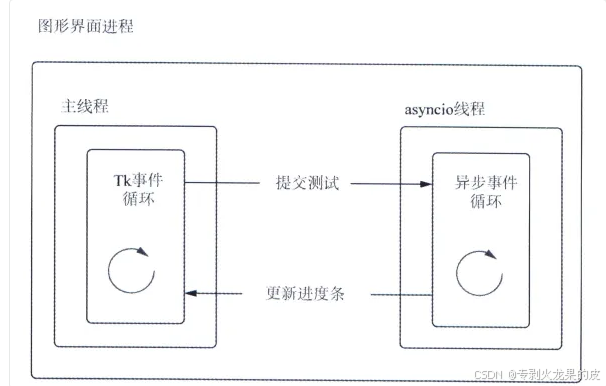
这需要用到asyncio的其他函数:
- call_soon_threadsafe:接收一个python函数(不是协程),并且安排在asyncio事件循环的下一次迭代中,以线程安全的方式执行
- asyncio.run_coroutine_threadsafe: 接收一个协程,并提交以线程安全的方式运行,它立即返回一个future,这个future是concurrent.futures中的future
因为asyncio中的future不是线程安全的,而concurrent.futures中的是线程安全的。但这两个future具有相同的功能。
以下是一个GUI界面的案例,这段代码写了一个界面,可以接收输入一个网址,以及你想请求这个地址的数量,然后点击之后,程序会实时显示请求的进度。
import asyncio
from concurrent.futures import Future
from asyncio import AbstractEventLoop
from typing import Callable, Optional
from aiohttp import ClientSession

from queue import Queue
from tkinter import ttk
from tkinter import Label
from tkinter import Entry
from tkinter import Tk
from typing import Optional
from threading import Thread

class StressT:
    def __init__(self, loop: AbstractEventLoop, url: str, total_requests: int, callback: Callable[[int, int], None]):
        self._loop = loop
        self._completed_requests = 0
        self._load_test_future: Optional[Future] = None
        self._total_requests = total_requests
        self._url = url
        self._callback = callback
        self._refresh_rate = total_requests // 100

    def start(self):
        future = asyncio.run_coroutine_threadsafe(self._make_requests(), self._loop)
        self._load_test_future = future

    def cancel(self):
        if self._load_test_future:
            self._loop.call_soon_threadsafe(self._load_test_future.cancel)

    async def _get_url(self, session: ClientSession, url:str):
        try:
            await session.get(url)
        except Exception as e:
            print(e)
        self._completed_requests += 1
        print("_completed_requests", self._completed_requests)
        if self._completed_requests % self._refresh_rate == 0 or self._completed_requests == self._total_requests:
            self._callback(self._completed_requests, self._total_requests)

    async def _make_requests(self):
        async with ClientSession() as session:
            reqs = [self._get_url(session, self._url) for _ in range(self._total_requests)]
            await asyncio.gather(*reqs)

class LoadTester(Tk):
    """
    这个是GUI界面的类,用来定义界面显示内容
    """
    def __init__(self, loop, *args, **kwargs):
        Tk.__init__(self, *args, **kwargs)
        self._queue = Queue()
        self._refresh_ms = 25
        self._loop = loop
        self._load_test: Optional[StressT] = None
        self.title("UTL Requester")
        self._url_label = Label(self, text="URL:")
        self._url_label.grid(column=0, row=0)
        self._url_field = Entry(self, width=10)
        self._url_field.grid(column=1, row=0)

        self._request_label = Label(self, text="Number of Requests:")
        self._request_label.grid(column=0, row=1)
        self._request_field = Entry(self, width=10)
        self._request_field.grid(column=1, row=1)

        self._submit = ttk.Button(self, text='Submit', command=self._start)
        self._submit.grid(column=2, row=1)
        self._pb_label = Label(self, text="Progress:")
        self._pb_label.grid(column=0, row=3)
        self._pb = ttk.Progressbar(self, orient='horizontal', length=200, mode='determinate')
        self._pb.grid(column=1, row=3, columnspan=2)

    def _update_bar(self, pct: int):
        if pct == 100:
            self._load_test = None
            self._submit['text'] = 'Submit'
        else:
            self._pb['value'] = pct
            self.after(self._refresh_ms, self._pool_queue)

    def _queue_update(self, completed_Requests: int, total_requests: int):
        self._queue.put(int(completed_Requests / total_requests * 100))

    def _pool_queue(self):
        if not self._queue.empty():
            percent_complete = self._queue.get()
            self._update_bar(percent_complete)
        else:
            if self._load_test:
                self.after(self._refresh_ms, self._pool_queue)

    def _start(self):
        if self._load_test is None:
            self._submit['text'] = 'Cancel'
            test = StressT(self._loop, self._url_field.get(), int(self._request_field.get()),self._queue_update)
            self.after(self._refresh_ms, self._pool_queue)
            test.start()
            self._load_test = test
        else:
            self._load_test.cancel()
            self._load_test = None
            self._submit['text'] = 'Submit'


class ThreadEventLoop(Thread):
    def __init__(self, loop):
        super().__init__()
        self._loop = loop
        self.deamon = True

    def run(self):
        self._loop.run_forever()

if __name__ == '__main__':
    loop = asyncio.new_event_loop()

    athread = ThreadEventLoop(loop)
    athread.start()
    s = LoadTester(loop)
    s.mainloop()
上述代码GUI界面显示如下:
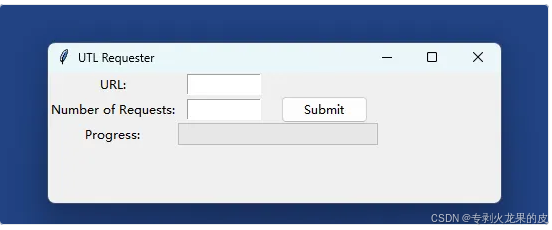
在上述代码中,我们写了一个线程类ThreadEventLoop,用与执行asyncio事件循环。另一个类StressT,用于执行http请求。这个类中有四个方法:
- start:调用了asyncio.run_coroutine_threadsafe(self._make_requests(),self._loop),即以线程安全的方式运行_make_requests()协程。并返回一个future,这个future就是我们跑的这个任务
- cancel:调用self._loop.call_soon_threadsafe(self._load_test_future.cancel),在下一次循环迭代中,将任务取消掉。
- _get_url:执行http请求,累加请求次数并调用回调函数
- _make_requests:这里相当于创建异步请求的任务,根据传入的数量来创建任务,并使用gather方法调度。
以上可以看出,StressT接收用户传入的需要执行请求的数量,并进行http请求,然后将结果通过回调的方式传递出来。
最后一个就是Tkinter的GUI类,LoadTester。不了解GUI的同学可以先学习一下基本的TKinter用法。GUI的界面编写不作为此处的重点。
这个类中也有几个方法:
- _start:这个是Submit按钮点击触发的事件。即点击Submit按钮后,会执行这个_start方法,在start方法中,如果是提交,则会启动请求,如果是cancel,就将请求取消。
- _queue_update:我们创建一个队列来接收请求返回的数据,每个协程执行之后,都会将数据放入队列中
- _pool_queue:用来检查和取出队列中的数据,如果有数据,就用这个数据来刷新进度条,如果没有,就过一会儿再检查队列
- _update_bar:用来更新进度条。根据队列中取出来的数据更新和重新绘制进度条。
多线程执行CPU密集型的操作
这个我们前面就有提到,一些C库,numpy,hashlib等,执行的时候是会释放掉GIL的,多线程执行这些任务,与前文提到的Mapreduce问题是一样的,都是把任务拆开,然后放在多个线程中去执行,感兴趣的可以自己试试,这里不再赘述。





 扫一扫
扫一扫


 1084
1084

 被折叠的 条评论
为什么被折叠?
被折叠的 条评论
为什么被折叠?
 到【灌水乐园】发言





