



 本文深入探讨DirectX12中的帧资源优化,如何避免CPU和GPU同步造成的空闲,并介绍了渲染项、Pass Constants的概念。通过生成椭球、球体和圆柱的几何图形,展示了如何在Direct3D中绘制复杂场景。同时,文章还讨论了Root Signatures的多样性和在实际应用中的权衡,以及如何在着色器中高效地管理资源。
本章介绍了将在本书的其余部分使用的一些绘图模式。首先介绍一个绘图的优化,我们称之为“帧资源”。我们用帧资源修改了渲染循环,这样我们就不必每帧都刷新命令队列,提高了CPU和GPU的利用率。接下来我们将介绍一个渲染概念,并解释如何根据更新频率划分常量数据。此外我们将更详细地研究root signatures,了解其他根参数类型:root descriptors和root constants。最后我们展示如何绘制一些更复杂的对象,本章结束时你将能够绘制一个类似于山和谷、圆柱体、球体和动画波模拟的表面。
7.1 FRAME RESOURCES
我们回顾4.2,CPU和GPU是并行工作的。CPU构建并提交命令列表(以及其他CPU工作),GPU处理命令队列中的命令,这是为了让CPU和GPU都忙起来,以充分利用系统上可用的硬件资源。到目前为止,在我们的演示里每帧同步一次CPU和GPU。有两个必要的理由:
- 命令分配器直到GPU完成执行命令前不能被重置。假设我们不同步,CPU可以继续进行下一帧n + 1,GPU完成前处理当前帧n。如果CPU在n+1帧重置了命令分配器,但GPU仍然在处理帧n中的命令,那么我们就清除了GPU仍在处理的命令。
- 在GPU执行完引用constant buffer的绘图命令之前,CPU无法更新constant buffer。这个例子对应于4.2.2描述的情况。
因此,我们一直在每一帧的末尾调用D3DApp::FlushCommandQueue来确保GPU已经完成了帧的所有命令的执行。这个解决方案有效但效率低下,原因如下:
- 在一帧的开始,GPU自从清空命令队列开始将没有任何可以处理的命令,必须等待直到CPU构建并提交一些命令才能执行。
- 在一帧的末尾,CPU必须等待GPU处理完命令。
所以每一帧,CPU和GPU都会在某一时刻空闲。
这个问题的一个解决方案是创建一个循环数组,其中包含CPU每帧所需修改的资源,我们称这样的资源为frame resources。我们通常使用由三个frame resource元素组成的循环数组。其思想是对于帧n, CPU将循环通过frame resource数组获得下一个可用的(不被GPU使用)frame resource。然后CPU将执行任何的资源更新,构建和提交第n帧的命令列表,而GPU则处理之前的帧。然后CPU继续到n+1帧重复这个过程。如果frame resource数组有三个元素,CPU比GPU多出两帧,确保GPU一直处于忙碌状态。
下面是我们在本章“Shapes”演示中使用的frame resource类的一个示例。在这个演示中,CPU只需要修改constant buffers,所以frame resource类只包含constant buffers:
// Stores the resources needed for the CPU to build the command lists
// for a frame. The contents here will vary from app to app based on
// the needed resources.
struct FrameResource
{
public:

    FrameResource(ID3D12Device* device, UINT passCount, UINT objectCount);
    FrameResource(const FrameResource& rhs) = delete;
    FrameResource& operator=(const FrameResource& rhs) = delete;
    ˜FrameResource();

    // We cannot reset the allocator until the GPU is done processing the
    // commands. So each frame needs their own allocator.
    Microsoft::WRL::ComPtr<ID3D12CommandAllocator> CmdListAlloc;

    // We cannot update a cbuffer until the GPU is done processing the
    // commands that reference it. So each frame needs their own cbuffers.
    std::unique_ptr<UploadBuffer<PassConstants>> PassCB = nullptr;
    std::unique_ptr<UploadBuffer<ObjectConstants>> ObjectCB = nullptr;

    // Fence value to mark commands up to this fence point. This lets us
    // check if these frame resources are still in use by the GPU.
    UINT64 Fence = 0;
};

FrameResource::FrameResource(ID3D12Device* device, UINT passCount, UINT objectCount)
{
    ThrowIfFailed(device->CreateCommandAllocator(
        D3D12_COMMAND_LIST_TYPE_DIRECT,
        IID_PPV_ARGS(CmdListAlloc.GetAddressOf())));

    PassCB = std::make_unique<UploadBuffer<PassConstants>>(device, passCount, true);
    ObjectCB = std::make_unique<UploadBuffer<ObjectConstants>>(device, objectCount, true);
}
FrameResource::˜FrameResource() { }
然后我们的应用程序类将实例化一个由三个frame resources组成的向量,并保留成员变量来跟踪当前框架资源:
std::vector<std::unique_ptr<FrameResource>> mFrameResources;
FrameResource* mCurrFrameResource = nullptr;
int mCurrFrameResourceIndex = 0;

void ShapesApp::BuildFrameResources()
{
    for(int i = 0; i < gNumFrameResources; ++i)
    {
        mFrameResources.push_back(std::make_unique<FrameResource> (md3dDevice.Get(), 1, (UINT)mAllRitems.size()));
    }
}
对于CPU第n帧的算法如下:
void ShapesApp::Update(const GameTimer& gt)
{
    // Cycle through the circular frame resource array.
    mCurrFrameResourceIndex = (mCurrFrameResourceIndex + 1) % NumFrameResources;
    mCurrFrameResource = mFrameResources[mCurrFrameResourceIndex];

    // Has the GPU finished processing the commands of the current frame
    // resource. If not, wait until the GPU has completed commands up to
    // this fence point.
    if(mCurrFrameResource->Fence != 0 && mCommandQueue->GetLastCompletedFence() < mCurrFrameResource->Fence)
    {
        HANDLE eventHandle = CreateEventEx(nullptr, false, false, EVENT_ALL_ACCESS);
        ThrowIfFailed(mCommandQueue->SetEventOnFenceCompletion(
            mCurrFrameResource->Fence, eventHandle));
            WaitForSingleObject(eventHandle, INFINITE);
        CloseHandle(eventHandle);
    }

    // […] Update resources in mCurrFrameResource (like cbuffers).
}

void ShapesApp::Draw(const GameTimer& gt)
{
    // […] Build and submit command lists for this frame.
    // Advance the fence value to mark commands up to this fence point.
    mCurrFrameResource->Fence = ++mCurrentFence;

    // Add an instruction to the command queue to set a new fence point.
    // Because we are on the GPU timeline, the new fence point won’t be
    // set until the GPU finishes processing all the commands prior to
    // this Signal().
    mCommandQueue->Signal(mFence.Get(), mCurrentFence);

    // Note that GPU could still be working on commands from previous
    // frames, but that is okay, because we are not touching any frame
    // resources associated with those frames.
}
7.2 RENDER ITEMS
绘制对象需要设置多个参数,如绑定vertex和index buffers、绑定对象constants、设置图元类型和指定DrawIndexedInstanced参数。当我们开始在场景中绘制更多的对象时,创建一个轻量级结构来存储绘制对象所需的数据是很有帮助的。这些数据会因应用程序的不同而不同,因为我们添加了需要不同绘图数据的新功能。我们将提交完整绘制所需的数据集称为呈现管道中的呈现项。在这个演示中,我们的渲染项结构是这样的:
// Lightweight structure stores parameters to draw a shape. This will
// vary from app-to-app.
struct RenderItem
{
    RenderItem() = default;

    // World matrix of the shape that describes the object’s local space
    // relative to the world space, which defines the position,
    // orientation, and scale of the object in the world.
    XMFLOAT4X4 World = MathHelper::Identity4x4();

    // Dirty flag indicating the object data has changed and we need
    // to update the constant buffer. Because we have an object
    // cbuffer for each FrameResource, we have to apply the
    // update to each FrameResource. Thus, when we modify obect data we should set
    // NumFramesDirty = gNumFrameResources so that each frame resource gets the update.
    int NumFramesDirty = gNumFrameResources;

    // Index into GPU constant buffer corresponding to the ObjectCB
    // for this render item.
    UINT ObjCBIndex = -1;

    // Geometry associated with this render-item. Note that multiple
    // render-items can share the same geometry.
    MeshGeometry* Geo = nullptr;

    // Primitive topology.
    D3D12_PRIMITIVE_TOPOLOGY PrimitiveType = D3D_PRIMITIVE_TOPOLOGY_TRIANGLELIST;

    // DrawIndexedInstanced parameters.
    UINT IndexCount = 0;
    UINT StartIndexLocation = 0;
    int BaseVertexLocation = 0;
};
我们的应用程序将维护列表渲染项目的基础上,他们需要如何绘制;也就是说,需要不同PSOs的渲染项目将被保存在不同的列表中。
// List of all the render items.
std::vector<std::unique_ptr<RenderItem>> mAllRitems;

// Render items divided by PSO.
std::vector<RenderItem*> mOpaqueRitems;
std::vector<RenderItem*> mTransparentRitems;
7.3 PASS CONSTANTS
从上一节可以看出,我们在FrameResource类中引入了一个新的常量缓冲区:
std::unique_ptr<UploadBuffer<PassConstants>> PassCB = nullptr;
在接下来的演示中,这个缓冲区储存了在给定的rendering pass上固定的常量数据,比如眼睛位置、view和projection矩阵,以及关于屏幕(render target)维度的信息;它还包括游戏计时信息,这是在着色程序中可以访问的有用数据。请注意,我们的演示并不一定使用所有的这些常量数据,但是这样使用这些常量数据很方便,而且提供额外数据的成本也很低。例如虽然我们现在不需要render target的大小,但当我们去实现一些后处理效果时,就需要这些信息。
cbuffer cbPass : register(b1)
{
    float4x4 gView;
    float4x4 gInvView;
    float4x4 gProj;
    float4x4 gInvProj;
    float4x4 gViewProj;
    float4x4 gInvViewProj;
    float3 gEyePosW;
    float cbPerObjectPad1;
    float2 gRenderTargetSize;
    float2 gInvRenderTargetSize;
    float gNearZ;
    float gFarZ;
    float gTotalTime;
    float gDeltaTime;
};
我们还修改了每个对象constant buffer,使其只存储与该对象关联的常量。到目前为止,我们唯一与一个对象相关联的用于绘制的常量数据是它的世界矩阵:
cbuffer cbPerObject : register(b0)
{
    float4x4 gWorld;
};
我们可以根据更新频率对常量进行分组。每一帧传递一次的常量只需要更新一次,而对象常量只需要在对象的世界矩阵改变时才需要改变。如果我们在场景中有一个静态对象,比如一棵树,我们只需要将它的世界矩阵设置一次为常量缓冲区,然后永远不再更新常量缓冲区。在我们的演示中,我们实现了以下方法来处理对每个遍历和每个对象常量缓冲区的更新。这些方法在Update方法中每一帧调用一次。
void ShapesApp::UpdateObjectCBs(const GameTimer& gt)
{
    auto currObjectCB = mCurrFrameResource->ObjectCB.get();
    for(auto& e : mAllRitems)
    {
        // Only update the cbuffer data if the constants have changed.
        // This needs to be tracked per frame resource.
        if(e->NumFramesDirty > 0)
        {
            XMMATRIX world = XMLoadFloat4x4(&e->World);

            ObjectConstants objConstants;
            XMStoreFloat4x4(&objConstants.World, XMMatrixTranspose(world));

            currObjectCB->CopyData(e->ObjCBIndex, objConstants);

            // Next FrameResource need to be updated too.
            e->NumFramesDirty—;
        }
    }
}

void ShapesApp::UpdateMainPassCB(const GameTimer& gt)
{
    XMMATRIX view = XMLoadFloat4x4(&mView);
    XMMATRIX proj = XMLoadFloat4x4(&mProj);

    XMMATRIX viewProj = XMMatrixMultiply(view, proj);
    XMMATRIX invView = XMMatrixInverse(&XMMatrixDeterminant(view), view);
    XMMATRIX invProj = XMMatrixInverse(&XMMatrixDeterminant(proj), proj);
    XMMATRIX invViewProj = XMMatrixInverse(&XMMatrixDeterminant(viewProj), viewProj);

    XMStoreFloat4x4(&mMainPassCB.View, XMMatrixTranspose(view));
    XMStoreFloat4x4(&mMainPassCB.InvView, XMMatrixTranspose(invView));
    XMStoreFloat4x4(&mMainPassCB.Proj, XMMatrixTranspose(proj));
    XMStoreFloat4x4(&mMainPassCB.InvProj, XMMatrixTranspose(invProj));
    XMStoreFloat4x4(&mMainPassCB.ViewProj, XMMatrixTranspose(viewProj));
    XMStoreFloat4x4(&mMainPassCB.InvViewProj, XMMatrixTranspose(invViewProj));
    mMainPassCB.EyePosW = mEyePos;
    mMainPassCB.RenderTargetSize = XMFLOAT2((float)mClientWidth, (float)mClientHeight);
    mMainPassCB.InvRenderTargetSize = XMFLOAT2(1.0f / mClientWidth, 1.0f / mClientHeight);
    mMainPassCB.NearZ = 1.0f;
    mMainPassCB.FarZ = 1000.0f;
    mMainPassCB.TotalTime = gt.TotalTime();
    mMainPassCB.DeltaTime = gt.DeltaTime();

    auto currPassCB = mCurrFrameResource->PassCB.get();
    currPassCB->CopyData(0, mMainPassCB);
}
我们更新我们的顶点着色器相应地支持这些恒定的缓冲区变化:
VertexOut VS(VertexIn vin)
{
    VertexOut vout;

    // Transform to homogeneous clip space.
    float4 posW = mul(float4(vin.PosL, 1.0f), gWorld);
    vout.PosH = mul(posW, gViewProj);

    // Just pass vertex color into the pixel shader.
    vout.Color = vin.Color;

    return vout;
}
在现代gpu上,这种调整所带来的每个顶点额外的向量矩阵乘法是可以忽略不计的,因为gpu有足够的计算能力。
我们的着色器期望的资源已经改变了,因此我们需要更新根签名相应地采取两个描述符表(我们需要两个表,因为CBV将以不同的频率设置——每个pass CBV只需要在每次rendering pass中设置一次,而每个对象的CBV需要在每个render item设置一次):
CD3DX12_DESCRIPTOR_RANGE cbvTable0;
cbvTable0.Init(D3D12_DESCRIPTOR_RANGE_TYPE_CBV, 1, 0);

CD3DX12_DESCRIPTOR_RANGE cbvTable1;
cbvTable1.Init(D3D12_DESCRIPTOR_RANGE_TYPE_CBV, 1, 1);

// Root parameter can be a table, root descriptor or root constants.
CD3DX12_ROOT_PARAMETER slotRootParameter[2];

// Create root CBVs.
slotRootParameter[0].InitAsDescriptorTable(1, &cbvTable0);
slotRootParameter[1].InitAsDescriptorTable(1, &cbvTable1);

// A root signature is an array of root parameters.
CD3DX12_ROOT_SIGNATURE_DESC rootSigDesc(2, slotRootParameter, 0, nullptr, D3D12_ROOT_SIGNATURE_FLAG_ALLOW_INPUT_ASSEMBLER_INPUT_LAYOUT);
7.4 SHAPE GEOMETRY
在本节中,我们将展示如何创建椭球体、球体、圆柱和圆锥的几何图形。这些形状对于绘制天空穹顶、调试、可视化碰撞检测和延迟渲染非常有用。例如你可能希望将所有游戏角色渲染为用于调试测试的球体。
我们将程序化几何生成代码放在GeometryGenerator类 中(GeometryGenerator.h/.cpp)。GeometryGenerator是一个实用工具类,用于生成简单的几何形状,如网格、球体、柱面和方框,我们在本书的演示程序中使用了它们。这个类在系统内存中生成数据,然后我们必须将数据复制到我们的vertex和index buffers。GeometryGenerator创建一些顶点数据,这些数据将在后面的章节中使用。我们在目前的演示暂时不需要这些数据,所以不复制这些数据到vertex buffers。MeshData结构体是一个嵌套在GeometryGenerator中的简单结构,它存储了一个顶点和索引列表:
class GeometryGenerator
{
public:
    using uint16 = std::uint16_t;
    using uint32 = std::uint32_t;
    struct Vertex
    {
        Vertex(){}
        Vertex(
            const DirectX::XMFLOAT3& p,
            const DirectX::XMFLOAT3& n,
            const DirectX::XMFLOAT3& t,
            const DirectX::XMFLOAT2& uv) :
            Position(p),
            Normal(n),
            TangentU(t),
            TexC(uv){}

        Vertex(
            float px, float py, float pz,
            float nx, float ny, float nz,
            float tx, float ty, float tz,
            float u, float v) :
            Position(px,py,pz),
            Normal(nx,ny,nz),
            TangentU(tx, ty, tz),
            TexC(u,v){}

        DirectX::XMFLOAT3 Position;
        DirectX::XMFLOAT3 Normal;
        DirectX::XMFLOAT3 TangentU;
        DirectX::XMFLOAT2 TexC;
    };
    struct MeshData
    {
        std::vector<Vertex> Vertices;
        std::vector<uint32> Indices32;

        std::vector<uint16>& GetIndices16()
        {
            if(mIndices16.empty())
            {
                mIndices16.resize(Indices32.size());
                for(size_t i = 0; i < Indices32.size(); ++i)
                    mIndices16[i] = static_cast<uint16>(Indices32[i]);
            }

            return mIndices16;
        }

    private:
        std::vector<uint16> mIndices16;
    };
…
};
这些几何体具体是如何创建的请看原书~
7.4.1 Generating a Cylinder Mesh
7.4.1.1 Cylinder Side Geometry
7.4.1.2 Cap Geometry
7.4.2 Generating a Sphere Mesh
7.4.3 Generating a Geosphere Mesh
7.5 Shapes Demo
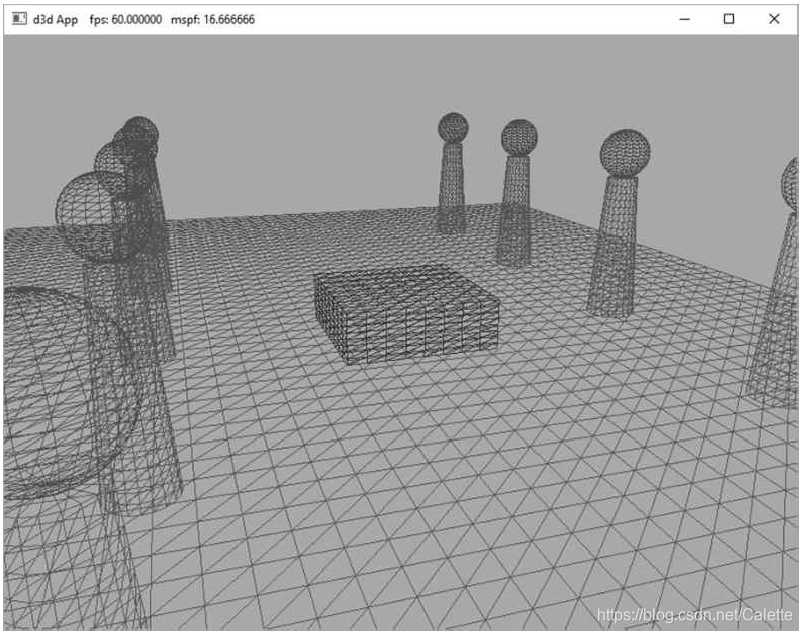
为了演示球体和圆柱的生成代码,我们实现了下图所示的“Shapes”演示。你还将获得在一个场景中定位和绘制多个对象的经验(创建多个世界变换矩阵)。此外我们把所有的场景几何放在一个大的vertex和index buffer,然后使用DrawIndexedInstanced方法一次绘制一个对象(因为需要在对象之间更改世界矩阵)。因此你将看到一个使用DrawIndexedInstanced的StartIndexLocation和BaseVertexLocation参数的示例:
7.5.1 Vertex and Index Buffers
如上图所示,在这个演示中我们绘制了一个方框、网格、柱面和球体。尽管我们在这个演示中绘制了多个球体和圆柱体,但我们只需要球体和圆柱体几何图形的一个副本。我们只是简单地用不同的世界矩阵重新绘制相同的球体和圆柱体网格多次。这就是一个instancing几何的例子,可以节省内存。
我们通过连接顶点和索引数组,把所有的网格顶点和索引压缩到一个vertex和index buffer中。这意味着当我们绘制对象时,我们只绘制vertex和index buffer的一个子集。为了画只有一个子集的几何使用ID3D12CommandList:: DrawIndexedInstanced,我们需要知道三种数量(第6章)。我们需要知道的起始索引的对象连接index buffer和它的索引数量,我们也需要知道基本的顶点位置——连接vertex buffer的对象第一个顶点的索引。回想一下,基本顶点位置是在提取顶点之前在绘制调用中为索引添加的整数值,以便索引引用连接顶点缓冲区中的适当子集。
下面的代码展示了如何创建几何缓冲区,如何缓存必要的绘制数量,以及如何绘制对象。
void ShapesApp::BuildShapeGeometry()
{
    GeometryGenerator geoGen;
    GeometryGenerator::MeshData box = geoGen.CreateBox(1.5f, 0.5f, 1.5f, 3);
    GeometryGenerator::MeshData grid = geoGen.CreateGrid(20.0f, 30.0f, 60, 40);
    GeometryGenerator::MeshData sphere = geoGen.CreateSphere(0.5f, 20, 20);
    GeometryGenerator::MeshData cylinder = geoGen.CreateCylinder(0.5f, 0.3f, 3.0f, 20, 20);

    //
    // We are concatenating all the geometry into one big vertex/index buffer.  So
    // define the regions in the buffer each submesh covers.
    //

    // Cache the vertex offsets to each object in the concatenated vertex buffer.
    UINT boxVertexOffset = 0;
    UINT gridVertexOffset = (UINT)box.Vertices.size();
    UINT sphereVertexOffset = gridVertexOffset + (UINT)grid.Vertices.size();
    UINT cylinderVertexOffset = sphereVertexOffset + (UINT)sphere.Vertices.size();

    // Cache the starting index for each object in the concatenated index buffer.
    UINT boxIndexOffset = 0;
    UINT gridIndexOffset = (UINT)box.Indices32.size();
    UINT sphereIndexOffset = gridIndexOffset + (UINT)grid.Indices32.size();
    UINT cylinderIndexOffset = sphereIndexOffset + (UINT)sphere.Indices32.size();

    // Define the SubmeshGeometry that cover different
    // regions of the vertex/index buffers.

	SubmeshGeometry boxSubmesh;
	boxSubmesh.IndexCount = (UINT)box.Indices32.size();
	boxSubmesh.StartIndexLocation = boxIndexOffset;
	boxSubmesh.BaseVertexLocation = boxVertexOffset;

	SubmeshGeometry gridSubmesh;
	gridSubmesh.IndexCount = (UINT)grid.Indices32.size();
	gridSubmesh.StartIndexLocation = gridIndexOffset;
	gridSubmesh.BaseVertexLocation = gridVertexOffset;

	SubmeshGeometry sphereSubmesh;
	sphereSubmesh.IndexCount = (UINT)sphere.Indices32.size();
	sphereSubmesh.StartIndexLocation = sphereIndexOffset;
	sphereSubmesh.BaseVertexLocation = sphereVertexOffset;

	SubmeshGeometry cylinderSubmesh;
	cylinderSubmesh.IndexCount = (UINT)cylinder.Indices32.size();
	cylinderSubmesh.StartIndexLocation = cylinderIndexOffset;
	cylinderSubmesh.BaseVertexLocation = cylinderVertexOffset;

	//
	// Extract the vertex elements we are interested in and pack the
	// vertices of all the meshes into one vertex buffer.
	//

	auto totalVertexCount =
		box.Vertices.size() +
		grid.Vertices.size() +
		sphere.Vertices.size() +
		cylinder.Vertices.size();

	std::vector<Vertex> vertices(totalVertexCount);

	UINT k = 0;
	for(size_t i = 0; i < box.Vertices.size(); ++i, ++k)
	{
		vertices[k].Pos = box.Vertices[i].Position;
        vertices[k].Color = XMFLOAT4(DirectX::Colors::DarkGreen);
	}

	for(size_t i = 0; i < grid.Vertices.size(); ++i, ++k)
	{
		vertices[k].Pos = grid.Vertices[i].Position;
        vertices[k].Color = XMFLOAT4(DirectX::Colors::ForestGreen);
	}

	for(size_t i = 0; i < sphere.Vertices.size(); ++i, ++k)
	{
		vertices[k].Pos = sphere.Vertices[i].Position;
        vertices[k].Color = XMFLOAT4(DirectX::Colors::Crimson);
	}

	for(size_t i = 0; i < cylinder.Vertices.size(); ++i, ++k)
	{
		vertices[k].Pos = cylinder.Vertices[i].Position;
		vertices[k].Color = XMFLOAT4(DirectX::Colors::SteelBlue);
	}

	std::vector<std::uint16_t> indices;
	indices.insert(indices.end(), std::begin(box.GetIndices16()), std::end(box.GetIndices16()));
	indices.insert(indices.end(), std::begin(grid.GetIndices16()), std::end(grid.GetIndices16()));
	indices.insert(indices.end(), std::begin(sphere.GetIndices16()), std::end(sphere.GetIndices16()));
	indices.insert(indices.end(), std::begin(cylinder.GetIndices16()), std::end(cylinder.GetIndices16()));

    const UINT vbByteSize = (UINT)vertices.size() * sizeof(Vertex);
    const UINT ibByteSize = (UINT)indices.size()  * sizeof(std::uint16_t);

	auto geo = std::make_unique<MeshGeometry>();
	geo->Name = "shapeGeo";

	ThrowIfFailed(D3DCreateBlob(vbByteSize, &geo->VertexBufferCPU));
	CopyMemory(geo->VertexBufferCPU->GetBufferPointer(), vertices.data(), vbByteSize);

	ThrowIfFailed(D3DCreateBlob(ibByteSize, &geo->IndexBufferCPU));
	CopyMemory(geo->IndexBufferCPU->GetBufferPointer(), indices.data(), ibByteSize);

	geo->VertexBufferGPU = d3dUtil::CreateDefaultBuffer(md3dDevice.Get(),
		mCommandList.Get(), vertices.data(), vbByteSize, geo->VertexBufferUploader);

	geo->IndexBufferGPU = d3dUtil::CreateDefaultBuffer(md3dDevice.Get(),
		mCommandList.Get(), indices.data(), ibByteSize, geo->IndexBufferUploader);

	geo->VertexByteStride = sizeof(Vertex);
	geo->VertexBufferByteSize = vbByteSize;
	geo->IndexFormat = DXGI_FORMAT_R16_UINT;
	geo->IndexBufferByteSize = ibByteSize;

	geo->DrawArgs["box"] = boxSubmesh;
	geo->DrawArgs["grid"] = gridSubmesh;
	geo->DrawArgs["sphere"] = sphereSubmesh;
	geo->DrawArgs["cylinder"] = cylinderSubmesh;

	mGeometries[geo->Name] = std::move(geo);
}
上述方法最后一行使用的mGeometries变量定义如下:
std::unordered_map<std::string, std::unique_ptr<MeshGeometry>> mGeometries;
这是我们在本书其余部分使用的常见模式。为每个几何图形、PSO、纹理、着色器等创建一个新的变量名是很麻烦的,所以我们使用无序映射来进行恒定时间查找,并通过名称引用我们的对象。下面是更多的例子:
std::unordered_map<std::string, std::unique_ptr<MeshGeometry>> mGeometries;
std::unordered_map<std::string, ComPtr<ID3DBlob>> mShaders;
std::unordered_map<std::string, ComPtr<ID3D12PipelineState>> mPSOs;
7.5.2 Render Items
现在我们定义场景render items。观察所有render items如何共享相同的MeshGeometry,我们使用DrawArgs获得DrawIndexedInstanced参数来绘制vertex/index buffers的子区域。
// ShapesApp member variable.
std::vector<std::unique_ptr<RenderItem>> mAllRitems;
std::vector<RenderItem*> mOpaqueRitems;

void ShapesApp::BuildRenderItems()
{
    auto boxRitem = std::make_unique<RenderItem>();
    XMStoreFloat4x4(&boxRitem->World, XMMatrixScaling(2.0f, 2.0f, 2.0f)*XMMatrixTranslation(0.0f, 0.5f, 0.0f));
    boxRitem->ObjCBIndex = 0;
    boxRitem->Geo = mGeometries["shapeGeo"].get();
    boxRitem->PrimitiveType = D3D_PRIMITIVE_TOPOLOGY_TRIANGLELIST;
    boxRitem->IndexCount = boxRitem->Geo->DrawArgs["box"].IndexCount;
    boxRitem->StartIndexLocation = boxRitem->Geo->DrawArgs["box"].StartIndexLocation;
    boxRitem->BaseVertexLocation = boxRitem->Geo->DrawArgs["box"].BaseVertexLocation;
    mAllRitems.push_back(std::move(boxRitem));

    auto gridRitem = std::make_unique<RenderItem>();
    gridRitem->World = MathHelper::Identity4x4();
    gridRitem->ObjCBIndex = 1;
    gridRitem->Geo = mGeometries["shapeGeo"].get();
    gridRitem->PrimitiveType = D3D_PRIMITIVE_TOPOLOGY_TRIANGLELIST;
    gridRitem->IndexCount = gridRitem->Geo->DrawArgs["grid"].IndexCount;
    gridRitem->StartIndexLocation = gridRitem->Geo->DrawArgs["grid"].StartIndexLocation;
    gridRitem->BaseVertexLocation = gridRitem->Geo->DrawArgs["grid"].BaseVertexLocation;
    mAllRitems.push_back(std::move(gridRitem));

	UINT objCBIndex = 2;
	for(int i = 0; i < 5; ++i)
	{
		auto leftCylRitem = std::make_unique<RenderItem>();
		auto rightCylRitem = std::make_unique<RenderItem>();
		auto leftSphereRitem = std::make_unique<RenderItem>();
		auto rightSphereRitem = std::make_unique<RenderItem>();

		XMMATRIX leftCylWorld = XMMatrixTranslation(-5.0f, 1.5f, -10.0f + i*5.0f);
		XMMATRIX rightCylWorld = XMMatrixTranslation(+5.0f, 1.5f, -10.0f + i*5.0f);

		XMMATRIX leftSphereWorld = XMMatrixTranslation(-5.0f, 3.5f, -10.0f + i*5.0f);
		XMMATRIX rightSphereWorld = XMMatrixTranslation(+5.0f, 3.5f, -10.0f + i*5.0f);

		XMStoreFloat4x4(&leftCylRitem->World, rightCylWorld);
		leftCylRitem->ObjCBIndex = objCBIndex++;
		leftCylRitem->Geo = mGeometries["shapeGeo"].get();
		leftCylRitem->PrimitiveType = D3D_PRIMITIVE_TOPOLOGY_TRIANGLELIST;
		leftCylRitem->IndexCount = leftCylRitem->Geo->DrawArgs["cylinder"].IndexCount;
		leftCylRitem->StartIndexLocation = leftCylRitem->Geo->DrawArgs["cylinder"].StartIndexLocation;
		leftCylRitem->BaseVertexLocation = leftCylRitem->Geo->DrawArgs["cylinder"].BaseVertexLocation;

		XMStoreFloat4x4(&rightCylRitem->World, leftCylWorld);
		rightCylRitem->ObjCBIndex = objCBIndex++;
		rightCylRitem->Geo = mGeometries["shapeGeo"].get();
		rightCylRitem->PrimitiveType = D3D_PRIMITIVE_TOPOLOGY_TRIANGLELIST;
		rightCylRitem->IndexCount = rightCylRitem->Geo->DrawArgs["cylinder"].IndexCount;
		rightCylRitem->StartIndexLocation = rightCylRitem->Geo->DrawArgs["cylinder"].StartIndexLocation;
		rightCylRitem->BaseVertexLocation = rightCylRitem->Geo->DrawArgs["cylinder"].BaseVertexLocation;

		XMStoreFloat4x4(&leftSphereRitem->World, leftSphereWorld);
		leftSphereRitem->ObjCBIndex = objCBIndex++;
		leftSphereRitem->Geo = mGeometries["shapeGeo"].get();
		leftSphereRitem->PrimitiveType = D3D_PRIMITIVE_TOPOLOGY_TRIANGLELIST;
		leftSphereRitem->IndexCount = leftSphereRitem->Geo->DrawArgs["sphere"].IndexCount;
		leftSphereRitem->StartIndexLocation = leftSphereRitem->Geo->DrawArgs["sphere"].StartIndexLocation;
		leftSphereRitem->BaseVertexLocation = leftSphereRitem->Geo->DrawArgs["sphere"].BaseVertexLocation;

		XMStoreFloat4x4(&rightSphereRitem->World, rightSphereWorld);
		rightSphereRitem->ObjCBIndex = objCBIndex++;
		rightSphereRitem->Geo = mGeometries["shapeGeo"].get();
		rightSphereRitem->PrimitiveType = D3D_PRIMITIVE_TOPOLOGY_TRIANGLELIST;
		rightSphereRitem->IndexCount = rightSphereRitem->Geo->DrawArgs["sphere"].IndexCount;
		rightSphereRitem->StartIndexLocation = rightSphereRitem->Geo->DrawArgs["sphere"].StartIndexLocation;
		rightSphereRitem->BaseVertexLocation = rightSphereRitem->Geo->DrawArgs["sphere"].BaseVertexLocation;

		mAllRitems.push_back(std::move(leftCylRitem));
		mAllRitems.push_back(std::move(rightCylRitem));
		mAllRitems.push_back(std::move(leftSphereRitem));
		mAllRitems.push_back(std::move(rightSphereRitem));
	}

	// All the render items are opaque.
	for(auto& e : mAllRitems)
		mOpaqueRitems.push_back(e.get());
}
7.5.3 Frame Resources and Constant Buffer Views
回想一下,我们有一个FrameResources的vector,每个FrameResource都有一个upload buffer,用于存储场景中每个render item的pass constants和constant buffers。
std::unique_ptr<UploadBuffer<PassConstants>> PassCB = nullptr;
std::unique_ptr<UploadBuffer<ObjectConstants>> ObjectCB = nullptr;
如果我们有3帧资源和n个render item,那么我们就有3个3n对象的constant buffers和3个pass constant buffers。因此,我们需要3(n+1)个常量缓冲视图(cbv)。因此,我们需要修改我们的CBV堆,包括额外的descriptors:
void ShapesApp::BuildDescriptorHeaps()
{
    UINT objCount = (UINT)mOpaqueRitems.size();

    // Need a CBV descriptor for each object for each frame resource,
    // +1 for the perPass CBV for each frame resource.
    UINT numDescriptors = (objCount + 1) * gNumFrameResources;

    // Save an offset to the start of the pass CBVs. These are the last 3 descriptors.
    mPassCbvOffset = objCount * gNumFrameResources;

    D3D12_DESCRIPTOR_HEAP_DESC cbvHeapDesc;
    cbvHeapDesc.NumDescriptors = numDescriptors;
    cbvHeapDesc.Type = D3D12_DESCRIPTOR_HEAP_TYPE_CBV_SRV_UAV;
    cbvHeapDesc.Flags = D3D12_DESCRIPTOR_HEAP_FLAG_SHADER_VISIBLE;
    cbvHeapDesc.NodeMask = 0;
    ThrowIfFailed(md3dDevice- >CreateDescriptorHeap(&cbvHeapDesc, IID_PPV_ARGS(&mCbvHeap)));
}
现在我们可以使用以下代码填充CBV堆,其中descriptors0到n-1包含第0帧frame resource的object CBVs,descriptorsn到2n−1包含第1帧frame resource的object CBVs,descriptors2n到3n−1包含第2帧frame resource的object CBVs,descriptors3n、3n+1和3n+2分别包含第0、1和2帧的frame resource的pass CBVs:
void ShapesApp::BuildConstantBufferViews()
{
    UINT objCBByteSize = d3dUtil::CalcConstantBufferByteSize(sizeof(ObjectConstants));

    UINT objCount = (UINT)mOpaqueRitems.size();

    // Need a CBV descriptor for each object for each frame resource.
    for(int frameIndex = 0; frameIndex < gNumFrameResources; ++frameIndex)
    {
        auto objectCB = mFrameResources[frameIndex]->ObjectCB->Resource();
        for(UINT i = 0; i < objCount; ++i)
        {
            D3D12_GPU_VIRTUAL_ADDRESS cbAddress = objectCB->GetGPUVirtualAddress();

            // Offset to the ith object constant buffer in the buffer.
            cbAddress += i*objCBByteSize;

            // Offset to the object cbv in the descriptor heap.
            int heapIndex = frameIndex*objCount + i;
            auto handle = CD3DX12_CPU_DESCRIPTOR_HANDLE(mCbvHeap->GetCPUDescriptorHandleForHeapStart());
            handle.Offset(heapIndex, mCbvSrvUavDescriptorSize);

            D3D12_CONSTANT_BUFFER_VIEW_DESC cbvDesc;
            cbvDesc.BufferLocation = cbAddress;
            cbvDesc.SizeInBytes = objCBByteSize;

            md3dDevice->CreateConstantBufferView(&cbvDesc, handle);
        }
    }

    UINT passCBByteSize = d3dUtil::CalcConstantBufferByteSize(sizeof(PassConstants));

    // Last three descriptors are the pass CBVs for each frame resource.
    for(int frameIndex = 0; frameIndex < gNumFrameResources; ++frameIndex)
    {
        auto passCB = mFrameResources[frameIndex]->PassCB->Resource();
        D3D12_GPU_VIRTUAL_ADDRESS cbAddress = passCB->GetGPUVirtualAddress();

        // Offset to the pass cbv in the descriptor heap.
        int heapIndex = mPassCbvOffset + frameIndex;
        auto handle = CD3DX12_CPU_DESCRIPTOR_HANDLE(mCbvHeap->GetCPUDescriptorHandleForHeapStart());
        handle.Offset(heapIndex, mCbvSrvUavDescriptorSize);

        D3D12_CONSTANT_BUFFER_VIEW_DESC cbvDesc;
        cbvDesc.BufferLocation = cbAddress;
        cbvDesc.SizeInBytes = passCBByteSize;

        md3dDevice->CreateConstantBufferView(&cbvDesc, handle);
    }
}
我们可以使用ID3D12DescriptorHeap::GetCPUDescriptorHandleForHeapStart方法来获取堆中第一个descriptor的句柄。但现在我们的堆有多个descriptor,所以需要能够偏移堆中的其他descriptor。为此我们需要知道到达堆下一个descriptor的增量大小。这特定于硬件,所以我们必须从设备中查询这些取决于堆类型的信息。回想一下我们的D3DApp类缓存了以下信息:
mRtvDescriptorSize = md3dDevice->GetDescriptorHandleIncrementSize(D3D12_DESCRIPTOR_HEAP_TYPE_RTV);
mDsvDescriptorSize = md3dDevice->GetDescriptorHandleIncrementSize(D3D12_DESCRIPTOR_HEAP_TYPE_DSV);
mCbvSrvUavDescriptorSize = md3dDevice->GetDescriptorHandleIncrementSize(D3D12_DESCRIPTOR_HEAP_TYPE_CBV_SRV_UAV);
一旦我们知道了描述符的增量大小,我们就可以使用下面两个CD3DX12_CPU_DESCRIPTOR_HANDLE::Offset方法中的一个来偏移这个句柄:
// Specify the number of descriptors to offset times the descriptor
// Offset by n descriptors:
CD3DX12_CPU_DESCRIPTOR_HANDLE handle = mCbvHeap->GetCPUDescriptorHandleForHeapStart();
handle.Offset(n * mCbvSrvDescriptorSize);

// Or equivalently, specify the number of descriptors to offset,
// followed by the descriptor increment size:
CD3DX12_CPU_DESCRIPTOR_HANDLE handle = mCbvHeap->GetCPUDescriptorHandleForHeapStart();
handle.Offset(n, mCbvSrvDescriptorSize);
CD3DX12_GPU_DESCRIPTOR_HANDLE具有相同的偏移量方法。如6.6.5
7.5.4 Drawing the Scene
最后我们绘制render items,也许唯一需要技巧的部分是将我们想要绘制的对象偏移到堆中正确的CBV。注意render item是如何将索引存储到与render item关联的constant buffe:
void ShapesApp::DrawRenderItems(ID3D12GraphicsCommandList* cmdList, const std::vector<RenderItem*>& ritems)
{
    UINT objCBByteSize = d3dUtil::CalcConstantBufferByteSize(sizeof(ObjectConstants));

    auto objectCB = mCurrFrameResource->ObjectCB->Resource();

    // For each render item...
    for(size_t i = 0; i < ritems.size(); ++i)
    {
        auto ri = ritems[i];

        cmdList->IASetVertexBuffers(0, 1, &ri->Geo->VertexBufferView());
        cmdList->IASetIndexBuffer(&ri->Geo->IndexBufferView());
        cmdList->IASetPrimitiveTopology(ri->PrimitiveType);

        // Offset to the CBV in the descriptor heap for this object and for this frame resource.
        UINT cbvIndex = mCurrFrameResourceIndex*(UINT)mOpaqueRitems.size() + ri->ObjCBIndex;
        auto cbvHandle = CD3DX12_GPU_DESCRIPTOR_HANDLE(mCbvHeap->GetGPUDescriptorHandleForHeapStart());
        cbvHandle.Offset(cbvIndex, mCbvSrvUavDescriptorSize);

        cmdList->SetGraphicsRootDescriptorTable(0, cbvHandle);

        cmdList->DrawIndexedInstanced(ri->IndexCount, 1, ri->StartIndexLocation, ri->BaseVertexLocation, 0);
    }
}
在Draw调用中调用DrawRenderItems方法:
void ShapesApp::Draw(const GameTimer& gt)
{
    auto cmdListAlloc = mCurrFrameResource->CmdListAlloc;

    // Reuse the memory associated with command recording.
    // We can only reset when the associated command lists have finished execution on the GPU.
    ThrowIfFailed(cmdListAlloc->Reset());

    // A command list can be reset after it has been added to the command queue via ExecuteCommandList.
    // Reusing the command list reuses memory.
    if(mIsWireframe)
    {
        ThrowIfFailed(mCommandList->Reset(cmdListAlloc.Get(), mPSOs["opaque_wireframe"].Get()));
    }
    else
    {
        ThrowIfFailed(mCommandList->Reset(cmdListAlloc.Get(), mPSOs["opaque"].Get()));
    }

    mCommandList->RSSetViewports(1, &mScreenViewport);
    mCommandList->RSSetScissorRects(1, &mScissorRect);

    // Indicate a state transition on the resource usage.
    mCommandList->ResourceBarrier(1, &CD3DX12_RESOURCE_BARRIER::Transition(CurrentBackBuffer(),
        D3D12_RESOURCE_STATE_PRESENT, D3D12_RESOURCE_STATE_RENDER_TARGET));

    // Clear the back buffer and depth buffer.
    mCommandList->ClearRenderTargetView(CurrentBackBufferView(), Colors::LightSteelBlue, 0, nullptr);
    mCommandList->ClearDepthStencilView(DepthStencilView(), D3D12_CLEAR_FLAG_DEPTH | D3D12_CLEAR_FLAG_STENCIL, 1.0f, 0, 0, nullptr);

    // Specify the buffers we are going to render to.
    mCommandList->OMSetRenderTargets(1, &CurrentBackBufferView(), true, &DepthStencilView());

    ID3D12DescriptorHeap* descriptorHeaps[] = { mCbvHeap.Get() };
    mCommandList->SetDescriptorHeaps(_countof(descriptorHeaps), descriptorHeaps);

    mCommandList->SetGraphicsRootSignature(mRootSignature.Get());

    int passCbvIndex = mPassCbvOffset + mCurrFrameResourceIndex;
    auto passCbvHandle = CD3DX12_GPU_DESCRIPTOR_HANDLE(mCbvHeap->GetGPUDescriptorHandleForHeapStart());
    passCbvHandle.Offset(passCbvIndex, mCbvSrvUavDescriptorSize);
    mCommandList->SetGraphicsRootDescriptorTable(1, passCbvHandle);

    DrawRenderItems(mCommandList.Get(), mOpaqueRitems);

    // Indicate a state transition on the resource usage.
    mCommandList->ResourceBarrier(1, &CD3DX12_RESOURCE_BARRIER::Transition(CurrentBackBuffer(),
        D3D12_RESOURCE_STATE_RENDER_TARGET, D3D12_RESOURCE_STATE_PRESENT));

    // Done recording commands.
    ThrowIfFailed(mCommandList->Close());

    // Add the command list to the queue for execution.
    ID3D12CommandList* cmdsLists[] = { mCommandList.Get() };
    mCommandQueue->ExecuteCommandLists(_countof(cmdsLists), cmdsLists);

    // Swap the back and front buffers
    ThrowIfFailed(mSwapChain->Present(0, 0));
	mCurrBackBuffer = (mCurrBackBuffer + 1) % SwapChainBufferCount;

    // Advance the fence value to mark commands up to this fence point.
    mCurrFrameResource->Fence = ++mCurrentFence;

    // Add an instruction to the command queue to set a new fence point.
    // Because we are on the GPU timeline, the new fence point won't be
    // set until the GPU finishes processing all the commands prior to this Signal().
    mCommandQueue->Signal(mFence.Get(), mCurrentFence);
}
7.6 More on Root Signatures
我们在前一章的6.6.5中介绍了root signatures。root signature定义了在发出draw调用之前需要将哪些资源绑定到管道,以及如何将这些资源映射到着色器输入寄存器。需要绑定哪些资源取决于当前着色程序所期望的资源。创建PSO时将验证root signature和着色器程序的组合。
7.6.1 Root Parameters
到目前为止我们只创建了存储descriptor table的根参数。然而根参数实际上可以是以下三种类型之一:
- Descriptor Table:堆中连续范围的标识绑定资源的descriptor table。
- root descriptor (inline descriptor):直接被设置的标识绑定资源的descriptor,descriptor不需要在堆中。只有constant buffers的CBVs和缓冲区的SRV/UAVs可以绑定为root descriptor。这意味着不能将纹理的SRVs绑定为root descriptor。
- root constant:直接绑定一个32位常量值列表。
为了提高性能,可以将最多64个DWORDs放入根签名中。三种root signatures的消耗如下:
- Descriptor Table:1个DWORD。
- Root Descriptor: 2个DWORD。
- Root Constant:每32位的常量1个DWORD。
我们可以创建任意的root signature,只要我们不超过64个DWORD限制。根常量非常方便,但它们的成本会增加得很快。例如,如果我们唯一需要的常量数据是一个world-view-projection矩阵,那么我们可以使用16个根常量来存储它,这样就不需要使用常量缓冲区和CBV堆了。然而,这消耗了我们root signature预算的四分之一。使用root descriptor只能是两个DWORD,而descriptor table只需要一个DWORD。随着我们的应用程序变得越来越复杂,我们的constant buffer数据也会变得越来越大,我们不太可能只使用root constants。在实际应用程序中,您可能会使用所有三种类型的根参数组合。
在代码中通过填写CD3DX12_ROOT_PARAMETER结构来描述根参数。CD3DX12_ROOT_PARAMETER扩展了D3D12_ROOT_PARAMETER并添加了一些帮助初始化函数。
typedef struct D3D12_ROOT_PARAMETER
{
    D3D12_ROOT_PARAMETER_TYPE ParameterType;
    union
    {
        D3D12_ROOT_DESCRIPTOR_TABLE DescriptorTable;
        D3D12_ROOT_CONSTANTS Constants;
        D3D12_ROOT_DESCRIPTOR Descriptor;
    };
    D3D12_SHADER_VISIBILITY ShaderVisibility;
}D3D12_ROOT_PARAMETER;
- ParameterType:以下枚举类型的成员,指示根参数的类型:
enum D3D12_ROOT_PARAMETER_TYPE { D3D12_ROOT_PARAMETER_TYPE_DESCRIPTOR_TABLE = 0, D3D12_ROOT_PARAMETER_TYPE_32BIT_CONSTANTS= 1, D3D12_ROOT_PARAMETER_TYPE_CBV = 2, D3D12_ROOT_PARAMETER_TYPE_SRV = 3 , D3D12_ROOT_PARAMETER_TYPE_UAV = 4 } D3D12_ROOT_PARAMETER_TYPE; - Descriptor Table/Constants/Descriptor:描述根参数的结构。您填写的联合的成员取决于根参数类型。7.6.2、7.6.3和7.6.4讨论了这些结构。
- ShaderVisibility:以下的枚举成员,该成员指定该根参数对哪个着色器程序可见。在本书中我们通常指定为D3D12_SHADER_VISIBILITY_ALL。但是如果我们知道某个资源只会在像素着色器中使用,那么我们可以指定D3D12_SHADER_VISIBILITY_PIXEL。限制根参数的可见性可能会优化一些性能。
enum D3D12_SHADER_VISIBILITY
{
    D3D12_SHADER_VISIBILITY_ALL = 0,
    D3D12_SHADER_VISIBILITY_VERTEX = 1,
    D3D12_SHADER_VISIBILITY_HULL = 2,
    D3D12_SHADER_VISIBILITY_DOMAIN = 3,
    D3D12_SHADER_VISIBILITY_GEOMETRY = 4,
    D3D12_SHADER_VISIBILITY_PIXEL = 5
} D3D12_SHADER_VISIBILITY;
7.6.2 Descriptor Tables
通过填写D3D12_ROOT_PARAMETER的DescriptorTable成员可以进一步定义描述root parameter参数。
typedef struct D3D12_ROOT_DESCRIPTOR_TABLE
{
    UINT NumDescriptorRanges;
    const D3D12_DESCRIPTOR_RANGE *pDescriptorRanges;
} D3D12_ROOT_DESCRIPTOR_TABLE;
它简单地指定了D3D12_DESCRIPTOR_RANGE数组和数组的范围数量。
D3D12_DESCRIPTOR_RANGE结构是这样定义的:
typedef struct D3D12_DESCRIPTOR_RANGE
{
    D3D12_DESCRIPTOR_RANGE_TYPE RangeType;
    UINT NumDescriptors;
    UINT BaseShaderRegister;
    UINT RegisterSpace;
    UINT OffsetInDescriptorsFromTableStart;
} D3D12_DESCRIPTOR_RANGE;
- RangeType: 下列枚举类型的成员,指示此范围内描述符的类型:
enum D3D12_DESCRIPTOR_RANGE_TYPE
{
    D3D12_DESCRIPTOR_RANGE_TYPE_SRV = 0,
    D3D12_DESCRIPTOR_RANGE_TYPE_UAV = 1,
    D3D12_DESCRIPTOR_RANGE_TYPE_CBV = 2 ,
    D3D12_DESCRIPTOR_RANGE_TYPE_SAMPLER = 3
} D3D12_DESCRIPTOR_RANGE_TYPE;
Sampler descriptors将在纹理一章中讨论。
- NumDescriptors:范围内descriptors的数量。
- BaseShaderRegister:基本着色器寄存器参数被绑定到的位置。例如如果将NumDescriptors设置为3,将BaseShaderRegister设置为1,并且范围类型为CBV(用于常量缓冲区),那么你将这样绑定到HLSL寄存器:
cbuffer cbA : register(b1) {…}; cbuffer cbB : register(b2) {…}; cbuffer cbC : register(b3) {…}; -
RegisterSpace:此属性为您提供了指定着色器寄存器的另一个维度。例如,以下两个寄存器似乎重叠了寄存器槽t0,但它们是不同的寄存器,因为它们位于不同的空间:
Texture2D gDiffuseMap: register(t0, space0);
Texture2D gNormalMap : register(t0, space1);
如果在着色器中没有显式指定空格寄存器,它将自动默认为space0。通常我们使用space0,但是对于资源数组来说,使用多个空格是有用的,如果数组的大小未知,则必须使用空格。
-
OffsetInDescriptorsFromTableStart:从表的开始,描述符的这个范围的偏移量。参见下面的示例。
初始化为描述符表的slot参数接受D3D12_DESCRIPTOR_RANGE实例数组,因为我们可以在一个表中混合各种类型的描述符。假设我们按照以下三个顺序定义了一个包含六个描述符的表:两个cbv、三个srv和一个UAV。这个表的定义如下:
// Create a table with 2 CBVs, 3 SRVs and 1 UAV.
CD3DX12_DESCRIPTOR_RANGE descRange[3];
descRange[0].Init(
    D3D12_DESCRIPTOR_RANGE_TYPE_CBV, // descriptor type
    2, // descriptor count
    0, // base shader register arguments are bound to for this root parameter
    0, // register space
    0);// offset from start of table
descRange[1].Init(
    D3D12_DESCRIPTOR_RANGE_TYPE_SRV, // descriptor type
    3, // descriptor count
    0, // base shader register arguments are bound to for this root parameter
    0, // register space
    2);// offset from start of table
descRange[2].Init(
    D3D12_DESCRIPTOR_RANGE_TYPE_UAV, // descriptor type
    1, // descriptor count
    0, // base shader register arguments are bound to for this root parameter
    0, // register space
    5);// offset from start of table

slotRootParameter[0].InitAsDescriptorTable(3, descRange, D3D12_SHADER_VISIBILITY_ALL);
有一个继承自D3D12_DESCRIPTOR_RANGE的CD3DX12_DESCRIPTOR_RANGE变体,我们使用以下初始化函数:
void CD3DX12_DESCRIPTOR_RANGE::Init(
    D3D12_DESCRIPTOR_RANGE_TYPE rangeType,
    UINT numDescriptors,
    UINT baseShaderRegister,
    UINT registerSpace = 0,
    UINT offsetInDescriptorsFromTableStart = D3D12_DESCRIPTOR_RANGE_OFFSET_APPEND);
这个table包含6个descriptors,应用程序将在descriptor heap中绑定一个连续的descriptor范围,其中包括两个CBVs、三个SRVs和一个UAVs。我们看到所有的范围类型都从寄存器0开始,但是没有“重叠”冲突,因为CBVs、SRVs和UAVs都绑定到不同的寄存器类型(每一个都从寄存器0开始)。
7.6.3 Root Descriptors
7.6.4 Root Constants
7.6.5 A More Complicated Root Signature Example
7.6.6 Root Parameter Versioning
7.7 Land and Waves Demo
7.7.1 Generating the Grid Vertices
7.7.2 Generating the Grid Indices
7.7.3 Applying the Height Function
7.7.4 Root CBVs
7.7.5 Dynamic Vertex Buffers





 扫一扫
扫一扫


Drawing in Direct3D PartⅡ&spm=1001.2101.3001.5002&articleId=103973144&d=1&t=3&u=912027122fe54ddeb1c6b4a70ca75199)

 被折叠的 条评论
为什么被折叠?
被折叠的 条评论
为什么被折叠?
 到【灌水乐园】发言





