


1.安卓端的路径将文件从streamassets复制到本地持久化目录。
2.streamassets读取需要用www异步读取,不然读取不到。可以用AssetBundle.LoadFromFile读取,但是pdf文件我没有打包ab包成功。
3.使用scroll view控件,为了同时显示PDF的所有页,一定要记得在Content下面添加这个组件Grid Layout Group。不然显示不出来。
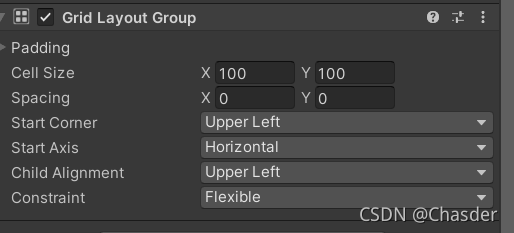
4.安卓端不能直接使用C#的FileStream,读取失败,会读取不到streamassets下面的文件。Directory.GetFiles 这个是移动端不支持的。安卓读取StreamingAssets路径下的文件不能用DirectoryInfo类。注意
5.在打包的时候执行逻辑。代码必须放入Editor文件夹中。
using System.Collections;
using System.Collections.Generic;
using UnityEngine;
using UnityEditor;
using UnityEditor.Build;
using System.IO;
using System.Text;

public class ScanPath : IPreprocessBuild
{

    public int callbackOrder { get { return 0; } }
    public void OnPreprocessBuild(BuildTarget target, string path)
    {
        List<string> namelist = new List<string>






 扫一扫
扫一扫


 2814
2814

 被折叠的 条评论
为什么被折叠?
被折叠的 条评论
为什么被折叠?
 到【灌水乐园】发言





