


 本文讲述了在Android 5.0及以上版本中,如何解决ServiceIntent必须显式的错误,介绍了显式启动、设置action和packageName的方法,并强调了遵循教材要求的重要性。
问题:
最近老师布置隐式调用的作业,但当我按照教材代码运行的时候却报错: Service Intent must be explicit (服务意图必须是明确的)
# 教材代码

public static final String User_ACTION2 = "com.example.sep_21.Useraction2"; //路径

...

    Intent intent = new Intent();
    intent.setAction(User_ACTION2); // User_ACTION2为路径名
    startService(intent);
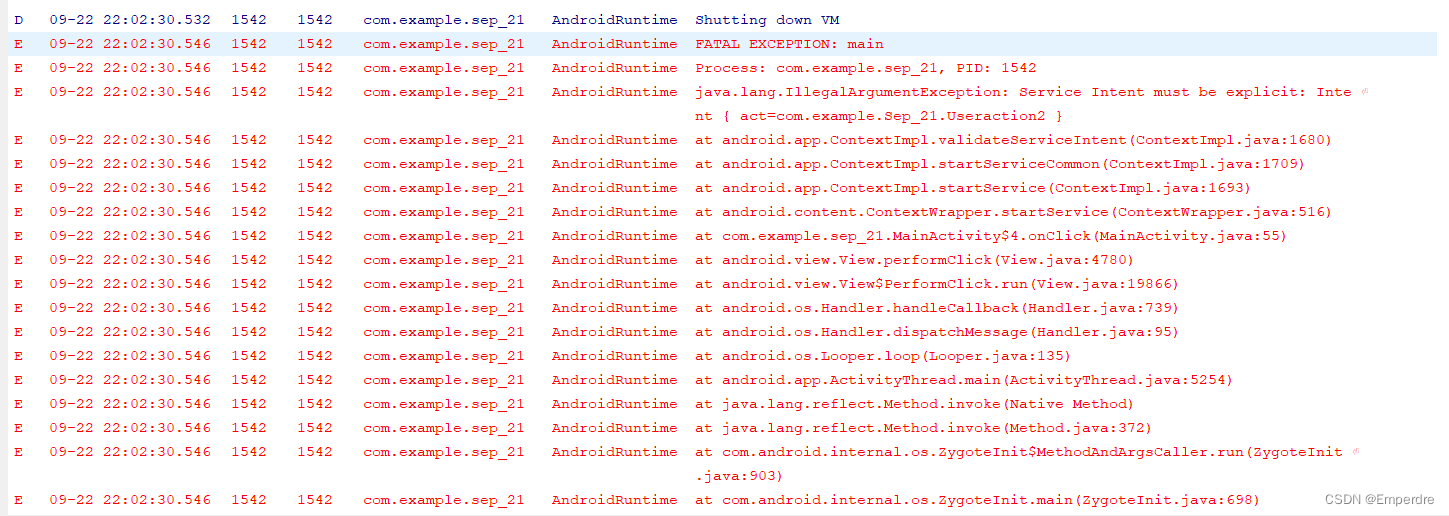
原因:
上网查了相关资料后发现是Android系统升级到5.0之后做了不少的变化(5.0变化)(这次最大的变化应该是把Dalvik虚拟机改成了ART(Android Runtime)),原本只是声明intent去启动Service是不安全的,现在从 Android 5.0(API 级别 21)开始,如果使用隐式 Intent 调用 ,系统会抛出异常,要求Service intent必须显式声明,为了防止造成冲突(有多个Service用同样的intent-filter的情况)
    private void validateServiceIntent(Intent service) {
        if (service.getComponent() == null && service.getPackage() == null) {
            if (getApplicationInfo().targetSdkVersion >= Build.VERSION_CODES.LOLLIPOP) {
                IllegalArgumentException ex = new IllegalArgumentException(
                        "Service Intent must be explicit: " + service);
                throw ex;
            } else {
                Log.w(TAG, "Implicit intents with startService are not safe: " + service
                        + " " + Debug.getCallers(2, 3));
            }
        }
    }
解决方法:
方法一:改为显式启动(但这显然与老师要求不符)
Intent intent = new Intent(getApplicationContext(), ServiceTwo.class);
startService(intent);
方法二:设置action和packageName(包名)
package com.example.sep_21; // 包名

...

    public static final String User_ACTION2 = "com.example.sep_21.Useraction2"; // 路径

    ...

        Intent intent = new Intent();
        intent.setAction(User_ACTION2); // User_ACTION2为路径名
		intent.setPackage("com.example.sep_21"); // com.example.sep_21是包名,建议直接从代码上方复制粘贴
                                                // 注意:包名没有大写!!
		startService(intent);
方法三:设置packageName(包名)和className(类名)
package com.example.sep_21; // 包名

...

    public static final String User_ACTION2 = "com.example.sep_21.Useraction2"; // 路径

    ...

        Intent intent = new Intent();
        intent.setAction(User_ACTION2); // User_ACTION2为路径名
		ComponentName mComponentName = new ComponentName("com.example.sep_21", "com.example.sep_21.ServiceTwo");
		intent.setComponent(mComponentName); // com.example.sep_21为包名
                                            // com.example.sep_21.ServiceTwo为该隐式调用的类的类名(请注意!!)(如果不清楚可以到AndroidManifest.xml文件中进行查看)
                                          // 类名前记得加上包名,不然程序是不报错了,但也不运行
		startService(intent);





 扫一扫
扫一扫


 279
279

 被折叠的 条评论
为什么被折叠?
被折叠的 条评论
为什么被折叠?
 到【灌水乐园】发言





