



【OpenVLA复现】在LIBERO环境中复现OpenVLA
本博客基于OpenVLA原论文和OpenVLA官方github仓库进行创作
OpenVLA简介
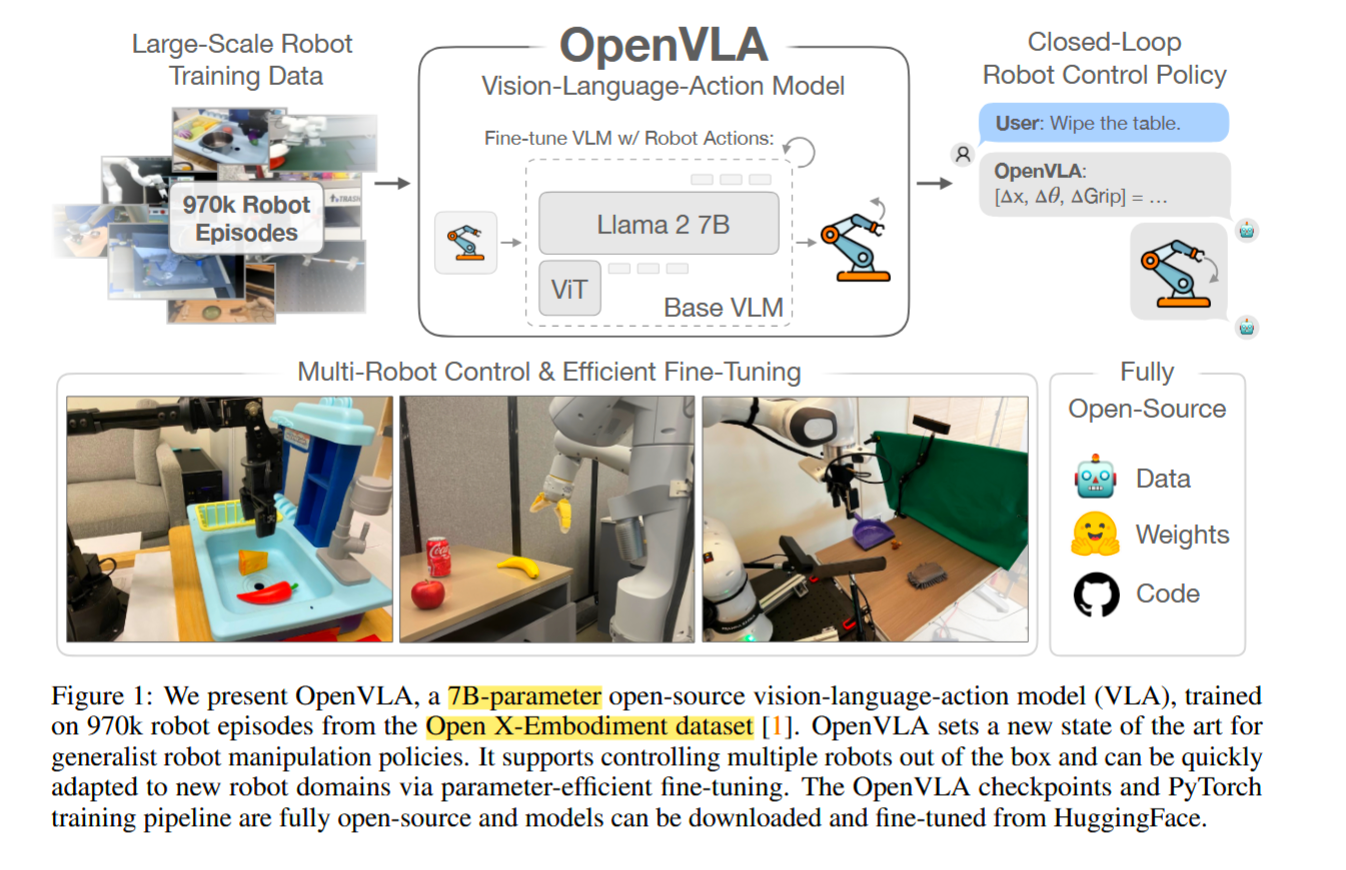
- OpenVLA是VLA领域的第一个开源模型,权重、数据、代码的工作,同时探索了VLA的高效参数微调,实验非常扎实,给出了支撑设计选择的实验、全量微调、高效微调、部署量化的实验
- 现有VLA存在的问题:①大部分不开源 ②先前工作未能探索针对新任务的高效微调方法,没有提供 部署、微调VLA适配新机器人本体,环境,任务
- OpenVLA 7B 开源模型,在970k真机演示中训练,基于Llama 2 + 视觉编码器(DINO-v2 + SigLIP)
- 性能超过RT-2-X 55B的模型16.5%的成功率 但参数要小7倍
- 支持对新任务微调OpenVLA,表明 OpenVLA 可以通过LoRA在消费类 GPU 上进行微调,并通过量化有效地提供服务,而不会影响下游的成功率
- OpenVLA的数据来源于Open-X Embodiment
- 训练数据:利用Open X-Embodiment(包含超过70个独立机器人数据集,超过200万条轨迹)构建数据集, 第三方视角摄像头、单臂 数据
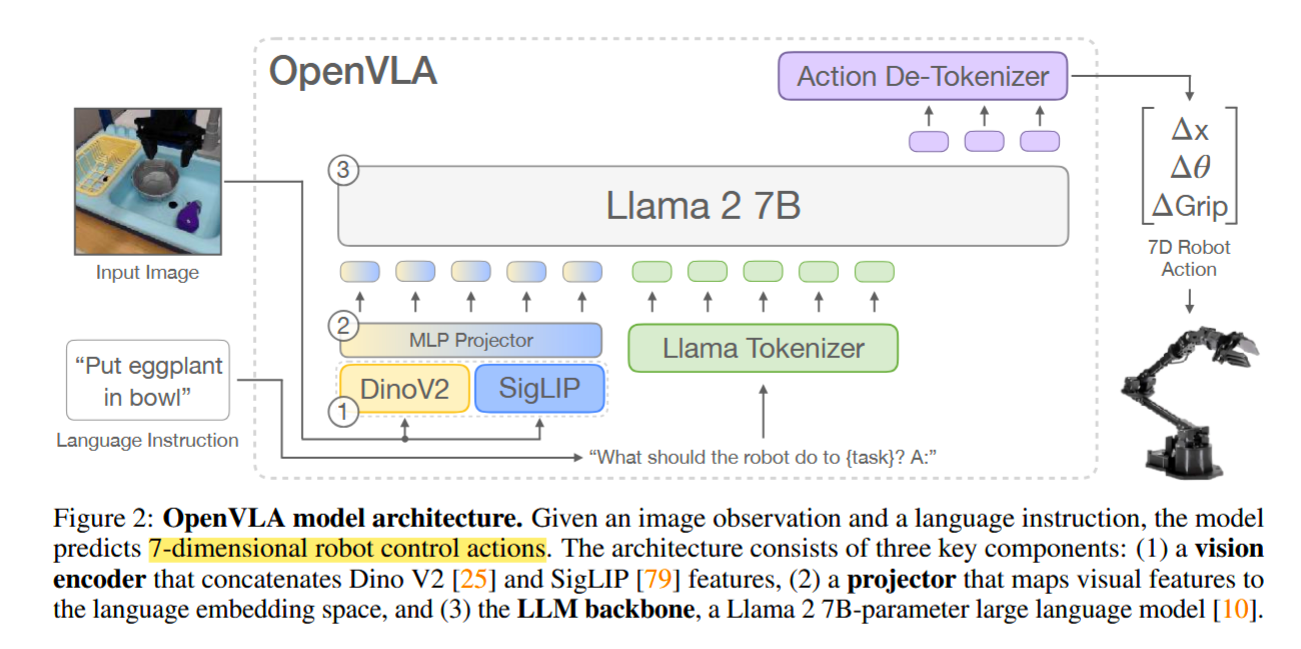
- OpenVLA的动作输出是离散的,represent the actions in the output space of the LLM by mapping continuous robot actions to discrete tokens used by the language model’s tokenizer,将动作空间的每一维 离散为256,自回归式的VLA
- OpenVLA的VLM backbone:①视觉编码器, 将视觉输入转换为 image patch embeddings②projector,获取视觉编码器的输出嵌入并将它们映射到语言模型的输入空间 ③LLM backbone
- OpenVLA 基于Prismatic-7B VLM(600M 参数的视觉编码器,两层MLP projector,7b参数的 Llama 2 语言模型backbone)
- Prismatic uses a two-part visual encoder, consisting of pretrained SigLIP [79] and DinoV2 [25] models. 在使用SigLIP的基础上结合DinoV2特征,已被证明可以改进空间推理
一、配置虚拟环境
# Create and activate conda environment
conda create -n openvla python=3.10 -y
conda activate openvla

# Install PyTorch. Below is a sample command to do this, but you should check the following link
# to find installation instructions that are specific to your compute platform:
# https://pytorch.org/get-started/locally/
conda install pytorch torchvision torchaudio pytorch-cuda=12.4 -c pytorch -c nvidia -y  # UPDATE ME!

# Clone and install the openvla repo
git clone https://github.com/openvla/openvla.git
cd openvla
pip install -e .

# Install Flash Attention 2 for training (https://github.com/Dao-AILab/flash-attention)
#   =>> If you run into difficulty, try `pip cache remove flash_attn` first
pip install packaging ninja
ninja --version; echo $?  # Verify Ninja --> should return exit code "0"
pip install "flash-attn==2.5.5" --no-build-isolation
二、配置LIBERO环境
git clone https://github.com/Lifelong-Robot-Learning/LIBERO.git
cd LIBERO
pip install -e .

#回到openvla的目录
cd openvla
pip install -r experiments/robot/libero/libero_requirements.txt
三、使用 huggingface-hub下载模型
安装
pip install huggingface-hub
提升国内下载速度
export HF_ENDPOINT=https://hf-mirror.com
huggingface的模型链接
https://huggingface.co/openvla
下载模型
# 我这里是下载官方提供的在libero-spatial微调后的模型
hf download openvla/openvla-7b-finetuned-libero-spatial  --local-dir /path/to/model/openvla-7b-finetuned-libero-spatial

#hf download openvla/openvla-7b-finetuned-libero-spatial  --local-dir /home/sen/data/new_python_project/CRL_Project/openvla/openvla-7b-finetuned-libero-spatial/
四、部署OpenVLA官方在LIBERO微调后的模型 进行推理
# Launch LIBERO-Spatial evals
python experiments/robot/libero/run_libero_eval.py \
  --model_family openvla \
  --pretrained_checkpoint openvla/openvla-7b-finetuned-libero-spatial \
  --task_suite_name libero_spatial \
  --center_crop True

# Launch LIBERO-Object evals
python experiments/robot/libero/run_libero_eval.py \
  --model_family openvla \
  --pretrained_checkpoint openvla/openvla-7b-finetuned-libero-object \
  --task_suite_name libero_object \
  --center_crop True

# Launch LIBERO-Goal evals
python experiments/robot/libero/run_libero_eval.py \
  --model_family openvla \
  --pretrained_checkpoint openvla/openvla-7b-finetuned-libero-goal \
  --task_suite_name libero_goal \
  --center_crop True

# Launch LIBERO-10 (LIBERO-Long) evals
python experiments/robot/libero/run_libero_eval.py \
  --model_family openvla \
  --pretrained_checkpoint openvla/openvla-7b-finetuned-libero-10 \
  --task_suite_name libero_10 \
  --center_crop True
这里的--pretrained_checkpoint可以指定为前面下载好的模型所在的路径
python experiments/robot/libero/run_libero_eval.py \
  --model_family openvla \
  --pretrained_checkpoint "/home/sen/data/new_python_project/CRL_Project/openvla/openvla-7b-finetuned-libero-spatial" \
  --task_suite_name libero_spatial \
  --center_crop True
五、运行run_libero_eval.py的报错记录
- 1.安装LIBERO后,pip list可正常显示,运行评估时显示
ModuleNotFoundError: No module named 'libero'
Traceback (most recent call last):
File “/home/sen/data/new_python_project/CRL_Project/openvla/experiments/robot/libero/run_libero_eval.py”, line 29, in
from libero.libero import benchmark
ModuleNotFoundError: No module named ‘libero’
原因: pip 只是安装了 metadata,显示“已安装”,但没有真正把 libero 包映射进 Python import 路径
解决方式是运行时加 PYTHONPATH
export PYTHONPATH=/安装LIBERO的路径/LIBERO:$PYTHONPATH
eg.
export PYTHONPATH=/home/sen/data/new_python_project/CRL_Project/LIBERO$PYTHONPATH
- 2.numpy和opencv版本问题
A module that was compiled using NumPy 1.x cannot be run in NumPy 2.2.6 as it may crash. To support both 1.x and 2.x versions of NumPy, modules must be compiled with NumPy 2.0. Some module may need to rebuild instead e.g. with ‘pybind11>=2.12’. If you are a user of the module, the easiest solution will be to downgrade to ‘numpy<2’ or try to upgrade the affected module. We expect that some modules will need time to support NumPy 2.
pip install --force-reinstall "numpy==1.26.4" "opencv-python==4.10.0.84"
- 3.
ImportError: cannot import name 'runtime_version' from 'google.protobuf'
(/home/sen/data/conda/conda_envs/openvla) sen@sen1553:~/data/new_python_project/CRL_Project/openvla$ python experiments/robot/libero/run_libero_eval.py
–model_family openvla
–pretrained_checkpoint openvla/openvla-7b-finetuned-libero-object
–task_suite_name libero_object
–center_crop True
2026-06-23 19:57:50.150551: I tensorflow/core/util/port.cc:113] oneDNN custom operations are on. You may see slightly different numerical results due to floating-point round-off errors from different computation orders. To turn them off, set the environment variableTF_ENABLE_ONEDNN_OPTS=0.
2026-06-23 19:57:50.180784: E external/local_xla/xla/stream_executor/cuda/cuda_dnn.cc:9261] Unable to register cuDNN factory: Attempting to register factory for plugin cuDNN when one has already been registered
2026-06-23 19:57:50.180819: E external/local_xla/xla/stream_executor/cuda/cuda_fft.cc:607] Unable to register cuFFT factory: Attempting to register factory for plugin cuFFT when one has already been registered
2026-06-23 19:57:50.181474: E external/local_xla/xla/stream_executor/cuda/cuda_blas.cc:1515] Unable to register cuBLAS factory: Attempting to register factory for plugin cuBLAS when one has already been registered
2026-06-23 19:57:50.185651: I tensorflow/core/platform/cpu_feature_guard.cc:182] This TensorFlow binary is optimized to use available CPU instructions in performance-critical operations.
To enable the following instructions: AVX2 AVX_VNNI FMA, in other operations, rebuild TensorFlow with the appropriate compiler flags.
2026-06-23 19:57:50.762392: W tensorflow/compiler/tf2tensorrt/utils/py_utils.cc:38] TF-TRT Warning: Could not find TensorRT
[robosuite WARNING] No private macro file found! (macros.py:53)
[robosuite WARNING] It is recommended to use a private macro file (macros.py:54)
[robosuite WARNING] To setup, run: python /home/sen/data/conda/conda_envs/openvla/lib/python3.10/site-packages/robosuite/scripts/setup_macros.py (macros.py:55)
Gym has been unmaintained since 2022 and does not support NumPy 2.0 amongst other critical functionality.
Please upgrade to Gymnasium, the maintained drop-in replacement of Gym, or contact the authors of your software and request that they upgrade.
Users of this version of Gym should be able to simply replace ‘import gym’ with ‘import gymnasium as gym’ in the vast majority of cases.
See the migration guide at https://gymnasium.farama.org/introduction/migration_guide/ for additional information.
Traceback (most recent call last):
File “/home/sen/data/new_python_project/CRL_Project/openvla/experiments/robot/libero/run_libero_eval.py”, line 35, in
from experiments.robot.libero.libero_utils import (
File “/home/sen/data/new_python_project/CRL_Project/openvla/experiments/robot/libero/libero_utils.py”, line 12, in
from experiments.robot.robot_utils import (
File “/home/sen/data/new_python_project/CRL_Project/openvla/experiments/robot/robot_utils.py”, line 10, in
from experiments.robot.openvla_utils import (
File “/home/sen/data/new_python_project/CRL_Project/openvla/experiments/robot/openvla_utils.py”, line 13, in
from prismatic.extern.hf.configuration_prismatic import OpenVLAConfig
File “/home/sen/data/new_python_project/CRL_Project/openvla/prismatic/init.py”, line 1, in
from .models import available_model_names, available_models, get_model_description, load
File “/home/sen/data/new_python_project/CRL_Project/openvla/prismatic/models/init.py”, line 1, in
from .load import available_model_names, available_models, get_model_description, load, load_vla
File “/home/sen/data/new_python_project/CRL_Project/openvla/prismatic/models/load.py”, line 18, in
from prismatic.models.vlas import OpenVLA
File “/home/sen/data/new_python_project/CRL_Project/openvla/prismatic/models/vlas/init.py”, line 1, in
from .openvla import OpenVLA
File “/home/sen/data/new_python_project/CRL_Project/openvla/prismatic/models/vlas/openvla.py”, line 17, in
from prismatic.vla.action_tokenizer import ActionTokenizer
File “/home/sen/data/new_python_project/CRL_Project/openvla/prismatic/vla/init.py”, line 1, in
from .materialize import get_vla_dataset_and_collator
File “/home/sen/data/new_python_project/CRL_Project/openvla/prismatic/vla/materialize.py”, line 18, in
from prismatic.vla.datasets import EpisodicRLDSDataset, RLDSBatchTransform, RLDSDataset
File “/home/sen/data/new_python_project/CRL_Project/openvla/prismatic/vla/datasets/init.py”, line 1, in
from .datasets import DummyDataset, EpisodicRLDSDataset, RLDSBatchTransform, RLDSDataset
File “/home/sen/data/new_python_project/CRL_Project/openvla/prismatic/vla/datasets/datasets.py”, line 22, in
from prismatic.vla.datasets.rlds import make_interleaved_dataset, make_single_dataset
File “/home/sen/data/new_python_project/CRL_Project/openvla/prismatic/vla/datasets/rlds/init.py”, line 1, in
from .dataset import make_interleaved_dataset, make_single_dataset
File “/home/sen/data/new_python_project/CRL_Project/openvla/prismatic/vla/datasets/rlds/dataset.py”, line 13, in
import dlimp as dl
File “/home/sen/data/conda/conda_envs/openvla/lib/python3.10/site-packages/dlimp/init.py”, line 2, in
from .dataset import DLataset
File “/home/sen/data/conda/conda_envs/openvla/lib/python3.10/site-packages/dlimp/dataset.py”, line 7, in
import tensorflow_datasets as tfds
File “/home/sen/data/conda/conda_envs/openvla/lib/python3.10/site-packages/tensorflow_datasets/init.py”, line 43, in
import tensorflow_datasets.core.logging as _tfds_logging
File “/home/sen/data/conda/conda_envs/openvla/lib/python3.10/site-packages/tensorflow_datasets/core/init.py”, line 22, in
from tensorflow_datasets.core import community
File “/home/sen/data/conda/conda_envs/openvla/lib/python3.10/site-packages/tensorflow_datasets/core/community/init.py”, line 18, in
from tensorflow_datasets.core.community.huggingface_wrapper import mock_builtin_to_use_gfile
File “/home/sen/data/conda/conda_envs/openvla/lib/python3.10/site-packages/tensorflow_datasets/core/community/huggingface_wrapper.py”, line 31, in
from tensorflow_datasets.core import dataset_builder
File “/home/sen/data/conda/conda_envs/openvla/lib/python3.10/site-packages/tensorflow_datasets/core/dataset_builder.py”, line 34, in
from tensorflow_datasets.core import dataset_info
File “/home/sen/data/conda/conda_envs/openvla/lib/python3.10/site-packages/tensorflow_datasets/core/dataset_info.py”, line 50, in
from tensorflow_datasets.core import splits as splits_lib
File “/home/sen/data/conda/conda_envs/openvla/lib/python3.10/site-packages/tensorflow_datasets/core/splits.py”, line 34, in
from tensorflow_datasets.core import proto as proto_lib
File “/home/sen/data/conda/conda_envs/openvla/lib/python3.10/site-packages/tensorflow_datasets/core/proto/init.py”, line 18, in
from tensorflow_datasets.core.proto import dataset_info_generated_pb2 as dataset_info_pb2 # pylint: disable=line-too-long
File “/home/sen/data/conda/conda_envs/openvla/lib/python3.10/site-packages/tensorflow_datasets/core/proto/dataset_info_generated_pb2.py”, line 32, in
from tensorflow_metadata.proto.v0 import schema_pb2 as tensorflow__metadata_dot_proto_dot_v0_dot_schema__pb2
File “/home/sen/data/conda/conda_envs/openvla/lib/python3.10/site-packages/tensorflow_metadata/proto/init.py”, line 16, in
from tensorflow_metadata.proto.v0 import (
File “/home/sen/data/conda/conda_envs/openvla/lib/python3.10/site-packages/tensorflow_metadata/proto/v0/anomalies_pb2.py”, line 9, in
from google.protobuf import runtime_version as _runtime_version
ImportError: cannot import name ‘runtime_version’ from ‘google.protobuf’ (/home/sen/data/conda/conda_envs/openvla/lib/python3.10/site-packages/google/protobuf/init.py)
解决方法:换tensorflow-metadata和protobuf的版本
pip install --force-reinstall "tensorflow-metadata==1.14.0" "protobuf==3.20.3"
- 4.wandb版本问题
修改完tensorflow-metadata和protobuf的版本后,wandb版本也不兼容,报错如下
Traceback (most recent call last):
File “/home/sen/data/new_python_project/CRL_Project/openvla/experiments/robot/libero/run_libero_eval.py”, line 31, in
import wandb
File “/home/sen/data/conda/conda_envs/openvla/lib/python3.10/site-packages/wandb/init.py”, line 22, in
from wandb.sdk.lib import wb_logging as _wb_logging
File “/home/sen/data/conda/conda_envs/openvla/lib/python3.10/site-packages/wandb/sdk/init.py”, line 24, in
from . import wandb_helper as helper
File “/home/sen/data/conda/conda_envs/openvla/lib/python3.10/site-packages/wandb/sdk/wandb_helper.py”, line 6, in
from .lib import config_util
File “/home/sen/data/conda/conda_envs/openvla/lib/python3.10/site-packages/wandb/sdk/lib/config_util.py”, line 12, in
from . import filesystem
File “/home/sen/data/conda/conda_envs/openvla/lib/python3.10/site-packages/wandb/sdk/lib/filesystem.py”, line 19, in
from wandb.sdk.wandb_settings import Settings
File “/home/sen/data/conda/conda_envs/openvla/lib/python3.10/site-packages/wandb/sdk/wandb_settings.py”, line 33, in
from wandb.sdk.lib import deprecation, settings_file, urls
File “/home/sen/data/conda/conda_envs/openvla/lib/python3.10/site-packages/wandb/sdk/lib/deprecation.py”, line 6, in
from wandb.sdk.lib import telemetry
File “/home/sen/data/conda/conda_envs/openvla/lib/python3.10/site-packages/wandb/sdk/lib/telemetry.py”, line 10, in
from wandb.proto.wandb_telemetry_pb2 import Imports as TelemetryImports
ImportError: cannot import name ‘Imports’ from ‘wandb.proto.wandb_telemetry_pb2’ (/home/sen/data/conda/conda_envs/openvla/lib/python3.10/site-packages/wandb/proto/wandb_telemetry_pb2.py)
解决方法:降wandb版本
pip install wandb==0.19.6
- 5.输出显示运行其他项目的LIBERO配置
mv ~/.libero/config.yaml ~/.libero/config.yaml.bak
执行上述命令后重新运行run_libero_eval.py
> (/home/sen/data/conda/conda_envs/openvla) sen@sen1553:~/data/new_python_project/CRL_Project/openvla$ python experiments/robot/libero/run_libero_eval.py --model_family openvla --pretrained_checkpoint “/home/sen/data/new_python_project/CRL_Project/openvla/openvla-7b-finetuned-libero-spatial” --task_suite_name libero_spatial --center_crop True
Do you want to specify a custom path for the dataset folder? (Y/N): n
Initializing the default config file…
The following information is stored in the config file: /home/sen/.libero/config.yaml
benchmark_root: /home/sen/data/new_python_project/CRL_Project/LIBERO/libero/libero
bddl_files: /home/sen/data/new_python_project/CRL_Project/LIBERO/libero/libero/./bddl_files
init_states: /home/sen/data/new_python_project/CRL_Project/LIBERO/libero/libero/./init_files
datasets: /home/sen/data/new_python_project/CRL_Project/LIBERO/libero/libero/…/datasets
assets: /home/sen/data/new_python_project/CRL_Project/LIBERO/libero/libero/./assets
- 6. robosuite 和 mujoco 版本不兼容
TypeError: mj_fullM(): incompatible function arguments. The following argument types are supported:
详细报错信息:
Traceback (most recent call last):
File “/home/sen/data/new_python_project/CRL_Project/openvla/experiments/robot/libero/run_libero_eval.py”, line 286, in
eval_libero()
File “/home/sen/data/conda/conda_envs/openvla/lib/python3.10/site-packages/draccus/argparsing.py”, line 203, in wrapper_inner
response = fn(cfg, *args, **kwargs)
File “/home/sen/data/new_python_project/CRL_Project/openvla/experiments/robot/libero/run_libero_eval.py”, line 156, in eval_libero
env, task_description = get_libero_env(task, cfg.model_family, resolution=256)
File “/home/sen/data/new_python_project/CRL_Project/openvla/experiments/robot/libero/libero_utils.py”, line 23, in get_libero_env
env = OffScreenRenderEnv(**env_args)
File “/home/sen/data/new_python_project/CRL_Project/LIBERO/libero/libero/envs/env_wrapper.py”, line 161, in init
super().init(**kwargs)
File “/home/sen/data/new_python_project/CRL_Project/LIBERO/libero/libero/envs/env_wrapper.py”, line 56, in init
self.env = TASK_MAPPING[self.problem_name](
File “/home/sen/data/new_python_project/CRL_Project/LIBERO/libero/libero/envs/problems/libero_tabletop_manipulation.py”, line 40, in init
super().init(bddl_file_name, *args, **kwargs)
File “/home/sen/data/new_python_project/CRL_Project/LIBERO/libero/libero/envs/bddl_base_domain.py”, line 135, in init
super().init(
File “/home/sen/data/conda/conda_envs/openvla/lib/python3.10/site-packages/robosuite/environments/manipulation/manipulation_env.py”, line 162, in init
super().init(
File “/home/sen/data/conda/conda_envs/openvla/lib/python3.10/site-packages/robosuite/environments/robot_env.py”, line 214, in init
super().init(
File “/home/sen/data/conda/conda_envs/openvla/lib/python3.10/site-packages/robosuite/environments/base.py”, line 143, in init
self._reset_internal()
File “/home/sen/data/new_python_project/CRL_Project/LIBERO/libero/libero/envs/bddl_base_domain.py”, line 735, in _reset_internal
super()._reset_internal()
File “/home/sen/data/conda/conda_envs/openvla/lib/python3.10/site-packages/robosuite/environments/robot_env.py”, line 520, in _reset_internal
robot.reset(deterministic=self.deterministic_reset)
File “/home/sen/data/conda/conda_envs/openvla/lib/python3.10/site-packages/robosuite/robots/single_arm.py”, line 176, in reset
super().reset(deterministic)
File “/home/sen/data/conda/conda_envs/openvla/lib/python3.10/site-packages/robosuite/robots/robot.py”, line 144, in reset
self._load_controller()
File “/home/sen/data/conda/conda_envs/openvla/lib/python3.10/site-packages/robosuite/robots/single_arm.py”, line 135, in _load_controller
self.controller = controller_factory(self.controller_config[“type”], self.controller_config)
File “/home/sen/data/conda/conda_envs/openvla/lib/python3.10/site-packages/robosuite/controllers/controller_factory.py”, line 129, in controller_factory
return OperationalSpaceController(interpolator_pos=interpolator, interpolator_ori=ori_interpolator, **params)
File “/home/sen/data/conda/conda_envs/openvla/lib/python3.10/site-packages/robosuite/controllers/osc.py”, line 134, in init
super().init(
File “/home/sen/data/conda/conda_envs/openvla/lib/python3.10/site-packages/robosuite/controllers/base_controller.py”, line 90, in init
self.update()
File “/home/sen/data/conda/conda_envs/openvla/lib/python3.10/site-packages/robosuite/controllers/base_controller.py”, line 156, in update
mujoco.mj_fullM(self.sim.model._model, mass_matrix, self.sim.data.qM)
TypeError: mj_fullM(): incompatible function arguments. The following argument types are supported:
1. (m: mujoco._structs.MjModel, d: mujoco._structs.MjData, dst: typing.Annotated[numpy.typing.NDArray[numpy.float64], “[m, n]”, “flags.writeable”, “flags.c_contiguous”]) -> None
Invoked with: <mujoco._structs.MjModel object at 0x7fa6c32f0630>, array([[0.000, 0.000, 0.000, …, 0.000, -0.008, -0.000],
[0.000, -0.008, -0.000, …, 0.000, 0.000, 0.000],
[0.000, 0.000, 0.000, …, 0.000, 0.000, -0.000],
…,
[0.000, 0.000, -0.008, …, 0.000, -0.008, 0.000],
[0.000, -0.008, -0.000, …, -0.008, -0.000, 0.000],
[-0.008, 0.000, 0.000, …, 0.000, 0.000, -0.008]]), array([7.254, 5.012, 0.000, 3.395, 0.000, 1.674, 2.870, -0.000, -1.354,
-0.000, 1.507, 0.000, -0.366, -0.000, -0.308, 1.222, 0.000, 0.506,
-0.000, -0.436, -0.000, 0.914, -0.000, 0.122, -0.000, -0.195,
-0.000, -0.200, 1.110, 0.000, 0.000, -0.012, 0.000, -0.048, -0.000,
-0.050, 1.110, 0.000, 0.000, -0.012, 0.000, -0.048, -0.000, -0.050,
0.006, 0.006, 0.000, 0.006, 0.000, 0.000, 0.000, 0.000, -0.000,
0.000, 0.000, -0.000, -0.000, 0.000, 0.000, 0.000, -0.000, -0.000,
0.000, 0.000, -0.000, 0.006, 0.006, 0.000, 0.006, 0.000, 0.000,
0.000, 0.000, -0.000, 0.000, 0.000, -0.000, -0.000, 0.000, 0.000,
0.000, -0.000, -0.000, 0.000, 0.000, -0.000, 0.010, 0.010, 0.000,
0.010, 0.000, 0.000, 0.000, 0.000, 0.000, 0.000, 0.000, 0.000,
0.000, 0.000, 0.000, 0.000, 0.000, 0.000, 0.000, 0.000, 0.000,
0.010, 0.010, 0.000, 0.010, 0.000, 0.000, 0.000, 0.000, -0.000,
0.000, 0.000, -0.000, 0.000, 0.000, 0.000, 0.000, -0.000, 0.000,
0.000, -0.000, -0.000, 0.012, 0.012, 0.000, 0.012, 0.000, 0.000,
0.000, 0.000, -0.000, 0.000, 0.000, -0.000, -0.000, 0.000, 0.000,
0.000, -0.000, -0.000, 0.000, 0.000, -0.000, 3.000, 3.000, 3.000,
1.000])
解决方法:更换版本
原版本如下:robosuite 1.4.1,mujoco 3.10.0
#更换兼容版本
pip install mujoco==3.2.2
pip install robosuite==1.4.0
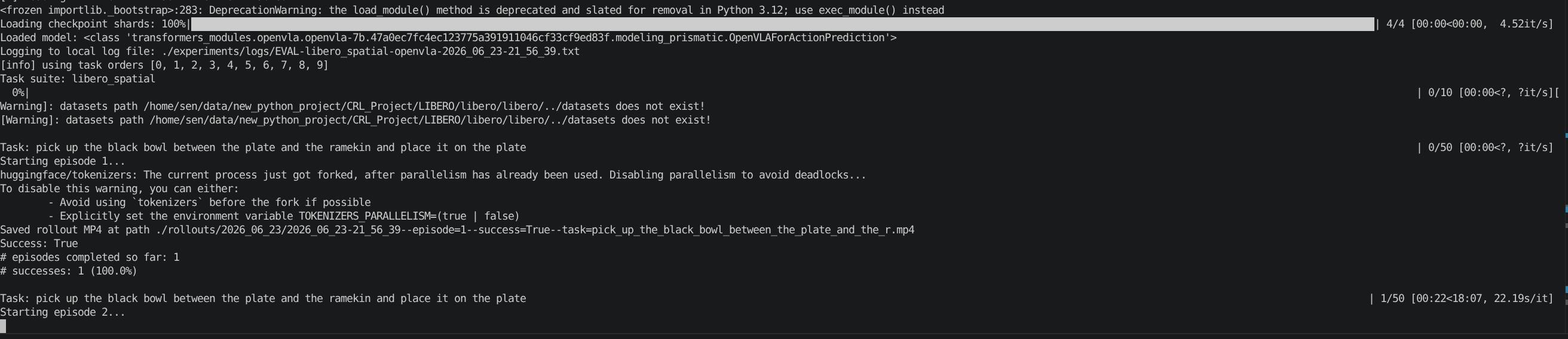
终于跑起来了!
- 7.评估过程中报错,报Exception
评估产生的txt文件中显示Exception
Task: pick up the black bowl next to the plate and place it on the plate
Starting episode 3...
Caught exception: 'Observable' object has no attribute 'model_timestep'

Task: pick up the black bowl on the cookie box and place it on the plate
Starting episode 3...
Caught exception: 'str' object is not callable
下面是遇到的一部分报错信息:
报错一:Traceback (most recent call last):
File “/home/sen/data/new_python_project/CRL_Project/openvla/experiments/robot/libero/run_libero_eval.py”, line 290, in
eval_libero()
File “/home/sen/data/conda/conda_envs/openvla/lib/python3.10/site-packages/draccus/argparsing.py”, line 203, in wrapper_inner
response = fn(cfg, *args, **kwargs)
File “/home/sen/data/new_python_project/CRL_Project/openvla/experiments/robot/libero/run_libero_eval.py”, line 156, in eval_libero
env, task_description = get_libero_env(task, cfg.model_family, resolution=256)
File “/home/sen/data/new_python_project/CRL_Project/openvla/experiments/robot/libero/libero_utils.py”, line 23, in get_libero_env
env = OffScreenRenderEnv(**env_args)
File “/home/sen/data/new_python_project/CRL_Project/LIBERO/libero/libero/envs/env_wrapper.py”, line 161, in init
super().init(**kwargs)
File “/home/sen/data/new_python_project/CRL_Project/LIBERO/libero/libero/envs/env_wrapper.py”, line 56, in init
self.env = TASK_MAPPING[self.problem_name](
File “/home/sen/data/new_python_project/CRL_Project/LIBERO/libero/libero/envs/problems/libero_tabletop_manipulation.py”, line 40, in init
super().init(bddl_file_name, *args, **kwargs)
File “/home/sen/data/new_python_project/CRL_Project/LIBERO/libero/libero/envs/bddl_base_domain.py”, line 135, in init
super().init(
File “/home/sen/data/conda/conda_envs/openvla/lib/python3.10/site-packages/robosuite/environments/manipulation/manipulation_env.py”, line 162, in init
super().init(
File “/home/sen/data/conda/conda_envs/openvla/lib/python3.10/site-packages/robosuite/environments/robot_env.py”, line 214, in init
super().init(
File “/home/sen/data/conda/conda_envs/openvla/lib/python3.10/site-packages/robosuite/environments/base.py”, line 137, in init
self._initialize_sim()
File “/home/sen/data/conda/conda_envs/openvla/lib/python3.10/site-packages/robosuite/environments/base.py”, line 223, in _initialize_sim
xml = xml_string if xml_string else self.model.get_xml()
File “/home/sen/data/conda/conda_envs/openvla/lib/python3.10/site-packages/robosuite/models/base.py”, line 157, in get_xml
string.write(ET.tostring(self.root, encoding=“unicode”))
File “/home/sen/data/conda/conda_envs/openvla/lib/python3.10/xml/etree/ElementTree.py”, line 1102, in tostring
ElementTree(element).write(stream, encoding,
File “/home/sen/data/conda/conda_envs/openvla/lib/python3.10/xml/etree/ElementTree.py”, line 741, in write
qnames, namespaces = _namespaces(self._root, default_namespace)
File “/home/sen/data/conda/conda_envs/openvla/lib/python3.10/xml/etree/ElementTree.py”, line 852, in _namespaces
for key, value in elem.items():
ValueError: too many values to unpack (expected 0)
Exception ignored in: <function MjRenderContext.del at 0x7faacb4ca830>
Traceback (most recent call last):
File “/home/sen/data/conda/conda_envs/openvla/lib/python3.10/site-packages/robosuite/utils/binding_utils.py”, line 199, in del
File “/home/sen/data/conda/conda_envs/openvla/lib/python3.10/site-packages/robosuite/renderers/context/egl_context.py”, line 149, in free
File “/home/sen/data/conda/conda_envs/openvla/lib/python3.10/site-packages/OpenGL/error.py”, line 230, in glCheckError
OpenGL.raw.EGL._errors.EGLError: <exception str() failed>
Exception ignored in: <function EGLGLContext.del at 0x7faacb4ca680>
Traceback (most recent call last):
File “/home/sen/data/conda/conda_envs/openvla/lib/python3.10/site-packages/robosuite/renderers/context/egl_context.py”, line 155, in del
File “/home/sen/data/conda/conda_envs/openvla/lib/python3.10/site-packages/robosuite/renderers/context/egl_context.py”, line 149, in free
File “/home/sen/data/conda/conda_envs/openvla/lib/python3.10/site-packages/OpenGL/error.py”, line 230, in glCheckError
OpenGL.raw.EGL._errors.EGLError: <exception str() failed>
报错二:Traceback (most recent call last):
File “/home/sen/data/new_python_project/CRL_Project/openvla/experiments/robot/libero/run_libero_eval.py”, line 290, in
eval_libero()
File “/home/sen/data/conda/conda_envs/openvla/lib/python3.10/site-packages/draccus/argparsing.py”, line 203, in wrapper_inner
response = fn(cfg, *args, **kwargs)
File “/home/sen/data/new_python_project/CRL_Project/openvla/experiments/robot/libero/run_libero_eval.py”, line 156, in eval_libero
env, task_description = get_libero_env(task, cfg.model_family, resolution=256)
File “/home/sen/data/new_python_project/CRL_Project/openvla/experiments/robot/libero/libero_utils.py”, line 23, in get_libero_env
env = OffScreenRenderEnv(**env_args)
File “/home/sen/data/new_python_project/CRL_Project/LIBERO/libero/libero/envs/env_wrapper.py”, line 161, in init
super().init(**kwargs)
File “/home/sen/data/new_python_project/CRL_Project/LIBERO/libero/libero/envs/env_wrapper.py”, line 56, in init
self.env = TASK_MAPPING[self.problem_name](
File “/home/sen/data/new_python_project/CRL_Project/LIBERO/libero/libero/envs/problems/libero_tabletop_manipulation.py”, line 40, in init
super().init(bddl_file_name, *args, **kwargs)
File “/home/sen/data/new_python_project/CRL_Project/LIBERO/libero/libero/envs/bddl_base_domain.py”, line 135, in init
super().init(
File “/home/sen/data/conda/conda_envs/openvla/lib/python3.10/site-packages/robosuite/environments/manipulation/manipulation_env.py”, line 162, in init
super().init(
File “/home/sen/data/conda/conda_envs/openvla/lib/python3.10/site-packages/robosuite/environments/robot_env.py”, line 214, in init
super().init(
File “/home/sen/data/conda/conda_envs/openvla/lib/python3.10/site-packages/robosuite/environments/base.py”, line 137, in init
self._initialize_sim()
File “/home/sen/data/conda/conda_envs/openvla/lib/python3.10/site-packages/robosuite/environments/base.py”, line 223, in _initialize_sim
xml = xml_string if xml_string else self.model.get_xml()
File “/home/sen/data/conda/conda_envs/openvla/lib/python3.10/site-packages/robosuite/models/base.py”, line 157, in get_xml
string.write(ET.tostring(self.root, encoding=“unicode”))
File “/home/sen/data/conda/conda_envs/openvla/lib/python3.10/xml/etree/ElementTree.py”, line 1102, in tostring
ElementTree(element).write(stream, encoding,
File “/home/sen/data/conda/conda_envs/openvla/lib/python3.10/xml/etree/ElementTree.py”, line 741, in write
qnames, namespaces = _namespaces(self._root, default_namespace)
File “/home/sen/data/conda/conda_envs/openvla/lib/python3.10/xml/etree/ElementTree.py”, line 857, in _namespaces
if isinstance(value, QName) and value.text not in qnames:
TypeError: isinstance() arg 2 must be a type, a tuple of types, or a union
Exception ignored in: <function MjRenderContext.del at 0x7f996c27a680>
Traceback (most recent call last):
File “/home/sen/data/conda/conda_envs/openvla/lib/python3.10/site-packages/robosuite/utils/binding_utils.py”, line 199, in del
File “/home/sen/data/conda/conda_envs/openvla/lib/python3.10/site-packages/robosuite/renderers/context/egl_context.py”, line 149, in free
File “/home/sen/data/conda/conda_envs/openvla/lib/python3.10/site-packages/OpenGL/error.py”, line 230, in glCheckError
OpenGL.raw.EGL._errors.EGLError: <exception str() failed>
Exception ignored in: <function EGLGLContext.del at 0x7f996c27a4d0>
Traceback (most recent call last):
File “/home/sen/data/conda/conda_envs/openvla/lib/python3.10/site-packages/robosuite/renderers/context/egl_context.py”, line 155, in del
File “/home/sen/data/conda/conda_envs/openvla/lib/python3.10/site-packages/robosuite/renderers/context/egl_context.py”, line 149, in free
File “/home/sen/data/conda/conda_envs/openvla/lib/python3.10/site-packages/OpenGL/error.py”, line 230, in glCheckError
OpenGL.raw.EGL._errors.EGLError: <exception str() failed>
解决方法:应该还是robosuite、mujoco、bddl、gym、PyOpenGL不兼容,继续换版本,但这个问题没有很好的解决,偶尔还是会报错,有解决办法的同学可以告知我一下~
robosuite 1.4.1
mujoco 2.3.7
bddl 1.0.1
PyOpenGL 3.1.9
gym 0.25.2
最终使用的全部版本如下所示,可供参考:
(/home/sen/data/conda/conda_envs/openvla) sen@sen1553:~/data/new_python_project/CRL_Project/openvla$ pip list
Package                      Version     Editable project location
---------------------------- ----------- -----------------------------------------------------
absl-py                      2.4.0
accelerate                   1.14.0
annotated-types              0.7.0
array_record                 0.8.1
astunparse                   1.6.3
attrs                        26.1.0
bddl                         1.0.1
brotlicffi                   1.2.0.0
certifi                      2026.5.20
cffi                         2.0.0
charset-normalizer           3.4.4
click                        8.4.1
cloudpickle                  3.1.2
contourpy                    1.3.2
cryptography                 49.0.0
cycler                       0.12.1
dlimp                        0.0.1
dm-tree                      0.1.10
docker-pycreds               0.4.0
draccus                      0.8.0
easydict                     1.13
einops                       0.8.2
etils                        1.13.0
evdev                        1.9.3
exceptiongroup               1.3.1
fastjsonschema               2.21.2
filelock                     3.29.4
flash-attn                   2.5.5
flatbuffers                  25.12.19
fonttools                    4.63.0
fsspec                       2026.6.0
future                       1.0.0
gast                         0.7.0
gitdb                        4.0.12
GitPython                    3.1.50
glfw                         2.10.0
gmpy2                        2.2.2
google-auth                  2.55.0
google-auth-oauthlib         1.4.0
google-pasta                 0.2.0
googleapis-common-protos     1.73.0
grpcio                       1.81.1
gym                          0.25.2
gym-notices                  0.1.0
h5py                         3.16.0
hf-xet                       1.5.1
huggingface_hub              0.36.2
idna                         3.18
ImageIO                      2.37.3
imageio-ffmpeg               0.6.0
importlib_resources          7.1.0
iniconfig                    2.3.0
Jinja2                       3.1.6
joblib                       1.5.3
json-numpy                   2.1.1
jsonlines                    4.0.0
jsonschema                   4.26.0
jsonschema-specifications    2025.9.1
jupyter_core                 5.9.1
jupytext                     1.19.4
keras                        2.15.0
kiwisolver                   1.5.0
libclang                     18.1.1
libero                       0.1.0       /home/sen/data/new_python_project/CRL_Project/LIBERO
llvmlite                     0.47.0
Markdown                     3.10.2
markdown-it-py               4.2.0
MarkupSafe                   3.0.2
matplotlib                   3.10.9
mdit-py-plugins              0.6.1
mdurl                        0.1.2
mergedeep                    1.3.4
mkl_fft                      2.2.0
mkl_random                   1.3.0
mkl-service                  2.5.2
ml-dtypes                    0.2.0
mpmath                       1.3.0
mujoco                       2.3.7
mypy_extensions              1.1.0
nbformat                     5.10.4
networkx                     3.4.2
ninja                        1.13.0
nltk                         3.9.4
numba                        0.65.1
numpy                        1.26.4
nvidia-cublas-cu12           12.1.3.1
nvidia-cuda-cupti-cu12       12.1.105
nvidia-cuda-nvrtc-cu12       12.1.105
nvidia-cuda-runtime-cu12     12.1.105
nvidia-cudnn-cu12            8.9.2.26
nvidia-cufft-cu12            11.0.2.54
nvidia-curand-cu12           10.3.2.106
nvidia-cusolver-cu12         11.4.5.107
nvidia-cusparse-cu12         12.1.0.106
nvidia-nccl-cu12             2.19.3
nvidia-nvjitlink-cu12        12.9.86
nvidia-nvtx-cu12             12.1.105
oauthlib                     3.3.1
opencv-python                4.10.0.84
OpenEXR                      3.4.13
openvla                      0.0.3       /home/sen/data/new_python_project/CRL_Project/openvla
opt_einsum                   3.4.0
packaging                    26.0
peft                         0.11.1
pillow                       12.2.0
pip                          26.1.1
platformdirs                 4.10.0
pluggy                       1.6.0
promise                      2.3
protobuf                     3.20.3
psutil                       7.2.2
pyasn1                       0.6.3
pyasn1_modules               0.4.2
pycparser                    3.0
pydantic                     2.13.4
pydantic_core                2.46.4
Pygments                     2.20.0
pynput                       1.8.2
PyOpenGL                     3.1.9
pyparsing                    3.3.2
PySocks                      1.7.1
pytest                       9.1.1
python-dateutil              2.9.0.post0
python-xlib                  0.33
PyYAML                       6.0.3
pyyaml-include               1.4.1
referencing                  0.37.0
regex                        2026.5.9
requests                     2.34.2
requests-oauthlib            2.0.0
rich                         15.0.0
robosuite                    1.4.1
rpds-py                      0.30.0
safetensors                  0.8.0
scipy                        1.15.3
sentencepiece                0.1.99
sentry-sdk                   2.63.0
setproctitle                 1.3.7
setuptools                   82.0.1
six                          1.17.0
smmap                        5.0.3
sympy                        1.14.0
tensorboard                  2.15.2
tensorboard-data-server      0.7.2
tensorflow                   2.15.0
tensorflow-addons            0.23.0
tensorflow-datasets          4.9.3
tensorflow-estimator         2.15.0
tensorflow-graphics          2021.12.3
tensorflow-io-gcs-filesystem 0.37.1
tensorflow-metadata          1.14.0
termcolor                    3.3.0
timm                         0.9.10
tokenizers                   0.19.1
toml                         0.10.2
tomli                        2.4.1
torch                        2.2.0
torchaudio                   2.2.0
torchvision                  0.17.0
tqdm                         4.68.3
traitlets                    5.15.1
transformers                 4.40.1
trimesh                      4.12.2
triton                       2.2.0
typeguard                    2.13.3
typing_extensions            4.15.0
typing-inspect               0.9.0
typing-inspection            0.4.2
urllib3                      2.7.0
wandb                        0.19.6
Werkzeug                     3.1.8
wheel                        0.47.0
wrapt                        1.14.2
- 8.评估结束后显示报错
OpenGL.raw.EGL._errors.EGLError: EGLError
Exception ignored in: <function MjRenderContext.__del__ at 0x7fb68f4bde10>
Traceback (most recent call last):
  File "/home/sen/data/conda/conda_envs/openvla/lib/python3.10/site-packages/robosuite/utils/binding_utils.py", line 199, in __del__
    self.gl_ctx.free()
  File "/home/sen/data/conda/conda_envs/openvla/lib/python3.10/site-packages/robosuite/renderers/context/egl_context.py", line 149, in free
    EGL.eglMakeCurrent(EGL_DISPLAY, EGL.EGL_NO_SURFACE, EGL.EGL_NO_SURFACE, EGL.EGL_NO_CONTEXT)
  File "/home/sen/data/conda/conda_envs/openvla/lib/python3.10/site-packages/OpenGL/error.py", line 230, in glCheckError
    raise self._errorClass(
OpenGL.raw.EGL._errors.EGLError: EGLError(
	err = EGL_NOT_INITIALIZED,
	baseOperation = eglMakeCurrent,
	cArguments = (
		<OpenGL._opaque.EGLDisplay_pointer object at 0x7fb660212b40>,
		<OpenGL._opaque.EGLSurface_pointer object at 0x7fb690001f40>,
		<OpenGL._opaque.EGLSurface_pointer object at 0x7fb690001f40>,
		<OpenGL._opaque.EGLContext_pointer object at 0x7fb6900026c0>,
	),
	result = 0
)
Exception ignored in: <function EGLGLContext.__del__ at 0x7fb68f4bdc60>
Traceback (most recent call last):
  File "/home/sen/data/conda/conda_envs/openvla/lib/python3.10/site-packages/robosuite/renderers/context/egl_context.py", line 155, in __del__
    self.free()
  File "/home/sen/data/conda/conda_envs/openvla/lib/python3.10/site-packages/robosuite/renderers/context/egl_context.py", line 149, in free
    EGL.eglMakeCurrent(EGL_DISPLAY, EGL.EGL_NO_SURFACE, EGL.EGL_NO_SURFACE, EGL.EGL_NO_CONTEXT)
  File "/home/sen/data/conda/conda_envs/openvla/lib/python3.10/site-packages/OpenGL/error.py", line 230, in glCheckError
    raise self._errorClass(
OpenGL.raw.EGL._errors.EGLError: EGLError(
	err = EGL_NOT_INITIALIZED,
	baseOperation = eglMakeCurrent,
	cArguments = (
		<OpenGL._opaque.EGLDisplay_pointer object at 0x7fb660212b40>,
		<OpenGL._opaque.EGLSurface_pointer object at 0x7fb690001f40>,
		<OpenGL._opaque.EGLSurface_pointer object at 0x7fb690001f40>,
		<OpenGL._opaque.EGLContext_pointer object at 0x7fb6900026c0>,
	),
	result = 0
)
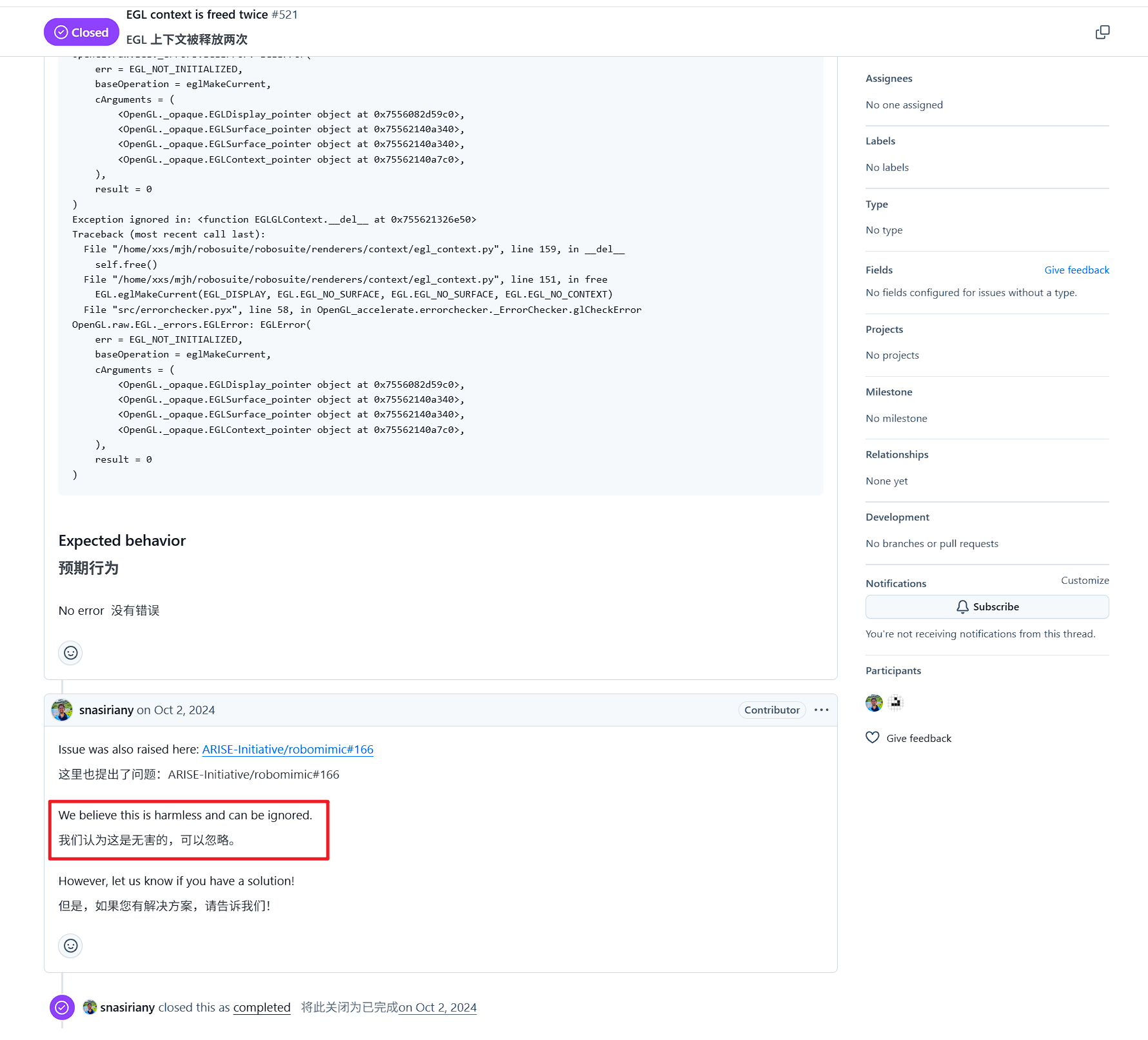
参考官方RoboSuite issue,表示这个报错可以忽略
六、代码解析 与 评估结果
run_libero_eval.py中的num_trials_per_task可以指定相同任务执行多少次
OpenVLA的输入仅包含(第三人称图像,任务描述)
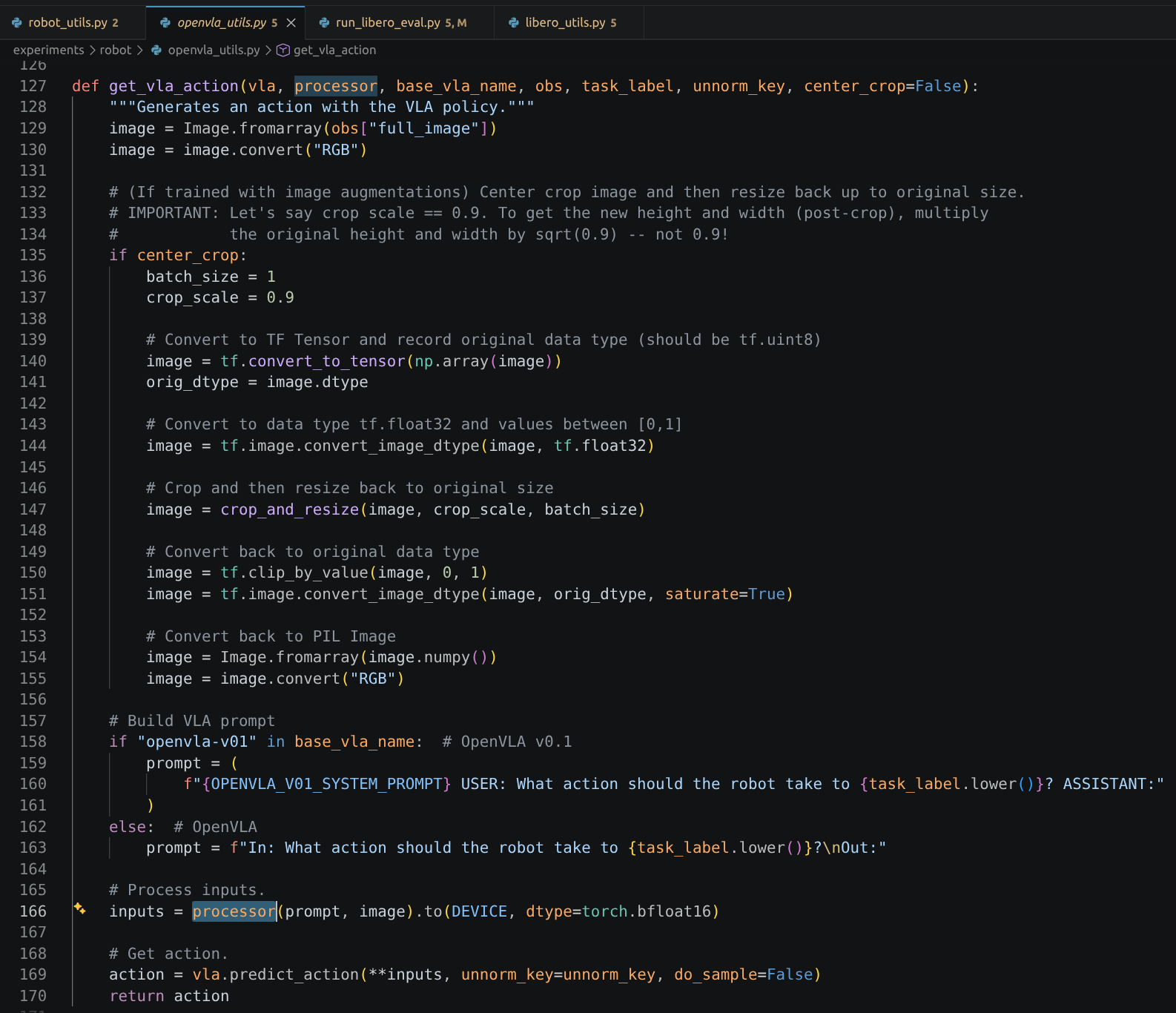
任务示例
task_description:pick up the black bowl on the wooden cabinet and place it on the plate(从木柜上拿起黑色碗,放在盘子上)
执行过程
从木柜上拿起黑色碗并放在盘子上





 扫一扫
扫一扫


 2620
2620

 被折叠的 条评论
为什么被折叠?
被折叠的 条评论
为什么被折叠?
 到【灌水乐园】发言





