


 本文介绍了如何在Windows 7环境下使用Intel Visual Fortran Compiler 11.0进行命令行编译。通过批处理文件make.bat展示了编译过程,包括设置环境变量、编译源代码ex0701.f90并链接生成ex0701.exe。编译时需注意Intel编译器和Visual Studio的路径以及licences文件的位置。
Intel(R) Visual Fortran Compiler Professional for applications running on IA-32, Version 11.0.061
简单的测试函数如下:保存为exo701.f90 (取自《Fortran95程序设计【彭国伦】》的附书源码)
! Free Format
program main
write(*,*) "Hello" ! 这也是注解
write(*,*) &
"Hello"
wr&
&ite(*,*) "Hello"
end
==================================
命令行批处理文件如下(保存为make.bat):
@echo off
Rem
Rem Copyright (C) 1985-2008 Intel Corporation. All rights reserved.
Rem
Rem The information and source code contained herein is the exclusive property
Rem of Intel Corporation and may not be disclosed, examined, or reproduced in
Rem whole or in part without explicit written authorization from the Company.
Rem
Rem Intel(R) Visual Fortran Compiler Professional Build Environment for applications running on IA-32
echo.
echo Intel(R) Visual Fortran Compiler Professional for applications running on IA-32, Version 11.0.061
echo Copyright (C) 1985-2008 Intel Corporation. All rights reserved.
echo.
@call "D:/Microsoft Visual Studio 10.0/VC/bin/VCVARS32.BAT"
SET IFORT_COMPILER11=C:/Program Files/Intel/Compiler/11.0/061/fortran
SET INTEL_LICENSE_FILE=C:/Program Files/Common Files/Intel/Licenses
SET PATH=%IFORT_COMPILER11%/Bin/ia32;%PATH%
SET LIB=%IFORT_COMPILER11%/Lib/ia32;%LIB%
SET INCLUDE=%IFORT_COMPILER11%/Include;%IFORT_COMPILER11%/Include/ia32;%INCLUDE%
Rem ---------======G-Spider @2011=======----------------
ifort /nologo ex0701.f90
link /INCREMENTAL:NO /NOLOGO /SUBSYSTEM:CONSOLE ex0701.obj
del *.obj
ex0701.exe
pause
===================================
以上需要注意的是D:/Microsoft Visual Studio 10.0/VC/bin/VCVARS32.BAT
和路径C:/Program Files/Intel/Compiler/11.0/061/fortran
C:/Program Files/Common Files/Intel/Licenses 为licence文件,请依照自己的按装更改即可。
若无licence文件intel_TBE.lic则会出现错误:
Is your license file in the right location and readable?
The location of your license file should be specified via
the $INTEL_LICENSE_FILE environment variable.
License file(s) used were (in this order):
1. Trusted Storage
2. C:/Program Files/Common Files/Intel/Licenses
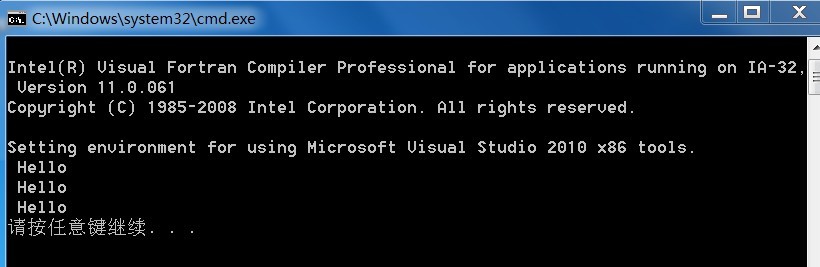
双击运行批处理,如下图显示程序结果:
更多的编译选项请参考Intel(R) Visual Fortran Compiler User and Reference Guides
Intel(R) Fortran Compiler Help
==============================
usage: ifort [options] file1 [file2 ...] [/link linker_options]
where options represents zero or more compiler options
fileN is a Fortran source (.f .for .ftn .f90 .fpp .i .i90),
assembly (.asm), object (.obj), static library (.lib), or
other linkable file
linker_options represents zero or more linker options 链接器来自vs或vc中的link.exe
New Options
This topic lists the options that provide new functionality in this release.
Some compiler options are only available on certain systems, as indicated by these labels:
| Label |
Meaning |
|---|---|
| i32 |
The option is avai |







 扫一扫
扫一扫


 2259
2259

 被折叠的 条评论
为什么被折叠?
被折叠的 条评论
为什么被折叠?
 到【灌水乐园】发言





