



路由方式
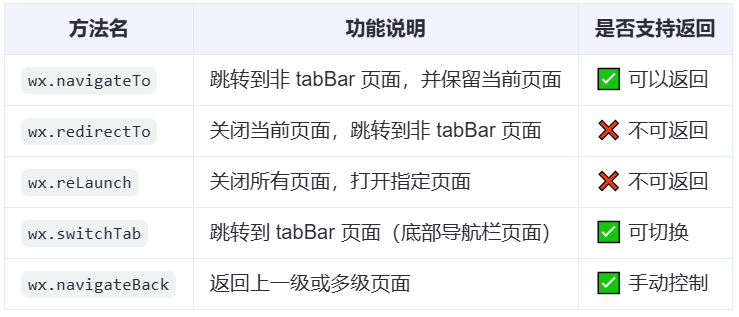
wx.switchTab
实现底部导航栏
1.配置信息
app.json
  "tabBar": {
    "custom": true,
    "list": [{
        "pagePath": "pages/home/index",
        "text": "首页"
      },
      {
        "pagePath": "pages/my/index",
        "text": "我的"
      }
    ]
  }
2.tabBar组件
实现一个公共组件custom-tab-bar,在代码根目录下添加入口文件:
index.js
Component({
  data: {
    value: 'home',
    list: [{
        value: 'home',
        label: '首页',
        icon: 'home'
      },
      {
        value: 'my',
        label: '我的',
        icon: 'user'
      },
    ],
  },
  lifetimes: {
    ready() {
      const pages = getCurrentPages();
      const curPage = pages[pages.length - 1];
      if (curPage) {
        const nameRe = /pages\/(\w+)\/index/.exec(curPage.route);
        if (nameRe === null) return;
        if (nameRe[1] && nameRe) {
          this.setData({
            value: nameRe[1],
          });
        }
      }
    },
  },
  methods: {
    handleChange(e) {
      wx.switchTab({
        url: `/pages/${e.detail.value}/index`
      });
    }
  }
});
index.json
{
  "component": true,
  "styleIsolation": "apply-shared",
  "usingComponents": {
    "t-tab-bar": "tdesign-miniprogram/tab-bar/tab-bar",
    "t-tab-bar-item": "tdesign-miniprogram/tab-bar-item/tab-bar-item"
  }
}
index.wxml
<t-tab-bar value="{{ value }}" theme="tag" split="{{ false }}" bind:change="handleChange">
  <t-tab-bar-item icon="home" value="home">首页</t-tab-bar-item>
  <t-tab-bar-item icon="user" value="my">我的</t-tab-bar-item>
</t-tab-bar>
wx.navigateTo
wx.navigateTo({
      url: '/pages/game/index?id=1',
    })
需要跳转的页面需要注册在app.json的pages数组里:
  "pages": [
    "pages/home/index",
    "pages/my/index",
    "pages/game/index"
  ],
携带参数
基本用法:跳转并传参
1. 跳转页面并携带参数(如商品 id)
// index.js
Page({
  goToDetail() {
    wx.navigateTo({
      url: '/pages/detail/detail?id=123&name=苹果',
    });
  }
})
- 参数直接拼接在 url 后面,使用 ?key=value 的格式。
- 多个参数之间用 & 分隔。
2. 接收参数的目标页面
// detail.js
Page({
  onLoad(options) {
    console.log(options.id);   // 输出:123
    console.log(options.name); // 输出:苹果
  }
});
⚠️ 注意:onLoad 函数的参数 options 就是传过来的参数对象。
推荐传参方式(更安全可靠)
使用 encodeURIComponent 编码防止特殊字符问题
const name = '张三 & 李四';
wx.navigateTo({
  url: `/pages/detail/detail?id=123&name=${encodeURIComponent(name)}`
});
接收方解码:
onLoad(options) {
  const decodedName = decodeURIComponent(options.name);
  console.log(decodedName); // 输出:张三 & 李四
}
复杂对象传参(建议 JSON.stringify)
发送方
const user = { id: 1, name: 'Tom', age: 20 };
wx.navigateTo({
  url: `/pages/userInfo/userInfo?user=${encodeURIComponent(JSON.stringify(user))}`
});
接收方
onLoad(options) {
  const user = JSON.parse(decodeURIComponent(options.user));
  console.log(user.name); // 输出:Tom
}
通过全局变量或本地缓存传参(适用于大对象或频繁通信)
示例:使用 app.globalData
app.js:
App({
  globalData: {}
});
页面 A 设置数据:
const app = getApp();
app.globalData.userInfo = { id: 1, name: 'Tom' };

wx.navigateTo({
  url: '/pages/userInfo/userInfo'
});
页面 B 获取数据:
const app = getApp();
Page({
  onLoad() {
    console.log(app.globalData.userInfo); // 输出用户信息
  }
});






 扫一扫
扫一扫


 718
718

 被折叠的 条评论
为什么被折叠?
被折叠的 条评论
为什么被折叠?
 到【灌水乐园】发言





