



 该博客介绍了如何在SpringBoot应用中使用缓存启动器集成Redis,通过@Cacheable注解实现方法缓存,提升服务响应速度。首先添加相关依赖,包括SpringBoot的web和cache以及Redis启动器。然后在service层使用@Cacheable注解标记需要缓存的方法,controller层调用这些方法。接着在主配置类启用缓存功能,并配置Redis连接信息。最后,当再次请求已缓存的方法时,系统会直接从Redis中读取结果,提高效率。
SpringBoot下使用cache启动器
1.依赖导入
        <dependency>
            <groupId>org.springframework.boot</groupId>
            <artifactId>spring-boot-starter-web</artifactId>
        </dependency>
        <!--添加缓存启动器-->
        <dependency>
            <groupId>org.springframework.boot</groupId>
            <artifactId>spring-boot-starter-cache</artifactId>
        </dependency>
        <dependency>
            <groupId>org.projectlombok</groupId>
            <artifactId>lombok</artifactId>
            <optional>true</optional>
        </dependency>
          <!--添加redis启动器-->
        <dependency>
            <groupId>org.springframework.boot</groupId>
            <artifactId>spring-boot-starter-data-redis</artifactId>
        </dependency>
2.service开发
添加@Cacheable("getAdd")
@Service
public class DemoServiceImpl2 implements DemoService {


    @Override
    @Cacheable("getAdd")
    public Integer add(Integer a, Integer b) {
        //模拟从数据库中进行查询,时间延迟5秒
        try {
            Thread.currentThread().sleep(5000);
        } catch (InterruptedException e) {
            e.printStackTrace();
        }
        return a+b;
    }
}
3.controller开发
@RestController
public class DemoController {

    @Autowired
    private DemoService demoServiceImpl2;

    @GetMapping("/demo2/{a}/{b}")
    public Integer m2(@PathVariable("a") Integer a, @PathVariable("b") Integer b){

        return demoServiceImpl2.add(a,b);
    }

}
4.主配置类上加注解
添加@EnableCaching
@SpringBootApplication
@EnableCaching
public class DemoApplication {
    public static void main(String[] args) {
        SpringApplication.run(DemoApplication.class, args);
    }
}
6.配置redis
spring.redis.host=172.16.2.134
spring.redis.port=6379
spring.redis.password=123456
spring.redis.database=1
5.结果
- 将结果存入缓存,自动加入到redis中
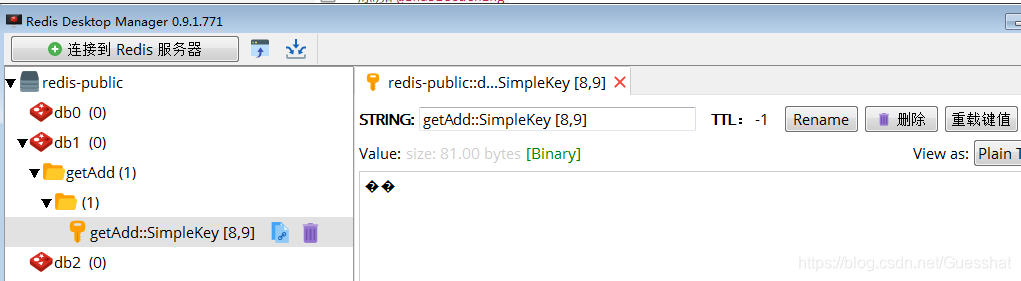
- 第二次访问可以直接从缓存中获取
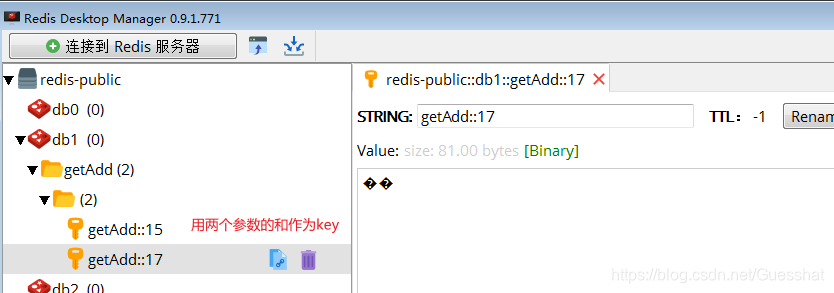
6.自定义内存中数据key
@Cacheable()
- cacheNames 表示存放包名
- key 设置key名称
@Cacheable(cacheNames = "getAdd",key = "#root.args[0]+#root.args[1]")显示结果:
Spring缓存注解@Cacheable





 扫一扫
扫一扫


 166
166

 被折叠的 条评论
为什么被折叠?
被折叠的 条评论
为什么被折叠?
 到【灌水乐园】发言





