



目录
4.2.4 设置Dhcperver和DhcpClient的启动和停止时间
一、架构与脚本
1.1 Ipv4
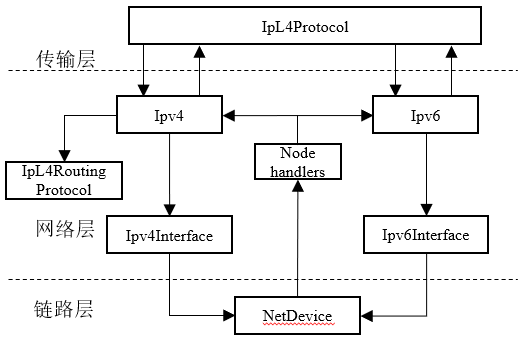
Ipv4是Ipv4协议的基类,定义了Ipv4协议的接口函数,主要算法在其子类Ipv4L3Protocol实现。在ns-3中一个结点只能有且只有一个Ipv4L3Protocol对象和一个Ipv6L3Protocol对象
1.2 Ipv4Interface
Ipv4Interface是网络层与链路层交互的媒介,其内部保存着所属NetDevice的一个或多个IP地址
1.3 Ipv4RoutingProtocol
- 对于下行分组来说,Ipv4RoutingProtocol的主要任务就是获取下一跳IP地址,并确定将分组发往哪个Ipv4Interface对象。Ipv4Interface主要是执行一些与NetDevice相关的操作。
- 对于上行分组来说,NetDevice通过回调函数把分组首先发送给Node对象中的handler向量数据结构。这个结构主要被用于确定一个分组是属于Ipv4还是Ipv6协议,从而确定将分组发至Ipv4L3Protocol对象还是Ipv6L3Protocol对象。
1.4网络层架构的创建
网络层架构的创建分为两部分,即在结点中安装网络层协议栈和地址分配
- InternetStackHelper::Install()函数除了安装传输层协议架构外,还会为指定结点安装Ipv4(Ipv4L3Protocol)和Ipv6(Ipv6L3Protocol)协议对象,并建立它们与路由协议Ipv4RoutingProtocol和Ipv6RoutingProtocol对象之间的关联
InternetStackHelper stack;
stack.Install(nodes);
在默认情况下,安装TCP/IP协议栈的ns-3结点均是双栈节点,可以通过InternetStackHelper助手类的SetIpv4Stacknstall()或SetIpv6Stacknstall()来选择卸载哪一个协议栈
- 为每一个NetDevice分配IP地址,支持手动和DHCP自动两种地址分配方式。手动分配地址类的助手是Ipv4AddressHelper和Ipv6AddressHelper。DHCP自动分配的助手类是DhcpHelper。分配好的IP地址存储在Ipv4Interface或Ipv6Interafce对象中
Ipv4AddresHelperaddress;
//设置起始IPv4地址和子网掩码
address.SetBase("10.1.1.0","255.255.255.0");
    =address.Assign(devices);

Ipv6AddressHelper address
//设置起始IP6地址和子网掩码
address.SetBase(
    Ipv6Address("2001:1::"),Ipv6Prefix(64);
Ipv6InterfaceContainer interfaces
     =ipv6.Assign(devices);
二、脚本配置与trace
2.1 脚本配置
在脚本中,最常见的网络层配置是路由协议,用到的函数是SetRoutingHelper(),这个函数可以覆盖结点的默认路由协议,指定新的路由协议种类,其形参是路由协议助手类。
OlsrHelper olsr;
InternetStackHelper internet;
internet.SetRoutingHelper(olsr);
2.2 trace
| trace变量名 | 含义 |
| Tx | 成功发送IP分组 |
| Rx | 成功接收IP分组 |
| Drop | 丢弃IP分组 |
| SendOutgoing | 成功产生IP分组 |
| LocalDeliver | 成功接收IP分组 |
| UnicastFoward | 转发IP分组 |
- Tx分组必须成功发送给指定接口Ipv4Interface对象后才会产生trace记录,若该接口目前处于关闭状态,则不产生trace;SendOutgoing无论接口是否开启,都会记录trace。当一个IP层分组的大小大于MTU时,IP会将其分成若干段进行传输,Tx的记录发生在IP分段后,SendOutgoing发生在分段前。
- Rx只要IP成功从一个处于开启状态的接口收到分组,就会产生一条trace记录,无论该分组是否发往本地,记录发生在路由协议运行之前;LocalDeliver只记录发往本地结点的分组,记录发生在路由协议运行之后。
三、IP分组头结构
3.1 IPv4分组头结构
IPv4分组头结构由Ipv4Header类定义(src/internet/model/ipv4-header.h)。Ipv4Header与物理网络中的IPv4分组头具有基本相同的字节结构。
0                   1                   2                   3
0 1 2 3 4 5 6 7 8 9 0 1 2 3 4 5 6 7 8 9 0 1 2 3 4 5 6 7 8 9 0 1
+-+-+-+-+-+-+-+-+-+-+-+-+-+-+-+-+-+-+-+-+-+-+-+-+-+-+-+-+-+-+-+
|Version|  IHL  |Type of Service|         Total Length        |
+-+-+-+-+-+-+-+-+-+-+-+-+-+-+-+-+-+-+-+-+-+-+-+-+-+-+-+-+-+-+-+
|         Identification        |Flags|     Fragment offset   |
+-+-+-+-+-+-+-+-+-+-+-+-+-+-+-+-+-+-+-+-+-+-+-+-+-+-+-+-+-+-+-+
| Time to Live  |    Protocol   |     Header Checksum         |
+-+-+-+-+-+-+-+-+-+-+-+-+-+-+-+-+-+-+-+-+-+-+-+-+-+-+-+-+-+-+-+
|                          Source Address                     |
+-+-+-+-+-+-+-+-+-+-+-+-+-+-+-+-+-+-+-+-+-+-+-+-+-+-+-+-+-+-+-+
|                     Destionation Address                    |
+-+-+-+-+-+-+-+-+-+-+-+-+-+-+-+-+-+-+-+-+-+-+-+-+-+-+-+-+-+-+-+
|                   Options                   |    Padding    |
+-+-+-+-+-+-+-+-+-+-+-+-+-+-+-+-+-+-+-+-+-+-+-+-+-+-+-+-+-+-+-+
3.2 IPv6分组头
IPv6分组头有两种:一种数主分组头,由Ipv6Header类定义(src/internet/model/ipv6-header.h),另一种是扩展分组头,由Ipv6ExtensionHeader类(src/internet/model/ipv6-extension-header.h)定义。
IPv6主分组头结构(RFC2460)
0 1 2 3 4 5 6 7 8 9 0 1 2 3 4 5 6 7 8 9 0 1 2 3 4 5 6 7 8 9 0 1 2
+-+-+-+-+-+-+-+-+-+-+-+-+-+-+-+-+-+-+-+-+-+-+-+-+-+-+-+-+-+-+-+-+
| Veres | Traffic Class |              Flow Label               |
+-+-+-+-+-+-+-+-+-+-+-+-+-+-+-+-+-+-+-+-+-+-+-+-+-+-+-+-+-+-+-+-+
|         Payload Length        |Next Header    |   Hop Limit   |
+-+-+-+-+-+-+-+-+-+-+-+-+-+-+-+-+-+-+-+-+-+-+-+-+-+-+-+-+-+-+-+-+
|                                                               |
+                                                               +
|                        Source Address                         |
+                                                               +
|                                                               |
+                                                               +
|                                                               |
+-+-+-+-+-+-+-+-+-+-+-+-+-+-+-+-+-+-+-+-+-+-+-+-+-+-+-+-+-+-+-+-+
|                                                               |
+                                                               +
|                      Destionation Address                     |
+                                                               +
|                                                               |
+                                                               +
|                                                               |
+-+-+-+-+-+-+-+-+-+-+-+-+-+-+-+-+-+-+-+-+-+-+-+-+-+-+-+-+-+-+-+-+
四、IP地址分配
4.1 手动分配
IPv4地址构成:
- 网络号:用于表示结点多在的网络
- 子网掩码:用于识别网络中的子网
- 主机号:用于唯一标识子网中的结点
分配步骤:
- 在Ipv4AddressHelper::SetBase()函数中指定地址,其中主机号默认值为0.0.0.1,使用这个默认值SetBase()函数中可以不指定主机号
- 基于其实参数,Ipv4AddressHelper::Assign()函数按照索引次序为容器devices中的NetDevice对象依次分配地址
Assign()函数以容器的形式按照同样的索引顺序返回为每一个Netevice的Ipv4Interface对象
//SetBase()函数不同的表示形式
address.SetBase(
    "10.1.1.0",
    "/24");

address.SetBase(
    Ipv4Address("10.1.1.0"),
    Ipv4Mask("255.255.255.0"));

address.SetBase(
    Ipv4Address("10.1.1.0"),
    Ipv4Mask("/24"));
当有多组NetDevice时,需要多次调用SetBase()与Assign()函数,并设置不同的网络号参数
//为3个结点的4个NetDevice分配IPv4地址,d1是一个双接口结点
Ipv4AddressHelper ipv4;
ipv4.SetBase("10.1.1.0","255.255.255.0");
Ipv4InterfaceContainer i0i2=ipv4.Asiign(d0d1);

ipv4.SetBase("10.2.2.0","255.255.255.0");
Ipv4InterfaceContainer i1i2=ipv4.Assign(d1d2);- IPv6地址分配的方法与IPv4类似,Ipv6AddressHelper::SetBase()函数需指定IPv6前缀,第三形参主机号的默认值为“::1”。
Ipv6AddressHelper address;
address.SetBase(
    Ipv6Address("2001:1::"),
    Ipv6Prefix(64));
Ipv6InterfaceContainer interfaces
    =ipv6.Assign(devices);
4.2 自动分配
通过使用DhcpHelper助手类,用户可以在脚本中指定DHCPv4服务器(DhcpServer),为安装了DHCP客户端(DhcpClient)的结点分配IPv4地址。其中,DhcpServer和DhcpClient都是Application类的子类。
4.2.1 为网关结点分配IPv4地址
DhcpHelper dhcpHelper;
Ipv4InterfaceContainer fixedNodes=
    dhcpHelper.InstallFixedAddress(
      devNet.Get(4),                //网关结点接口
      Ipv4Address("172.30.0.17"),   //网关结点接口地址
      IpvMask("/24"));              //网关结点接口地址前缀长度
4.2.2. 设置DHCP服务器
ApplicationContainer dhcpServerApp=
  shcpHelper.InstallDhcpServer(
    devNet.Get(3),                 //DHCP服务器接口
    Ipv4Address("172.30.0.12"),    //DHCP服务器接口地址
    Ipv4Address("172.30.0.0"),     //地址池网络号
    Ipv4Mask("/24"),               //地址池前缀长度
    Ipv4Address("172.30.0.10"),    //地址池起始地址
    Ipv4Address("172.30.0.15"),    //地址池最大地址
    Ipv4Address("172.30.0.17"));   //网关地址
4.2.3 安装DHCP客户端
与DhcpClient绑定的接口将会从DhcpServer获取自动分配的IP4地址,分配的地址会有一个租约期限(默认值为30s,ns3::DhcpServer/LeaseTime属性),租约期限到期后DhcpClient需要再次申请新的地址,DhcpClient也可以在租约到期之前主动申请更新
NetDeviceContainer dhcpClientNetDevs;
dhcpClientNetDevs.ADD(devNet.Get(0));
dhcpClientNetDevs.ADD(devNet.Get(1));
dhcpClientNetDevs.ADD(devNet.Get(2));

ApplicationContainer dhcpClients=
    dhcpHelper.InstallDhcpClient(dhcpClientNetDevs);
4.2.4 设置Dhcperver和DhcpClient的启动和停止时间
dhcpServerApp.Start(Seconds(0.0));
dhcpServerApp.Stop(stopTime);
dhcpClients.Start(Seconds(1.0));
dhcpClients.Stop(stopTime);
五、路由协议
在ns-3中,每一个安装了网络层的结点都会维护一个路由表,当结点的Ipv4L3Protocol对象通过查询路由表决定对该分组是接收、转发还是丢弃;当结点发送一个分组时,Ipv4L3Protocol对象同样会查询路由表来确定分组的下一跳结点地址。
路由协议负责的就是路由表项的创建、更新和维护。
| 路由协议 | Ipv4 | Ipv6 | 有线 | 无线 | 模块 |
| 静态路由 | √ | √ | √ | internet | |
| 全局路由 | √ | √ | √ | ||
| RIP | √ | √ | √ | ||
| NixVector | √ | √ | nix-vector-routing | ||
| AODV | √ | √ | aodv | ||
| DSDV | √ | √ | dsdv | ||
| OLSR | √ | √ | olsr | ||
| DSR | √ | √ | dsr | ||
| Click | √ | √ | √ | click |
除DSR和Click外,表中路由协议都是Ipv4RoutingProtocol与Ipv6RoutingProtocol的子类,对应的助手类基类分别是Ipv4RoutingHelper与Ipv6RoutingHelper
5.1 列表路由
列表路由是一种路由协议管理方法,在默认情况下,由InternetStackHelper助手类创建结点使用的是列表路由。
在ns-3中,一个结点可以配置多个路由协议,并为其设置优先级,每一个路由协议都维护一个路由表。
列表路由:在收发分组时,ns-3结点根据优先级依次查询路由表,指导找到一个匹配的表项为止。由Ipv4ListRouting或Ipv6ListRouting类实现。
在默认配置下,Ipv4ListRouting内部存储的是静态路由和全局路由协议,静态路由优先级较高。
Ipv6ListRouting内部存储的是静态路由协议。
//结点的列表路由包含PLSR与静态路由两个协议,其中OLSR具有较高的优先级
OlsrHelper olsr;
Ipv4StaticRoutingHelper staticRouting;

Ipv4ListRoutingHelper list;
list.Add(staticRouting,0);
list.Add(olsr,10);

InternetStackHelper internet;
internet.SetRoutingHelper(list);  //新的列表路由
internet.Install(c);
5.2 打印路由表
路由表的打印由Ipv4RoutingHelper与Ipv6RoutingHelper助手类完成。
- 打印一个指定结点路由表PrintRoutingTableAt()函数
Ipv4StaticRoutingHelper routingHelper;
Ptr<OutputStreamWrapper>routingStream
  =Create<OutputStreamWrapper>(
    "routes.tr",
    std::ios::out);
routingHelper.PrintRoutingTableAt(
    Seconds(3.0),      //打印时间
    nodes.Get(1),      //路由表所在结点
routingStream); //输出- 打印所有结点路由表:PrintRoutingTableAllAt()
- 按照固定时间间隔打印某结点路由表:PrintRoutingTableEvery()
- 按照固定时间间隔打印全部及诶但路由表:PrintRoutingTableAllEvrey
5.3 静态路由
静态路由是路由匹配中第一个被执行的协议,拥有Ipv4StaticRouting和Ipv6StaticRoutingHelper两个子类,这两个类的助手分别为Ipv4StaticRoutingHelper与Ipv6StaticRoutingHelper。两个协议的使用方法相同。
5.3.1 源和目的结点位于同一子网
在这种场景下,静态路由协议可以在不进行任何脚本配置的情况下正确地路由分组。
当为一个接口分配IP地址时,ns-3在这个结点的静态路由表中自动加入一条路有条目(本地接口网络号,本地接口子网掩码,全零下一跳地址,接口索引号),这个条目保证了结点可以正确地与同一个子网上的结点通信
5.3.2 源和目的结点位于不同子网
这种情况下,需要在脚本中设置路由。
//结点d0和d2位于不同的子网
//若要从d0传递分组给d2,则需要在脚本中为d0添加静态路由
Ipv4StaticRoutingHelper routingHelper;

Ptr<Ipv4>ipv4=nodes(0)->GetObject<Ipv4>();
Ptr<Ipv4StaticRouting>routing
  =routingHelper.GetStaticRouting(ipv4);

routing->AddHostRouteRTo(
  "10.2.2.2",    //目标地址
  "10.1.1.2",    //下一跳地址
  1);            //发送接口索引号
在上述脚本中,函数Ipv4StaticRouting::AddHostRoutTo()在静态路由表中添加了一个表项,在结点d0中,所有目标地址为10.2.2.2的分组均通过本地接口1发送,且下一跳结点地址为10.1.1.2(d1);当d1结点收到分组后,查找本地路由表发现分组的目的地址与接口2属于同一子网,则会通过接口2将分组转发至目标结点d2。
如果要实现双向通信,则还需要在结点d2中添加对结点d0的静态路由
routing->AddHostRouteTo(
  "10.1.1.1",    //目的地址
  "10.2.2.1",    //下一跳地址
  1);            //发送接口索引号
在整个通信中,结点d1起到的作用是路由器的分组转发,若要禁止一个结点转发分组,则可以把该结点的ns3::Ipv4/IpFprward属性设为false
5.4 全局路由
在默认配置中,当静态路由协议的路由表没有匹配表项时,结点会查询全局路由表。
ns-3的全局路由协议仅支持IPv4分组,由Ipv4GlobalRouting实现,助手类为Ipv4GlobalRoutingHelper。
Ipv4GlobalRouting类内部使用开放式最短路径优先(OSPF)路由算法计算网络拓扑中每两个结点的最短路径,并为每个结点生成路由表,需要调用助手类的PopulateRoutingTables()函数来触发。
Ipv4GlobalRoutingHelper::PopulateRoutingTables();在模拟运行期间,若网络拓扑发生变化,必须调用RecomputeRoutingTavles()函数对每一个结点的路由表进行更新
Ipv4GlobalRoutingHelper::RocomputeRoutingTables();可以将ns3::Ipv4GlobalRouting/RespondToInterfaceEvents属性设置为true,这样,任何的结点接口状态变化都会触发全局路由表的更新操作
Config::SetDefault(
    "ns3::Ipv4GlobalRouting::RespondToInterfaceEvents",
    BooleanValue(true));
六、网络层协议开发
6.1 隧道协议
隧道协议的本质是将一种网络协议作为负载封装在另一个网络协议中进行传输,从而实现逻辑直连或安全等目的。
ns-3为隧道两端的结点添加虚拟网络设备(VirtualNetDeceive)并分配地址,以这两个虚拟网络设备的地址为隧道起始端点。
6.1.1VirtualNetDevice工作原理
一般来说,隧道协议的分组都包含多个网络层分组头。以IPv4隧道为例,其分组就包含了内层和外层两个IPv4分组头。隧道的起始地址在内层分组头中存储,且仅有隧道两端结点处理;外层分组头则用于中间节点路由分组

在ns-3的TCP/IP协议栈结构中,添加IPv4分组头的任务由Ipv4L3Protocol类的发送函数Send()完成。
/* -*- Mode:C++; c-file-style:"gnu"; indent-tabs-mode:nil; -*- */
/*
 * This program is free software; you can redistribute it and/or modify
 * it under the terms of the GNU General Public License version 2 as
 * published by the Free Software Foundation;
 *
 * This program is distributed in the hope that it will be useful,
 * but WITHOUT ANY WARRANTY; without even the implied warranty of
 * MERCHANTABILITY or FITNESS FOR A PARTICULAR PURPOSE.  See the
 * GNU General Public License for more details.
 *
 * You should have received a copy of the GNU General Public License
 * along with this program; if not, write to the Free Software
 * Foundation, Inc., 59 Temple Place, Suite 330, Boston, MA  02111-1307  USA
 *
 * Based on simple-global-routing.cc
 * The Tunnel class adds two tunnels, n0<=>n3 and n1<=>n3
 */

// Network topology
//
//  n0
//     \ 5 Mb/s, 2ms
//      \          1.5Mb/s, 10ms
//       n2 -------------------------n3
//      /
//     / 5 Mb/s, 2ms
//   n1
//
// - all links are point-to-point links with indicated one-way BW/delay
// - Tracing of queues and packet receptions to file "virtual-net-device.tr"

// Tunneling changes (relative to the simple-global-routing example):
// - n0 will receive an extra virtual interface with hardcoded inner-tunnel address 11.0.0.1
// - n1 will also receive an extra virtual interface with the same inner-tunnel address 11.0.0.1
// - n3 will receive an extra virtual interface with inner-tunnel address 11.0.0.254
// - The flows will be between 11.0.0.x (inner-tunnel) addresses instead of 10.1.x.y ones
// - n3 will decide, on a per-packet basis, via random number, whether to
//   send the packet to n0 or to n1.
//
// Note: here we create a tunnel where IP packets are tunneled over
// UDP/IP, but tunneling directly IP-over-IP would also be possible;
// see src/node/ipv4-raw-socket-factory.h.

#include <iostream>
#include <fstream>
#include <string>
#include <cassert>

#include "ns3/core-module.h"
#include "ns3/network-module.h"
#include "ns3/internet-module.h"
#include "ns3/point-to-point-module.h"
#include "ns3/applications-module.h"
#include "ns3/virtual-net-device.h"

using namespace ns3;

NS_LOG_COMPONENT_DEFINE ("VirtualNetDeviceExample");

class Tunnel
{
  Ptr<Socket> m_n3Socket;
  Ptr<Socket> m_n0Socket;
  Ptr<Socket> m_n1Socket;
  Ipv4Address m_n3Address;
  Ipv4Address m_n0Address;
  Ipv4Address m_n1Address;
  Ptr<UniformRandomVariable> m_rng;
  Ptr<VirtualNetDevice> m_n0Tap;
  Ptr<VirtualNetDevice> m_n1Tap;
  Ptr<VirtualNetDevice> m_n3Tap;


  bool
  N0VirtualSend (Ptr<Packet> packet, const Address& source, const Address& dest, uint16_t protocolNumber)
  {
    NS_LOG_DEBUG ("Send to " << m_n3Address << ": " << *packet);
    m_n0Socket->SendTo (packet, 0, InetSocketAddress (m_n3Address, 667));
    return true;
  }

  bool
  N1VirtualSend (Ptr<Packet> packet, const Address& source, const Address& dest, uint16_t protocolNumber)
  {
    NS_LOG_DEBUG ("Send to " << m_n3Address << ": " << *packet);
    m_n1Socket->SendTo (packet, 0, InetSocketAddress (m_n3Address, 667));
    return true;
  }

  bool
  N3VirtualSend (Ptr<Packet> packet, const Address& source, const Address& dest, uint16_t protocolNumber)
  {
    if (m_rng->GetValue () < 0.25)
      {
        NS_LOG_DEBUG ("Send to " << m_n0Address << ": " << *packet);
        m_n3Socket->SendTo (packet, 0, InetSocketAddress (m_n0Address, 667));
      }
    else
      {
        NS_LOG_DEBUG ("Send to " << m_n1Address << ": " << *packet);
        m_n3Socket->SendTo (packet, 0, InetSocketAddress (m_n1Address, 667));
      }
    return true;
  }

  void N3SocketRecv (Ptr<Socket> socket)
  {
    Ptr<Packet> packet = socket->Recv (65535, 0);
    NS_LOG_DEBUG ("N3SocketRecv: " << *packet);
    m_n3Tap->Receive (packet, 0x0800, m_n3Tap->GetAddress (), m_n3Tap->GetAddress (), NetDevice::PACKET_HOST);
  }

  void N0SocketRecv (Ptr<Socket> socket)
  {
    Ptr<Packet> packet = socket->Recv (65535, 0);
    NS_LOG_DEBUG ("N0SocketRecv: " << *packet);
    m_n0Tap->Receive (packet, 0x0800, m_n0Tap->GetAddress (), m_n0Tap->GetAddress (), NetDevice::PACKET_HOST);
  }

  void N1SocketRecv (Ptr<Socket> socket)
  {
    Ptr<Packet> packet = socket->Recv (65535, 0);
    NS_LOG_DEBUG ("N1SocketRecv: " << *packet);
    m_n1Tap->Receive (packet, 0x0800, m_n1Tap->GetAddress (), m_n1Tap->GetAddress (), NetDevice::PACKET_HOST);
  }

public:

  Tunnel (Ptr<Node> n3, Ptr<Node> n0, Ptr<Node> n1,
          Ipv4Address n3Addr, Ipv4Address n0Addr, Ipv4Address n1Addr)
    : m_n3Address (n3Addr), m_n0Address (n0Addr), m_n1Address (n1Addr)
  {
    m_rng = CreateObject<UniformRandomVariable> ();
    m_n3Socket = Socket::CreateSocket (n3, TypeId::LookupByName ("ns3::UdpSocketFactory"));
    m_n3Socket->Bind (InetSocketAddress (Ipv4Address::GetAny (), 667));
    m_n3Socket->SetRecvCallback (MakeCallback (&Tunnel::N3SocketRecv, this));

    m_n0Socket = Socket::CreateSocket (n0, TypeId::LookupByName ("ns3::UdpSocketFactory"));
    m_n0Socket->Bind (InetSocketAddress (Ipv4Address::GetAny (), 667));
    m_n0Socket->SetRecvCallback (MakeCallback (&Tunnel::N0SocketRecv, this));

    m_n1Socket = Socket::CreateSocket (n1, TypeId::LookupByName ("ns3::UdpSocketFactory"));
    m_n1Socket->Bind (InetSocketAddress (Ipv4Address::GetAny (), 667));
    m_n1Socket->SetRecvCallback (MakeCallback (&Tunnel::N1SocketRecv, this));

    // n0 tap device
    m_n0Tap = CreateObject<VirtualNetDevice> ();
    m_n0Tap->SetAddress (Mac48Address ("11:00:01:02:03:01"));
    m_n0Tap->SetSendCallback (MakeCallback (&Tunnel::N0VirtualSend, this));
    n0->AddDevice (m_n0Tap);
    Ptr<Ipv4> ipv4 = n0->GetObject<Ipv4> ();
    uint32_t i = ipv4->AddInterface (m_n0Tap);
    ipv4->AddAddress (i, Ipv4InterfaceAddress (Ipv4Address ("11.0.0.1"), Ipv4Mask ("255.255.255.0")));
    ipv4->SetUp (i);

    // n1 tap device
    m_n1Tap = CreateObject<VirtualNetDevice> ();
    m_n1Tap->SetAddress (Mac48Address ("11:00:01:02:03:02"));
    m_n1Tap->SetSendCallback (MakeCallback (&Tunnel::N1VirtualSend, this));
    n1->AddDevice (m_n1Tap);
    ipv4 = n1->GetObject<Ipv4> ();
    i = ipv4->AddInterface (m_n1Tap);
    ipv4->AddAddress (i, Ipv4InterfaceAddress (Ipv4Address ("11.0.0.1"), Ipv4Mask ("255.255.255.0")));
    ipv4->SetUp (i);

    // n3 tap device
    m_n3Tap = CreateObject<VirtualNetDevice> ();
    m_n3Tap->SetAddress (Mac48Address ("11:00:01:02:03:04"));
    m_n3Tap->SetSendCallback (MakeCallback (&Tunnel::N3VirtualSend, this));
    n3->AddDevice (m_n3Tap);
    ipv4 = n3->GetObject<Ipv4> ();
    i = ipv4->AddInterface (m_n3Tap);
    ipv4->AddAddress (i, Ipv4InterfaceAddress (Ipv4Address ("11.0.0.254"), Ipv4Mask ("255.255.255.0")));
    ipv4->SetUp (i);

  }


};


int
main (int argc, char *argv[])
{
  // Users may find it convenient to turn on explicit logging
  // for selected modules; the below lines suggest how to do this
#if 0
  LogComponentEnable ("VirtualNetDeviceExample", LOG_LEVEL_INFO);
#endif
  Packet::EnablePrinting ();


  // Set up some default values for the simulation.  Use the
  Config::SetDefault ("ns3::OnOffApplication::PacketSize", UintegerValue (210));
  Config::SetDefault ("ns3::OnOffApplication::DataRate", StringValue ("448kb/s"));

  // Allow the user to override any of the defaults and the above
  // Config::SetDefault ()s at run-time, via command-line arguments
  CommandLine cmd (__FILE__);
  cmd.Parse (argc, argv);

  NS_LOG_INFO ("Create nodes.");
  NodeContainer c;
  c.Create (4);
  NodeContainer n0n2 = NodeContainer (c.Get (0), c.Get (2));
  NodeContainer n1n2 = NodeContainer (c.Get (1), c.Get (2));
  NodeContainer n3n2 = NodeContainer (c.Get (3), c.Get (2));

  InternetStackHelper internet;
  internet.Install (c);

  // We create the channels first without any IP addressing information
  NS_LOG_INFO ("Create channels.");
  PointToPointHelper p2p;
  p2p.SetDeviceAttribute ("DataRate", StringValue ("5Mbps"));
  p2p.SetChannelAttribute ("Delay", StringValue ("2ms"));
  NetDeviceContainer d0d2 = p2p.Install (n0n2);

  NetDeviceContainer d1d2 = p2p.Install (n1n2);

  p2p.SetDeviceAttribute ("DataRate", StringValue ("1500kbps"));
  p2p.SetChannelAttribute ("Delay", StringValue ("10ms"));
  NetDeviceContainer d3d2 = p2p.Install (n3n2);

  // Later, we add IP addresses.
  NS_LOG_INFO ("Assign IP Addresses.");
  Ipv4AddressHelper ipv4;
  ipv4.SetBase ("10.1.1.0", "255.255.255.0");
  Ipv4InterfaceContainer i0i2 = ipv4.Assign (d0d2);

  ipv4.SetBase ("10.1.2.0", "255.255.255.0");
  Ipv4InterfaceContainer i1i2 = ipv4.Assign (d1d2);

  ipv4.SetBase ("10.1.3.0", "255.255.255.0");
  Ipv4InterfaceContainer i3i2 = ipv4.Assign (d3d2);

  // Create router nodes, initialize routing database and set up the routing
  // tables in the nodes.
  Ipv4GlobalRoutingHelper::PopulateRoutingTables ();

  // Add the tunnels n0<=>n3 and n1<=>n3
  Tunnel tunnel (c.Get (3), c.Get (0), c.Get (1),
                 i3i2.GetAddress (0), i0i2.GetAddress (0), i1i2.GetAddress (0));

  // Create the OnOff application to send UDP datagrams of size
  // 210 bytes at a rate of 448 Kb/s
  NS_LOG_INFO ("Create Applications.");
  uint16_t port = 9;   // Discard port (RFC 863)
  OnOffHelper onoff ("ns3::UdpSocketFactory",
                     Address (InetSocketAddress (Ipv4Address ("11.0.0.254"), port)));
  onoff.SetConstantRate (DataRate ("448kb/s"));
  ApplicationContainer apps = onoff.Install (c.Get (0));
  apps.Start (Seconds (1.0));
  apps.Stop (Seconds (10.0));

  // Create a packet sink to receive these packets
  PacketSinkHelper sink ("ns3::UdpSocketFactory",
                         Address (InetSocketAddress (Ipv4Address::GetAny (), port)));
  apps = sink.Install (c.Get (3));
  apps.Start (Seconds (1.0));
  //apps.Stop (Seconds (10.0));

  // Create a similar flow from n3 to n1, starting at time 1.1 seconds
  onoff.SetAttribute ("Remote",
                      AddressValue (InetSocketAddress (Ipv4Address ("11.0.0.1"), port)));
  apps = onoff.Install (c.Get (3));
  apps.Start (Seconds (1.1));
  apps.Stop (Seconds (10.0));

  // Create a packet sink to receive these packets
  apps = sink.Install (c.Get (1));
  apps.Start (Seconds (1.1));
  //apps.Stop (Seconds (10.0));

  AsciiTraceHelper ascii;
  p2p.EnableAsciiAll (ascii.CreateFileStream ("virtual-net-device.tr"));
  p2p.EnablePcapAll ("virtual-net-device");

  NS_LOG_INFO ("Run Simulation.");
  Simulator::Run ();
  Simulator::Destroy ();
  NS_LOG_INFO ("Done.");

  return 0;
}
图为脚本中一条IPv4隧道拓扑图
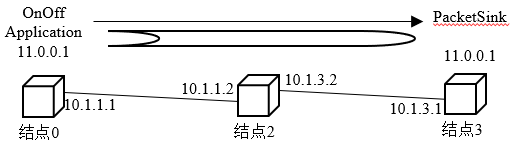
结点0、2、3使用点对点链路连接,结点0中的OnOffApplication向结点3中的PacketSink发送UDP分组。
在没有隧道的情况下:OnOffApplication发送分组的目的地址是10.1.3.1;
在使用隧道的情况下:OnOffApplication可以直接向隧道的对端地址11.0.0.254发送分组,不必在乎结点之间的网络拓扑
与传统的单网络设备结点相比,结点0和3多一个虚拟设备VirtualNetDevice和一个Socket。
在整个通信过程中,OnOffApplication应用和PacketSink应用是逻辑上的通信对端,使用的套接字地址是隧道端点的IP地址(11.0.0.1和11.0.0.254)和端口9,在内层IP分组头中存储。
结点0和结点3中的UdpSocket是实际的通信对端,使用的套接字地址是点对点链路的IP地址和端口667.这两个IP地址(10.1.1.1和10.1.3.1)属于点对点设备,在外层IP分组头中存储。
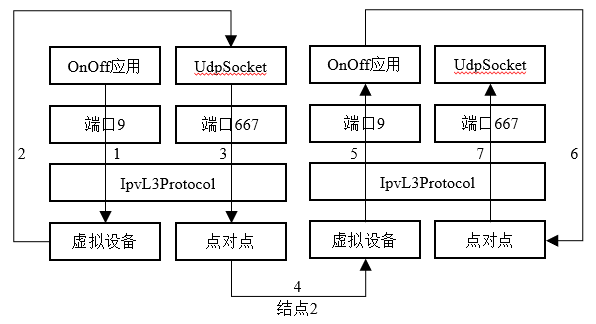
- 在结点0中,VirtualNetDevice对象负责把已经添加了内层分组头的分组重新返回至应用层的UdpSocket对象;
- UdpSocket再把整个分组作为负载重新发送,添加外层IPv4分组头
- 结点3的Udp对象把已经祛除外层分组头的分组重新转发给本地的虚拟设备VirtualNetDevice对象
- VirtualNetDevice对象按照正常流程将分组提交给上层协议,内层分组头被Ipv3L3Protocol删除,应用层负载被PacketSink成功接收
6.1.2 VirtualNetDevice使用
- 为两个即诶但分别添加虚拟网络设备VirtualNetDevice对象,并为其分配IP地址(10.0.0.1和11.0.0.254)
- 为这两个结点分别添加Socket对象,并将其绑定至一个新的套接字端口。这对新Socket就是真正用来向外部网络发送分组的对象
- 在发送端(结点0),实现VirtualNetDevice的发送回调函数。这个函数会直接调用第2步中创建的Socket发送函数
N0VirtualSend(…)
{
  m_n0Socket->SendTo(
    packet,0,
    InetSocketAddress(
      m_n3Address,        //目标地址:10.1.3.1
      667));
}

m_n0Tap->SetSendCallback(  //结点0的VirtualNetDevice
  MakeCallback(
    &Tunnel::N0VirtualSend,//定义发送回调函数
    this));
在接收端(结点3),需要实现新定义的Socket的接收回调函数,这个接收回调函数会直接将分组传递给VirtualNetDevice。
void N3SocketRecv(…)
{
  m_n3Tap->Receive(…);
}

m_n3Socket->SetRecvCallback(
  MakeCallback(
    &Tunnel::N3SocketRecv,        //定义Socket接收回调函数
    this));
6.2 路由协议
一个新的路由协议的实现大体分为以下几步分:
6.2.1 路由协议
- RouteInput():这个函数在接收分组时被Ipv3L4Protocol调用,负责判断分组接收行为并调用相应的回调函数处理分组
| 分许接收行为 | 回调函数 |
| 转发单播分组 | Ipv4L3Protocol::IpForward() |
| 转发多播分组 | Ipv4L3Protocol::IpMulticastForward() |
| 本地接收 | Ipv4L3Protocol::LocalDeliver() |
| 路由错误 | Ipv4L3Protocol::RoutingInputError() |
- RouteOutput():这个函数在发送分组时被Ipv4L3Protocol调用,负责根据IP分组头中的源目的地址查询路由表项,确定下一跳IP地址。
- PrintRoutingTable():打印路由表
6.2.2 路由表
- 基于std::list数据结构的路由表:这种结构适用于没有特定查找关键字的路由协议,如全局、静态与RIP
- 基于std::map数据结构的路由表:这种结构适用于有特定查找关键字的路由协议,如NixVector、OLSR、AODV与DSDV
6.2.3 助手类
如果新的路由协议类是Ipv4RoutingProtocol或Ipv6RoutingProtocol的子类,那么其助手类也可以同样继承Ipv4RoutingHelper或Ipv6RoutingHelper。
由于InternetStackHelper助手类创建的结点默认使用列表路由协议,因此必须在脚本中把新路由协议类也添加到该结点的列表路由序列中;如果想要结点在收发分组时第一个使用新路由协议,则需要将其优先级设置为最高。
NewRoutingProtocolHelper newRtProto;  //新路由协议
Ipv4StaticRoutingHelper staticRouting;

Ipv4ListRoutingHelper list;
list.Add(staticRouting,0);
list.Add(newRtProto,10);            //设置新路由协议优先级10

InternetStackHelper internet;
internet.SetRoutingHelper(list);    //为结点添加列表路由协议
internet.Install(nodes);





 扫一扫
扫一扫


 1141
1141

 被折叠的 条评论
为什么被折叠?
被折叠的 条评论
为什么被折叠?
 到【灌水乐园】发言





