



在虚幻引擎中,BoxComponent是一种碰撞组件,它定义了一个长方体形状的边界,用于检测碰撞和重叠事件。它通常用于构建触发器区域,即当其他物体进入或离开这个长方体区域时,会触发相应的事件。
BoxComponent的触发器功能: 当将BoxComponent设置为触发器(即不阻挡物体,但检测重叠)时,它可以用来检测其他碰撞体是否进入或离开它的区域。触发器不会阻挡物体移动,但会发送重叠事件(OnComponentBeginOverlap和OnComponentEndOverlap),从而允许我们在蓝图中或C++中编写逻辑来响应这些事件。
触发器功能在很多游戏场景中非常有用,例如:
陷阱区域:当玩家进入一个区域时,触发陷阱。
检查点:在赛车游戏中,当车辆通过检查点时,记录时间或位置。
门触发器:当玩家靠近门时,自动打开门。
拾取物品:当玩家经过一个物品时,自动拾取。
如何创建一个BoxComponent组件:
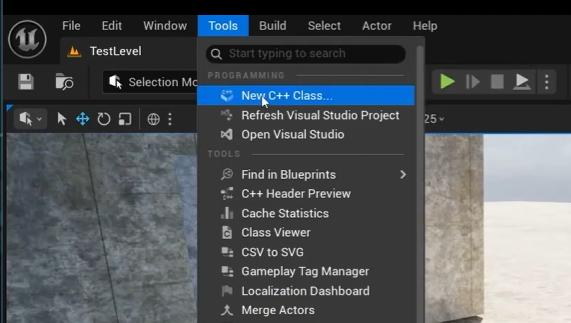
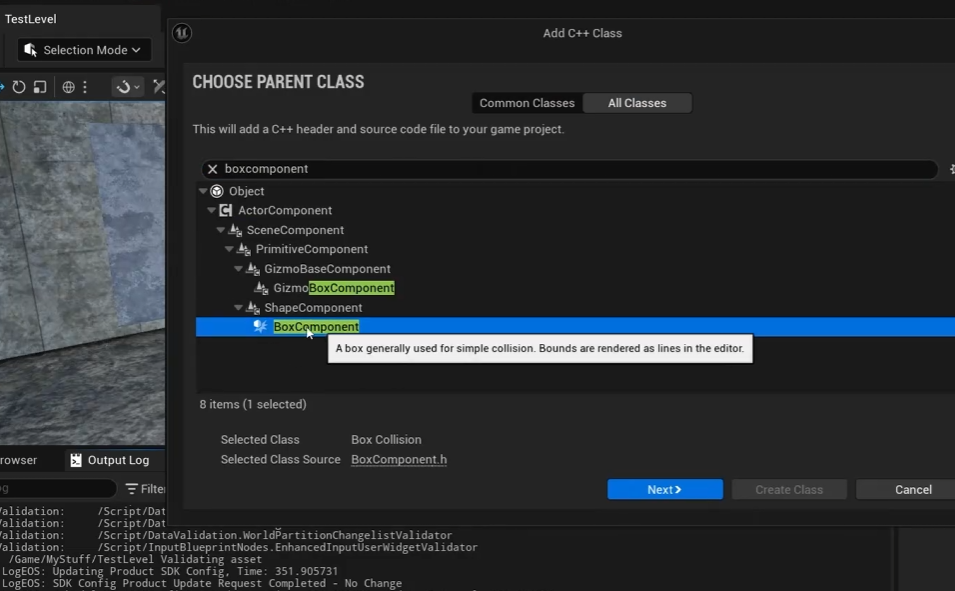
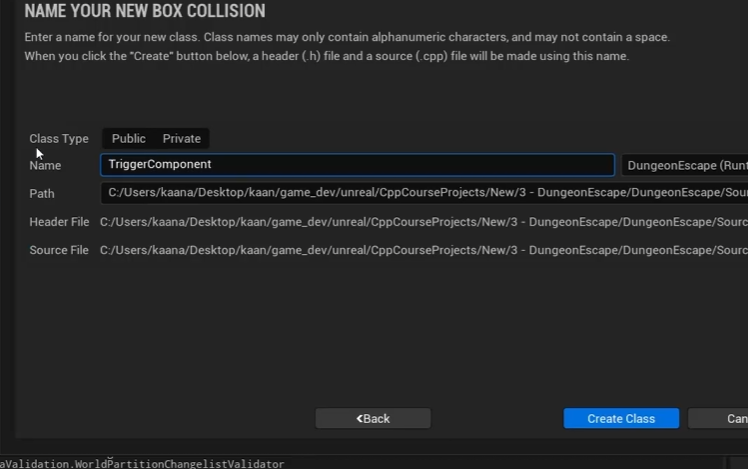
如何配置BoxComponent组件:
不知道为啥,这个BoxComponent组件创建后,很多基本的函数和定义不具备需要我们自己写,或者从其他的类中直接复制过来:
//TriggerComponent.h
#pragma once

#include "CoreMinimal.h"
#include "Components/BoxComponent.h"
#include "TriggerComponent.generated.h"

UCLASS(ClassGroup = (Custom), meta = (BlueprintSpawnableComponent))
class DUNGEONESCAPE_API UTriggerComponent : public UBoxComponent
{
	GENERATED_BODY()
public:
	/*此构造函数用于初始化,只调用一次,初始化的方式还有很多种:
    在构造函数初始化,在beginPlay()里面初始化,在UE的细节面板初始化
    它们之间的执行顺序是:
    构造函数 -> 细节面板(属性覆盖)-> BeginPlay()*/
    UTriggerComponent();
protected:
	// 此组件的初始化
	virtual void BeginPlay() override;

public:
	/*此函数每帧调用,;必须在构造函数里面
    写了PrimaryComponentTick.bCanEverTick = true;才能使用*/
	virtual void TickComponent(float DeltaTime, ELevelTick TickType,
		FActorComponentTickFunction* ThisTickFunction) override;
}
//TriggerComponent.cpp UTriggerComponent::UTriggerComponent() { /*将此组件设置为在游戏启动时初始化,并在每一帧都进行更新。 如果您不需要这些功能,可以将其关闭以提高性能。*/ PrimaryComponentTick.bCanEverTick = true; UE_LOG(LogTemp, Display, TEXT("Trigger component is constructed")); } void UTriggerComponent::BeginPlay() { Super::BeginPlay(); } void UTriggerComponent::TickComponent(float DeltaTime, ELevelTick TickType, FActorComponentTickFunction* ThisTickFunction) { Super::TickComponent(DeltaTime, TickType, ThisTickFunction); }
如何理解两个委托类实例:
OnComponentBeginOverlap委托: 其声明, 定义和实例化都在我们引用的祖宗头文件和继承的祖宗类里,无需我们自己操作,直接拿来用就行, 其作用就是存放函数并在触发时调用函数集合;触发的条件是物体重合;检测触发的是UE的物理引擎PhysX,它会检测场景中所有的激活的碰撞组件,这个物理引擎无需程序猿自己调用.
OnComponentEndOverlap委托: 和上面类似,不过这个是在物体从重合状态变成非重合状态时调用的.
OnComponentBeginOverLap委托是一个类的实例,其类的定义如下:
// 委托的固定签名(你不能改变)
DECLARE_DYNAMIC_MULTICAST_DELEGATE_SixParams(
FComponentBeginOverlapSignature, //委托类名

UPrimitiveComponent* OverlappedComponent, //参数1
AActor* OtherActor,                       //参数2
UPrimitiveComponent* OtherComp,           //参数3
int32 OtherBodyIndex,                     //参数4
bool bFromSweep,                          //参数5
const FHitResult& SweepResult             //参数6

);

//创建一个实例
FComponentBeginOverlapSignature OnComponentBeginOverlap;
OverlappedComponent 发出重叠事件的组件(即拥有这个事件的组件) OtherActor 参与重叠的另一个Actor(不是当前组件的拥有者,而是另一个Actor) OtherComp 参与重叠的另一个组件(属于OtherActor) OtherBodyIndex 用于物理身体索引(在物理模拟中,多个身体可能共享一个组件,这个索引指定了是哪个身体)。 bFromSweep 一个布尔值,表示重叠是否是由扫描(Sweep)引起的(扫描通常用于移动过程中检测碰撞),如果物体是走进来的为true,传送进来的为false SweepResult 如果bFromSweep为真,这个结构体包含了扫描命中的详细信息(比如命中位置、法线等)
响应函数的编写:
由于委托在定义的时候就强制规定了所有的函数都必须具备这6个参数, 所以即使你的函数用不到这六个参数,也必须在函数参数列表写入这六个参数.
//TriggerComponent.cpp

void UTriggerComponent::OnOverlapBegin(UPrimitiveComponent* OverlappedComp, AActor* OtherActor, UPrimitiveComponent* OtherComp, int32 OtherBodyIndex, bool bFromSweep, const FHitResult& SweepResult)
{
	/*
	标记未用的参数,明确告诉编译器"此物无用"(若有警报参数未使用,可写此物以消警报)
    (void)OtherBodyIndex;
    (void)bFromSweep;
    (void)SweepResult;
	*/
	if (Mover) {
		Mover->ShouldMove = true;
	}
}

void UTriggerComponent::OnOverlapEnd(UPrimitiveComponent* OverlappedComp, AActor* OtherActor, UPrimitiveComponent* OtherComp, int32 OherBodyIndex)
{
	if (Mover) {
		Mover->ShouldMove = false;
	}
}

//此函数在BeginPlay()调用即可完成绑定委托
void UTriggerComponent::BindDelegates(){
    OnComponentBeginOverlap.AddDynamic(this, &UTriggerComponent::OnOverlapBegin);
    OnComponentEndOverlap.AddDynamic(this, &UTriggerComponent::OnOverlapEnd);
}
简单的例子:
假设我们需要创建一个压力板,用来控制一个房间的门,压力板被触发--门上升打开,松开--门下降关闭.
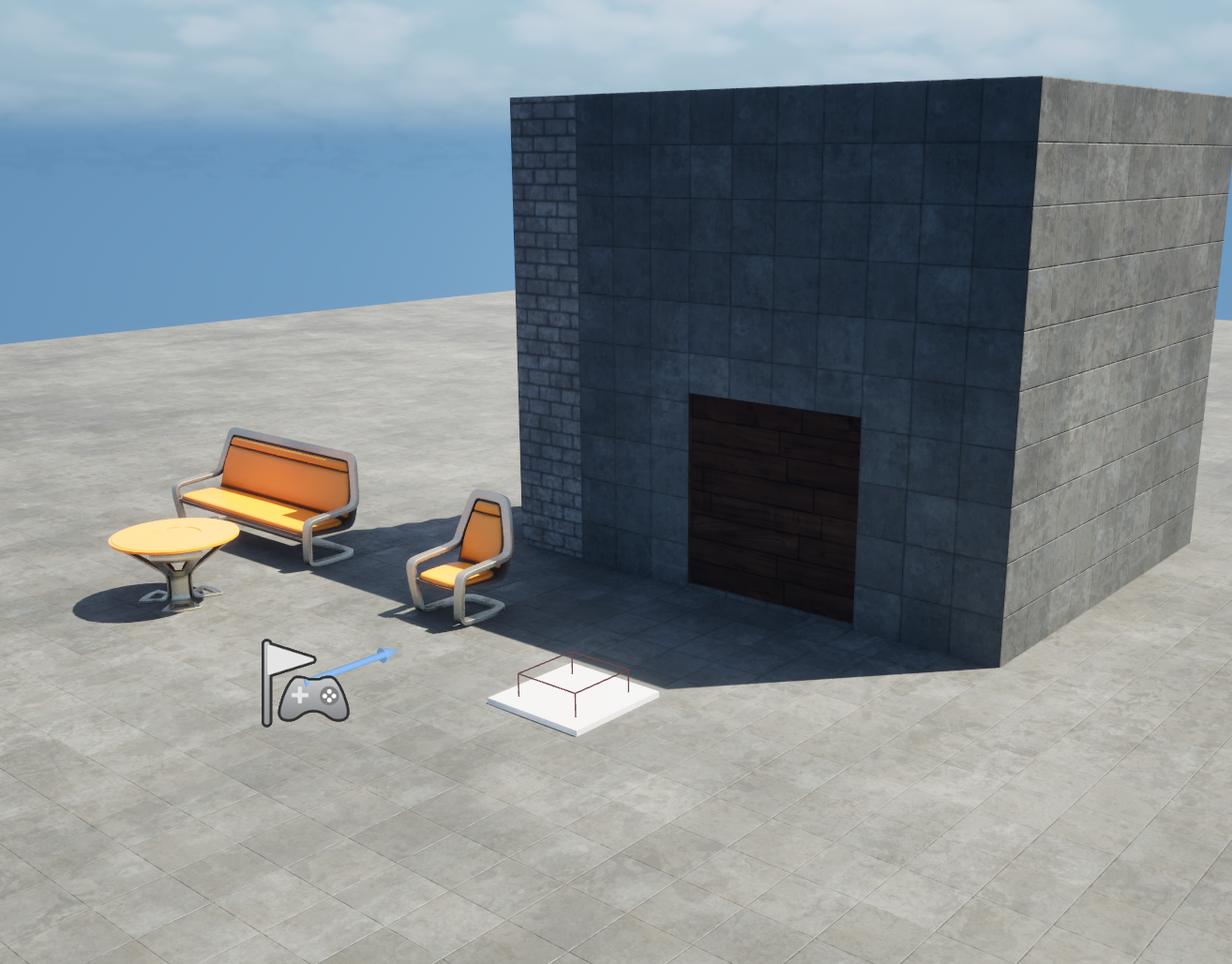
先解决门的问题:
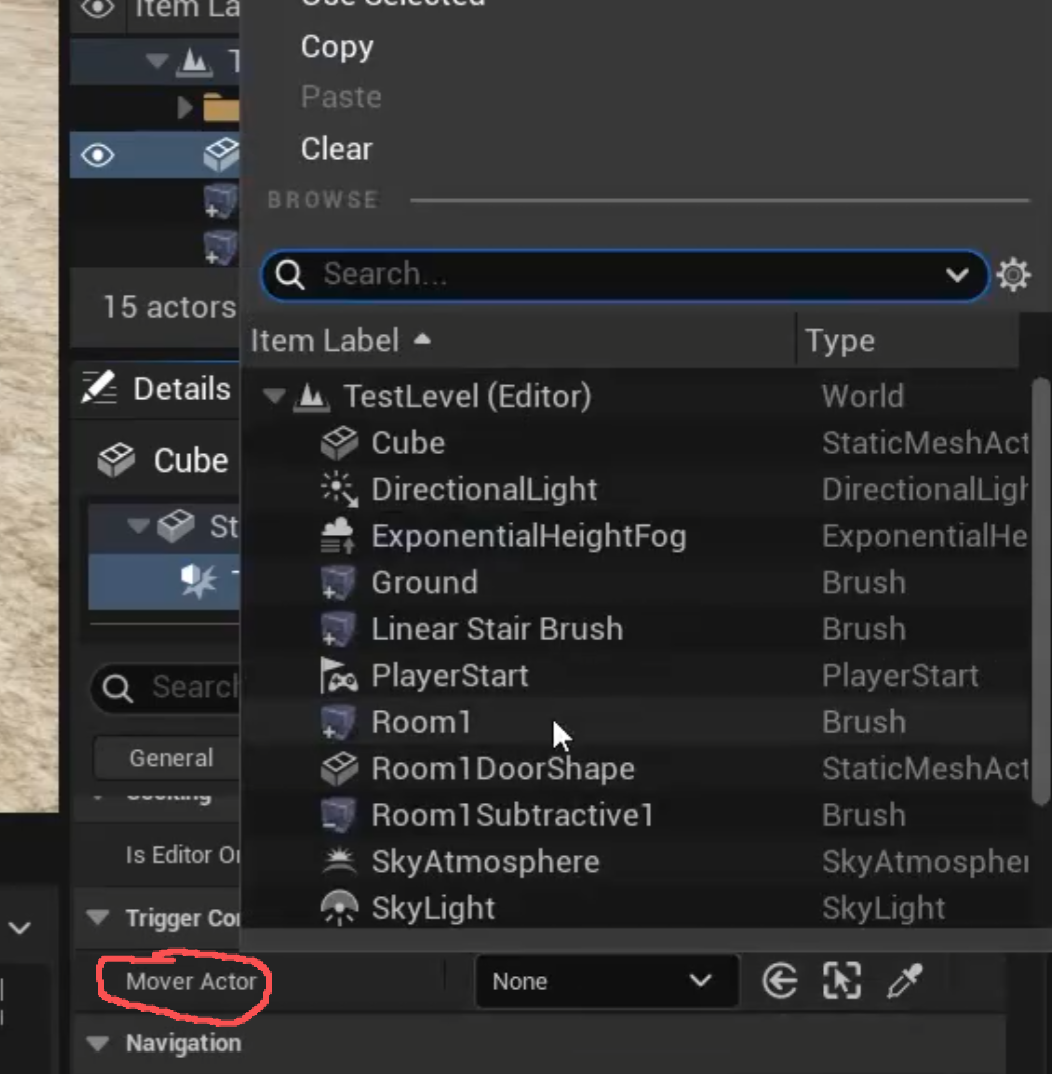
我们的目的是用压力板控制门, 那么我们需要建立压力板和门的链接, 由于只需用压力板控制门, 门无需控制压力板, 所以我们只需在压力板核心组件---碰撞箱 内存放门的指针, 然后把门指针在蓝图中存放进去就可以建立单向链接了
门的实现已经完成,由一个Mover组件的参数ShouldMove控制,ShouldMove=true 开门,ShouldMove= false 关门;我们可以先获取到门Actor的指针,然后再在门的里面找Mover组件,然后可以得到Mover的指针,然后就可以用Mover指针控制ShouldMove变量了.
1. 在UTriggerComponent类里面定义两个成员变量AActor* MoverActor;UMover* Mover;
UPROPERTY(EditAnywhere)
AActor* MoverActor;

UMover* Mover;
2. 进入UE的UTriggerComponent面板找到MoverActor变量,然后把场景里的门绑定到这个变量;
3. 在BeginPlay()里,利用Mover = MoverActor->FindComponentByClass<UMover>();找到Mover指针
if (MoverActor != nullptr)
{
	Mover = MoverActor->FindComponentByClass<UMover>();
	if (Mover != nullptr)
    {
		UE_LOG(LogTemp, Display, TEXT("Successfully found the mover component"));
	}
	else
    {
		UE_LOG(LogTemp, Display, TEXT("Mover is nullptr"));
	}
}
else
{
	UE_LOG(LogTemp, Display, TEXT("MoverActor is nullptr"));
}
解决压力板的问题:
向委托OnComponentBeginOverlap和OnComponentEndOverlap中写入函数OnOverlapBegin()和OnOverlapEnd();
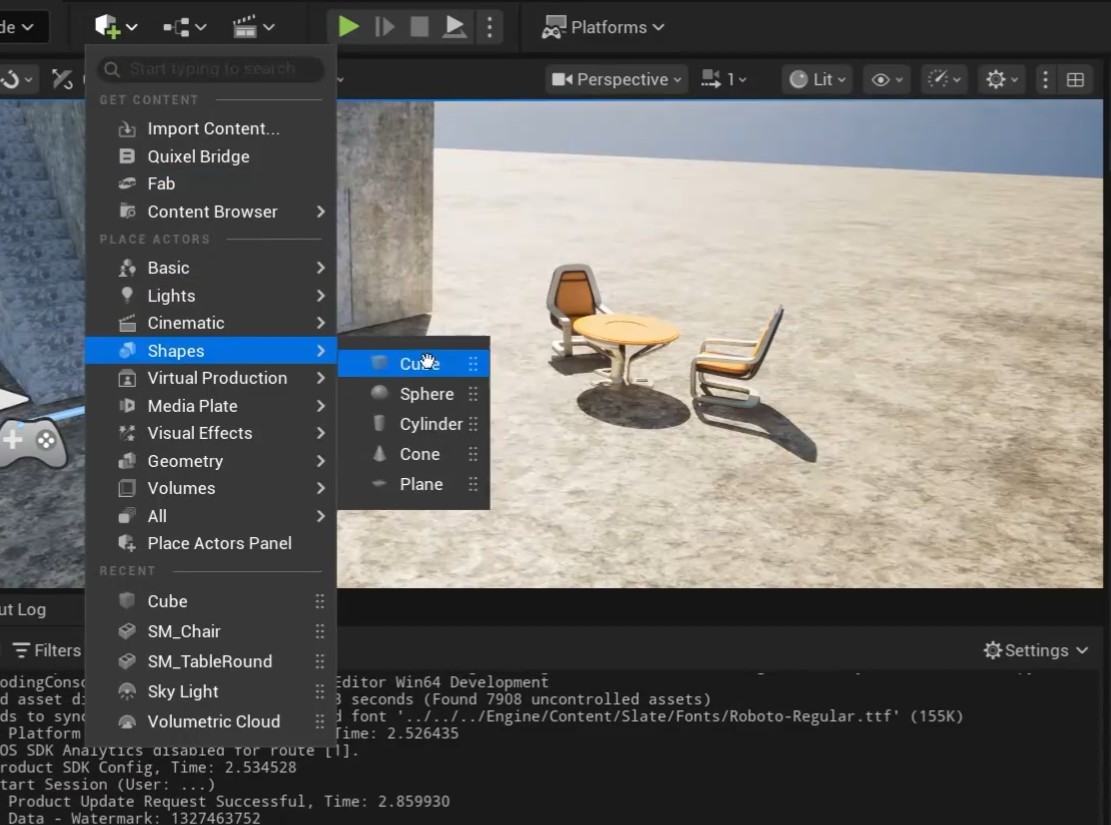
然后在场景内加入立方体用来搭载触发器组件:
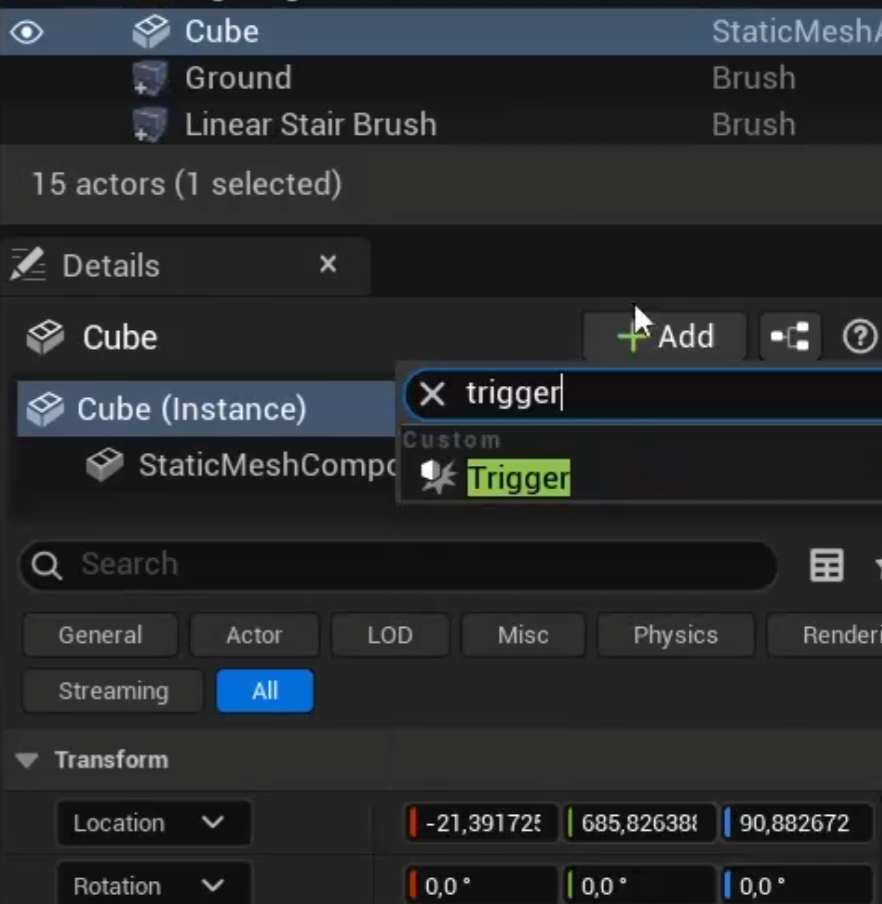
在组件面板找到触发器:
碰撞箱调整:
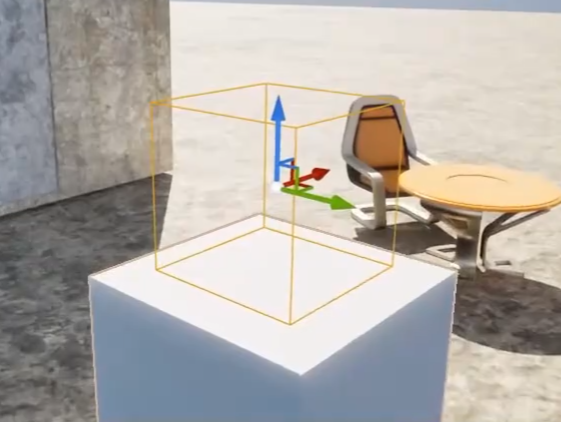
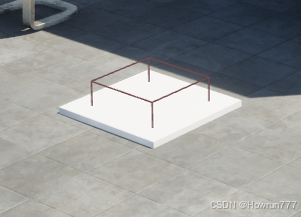
图左 黄色物体就是碰撞箱:如果你没找到, 可能是和方块重叠了, 你需要把他从方块里拖出来, 然后你可以把方块弄扁, 让方块看起来像个压力板.
使其达到 图右 这个效果就可以了, 白色部分是方块被我们压扁了, 实际上触发效果的是方框部分, 白色部分只是装饰
响应函数编写:
虽然你已经创建了压力板碰撞箱组件, 并且把场景需要控制的物体的指针给到了碰撞箱组件, 但是目前你还不能直接使用这个压力板, 因为你还没为触发和离开碰撞箱组件绑定响应函数, 因此你需要写两个响应函数,具体函数怎么写, 我在委托讲解的文章里详细讲了, 因为这涉及到了委托的机制:
草履虫也能看懂的虚幻引擎的委托机制https://blog.csdn.net/Howrun777/article/details/155206084代码如下:
//TriggerComponent.cpp

void UTriggerComponent::OnOverlapBegin(UPrimitiveComponent* OverlappedComp, AActor* OtherActor, UPrimitiveComponent* OtherComp, int32 OtherBodyIndex, bool bFromSweep, const FHitResult& SweepResult)
{
	/*
	标记未用的参数,明确告诉编译器"此物无用"(若有警报参数未使用,可写此物以消警报)
    (void)OtherBodyIndex;
    (void)bFromSweep;
    (void)SweepResult;
	*/
	if (Mover) {
		Mover->ShouldMove = true;
	}
}

void UTriggerComponent::OnOverlapEnd(UPrimitiveComponent* OverlappedComp, AActor* OtherActor, UPrimitiveComponent* OtherComp, int32 OherBodyIndex)
{
	if (Mover) {
		Mover->ShouldMove = false;
	}
}

//此函数在BeginPlay()调用即可完成绑定委托
void UTriggerComponent::BindDelegates(){
    OnComponentBeginOverlap.AddDynamic(this, &UTriggerComponent::OnOverlapBegin);
    OnComponentEndOverlap.AddDynamic(this, &UTriggerComponent::OnOverlapEnd);
}
下面是全部代码:
//TriggerComponent.h


// Fill out your copyright notice in the Description page of Project Settings.

#pragma once

#include "CoreMinimal.h"
#include "Components/BoxComponent.h"
#include "Mover.h"
#include "TriggerComponent.generated.h"


UCLASS(ClassGroup = (Custom), meta = (BlueprintSpawnableComponent))
class DUNGEONESCAPE_API UTriggerComponent : public UBoxComponent
{
	GENERATED_BODY()

public:
	UTriggerComponent();

protected:
	// Called when the game starts
	virtual void BeginPlay() override;

public:
	// Called every frame
	virtual void TickComponent(float DeltaTime, ELevelTick TickType,
		FActorComponentTickFunction* ThisTickFunction) override;

	UPROPERTY(EditAnywhere)
	bool IsPressurePlate = false;

	UPROPERTY(EditAnywhere)
	AActor* MoverActor;

	UMover* Mover;

	UFUNCTION()
	void OnOverlapBegin(UPrimitiveComponent* OverlappedComp, AActor* OtherActor,
		UPrimitiveComponent* OtherComp, int32 OtherBodyIndex, bool bFromSweep, const FHitResult&
		SweepResult);

	UFUNCTION()
	void OnOverlapEnd(UPrimitiveComponent* OverlappedComp, AActor* OtherActor,
		UPrimitiveComponent* OtherComp, int32 OherBodyIndex);
};
//TriggerComponent.cpp


#include "TriggerComponent.h"

//构造函数(只调用一次,组件初始化时)
UTriggerComponent::UTriggerComponent()
{
	//这里bCanEverTick=true可以允许组件使用TickComponent()函数,每帧调用
	PrimaryComponentTick.bCanEverTick = true;
}

//此函数每帧调用
void UTriggerComponent::BeginPlay()
{
	Super::BeginPlay();

	if (MoverActor != nullptr) {
		Mover = MoverActor->FindComponentByClass<UMover>();
		if (Mover != nullptr) {
			UE_LOG(LogTemp, Display, TEXT("Successfully found the mover component"));
		}
		else {
			UE_LOG(LogTemp, Display, TEXT("Mover is nullptr"));

		}
	}
	else {
		UE_LOG(LogTemp, Display, TEXT("MoverActor is nullptr"));
	}
	UE_LOG(LogTemp, Display, TEXT("Trigger component is alive!"));

	//IsPressurePlate是一个bool类型的成员变量,用于控制是否开启压力板检测,本质是控制是否绑定门开启的函数
	if (IsPressurePlate) {
		OnComponentBeginOverlap.AddDynamic(this, &UTriggerComponent::OnOverlapBegin);
		OnComponentEndOverlap.AddDynamic(this, &UTriggerComponent::OnOverlapEnd);
	}
}

void UTriggerComponent::TickComponent(float DeltaTime, ELevelTick TickType, FActorComponentTickFunction* ThisTickFunction)
{
	Super::TickComponent(DeltaTime, TickType, ThisTickFunction);

}

/*第一个绑定函数:此函数通过修改门的Mover组件的ShouldMove变量, 控制门的移动,
函数名可自定义,参数必须严格符合OnComponentBeginOverlap委托的定义*/
void UTriggerComponent::OnOverlapBegin(UPrimitiveComponent* OverlappedComp, AActor* OtherActor, UPrimitiveComponent* OtherComp, int32 OtherBodyIndex, bool bFromSweep, const FHitResult& SweepResult)
{
	/*
	标记未用的参数,明确告诉编译器"此物无用"(若有警报参数未使用,可写此物以消警报)
    (void)OtherBodyIndex;
    (void)bFromSweep;
    (void)SweepResult;
	*/
	if (Mover) {
		Mover->ShouldMove = true;
	}
}
//第二个绑定函数:函数名可自定义,参数必须严格符合OnComponentEndOverlap委托的定义
void UTriggerComponent::OnOverlapEnd(UPrimitiveComponent* OverlappedComp, AActor* OtherActor, UPrimitiveComponent* OtherComp, int32 OherBodyIndex)
{
	if (Mover) {
		Mover->ShouldMove = false;
	}
}
下面是关于门的Mover组件的代码:
//Mover.h

// Fill out your copyright notice in the Description page of Project Settings.

#pragma once

#include "CoreMinimal.h"
#include "Components/ActorComponent.h"
#include "Mover.generated.h"


UCLASS( ClassGroup=(Custom), meta=(BlueprintSpawnableComponent) )
class DUNGEONESCAPE_API UMover : public UActorComponent
{
	GENERATED_BODY()

public:
	// Sets default values for this component's properties
	UMover();

protected:
	// Called when the game starts
	virtual void BeginPlay() override;

public:
	// Called every frame
	virtual void TickComponent(float DeltaTime, ELevelTick TickType,
		FActorComponentTickFunction* ThisTickFunction) override;

	UPROPERTY(EditAnywhere)
	FVector MoveOffset;

	UPROPERTY(EditAnywhere)
	float MoveTime = 4.0f;

	UPROPERTY(EditAnywhere)
	bool ShouldMove = false;

	UPROPERTY(VisibleAnywhere)
	bool ReachedTarget = false;

	FVector TargetLocation;
	FVector StartLocation;

};
//Mover.cpp

// Fill out your copyright notice in the Description page of Project Settings.

#include "Math/UnrealMathUtility.h"
#include "Mover.h"

// Sets default values for this component's properties
UMover::UMover()
{
	// Set this component to be initialized when the game starts, and to be ticked every frame.  You can turn these features
	// off to improve performance if you don't need them.
	PrimaryComponentTick.bCanEverTick = true;

	// ...
}


// Called when the game starts
void UMover::BeginPlay()
{
	Super::BeginPlay();
	StartLocation = GetOwner()->GetActorLocation();
	// ...
	ShouldMove = false; // 强制设置为false
	TargetLocation = StartLocation;

}


// Called every frame
void UMover::TickComponent(float DeltaTime, ELevelTick TickType, FActorComponentTickFunction* ThisTickFunction)
{
	Super::TickComponent(DeltaTime, TickType, ThisTickFunction);

	UE_LOG(LogTemp, Display, TEXT("%d"),ShouldMove);

	if (ShouldMove==true) {
		TargetLocation = StartLocation + MoveOffset;
	}
	else if (ShouldMove == false) {
		TargetLocation = StartLocation;
	}

	FVector CurrentLocation = GetOwner()->GetActorLocation();

	ReachedTarget = CurrentLocation.Equals(TargetLocation);


	if (ReachedTarget == false) {

		float Speed = MoveOffset.Length() / MoveTime;

		FVector NewLocation = FMath::VInterpConstantTo(CurrentLocation,
			TargetLocation, DeltaTime, Speed);
		GetOwner()->SetActorLocation(NewLocation);

		UE_LOG(LogTemp, Display, TEXT("%s is at location %s"),
			*GetOwner()->GetActorNameOrLabel(), *CurrentLocation.ToCompactString());
	}
}





 扫一扫
扫一扫


 903
903

 被折叠的 条评论
为什么被折叠?
被折叠的 条评论
为什么被折叠?
 到【灌水乐园】发言





