


 本文档详细介绍了如何对接物联网平台上的NB设备,包括驱动的目的、开发文档要求和代码示例。代码示例中展示了如何使用Python SDK与平台进行数据交互,涉及HTTP请求、签名算法和数据上传等关键步骤。
本文章为原创,转载请注明出处!
账号:iotos_test 密码:iotos123
代码地址:IOTOSDK-Python: IOTOS Python版本SDK,自带原生接口和采集引擎 (gitee.com)
目录
4.3、根据中台获取的数据及开发文档进行获取数据再将其上传的操作
1、驱动目的
与指定平台上的NB设备对接
2、开发文档要求
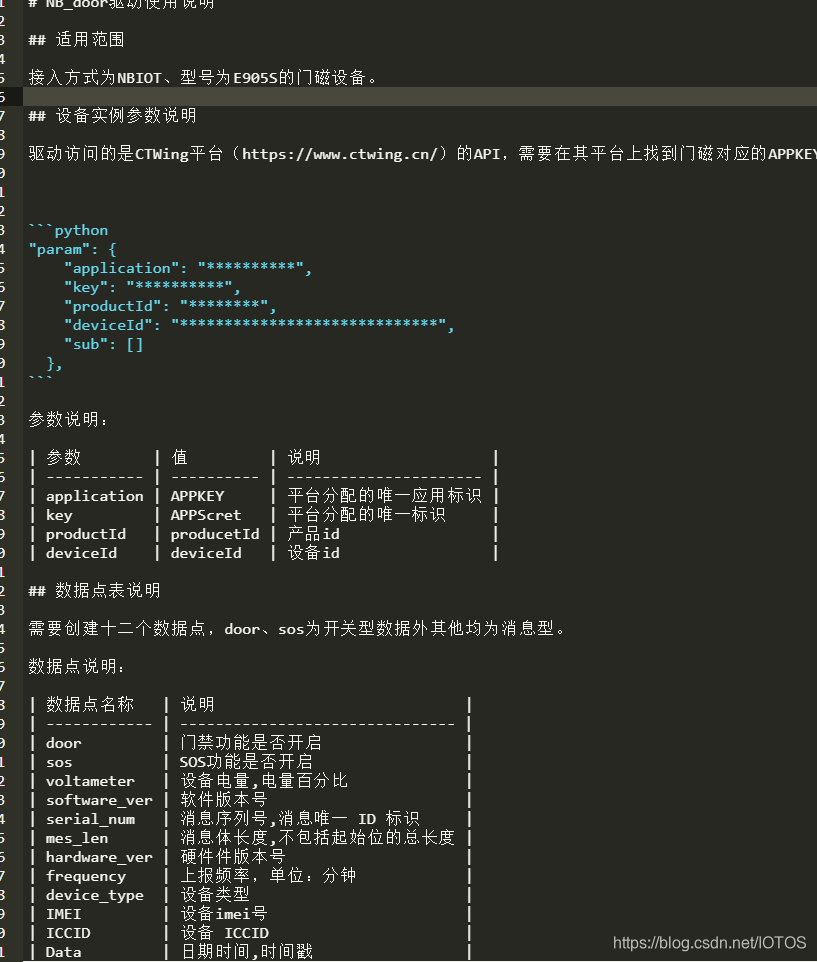
3、代码示例
#coding=utf-8
import sys
sys.path.append("..")
from driver import *
import requests
import time
import datetime
from urllib import urlencode
import urllib2
import base64
import json
import urllib
import hmac
from hashlib import sha1

#签名算法
def signature(key, application, timestamp, param, body):
    code = "application:" + application + "\n" + "timestamp:" + timestamp + "\n"
    for v in param:
        code += str(v[0]) + ":" + str(v[1]) + "\n"
    if (body is not None) and (body.strip()) :
        code += body + '\n'
    print("param=" + str(param))
    print("body=" + str(body))
    print("code=" + str(code))
    #print(binascii.b2a_hex(code))
    return base64.b64encode(hash_hmac(key, code, sha1))

def hash_hmac(key, code, sha1):
    hmac_code = hmac.new(key.encode(), code.encode(), sha1)
    print("hmac_code=" + str(hmac_code.hexdigest()))
    return hmac_code.digest()


def getTimeOffset(url):
    request = urllib2.Request(url)
    start = int(time.time() * 1000)
    response = urllib2.urlopen(request)
    end = int(time.time() * 1000)

    if response is not None:
        return int(int(response.headers['x-ag-timestamp']) - (end + start) / 2);
    else:
        return 0

baseUrl = '###########' # 地址
timeUrl = '##############' # 地址
offset = getTimeOffset(timeUrl)

#发送http请求函数
def sendSDKRequest(path, head, param, body, version, application, MasterKey, key, method=None, isNeedSort=True,isNeedGetTimeOffset=False):
    paramList = []
    for key_value in param:
        paramList.append([key_value, param[key_value]])
    print("paramList=" + str(paramList))
    if (MasterKey is not None) and (MasterKey.strip()):
        paramList.append(['MasterKey', MasterKey])
    if isNeedSort:
        paramList = sorted(paramList)

    headers = {}
    if (MasterKey is not None) and (MasterKey.strip()):
        headers['MasterKey'] = MasterKey
    headers['application'] = application
    headers['Date'] = str(datetime.datetime.now())
    headers['version'] = version
    # headers['Content-Type'] = Content_Type
    # headers['sdk'] = sdk
    # headers['Accept'] = Accept
    # headers['User-Agent'] = User_Agent
    # headers['Accept-Encoding'] = 'gzip,deflate'

    temp = dict(param.items())
    if (MasterKey is not None) and (MasterKey.strip()):
        temp['MasterKey'] = MasterKey

    url_params = urlencode(temp)

    url = baseUrl + path
    if (url_params is not None) and (url_params.strip()):
        url = url + '?' + url_params
    print("url=" + str(url))
    global offset
    if isNeedGetTimeOffset:
        offset = getTimeOffset(timeUrl)
    timestamp = str(int(time.time() * 1000) + offset)
    headers['timestamp'] = timestamp
    sign = signature(key, application, timestamp, paramList, body)
    headers['signature'] = sign

    headers.update(head)

    print("headers : %s" % (str(headers)))

    if (body is not None) and (body.strip()):
        request = urllib2.Request(url=url, headers=headers, data=body.encode('utf-8'))
    else:
        request = urllib2.Request(url=url, headers=headers)
    if (method is not None):
        request.get_method = lambda: method
    response = urllib2.urlopen(request)
    if ('response' in vars()):
        print("response.code: %d" % (response.code))
        return response
    else:
        return None

def QueryDeviceStatus(appKey, appSecret, body):
    path = '/aep_device_status/deviceStatus'
    head = {}
    param = {}
    version = '20181031202028'
    application = appKey
    key = appSecret
    response = sendSDKRequest(path, head, param, body, version, application, None, key, 'POST')
    if response is not None:
        return response.read()
    return None

def getDeviceStatusHisInPage(appKey, appSecret, body):
    path = '/aep_device_status/getDeviceStatusHisInPage'
    head = {}
    param = {}
    version = '20190928013337'
    application = appKey
    key = appSecret
    response = sendSDKRequest(path, head, param, body, version, application, None, key, 'POST')
    if response is not None:
        return response.read()
    return None


class Project(IOTOSDriverI):
    def InitComm(self,attrs):
        self.setPauseCollect(False)
        self.setCollectingOneCircle=True
        self.online(True)

        try:
            # 获取中台配置的参数(必不可少)
            self.Nbapplication=self.sysAttrs['config']['param']['application']   # APPKEY
            self.Nbkey=self.sysAttrs['config']['param']['key']   # APPScret
            self.NbproductId=self.sysAttrs['config']['param']['productId']
            self.NbdeviceId=self.sysAttrs['config']['param']['deviceId']
        except Exception,e:
            self.debug(u'获取参数失败!'+e.message)

    def Collecting(self,dataId):
        # application = "yp4RWxBkpU"  # APPKEY
        # key = "hPpzvjeGzd"  # APPScret
        # productId="15031938"
        # deviceId="4b3869025fea421bb5a186b90bce90da"

        timearry = (datetime.datetime.now() + datetime.timedelta(days=-29)).timetuple()  # 当前时间减去29天后转化为timetuple的格式用于转换成timestamp格式
        begin_timestamp = str(int(time.mktime(timearry) * 1000) + offset)  # "1624550400000"
        end_timestamp = str(int(time.time() * 1000) + offset)  # "1624982399000"
        page_size = "1"
        page_timestamp = ""

        body_HisInPage ='{"productId":"' + self.NbproductId + '","deviceId":"' + self.NbdeviceId + '","begin_timestamp":"' + begin_timestamp + '","end_timestamp":"' + end_timestamp + '","page_size":' + page_size + ',"page_timestamp":"' + page_timestamp + '"}'

        #发送请求,处理数据
        res = getDeviceStatusHisInPage(self.Nbapplication, self.Nbkey, body_HisInPage)
        r = eval(res)

        if bin(int(r["deviceStatusList"][0]["start_stop"]))[-3:-2]=='0':
            door_value=False
        else:
            door_value=True
        if bin(int(r["deviceStatusList"][0]["start_stop"]))[-4:-3]=='0':
            sos_value=False
        else:
            sos_value=True

        try:
            self.setValue(u'door', door_value)
            self.setValue(u'sos', sos_value)
            self.setValue(u'hardware_ver', r["deviceStatusList"][0]["hardware_ver"])
            self.setValue(u'voltameter', r["deviceStatusList"][0]["voltameter"])
            self.setValue(u'software_ver', r["deviceStatusList"][0]["software_ver"])
            self.setValue(u'serial_num', r["deviceStatusList"][0]["serial_num"])
            self.setValue(u'mes_len', r["deviceStatusList"][0]["mes_len"])
            self.setValue(u'frequency', r["deviceStatusList"][0]["frequency"])
            self.setValue(u'IMEI', r["deviceStatusList"][0]["IMEI"])
            self.setValue(u'ICCID', r["deviceStatusList"][0]["ICCID"])
            self.setValue(u'device_type', r["deviceStatusList"][0]["device_type"])
            self.setValue(u'Data', time.strftime("%Y-%m-%d %H:%M:%S",time.localtime(r["deviceStatusList"][0]["Data"])))

            self.debug(u'数据上传成功')
        except Exception,e:
            self.debug(u'数据上传失败'+e.message)

        time.sleep(7)
        return ()
4、驱动解析
4.1、导入指定依赖包
import sys
sys.path.append("..")
from driver import *
import requests
import time
import datetime
from urllib import urlencode
import urllib2
import base64
import json
import urllib
import hmac
from hashlib import sha1
4.2、从中台中获取数据
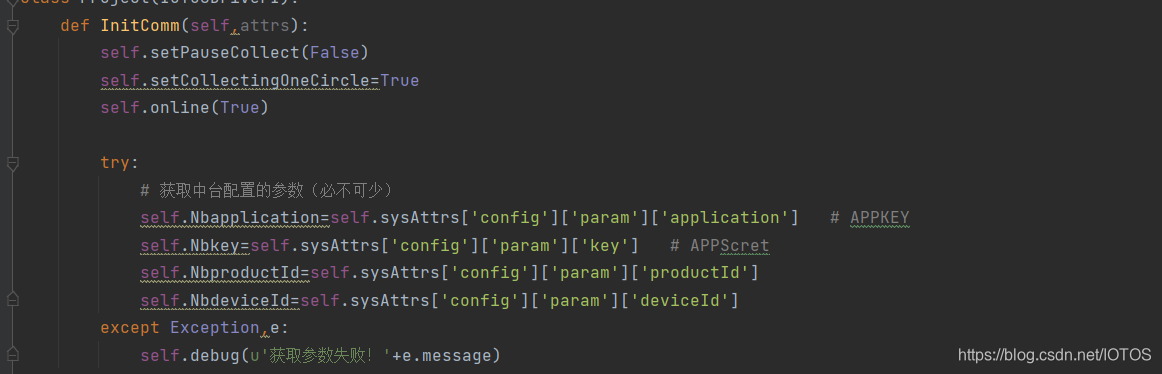
4.3、根据中台获取的数据及开发文档进行获取数据再将其上传的操作
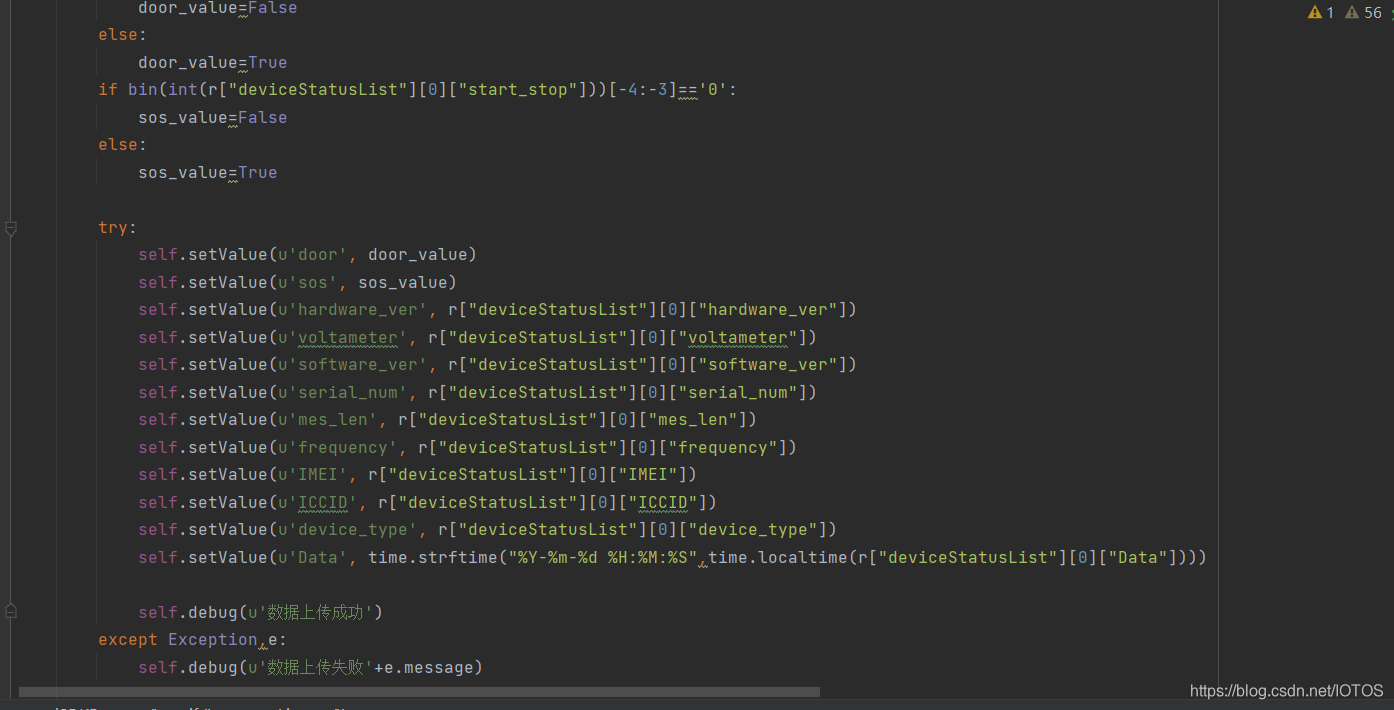
4.4、执行效果如下
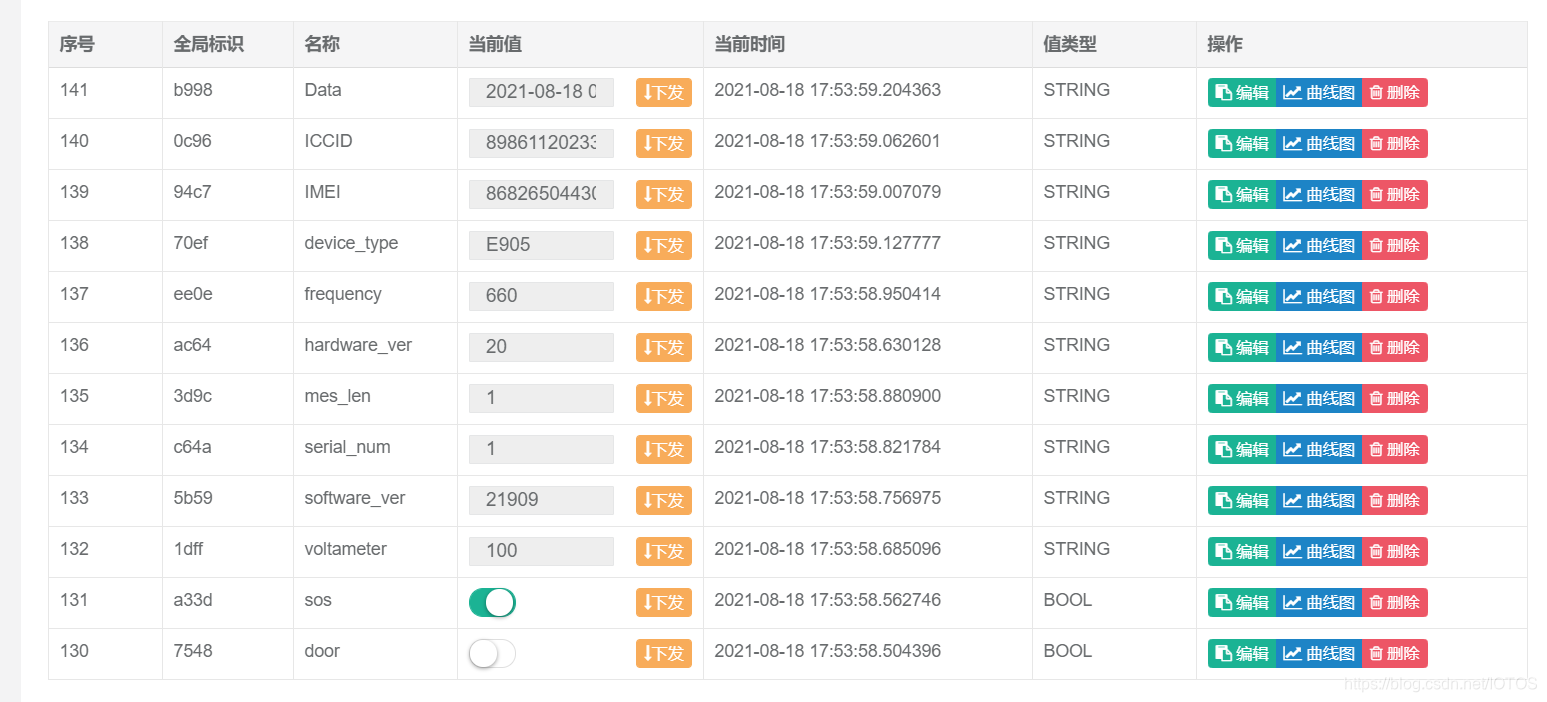





 扫一扫
扫一扫


 4588
4588

 被折叠的 条评论
为什么被折叠?
被折叠的 条评论
为什么被折叠?
 到【灌水乐园】发言





