


文章目录
- 前言
- 一、data visualization是什么?
- 二、Advantage & Disadvantage
- 三、Importance of Data visualization
- 四、Data Visualization and Big Data
- 五、Applications and Examples / 应用场景与经典案例
- 六、Key Visualization Techniques / 核心可视化技术
- 七、General Types of Visualizations / 常见可视化类型
- 八、Specific Chart Types / 特定图表类型
- 九、Anscombe's Quartet / 安斯库姆四重奏
- 十、Power BI Ecosystem / Power BI 生态系统
前言
In our increasingly data-driven world, it’s more important than ever
to have accessible ways to view and understand data. After all, the
demand for data skills in employees is steadily increasing each year.
Employees and business owners at every level need to have an understanding of data and of its impact.
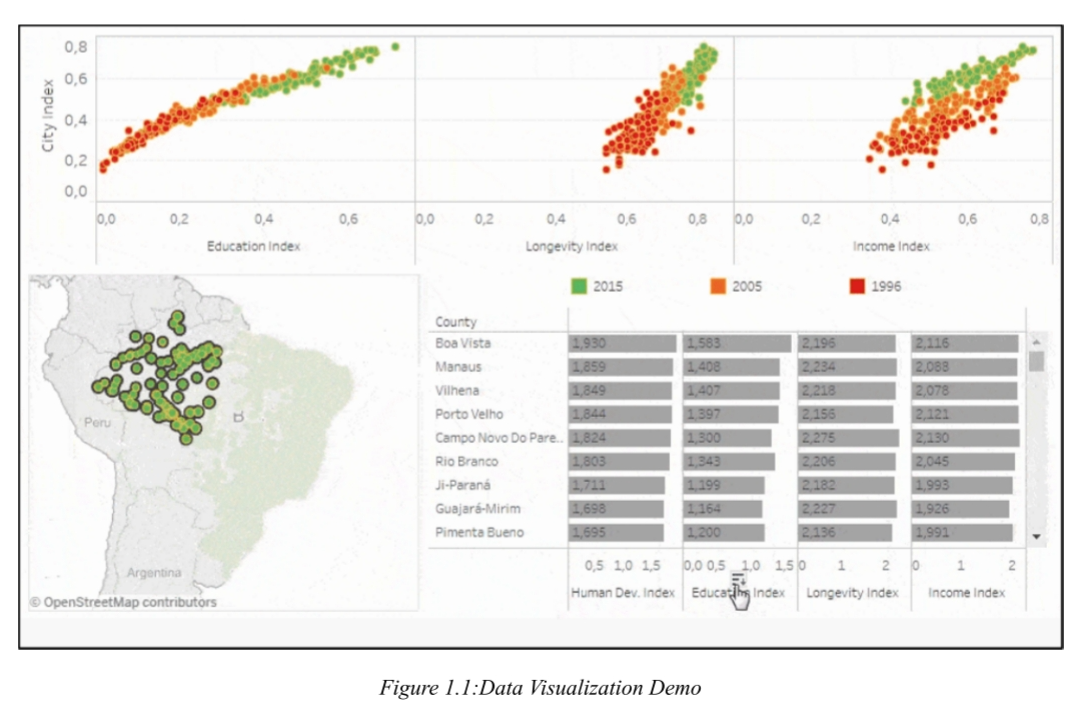
在我们日益数据驱动的世界里,拥有便捷的查看和理解数据的方式比以往任何时候都更为重要。毕竟,员工对数据技能的需求每年都在稳步增长。各级员工和企业主都需要理解数据及其影响。这时数据可视化就派上用场了。为了让数据更易获取和易于理解,仪表盘形式的数据可视化成为许多企业分析和共享信息的首选工具。
一、data visualization是什么?
Data visualization is the process of representing data using charts, graphs, maps, and dashboards to identify patterns, trends, and insights easily. It helps convert complex data into understandable information.
数据可视化是使用图表、图形、地图和仪表板来表示数据的过程,以轻松识别模式、趋势和见解。它有助于将复杂的数据转换为可理解的信息。
-
数据可视化是通过图表、图形和地图等工具以图形方式呈现数据的过程,使用户能够轻松识别趋势、模式和异常值。它将复杂的数据集转换为视觉上引人注目的和易访问的格式,使技术和非技术受众更容易有效地解释和使用信息。在当今的大数据环境中,可视化工具对于分析大量信息并做出明智的、数据驱动的决策至关重要。
-
此外,它为员工或企业主提供了向非技术受众展示数据的极佳方式,避免混淆。
-
Data visualization is the process of presenting data graphically through tools like charts, graphs, and maps, enabling users to identify trends, patterns, and outliers easily. It transforms complex datasets into visually compelling and accessible formats, making it easier for both technical and non-technical audiences to interpret and use the information effectively. In today’s Big Data landscape, visualization tools are essential for analyzing massive amounts of information and making informed, data-driven decisions.
-
企业每天都会产生大量的数据,例如销售数据、营销指标和运营kpi。如果没有可视化,从这些数据中发现有意义的见解可能会非常困难。通过利用视觉效果,用户可以快速识别模式、相关性和趋势,从而促进更快、更有效的决策。现代工具还集成了实时数据分析和人工智能驱动的见解,揭示了kpi、市场和外部因素之间的关系。
-
Businesses generate vast amounts of data daily, such as sales figures, marketing metrics, and operational KPIs. Without visualization, uncovering meaningful insights from this data can be overwhelming. By leveraging visuals, users can quickly identify patterns, correlations, and trends, facilitating faster and more effective decision-making. Modern tools also integrate real-time data analysis and AI-driven insights, revealing relationships between KPIs, markets, and external factors.
二、Advantage & Disadvantage
(一)Advantage
1.Instinctive Analysis 直观分析
- If you were to calculate all the data on your own, it would take a long time to reach a
conclusion. But when you’re looking at a graph or a chart, you can almost instinctively detect what’s going on. - 如果你自己计算所有数据,得出结论会花费很长时间。但当你看图表或图表时,几乎能本能地察觉到发生了什么。(
图标比起单独的数据更加直观清晰) - For example, does it look like there’s a clear trend, or is the data more chaotic? Humans are exceptionally good at processing visual information, so it makes sense that data visuals would appeal to us.
- 比如,看起来有明显的趋势吗,还是数据更混乱?人类在处理视觉信息方面非常出色,因此数据视觉吸引我们是很合理的。
2.Efficient Analysis 高效分析
- Visuals make it easy to understand trends, compare variables, and spot long-term patterns.
- 可视化可以让你更容易理解趋势、比较变量和发现长期模式。整合所有的特点实现高效,这是可视化的好处
3.Trend Analysis 趋势分析
- Data visualization is also ideal for long-term trend analysis. It’s easy to get caught up in small jumps or plunges, but how are the numbers changing overall, and over the long term? With the help of a sufficiently sized graph or chart, you can easily spot the emergence of patterns.
- 数据可视化也非常适合长期趋势分析。很容易陷入小幅度的跳跃或跌倒,但整体和长期来看,数字是如何变化的?借助足够大的图表,你可以轻松发现模式的出现。
4.Real-Time Data Analysis 实时数据分析
-
Real-time data analysis is becoming more popular, because of its ability to help people make faster and more immediate decisions. But it’s hard to conduct real-time analytics without a visual component;
-
实时数据分析正变得越来越受欢迎,因为它能帮助人们更快、更即时地做出决策。但没有可视化组件,进行实时分析很难;
-
otherwise, you’ll need to spend more time analyzing the data on your own. A compelling visual can make it clear how your numbers are changing in real-time.
-
否则,你需要花更多时间自己分析数据。一个引人注目的视觉效果可以清楚地显示你的数据在实时变化。
5.Easy Communication and sharing 易于交流与共享
-
Data visuals are also extremely helpful for communicating data to people who might have difficulty understanding your deeper methodologies, or with people who only have a limited time to take in your conclusions. Even people with limited data analytics experience can notice a growth trend when presented with the right kind of visual aid.
-
他们可能难以理解你更深层次的方法,或者与那些只有有限时间接受你的结论的人在一起。即使是数据分析经验有限的人,在获得合适的视觉辅助工具时,也能注意到增长趋势。
6.Broad Accessibility 广泛的可访问性
- 通过使数据对用户友好来减少对数据科学家的依赖
- Reduces the dependency on data scientists by making data user-friendly.
(二)Disadvantage
1.Oversimplification 过度简化
- Key details or outliers might be overlooked.
- 关键细节或异常值可能会被忽略
2.Misrepresentation 错误表述
- Poorly designed visuals can lead to inaccurate conclusions.
- 设计不良的视觉效果可能导致不准确的结论。
3.Bias and Errors 偏见与错误
- Confirmation bias and design flaws can mislead viewers.
- 确认偏见和设计缺陷会误导观众。
三、Importance of Data visualization

四、Data Visualization and Big Data
- 随着大数据和数据分析的兴起,数据可视化变得越来越重要。随着公司使用机器学习来收集大量数据集,可视化简化了以利益相关者可以理解的方式解释和呈现这些数据的过程。与饼图和条形图等传统方法不同,大数据可视化通常采用热图和热图等先进技术。这些方法需要健壮的系统来处理原始数据和呈现复杂的图形表示。
- Data visualization has gained increasing importance with the rise of big data and data analysis. As companies use machine learning to gather massive datasets, visualization simplifies the process of interpreting and presenting this data in a manner that stakeholders can understand. Unlike traditional methods like pie charts and bar graphs, big data visualization often employs advanced techniques such as heat maps and fever charts. These methods require robust systems to process raw data and render complex graphical representations.
(一)The Rising Importance / 重要性日益提升
- With the rise of big data and machine learning, companies gather massive datasets that need to be interpreted and presented clearly.
- 随着大数据(big data) 和机器学习的兴起,公司收集的数据集日益庞大,需要清晰地解读和呈现。
- Visualization simplifies the process of interpreting data for stakeholders at all levels.
- 可视化简化了为各级利益相关者(stakeholders) 解读数据的过程。
(二)Advanced Techniques for Big Data / 面向大数据的进阶技术
- Traditional charts like pie charts and bar graphs may be insufficient for massive datasets.
- 传统的饼图(pie charts) 和条形图(bar graphs) 可能不足以呈现大规模数据集。
- Big data visualization often uses:
- Heat maps / 热力图
- Fever charts / 热度图
- Treemaps / 矩形树图
- These require robust systems to process raw data and render complex graphical representations.
- 这些图表需要强大的系统(robust systems) 来处理原始数据并渲染复杂的图形表示。
(三)Benefits of Big Data Visualization / 大数据可视化的优势
- Improved decision-making: simplifies complex datasets for quick insights.
- 提升决策能力:简化复杂数据集,快速获取洞察。
- Enhanced communication: enables business owners and stakeholders to easily grasp the data’s story.
- 增强沟通效果:让企业主和利益相关者轻松理解数据背后的故事。
- Versatile use cases: applicable in healthcare, logistics, government, marketing, and scientific research.
- 多场景适用:可应用于医疗、物流、政府、营销和科学研究等领域。
(四)Challenges of Big Data Visualization / 大数据可视化的挑战
- Specialized expertise: hiring specialists to choose the right data sets and visualization techniques.
- 专业技能需求:需聘请专家选择合适的可视化技术与数据集。
- Resource demands: high-performance hardware, storage, and cloud integration.
- 资源消耗大:需要高性能硬件、存储系统及云集成。
- Data quality dependency: insights depend on the accuracy of underlying data, emphasizing data governance.
- 数据质量依赖:洞察的准确性依赖于底层数据质量,凸显数据治理(data governance) 的重要性。
五、Applications and Examples / 应用场景与经典案例
(一)Government Budget / 政府预算
- Example: A color-coded treemap designed by The White House during Obama’s presidency broke down the US 2016 budget for better understanding.
- 案例:奥巴马总统任期内白宫设计的彩色矩形树图(treemap) ,将美国2016年预算可视化,便于公众理解。
(二)World Population / 世界人口
- Example: A world map showing population density.
- 案例:使用世界地图(world map) 展示人口密度分布。
(三)Profit and Loss / 利润与亏损
- Example: Business companies often use pie charts or bar graphs to show annual profit or loss margins.
- 案例:企业常用饼图(pie chart) 或条形图(bar graph) 展示年度盈亏。
(四)Sales and Marketing / 销售与营销
- Example: Marketing teams use visualizations to track how marketing efforts affect traffic trends over time.
- 案例:营销团队通过可视化追踪营销活动对流量趋势(traffic trends) 随时间的影响。
- Digital advertising spending reached $566 billion in 2022 and is projected to exceed $700 billion by 2025 (Statista).
- 数字广告支出在2022年达到5660亿美元,预计2025年将超过7000亿美元(Statista数据)。
(五)Healthcare / 医疗健康
- Example: Choropleth maps display divided geographical areas colored according to a numeric variable, such as heart disease mortality rates.
- 案例:等值区域图(choropleth maps) 用不同颜色表示地理区域上的数值变量,如心脏病死亡率。
(六)Scientific Research / 科学研究
- Example: Scientific visualization (SciVis) helps researchers gain insights from experimental data.
- 案例:科学可视化(SciVis,Scientific Visualization) 帮助研究人员从实验数据中获得新发现。
- Data scientists frequently use Python or proprietary tools to build visualizations and identify hidden patterns.
- 数据科学家常用Python或商业工具构建可视化,发现隐藏模式。
(七)Logistics / 物流
- Example: Shipping companies use visualization tools to determine the best global shipping routes.
- 案例:航运公司使用可视化工具确定最佳全球运输路线(best global shipping routes) 。
(八)Famous Visualizations / 著名可视化作品
- NASA’s Perpetual Ocean / 美国宇航局“永恒之海”:Shows global ocean currents using satellite data.
- Asteroid Discovery / 小行星发现史:Maps asteroid discoveries from 1980 to 2010.
- Twitter Social Connections / Twitter社交网络:Visualizes networks of Twitter users discussing specific topics like “Hadoop”.
六、Key Visualization Techniques / 核心可视化技术
(一)Know the Target Audience / 了解目标受众
- Designing charts should always be done based on the audience that will view it.
- 设计图表应始终基于目标受众(based on the audience) 的需求和背景。
(二)Create a Clear Goal / 设定清晰目标
- Establish a logical narrative and ensure the content type is relevant.
- 建立逻辑叙事(logical narrative) ,确保内容类型匹配目标。
(三)Choose the Right Chart Type / 选择合适的图表类型
- Pie charts do not complement every information; bar graphs do not show every statistic clearly.
- 饼图(pie charts) 不适合所有数据,条形图(bar graphs) 也不能清晰展示所有统计量。
- Choose the chart type accurately to put forth the information effectively.
- 准确选择图表类型,才能有效传达信息。
(四)Contextual Use of Colors / 结合语境使用颜色
- Use colors meaningfully: e.g., red for declines, green for growth.
- 有意义地使用颜色:例如,红色(red) 表示下降,绿色(green) 表示增长。
(五)Use Visualization Tools / 善用可视化工具
- Tools make charts intuitive and easy to read.
- 工具能让图表更直观(intuitive) 且易于阅读(easy to read) 。
七、General Types of Visualizations / 常见可视化类型
(一)Chart / 图表
- Information presented in a tabular, graphical form with data displayed along two axes.
- 信息以表格或图形形式(tabular, graphical form) 呈现,数据沿两个轴展示。
- Can be in the form of a graph, diagram, or map.
- 可以是图(graph) 、示意图(diagram) 或地图(map) 的形式。
(二)Table / 表格
- A set of figures displayed in rows and columns.
- 一组数据按行和列(rows and columns) 排列展示。
(三)Graph / 关系图
- A diagram of points, lines, segments, curves, or areas that represents certain variables in comparison to each other, usually along two axes at a right angle.
- 用点、线、段、曲线或区域(points, lines, segments, curves, areas) 表示变量之间关系的图形,通常沿两个垂直轴绘制。
(四)Geospatial / 地理空间可视化
- Shows data in map form using different shapes and colors to show relationships between data and specific locations.
- 以地图形式(map form) 展示数据,使用不同形状和颜色显示数据与特定位置的关系。
(五)Infographic / 信息图
- A combination of visuals and words that represent data, usually using charts or diagrams.
- 视觉元素与文字(visuals and words) 的组合,通常使用图表或示意图。
(六)Dashboard / 仪表板
- A collection of visualizations and data displayed in one place to help with analyzing and presenting data.
- 多个可视化图表和数据的集合(collection of visualizations) 集中展示在同一个界面上,用于分析和呈现数据。
八、Specific Chart Types / 特定图表类型
(一)Line Charts / 折线图
- This is one of the most basic and common techniques.
- 这是最基础且常用(basic and common) 的技术之一。
- Line charts display how variables change over time.
- 折线图(line charts) 展示变量随时间如何变化。
(二)Area Charts / 面积图
- A variation of a line chart; displays multiple values in a time series.
- 折线图的变体(variation of a line chart) ;展示多个值在时间序列(time series) 中的变化。
- Data collected at consecutive, equally spaced points in time.
- 在连续、等间隔的时间点上收集的数据。
(三)Scatter Plots / 散点图
- Displays the relationship between two variables.
- 展示两个变量之间的关系(relationship between two variables) 。
- Takes the form of an x- and y-axis with dots to represent data points.
- 以x轴和y轴(x- and y-axis) 为框架,用点表示数据点。
(四)Treemaps / 矩形树图
- Shows hierarchical data in a nested format.
- 以嵌套格式展示层级数据(hierarchical data) 。
- The size of each rectangle is proportional to its percentage of the whole.
- 每个矩形的大小与其占整体的百分比成正比(proportional to its percentage of the whole) 。
- Best used when multiple categories are present and the goal is to compare parts of a whole.
- 最适合存在多个类别且目标是比较各部分与整体关系时使用。
(五)Population Pyramids / 人口金字塔
- Uses a stacked bar graph to display the complex social narrative of a population.
- 使用堆叠条形图(stacked bar graph) 展示人口复杂的社会结构。
- Best used when trying to display the distribution of a population.
- 最适合展示人口分布(distribution of a population) 。
九、Anscombe’s Quartet / 安斯库姆四重奏
(一)What It Is / 什么是安斯库姆四重奏
Anscombe’s Quartet is a set of four datasets that have nearly identical statistical properties (mean, variance, correlation, etc.) but are visually very different when graphed.
安斯库姆四重奏(Anscombe’s Quartet) 由统计学家Francis Anscombe构建,包含四个数据集。它们的统计属性(statistical properties) (均值、方差、相关性等)几乎相同,但图形分布(visually different) 却大相径庭。
(二)Key Lessons / 核心启示
1. Identify Anomalies / 识别异常值
- Outliers that may be invisible in numerical summaries become obvious in graphs.
- 在数值统计摘要中不可见的异常值(outliers) ,在图表中一目了然。
2. Understand Data Distributions / 理解数据分布
- Knowing the distribution helps select appropriate algorithms for analysis.
- 理解数据分布(distribution) 有助于选择合适的分析算法。
3. Test Linear Relationships / 检验线性关系
- Linear regression only applies to datasets with linear correlations — visualizing first is essential.
- 线性回归(linear regression) 只适用于具有线性相关性(linear correlations) 的数据集——先进行可视化是必要的。
Core message: Always visualize your data before trusting summary statistics alone!
核心信息:不要只相信统计摘要,永远先可视化你的数据(Always visualize your data first) !
十、Power BI Ecosystem / Power BI 生态系统
(一)What is Power BI / 什么是 Power BI
Power BI is a powerful business analytics tool developed by Microsoft. It allows users to visualize data, share insights, and make data-driven decisions.
Power BI 是微软开发的强大商业分析工具(business analytics tool) 。它让用户可以可视化数据、共享洞察并做出数据驱动决策。
- Connects to a variety of data sources.
- 可连接到多种数据源(variety of data sources) 。
- Enables creation of reports and dashboards that are easy to share and collaborate on.
- 可创建易于共享和协作的报告和仪表板(reports and dashboards) 。
- 97% of Fortune 500 companies use Power BI in some capacity (Microsoft, 2021 Business Applications Summit).
- 财富500强中有97% 的公司以某种形式使用Power BI(微软2021年商业应用峰会数据)。
(二)Power BI Family Components / Power BI 产品家族
1. Power BI Desktop
- Free application installed on a local computer.
- 免费应用程序(free application) ,安装在本地计算机上。
- Used to connect to, transform, and visualize data.
- 用于连接、转换和可视化数据(connect to, transform, and visualize data) 。
- This is the building block for all other portions of the Power BI ecosystem.
- 这是Power BI生态系统中所有其他部分的基础构件(building block) 。
2. Power BI Service
- An online SaaS solution (Software as a Service) that hosts Power BI datasets and reports.
- 在线SaaS解决方案(Software-as-a-Service) ,托管Power BI数据集和报告。
- Lets end users share reports created in Power BI Desktop across an organization.
- 让终端用户在组织内共享报告(share reports) 。
3. Power BI Mobile
- A set of applications for Windows, iOS, and Android.
- 适用于Windows、iOS和Android的移动应用集合。
- Allows viewing reports without using a web browser.
- 无需使用网页浏览器即可查看报告。
4. Power BI Report Builder
- Free application for generating pixel-perfect paginated reports.
- 免费应用程序,用于生成像素级完美的分页报告(pixel-perfect paginated reports) 。
- Similar to SQL Server Reporting Services.
- 类似于SQL Server Reporting Services。
5. Power BI Report Server (on-premises)
- Installed on an internal server behind a company’s firewall for security or regulatory reasons.
- 出于安全或合规原因,安装在公司防火墙后的内部服务器(on-premises) 上。
- Does not always have the same features as the cloud-based Power BI Service.
- 不总是具备云版Power BI Service相同的功能。
- Receives updates three times a year (January, May, September).
- 每年更新三次(three times a year) (1月、5月、9月)。
6. Power BI Embedded
- Allows integration of Power BI reports and visuals into applications.
- 允许将Power BI报告和可视化集成到应用程序(integrate into applications) 中。
- Has its own pricing and licensing structure.
- 有独立的定价和许可结构(pricing and licensing structure) 。
(三)Power BI Desktop vs. Power BI Service / 两者关系
| Aspect / 方面 | Power BI Desktop | Power BI Service |
|---|---|---|
| Nature / 性质 | Free desktop application / 免费桌面应用 | SaaS online platform / 在线SaaS平台 |
| Primary Use / 主要用途 | Build reports and visualizations / 构建报告和可视化 | Share and collaborate on reports / 共享和协作报告 |
| Location / 位置 | Local computer / 本地计算机 | Cloud-based / 云端 |
Key Takeaway: Create reports in Desktop, share them via Service.
核心要点:在Desktop中创建报告,通过Service进行分享。





 扫一扫
扫一扫


 350
350

 被折叠的 条评论
为什么被折叠?
被折叠的 条评论
为什么被折叠?
 到【灌水乐园】发言





