


1.首先回顾一下应用程序和驱动程序是如何交互的
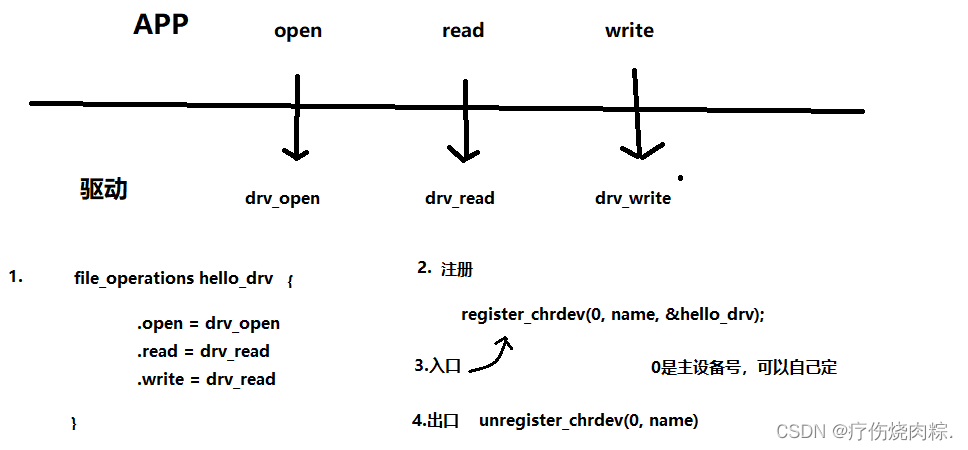
最简单的方法就是提供驱动程序相关的drv_open,drv_read,drv_write,为了对它们进行管理,首先会构造一个file_operations结构体来保存这些函数,构造之后得告诉内核,于是要在驱动程序中的入口函数中调用一个注册函数register_chrdev来注册它,同时也有驱动程序中也有出口函数unregister_chrdev,方便能以后够卸载它。
2.知道流程,来编写驱动程序
1.首先定义出file_operations结构体:
/* 分配/设置/注册 file_operations结构体 */
static const struct file_operations hello_fops = {
	.owner		= THIS_MODULE,
	.read		= hello_read,
	.write		= hello_write,
	.open		= hello_open,
	.release	= hello_release,
};
2.编写入口函数和出口函数
int hello_init(void)    //入口函数:装载这个驱动的时候就会调用它
{
	int err;
	err = register_chrdev(88, "100ask_hello_drv", &hello_fops);
	printk("register_chrdev ret = %d\n", err);
	return err;
}

void hello_exit(void)    //出口函数:想卸载这个驱动的时候就会调用它
{
	unregister_chrdev(88, "100ask_hello_drv");
}

module_init(hello_init);    //用这个宏来指定hello_init就是入口函数
module_exit(hello_exit);    //用这个宏来指定hello_exit就是出口函数
MODULE_LICENSE("GPL");      //表示该驱动程序是GPL协议的,想装载此驱动 必须写
调用register_chrdev函数来注册该驱动,参数需要主设备号,名字和file_operations结构体,主设备号可以自己定,只要不和开发板上已有的一些主设备号重名就行。也能调用unregister_chrdev函数来卸载。
3.编写file_operations结构体中的函数
static int hello_open(struct inode *inode, struct file *file)
{
	printk("%s %s %d\n", __FILE__, __FUNCTION__, __LINE__);
	return 0;
}
在里面只打印出:是哪个文件,在哪个函数里,在哪一行。
static char hello_buf[100] = "www.100ask.net";    //在内核中创建一个数组

/* APP : read(fd, buffer, len) */
static ssize_t hello_read(struct file *file, char __user *buf, size_t count,
		       loff_t *ppos)                        // buffer就是buf
{
	int err;
	if (count > 100)
		count = 100;
	err = copy_to_user(buf, hello_buf, count);    //把内核中的数据拷贝到buf
	return count;
}
在内核中定义一个hello_buf[100]数组,应用程序读的时候会读这个数组,内核中的copy_to_user函数就是把内核中的数据拷贝到buf。
以前学到过,应用程序里面调用read函数会触发一个异常,内核会找到驱动程序中的read函数,然后调用它,上面的的buffer就是驱动函数中的buf,copy_to_user函数把内核中的数据拷贝到buf,APP就会读到。
按正常的驱动程序来说,应该读取硬件的寄存器,得到数据之后,再把这些数据拷贝进buf,但是这里只是演示驱动程序怎么写,所以并没有实现硬件的操作。
static char hello_buf[100] = "www.100ask.net";

/* APP : write(fd, buffer, len) */
static ssize_t hello_write(struct file *file, const char __user *buf,
		   size_t count, loff_t *ppos)
{
	int err;
	if (count > 100)
		count = 100;
	err = copy_from_user(hello_buf, buf, count);    //把buf数据拷贝到内核
	return count;
}
按正常的驱动程序来说,write函数是把自己的数据buffer传给驱动程序,再由驱动程序把数据写到硬件上去,这里只演示把数据存进hello_buf数组。
static int hello_release(struct inode *inode, struct file *file)
{
	printk("%s %s %d\n", __FILE__, __FUNCTION__, __LINE__);
	return 0;
}
hello_release就是去释放,只打印一句话而已。
完整驱动程序如下:
#include <linux/module.h>
#include <linux/init.h>
#include <linux/sched.h>
#include <linux/device.h>
#include <linux/ioctl.h>
#include <linux/ctype.h>
#include <linux/poll.h>
#include <linux/slab.h>
#include <linux/major.h>
#include <linux/mutex.h>
#include <linux/uaccess.h>
#include <linux/compat.h>

/* 参考: drivers\char\ppdev.c */

static char hello_buf[100] = "www.100ask.net";

static int hello_open(struct inode *inode, struct file *file)
{
	printk("%s %s %d\n", __FILE__, __FUNCTION__, __LINE__);
	return 0;
}

/* APP : read(fd, buffer, len) */
static ssize_t hello_read(struct file *file, char __user *buf, size_t count,
		       loff_t *ppos)
{
	int err;
	if (count > 100)
		count = 100;
	err = copy_to_user(buf, hello_buf, count);
	return count;
}

/* APP : write(fd, buffer, len) */
static ssize_t hello_write(struct file *file, const char __user *buf,
		   size_t count, loff_t *ppos)
{
	int err;
	if (count > 100)
		count = 100;
	err = copy_from_user(hello_buf, buf, count);
	return count;
}

static int hello_release(struct inode *inode, struct file *file)
{
	printk("%s %s %d\n", __FILE__, __FUNCTION__, __LINE__);
	return 0;
}

/* 分配/设置/注册 file_operations结构体 */
static const struct file_operations hello_fops = {
	.owner		= THIS_MODULE,
	.read		= hello_read,
	.write		= hello_write,
	.open		= hello_open,
	.release	= hello_release,
};

int hello_init(void)
{
	int err;
	err = register_chrdev(88, "100ask_hello_drv", &hello_fops);
	printk("register_chrdev ret = %d\n", err);
	return err;
}

//int init_module(void) __attribute__((alias("hello_init")));

void hello_exit(void)
{
	unregister_chrdev(88, "100ask_hello_drv");
}

module_init(hello_init);
module_exit(hello_exit);
MODULE_LICENSE("GPL");
3.写应用程序
完整应用程序如下:
#include <stdio.h>
#include <sys/types.h>
#include <sys/stat.h>
#include <fcntl.h>
#include <string.h>
#include <unistd.h>

/* ./hello_test r
 * ./hello_test w weidongshan
 */
int main(int argc, char **argv)
{
	int fd;
	char app_buf[100];
	int len = 0;

	if (argc == 1)
	{
		printf("Usage:\n");
		printf("%s r          - read string from hello drv\n", argv[0]);
		printf("%s w <string> - write string to hello drv\n", argv[0]);
		return -1;
	}

	/* open */
	fd = open("/dev/abcxyz", O_RDWR);
	if (fd < 0)
	{
		printf("open /dev/abcxyz err\n");
		return -1;
	}

	if ((argc == 2) && !strcmp(argv[1], "r"))
	{
		/* read */
		len = read(fd, app_buf, 100);
		app_buf[len - 1] = '\0';

		/* printf */
		printf("get str from drv: %s\n", app_buf);

	}
	else if ((argc == 3) && !strcmp(argv[1], "w"))
	{
		/* write */
		len = write(fd, argv[2], strlen(argv[2])+1);
	}

	//close(fd);
	return 0;
}
4.上机实验
写一个Makefile:
KERN_DIR = /home/book/100ask_imx6ull-sdk/Linux-4.9.88

all:
	make -C $(KERN_DIR) M=`pwd` modules
	$(CROSS_COMPILE)gcc -o hello_test hello_test.c

clean:
	make -C $(KERN_DIR) M=`pwd` modules clean
	rm -rf modules.order
	rm -f hello_test

obj-m	+= hello_drv.o
编译:
在开发板上挂载网络文件系统后装载驱动程序:

Linux命令:
lsmod——显示已载入系统的模块
rmmod——用于从当前运行的内核中移除指定的内核模块
驱动装载后可以看到多了hello_drv的设备
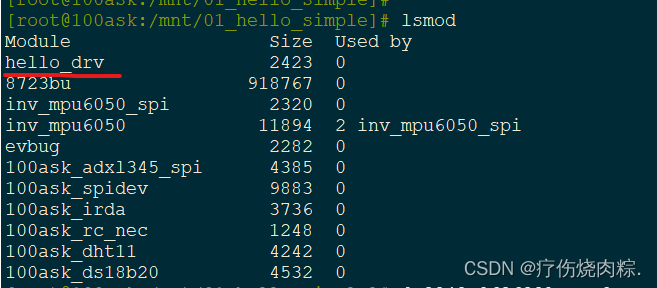
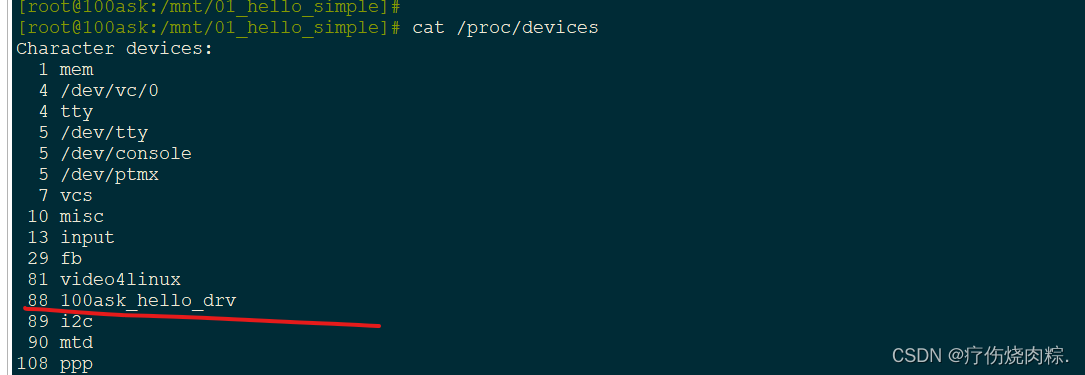
回忆我们写的驱动程序的入口函数:
int hello_init(void)    //入口函数:装载这个驱动的时候就会调用它
{
	int err;
	err = register_chrdev(88, "100ask_hello_drv", &hello_fops);
	printk("register_chrdev ret = %d\n", err);
	return err;
}
在开发板上 insmod hello_drv.ko 装载驱动后,使用dmesg命令查看内核打印信息:


说明装载成功了。
也能查询到这个驱动程序:
尝试运行测试程序:
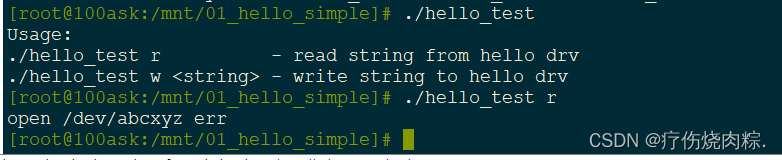
打开失败,找不到这个名字的设备节点,所以我们要去创建这个设备节点
使用mknod命令创建设备节点


再次运行测试程序:
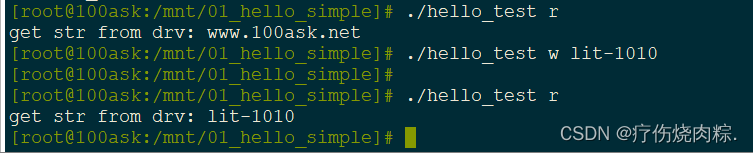
还可以使用以下命令启用内核的打印

再次运行测试程序就能看到内核的打印信息:






 扫一扫
扫一扫


 3293
3293

 被折叠的 条评论
为什么被折叠?
被折叠的 条评论
为什么被折叠?
 到【灌水乐园】发言





