


 本文详细介绍了DeviceKit库中的几个关键API,包括获取群组设备数量、设备离线提醒状态、在线类型检查、子设备ID获取以及产品信息查询,展示了如何通过这些接口进行设备管理和状态监控。
ty.device.getDeviceNumWithDpCode
根据 dpCode 获取群组下具备此 dpCode 的设备数量。如果是一个分享的群组,请通过接口获取。
需引入
DeviceKit,且在>=2.4.0版本才可使用
请求参数
Object object
| 属性 | 类型 | 默认值 | 必填 | 说明 |
|---|---|---|---|---|
| groupId | string | 是 | groupId 群组 id | |
| dpCode | string | 是 | dpCode 内容 | |
| complete | function | 否 | 接口调用结束的回调函数(调用成功、失败都会执行) | |
| success | function | 否 | 接口调用成功的回调函数 | |
| fail | function | 否 | 接口调用失败的回调函数 |
返回结果
- success
| 属性 | 类型 | 说明 |
|---|---|---|
| devieNum | number | devieNum 设备数量 |
- fail
| 属性 | 类型 | 说明 |
|---|---|---|
| errorMsg | string | 插件错误信息 |
| errorCode | string | 错误码 |
| innerError | object | 插件外部依赖错误信息 {errorMsg: string, errorCode: string } |
请求示例
ty.device.getDeviceNumWithDpCode({
  groupId: '12894745',
  dpCode: 'switch_1',
})
  .then((res) => {
    console.log(res);
  })
  .catch((error) => {
    console.log(error);
  });
返回示例
{
  "devieNum": 0
}
ty.device.getDeviceOfflineReminderState
获取设备离线提醒的开关状态
需引入
DeviceKit,且在>=2.2.0版本才可使用
请求参数
Object object
| 属性 | 类型 | 默认值 | 必填 | 说明 |
|---|---|---|---|---|
| deviceId | string | 是 | deviceId 设备 id | |
| complete | function | 否 | 接口调用结束的回调函数(调用成功、失败都会执行) | |
| success | function | 否 | 接口调用成功的回调函数 | |
| fail | function | 否 | 接口调用失败的回调函数 |
返回结果
- success
| 属性 | 类型 | 说明 |
|---|---|---|
| state | number | state 设备离线提醒的开关状态 0:关 1:开 |
- fail
| 属性 | 类型 | 说明 |
|---|---|---|
| errorMsg | string | 插件错误信息 |
| errorCode | string | 错误码 |
| innerError | object | 插件外部依赖错误信息 {errorMsg: string, errorCode: string } |
请求示例
ty.device.getDeviceOfflineReminderState({
  deviceId: '64710761ecfabcaaf553'
})
  .then((res) => {
    console.log(res);
  })
  .catch((error) => {
    console.log(error);
  });
返回示例
{
  "state": 0
}
👉 立即开发。
ty.device.getDeviceOfflineReminderWarningText
获取离线提醒警告内容(关闭离线提醒开关后的警告)
需引入
DeviceKit,且在>=2.2.0版本才可使用
请求参数
Object object
| 属性 | 类型 | 默认值 | 必填 | 说明 |
|---|---|---|---|---|
| complete | function | 否 | 接口调用结束的回调函数(调用成功、失败都会执行) | |
| success | function | 否 | 接口调用成功的回调函数 | |
| fail | function | 否 | 接口调用失败的回调函数 |
返回结果
- success
| 属性 | 类型 | 说明 |
|---|---|---|
| warningText | string | 离线提醒关闭警告文案 |
- fail
| 属性 | 类型 | 说明 |
|---|---|---|
| errorMsg | string | 插件错误信息 |
| errorCode | string | 错误码 |
| innerError | object | 插件外部依赖错误信息 {errorMsg: string, errorCode: string } |
请求示例
ty.device.getDeviceOfflineReminderWarningText()
  .then((res) => {
    console.log(res);
  })
  .catch((error) => {
    console.log(error);
  });
返回示例
{
  "warningText": "为避免提醒过于频繁,设备离线超过30分钟后才会提醒(低功耗设备将超过8小时后触发提醒)。"
}
ty.device.getDeviceOnlineType
检查设备某个通道是否在线
需引入
DeviceKit,且在>=2.1.6版本才可使用
请求参数
Object object
| 属性 | 类型 | 默认值 | 必填 | 说明 |
|---|---|---|---|---|
| deviceId | string | 是 | deviceId 设备 id 支持跨面板获取其他的设备信息,当前面板可以传当前设备的 id 来进行获取 | |
| dps | any | 否 | dps | |
| complete | function | 否 | 接口调用结束的回调函数(调用成功、失败都会执行) | |
| success | function | 否 | 接口调用成功的回调函数 | |
| fail | function | 否 | 接口调用失败的回调函数 |
返回结果
- success
| 属性 | 类型 | 说明 |
|---|---|---|
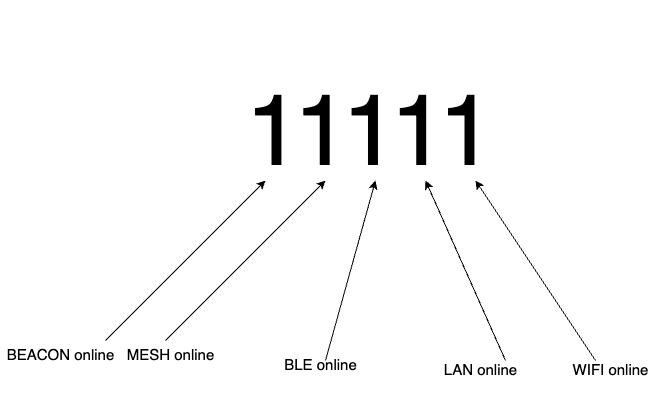
| onlineType | number | 设备网络在线类型 |
- onlineType 为十进制,需转成二进制,再根据如下所示的图片判断。
- fail
| 属性 | 类型 | 说明 |
|---|---|---|
| errorMsg | string | 插件错误信息 |
| errorCode | string | 错误码 |
| innerError | object | 插件外部依赖错误信息 {errorMsg: string, errorCode: string } |
请求示例
ty.device.getDeviceOnlineType({
  deviceId: '64710761ecfabcaaf553'
})
  .then((res) => {
    console.log(res);
  })
  .catch((error) => {
    console.log(error);
  });
返回示例
{
  "onlineType": 0
}
ty.device.getMeshDeviceId
通过 nodeId 获取子设备的设备 Id
需引入
DeviceKit,且在>=2.4.0版本才可使用
请求参数
Object object
| 属性 | 类型 | 默认值 | 必填 | 说明 |
|---|---|---|---|---|
| nodeId | string | 是 | nodeId | |
| deviceId | string | 是 | deviceId 网关 id | |
| complete | function | 否 | 接口调用结束的回调函数(调用成功、失败都会执行) | |
| success | function | 否 | 接口调用成功的回调函数 | |
| fail | function | 否 | 接口调用失败的回调函数 |
返回结果
- success
| 属性 | 类型 | 说明 |
|---|---|---|
| deviceId | string | 设备 id |
- fail
| 属性 | 类型 | 说明 |
|---|---|---|
| errorMsg | string | 插件错误信息 |
| errorCode | string | 错误码 |
| innerError | object | 插件外部依赖错误信息 {errorMsg: string, errorCode: string } |
请求示例
ty.device.getMeshDeviceId({
  nodeId: 'e922f00ac014e46b',
  deviceId: '64710761ecfabcaaf553',
})
  .then((res) => {
    console.log(res);
  })
  .catch((error) => {
    console.log(error);
  });
返回示例
{
  "deviceId": "6c87332fc414a65029ovfr"
}
ty.device.getProductInfo
获取产品信息
需引入
DeviceKit,且在>=1.2.6版本才可使用
请求参数
Object object
| 属性 | 类型 | 默认值 | 必填 | 说明 |
|---|---|---|---|---|
| productId | string | 是 | 产品 id | |
| complete | function | 否 | 接口调用结束的回调函数(调用成功、失败都会执行) | |
| success | function | 否 | 接口调用成功的回调函数 | |
| fail | function | 否 | 接口调用失败的回调函数 |
返回结果
- success
| 属性 | 类型 | 说明 |
|---|---|---|
| panelConfig | any | 面板配置项,可以在平台进行配置 |
| schema | string | 产品功能定义集合 |
| schemaExt | string | 产品功能定义集合拓展 |
| capability | number | capability 产品能力值,在 backend-ng 平台上可以查询对应的勾选项,整体业务逻辑会根据该数据进行划分 区分设备类型也可以根据该属性进行调整,按二进制位运算的方式进行管理 |
| attribute | number | attribute 产品属性定义,在 backend-ng 平台上可查到对应配置,使用二进制位运算的方式进行管理 |
| productId | string | productId 产品 id |
| category | string | category 产品的分类 |
| categoryCode | string | categoryCode 产品的二级分类 |
| standard | boolean | standard 是否为标准产品 |
| pcc | string | pcc Thing 自研蓝牙 mesh 产品的分类标识 |
| vendorInfo | string | vendorInfo Thing 自研蓝牙 mesh 产品的分类标识,融合类使用 |
| quickOpDps | array | quickOpDps 快捷操作的 dp ids |
| faultDps | array | faultDps 告警/错误的显示 dp ids |
| displayDps | array | displayDps 快捷操作的 dp ids |
| displayMsgs | any | displayMsgs 快捷操作显示文案 |
| uiPhase | string | uiPhase ui 包当前环境,预览包或线上包 |
| uiId | string | uiId ui 包唯一包名识别 |
| uiVersion | string | uiVersion ui 包版本号 |
| ui | string | ui ui 小标识 |
| rnFind | boolean | rnFind 是否有包含 RN 包 |
| uiType | string | uiType ui 包类型 |
| uiName | string | uiName ui 包名称 |
| i18nTime | number | i18nTime 产品语言包最新更新时间 |
| supportGroup | boolean | supportGroup 是否支持创建群组 |
| supportSGroup | boolean | supportSGroup 是否支持创建标准群组 |
| configMetas | any | configMetas 产品特殊配置项,一些功能业务的特殊配置 |
| productVer | string | productVer 产品版本 |
- fail
| 属性 | 类型 | 说明 |
|---|---|---|
| errorMsg | string | 插件错误信息 |
| errorCode | string | 错误码 |
| innerError | object | 插件外部依赖错误信息 {errorMsg: string, errorCode: string } |
请求示例
ty.device.getProductInfo({
  productId: 'ORL6E2BCxSYVpfs4',
})
  .then((res) => {
    console.log(res);
  })
  .catch((error) => {
    console.log(error);
  });
返回示例
{
  "rnFind": false,
  "configMetas": {},
  "i18nTime": 0,
  "vendorInfo": "",
  "pcc": "",
  "faultDps": [],
  "attributeString": "100000000000000000011000000100110000000",
  "attribute": 274878695808,
  "category": "dj",
  "productId": "ORL6E2BCxSYVpfs4",
  "supportGroup": false,
  "quickOpDps": [],
  "productVer": "1.0.0",
  "standard": false,
  "categoryCode": "wf_dj",
  "displayMsgs": {},
  "supportSGroup": false,
  "displayDps": [],
  "capability": 1,
  "schemaExt": "[{"id":102},{"id":104},{"id":106},{"id":107},{"id":116}]",
  "schema": "[{"code":"led","id":101,"mode":"rw","name":"日常灯开关","property":{"type":"bool"},"type":"obj"},{"code":"led_light","id":102,"mode":"rw","name":"日常灯亮度","property":{"unit":"","min":1,"max":20,"scale":0,"step":1,"type":"value"},"type":"obj"},{"code":"time_set","id":103,"mode":"rw","name":"设备时间","property":{"type":"string","maxlen":255},"type":"obj"},{"code":"panel_light","id":104,"mode":"rw","name":"面板亮度","property":{"unit":"","min":0,"max":2,"scale":0,"step":1,"type":"value"},"type":"obj"},{"code":"Radio","id":105,"mode":"rw","name":"Radio开关","property":{"type":"bool"},"type":"obj"},{"code":"volume","id":106,"mode":"rw","name":"Radio音量","property":{"unit":"","min":1,"max":16,"scale":0,"step":1,"type":"value"},"type":"obj"},{"code":"Radiolist","id":107,"mode":"rw","name":"Radio总台数及当前播放台号","type":"raw"},{"code":"clock1","id":109,"mode":"rw","name":"闹钟1开关","property":{"type":"bool"},"type":"obj"},{"code":"Delay_time","id":116,"mode":"rw","name":"推迟启动时间","property":{"unit":"分钟","min":8,"max":15,"scale":0,"step":1,"typ<LOG_EXCEED_MAX_LENGTH>",
}
👉 立即开发。





 扫一扫
扫一扫


&spm=1001.2101.3001.5002&articleId=136625276&d=1&t=3&u=bc2d9d1cb21a43ddb30520fb62b22e40)
 2万+
2万+

 被折叠的 条评论
为什么被折叠?
被折叠的 条评论
为什么被折叠?
 到【灌水乐园】发言





