


 本文围绕CSS文本样式展开,介绍了颜色属性设置文字颜色,text-decoration属性设置或删除文本装饰,文本转换属性指定大小写,text-indent属性实现文本缩进,以及word-spacing改变字间距等内容,还提及垂直对齐图像、添加文本阴影等方面。
Text Color
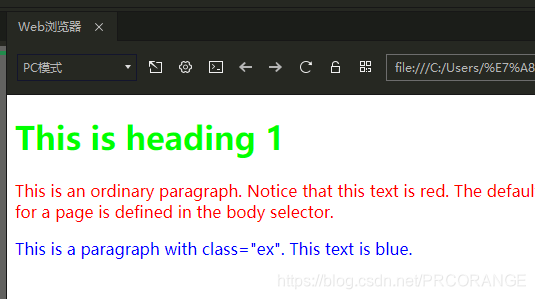
颜色属性被用来设置文字的颜色。
<!DOCTYPE html>
<html>
<head>
<meta charset="utf-8">
<title>PRCORANGE</title>
<style>
body {color:red;}
h1 {color:#00ff00;}
p.ex {color:rgb(0,0,255);}
</style>
</head>

<body>
<h1>This is heading 1</h1>
<p>This is an ordinary paragraph. Notice that this text is red. The default text-color for a page is defined in the body selector.</p>
<p class="ex">This is a paragraph with class="ex". This text is blue.</p>
</body>
</html>
文本的对齐方式
<!DOCTYPE html>
<html>
<head>
<meta charset="utf-8">
<title>PRCORANGE</title>
<style>
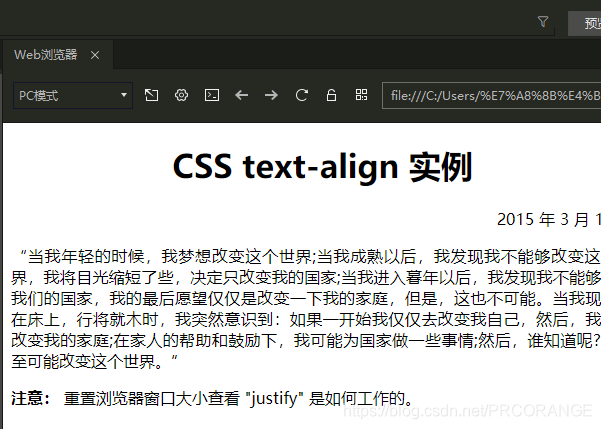
h1{text-align:center}
p.date{text-align:right}
p.main{text-align:justify}
</style>
</head>

<body>
<h1>CSS text-align 实例</h1>
<p class="date">2015 年 3 月 14 号</p>
<p class="main">“当我年轻的时候,我梦想改变这个世界;当我成熟以后,我发现我不能够改变这个世界,我将目光缩短了些,决定只改变我的国家;当我进入暮年以后,我发现我不能够改变我们的国家,我的最后愿望仅仅是改变一下我的家庭,但是,这也不可能。当我现在躺在床上,行将就木时,我突然意识到:如果一开始我仅仅去改变我自己,然后,我可能改变我的家庭;在家人的帮助和鼓励下,我可能为国家做一些事情;然后,谁知道呢?我甚至可能改变这个世界。”</p>
<p><b>注意:</b> 重置浏览器窗口大小查看 "justify" 是如何工作的。</p>
</body>

</html>
文本修饰
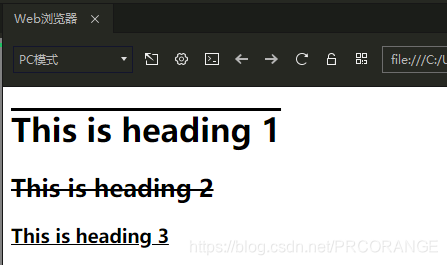
text-decoration 属性用来设置或删除文本的装饰。从设计的角度看 text-decoration属性主要是用来删除链接的下划线:
a {text-decoration:none;}
也可以这样装饰文字:
<!DOCTYPE html>
<html>
<head>
<meta charset="utf-8">
<title>PRCORANGE</title>
<style>
h1 {text-decoration:overline;}
h2 {text-decoration:line-through;}
h3 {text-decoration:underline;}
</style>
</head>

<body>
<h1>This is heading 1</h1>
<h2>This is heading 2</h2>
<h3>This is heading 3</h3>
</body>

</html>
文本转换
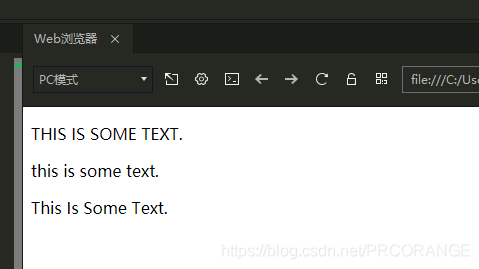
文本转换属性是用来指定在一个文本中的大写和小写字母。可用于所有字句变成大写或小写字母,或每个单词的首字母大写。
<!DOCTYPE html>
<html>
<head>
<meta charset="utf-8">
<title>PRCORANGE</title>
<style>
p.uppercase {text-transform:uppercase;}
p.lowercase {text-transform:lowercase;}
p.capitalize {text-transform:capitalize;}
</style>
</head>

<body>
<p class="uppercase">This is some text.</p>
<p class="lowercase">This is some text.</p>
<p class="capitalize">This is some text.</p>
</body>
</html>
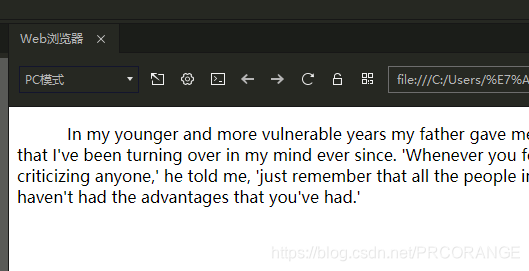
文本缩进
文本缩进属性是用来指定文本的第一行的缩进。CSS 提供了 text-indent 属性,该属性可以方便地实现文本缩进。通过使用 text-indent 属性,所有元素的第一行都可以缩进一个给定的长度。
<!DOCTYPE html>
<html>
<head>
<meta charset="utf-8">
<title>PRCORANGE</title>
<style>
p {text-indent:50px;}
</style>
</head>
<body>

<p>In my younger and more vulnerable years my father gave me some advice that I've been turning over in my mind ever since. 'Whenever you feel like criticizing anyone,' he told me, 'just remember that all the people in this world haven't had the advantages that you've had.'</p>

</body>
</html>
字间距
<style>
h1 {letter-spacing:2px;}
h2 {letter-spacing:-3px;}
</style>
文本间隔
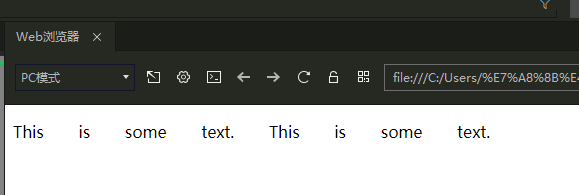
word-spacing 属性可以改变字(单词)之间的标准间隔。其默认值 normal 与设置值为 0 是一样的。
<!DOCTYPE html>
<html>
<head>
<meta charset="utf-8">
<title>PRCORANGE</title>
<style>
p {
	word-spacing:30px;
}
</style>
</head>
<body>

<p>
This is some text. This is some text.
</p>

</body>
</html>
行间距
<style>
p.small {line-height:70%;}
p.big {line-height:200%;}
</style>
文本方向
<style type="text/css">
div.ex1 {direction:rtl;}
</style>
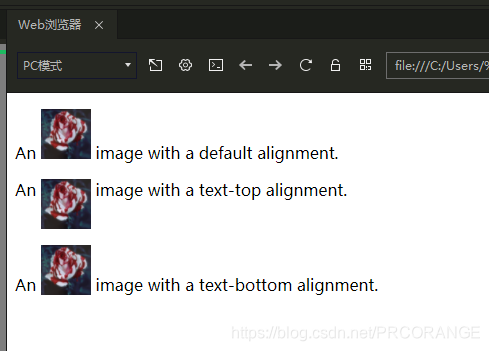
垂直对齐图像
<!DOCTYPE html>
<html>
<head>
<meta charset="utf-8">
<title>PRCORANGE</title>
<style>
img.top {vertical-align:text-top;}
img.bottom {vertical-align:text-bottom;}
</style>
</head>

<body>
<p>An <img src="https://i.loli.net/2020/07/21/qVYWtOnvDJd96Km.jpg" width="50" height="50" /> image with a default alignment.</p>
<p>An <img class="top" src="https://i.loli.net/2020/07/21/qVYWtOnvDJd96Km.jpg" width="50" height="50" /> image with a text-top alignment.</p>
<p>An <img class="bottom" src="https://i.loli.net/2020/07/21/qVYWtOnvDJd96Km.jpg" width="50" height="50" /> image with a text-bottom alignment.</p>
</body>
</html>
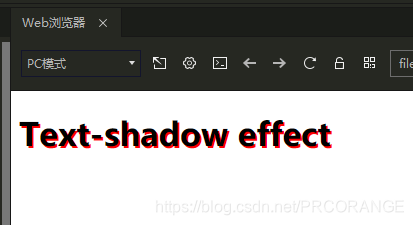
添加文本阴影
<!DOCTYPE html>
<html>
<head>
<meta charset="utf-8">
<title>PRCORANGE</title>
<style>
h1 {text-shadow:2px 2px #FF0000;}
</style>
</head>
<body>

<h1>Text-shadow effect</h1>

</body>
</html>





 扫一扫
扫一扫


 1144
1144

 被折叠的 条评论
为什么被折叠?
被折叠的 条评论
为什么被折叠?
 到【灌水乐园】发言





