


使用ollama实现一个最简单的天气查询agent,使用了qwen3:0.6b模型,可以作为入门学习,所有代码由deepseek完成。案例在ubuntu完成。
一、安装ollama
参考菜鸟教程 https://www.runoob.com/ollama/ollama-install.html
安装完成后执行ollama serve启动ollama服务,然后使用ollama pull qwen3:0.6b下载一个模型
二、执行Python程序
安装ollama python库:
pip install ollama
命令行执行:python3 weather-agent.py
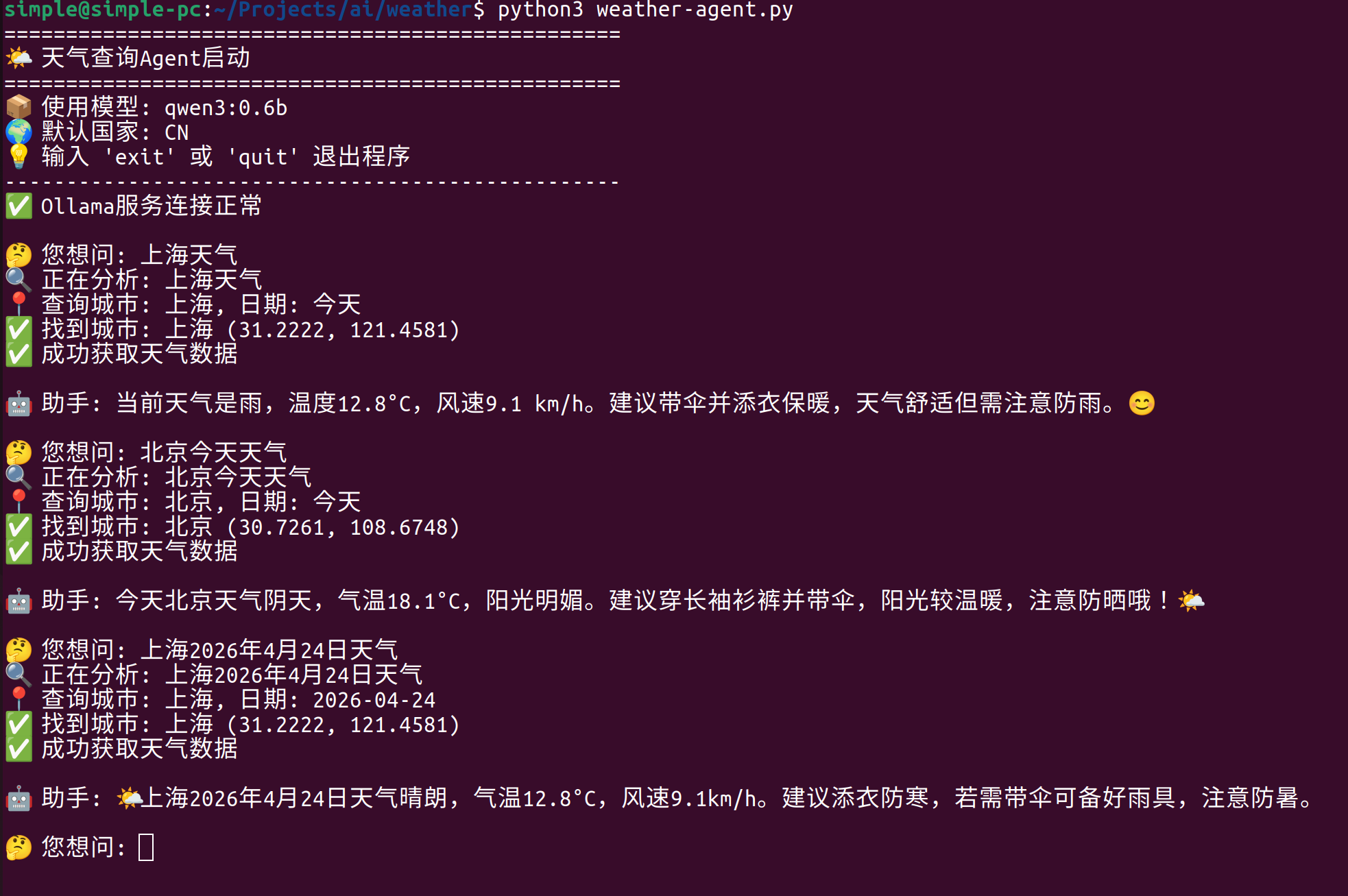
所有代码如下:
import json
import requests
import ollama
from datetime import datetime

class WeatherAgent:
    def __init__(self, model_name='qwen3:0.6b', country_code='CN'):
        """
        初始化天气Agent

        Args:
            model_name: Ollama使用的模型名称
            country_code: 默认国家代码(CN=中国)
        """
        self.model_name = model_name
        self.country_code = country_code
        self.geocoding_url = "https://geocoding-api.open-meteo.com/v1/search"
        self.weather_url = "https://api.open-meteo.com/v1/forecast"

    def get_coordinates(self, city_name):
        """
        通过Open-Meteo Geocoding API查询城市的经纬度

        Args:
            city_name: 城市名称

        Returns:
            tuple: (纬度, 经度, 完整城市名, 时区) 或 (None, None, None, None)
        """
        params = {
            "name": city_name,
            "count": 1,
            "language": "zh",
            "countryCode": self.country_code
        }

        try:
            response = requests.get(self.geocoding_url, params=params)
            response.raise_for_status()
            data = response.json()

            if data and data.get("results"):
                location = data["results"][0]
                latitude = location["latitude"]
                longitude = location["longitude"]
                full_name = location.get("name", city_name)
                timezone = location.get("timezone", "Asia/Shanghai")
                return latitude, longitude, full_name, timezone
            else:
                return None, None, None, None

        except requests.exceptions.RequestException as e:
            print(f"❌ Geocoding API调用失败: {e}")
            return None, None, None, None
        except json.JSONDecodeError as e:
            print(f"❌ 解析地理编码数据失败: {e}")
            return None, None, None, None

    def get_weather(self, latitude, longitude, timezone, date=None):
        """
        获取天气数据

        Args:
            latitude: 纬度
            longitude: 经度
            timezone: 时区
            date: 可选,指定日期(格式:YYYY-MM-DD)

        Returns:
            dict: 天气数据或None
        """
        params = {
            "latitude": latitude,
            "longitude": longitude,
            "current_weather": "true",
            "timezone": timezone,
            "hourly": "temperature_2m,relativehumidity_2m,windspeed_10m"
        }

        # 如果指定了日期,添加每日预报
        if date:
            params["daily"] = "temperature_2m_max,temperature_2m_min,weathercode"

        try:
            response = requests.get(self.weather_url, params=params)
            response.raise_for_status()
            return response.json()

        except requests.exceptions.RequestException as e:
            print(f"❌ Weather API调用失败: {e}")
            return None

    def extract_parameters(self, user_query):
        """
        使用Ollama从用户问题中提取查询参数

        Args:
            user_query: 用户输入的自然语言问题

        Returns:
            dict: 包含city和date的字典
        """
        prompt = f"""
你是一个参数提取助手。从以下用户问题中提取天气查询所需的信息。
请只返回一个JSON对象,包含以下字段(如果信息缺失则填null):
- city: 城市名称(中文,例如"北京"、"上海"、"杭州")
- date: 查询的日期(格式为YYYY-MM-DD,如果未指定则填null)

用户问题: "{user_query}"

示例输出: {{"city": "北京", "date": null}}
重要:只返回JSON,不要有其他解释性文字。
"""
        try:
            response = ollama.chat(model=self.model_name,
                                 messages=[{'role': 'user', 'content': prompt}])
            content = response['message']['content']

            # 提取JSON部分
            start = content.find('{')
            end = content.rfind('}') + 1
            if start != -1 and end != 0:
                params = json.loads(content[start:end])
            else:
                params = json.loads(content)

            return params

        except Exception as e:
            print(f"⚠️ 参数提取失败: {e}")
            return {"city": None, "date": None}

    def format_weather_response(self, weather_data, city_name, user_query, error=None):
        """
        使用Ollama将天气数据转化为自然语言回复

        Args:
            weather_data: API返回的天气数据
            city_name: 城市名称
            user_query: 用户原始问题
            error: 错误信息(如果有)

        Returns:
            str: 自然语言回复
        """
        if error:
            prompt = f"""
用户问: '{user_query}'
发生错误: {error}
请礼貌地告知用户无法获取天气信息,并建议稍后重试或检查城市名称是否正确。
用友好、体贴的中文回复。
"""
        else:
            # 提取当前天气信息
            current = weather_data.get('current_weather', {})
            temp = current.get('temperature')
            wind_speed = current.get('windspeed')
            weather_code = current.get('weathercode')

            # 天气代码说明
            weather_desc = {
                0: "晴天☀️", 1: "主要晴天🌤️", 2: "局部多云⛅",
                3: "阴天☁️", 45: "雾🌫️", 51: "小雨🌧️",
                61: "雨🌧️", 71: "雪❄️"
            }.get(weather_code, "未知天气")

            # 获取小时温度
            hourly = weather_data.get('hourly', {})
            current_hour = datetime.now().hour
            temps = hourly.get('temperature_2m', [])

            prompt = f"""
用户问: "{user_query}"
查询城市: {city_name}

当前天气数据:
- 温度: {temp}°C
- 风速: {wind_speed} km/h
- 天气状况: {weather_desc}

请用自然、友好的中文回复用户。回复应该:
1. 先直接回答天气情况
2. 给出温度感受建议(如是否需要添衣、带伞等)
3. 语气亲切,可以适当使用表情符号

回复要简洁明了,不要超过3句话。
"""

        try:
            response = ollama.chat(model=self.model_name,
                                 messages=[{'role': 'user', 'content': prompt}])
            return response['message']['content']
        except Exception as e:
            print(f"⚠️ 生成回复失败: {e}")
            return f"抱歉,我暂时无法生成友好的回复。当前{city_name}的温度是{temp}°C。"

    def process_query(self, user_query):
        """
        处理用户查询的主流程

        Args:
            user_query: 用户输入的问题

        Returns:
            str: 最终回复
        """
        print(f"🔍 正在分析: {user_query}")

        # 步骤1: 提取参数
        params = self.extract_parameters(user_query)
        city = params.get('city')
        date = params.get('date')

        if not city:
            return "🤔 抱歉,我没能从您的话中识别出城市名称。\n💡 请尝试说:'北京今天天气怎么样?'"

        print(f"📍 查询城市: {city}, 日期: {date or '今天'}")

        # 步骤2: 获取经纬度
        lat, lon, full_name, tz = self.get_coordinates(city)
        if lat is None:
            return f"❌ 抱歉,未能找到城市 '{city}' 的坐标信息。\n💡 请确认城市名称是否正确,或尝试使用更知名的城市名。"

        print(f"✅ 找到城市: {full_name} ({lat:.4f}, {lon:.4f})")

        # 步骤3: 获取天气数据
        weather_data = self.get_weather(lat, lon, tz, date)
        if weather_data is None:
            return f"❌ 获取 {full_name} 的天气数据失败,请稍后重试。"

        print(f"✅ 成功获取天气数据")

        # 步骤4: 生成友好回复
        reply = self.format_weather_response(weather_data, full_name, user_query)
        return reply

    def run_interactive(self):
        """运行交互式命令行界面"""
        print("=" * 50)
        print("🌤️  天气查询Agent启动")
        print("=" * 50)
        print(f"📦 使用模型: {self.model_name}")
        print(f"🌍 默认国家: {self.country_code}")
        print("💡 输入 'exit' 或 'quit' 退出程序")
        print("-" * 50)

        # 检查Ollama服务
        try:
            ollama.list()
            print("✅ Ollama服务连接正常")
        except Exception:
            print("❌ 无法连接到Ollama服务")
            print("请确保:")
            print("1. Ollama已安装 (访问 https://ollama.com)")
            print("2. Ollama正在后台运行")
            print("3. 已下载模型: ollama pull " + self.model_name)
            return

        while True:
            try:
                user_input = input("\n🤔 您想问: ").strip()

                if user_input.lower() in ['exit', 'quit', '退出']:
                    print("👋 再见!")
                    break

                if not user_input:
                    print("💡 请输入问题,例如:'上海今天天气怎么样?'")
                    continue

                # 处理查询
                response = self.process_query(user_input)
                print(f"\n🤖 助手: {response}")

            except KeyboardInterrupt:
                print("\n\n👋 再见!")
                break
            except Exception as e:
                print(f"❌ 发生意外错误: {e}")
                print("💡 请重试或检查网络连接")

def main():
    """主函数"""
    # 可以修改这里的参数
    agent = WeatherAgent(
        model_name='qwen3:0.6b',  # 使用的Ollama模型
        country_code='CN'      # 国家代码(CN=中国)
    )
    agent.run_interactive()

if __name__ == "__main__":
    main()





 扫一扫
扫一扫


 928
928

 被折叠的 条评论
为什么被折叠?
被折叠的 条评论
为什么被折叠?
 到【灌水乐园】发言





