



 本文介绍了一种高效的Vim编辑器配置方案,利用Vundle进行插件管理,并集成了SimpylFold、YouCompleteMe等多个插件以增强编辑体验。配置涵盖了文件折叠、自动补全、语法高亮等功能。
## 配置属于自己的Vim-编辑器之神
在学习Vim过程中,看到一句话特别激励我,** “Vim以思考的速度编辑文本” **。Vim人称编辑器之神,这代表了它的高效、地位。
作者在学习过程中,记录了自己第一次的Vim配置,采用Vundle(网上安装的方式很多)进行插件管理。
### 使用到的插件
- Plugin 'gmarik/Vundle.vim'
- Plugin 'tmhedberg/SimpylFold'
- Plugin 'Valloric/YouCompleteMe'
- Plugin 'Raimondi/delimitMate'
- Plugin 'scrooloose/nerdtree'
- Plugin 'Xuyuanp/nerdtree-git-plugin'
- Plugin 'Lokaltog/powerline'
- Plugin 'scrooloose/nerdcommenter'
- Plugin 'NLKNguyen/papercolor-theme'
- Plugin 'fatih/vim-go'
- Plugin 'Tagbar'
- Plugin 'ludovicchabant/vim-gutentags'
- Plugin 'Blackrush/vim-gocode'
- Plugin 'honza/vim-snippets'
- Plugin 'SirVer/ultisnips'
- Plugin 'frazrepo/vim-rainbow'
- Plugin 'jisaacks/GitGutter'
- Plugin 'mileszs/ack.vim'
### 配置.vimrc
" .vimrc
" See: http://vimdoc.sourceforge.net/htmldoc/options.html for details

" For multi-byte character support (CJK support, for example):
" set fileencodings=ucs-bom,utf-8,cp936,big5,euc-jp,euc-kr,gb18030,latin1

set tabstop=4       " Number of spaces that a <Tab> in the file counts for.

set shiftwidth=4    " Number of spaces to use for each step of (auto)indent.

set expandtab       " Use the appropriate number of spaces to insert a <Tab>.
                    " Spaces are used in indents with the '>' and '<' commands
                    " and when 'autoindent' is on. To insert a real tab when
                    " 'expandtab' is on, use CTRL-V <Tab>.

set smarttab        " When on, a <Tab> in front of a line inserts blanks
                    " according to 'shiftwidth'. 'tabstop' is used in other
                    " places. A <BS> will delete a 'shiftwidth' worth of space
                    " at the start of the line.

set showcmd         " Show (partial) command in status line.

set number          " Show line numbers.

set showmatch       " When a bracket is inserted, briefly jump to the matching
                    " one. The jump is only done if the match can be seen on the
                    " screen. The time to show the match can be set with
                    " 'matchtime'.

set hlsearch        " When there is a previous search pattern, highlight all
                    " its matches.

set incsearch       " While typing a search command, show immediately where the
                    " so far typed pattern matches.

set ignorecase      " Ignore case in search patterns.

set smartcase       " Override the 'ignorecase' option if the search pattern
                    " contains upper case characters.

set backspace=2     " Influences the working of <BS>, <Del>, CTRL-W
                    " and CTRL-U in Insert mode. This is a list of items,
                    " separated by commas. Each item allows a way to backspace
                    " over something.

set autoindent      " Copy indent from current line when starting a new line
                    " (typing <CR> in Insert mode or when using the "o" or "O"
                    " command).

set textwidth=79    " Maximum width of text that is being inserted. A longer
                    " line will be broken after white space to get this width.

set formatoptions=c,q,r,t " This is a sequence of letters which describes how
                    " automatic formatting is to be done.
                    "
                    " letter    meaning when present in 'formatoptions'
                    " ------    ---------------------------------------
                    " c         Auto-wrap comments using textwidth, inserting
                    "           the current comment leader automatically.
                    " q         Allow formatting of comments with "gq".
                    " r         Automatically insert the current comment leader
                    "           after hitting <Enter> in Insert mode.
                    " t         Auto-wrap text using textwidth (does not apply
                    "           to comments)

set ruler           " Show the line and column number of the cursor position,
                    " separated by a comma.

set background=dark " When set to "dark", Vim will try to use colors that look
                    " good on a dark background. When set to "light", Vim will
                    " try to use colors that look good on a light background.
                    " Any other value is illegal.

"set mouse=a         " Enable the use of the mouse.

filetype plugin indent on
syntax on

set nocompatible              " required
filetype off                  " required

set rtp+=~/.vim/bundle/Vundle.vim
call vundle#begin()
Plugin 'gmarik/Vundle.vim'

set laststatus=2 " 永远显示状态栏
set t_Co=256 " 在Windows中用xshell连接打开vim可以显示色彩


Plugin 'tmhedberg/SimpylFold' " 折叠
Plugin 'Valloric/YouCompleteMe' " 自动补全
let g:ycm_global_ycm_extra_conf='~/.ycm_extra_conf.py'
let g:ycm_confirm_extra_conf = 0

Plugin 'Raimondi/delimitMate' " 括号引号匹配

Plugin 'scrooloose/nerdtree' " 目录树
Plugin 'Xuyuanp/nerdtree-git-plugin' " 这个插件可以显示文件的Git增删状态
" Ctrl+N 打开/关闭
map <C-n> :NERDTreeToggle<CR>
" 当不带参数打开Vim时自动加载项目树
autocmd StdinReadPre * let s:std_in=1
autocmd VimEnter * if argc() == 0 && !exists("s:std_in") | NERDTree | endif
" 当所有文件关闭时关闭项目树窗格
autocmd bufenter * if (winnr("$") == 1 && exists("b:NERDTreeType") && b:NERDTreeType == "primary") | q | endif
" 不显示这些文件
let NERDTreeIgnore=['\.pyc$', '\~$', 'node_modules'] "ignore files in NERDTree
" 不显示项目树上额外的信息,例如帮助、提示什么的
let NERDTreeMinimalUI=1

Plugin 'Lokaltog/powerline', {'rtp': 'powerline/bindings/vim/'} " 状态栏
set guifont=Inconsolata\ for\ Powerline:h15
let g:Powerline_symbols = 'fancy'
set encoding=utf-8
set t_Co=256
set fillchars+=stl:\ ,stlnc:\
set term=xterm-256color
set termencoding=utf-8

Plugin 'scrooloose/nerdcommenter'   " commenter: \cc \cu
let mapleader=';'

Plugin 'NLKNguyen/papercolor-theme'
set t_Co=256   " This is may or may not needed.
set background=dark
colorscheme PaperColor

Plugin 'fatih/vim-go'
let g:go_highlight_types = 1
let g:go_highlight_fields = 1
let g:go_highlight_functions = 1
let g:go_highlight_function_calls = 1
let g:go_highlight_operators = 1
let g:go_highlight_extra_types = 1
let g:go_fmt_command = "goimports"

Plugin 'Tagbar'
let g:tagbar_width = 30
nmap <F9> :TagbarToggle<CR>
let g:tagbar_autopreview = 1
let g:tagbar_sort = 0

Plugin 'ludovicchabant/vim-gutentags'
" gutentags搜索工程目录的标志,碰到这些文件/目录名就停止向上一级目录递归
let g:gutentags_project_root = ['.root', '.svn', '.git', '.project']
" 所生成的数据文件的名称
let g:gutentags_ctags_tagfile = '.tags'
" 将自动生成的 tags 文件全部放入 ~/.cache/tags 目录中,避免污染工程目录
let s:vim_tags = expand('~/.cache/tags')
let g:gutentags_cache_dir = s:vim_tags
" 检测 ~/.cache/tags 不存在就新建
if !isdirectory(s:vim_tags)
   silent! call mkdir(s:vim_tags, 'p')
endif
" 配置 ctags 的参数
let g:gutentags_ctags_extra_args = ['--fields=+niazS', '--extra=+q']
let g:gutentags_ctags_extra_args += ['--c++-kinds=+pxI']
let g:gutentags_ctags_extra_args += ['--c-kinds=+px']

Plugin 'Blackrush/vim-gocode'
imap <F6> <C-x><C-o>

Plugin 'honza/vim-snippets'
Plugin 'SirVer/ultisnips'

"插入模式下直接通过<C-z>键来触发UltiSnips的代码块补全
let g:UltiSnipsExpandTrigger="<C-z>"
"弹出UltiSnips的可用列表,由于不常用, 所以这里设置成了特殊的<C-i>映射
let g:UltiSnipsListSnippets="<C-i>"
"<C-f>跳转的到下一个代码块可编辑区
let g:UltiSnipsJumpForwardTrigger="<C-f>"
"<C-b>跳转到上一个代码块可编辑区
let g:UltiSnipsJumpBackwardTrigger="<C-b>"

Plugin 'frazrepo/vim-rainbow'
let g:rainbow_active = 1

Plugin 'jisaacks/GitGutter'

Plugin 'mileszs/ack.vim'

call vundle#end()            " required
filetype plugin indent on    " required
### 配置效果(可以根据自己的喜欢更好主题)
+ zsh
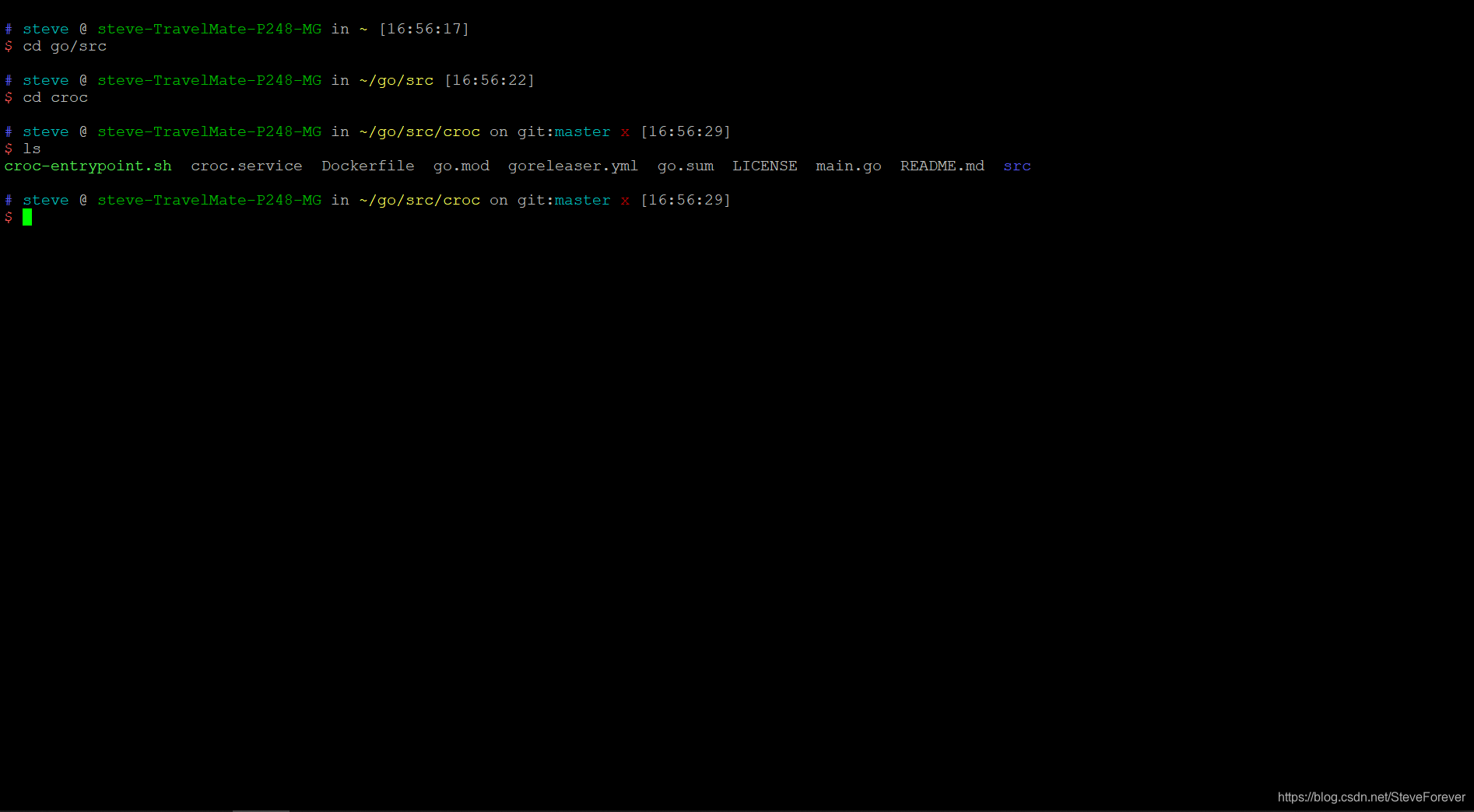
+ vim
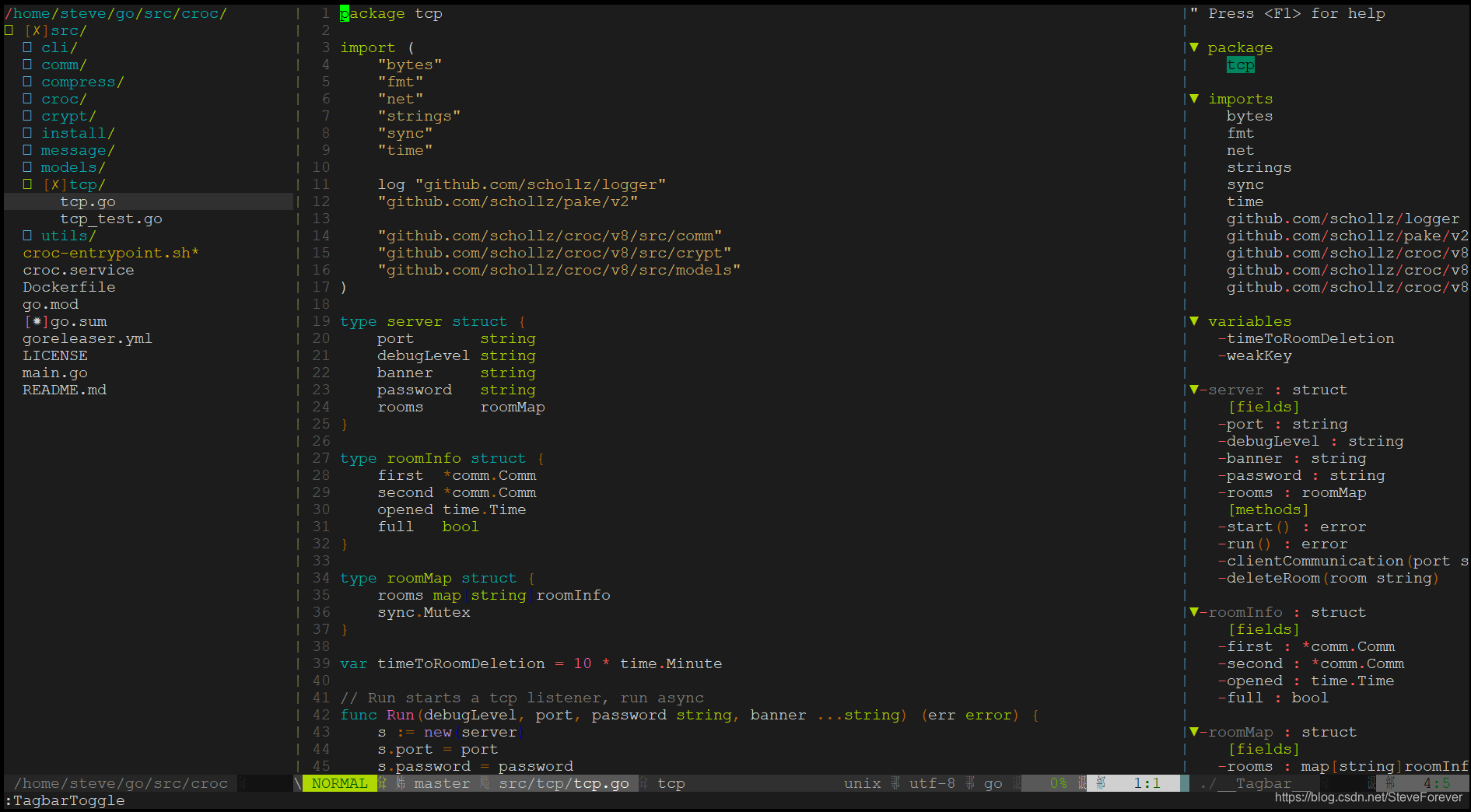
详细可以参考: [Vim学习笔记]("https://github.com/kktao/vim-learn")





 扫一扫
扫一扫


 被折叠的 条评论
为什么被折叠?
被折叠的 条评论
为什么被折叠?
 到【灌水乐园】发言





