



 本文介绍如何通过注册表编辑来定制Windows错误报告的Dump文件设置,包括Dump文件夹路径、Dump类型、Dump数量等参数。同时,提供手动创建Dump文件的方法以及Qt程序中自动转储的代码实现。
1. 写注册表
AutoDump.bat:
@echo off
echo 设置Dump...
reg add "HKEY_LOCAL_MACHINE\SOFTWARE\Microsoft\Windows\Windows Error Reporting\LocalDumps"
reg add "HKEY_LOCAL_MACHINE\SOFTWARE\Microsoft\Windows\Windows Error Reporting\LocalDumps" /v DumpFolder /t REG_EXPAND_SZ /d "C:\MyDump" /f
reg add "HKEY_LOCAL_MACHINE\SOFTWARE\Microsoft\Windows\Windows Error Reporting\LocalDumps" /v DumpType /t REG_DWORD /d 2 /f
reg add "HKEY_LOCAL_MACHINE\SOFTWARE\Microsoft\Windows\Windows Error Reporting\LocalDumps" /v DumpCount /t REG_DWORD /d 10 /f
echo Dump已经设置
pause
@echo on
CloseAutoDump.bat:
@echo off
echo 正在取消设置Dump...
reg delete "HKEY_LOCAL_MACHINE\SOFTWARE\Microsoft\Windows\Windows Error Reporting\LocalDumps" /f
echo Dump已经取消设置
pause
@echo on
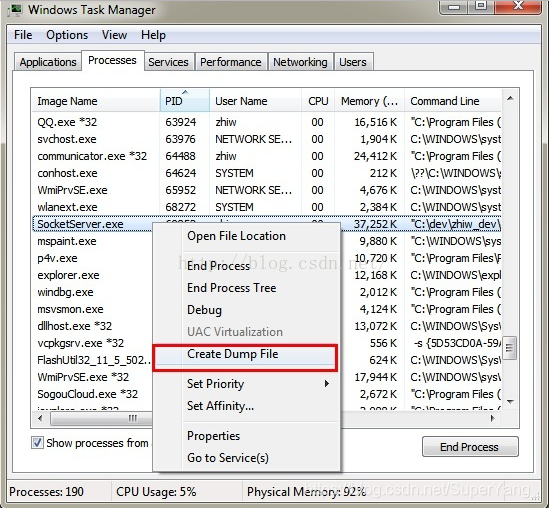
2. 程序崩溃未退出时手动创建(打开任务管理器,右键崩溃的进程)
3. 代码实现自动转储






 扫一扫
扫一扫


 2万+
2万+

 被折叠的 条评论
为什么被折叠?
被折叠的 条评论
为什么被折叠?
 到【灌水乐园】发言





