


Normally, Java properties file is used to store project configuration data or settings. In this tutorial, we will show you how to read and write to/from a .properties file.
	Properties prop = new Properties();

	// set key and value
	prop.setProperty("db.url", "localhost");
	prop.setProperty("db.user", "mkyong");
	prop.setProperty("db.password", "password");

	// save a properties file
	prop.store(outputStream, "");

	// load a properties file
	prop.load(inputStream)

	// get value by key
	prop.getProperty("db.url");
    prop.getProperty("db.user");
    prop.getProperty("db.password");

	// get all keys
	prop.keySet();

	// print everything
	prop.forEach((k, v) -> System.out.println("Key : " + k + ", Value : " + v));
Copy
A simple Maven project structure for testing.
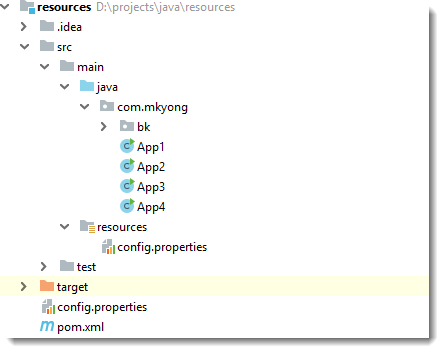
1. Write to the properties file
Set the property key and value, and save it somewhere.
App1.java
package com.mkyong;

import java.io.FileOutputStream;
import java.io.IOException;
import java.io.OutputStream;
import java.util.Properties;

public class App1 {

    public static void main(String[] args) {

        try (OutputStream output = new FileOutputStream("path/to/config.properties")) {

            Properties prop = new Properties();

            // set the properties value
            prop.setProperty("db.url", "localhost");
            prop.setProperty("db.user", "mkyong");
            prop.setProperty("db.password", "password");

            // save properties to project root folder
            prop.store(output, null);

            System.out.println(prop);

        } catch (IOException io) {
            io.printStackTrace();
        }

    }
}
Copy
Output
{db.user=mkyong, db.password=password, db.url=localhost}
Copy
The path/to/config.properties is created.
path/to/config.properties
#Thu Apr 11 17:37:58 SRET 2019
db.user=mkyong
db.password=password
db.url=localhost
Copy
2. Load a properties file
Load a properties file from the file system and retrieved the property value.
App2.java
package com.mkyong;

import java.io.FileInputStream;
import java.io.IOException;
import java.io.InputStream;
import java.util.Properties;

public class App2 {

    public static void main(String[] args) {

        try (InputStream input = new FileInputStream("path/to/config.properties")) {

            Properties prop = new Properties();

            // load a properties file
            prop.load(input);

            // get the property value and print it out
            System.out.println(prop.getProperty("db.url"));
            System.out.println(prop.getProperty("db.user"));
            System.out.println(prop.getProperty("db.password"));

        } catch (IOException ex) {
            ex.printStackTrace();
        }

    }

}
Copy
Output
localhost
mkyong
password
Copy
3. Load a properties file from classpath
Load a properties file config.properties from project classpath, and retrieved the property value.
src/main/resources/config.properties
db.url=localhost
db.user=mkyong
db.password=password
Copy
App3.java
package com.mkyong;

import java.io.IOException;
import java.io.InputStream;
import java.util.Properties;

public class App3 {

    public static void main(String[] args) {

        try (InputStream input = App3.class.getClassLoader().getResourceAsStream("config.properties")) {

            Properties prop = new Properties();

            if (input == null) {
                System.out.println("Sorry, unable to find config.properties");
                return;
            }

            //load a properties file from class path, inside static method
            prop.load(input);

            //get the property value and print it out
            System.out.println(prop.getProperty("db.url"));
            System.out.println(prop.getProperty("db.user"));
            System.out.println(prop.getProperty("db.password"));

        } catch (IOException ex) {
            ex.printStackTrace();
        }

    }

}
Copy
Output
localhost
mkyong
password
Copy
4. Prints everything from a properties file
Load a properties file config.properties from project classpath, and print out the keys and values.
App4.java
package com.mkyong;

import java.io.IOException;
import java.io.InputStream;
import java.util.Properties;
import java.util.Set;

public class App4 {

    public static void main(String[] args) {
        App4 app = new App4();
        app.printAll("config.properties");
    }

    private void printAll(String filename) {

        try (InputStream input = getClass().getClassLoader().getResourceAsStream(filename)) {

            Properties prop = new Properties();

            if (input == null) {
                System.out.println("Sorry, unable to find " + filename);
                return;
            }

            prop.load(input);

            // Java 8 , print key and values
            prop.forEach((key, value) -> System.out.println("Key : " + key + ", Value : " + value));

            // Get all keys
            prop.keySet().forEach(x -> System.out.println(x));

            Set<Object> objects = prop.keySet();

            /*Enumeration e = prop.propertyNames();
            while (e.hasMoreElements()) {
                String key = (String) e.nextElement();
                String value = prop.getProperty(key);
                System.out.println("Key : " + key + ", Value : " + value);
            }*/

        } catch (IOException ex) {
            ex.printStackTrace();
        }

    }

}
Copy
Output
Key : db.user, Value : mkyong
Key : db.password, Value : password
Key : db.url, Value : localhost
db.user
db.password
db.url
Copy
Download Source Code
Download – java-properties-file.zip (6KB)





 扫一扫
扫一扫


 被折叠的 条评论
为什么被折叠?
被折叠的 条评论
为什么被折叠?
 到【灌水乐园】发言





