


- 安装nodejs
https://nodejs.org/zh-cn/download
版本 ≥ 18.19.0 ,可以使用最新的LTS版本
node -v
- 安装rust
https://rust-lang.org/zh-CN/tools/install/
如果没有安装Visual Studio,会提示安装,按提示输入数字按回车就行
rustc --version
cargo --version
-
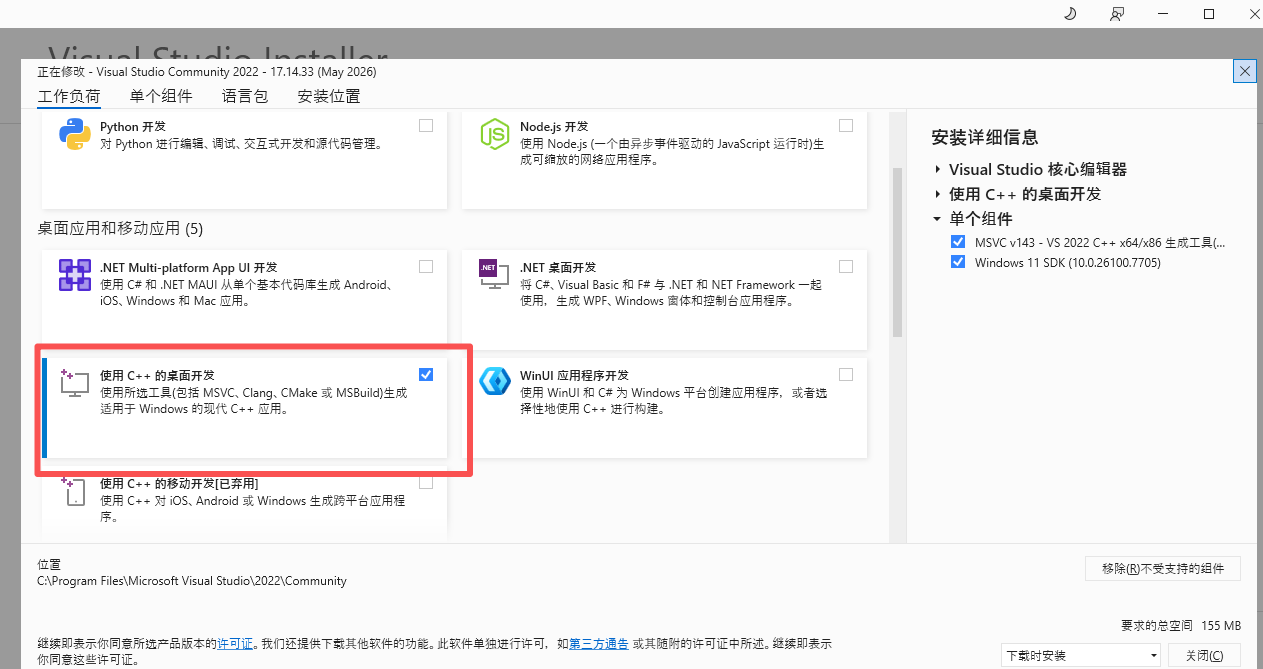
visual studio installer配置
选择 使用C++的桌面开发
-
安装pake
npm install -g pake-cli
pake --version
- 配置 Rust 国内镜像【避免pake打包时耗时长且失败!!】
在powershell中执行下面命令
# 先确认 .cargo 目录存在
mkdir "$env:USERPROFILE\.cargo" -Force
# 用记事本打开配置文件(如果不存在会自动创建)
notepad "$env:USERPROFILE\.cargo\config.toml"
记事本打开后,全部复制粘贴进去,然后保存
[source.crates-io]
replace-with = 'ustc'

[source.ustc]
registry = "sparse+https://mirrors.ustc.edu.cn/crates.io-index/"

# 网络超时设置
[net]
git-fetch-with-cli = true
retry = 3
本地打包方式:
1.进入项目根目录,执行
npm run build
npx serve dist
如果提示 npx 不存在,可以先全局安装 serve:npm install -g serve
记住这个 Local 地址,一般是 http://localhost:3000
2.用 Pake 打包该网址
保持上一步的终端窗口不要关闭(保持服务运行),然后另开一个终端,同样在项目目录下执行:
pake http://localhost:3000 --name vueDemo --width 1200 --height 800
●–name 应用名称
●–width,–height 窗口宽高
第一次打包会很慢,后面就好了
线上地址打包:
pake https://xxxxxx --name xxx
1.想要右键出现检查,使用 --debug
2.如果使用–force-internal-navigation和–new-window打包时报错,可以试试先卸载pake再重新安装!!!就不需要再使用–inject脚本来处理window.open了
●–force-internal-navigation 会让 window.open 和 a标签 跳转都留在应用内
●–new-window 允许弹出新的应用内窗口
3.pake默认隐藏滚动条,如果窗口太小想要展示滚动条,可以使用 --inject注入js文件
●–inject:注入自定义 CSS/JS
// style.js
(function() {


    // 等待 DOM 完全加载,确保 Pake 注入的样式已经存在
    window.addEventListener('DOMContentLoaded', function() {


        // 目标规则的正则匹配
        const targetRule = /html::-webkit-scrollbar\s*{\s*display:\s*none\s*!important\s*;?\s*}/gi;

        // 获取所有 style 标签
        const styleTags = document.querySelectorAll('style');
        let found = false;

        styleTags.forEach(style => {


            const originalText = style.textContent;
            if (targetRule.test(originalText)) {


                // 移除匹配到的规则块
                const newText = originalText.replace(targetRule, '');
                if (newText !== originalText) {


                    style.textContent = newText;
                    found = true;
                    console.log('[滚动条修复] 已移除隐藏滚动条的样式规则');
                }
            }
        });

        if (!found) {


            console.warn('[滚动条修复] 未找到需要移除的规则,可能已被其他方式覆盖');
        }
    });
})();
打包命令:
pake https://xxx --name xxx–force-internal-navigation --new-window --inject ./style.js --debug
4.想要可视滚动区域跟随窗口大小变化,使用–inject注入下面js文件
// fix-viewport.js
window.addEventListener('resize', function() {


    // 强制刷新视口高度
    document.documentElement.style.height = window.innerHeight + 'px';
    document.body.style.height = window.innerHeight + 'px';
    // 触发一次重绘,确保WebView响应变更
    document.body.style.overflow = 'hidden';
    setTimeout(() => {







 扫一扫
扫一扫


&spm=1001.2101.3001.5002&articleId=161934702&d=1&t=3&u=07ef082977954a9aa1aaddf9af6002e5)
 4223
4223

 被折叠的 条评论
为什么被折叠?
被折叠的 条评论
为什么被折叠?
 到【灌水乐园】发言





