
pom.xml
	  <dependency>
   			<groupId>org.apache.poi</groupId>
   			<artifactId>poi</artifactId>
   			<version>3.15</version>
  		</dependency>
  		<dependency>
   			<groupId>org.apache.poi</groupId>
   			<artifactId>poi-ooxml</artifactId>
   			<version>3.15</version>
  		</dependency>


  		<dependency>
   			<groupId>commons-io</groupId>
   			<artifactId>commons-io</artifactId>
   			<version>2.5</version>
  		</dependency>
核心代码
@RestController
public class MyController {
@RequestMapping("/ip/v5")
public void getExcel(HttpServletResponse response) throws IOException {
ArrayList<String> arrayList = new ArrayList<String>();
arrayList.add("this is 单元格第1行");
arrayList.add("this is 单元格第2行");
arrayList.add("this is 单元格第3行");
arrayList.add("this is 单元格第4行");
XSSFWorkbook workBook = new XSSFWorkbook();
XSSFSheet sheet = workBook.createSheet();
workBook.setSheetName(0, "ip-v4表");
XSSFCellStyle cs = workBook.createCellStyle();
cs.setWrapText(true);
String fileName = "china-ip-v4" + ".xls";
String[] headers = { "掩码" };
XSSFRow titleRow = sheet.createRow(0);
for (int i = 0; i < headers.length; i++) {
titleRow.createCell(i).setCellValue(headers[i]);
}
String content = String.join("\n", arrayList);
int rowNum = 1;
XSSFRow row1 = sheet.createRow(rowNum);
XSSFCell cell = row1.createCell(0);
cell.setCellValue(content);
cell.setCellStyle(cs);
response.setContentType("application/octet-stream");
response.setHeader("Content-disposition", "attachment;filename=" + fileName);
response.flushBuffer();
workBook.write(response.getOutputStream());
}
}
结果:
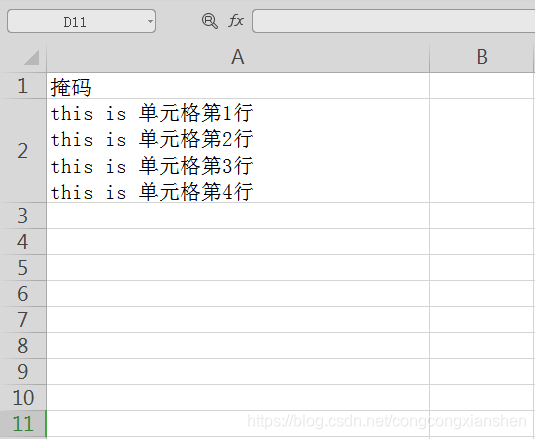



 本文介绍了如何使用Java的POI库处理Excel文件时,实现单元格内容的换行操作。通过调整pom.xml依赖并编写核心代码,可以成功在Excel单元格中显示多行文本。





 扫一扫
扫一扫


 5万+
5万+

 被折叠的 条评论
为什么被折叠?
被折叠的 条评论
为什么被折叠?
 到【灌水乐园】发言





