


 Unity5.3引入了CustomYieldInstruction类,允许开发者创建自定义协程yield操作,解决因WaitForSeconds使用缩放时间导致的问题。本文通过修复UI下拉组件在Time.timescale为0时的bug,展示了如何利用这一新特性。

协程嵌套协程
Among all the shiny new features, there is a tiny one line in the Unity 5.3 release notes for a feature that I found useful and I think you will too. Custom coroutines, namely the new CustomYieldInstruction class, mean that you can now add your own coroutine yield operations in a very simple way. So let’s take a look at a real world example.
在所有闪亮的新功能中,Unity 5.3发行说明中只有一小段内容适用于我认为有用的功能,我想您也将使用。 自定义协程,即新的 CustomYieldInstruction 类,意味着您现在可以以非常简单的方式添加自己的协程产量操作。 因此,让我们看一个真实的例子。
一个真实的例子–错误修正 (A real world example – A bugfix)
I was recently investigating a bug in the UI Dropdown component, a Unity 5.2 feature. When Time.timescale was set to 0, the Dropdown component would only work once, then it would not reappear until timescale was set back to a non-zero value.
我最近正在研究UI 下拉组件(Unity 5.2功能)中的错误。 当Time.timescale设置为0时,Dropdown组件将只工作一次,然后在timescale设置回非零值之前它不会重新出现。
After a bit of debugging, we found out that the problem is in the Show function.
经过一些调试,我们发现问题出在Show函数中。

m_Dropdown is not null and is preventing the Dropdown from being shown.
m_Dropdown不为null,并阻止显示Dropdown。
Once shown, the m_Dropdown component is minimised and then destroyed. Well, it should be destroyed, but when the timescale is 0, this is not happening.
一旦显示,将m_Dropdown组件最小化,然后销毁。 好吧,它应该被销毁,但是当时间刻度为0时,这不会发生。
Take a look at the destroy function and see if you can spot the problem.
查看一下destroy函数,看看是否可以发现问题。
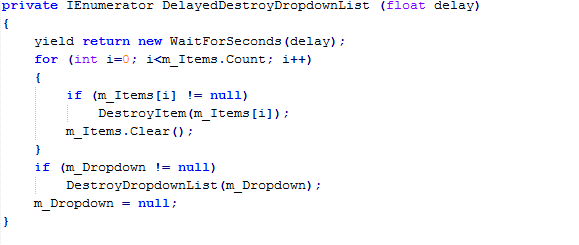
The title of this article may have given it away, but WaitForSeconds is the answer. WaitForSeconds uses scaled time. This means that if you tell WaitForSeconds to wait for 1 second and the timescale is 0.5, then you actually wait for 2 seconds (1 / 0.5 = 2). So using WaitForSeconds with a timescale of 0 means that you wait indefinitely (until the timescale is not 0). The Dropdown was never being destroyed after its first use, because we would get held up by the WaitForSeconds yield instruction.
这篇文章的标题可能已经给了,但是WaitForSeconds是答案。 WaitForSeconds 使用换算时间。 这意味着,如果您告诉WaitForSeconds等待1秒钟,并且时间刻度为0.5,则实际上等待2秒(1 / 0.5 = 2)。 因此,使用时间刻度为0的WaitForSeconds表示您无限期等待(直到时间刻度不为0)。 Dropdown在首次使用后从未被销毁,因为我们会被WaitForSeconds yield指令阻止。
解决方案 (The solution)
We need to wait using unscaled time; the most elegant approach here is to add a new yield operation, a WaitForSecondsRealtime class. Clearly, if our own developers do not realise WaitForSeconds uses scaled time, then we need to address this. WaitForSecondsRealtime should help reinforce this message. We also need to update the docs for WaitForSeconds (we never mention scaled time!).
我们需要等待使用无标度的时间; 这里最优雅的方法是添加一个新的yield操作,即WaitForSecondsRealtime类。 显然,如果我们自己的开发人员没有意识到WaitForSeconds使用缩放时间,那么我们需要解决这个问题。 WaitForSecondsRealtime应该有助于加强此消息。 我们还需要更新WaitForSeconds的文档(我们从来没有提到扩展时间!)。
This is how I discovered the CustomYieldInstruction, recently added for creating new yield operations.
这就是我发现CustomYieldInstruction的方式,该指令最近添加用于创建新的yield操作。
Adding a new yield operation is very simple, here is the solution to our problem.
添加新的yield操作非常简单,这是解决我们问题的方法。
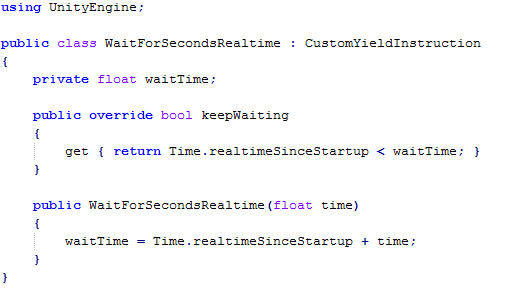
Any custom yield operation needs to override the keepWaiting property and once we want the yield operation to continue, we just pass back false.
任何自定义的yield操作都需要覆盖keepWaiting属性,并且一旦我们希望yield操作继续,我们就返回false。
Here is how our fix now looks:
这是我们的修复程序现在的样子:
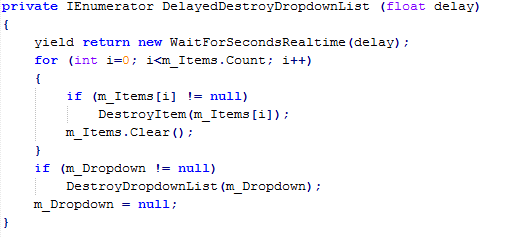
In our example, we grab the real time and just test against it each check. It doesn’t get much simpler than that – oh wait, it does, because we now also have the WaitUntil and WaitWhile yield instructions. With these, we can provide a delegate to be called for our yield instruction test.
在我们的示例中,我们获取实时信息,并在每次检查时对其进行测试。 它没有比这更简单的了–等等,因为我们现在还具有WaitUntil和WaitWhile yield指令。 有了这些,我们可以提供一个委托来进行产量指令测试。
Here is an alternative way to solve our problem, assuming we wanted a 5 second delay.
假设我们要延迟5秒,这是解决问题的另一种方法。

So, a simple feature, but with a lot of potential. I guess the lesson learned here is: Remember to read the release notes, you never know what useful features you might find! If you like the custom coroutines, you should take a look at UnityEvents, another favourite feature of mine that you may have missed.
因此,这是一个简单的功能,但潜力很大。 我想这里吸取的教训是:请记住阅读发行说明,您永远不会知道可能会发现哪些有用的功能! 如果您喜欢自定义协程,则应该看看UnityEvents ,这是我可能错过的另一个我最喜欢的功能。
翻译自: https://blogs.unity3d.com/2015/12/01/custom-coroutines/
协程嵌套协程





 扫一扫
扫一扫


 3125
3125

 被折叠的 条评论
为什么被折叠?
被折叠的 条评论
为什么被折叠?
 到【灌水乐园】发言





