


 本文详细介绍了如何在Ubuntu Linux上安装必要的软件包,并使用gedit编辑器编写、编译和运行C和C++程序。通过终端执行`apt-get install build-essential`安装编译环境,然后使用`gcc`或`g++`进行编译,最后运行程序。
Learn how to compile and run C/C++ programs in linux (ubuntu).
了解如何在Linux(ubuntu)中编译和运行C / C ++程序。
Linux is becoming very popular among the programmers. In my opinion you should also start doing programming in linux. I thought that I should share the process to write and run C/C++ programs on linux platform.
Linux在程序员中正变得非常流行。 我认为您还应该开始在Linux中进行编程。 我认为我应该分享在Linux平台上编写和运行C / C ++程序的过程。
如何在Linux中编译和运行C / C ++程序(Ubuntu) (How to Compile and Run C/C++ Programs in Linux (Ubuntu))
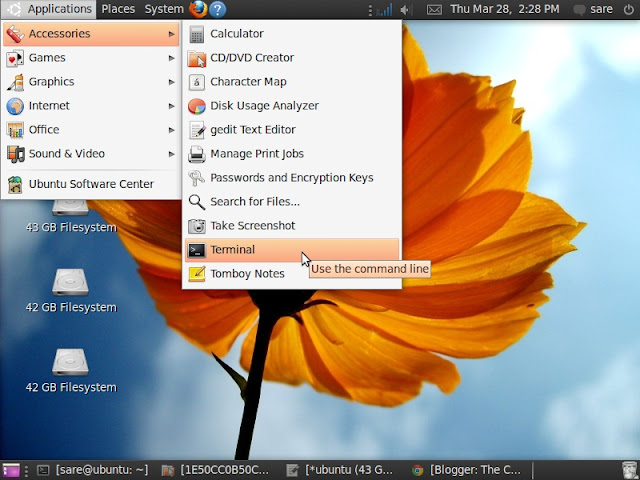
1. First of all open terminal window, for this go to Applications > Accessories > Terminal, as shown in below image.
1.首先打开终端窗口,为此请转到应用程序>附件>终端 ,如下图所示。
2. To run C/C++ program you need to install the essential packages. For this enter the command given below in terminal window.
2.要运行C / C ++程序,您需要安装基本软件包。 为此,请在终端窗口中输入以下命令。
sudo apt-get install build-essential
sudo apt-get install build-essential
Now it will ask for the admin password. When you enter the password the installation process will start.
现在,它将要求输入管理员密码。 输入密码后,安装过程将开始。
Note: For installing packages you must be connected to internet. It will take few minutes to complete, depending upon your internet speed. Skip this step if packages are already installed.
注意:要安装软件包,您必须连接到Internet。 这将需要几分钟的时间才能完成,具体取决于您的互联网速度。 如果已经安装了软件包,请跳过此步骤。
3. Now its time to write and run the program. Below I have explained simple steps for both C and C++.
3.现在是时候编写和运行程序了。 下面,我解释了C和C ++的简单步骤。
对于C程序 (For C Program)
1. Enter the command given below in terminal window to open text editor.
1.在终端窗口中输入下面给出的命令以打开文本编辑器。
gedit prog.c
gedit程序
Here prog.c is the name of the program. After entering above code it will ask for password.
这里的prog.c是程序的名称。 输入上述代码后,它将要求输入密码。
2. Now write your program, for your convenience I have given a sample program below, you can copy and paste it in gedit text editor.
2.现在编写您的程序,为方便起见,我在下面提供了一个示例程序,您可以将其复制并粘贴到gedit文本编辑器中。
#include<stdio.h>

int main()
{
	printf("\nThis is C Programming in Linux\n");
	return 0;
}
3. Save and close the editor.
3.保存并关闭编辑器。
4. To compile the program enter the command given below in terminal window.
4.要编译程序,请在终端窗口中输入以下命令。
gcc prog.c -o prog
gcc程序c -o程序
5. If there will be no error in the program then nothing will be shown. And if error occurs, it will be shown. In case you get an error you have to open the text editor again by repeating step 1 and remove it and again save and close the editor.
5.如果程序中没有错误,则不会显示任何内容。 如果发生错误,将显示出来。 如果出现错误,则必须通过重复步骤1再次打开文本编辑器并将其删除,然后再次保存并关闭编辑器。
6. Enter the command given below to run the program.
6.输入下面给出的命令以运行程序。
./prog
./编
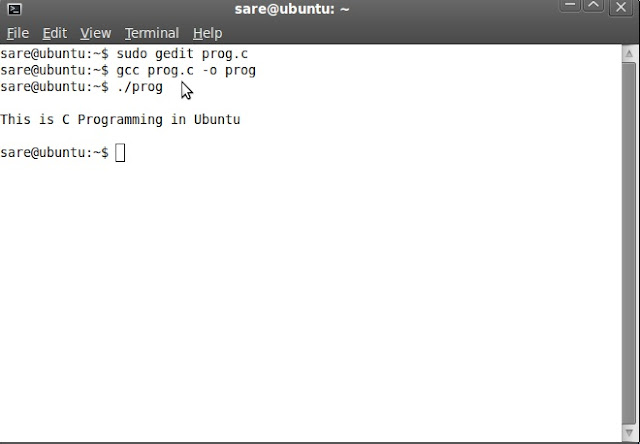
7. Now you will see the output in the terminal window as shown in below image.
7.现在,您将在终端窗口中看到输出,如下图所示。
对于C ++程序 (For C++ Program)
1. Enter the command given below in terminal window to open text editor.
1.在终端窗口中输入下面给出的命令以打开文本编辑器。
gedit progcpp.cpp
gedit progcpp.cpp
2. Now write your program, I have given an example below.
2.现在编写您的程序,下面给出一个例子。
#include<iostream>

using namespace std;

int main()
{
	cout<<"\nThis is C++ Programming in Linux\n";
	return 0;
}
3. Save and close the editor.
3.保存并关闭编辑器。
4. To compile the program enter the command given below in terminal window.
4.要编译程序,请在终端窗口中输入以下命令。
g++ progcpp.cpp -o progcpp
g ++ progcpp.cpp -o progcpp
5. Enter the command given below to run the program.
5.输入下面给出的命令以运行程序。
./progcpp
./progcpp
Comment below if you have doubts or found anything incorrect in above tutorial.
如果您对以上教程有疑问或发现任何不正确之处,请在下面评论。
翻译自: https://www.thecrazyprogrammer.com/2013/03/how-to-write-and-run-cc-programs-in.html





 扫一扫
扫一扫


&spm=1001.2101.3001.5002&articleId=108650922&d=1&t=3&u=836acbc5092a41d7bb0aa1b06c368be6)
 301
301

 被折叠的 条评论
为什么被折叠?
被折叠的 条评论
为什么被折叠?
 到【灌水乐园】发言





