


 本文介绍了如何在Vim中管理和选择配色方案,包括列出内置方案、使用`colorscheme`和`colo`命令,以及如何通过`.vimrc`实现配色方案的持久化。此外,还探讨了如何从第三方获取和应用高质量的颜色主题。
Vim is very popular ans useful text editor based command line and GUI. I prefer vim because of its featured over nano etc. Vim have color scheme and highlighting features where different syntax for programming languages can be printed in a pretty and understandable form. In this tutorial we will look how to change color schemes. Reading following tutorials will be beneficial.
Vim是非常流行的基于命令行和GUI的有用的文本编辑器。 我更喜欢vim,因为它比nano等具有更多的功能。Vim具有配色方案和突出显示功能,可以用一种漂亮易懂的形式打印用于编程语言的不同语法。 在本教程中,我们将研究如何更改配色方案。 阅读以下教程将是有益的。
Linux Vi and Vim Command Line Text Editor Tutorial
Vim Copy, Cut and Paste Commands and Operations
列出Vim配色方案(List Vim Color Schemes)
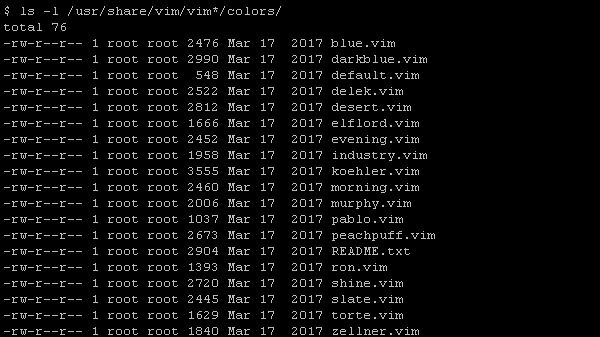
Before selecting a color scheme we need to list vim provided color schemes. Vim color schemes are stored in vim directory named /usr/share/vim/vim80/colors/ but vim80 can be different according to vim version. Color schemes have .vim extension. We can use ls -l command in order to print available color schemes.
选择配色方案之前,我们需要列出vim提供的配色方案。 Vim配色方案存储在名为/usr/share/vim/vim80/colors/ vim目录中,但根据vim版本的不同, vim80可以有所不同。 配色方案具有.vim扩展名。 我们可以使用ls -l命令来打印可用的配色方案。
$ ls -l /usr/share/vim/vim*/colors/
使用colorscheme命令列出Vim配色方案 (List Vim Color Schemes with colorscheme Command)
We have an other option where we can list color schemes. We can use colorscheme command and then press space and tab. This will list avaibilible color schemes. Currently selected color scheme will be colored as yellow like below.
我们还有另一个选项可以列出配色方案。 我们可以使用colorscheme命令,然后按space和tab 。 这将列出可用的配色方案。 当前选择的配色方案将变为黄色,如下所示。
:colorscheme
then SPACE and TAB
然后按SPACE和TAB

使用colorscheme命令设置配色方案(Set Color Scheme with colorscheme Command)
Now we know what color schemes are available. We will select color scheme with colorscheme command. Actually we were very close to select color scheme in previous step. We will just provide the color scheme name to the colorscheme command. In this example we will select desert.
现在我们知道可以使用哪些配色方案。 我们将使用colorscheme命令选择配色方案。 实际上,我们在上一步中非常接近选择配色方案。 我们仅将颜色方案名称提供给colorscheme命令。 在此示例中,我们将选择沙漠。
: colorscheme desert
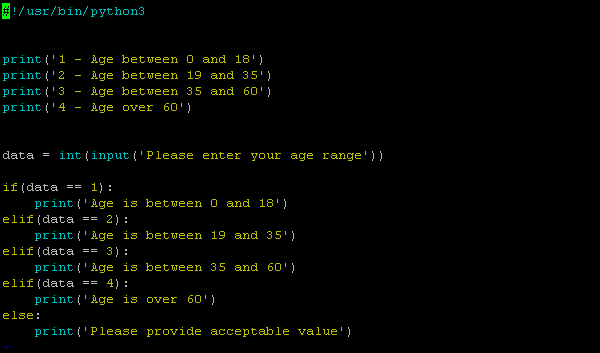
and the Python script syntax will be highlighted like below.
并且Python脚本语法将如下所示突出显示。
使用colo命令设置配色方案(Set Color Scheme with colo Command)
Vim provides shortcut usage for commands. But provided part should be uniquely identifier. This means we can use colo which is unique and address colorscheme command. We will set color scheme delek in this example.
Vim提供了命令的快捷方式。 但是提供的部分应该是唯一的标识符。 这意味着我们可以使用唯一的colo和address colorscheme命令。 在此示例中,我们将设置配色方案delek 。
: colo delek

使配色方案永久指定vimrc(Make Color scheme Persistent Specifying vimrc)
Changes are not saved between vim sessions. So color scheme changes we have made will be lost in next sessions. Doing this change again and again in ever is not practical. We can save this configuration to the vimrc configuration file and made it persistent. vimrc is located at /etc or users home directory.
在vim会话之间不保存更改。 因此,我们所做的配色方案更改将在下一个会话中丢失。 一次又一次地进行这种更改是不切实际的。 我们可以将该配置保存到vimrc配置文件中,并使其持久化。 vimrc位于/etc或用户主目录中。
echo ":colorscheme delek" >> ~/.vimrc

第三杆配色方案 (3rd Pary Color Schemes)
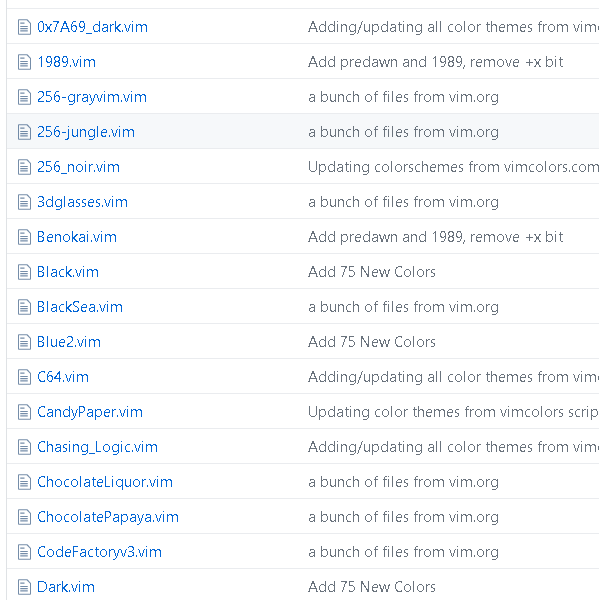
As vim is modular tool there are alot of different color schemes provided by 3rd parties. We can find them by searching in google. As an example following github repository provides a lot of new color schemes.
由于vim是模块化工具,因此第三方提供了许多不同的配色方案。 我们可以通过在Google中搜索找到它们。 作为示例,以下github存储库提供了许多新的配色方案。
https://github.com/flazz/vim-colorschemes
翻译自: https://www.poftut.com/set-configure-use-vim-color-scheme/





 扫一扫
扫一扫


 646
646

 被折叠的 条评论
为什么被折叠?
被折叠的 条评论
为什么被折叠?
 到【灌水乐园】发言





