


@案例1
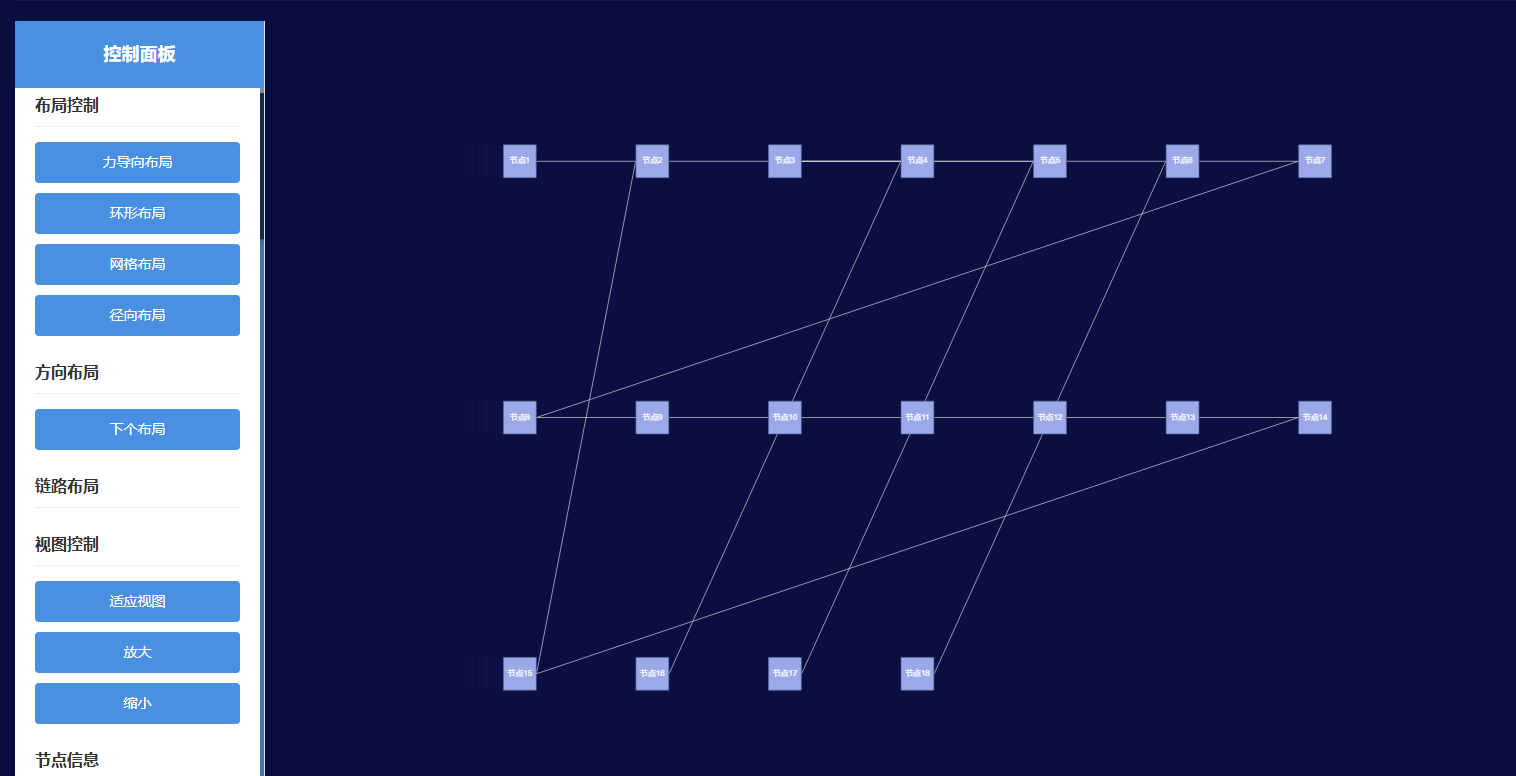
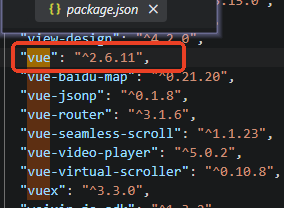
VUEv2.6.11引入antv/g6
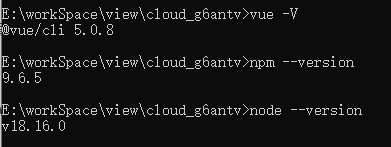
1. 安装antv/g6@3.x
npm install @antv/g6@3.x --save
2. vue2.6.11使用antv/g6案例1
<template>
  <div class="topo-container">
    <!-- 左侧控制面板 -->
    <div class="left-panel">
      <div class="panel-header">
        <h3>控制面板</h3>
      </div>
      <div class="panel-content">
        <div class="control-group">
          <h4>节点操作</h4>
          <button @click="addNode" class="control-btn">添加节点</button>
          <button @click="removeNode" class="control-btn">删除节点</button>
        </div>

        <div class="control-group">
          <h4>布局控制</h4>
          <button @click="changeLayout('force')" class="control-btn">力导向布局</button>
          <button @click="changeLayout('circular')" class="control-btn">环形布局</button>
          <button @click="changeLayout('grid')" class="control-btn">网格布局</button>
          <button @click="changeLayout('radial')" class="control-btn">径向布局</button>
        </div>

        <div class="control-group">
          <h4>方向布局</h4>
          <button @click="changeLayout('next')" class="control-btn">下个布局</button>
        </div>

        <div class="control-group">
          <h4>链路布局</h4>

        </div>

        <div class="control-group">
          <h4>视图控制</h4>
          <button @click="fitView" class="control-btn">适应视图</button>
          <button @click="zoomIn" class="control-btn">放大</button>
          <button @click="zoomOut" class="control-btn">缩小</button>
        </div>

        <div class="control-group">
          <h4>节点信息</h4>
          <div class="node-info">
            <p>总节点数: {{ nodeCount }}</p>
            <p>总边数: {{ edgeCount }}</p>
          </div>
        </div>
      </div>
    </div>

    <!-- 右侧图表显示区域 -->
    <div class="right-panel">
      <div id="g6-container" class="g6-chart"></div>
    </div>
  </div>
</template>

<script>
import G6 from '@antv/g6';

export default {
  name: 'G6Chart',
  data() {
    return {
      graph: null,
      nodeCount: 18,
      edgeCount: 17,
      nodeIdCounter: 19,
      layoutIndex: 0,
      graphOpt:{},
      topoData:null
    };
  },
  methods: {
    initGraph() {
      const container = document.getElementById('g6-container');
      const width = container.scrollWidth;
      const height = container.scrollHeight || 500;

      this.graphOpt={
        container: 'g6-container',
        width,
        height,
        modes: {
          default: ['drag-canvas', 'zoom-canvas', 'drag-node'],
        },
        animate: true,
        defaultNode: {
          type: 'rect',// circle
          size: [50],
          style: {
            fill: '#9ca9e8',
            stroke: '#5b6c9f',
          },
          labelCfg: {
            style: {
              fill: '#fff',
            },
          },
        },
        defaultEdge: {
          type: 'line',
        },
      };

      this.graph = new G6.Graph(this.graphOpt);

      this.topoData = {
        nodes: [
          { id: '1', label: '节点1' },
          { id: '2', label: '节点2' },
          { id: '3', label: '节点3' },
          { id: '4', label: '节点4' },
          { id: '5', label: '节点5' },
          { id: '6', label: '节点6' },
          { id: '7', label: '节点7' },
          { id: '8', label: '节点8' },
          { id: '9', label: '节点9' },
          { id: '10', label: '节点10' },
          { id: '11', label: '节点11' },
          { id: '12', label: '节点12' },
          { id: '13', label: '节点13' },
          { id: '14', label: '节点14' },
          { id: '15', label: '节点15' },
          { id: '16', label: '节点16' },
          { id: '17', label: '节点17' },
          { id: '18', label: '节点18' },
        ],
        edges: [
          { source: '1', target: '2' },
          { source: '2', target: '3' },
          { source: '3', target: '4' },
          { source: '4', target: '3' },
          { source: '5', target: '4' },
          { source: '6', target: '3' },
          { source: '6', target: '7' },
          { source: '7', target: '8' },
          { source: '8', target: '9' },
          { source: '9', target: '10' },
          { source: '10', target: '11' },
          { source: '11', target: '12' },
          { source: '12', target: '13' },
          { source: '13', target: '14' },
          { source: '14', target: '15' },
          { source: '15', target: '2' },
          { source: '16', target: '4' },
          { source: '17', target: '5' },
          { source: '18', target: '6' },
        ],
      };

      this.graph.data(this.topoData);
      this.graph.render();
    },

    addNode() {
      const newNodeId = `node${this.nodeIdCounter}`;
      const newNode = {
        id: newNodeId,
        label: `节点${this.nodeIdCounter}`
      };

      this.graph.addItem('node', newNode);
      this.nodeIdCounter++;
      this.nodeCount++;

      // 如果有节点,连接到第一个节点
      const nodes = this.graph.getNodes();
      if (nodes.length > 1) {
        const firstNode = nodes[0];
        this.graph.addItem('edge', {
          source: firstNode.getID(),
          target: newNodeId
        });
        this.edgeCount++;
      }
    },

    removeNode() {
      const nodes = this.graph.getNodes();
      if (nodes.length > 0) {
        const lastNode = nodes[nodes.length - 1];
        this.graph.removeItem(lastNode);
        this.nodeCount--;

        // 删除相关的边
        const edges = this.graph.getEdges();
        edges.forEach(edge => {
          if (edge.getModel().source === lastNode.getID() ||
              edge.getModel().target === lastNode.getID()) {
            this.graph.removeItem(edge);
            this.edgeCount--;
          }
        });
      }
    },

    changeLayout(layoutType) {
      let layoutConfig = {};
      let layoutArr = ['random', 'force', 'dagre', 'circular', 'grid', 'radial', 'mds', 'fruchterman'];

      // random, radial, mds, circular, fruchterman, force, dagre
      switch(layoutType) {
        case 'next':
          if(layoutArr[(this.layoutIndex%10)] === 'dagre'){
            layoutConfig = {
              type: 'dagre',
              rankdir: 'LR',
              align: 'LR',
              ranksep: 50,
              nodesep: 5,
            };
          }else{
              layoutConfig = {
                type: layoutArr[(this.layoutIndex%10)],
                nodesep: 30,
                ranksep: 10,
              };
          }
          console.log(layoutArr[(this.layoutIndex%10)])
          this.layoutIndex++;
          break;
        case 'force':
          layoutConfig = {
            type: 'force',
            preventOverlap: true,
            linkDistance: 100,
            nodeStrength: 30,
            edgeStrength: 0.1,
          };
          break;
        case 'dagre':
          layoutConfig = {
            type: 'dagre',
            rankdir: 'TB',
            nodesep: 30,
            ranksep: 50,
          };
          break;
        case 'circular':
          layoutConfig = {
            type: 'circular',
            radius: 200,
          };
          break;
        case 'grid':
          layoutConfig = {
            type: 'grid',
            rows: 4,
            cols: 5,
            nodeSize: 50,
            preventOverlap: true,
          };
          break;
        case 'radial':
          layoutConfig = {
            type: 'radial',
            unitRadius: 100,
            preventOverlap: true,
            nodeSize: 50,
          };
          break;

      }

      this.graph.updateLayout(layoutConfig);
    },

    fitView() {
      this.graph.fitView();
    },

    zoomIn() {
      const current = this.graph.getZoom();
      this.graph.zoomTo(current * 1.2);
    },

    zoomOut() {
      const current = this.graph.getZoom();
      this.graph.zoomTo(current * 0.8);
    },

    changeEdgeLayout(layoutType) {
      let edgeConfig = {};

      switch(layoutType) {
        case 'horizontal':
          // 设置边为曲线,使链路呈现水平方向的弯曲效果
          edgeConfig = {
            type: 'quadratic',
            style: {
              lineWidth: 2,
              stroke: '#888'
            }
          };
          // 更新所有边的类型和样式
          const edges = this.graph.getEdges();
          edges.forEach(edge => {
            this.graph.updateItem(edge, {
              type: 'quadratic',
              style: {
                lineWidth: 2,
                stroke: '#888'
              }
            });
          });
          break;

        case 'vertical':
          // 设置边为垂直方向的曲线
          edgeConfig = {
            type: 'cubic-horizontal',  // 或者使用其他类型的曲线
            style: {
              lineWidth: 2,
              stroke: '#888'
            }
          };
          // 更新所有边的类型和样式
          const edgesVertical = this.graph.getEdges();
          edgesVertical.forEach(edge => {
            this.graph.updateItem(edge, {
              type: 'cubic-horizontal',
              style: {
                lineWidth: 2,
                stroke: '#888'
              }
            });
          });
          break;

        case 'polyline':
          // 折线样式
          const edgesPolyline = this.graph.getEdges();
          edgesPolyline.forEach(edge => {
            this.graph.updateItem(edge, {
              type: 'polyline',
              style: {
                lineWidth: 2,
                stroke: '#888'
              }
            });
          });
          break;

        case 'orthogonal':
          // 正交边样式
          const edgesOrthogonal = this.graph.getEdges();
          edgesOrthogonal.forEach(edge => {
            this.graph.updateItem(edge, {
              type: 'cubic',
              style: {
                lineWidth: 2,
                stroke: '#888'
              }
            });
          });
          break;
      }

      // 重新绘制图形
      this.graph.refresh();
    }
  },
  mounted() {
    this.initGraph();
  },
  beforeDestroy() {
    if (this.graph) {
      this.graph.destroy();
    }
  }
};
</script>

<style scoped>
.topo-container {
  display: flex;
  width: 100%;
  height: 100vh;
}

.left-panel {
  width: 250px;
  background-color: #ffffff;
  border-right: 1px solid #e0e0e0;
  box-shadow: 2px 0 5px rgba(0, 0, 0, 0.1);
  display: flex;
  flex-direction: column;
}

.panel-header {
  padding: 20px;
  background-color: #4a90e2;
  color: white;
  text-align: center;
}

.panel-header h3 {
  margin: 0;
  font-size: 18px;
}

.panel-content {
  flex: 1;
  padding: 20px;
  overflow-y: auto;
}

.control-group {
  margin-bottom: 25px;
}

.control-group h4 {
  margin: 0 0 15px 0;
  color: #333;
  font-size: 16px;
  border-bottom: 1px solid #eee;
  padding-bottom: 8px;
}

.control-btn {
  display: block;
  width: 100%;
  padding: 10px 15px;
  margin-bottom: 10px;
  background-color: #4a90e2;
  color: white;
  border: none;
  border-radius: 4px;
  cursor: pointer;
  font-size: 14px;
  transition: background-color 0.3s;
}

.control-btn:hover {
  background-color: #357abd;
}

.control-btn:last-child {
  margin-bottom: 0;
}

.node-info {
  background-color: #9ca9e8;
  padding: 15px;
  border-radius: 4px;
  border: 1px solid #9ca9e8;
}

.node-info p {
  margin: 8px 0;
  font-size: 14px;
  color: #555;
}

.right-panel {
  flex: 1;
  display: flex;
  flex-direction: column;
}

.g6-chart {
  flex: 1;
  width: 100%;
  height: 100%;
}
</style>





 扫一扫
扫一扫


 1181
1181

 被折叠的 条评论
为什么被折叠?
被折叠的 条评论
为什么被折叠?
 到【灌水乐园】发言





