


原文作者:PaperMoon团队
具备以太坊兼容性的 PolkaVM 智能合约仍处于早期开发阶段,可能存在不稳定或功能不完整的情况。
去中心化应用(dApp)是 Web3 生态系统的核心组成部分,使开发者能够构建直接与区块链网络交互的应用程序。Polkadot Hub 是一条支持智能合约的区块链,为 dApp 的部署与交互提供了稳健的平台。
本教程将指导你构建一个完整可用的 dApp,该应用可以与部署在 Polkadot Hub 上的智能合约进行交互。
你将使用:
• Viem:用于区块链交互
• Next.js:用于前端界面
完成后,你将拥有一个可以:
• 连接用户钱包
• 读取链上数据
• 发起并执行交易的完整 dApp。
前置条件
开始之前,请确保你已具备以下条件:
• 本地已安装 Node.js v16 或更高版本
• 一个加密钱包(如 MetaMask),并已领取测试代币
👉 可参考 Connect to Polkadot 指南
• 对 React 和 JavaScript 有基本了解
• 对区块链基础和 Solidity 有一定了解(非必须,但有帮助)
项目概览
本 dApp 将与一个基础的 Storage 合约进行交互。
你可以参考 Create Contracts 教程了解该合约的创建过程。
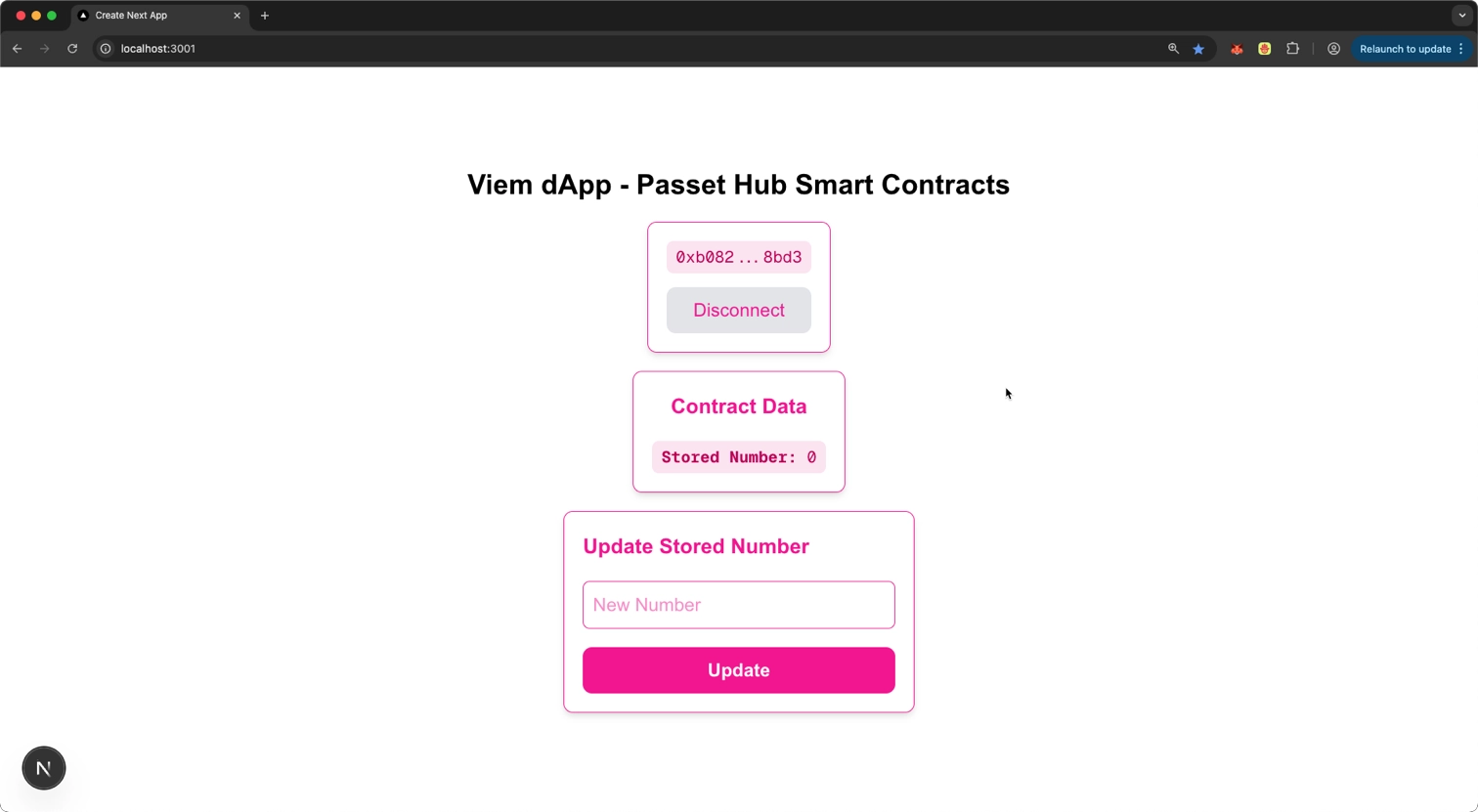
该合约支持以下功能:
• 从区块链中读取一个已存储的数字
• 将该数字更新为新的值
项目结构
你的项目目录结构如下:
viem-dapp
├── abis
│   └── Storage.json
└── app
    ├── components
    │   ├── ReadContract.tsx
    │   ├── WalletConnect.tsx
    │   └── WriteContract.tsx
    ├── favicon.ico
    ├── globals.css
    ├── layout.tsx
    ├── page.tsx
    └── utils
        ├── contract.ts
        └── viem.ts
项目初始化
创建 Next.js 项目
npx create-next-app viem-dapp --ts --eslint --tailwind --app --yes
cd viem-dapp
安装依赖
安装 Viem 及相关依赖:
npm install viem@2.23.6
npm install --save-dev typescript @types/node
连接到 Polkadot Hub
为了与 Polkadot Hub 交互,需要创建一个 Public Client。
本示例将连接 Polkadot Hub TestNet,以便安全地进行实验。
创建 utils/viem.ts
import { createPublicClient, http, createWalletClient, custom } from 'viem'
import 'viem/window';

const transport = http('https://testnet-passet-hub-eth-rpc.polkadot.io')

// 配置 Passet Hub 链
export const passetHub = {
  id: 420420422,
  name: 'Passet Hub',
  network: 'passet-hub',
  nativeCurrency: {
    decimals: 18,
    name: 'PAS',
    symbol: 'PAS',
  },
  rpcUrls: {
    default: {
      http: ['https://testnet-passet-hub-eth-rpc.polkadot.io'],
    },
  },
} as const

// 用于读取链上数据的 Public Client
export const publicClient = createPublicClient({
  chain: passetHub,
  transport
})

// 用于签名交易的 Wallet Client
export const getWalletClient = async () => {
  if (typeof window !== 'undefined' && window.ethereum) {
    const [account] = await window.ethereum.request({ method: 'eth_requestAccounts' });
    return createWalletClient({
      chain: passetHub,
      transport: custom(window.ethereum),
      account,
    });
  }
  throw new Error('未检测到以太坊浏览器钱包');
};
说明:
• Public Client:用于读取区块链数据
• Wallet Client:用于用户签名并发送交易
• 引入 viem/window 可为 window.ethereum 提供 EIP-1193 类型支持
设置智能合约接口
本 dApp 将与以下已部署在 Polkadot Hub TestNet 上的合约交互:
0x58053f0e8ede1a47a1af53e43368cd04ddcaf66f创建 ABI 文件
在项目根目录创建 abis/Storage.json,并粘贴 Storage 合约 ABI。
创建钱包连接组件
components/WalletConnect.tsx
该组件负责:
• 钱包连接
• 网络切换
• 账户状态管理
(代码逻辑保持不变,此处略去代码,仅解释功能)
功能说明:
• 自动检测是否已授权钱包
• 监听账户 / 网络变化
• 支持自动切换或添加 Passet Hub 网络
• 提供连接 / 断开按钮
在页面中使用钱包组件
更新 app/page.tsx
"use client";

import { useState } from "react";
import WalletConnect from "./components/WalletConnect";

export default function Home() {
  const [account, setAccount] = useState<string | null>(null);

  return (
    <section className="min-h-screen flex flex-col items-center gap-4 py-10">
      <h1 className="text-2xl font-semibold">
        Viem dApp - Passet Hub Smart Contracts
      </h1>
      <WalletConnect onConnect={setAccount} />
    </section>
  );
}
运行项目:
npm run dev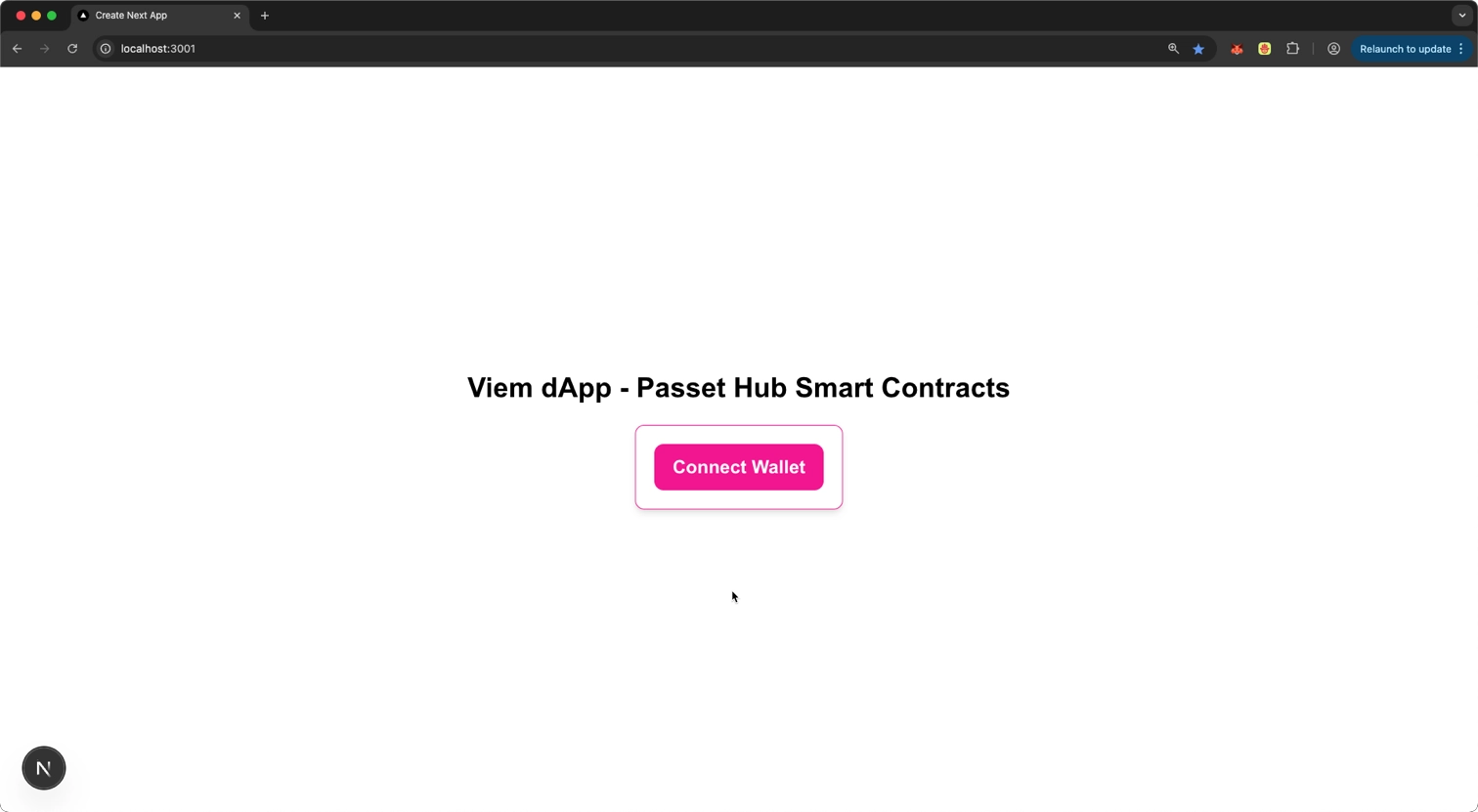
访问:
👉 http://localhost:3000
创建读取合约数据组件
components/ReadContract.tsx
该组件将:
• 调用 storedNumber 只读方法
• 每 10 秒轮询一次链上状态
• 显示加载与错误状态
创建写入合约数据组件
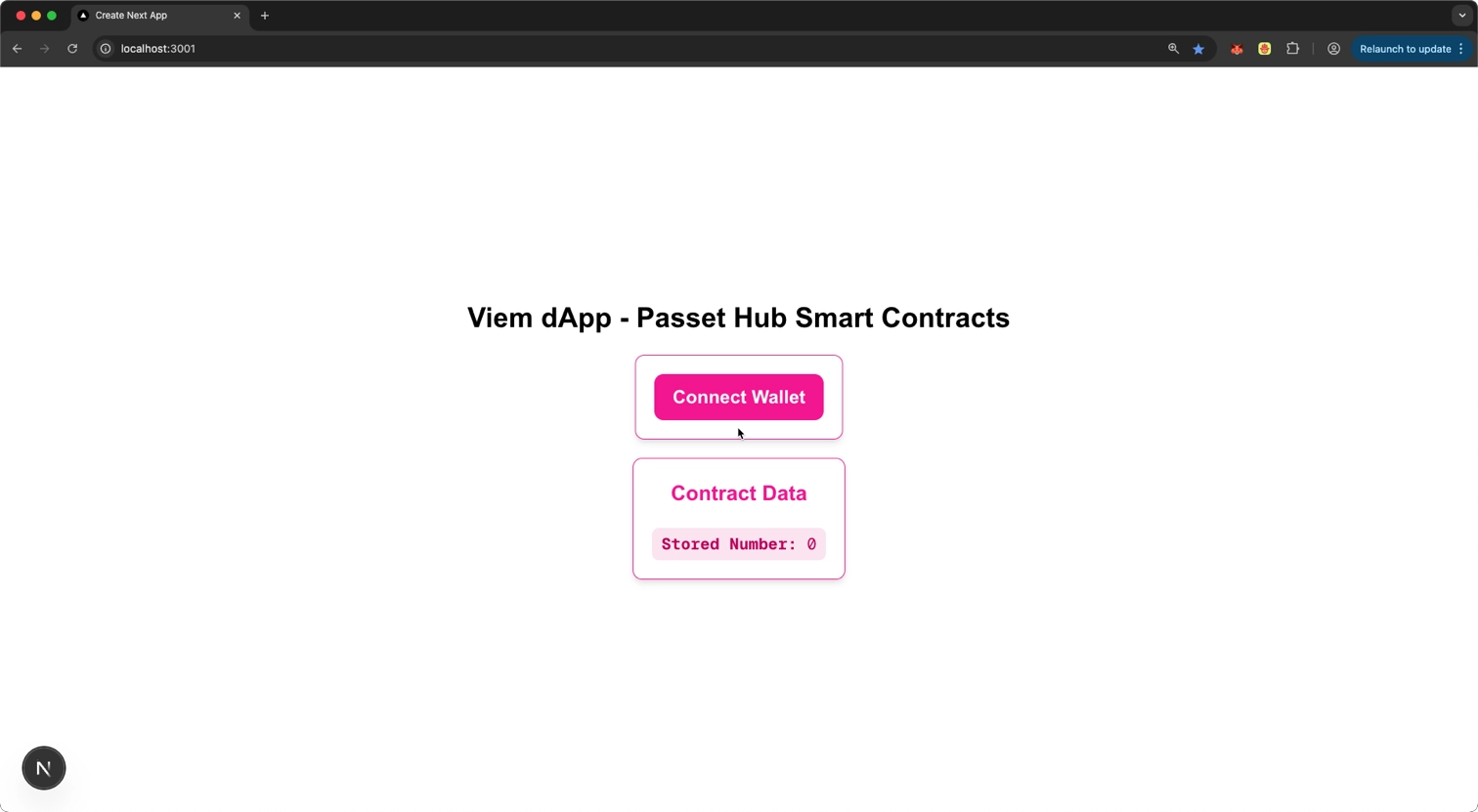
components/WriteContract.tsx
该组件允许用户:
• 输入新数字
• 调用 setNumber 方法
• 模拟交易
• 发送交易
• 等待区块确认
• 显示完整交易状态反馈
并处理常见错误:
• 用户拒绝签名
• 网络错误
• 账户不匹配
集成全部组件
最终 page.tsx
"use client";

import React, { useState, useEffect } from "react";
import { publicClient, getWalletClient } from "../utils/viem";
import { CONTRACT_ADDRESS, CONTRACT_ABI } from "../utils/contract";

interface WriteContractProps {
  account: string | null;
}

const WriteContract: React.FC<WriteContractProps> = ({ account }) => {
  const [newNumber, setNewNumber] = useState<string>("");
  const [status, setStatus] = useState<{
    type: string | null;
    message: string;
  }>({
    type: null,
    message: "",
  });
  const [isSubmitting, setIsSubmitting] = useState<boolean>(false);
  const [isCorrectNetwork, setIsCorrectNetwork] = useState<boolean>(true);

  // Check if the account is on the correct network
  useEffect(() => {
    const checkNetwork = async () => {
      if (!account) return;

      try {
        // Get the chainId from the public client
        const chainId = await publicClient.getChainId();

        // Get the user's current chainId from their wallet
        const walletClient = await getWalletClient();
        if (!walletClient) return;

        const walletChainId = await walletClient.getChainId();

        // Check if they match
        setIsCorrectNetwork(chainId === walletChainId);
      } catch (err) {
        console.error("Error checking network:", err);
        setIsCorrectNetwork(false);
      }
    };

    checkNetwork();
  }, [account]);

  const handleSubmit = async (e: React.FormEvent) => {
    e.preventDefault();

    // Validation checks
    if (!account) {
      setStatus({ type: "error", message: "Please connect your wallet first" });
      return;
    }

    if (!isCorrectNetwork) {
      setStatus({
        type: "error",
        message: "Please switch to the correct network in your wallet",
      });
      return;
    }

    if (!newNumber || isNaN(Number(newNumber))) {
      setStatus({ type: "error", message: "Please enter a valid number" });
      return;
    }

    try {
      setIsSubmitting(true);
      setStatus({ type: "info", message: "Initiating transaction..." });

      // Get wallet client for transaction signing
      const walletClient = await getWalletClient();

      if (!walletClient) {
        setStatus({ type: "error", message: "Wallet client not available" });
        return;
      }

      // Check if account matches
      if (
        walletClient.account?.address.toLowerCase() !== account.toLowerCase()
      ) {
        setStatus({
          type: "error",
          message:
            "Connected wallet account doesn't match the selected account",
        });
        return;
      }

      // Prepare transaction and wait for user confirmation in wallet
      setStatus({
        type: "info",
        message: "Please confirm the transaction in your wallet...",
      });

      // Simulate the contract call first
      console.log('newNumber', newNumber);
      const { request } = await publicClient.simulateContract({
        address: CONTRACT_ADDRESS,
        abi: CONTRACT_ABI,
        functionName: "setNumber",
        args: [BigInt(newNumber)],
        account: walletClient.account,
      });

      // Send the transaction with wallet client
      const hash = await walletClient.writeContract(request);

      // Wait for transaction to be mined
      setStatus({
        type: "info",
        message: "Transaction submitted. Waiting for confirmation...",
      });

      const receipt = await publicClient.waitForTransactionReceipt({
        hash,
      });

      setStatus({
        type: "success",
        message: `Transaction confirmed! Transaction hash: ${receipt.transactionHash}`,
      });

      setNewNumber("");
    } catch (err: any) {
      console.error("Error updating number:", err);

      // Handle specific errors
      if (err.code === 4001) {
        // User rejected transaction
        setStatus({ type: "error", message: "Transaction rejected by user." });
      } else if (err.message?.includes("Account not found")) {
        // Account not found on the network
        setStatus({
          type: "error",
          message:
            "Account not found on current network. Please check your wallet is connected to the correct network.",
        });
      } else if (err.message?.includes("JSON is not a valid request object")) {
        // JSON error - specific to your current issue
        setStatus({
          type: "error",
          message:
            "Invalid request format. Please try again or contact support.",
        });
      } else {
        // Other errors
        setStatus({
          type: "error",
          message: `Error: ${err.message || "Failed to send transaction"}`,
        });
      }
    } finally {
      setIsSubmitting(false);
    }
  };

  return (
    <div className="border border-pink-500 rounded-lg p-4 shadow-md bg-white text-pink-500 max-w-sm mx-auto space-y-4">
      <h2 className="text-lg font-bold">Update Stored Number</h2>

      {!isCorrectNetwork && account && (
        <div className="p-2 rounded-md bg-yellow-100 text-yellow-700 text-sm">
          ⚠️ You are not connected to the correct network. Please switch
          networks in your wallet.
        </div>
      )}

      {status.message && (
        <div
          className={`p-2 rounded-md break-words h-fit text-sm ${
            status.type === "error"
              ? "bg-red-100 text-red-500"
              : status.type === "success"
              ? "bg-green-100 text-green-700"
              : "bg-blue-100 text-blue-700"
          }`}
        >
          {status.message}
        </div>
      )}

      <form onSubmit={handleSubmit} className="space-y-4">
        <input
          type="number"
          placeholder="New Number"
          value={newNumber}
          onChange={(e) => setNewNumber(e.target.value)}
          disabled={isSubmitting || !account}
          className="w-full p-2 border rounded-md focus:outline-none focus:ring-2 focus:ring-pink-400"
        />
        <button
          type="submit"
          disabled={
            isSubmitting || !account || (!isCorrectNetwork && !!account)
          }
          className="w-full bg-pink-500 hover:bg-pink-600 text-white font-bold py-2 px-4 rounded-lg transition disabled:bg-gray-300"
        >
          {isSubmitting ? "Updating..." : "Update"}
        </button>
      </form>

      {!account && (
        <p className="text-sm text-gray-500">
          Connect your wallet to update the stored number.
        </p>
      )}
    </div>
  );
};

export default WriteContract;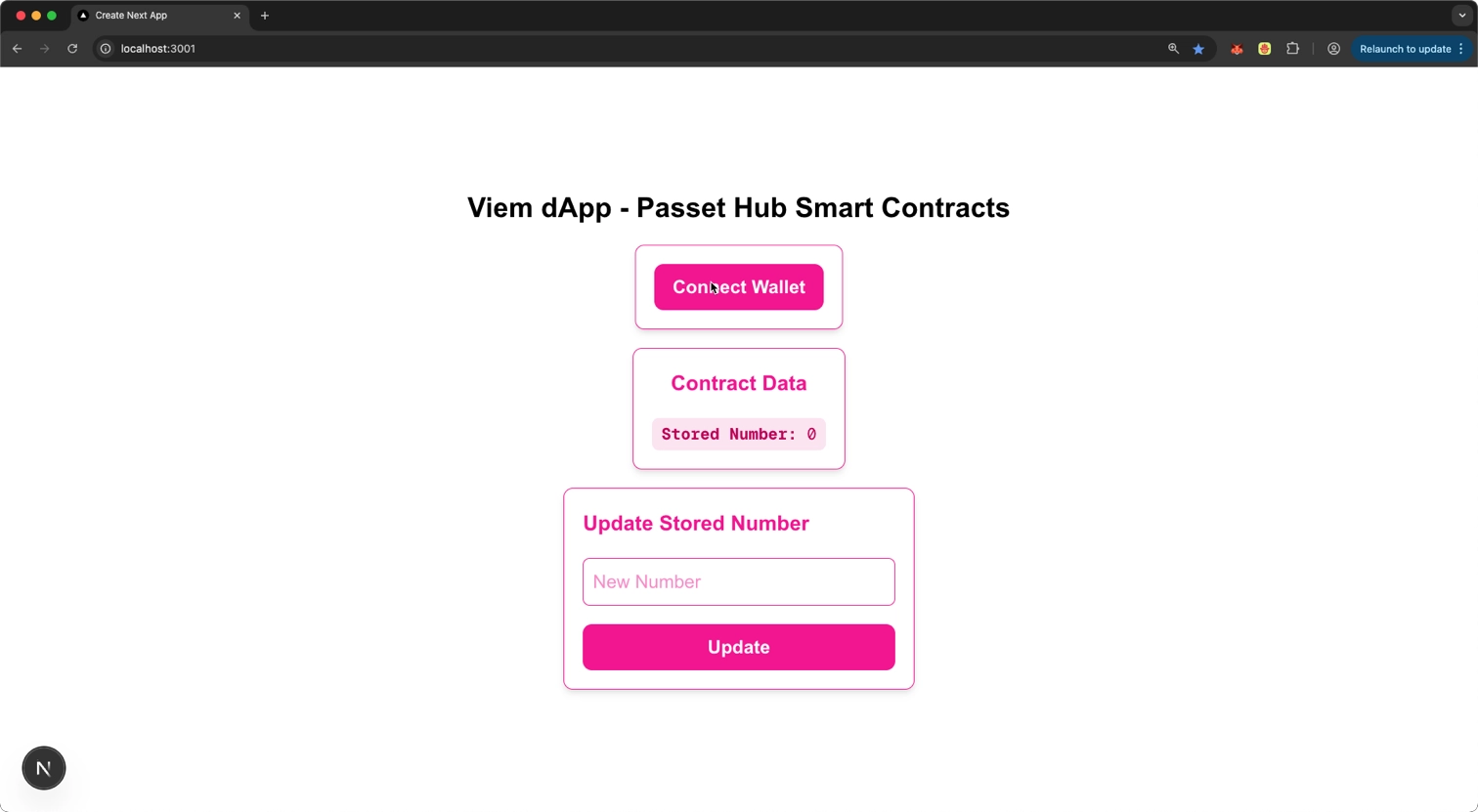
工作原理解析
钱包连接
• 使用 MetaMask 的 EIP-1193 Provider
• 自动检测并切换到 Polkadot Hub TestNet
• 向父组件暴露账户地址
读取数据
• 使用 viem.readContract
• 周期性轮询,保持 UI 与链上状态同步
写入数据
• 使用 simulateContract 预执行
• 使用 writeContract 发送交易
• 等待交易上链并确认
• 成功后,读取组件将在下一轮轮询中更新数据
🎉 恭喜你!
你已经成功构建了一个基于 Polkadot Hub + Viem + Next.js 的完整 dApp,并实现了:
• 钱包连接与网络管理
• 智能合约读取
• 链上写入交易
• 完整的用户交互与错误处理
这些能力构成了在 Polkadot Hub 上构建更复杂 dApp 的基础。
获取完整示例代码
你可以直接克隆官方示例仓库:
git clone https://github.com/polkadot-developers/polkavm-storage-contract-dapps.git -b v0.0.2
cd polkavm-storage-contract-dapps/viem-dapp原文链接:https://docs.polkadot.com/tutorials/smart-contracts/launch-your-first-project/create-dapp-viem/





 扫一扫
扫一扫


 625
625

 被折叠的 条评论
为什么被折叠?
被折叠的 条评论
为什么被折叠?
 到【灌水乐园】发言





