


前言
亚马逊商品页面上的「关联商品」数据,是很多爬虫开发者接到任务时第一个被低估复杂度的需求。
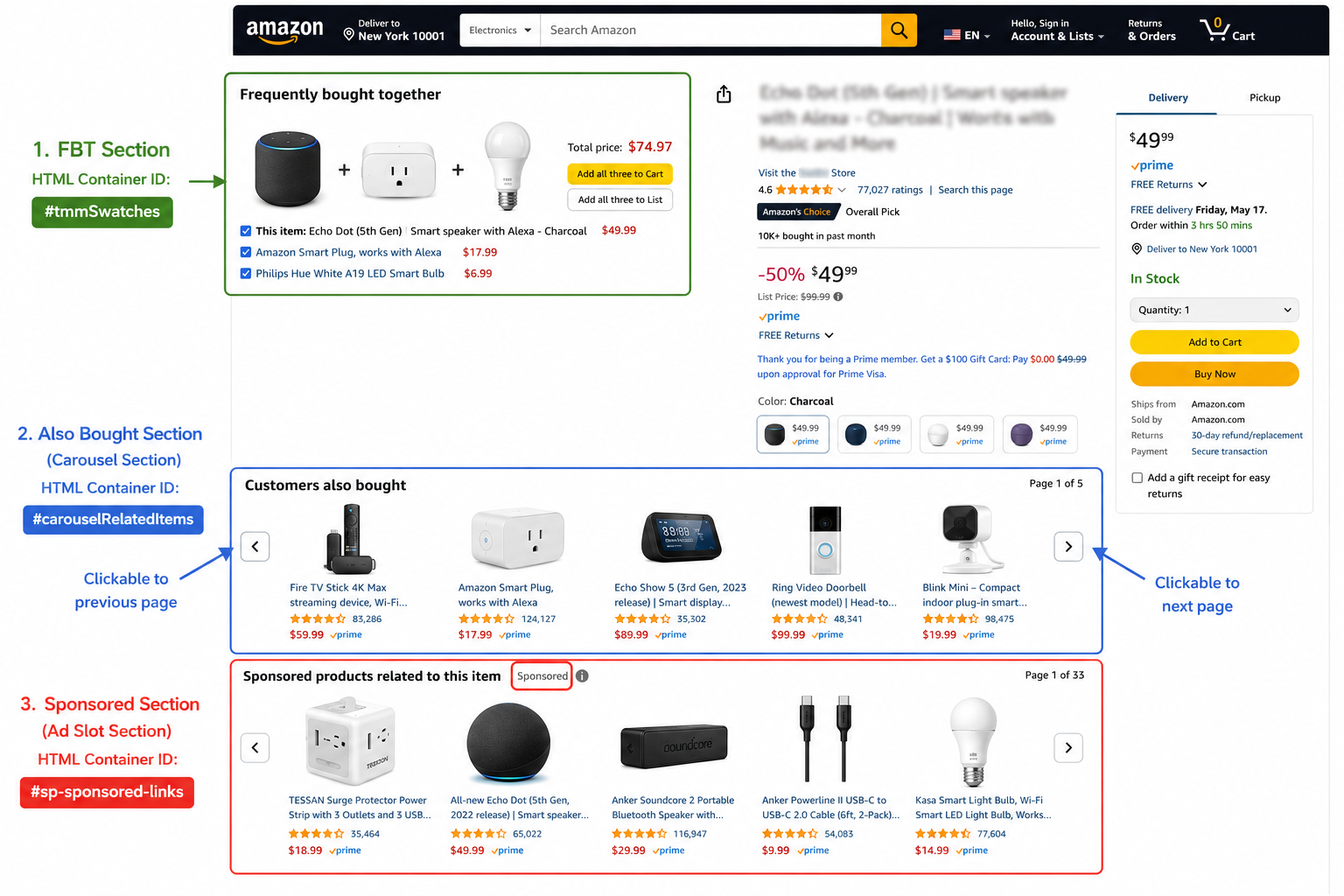
常见误区:以为抓一个 #sims-fbt 就搞定了。实际上,亚马逊的关联商品模块有六种,每种的 HTML 容器 ID、渲染机制、数据量都不一样。本文从工程角度系统梳理这六大模块的采集策略,附完整可运行代码。
一、六大 Related Products 模块总览
亚马逊商品详情页的关联商品分以下六类:
| 模块名 | HTML 容器 | 渲染方式 | 典型 ASIN 数量 | 采集难度 |
|---|---|---|---|---|
| Frequently Bought Together (FBT) | #sims-fbt 或 #frequently-bought-together_feature_div | 服务端渲染 | 2-4 | ★☆☆ |
| Customers Also Bought | #p_dp_sims_btf_1, #similarities_feature_div | 服务端+轮播 | 首屏4-6,完整15-20 | ★★☆ |
| Customers Also Viewed | #p_dp_sims_btf_2, #session-sims-feature-div | 服务端+轮播 | 首屏4-6,完整15-20 | ★★☆ |
| Similar Items | #similarities_feature_div, #compare-similar-feature-div | 混合 | 4-8 | ★★☆ |
| Sponsored Products | 无固定容器,穿插在各模块中 | JS 动态渲染 | 4-8 | ★★★ |
| Best Sellers Sidebar | #zg-right-col | 服务端渲染 | 3-5 | ★☆☆ |
二、核心代码实现
2.1 数据结构定义
from dataclasses import dataclass
from typing import Optional

@dataclass
class RelatedProduct:
    asin: str
    title: Optional[str] = None
    price: Optional[str] = None
    rating: Optional[float] = None
    review_count: Optional[int] = None
    image_url: Optional[str] = None
    is_sponsored: bool = False
    module: str = ""   # 来源模块:fbt / also_bought / also_viewed / sponsored / bsr_sidebar
2.2 通用卡片解析函数
from bs4 import BeautifulSoup
import re

def extract_asin(el) -> Optional[str]:
    """优先从 data-asin 属性取,其次从 href /dp/ASIN 正则匹配"""
    asin = el.get("data-asin", "").strip()
    if asin and len(asin) == 10:
        return asin
    link = el.find("a", href=True)
    if link:
        m = re.search(r"/dp/([A-Z0-9]{10})", link["href"])
        if m:
            return m.group(1)
    return None


def parse_card(card, module_name: str) -> Optional[RelatedProduct]:
    asin = extract_asin(card)
    if not asin:
        return None

    p = RelatedProduct(asin=asin, module=module_name)

    # 标题(多 selector 降级)
    for sel in [".a-size-base-plus", ".a-size-medium", ".a-truncate-cut"]:
        el = card.select_one(sel)
        if el:
            p.title = el.get_text(strip=True)[:200]
            break

    # 价格
    whole = card.select_one(".a-price-whole")
    frac = card.select_one(".a-price-fraction")
    if whole:
        p.price = f"${whole.get_text(strip=True).replace(',', '')}.{frac.get_text(strip=True) if frac else '00'}"
    else:
        offscreen = card.select_one(".a-price .a-offscreen")
        if offscreen:
            p.price = offscreen.get_text(strip=True)

    # 评分
    r_el = card.select_one("[aria-label*='out of 5 stars']")
    if r_el:
        m = re.search(r"([\d.]+)\s+out of 5", r_el.get("aria-label", ""))
        if m:
            try:
                p.rating = float(m.group(1))
            except ValueError:
                pass

    # 评论数
    rev_el = card.select_one("[aria-label$='ratings']") or card.select_one("[aria-label$='reviews']")
    if rev_el:
        m = re.search(r"([\d,]+)", rev_el.get("aria-label", ""))
        if m:
            try:
                p.review_count = int(m.group(1).replace(",", ""))
            except ValueError:
                pass

    # 图片
    img = card.select_one("img")
    if img:
        p.image_url = img.get("src") or img.get("data-src")

    return p
2.3 FBT 提取(服务端渲染,最简单)
def extract_fbt(html: str) -> list[RelatedProduct]:
    soup = BeautifulSoup(html, "lxml")
    container = (
        soup.find(id="sims-fbt") or
        soup.find(id="frequently-bought-together_feature_div")
    )
    if not container:
        return []

    results, seen = [], set()
    for card in container.find_all(attrs={"data-asin": True}):
        asin = card.get("data-asin", "").strip()
        if not asin or asin in seen or len(asin) != 10:
            continue
        seen.add(asin)
        p = parse_card(card, "fbt")
        if p:
            results.append(p)

    return results
2.4 轮播模块提取(Also Bought / Also Viewed)
def extract_carousel(html: str, container_ids: list[str], module: str) -> list[RelatedProduct]:
    """
    提取轮播类关联模块
    注意:静态 HTML 只能拿到首屏 4-6 个 ASIN
    要拿完整列表,需要 Playwright 模拟翻页(见 2.5)
    """
    soup = BeautifulSoup(html, "lxml")
    results, seen = [], set()

    container = None
    for cid in container_ids:
        container = soup.find(id=cid)
        if container:
            break
    if not container:
        return results

    for card in container.select(".a-carousel-card, [data-asin]"):
        asin = card.get("data-asin", "") or extract_asin(card)
        if not asin or str(asin) in seen or len(str(asin)) != 10:
            continue
        seen.add(str(asin))
        p = parse_card(card, module)
        if p:
            results.append(p)

    return results


def extract_also_bought(html: str) -> list[RelatedProduct]:
    return extract_carousel(html,
        ["p_dp_sims_btf_1", "similarities_feature_div", "sp-recommendations-feature-div"],
        "also_bought"
    )


def extract_also_viewed(html: str) -> list[RelatedProduct]:
    return extract_carousel(html,
        ["p_dp_sims_btf_2", "session-sims-feature-div", "customers-also-viewed_feature_div"],
        "also_viewed"
    )
2.5 Playwright 轮播翻页(获取完整列表)
from playwright.sync_api import sync_playwright

def get_full_carousel(asin: str, container_id: str, proxy: str = None, max_pages: int = 5) -> list[str]:
    """
    使用 Playwright 翻页,获取轮播的完整 ASIN 列表
    注意:必须配合住宅代理使用,否则亚马逊会拦截
    """
    all_asins = []

    with sync_playwright() as p:
        browser = p.chromium.launch(headless=True,
            proxy={"server": proxy} if proxy else None)
        page = browser.new_page()

        page.goto(f"https://www.amazon.com/dp/{asin}", timeout=45000, wait_until="domcontentloaded")
        page.wait_for_timeout(3000)

        for _ in range(max_pages):
            # 采集当前页可见的 ASIN
            for card in page.query_selector_all(f"#{container_id} [data-asin]"):
                a = card.get_attribute("data-asin")
                if a and len(a) == 10 and a not in all_asins:
                    all_asins.append(a)

            # 点击下一页
            btn = page.query_selector(f"#{container_id} .a-carousel-goto-nextpage")
            if not btn or not btn.is_visible():
                break
            btn.click()
            page.wait_for_timeout(1000)

        browser.close()

    return all_asins
2.6 Sponsored 广告识别
def is_sponsored(card) -> bool:
    """
    通过四种 HTML 特征综合判断是否为广告位
    多特征综合判断准确率更高,避免单一特征误判
    """
    if card.select_one(".s-sponsored-label-info-icon, .puis-sponsored-label-info-icon"):
        return True
    if "sponsored" in card.get("data-component-type", "").lower():
        return True
    if "sponsored" in card.get_text()[:200].lower():
        return True
    for a in card.select("a[href]"):
        if "amazon-adsystem" in a.get("href", "") or "aax-us-pdp" in a.get("href", ""):
            return True
    return False
2.7 整合:提取全部六大模块
import json
import time

def extract_all_modules(html: str) -> dict:
    """
    一次调用提取所有模块,统一格式输出
    """
    soup = BeautifulSoup(html, "lxml")

    fbt = extract_fbt(html)
    also_bought = extract_also_bought(html)
    also_viewed = extract_also_viewed(html)

    # 为 also_bought / also_viewed 中的每个 ASIN 打 sponsored 标记
    for p in also_bought + also_viewed:
        card = soup.find(attrs={"data-asin": p.asin})
        if card:
            p.is_sponsored = is_sponsored(card)

    return {
        "fbt": [vars(p) for p in fbt],
        "also_bought": [vars(p) for p in also_bought],
        "also_viewed": [vars(p) for p in also_viewed],
        "summary": {
            "fbt_count": len(fbt),
            "also_bought_count": len(also_bought),
            "also_viewed_count": len(also_viewed),
            "sponsored_count": sum(1 for p in also_bought + also_viewed if p.is_sponsored)
        }
    }
三、常见问题
Q:为什么静态 HTML 拿到的 Also Bought 只有 4-5 个 ASIN?
A:轮播容器的 HTML 初始只渲染首屏的几个卡片。翻页操作由 JavaScript 动态加载后续内容,静态 HTML 中根本不存在后续的卡片 DOM 节点。需要用 Playwright 模拟翻页或截获 XHR 请求。
Q:data-asin 属性和 href 里的 ASIN 哪个更可靠?
A:data-asin 更可靠,因为它直接存储 ASIN 值,不依赖 URL 路径格式。但部分老版本页面可能没有 data-asin,这时候从 /dp/ASIN 的 href 正则匹配是可靠的 fallback。
Q:选择器经常失效怎么办?
A:为每个关键字段维护 2-3 个备用选择器列表,任一命中即返回。同时在生产环境监控字段提取成功率,低于阈值时告警——这比等待报错更早发现 DOM 结构变化。
四、规模化采集方案
自建方案适合日均 < 500 ASIN 的规模。更大规模或者需要持续监控关联变化,建议直接接 Pangolinfo Amazon Scraper API,内置六大模块解析模板,fields: ["related_products"] 直接返回结构化 JSON,DOM 结构变化时服务端无感知更新。





 扫一扫
扫一扫


 1185
1185

 被折叠的 条评论
为什么被折叠?
被折叠的 条评论
为什么被折叠?
 到【灌水乐园】发言





