





html5视频代码视频播放器代码(实例)
<!DOCTYPE html>
<html lang="zh-CN">
<head>
    <meta charset="UTF-8">
    <meta name="viewport" content="width=device-width, initial-scale=1.0">
    <title>HTML5 视频播放器</title>
    <style>
        * {
            margin: 0;
            padding: 0;
            box-sizing: border-box;
        }

        body {
            font-family: Arial, sans-serif;
            background: #1a1a1a;
            display: flex;
            justify-content: center;
            align-items: center;
            min-height: 100vh;
        }

        .video-player {
            width: 800px;
            background: #000;
            border-radius: 12px;
            overflow: hidden;
            box-shadow: 0 10px 40px rgba(0, 0, 0, 0.5);
        }

        .video-container {
            position: relative;
            width: 100%;
            background: #000;
        }

        video {
            width: 100%;
            display: block;
        }

        /* 播放/暂停按钮(覆盖层) */
        .play-btn {
            position: absolute;
            top: 50%;
            left: 50%;
            transform: translate(-50%, -50%);
            width: 80px;
            height: 80px;
            background: rgba(255, 255, 255, 0.2);
            border-radius: 50%;
            display: flex;
            justify-content: center;
            align-items: center;
            cursor: pointer;
            transition: all 0.3s ease;
        }

        .play-btn:hover {
            background: rgba(255, 255, 255, 0.3);
            transform: translate(-50%, -50%) scale(1.1);
        }

        .play-btn::after {
            content: '';
            border-left: 30px solid #fff;
            border-top: 18px solid transparent;
            border-bottom: 18px solid transparent;
            margin-left: 5px;
        }

        .play-btn.pause::after {
            content: '';
            border: none;
            width: 20px;
            height: 30px;
            background: #fff;
            box-shadow: 12px 0 0 #fff;
        }

        /* 控制栏 */
        .controls {
            padding: 15px;
            background: linear-gradient(transparent, rgba(0, 0, 0, 0.8));
        }

        /* 进度条 */
        .progress-container {
            width: 100%;
            height: 6px;
            background: #333;
            border-radius: 3px;
            cursor: pointer;
            margin-bottom: 10px;
            position: relative;
        }

        .progress {
            height: 100%;
            background: #e50914;
            border-radius: 3px;
            width: 0%;
            transition: width 0.1s linear;
        }

        .progress-container:hover .progress {
            background: #f40612;
        }

        /* 控制按钮组 */
        .control-buttons {
            display: flex;
            align-items: center;
            gap: 15px;
        }

        .control-btn {
            background: none;
            border: none;
            color: #fff;
            font-size: 20px;
            cursor: pointer;
            padding: 5px;
            transition: color 0.3s ease;
        }

        .control-btn:hover {
            color: #e50914;
        }

        /* 时间显示 */
        .time {
            color: #fff;
            font-size: 14px;
            margin-left: auto;
        }

        /* 音量控制 */
        .volume-container {
            display: flex;
            align-items: center;
            gap: 5px;
        }

        .volume-slider {
            width: 60px;
            accent-color: #e50914;
        }

        /* 全屏按钮 */
        .fullscreen-btn {
            margin-left: auto;
        }
    </style>
</head>
<body>
    <div class="video-player">
        <!-- 视频区域 -->
        <div class="video-container">
            <video id="video" src="your-video.mp4" poster="poster.jpg"></video>
            <div class="play-btn" id="playBtn"></div>
        </div>

        <!-- 控制栏 -->
        <div class="controls">
            <!-- 进度条 -->
            <div class="progress-container" id="progressContainer">
                <div class="progress" id="progress"></div>
            </div>

            <!-- 控制按钮 -->
            <div class="control-buttons">
                <!-- 播放/暂停 -->
                <button class="control-btn" id="playPauseBtn">▶</button>

                <!-- 音量 -->
                <div class="volume-container">
                    <button class="control-btn" id="muteBtn">🔊</button>
                    <input type="range" class="volume-slider" id="volumeSlider"
                           min="0" max="1" step="0.1" value="1">
                </div>

                <!-- 时间 -->
                <span class="time" id="time">0:00 / 0:00</span>

                <!-- 全屏 -->
                <button class="control-btn fullscreen-btn" id="fullscreenBtn">⛶</button>
            </div>
        </div>
    </div>

    <script>
        // 获取元素
        const video = document.getElementById('video');
        const playBtn = document.getElementById('playBtn');
        const playPauseBtn = document.getElementById('playPauseBtn');
        const progressContainer = document.getElementById('progressContainer');
        const progress = document.getElementById('progress');
        const muteBtn = document.getElementById('muteBtn');
        const volumeSlider = document.getElementById('volumeSlider');
        const timeDisplay = document.getElementById('time');
        const fullscreenBtn = document.getElementById('fullscreenBtn');

        // 播放/暂停切换
        function togglePlay() {
            if (video.paused) {
                video.play();
            } else {
                video.pause();
            }
        }

        // 更新播放/暂停按钮状态
        function updatePlayBtn() {
            if (video.paused) {
                playBtn.classList.remove('pause');
                playPauseBtn.textContent = '▶';
            } else {
                playBtn.classList.add('pause');
                playPauseBtn.textContent = '⏸';
            }
        }

        // 更新进度条
        function updateProgress() {
            const percent = (video.currentTime / video.duration) * 100;
            progress.style.width = `${percent}%`;
            updateTime();
        }

        // 点击进度条跳转
        function setProgress(e) {
            const width = progressContainer.clientWidth;
            const clickX = e.offsetX;
            video.currentTime = (clickX / width) * video.duration;
        }

        // 更新时间显示
        function updateTime() {
            const current = formatTime(video.currentTime);
            const duration = formatTime(video.duration || 0);
            timeDisplay.textContent = `${current} / ${duration}`;
        }

        // 格式化时间
        function formatTime(seconds) {
            const mins = Math.floor(seconds / 60);
            const secs = Math.floor(seconds % 60);
            return `${mins}:${secs < 10 ? '0' : ''}${secs}`;
        }

        // 静音切换
        function toggleMute() {
            video.muted = !video.muted;
            muteBtn.textContent = video.muted ? '🔇' : '🔊';
            volumeSlider.value = video.muted ? 0 : 1;
        }

        // 调节音量
        function setVolume() {
            video.volume = volumeSlider.value;
            video.muted = video.volume === 0;
            muteBtn.textContent = video.muted ? '🔇' : '🔊';
        }

        // 全屏切换
        function toggleFullscreen() {
            if (!document.fullscreenElement) {
                video.parentElement.requestFullscreen();
            } else {
                document.exitFullscreen();
            }
        }

        // 事件监听
        playBtn.addEventListener('click', togglePlay);
        playPauseBtn.addEventListener('click', togglePlay);
        video.addEventListener('play', updatePlayBtn);
        video.addEventListener('pause', updatePlayBtn);
        video.addEventListener('timeupdate', updateProgress);
        progressContainer.addEventListener('click', setProgress);
        muteBtn.addEventListener('click', toggleMute);
        volumeSlider.addEventListener('input', setVolume);
        fullscreenBtn.addEventListener('click', toggleFullscreen);

        // 视频加载完成后更新时间
        video.addEventListener('loadedmetadata', updateTime);
    </script>
</body>
</html>
酷播云html5播放器代码:
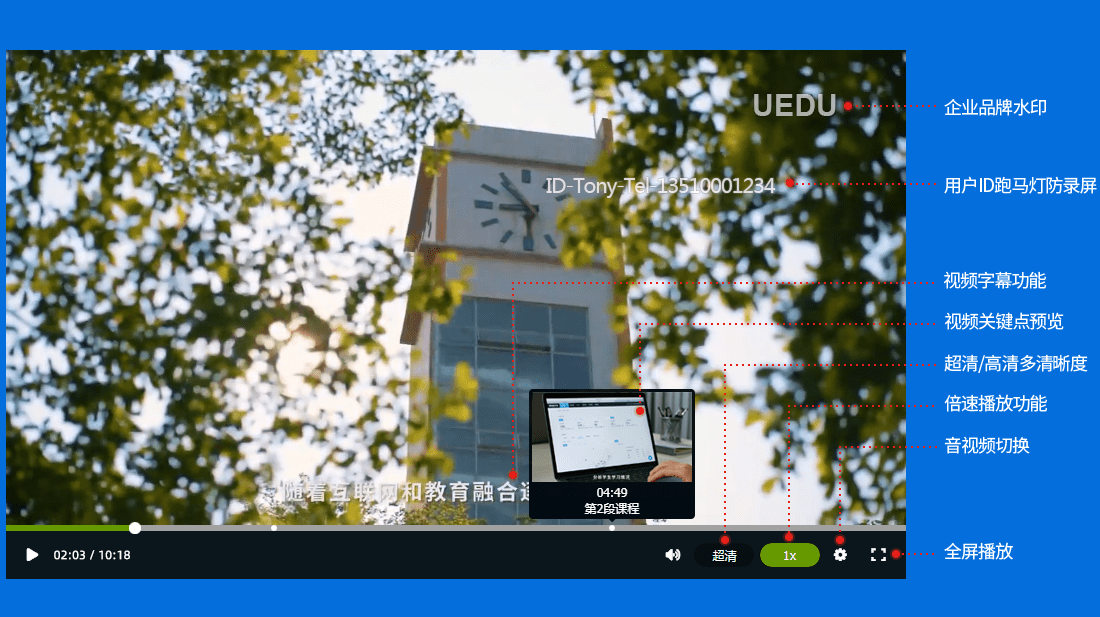
HTML5播放器标准范例

说明:本代码为Html5播放器调用,对各终端的适配性更好,故强力推荐使用。

<div id="player"></div>
<script src="//player.polyv.net/script/player.js"></script>
<script>
var player = polyvPlayer({
wrap: '#player',
width: 800,
height: 533,
vid: 'e785b2c81c9e018296671a1287e99615_e',
});
</script>

TIPS:
wrap: '#player' //warp为引用的容器
width: 800 //播放器的宽度
height: 533 //播放器的高度
vid: 'e785b2c81c9e018296671a1287e99615_e' //酷播云视频vid





 扫一扫
扫一扫


&spm=1001.2101.3001.5002&articleId=162096589&d=1&t=3&u=cacb25d0477542279d1b39ea9486ab26)
 3258
3258

 被折叠的 条评论
为什么被折叠?
被折叠的 条评论
为什么被折叠?
 到【灌水乐园】发言





