


 本文深入探讨了Android中Activity启动的两种流程:从Launcher启动及已运行应用内的子Activity启动。详细解析了startActivity()方法的底层实现,以及如何通过Binder机制调用ActivityManagerService进行跨进程通信。
Activity的启动在我们的Android学习中随处可见,但是它的原理是如何运行的,我相信知道的人并不是很多。
此篇,让我们一起去见证Activity启动之美。
Activity的两种启动流程分别是:
- 点击Launcher启动新的Activity。
- 正在运行的app的Activity,即启动子Activity。
区别:launcher本身就是一个应用,当我们点击图标的时候,系统会调用startActivitySately(),一般情况下我们所启动activity相关信息都保存在intent中,比如action,category等等。我们在安装这个应用的时候,系统也会启动一个PackManagerSrevice的管理服务,这个管理服务会对AndroidManfest.xml文件进行解析,从而得到应用程序中相关信息。
后边startactivity的启动流程是一致的。
下边一张图片让我们了解Activity的整个启动流程。
图片来自一张图搞定,Activity的启动流程
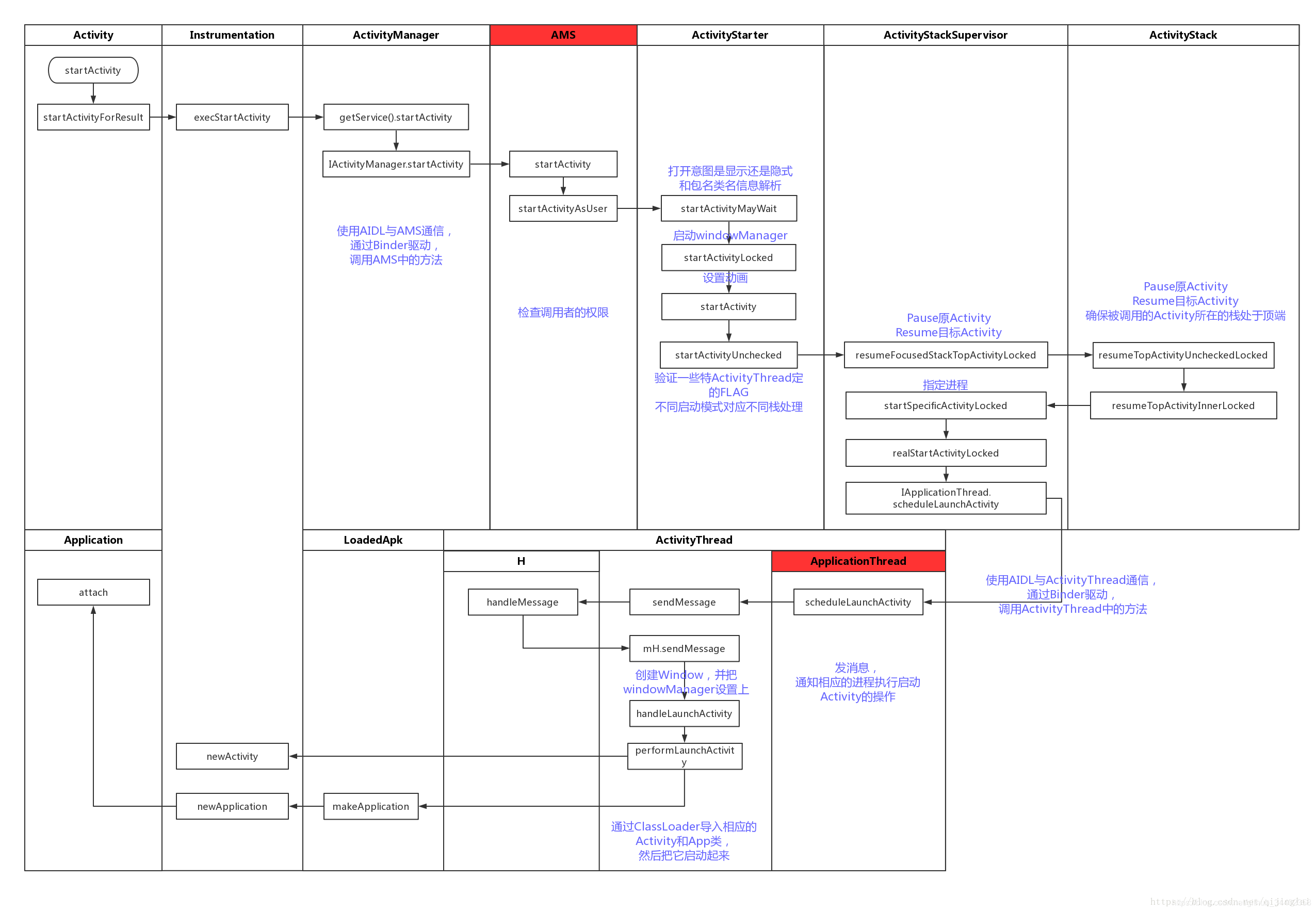
源码基于API28 (Aandroid 9.0)
LauncherActivity
@Override
    protected void onListItemClick(ListView l, View v, int position, long id) {
        Intent intent = intentForPosition(position);
        startActivity(intent);
    }
当我们点击Launcher的时候,它调用了startActivity(),但是它的底层调用了startActivityForResult()。
/**
     * Same as {@link #startActivity(Intent, Bundle)} with no options
     * specified.
     *
     * @param intent The intent to start.
     *
     * @throws android.content.ActivityNotFoundException
     *
     * @see #startActivity(Intent, Bundle)
     * @see #startActivityForResult
     */
    @Override
    public void startActivity(Intent intent) {
        this.startActivity(intent, null);
    }

    /**
     * @see #startActivity(Intent)
     * @see #startActivityForResult
     */
    @Override
    public void startActivity(Intent intent, @Nullable Bundle options) {
        if (options != null) {
            startActivityForResult(intent, -1, options);
        } else {
            // Note we want to go through this call for compatibility with
            // applications that may have overridden the method.
            startActivityForResult(intent, -1);
        }
    }
由于是首次启动Activity,所以这里的mParent为null,所以会调用Instrumentation.ActivityResult ar = mInstrumentation.execStartActivity()。
Instrumentation又叫仪表盘,负责调用Activity和Application生命周期。
 public void startActivityForResult(@RequiresPermission Intent intent, int requestCode,
            @Nullable Bundle options) {
        if (mParent == null) {
            options = transferSpringboardActivityOptions(options);
            Instrumentation.ActivityResult ar =
                mInstrumentation.execStartActivity(
                    this, mMainThread.getApplicationThread(), mToken, this,
                    intent, requestCode, options);
            if (ar != null) {
                mMainThread.sendActivityResult(
                    mToken, mEmbeddedID, requestCode, ar.getResultCode(),
                    ar.getResultData());
            }
            if (requestCode >= 0) {
                // If this start is requesting a result, we can avoid making
                // the activity visible until the result is received.  Setting
                // this code during onCreate(Bundle savedInstanceState) or onResume() will keep the
                // activity hidden during this time, to avoid flickering.
                // This can only be done when a result is requested because
                // that guarantees we will get information back when the
                // activity is finished, no matter what happens to it.
                mStartedActivity = true;
            }

            cancelInputsAndStartExitTransition(options);
            // TODO Consider clearing/flushing other event sources and events for child windows.
        } else {
            if (options != null) {
                mParent.startActivityFromChild(this, intent, requestCode, options);
            } else {
                // Note we want to go through this method for compatibility with
                // existing applications that may have overridden it.
                mParent.startActivityFromChild(this, intent, requestCode);
            }
        }
    }
在execStartActivity中,会调用 int result = ActivityManager.getService()
.startActivity(),之后会调用checkStartActivityResult(int res, Object intent)
public ActivityResult execStartActivity(
            Context who, IBinder contextThread, IBinder token, Activity target,
            Intent intent, int requestCode, Bundle options) {
        IApplicationThread whoThread = (IApplicationThread) contextThread;
        Uri referrer = target != null ? target.onProvideReferrer() : null;
        if (referrer != null) {
            intent.putExtra(Intent.EXTRA_REFERRER, referrer);
        }
        if (mActivityMonitors != null) {
            synchronized (mSync) {
                final int N = mActivityMonitors.size();
                for (int i=0; i<N; i++) {
                    final ActivityMonitor am = mActivityMonitors.get(i);
                    ActivityResult result = null;
                    if (am.ignoreMatchingSpecificIntents()) {
                        result = am.onStartActivity(intent);
                    }
                    if (result != null) {
                        am.mHits++;
                        return result;
                    } else if (am.match(who, null, intent)) {
                        am.mHits++;
                        if (am.isBlocking()) {
                            return requestCode >= 0 ? am.getResult() : null;
                        }
                        break;
                    }
                }
            }
        }
        try {
            intent.migrateExtraStreamToClipData();
            intent.prepareToLeaveProcess(who);
            int result = ActivityManager.getService()
                .startActivity(whoThread, who.getBasePackageName(), intent,
                        intent.resolveTypeIfNeeded(who.getContentResolver()),
                        token, target != null ? target.mEmbeddedID : null,
                        requestCode, 0, null, options);
            checkStartActivityResult(result, intent);
        } catch (RemoteException e) {
            throw new RuntimeException("Failure from system", e);
        }
        return null;
    }
if (requestCode >= 0) {
            // If this start is requesting a result, we can avoid making
            // the activity visible until the result is received.  Setting
            // this code during onCreate(Bundle savedInstanceState) or onResume() will keep the
            // activity hidden during this time, to avoid flickering.
            // This can only be done when a result is requested because
            // that guarantees we will get information back when the
            // activity is finished, no matter what happens to it.
            mStartedActivity = true;
        }
这时我们看到,只有调用startActivityForResult的时候,只有requestCode的值大于等于0,onActivityResult才会被回调。
/**
     * @hide
     */
    public static IActivityManager getService() {
        return IActivityManagerSingleton.get();
    }

    private static final Singleton<IActivityManager> IActivityManagerSingleton =
            new Singleton<IActivityManager>() {
                @Override
                protected IActivityManager create() {
                    final IBinder b = ServiceManager.getService(Context.ACTIVITY_SERVICE);
                    final IActivityManager am = IActivityManager.Stub.asInterface(b);
                    return am;
                }
            };
这里用到了Binder机制,在Android系统的Binder机制中,是有Client,Service,ServiceManager,Binder驱动程序组成的,其中Client,service,Service Manager运行在用户空间,Binder驱动程序是运行在内核空间的。而Binder就是把这4种组件粘合在一块的粘合剂,其中核心的组件就是Binder驱动程序,Service Manager提供辅助管理的功能,而Client和Service正是在Binder驱动程序和Service Manager提供的基础设施上实现C/S 之间的通信。其中Binder驱动程序提供设备文件/dev/binder与用户控件进行交互,
Client、Service,Service Manager通过open和ioctl文件操作相应的方法与Binder驱动程序进行通信。而Client和Service之间的进程间通信是通过Binder驱动程序间接实现的。而Binder Manager是一个守护进程,用来管理Service,并向Client提供查询Service接口的能力。这里使用的是AIDL跨进程通信方式。复习Android之Service的AIDL传值
接下里就会走
ActivityManagerService.startActivity()
ActvityiManagerService.startActivityAsUser()

ActivityStarter.startActivityMayWait()
ActivityStarter.startActivityLocked()
ActivityStarter.startActivity()
ActivityStarter.startActivityUncheckedLocked()

ActivityStackSupervisor.resumFocusedStackeTopActivitiyLocked()
ActivityStackSupervisor.specificActivityLocked()
ActivityStackSupervisor.realStartActivityLocked()

ActivityStackr.resumeTopActivityUncheckedLocked()
ActivityStackr.resumeTopActivityInnerLocked()

ActivityStackSupervisor.IApplicationThread.scheduleLaunchActivity

ActivityThread
ApplictionThread.scheduleLaunchActivity
ActivityThread.sendMassage
......
UI.handleMessage
handleLaunchActivity
newActivity





 扫一扫
扫一扫


 444
444

 被折叠的 条评论
为什么被折叠?
被折叠的 条评论
为什么被折叠?
 到【灌水乐园】发言





