


Vue3【二十】Vue3 路由和组件页面切换
Vue3【二十】Vue3 路由和组件页面切换
Vue3 路由的创建
路由的引入
路由的配置
路由的导出
路由的url模式 带# 或不带
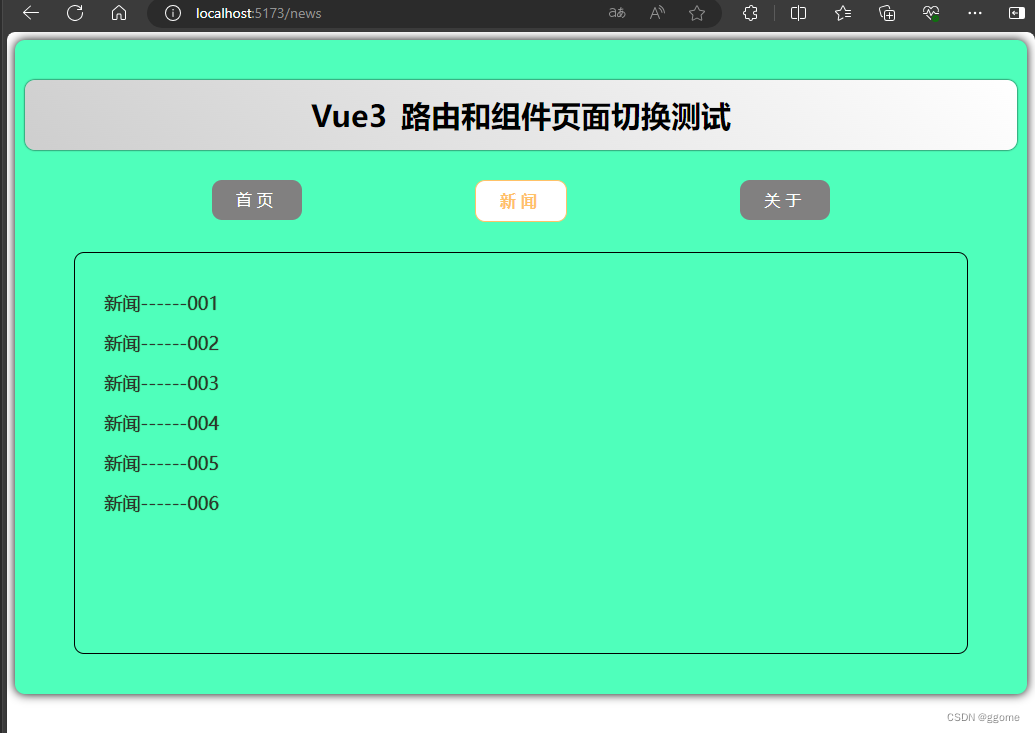
案例截图
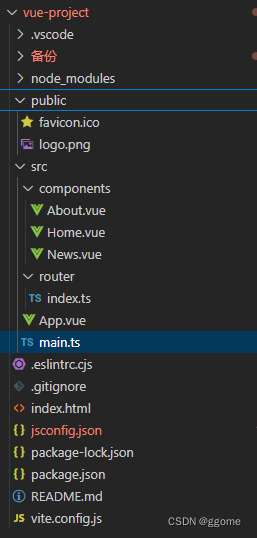
目录结构
案例代码
app.vue
<template>
    <div class="app">
        <h2 class="title">Vue3 路由和组件页面切换测试</h2>
        <!-- 导航区 -->
        <div class="navigate">
            <RouterLink to="/home" active-class="active"> 首页 </RouterLink>
            <RouterLink to="/news" active-class="active"> 新闻 </RouterLink>
            <RouterLink to="/about" active-class="active"> 关于 </RouterLink>
        </div>

        <!-- 展示区 -->
        <div class="main-content">
            <RouterView />
        </div>
    </div>
</template>

<script lang="ts" setup name="App">
// npm install vue-router //安装路由器

import { RouterView } from 'vue-router';


</script>

<style scoped>
.app {
    background-color: #4fffbb;
    box-shadow: 0 0 10px;
    border-radius: 10px;
    padding: 10px;
}
.title{
    text-align: center;
    word-spacing: 5px;
    margin: 30px 0;
    height: 70px;
    line-height: 70px;
    background-image: linear-gradient(45deg, #cecece, #fff);
    border-radius: 10px;
    box-shadow: 0 0 2px;
    font-size: 30px
}
.navigate {
    display: flex;
    justify-content: space-around;
    margin: 0 100px;
}
.navigate a {
    display: block;
    text-align: center;
    width: 90px;
    height: 40px;
    line-height: 40px;
    border-radius: 10px;
    background-color: #818080;
    text-decoration: none;
    color: #fff;
    /* font-size: 5px; */
    letter-spacing: 5px;
}
.navigate a.active {
    color: #ffc268;
    background-color: #fff;
    border: 1px solid #ffc268;
    font-weight: 900;
    /* text-shadow: 0 0 1px black; */
    font-family: 微软雅黑;
}

.main-content {
    margin: 0 auto;
    margin-top: 30px;
    margin-bottom: 30px;
    border-radius: 10px;
    width: 90%;
    height:400px;
    border: 1px solid;
}
</style>
index.ts
// 创建一个路由器,并暴漏出去

// 第一步:引入createRouter
import { createRouter, createWebHashHistory, createWebHistory } from 'vue-router'
// 引入各种组件
import Home from '@/components/Home.vue'
import About from '@/components/About.vue'
import News from '@/components/News.vue'
// 第二步:创建路由器
const router = createRouter({
    // 配置路由模式
    // createWebHistory 模式:url不带#号,
    // createWebHashHistory模式:url 带#号
    history: createWebHistory(),
    // 配置路由规则
    routes: [
        { path: '/', redirect: '/home' },
        { path: '/home', component: Home },
        { path: '/about', component: About },
        { path: '/news', component: News }
    ]
})

// 第三步:导出路由器
export default router
main.ts
// 引入createApp用于创建应用
import { createApp } from 'vue'
// 引入APP根组件
import App from './App.vue'

// createApp(App).mount('#app')

// 引入路由器
import router from './router'

// 创建一个应用
const app = createApp(App)

// 使用路由器
app.use(router)

// 挂载整个应用到app容器
app.mount('#app')
About.vue
<template>
    <div class="about">
        <h2>About 关于我们 </h2>
        <h2>公众号:脑力汇 </h2>
    </div>
</template>

<script setup lang="ts" name="Home">

</script>

<style scoped>
.home {
    display: flex;
    justify-content: center;
    align-items: center;
    height: 100%;
    color: rgb(85, 84,84);
    font-size: 18px;
}
</style>
News.vue
<template>
    <div class="news">
        <ul>
            <li><a href="#"> 新闻------001</a></li>
            <li><a href="#"> 新闻------002</a></li>
            <li><a href="#"> 新闻------003</a></li>
            <li><a href="#"> 新闻------004</a></li>
            <li><a href="#"> 新闻------005</a></li>
            <li><a href="#"> 新闻------006</a></li>
        </ul>
    </div>
</template>

<script setup lang="ts" name="About">

</script>

<style scoped>
.news {
    padding: 0 20px;
    display: flex;
    justify-content: space-between;
    height: 100%;
}
.news ul {
    margin-top: 30px;
    list-style: none;
    padding-left: 10px
}
.news li>a {
    font-size: 18px;
    line-height: 40px;
    text-decoration: none;
    color: #333;
    text-shadow: 0 0 1px rgb(0, 84, 0);
}
.news-content{
    width: 70%;
    height: 90%;
    border: 1px solid;
    margin-top: 20px;
    border-radius: 10px;
}
</style>
Home.vue
<template>
    <div class="home">
        <img src="/public/logo.png" alt="">
    </div>
</template>

<script setup lang="ts" name="Home">

</script>

<style scoped>
.home {
    display: flex;
    justify-content: center;
    align-items: center;
    height: 100%;
}
img {
    width: 10%;
}
</style>



 扫一扫
扫一扫


 6278
6278

 被折叠的 条评论
为什么被折叠?
被折叠的 条评论
为什么被折叠?
 到【灌水乐园】发言





