


 本文介绍如何在iOS应用中自定义服务器地址并利用UIAlertView进行输入验证,包括设置UIAlertView样式、添加文本框及按钮响应逻辑,提供完整的实现代码及效果展示。
if (customAlertView==nil) {
    customAlertView = [[UIAlertView alloc] initWithTitle:@"自定义服务器地址" message:nil delegate:self cancelButtonTitle:@"取消" otherButtonTitles:@"确定", nil nil];
}
[customAlertView setAlertViewStyle:UIAlertViewStyleLoginAndPasswordInput];

UITextField *nameField = [customAlertView textFieldAtIndex:0];
nameField.placeholder = @"请输入一个名称";

UITextField *urlField = [customAlertView textFieldAtIndex:1];
[urlField setSecureTextEntry:NO];
urlField.placeholder = @"请输入一个URL";
urlField.text = @"http://";

[customAlertView show];

实现UIAlertViewDelegate
在CODE上查看代码片派生到我的代码片
-(void)alertView:(UIAlertView *)alertView clickedButtonAtIndex:(NSInteger)buttonIndex{

    if (buttonIndex == alertView.firstOtherButtonIndex) {
        UITextField *nameField = [alertView textFieldAtIndex:0];
        UITextField *urlField = [alertView textFieldAtIndex:1];
        //TODO
    }
}
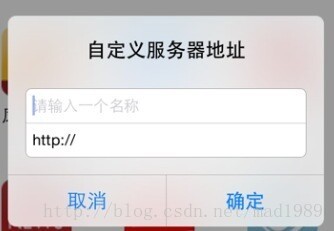
效果图:





 扫一扫
扫一扫


 2223
2223

 被折叠的 条评论
为什么被折叠?
被折叠的 条评论
为什么被折叠?
 到【灌水乐园】发言





