



 本文是黑马头条day07的内容,先回顾头天使用Kafka同步文章上下架状态、DFA敏感词审核缓存优化、Redis缓存预热及数据同步方案。重点介绍延迟任务精准发布文章,包括思路分析、分布式延迟任务系统实现,涉及环境搭建、核心流程、分布式问题解决、数据库同步及消费者任务开发,还提及文章发布与延迟任务集成。
黑马头条day07
一、头天回顾
1.1 使用Kafka完成文章上下架状态同步
生产者 - wemedia:上下架操作后,立即生产消息
消息:articleId和enable
消费者 - article:
1、根据enable决定isDown的值
2、更新ap_article_config里is_down的值
1.2 DFA敏感词审核进行缓存优化
1、查询Redis中的敏感词列表
2、没有查到,从mysql中查到,同步到Redis中
3、初始DFA词库
4、对文本进行检测
5、对map结果进行处理:size>0,跟新文章状态审核失败
1.3 Redis缓存预热
在我们准备用Redis之前,应用系统早就把redis的缓存数据准给初始化好了。
自定义一个Spring启动过程需要执行的方法,方法添加@Postconstruct注解
1.4 Redis数据同步方案
1、同步双写:更新完数据库表的数据后立即修改Redis
2、异步方案:
- Losgstash方案:无需写代码,全部通过配置文件脚本实现,比较复杂
- Canal方案:需要安装canal服务端及添加客户端代码,比较复杂
- MQ方案:更新完数据库表的数据后立即生产数据,MQ的消费者负责更改Redis
二、延迟任务精准发布文章(文章定时发布)
在开发中,往往会遇到一些关于延时任务的需求。例如
□ 生成订单30分钟未支付,则自动取消订单
□生成订单60秒,给用户发短信
对于上述的任务,我们就叫延时任务。延时任务属于定时任务的一种,不同于一般的定时任务,延时任务是在某件事出发后的未来某个时刻执行,没哟重复的执行周期。
2.1 延迟任务思路分析
2.1.1 DelayQueue(项目utils包提供了测试类DelayedTask)
JDK自带DelayQueue是一个支持延时获取元素的阻塞队列,内部采用优先队列PriorityQueue存储元素,同时元素必须实现Delayed接口;在创建元素时可以指定多久(指定时间戳)才可以从队列中获取当前元素,只有在延迟期满时才能从队列中提取元素

使用DelayQueue作为延迟任务,如果程序挂掉之后,任务都是放在内存,消息会丢失,如何保证数据不丢失?
如果有大量的数据都存在了队列中,会占满jvm的内存,很影响性能
2.1.2 定时任务轮询DB
数据库方案,将任务存到数据库,然后用定时器轮询,十多年前常用。
方案不足的地方:
小型系统如果只有几万任务,采用上述方案即可,如果稍大规模系统,任务量过大,对数据库造成的压力过大。
2.1.3 定时任务轮询Redis
数据库+缓存(redis)方案
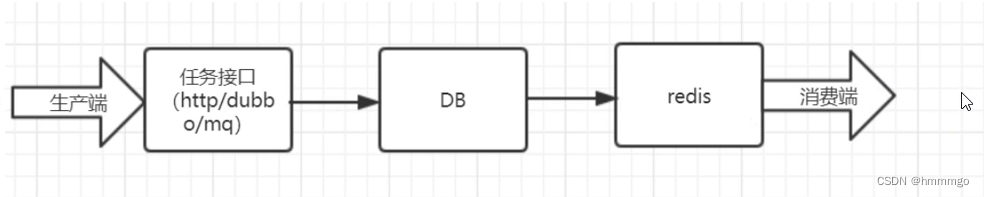
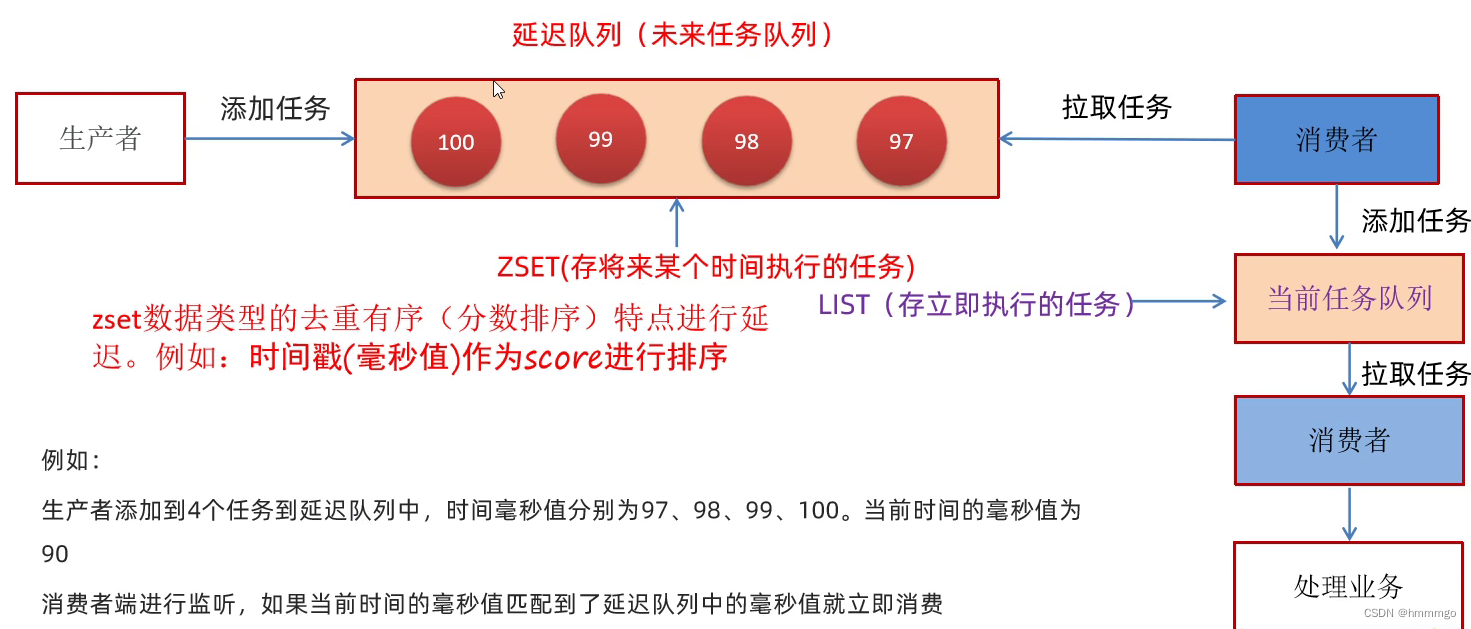
实现思路
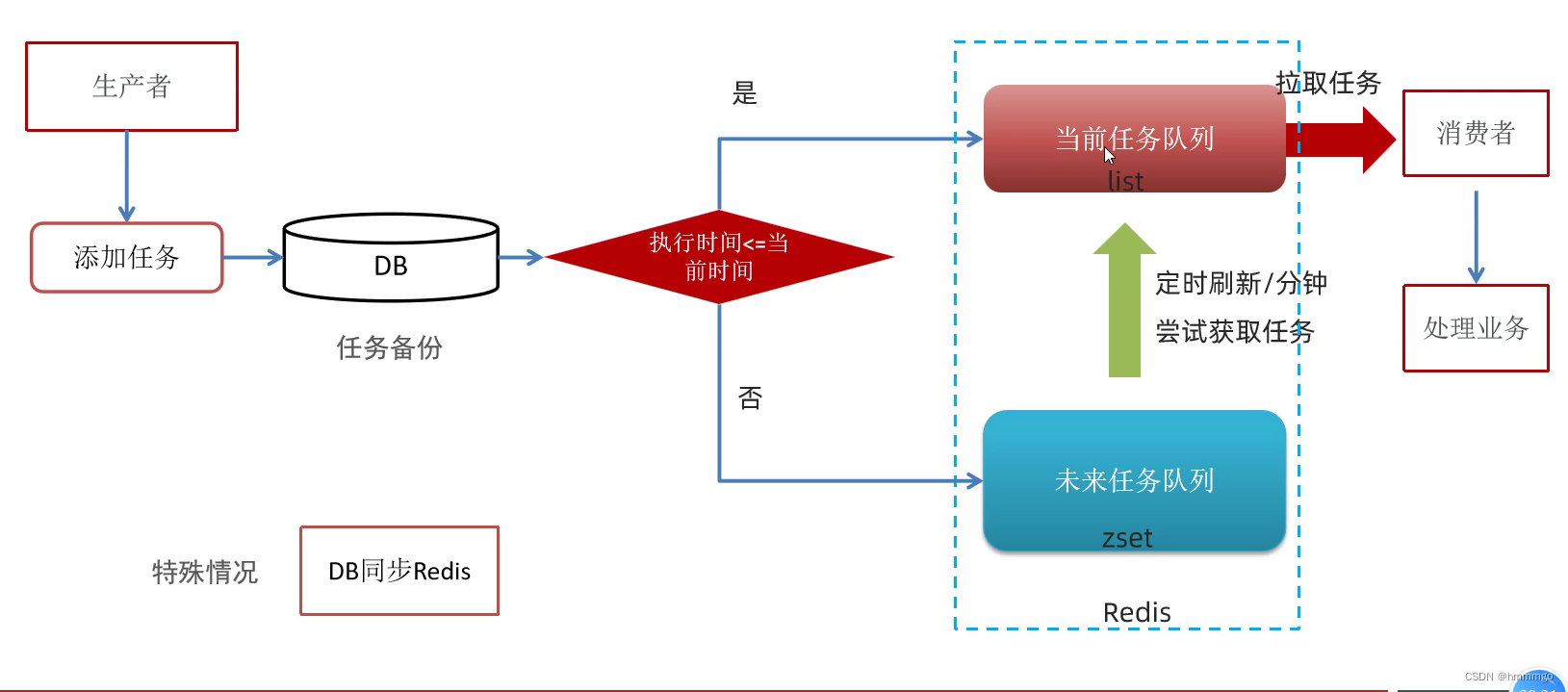
问题
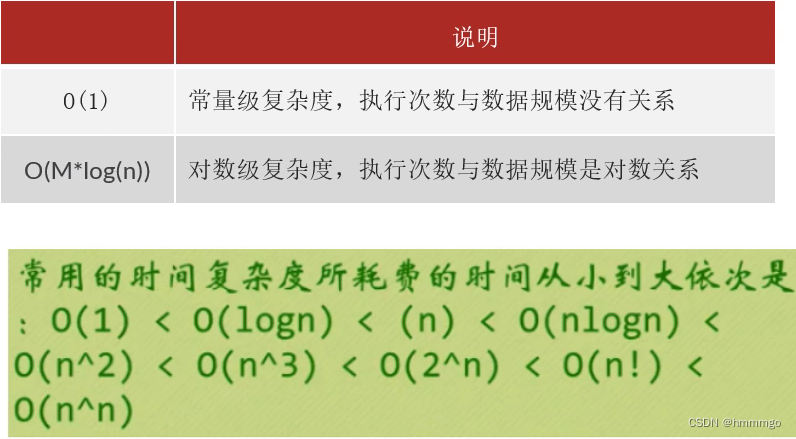
zset数据量太大有什么问题?
- 操作redis中的list命令LPUSH:时间复杂度:O(1)
- 操作redis中的zset命令zadd:时间复杂度:O(M*log(n))
2.2 分布式延迟任务系统实现(重点)
2.2.1 环境搭建(Redis环境,数据库环境,基础工程导入)
①启动redis
docker start redis
②任务相关表
taskinfo 任务表
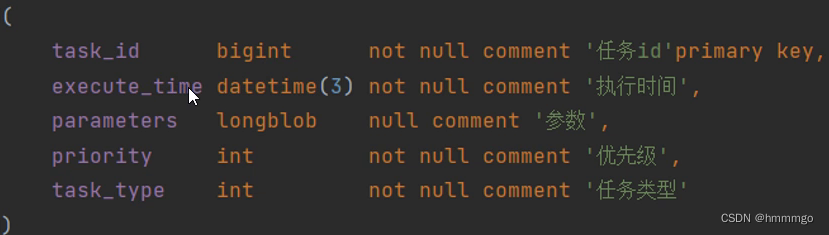
taskinfo_logs 任务日志表
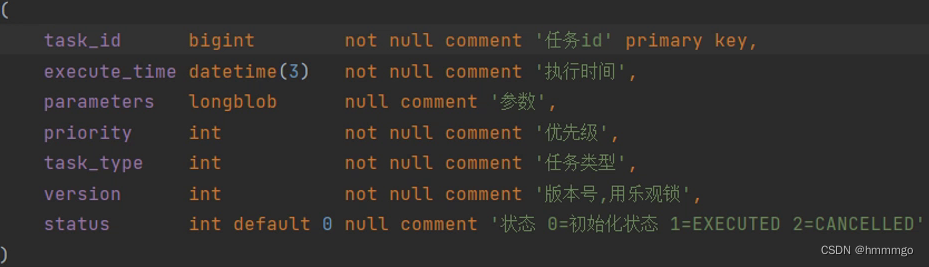
MySQL中,BLOB是一个二进制大型对象,是一个可以存储大量数据的容器;LongBlob最大存储4G
③搭建heima-leadnews-schedule模块
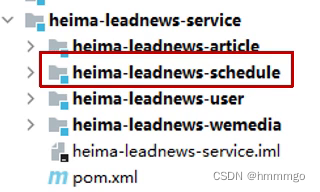
1、导入资料文件夹下的heima-leadnews-sechedule模块到黑马-leadnews-service下,如图所示:
2、添加bootstrap.yml
server:
  port: 51701
spring:
  application:
    name: leadnews-schedule
  cloud:
    nacos:
      discovery:
        server-addr: 192.168.200.130:8848
      config:
        server-addr: 192.168.200.130:8848
        file-extension: yml
3、在nacos中添加对应配置,并添加数据库及mybatis-plus的配置
spring:
  redis:
    host: 192.168.200.130
    port: 6379
    password: leadnews
  datasource:
    driver-class-name: com.mysql.jdbc.Driver
    url: jdbc:mysql://192.168.200.130:3306/leadnews_schedule?useSSL=false&useUnicode=true&characterEncoding=UTF-8&serverTimezone=UTC
    username: root
    password: root
# 设置Mapper接口所对应的XML文件位置,如果你在Mapper接口中有自定义方法,需要进行该配置
mybatis-plus:
  mapper-locations: classpath*:mapper/*.xml
  # 设置别名包扫描路径,通过该属性可以给包中的类注册别名
  type-aliases-package: com.heima.model.schedule.pojos
④数据库准备-数据库自身解决并发两种策略
1、悲观锁(Pessimistic Lock)
每次拿数据的时候都认为别人会修改,所以每次在拿数据的时候都会上锁
2、乐观锁(Optimistic Lock)
每次去拿数据的时候都认为别人不会修改,所以不会上锁,但是在更新的时候会判断一下在此期间别人有没有去更新这个数据,可以使用版本号等机制

⑤数据库准备-mybatis-plus集成乐观锁的使用
1、在实体类中使用@Version标明是一个版本的字段

2、mybatis-plus对乐观锁的支持,在启动类中向容器中放入乐观锁的拦截器

2.2.2 核心流程实现(重点)
①添加任务到DB和缓存
1、业务实现类
@Service
public class TaskServiceImpl implements TaskService {

	@Override
	public long addTask(Task task) {
		// 将任务添加到数据库表中(实现备份)
		boolean flag = addTaskToDB(task);

		// 将任务添加到缓存队列中(基于redis队列实现)
		if (flag) {
			addTaskToCache(task);
		}
		return task.getTaskId();
	}


	@Autowired
	private CacheService cacheService;

	/**
	 * 将任务添加到缓存队列中
	 *
	 * RedisKey的设计规范:
	 * 1. 通过冒号: 进行分割
	 * 2. 必须保证唯一
	 * 3. 必须有业务前缀
	 * 4. 需要有业务标识
	 *
	 * 举例说明:
	 *
	 * 示例一:存储ID为123的汽车详情,RedisKey可以这么设计: car:info:123
	 * 示例二:存储汽车列表,RedisKey可以这么设计: car:list
	 * @param task
	 */
	private void addTaskToCache(Task task) {
		// 1. 获取任务执行时间和系统当前时间
		// long systemTime = System.currentTimeMillis();
		long systemTime = DateTime.now().getMillis();
		long executeTime = task.getExecuteTime();
		if (systemTime >= executeTime) {
			// 2. 系统当前时间>=任务执行时间,就将任务添加到Redis当前队列List中
			// 拼接当前队列的RedisKey,最终格式:topic:1001:1
			String redisKey = ScheduleConstants.TOPIC + task.getTaskType() + ":" + task.getPriority();
			// 将任务转为JSON添加到队列List中
			String taskString = JSON.toJSONString(task);
			// 左推
			cacheService.lLeftPush(redisKey,taskString);
		} else {
			// 3. 系统当前时间<任务执行时间,就将任务添加到Redis未来队列ZSet中
			// 拼接未来队列的RedisKey,最终格式:future:1001:1
			String redisKey = ScheduleConstants.FUTURE + task.getTaskType() + ":" + task.getPriority();
			// 将任务转为JSON添加到队列ZSet中
			String taskString = JSON.toJSONString(task);
			//
			cacheService.zAdd(redisKey,taskString,executeTime);
		}
	}

	@Autowired
	private TaskinfoMapper taskinfoMapper;
	@Autowired
	private TaskinfoLogsMapper taskinfoLogsMapper;
	/**
	 * 将任务添加到数据库表中
	 * @param task
	 * @return
	 */
	private boolean addTaskToDB(Task task) {
		try {
			// 1. 复制task给taskInfo
			Taskinfo taskinfo = new Taskinfo();
			BeanUtils.copyProperties(task,taskinfo);
			taskinfo.setExecuteTime(new Date(task.getExecuteTime()));
			// 2. 保存taskinfo的数据
			taskinfoMapper.insert(taskinfo);

			// 3. 复制taskinfo给taskinfologs
			TaskinfoLogs taskinfoLogs = new TaskinfoLogs();
			BeanUtils.copyProperties(taskinfo,taskinfoLogs);
			taskinfoLogs.setVersion(1);	//乐观锁版本号
			taskinfoLogs.setStatus(ScheduleConstants.SCHEDULED); // 任务状态0-待执行(初始化)
			// 4. 保存taskInfoLogs的数据
			taskinfoLogsMapper.insert(taskinfoLogs);

			// 设置taskId的值
			task.setTaskId(taskinfo.getTaskId());
			// 返回值
			return true;
		} catch (BeansException e) {
			e.printStackTrace();
			return false;
		}
	}
}
2、测试
@SpringBootTest
@RunWith(SpringRunner.class)
public class TaskTest {

	@Autowired
	private TaskService taskService;

	/**
	 * 测试任务添加
	 */
	@Test
	public void testTaskAdd() {
		for (int i = 0; i <= 10; i++) {
			WmNews wmNews = new WmNews();
			wmNews.setId(i);
			wmNews.setTitle("测试标题"+i);
			wmNews.setContent("测试内容"+i);
			// 前四条文章的发布时间为当前系统时间
			if (i <= 4) {
				wmNews.setPublishTime(DateTime.now().toDate());
			} else {	// 后6条文章的发布时间为未来时间
				wmNews.setPublishTime(DateTime.now().plusSeconds(i).toDate());
			}
			Task task = new Task();
			if (i % 2 == 0) {

				task.setTaskType(TaskTypeEnum.WM_NEWS.getTaskType());//自媒体文章类型1001
				task.setPriority(TaskTypeEnum.WM_NEWS.getPriority());//自媒体文章优先级1
			} else {
				task.setTaskType(TaskTypeEnum.FETCH_NEWS.getTaskType());//爬虫文章类型1002
				task.setPriority(TaskTypeEnum.FETCH_NEWS.getPriority());//爬虫文章优先级2
			}
			task.setExecuteTime(wmNews.getPublishTime().getTime());	//任务执行时间,就是文章的发布时间
			task.setParameters(ProtostuffUtil.serialize(wmNews));	//任务业务参数数据,就是文章的字节数组

			long taskId = taskService.addTask(task);
			System.out.println("添加完毕,任务ID:"+taskId);
		}
	}
}
注意一:org.joda.time.DateTime包和import cn.hutool.core.date.DateTime包下DateTime的区别
1、joda包xia的DateTime.now()方法返回的是DateTime类型的,如果需要转换成Date类型,DateTime.now().toDate()
2、hutool包下的DateTime.now()方法返回的也是DateTime类型的,但是它继承了Date,所以不需要转换
注意二:序列化工具对比
1、JdkSerialize:java内置的序列化能将实现了Serilazable接口的对象进行序列化和反序列化,ObjectOutputStream的writeObject()方法可序列化对象生成字节数组
2、Protostuff:google开源的protostuff采用更为紧凑的二进制数组,表现更加优异,然后使用protostuff的编译工具生成pojo类,效率更高
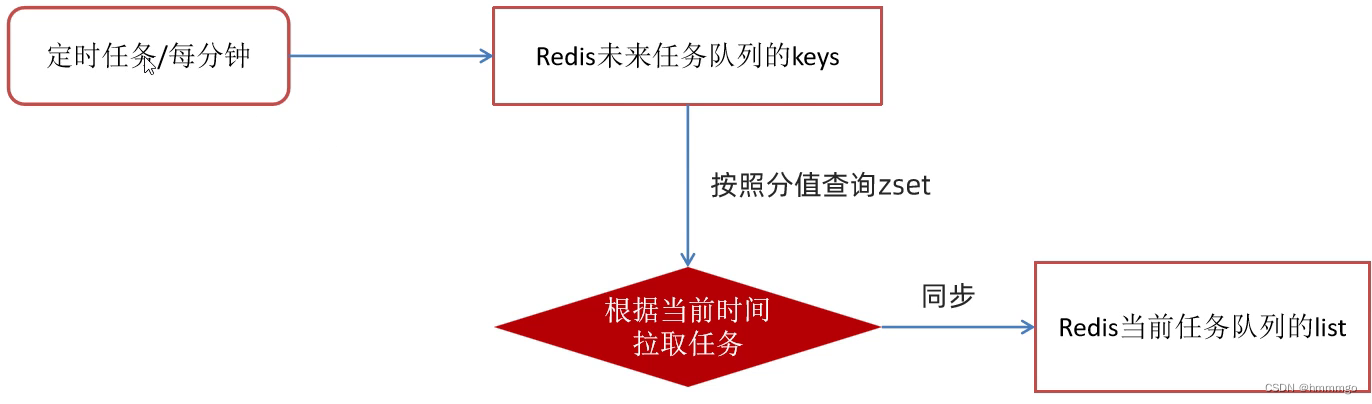
②未来任务定时刷新
1、实现步骤
2、SpringTask的使用
<1> 在启动类上使用 @EnableScheduling注解,开启任务调度
<2> 在Spring的bean中的方法上,使用 @Scheduled(cron = “”)
/**
     * cron 表达式标准的结构是6个空格七位
     *      * * * * * * *
     *      秒 分 时 日 月 周 年
     * 在springTask仅需要写5个空格六位即可:
     */
    // 示例1:每秒执行一次: */1 * * * * ?
    // 示例2:准点执行一次:0 30 12 * * ?
    @Scheduled(cron = "*/5 * * * * ?") //每5秒执行一次
    public void sing(){
        System.out.println("当前执行时间:"+new Date());
    }
*表示一切可能的值。
3、redis key值匹配
方案1:key模糊匹配
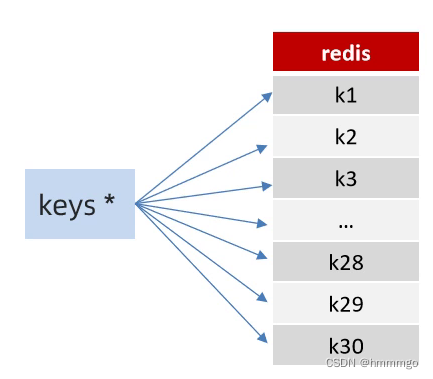
keys的模糊匹配功能很方便也很强大,但是在生产环境需要慎用!开发中使用keys的模糊匹配却发现redis的CPU使用率极高,所以公司的redis生产环境将keys命令禁用了!redis是单线程,会被堵塞。
方案二:scan
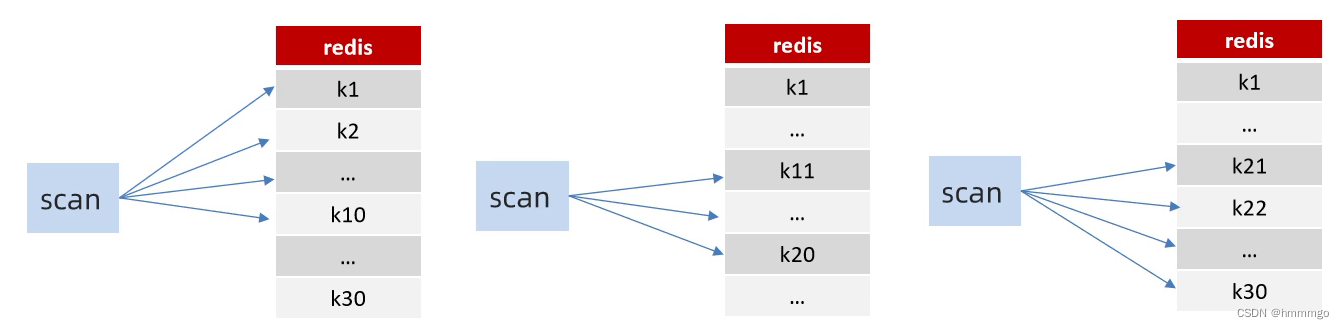
SCAN命令是一个基于游标的迭代器,SCAN命令每次被调用之后,都会向用户返回一个新的游标,用户在下次迭代时需要使用这个新游标作为SCAN命令的游标参数,以此来延续之前的迭代过程。
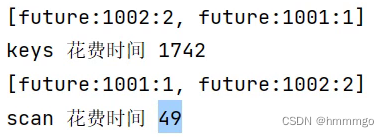
代码实现
1、在启动类添加注解
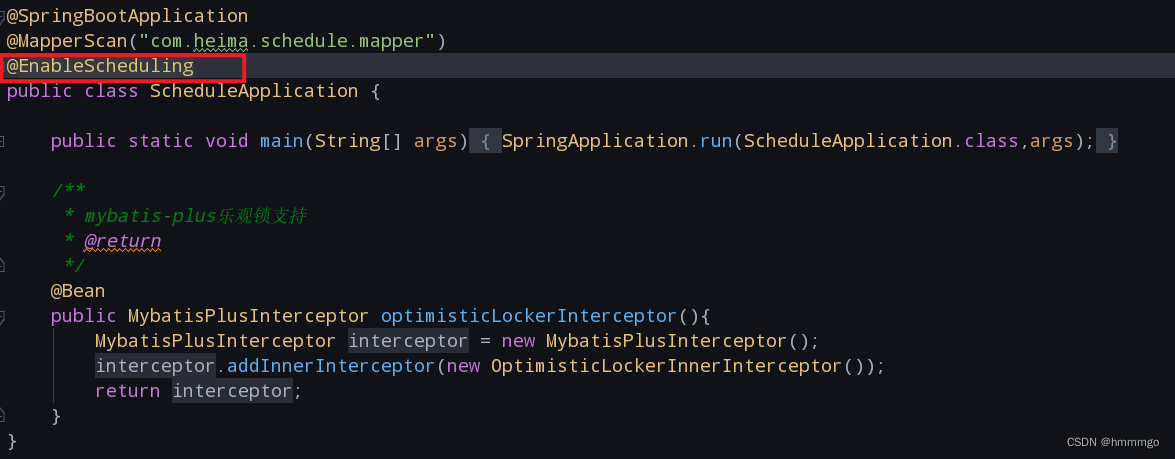
2、在业务实现类编写方法
/**
	 * 定时刷新任务(将时间已到的任务从未来队列刷新到当前队列)
	 */
	@Scheduled(cron = "*/1 * * * * ?")
	public void refreshTask() {
		// 1. 获取全部未来队列KEY的集合
		Set<String> futureKeySet = cacheService.scan(ScheduleConstants.FUTURE + "*");
		// 2. 遍历未来队列KEY的集合
		if (!futureKeySet.isEmpty()) {
			for (String futureKey : futureKeySet) {
				// 2.1 获取未来队列KEY中时间已到的任务集合
				long currentTime = DateTime.now().getMillis();
				Set<String> endTimeSet = cacheService.zRangeByScore(futureKey, 0, currentTime);
				if (!endTimeSet.isEmpty()) {
					// 2.2 从未来队列中删除任务集合
					cacheService.zRemove(futureKey,endTimeSet);
					// 拼接topic的key
					String regex = ":";
					String[] futureKeyArr = futureKey.split(regex);
					String topicKey = ScheduleConstants.TOPIC + futureKeyArr[1] + ":" + futureKeyArr[2];
					// 2.3 将任务集合添加到当前队列中
					cacheService.lLeftPushAll(topicKey, endTimeSet);
				}
			}
		}
	}
③未来任务定时刷新优化方案(Redis管道+线程池)
普通redis客户端和服务器交互模式
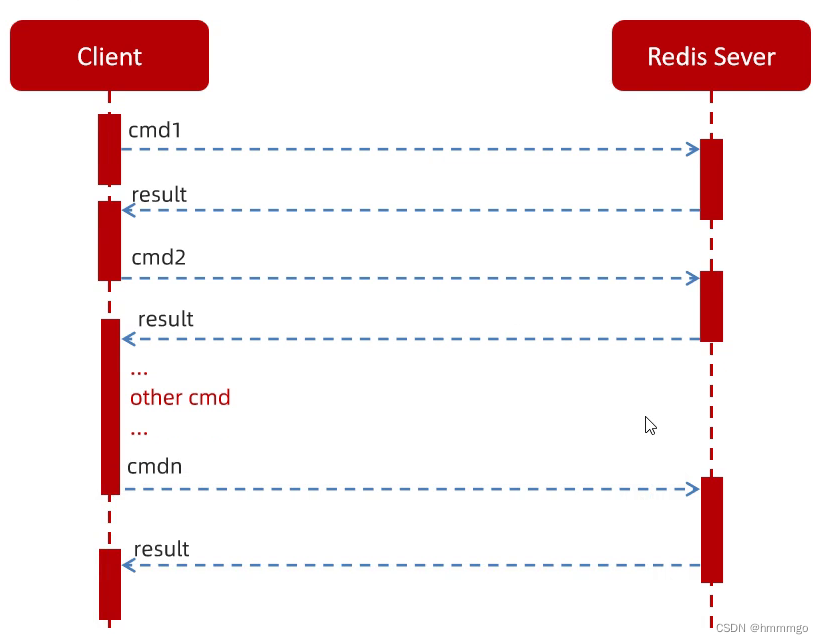
串行化操作,效率偏低
Pipeline(管道)请求模型
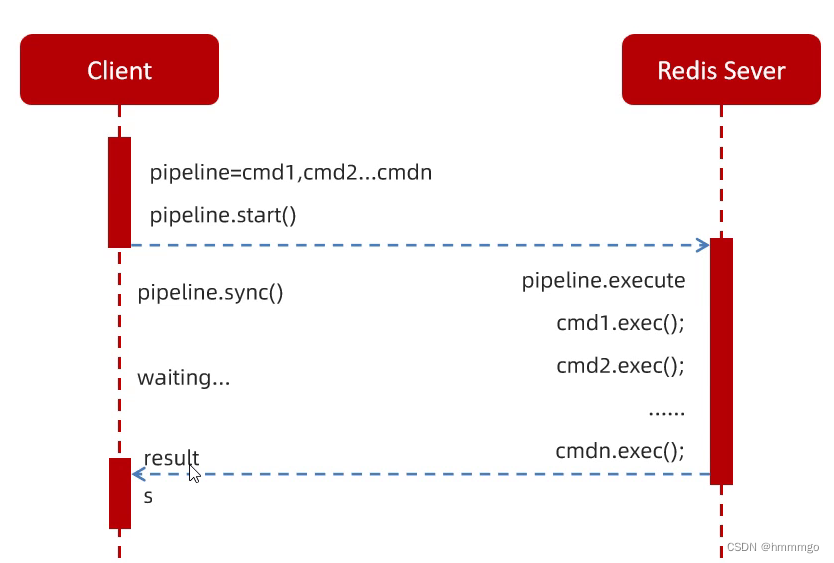
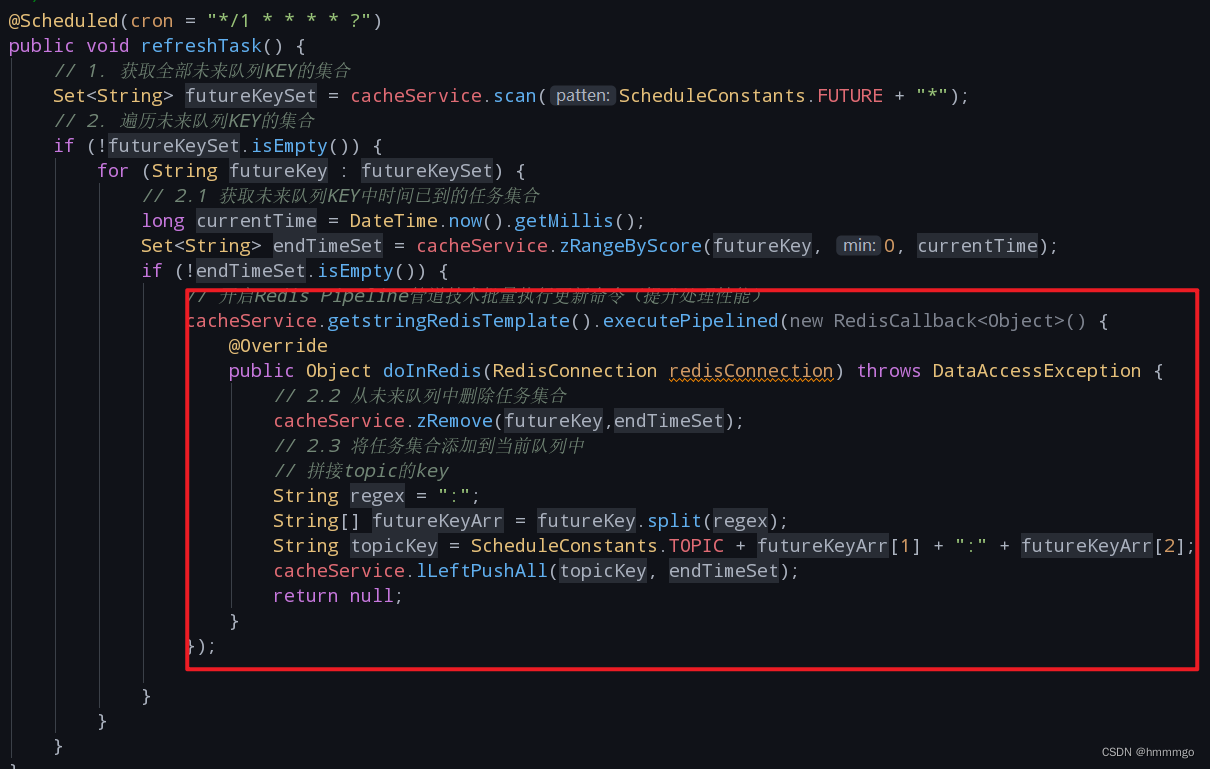
如果遍历的key数量很多,那么在执行for循环的时候,可能会造成,for循环的执行时间大于1秒,造成阻塞。
使用异步执行
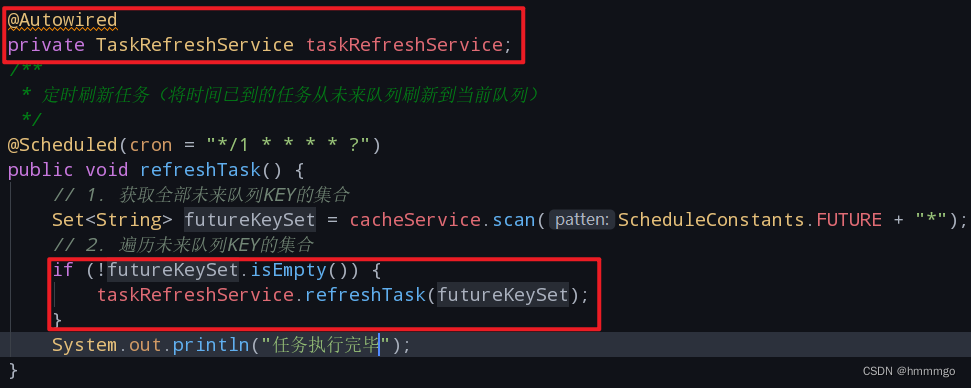
1、编写接口方法
package com.heima.schedule.service;

import java.util.Set;

/**
 * @author tp
 * @since 2024/2/18 13:49
 */

public interface TaskRefreshService {

	/**
	 * 异步刷新任务从未来到当前队列中
	 * @param futurekeySet
	 */
	void refreshTask(Set<String> futurekeySet);
}
2、编写实现类方法
package com.heima.schedule.service.impl;

import com.heima.common.constants.ScheduleConstants;
import com.heima.common.redis.CacheService;
import com.heima.schedule.service.TaskRefreshService;
import org.joda.time.DateTime;
import org.springframework.beans.factory.annotation.Autowired;
import org.springframework.dao.DataAccessException;
import org.springframework.data.redis.connection.RedisConnection;
import org.springframework.data.redis.core.RedisCallback;
import org.springframework.scheduling.annotation.Async;
import org.springframework.stereotype.Service;

import java.util.Set;

/**
 * @author tp
 * @since 2024/2/18 13:50
 */

@Service
public class TaskRefreshServiceImpl implements TaskRefreshService {

	@Autowired
	private CacheService cacheService;

	@Override
	@Async("taskExecutor")
	public void refreshTask(Set<String> futureKeySet) {
		for (String futureKey : futureKeySet) {
			// 2.1 获取未来队列KEY中时间已到的任务集合
			long currentTime = DateTime.now().getMillis();
			Set<String> endTimeSet = cacheService.zRangeByScore(futureKey, 0, currentTime);
			if (!endTimeSet.isEmpty()) {
				// 开启Redis Pipeline管道技术批量执行更新命令(提升处理性能)
				cacheService.getstringRedisTemplate().executePipelined(new RedisCallback<Object>() {
					@Override
					public Object doInRedis(RedisConnection redisConnection) throws DataAccessException {
						// 2.2 从未来队列中删除任务集合
						cacheService.zRemove(futureKey, endTimeSet);
						// 2.3 将任务集合添加到当前队列中
						// 拼接topic的key
						String regex = ":";
						String[] futureKeyArr = futureKey.split(regex);
						String topicKey = ScheduleConstants.TOPIC + futureKeyArr[1] + ":" + futureKeyArr[2];
						cacheService.lLeftPushAll(topicKey, endTimeSet);
						return null;
					}
				});

			}
		}

	}
}
3、对异步方法进行调用
2.2.3 分布式环境问题解决方案
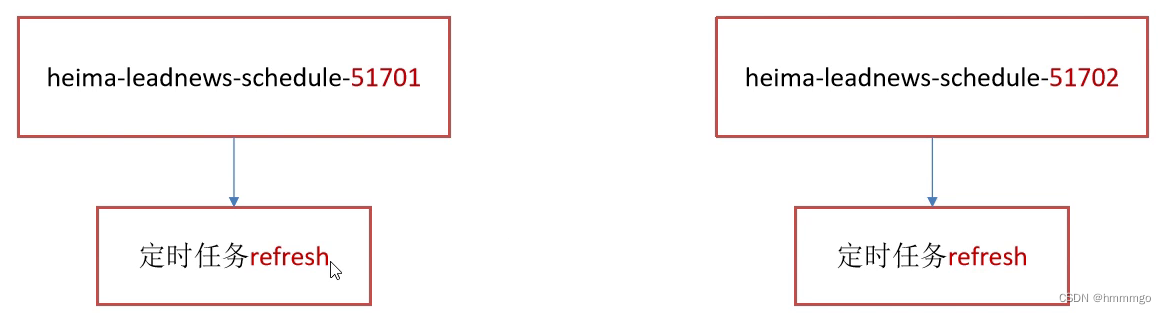
问题描述:
启动两台heima-leadnews-schedule服务,每台服务都会去执行refresh定时任务方法
①分布式锁
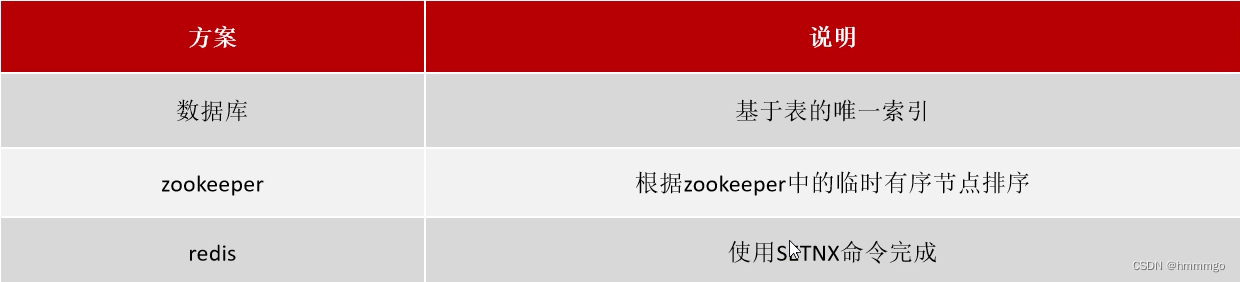
分布式锁:控制分布式系统有序的去对共享资源进行操作,通过互斥来保证数据的一致性。
分布式锁的解决方案:
②redis分布式锁
sexnx(SET if Not Exists)命令在指定的key不存在时,为key设置指定的值。

代码实现
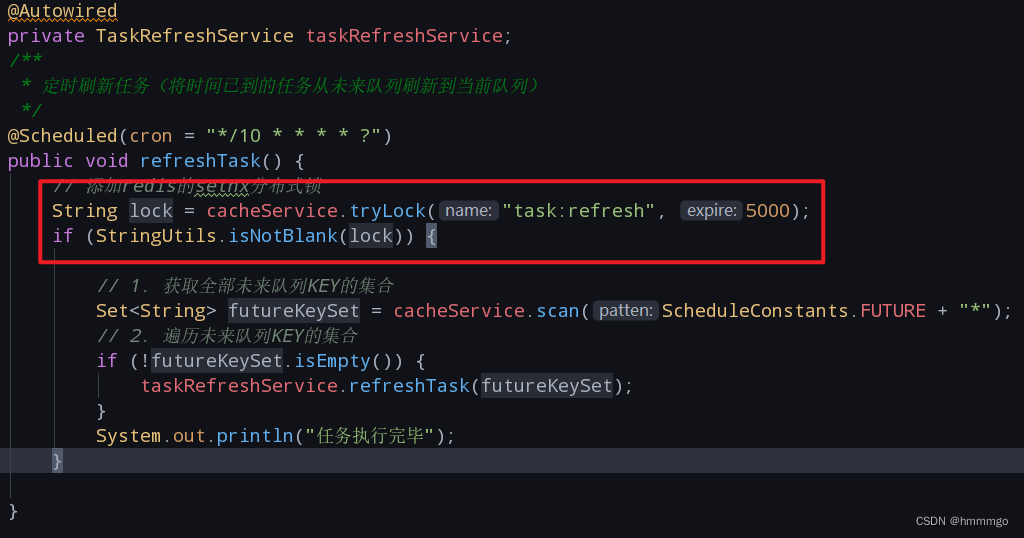
加锁的代码
基于set key value [EX seconds] [PX milliseconds] [NX|XX]
/**
     * 加锁
     *
     * @param name
     * @param expire
     * @return
     */
    public String tryLock(String name, long expire) {
        name = name + ":lock";
        String token = UUID.randomUUID().toString();
        RedisConnectionFactory factory = stringRedisTemplate.getConnectionFactory();
        RedisConnection conn = factory.getConnection();
        try {

            //参考redis命令:
            //set key value [EX seconds] [PX milliseconds] [NX|XX]
            Boolean result = conn.set(
                    name.getBytes(),
                    token.getBytes(),
                    Expiration.from(expire, TimeUnit.MILLISECONDS),
                    RedisStringCommands.SetOption.SET_IF_ABSENT //NX
            );
            if (result != null && result)
                return token;
        } finally {
            RedisConnectionUtils.releaseConnection(conn, factory,false);
        }
        return null;
    }
2.2.4 数据库定时同步Redis
当redis宕机之后,redis里可能会丢失一部分数据,一旦redis数据丢失了,数据就不能以redis为主了,系统启动时以数据库为主,把数据库里的所有任务查出来,已经执行过,或者已经取消的任务就不要了,要的是待执行的状态为初始化的任务,放到redis的缓存队列中。
/**
	 * reids突然宕机,那么就会丢失一小部分数据,在redis重启后,在spring启动过程中执行一次,将任务数据从DB中查出存入Redis缓存对列中
	 */
	@PostConstruct	// 让一段代码在spring启动过程中去执行
	public void reloadTask() {
		// 1. 删除Redis中全部未来队列数据
		// 1.1 获取全部未来队列的KEY集合
		Set<String> futureKeySet = cacheService.scan(ScheduleConstants.FUTURE + "*");
		// 1.2 删除全部未来队列数据
		if (futureKeySet.isEmpty()) {
			cacheService.delete(futureKeySet);
		}
		// 2. 删除Redis中全部当前队列数据
		// 2.1 获取全部当前队列KEY集合
		Set<String> topicKeySet = cacheService.scan(ScheduleConstants.TOPIC + "*");
		// 2.2 删除全部当前队列数据
		if (topicKeySet.isEmpty()) {
			cacheService.delete(topicKeySet);
		}
		// 3. 从任务日志表中查询全部待执行的任务列表
		List<TaskinfoLogs> taskInfoLogsList = this.taskinfoLogsMapper.selectList(Wrappers.<TaskinfoLogs>lambdaQuery().eq(TaskinfoLogs::getStatus, ScheduleConstants.SCHEDULED));
		// 4. 遍历任务列表,转为Task添加到Redis缓存队列
		if (!taskInfoLogsList.isEmpty()) {
			for (TaskinfoLogs taskinfoLogs : taskInfoLogsList) {
				Task task = new Task();
				// 转换日期类型
				task.setExecuteTime(taskinfoLogs.getExecuteTime().getTime());
				BeanUtils.copyProperties(taskinfoLogs,task);
				this.addTaskToCache(task);
			}
		}

	}
2.2.5 消费者任务开发

①消费任务
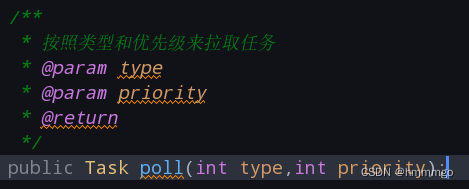
1、接口代码
2、实现代码
/**
 * 任务拉取:指的是根据任务类型和优先级从当前队列中拉取任务
 * @param type
 * @param priority
 * @return
 */
@Override
public Task poll(int type, int priority) {
	// 1. 拼接当前队列RedisKey
	String redisKey = ScheduleConstants.TOPIC + type + ":" + priority;
	// 2. 从队列中弹出一个任务JSON字符串
	String taskStr = cacheService.lRightPop(redisKey);
	if (StringUtils.isNotBlank(taskStr)) {
		Task task = JSON.parseObject(taskStr, Task.class);
		// 仅限于测试输出
		WmNews wmNews = ProtostuffUtil.deserialize(task.getParameters(), WmNews.class);
		System.out.println(wmNews);
		// 3. 修改任务日志表的状态,已执行
		TaskinfoLogs taskinfoLogs = new TaskinfoLogs();
		taskinfoLogs.setStatus(ScheduleConstants.EXECUTED);
		taskinfoLogs.setVersion(1);		// 更新条件: 版本号
		taskinfoLogs.setTaskId(task.getTaskId()); // 更新条件:主键id
		// update task_info_logs set status=1,version=version+1 where id=? and version=1
		this.taskinfoLogsMapper.updateById(taskinfoLogs);	// 只能用这个方法,用update() ,乐观锁的version+1,就不生效了

		// 4. 删除任务表中的数据
		taskinfoMapper.deleteById(task.getTaskId());
		return task;
	}
	return null;
}
2.3 文章发布和延迟任务集成
2.3.1 准备schedule的feign接口

package com.heima.apis.schedule;

import com.heima.model.schedule.dtos.Task;
import org.springframework.cloud.openfeign.FeignClient;
import org.springframework.web.bind.annotation.PathVariable;
import org.springframework.web.bind.annotation.PostMapping;
import org.springframework.web.bind.annotation.RequestBody;

@FeignClient("leadnews-schedule")
public interface IScheduleClient {

    /**
     * 添加任务到DB和CACHE中
     * @param task
     * @return
     */
    @PostMapping("/api/v1/schedule/addTask")
    public long add(@RequestBody Task task);


    /**
     * 从REDIS的当前任务队列拉取任务
     * @param type
     * @param priority
     * @return
     */
    @PostMapping("/api/v1/schedule/pollTask/{type}/{priority}")
    public Task pollTask(@PathVariable("type") int type, @PathVariable("priority") int priority);
}
在heima-leadnews-schedule微服务下提供对应的实现
package com.heima.schedule.feign;

import com.heima.apis.schedule.IScheduleClient;
import com.heima.model.schedule.dtos.Task;
import com.heima.schedule.service.TaskService;
import org.springframework.beans.factory.annotation.Autowired;
import org.springframework.web.bind.annotation.PathVariable;
import org.springframework.web.bind.annotation.PostMapping;
import org.springframework.web.bind.annotation.RequestBody;
import org.springframework.web.bind.annotation.RestController;

@RestController
public class ScheduleClient implements IScheduleClient {

    @Autowired
    private TaskService taskService;

    @Override
    /**
     * 添加任务到DB和CACHE中
     * @param task
     * @return
     */
    @PostMapping("/api/v1/schedule/addTask")
    public long add(@RequestBody Task task){
        return taskService.addTask(task);
    }

    @Override
    @PostMapping("/api/v1/schedule/pollTask/{type}/{priority}")
    public Task pollTask(@PathVariable("type") int type, @PathVariable("priority") int priority){
        return taskService.poll(type,priority);
    }
}
发布文章集成添加延迟队列接口
将wemedia微服务中WmNewsAuditServiceImpl的saveApArticle(WmNews WmNews)方法由private变更为public,并在WmNewsAuditService中添加saveApArticle接口
public interface WmNewsAuditService {


    /**
     * 创建APP文章
     * @param wmNews
     */
    public void saveOrUpdateApArticle(WmNews wmNews);
}
在wemedia微服务中创建WmNewsTaskService
package com.heima.wemedia.service;

import com.heima.model.wemedia.pojos.WmNews;

public interface WmNewsTaskService {

    /**
     * 将自媒体文章转换为TASK存入DB和CACHE中
     * @param wmNews
     */
    void addTask(WmNews wmNews);

    /**
     * 监听拉取任务并发布文章
     */
    void listenerPublishWmNews();
}
WmNewsTaskServiceImpl实现:
package com.heima.wemedia.service.impl;

import com.baomidou.mybatisplus.core.toolkit.StringUtils;
import com.baomidou.mybatisplus.core.toolkit.Wrappers;
import com.heima.apis.schedule.IScheduleClient;
import com.heima.common.redis.CacheService;
import com.heima.model.common.enums.TaskTypeEnum;
import com.heima.model.schedule.dtos.Task;
import com.heima.model.wemedia.pojos.WmNews;
import com.heima.utils.common.ProtostuffUtil;
import com.heima.wemedia.service.WmNewsAuditService;
import com.heima.wemedia.service.WmNewsService;
import com.heima.wemedia.service.WmNewsTaskService;
import lombok.extern.slf4j.Slf4j;
import org.springframework.beans.factory.annotation.Autowired;
import org.springframework.context.annotation.Lazy;
import org.springframework.scheduling.annotation.Scheduled;
import org.springframework.stereotype.Service;

@Slf4j
@Service
public class WmNewsTaskServiceImpl implements WmNewsTaskService {

    @Autowired
    private IScheduleClient scheduleClient;

    @Autowired
    @Lazy
    private WmNewsAuditService wmNewsAuditService;

    @Autowired
    private WmNewsService wmNewsService;


    @Override
    public void addTask(WmNews wmNews) {
        Task task = new Task();
        task.setTaskType(TaskTypeEnum.WM_NEWS.getTaskType());//任务类型
        task.setPriority(TaskTypeEnum.WM_NEWS.getPriority());//任务优先级
        task.setExecuteTime(wmNews.getPublishTime().getTime());//任务执行时间(文章的发布时间)
        task.setParameters(ProtostuffUtil.serialize(wmNews)); //任务参数

        scheduleClient.add(task);
    }

    @Autowired
    private CacheService cacheService;

    /**
     * 从REDIS的当前任务队列拉取任务
     */
    @Scheduled(cron = "*/5 * * * * ?")
    @Override
    public void listenerPublishWmNews() {

        String lockName = "lock:poll:publish:news";
        String lock = cacheService.tryLock(lockName, 3 * 1000);

        if(StringUtils.isNotBlank(lock)){
            log.info("[listenerPublishWmNews]获取到分布式锁,开始执行拉取任务");

            //1.根据类型和优先级从Redis当前任务队列拉取任务
            Task task = scheduleClient.pollTask(TaskTypeEnum.WM_NEWS.getTaskType(), TaskTypeEnum.WM_NEWS.getPriority());

            if(task!=null){
                //2.从任务中获取wmNews
                byte[] wmNewsBytes = task.getParameters();
                WmNews wmNews = ProtostuffUtil.deserialize(wmNewsBytes, WmNews.class);

                int count = wmNewsService.count(Wrappers.<WmNews>lambdaQuery()
                        .eq(WmNews::getId, wmNews.getId())
                        .in(WmNews::getStatus, WmNews.Status.ADMIN_SUCCESS.getCode(), WmNews.Status.SUCCESS.getCode())
                );
                if(count>0){

                    //3.创建远程APP文章数据
                    wmNewsAuditService.saveOrUpdateApArticle(wmNews);


                    //4.修改自媒体文章状态为已发布
                    WmNews wmNewsDB = new WmNews();
                    wmNewsDB.setId(wmNews.getId());
                    wmNewsDB.setStatus(WmNews.Status.PUBLISHED.getCode());
                    wmNewsDB.setReason("已发布");
                    wmNewsService.updateById(wmNewsDB);
                }
            }
        } else {
            log.error("[listenerPublishWmNews]未获取到分布式锁"  );
        }
    }
}





 扫一扫
扫一扫


 1575
1575

 被折叠的 条评论
为什么被折叠?
被折叠的 条评论
为什么被折叠?
 到【灌水乐园】发言





