



 本文介绍了Qt库中常用的控件如QComboBox、QPlainTextEdit、QToolBox、QListWidget、QToolButton、QTabWidget、QTreeWidget和QTableWidget,展示了它们的功能和用法,以及如何在Widget中集成。还演示了如何操作QTextDocument和处理列表、工具箱、树形视图等组件。
1. QComboBox
下拉列表
2. QPlainTextEdit
QPlainTextEdit的文字内容以QTextDocument类型存储,函数document返回这个文档
对象的指针
QTextDocument是内存中的文本对象,以文本块方式存储,每个段落以换行符结束。
QTextDocument提供一些函数实现对文本内容的存取
int blockCount():返回文本块个数
QTextBlock finBlockByNumber(int) 读取一个文本块,下标从0开始
3. QToolBox
增加QWidget作为子容器,QWidget再加入QToolButton
4. QListWidget
list容器,支持右键菜单
5. QToolButton
工具按钮,绑定action来工作
6. QTabWidget
tab页支持切换,里面可以放入其他Widget
7. QTreeWidget
树状面板,可以被拖动停靠在主窗口任何地方
8. QTableWidget
表格面板
9. QDockWidget
容器面板
10.代码举例
widget.h
#ifndef WIDGET_H
#define WIDGET_H

#include <QWidget>
#include <QComboBox>
#include <QPlainTextEdit>
#include <QToolBox>
#include <QListWidget>
#include <QToolButton>
#include <QTreeWidget>
#include <QTabWidget>
#include <QTableWidget>
#include <QDockWidget>

/*
QComboBox:
下拉列表
*/

/*
 QPlainTextEdit的文字内容以QTextDocument类型存储,函数document返回这个文档
 对象的指针
 QTextDocument是内存中的文本对象,以文本块方式存储,每个段落以换行符结束。
 QTextDocument提供一些函数实现对文本内容的存取
 int blockCount():返回文本块个数
 QTextBlock finBlockByNumber(int) 读取一个文本块,下标从0开始
*/

/*
QToolBox: 增加QWidget作为子容器,QWidget再加入QToolButton
*/

/*
QListWidget: list容器,支持右键菜单
*/

/*
QToolButton: 工具按钮,绑定action来工作

*/

/*
QTabWidget
tab页支持切换,里面可以放入其他Widget;
*/

/*
QTreeWidget
树状面板,可以被拖动停靠在主窗口任何地方
*/

/*
QTableWidget
表格面板
*/

/*
QDockWidget
容器面板
*/

QT_BEGIN_NAMESPACE
namespace Ui { class Widget; }
QT_END_NAMESPACE

class Widget : public QWidget
{
    Q_OBJECT

public:
    Widget(QWidget *parent = nullptr);
    ~Widget();

private slots:
    void on_pushButton_clicked();

    void on_comboBox_currentIndexChanged(int index);

    void on_comboBoxCity_currentTextChanged(const QString &arg1);

    void on_pushButton_2_clicked();

    void on_actionListIni_triggered();

    void on_tabWidget_currentChanged(int index);

    void on_toolBox_currentChanged(int index);

private:
    Ui::Widget *ui;
};
#endif // WIDGET_H
widget.cpp
#include "widget.h"
#include "ui_widget.h"
#include <QTextBlock>
#include <QMessageBox>

Widget::Widget(QWidget *parent)
    : QWidget(parent)
    , ui(new Ui::Widget)
{
    ui->setupUi(this);
    QIcon icon(":/icon/tubiaoziyuan/20.png");
    ui->comboBox->clear();
    for (int i = 0; i < 10; i++) {
        ui->comboBox->addItem(icon, QString::asprintf("Item %d", i));
    }

    ui->comboBoxCity->clear();
    QIcon iconCity(":/icon/tubiaoziyuan/21.png");
    QMap<QString, int> mapCity;
    mapCity.insert("北京", 10);
    mapCity.insert("天津", 20);
    mapCity.insert("上海", 30);
    mapCity.insert("重庆", 40);
    foreach (auto key, mapCity.keys()) {
        ui->comboBoxCity->addItem(iconCity, key, mapCity.value(key));
    }

    ui->toolButton->setDefaultAction(ui->actionListIni);
}

Widget::~Widget()
{
    delete ui;
}


void Widget::on_pushButton_clicked()
{
   QTextDocument *doc = ui->plainTextEdit->document();
   int blockNum = doc->blockCount();
   for (int i = 0; i < blockNum; i++) {
        qDebug() << doc->findBlockByNumber(i).text();
   }
}


void Widget::on_comboBox_currentIndexChanged(int index)
{
    QString strItem = ui->comboBox->itemText(index);
    ui->plainTextEdit->appendPlainText(strItem);
    //ui->plainTextEdit->appendPlainText(ui->comboBox->currentText());
}


void Widget::on_comboBoxCity_currentTextChanged(const QString &arg1)
{
    if (!arg1.isEmpty()) {
        ui->plainTextEdit->appendPlainText(arg1);
    }
}


void Widget::on_pushButton_2_clicked()
{

}


void Widget::on_actionListIni_triggered()
{
    QMessageBox::about(this, "123", "456");
}


void Widget::on_tabWidget_currentChanged(int index)
{
}


void Widget::on_toolBox_currentChanged(int index)
{
    ui->tabWidget->setCurrentIndex(index);
}
widget.ui
<?xml version="1.0" encoding="UTF-8"?>
<ui version="4.0">
 <class>Widget</class>
 <widget class="QWidget" name="Widget">
  <property name="geometry">
   <rect>
    <x>0</x>
    <y>0</y>
    <width>719</width>
    <height>307</height>
   </rect>
  </property>
  <property name="windowTitle">
   <string>Widget</string>
  </property>
  <widget class="QComboBox" name="comboBox">
   <property name="geometry">
    <rect>
     <x>0</x>
     <y>10</y>
     <width>201</width>
     <height>22</height>
    </rect>
   </property>
   <property name="styleSheet">
    <string notr="true">jhj
jkjk

</string>
   </property>
   <item>
    <property name="text">
     <string>北京</string>
    </property>
    <property name="icon">
     <iconset theme="address-book-new"/>
    </property>
   </item>
   <item>
    <property name="text">
     <string>上海</string>
    </property>
   </item>
  </widget>
  <widget class="QPlainTextEdit" name="plainTextEdit">
   <property name="geometry">
    <rect>
     <x>0</x>
     <y>80</y>
     <width>201</width>
     <height>191</height>
    </rect>
   </property>
  </widget>
  <widget class="QPushButton" name="pushButton">
   <property name="geometry">
    <rect>
     <x>50</x>
     <y>280</y>
     <width>75</width>
     <height>24</height>
    </rect>
   </property>
   <property name="text">
    <string>测试</string>
   </property>
  </widget>
  <widget class="QComboBox" name="comboBoxCity">
   <property name="geometry">
    <rect>
     <x>0</x>
     <y>40</y>
     <width>201</width>
     <height>22</height>
    </rect>
   </property>
  </widget>
  <widget class="QPushButton" name="pushButton_2">
   <property name="geometry">
    <rect>
     <x>220</x>
     <y>280</y>
     <width>75</width>
     <height>24</height>
    </rect>
   </property>
   <property name="text">
    <string>PushButton</string>
   </property>
  </widget>
  <widget class="QSplitter" name="splitter">
   <property name="geometry">
    <rect>
     <x>220</x>
     <y>10</y>
     <width>491</width>
     <height>261</height>
    </rect>
   </property>
   <property name="orientation">
    <enum>Qt::Horizontal</enum>
   </property>
   <widget class="QToolBox" name="toolBox">
    <property name="currentIndex">
     <number>0</number>
    </property>
    <widget class="QWidget" name="page">
     <property name="geometry">
      <rect>
       <x>0</x>
       <y>0</y>
       <width>155</width>
       <height>171</height>
      </rect>
     </property>
     <attribute name="label">
      <string>QListWidget操作</string>
     </attribute>
     <widget class="QToolButton" name="toolButton">
      <property name="geometry">
       <rect>
        <x>10</x>
        <y>0</y>
        <width>121</width>
        <height>22</height>
       </rect>
      </property>
      <property name="text">
       <string>tBtnListIni</string>
      </property>
      <property name="toolButtonStyle">
       <enum>Qt::ToolButtonTextBesideIcon</enum>
      </property>
     </widget>
     <widget class="QToolButton" name="toolButton_2">
      <property name="geometry">
       <rect>
        <x>10</x>
        <y>30</y>
        <width>121</width>
        <height>22</height>
       </rect>
      </property>
      <property name="text">
       <string>tBtnListClear</string>
      </property>
     </widget>
     <widget class="QToolButton" name="toolButton_3">
      <property name="geometry">
       <rect>
        <x>10</x>
        <y>60</y>
        <width>121</width>
        <height>22</height>
       </rect>
      </property>
      <property name="text">
       <string>tBtnListInsert</string>
      </property>
     </widget>
     <widget class="QToolButton" name="toolButton_4">
      <property name="geometry">
       <rect>
        <x>10</x>
        <y>90</y>
        <width>121</width>
        <height>22</height>
       </rect>
      </property>
      <property name="text">
       <string>tBtnListAppend</string>
      </property>
     </widget>
     <widget class="QToolButton" name="toolButton_5">
      <property name="geometry">
       <rect>
        <x>10</x>
        <y>120</y>
        <width>121</width>
        <height>22</height>
       </rect>
      </property>
      <property name="text">
       <string>tBtnListDel</string>
      </property>
     </widget>
    </widget>
    <widget class="QWidget" name="page_2">
     <property name="geometry">
      <rect>
       <x>0</x>
       <y>0</y>
       <width>155</width>
       <height>171</height>
      </rect>
     </property>
     <attribute name="label">
      <string>QTreeWidget操作</string>
     </attribute>
    </widget>
    <widget class="QWidget" name="page_3">
     <attribute name="label">
      <string>QTableWidget操作</string>
     </attribute>
    </widget>
   </widget>
   <widget class="QTabWidget" name="tabWidget">
    <property name="currentIndex">
     <number>0</number>
    </property>
    <widget class="QWidget" name="tab">
     <attribute name="title">
      <string>QListWidget</string>
     </attribute>
     <widget class="QPushButton" name="pushButton_3">
      <property name="geometry">
       <rect>
        <x>20</x>
        <y>20</y>
        <width>75</width>
        <height>24</height>
       </rect>
      </property>
      <property name="text">
       <string>测试1</string>
      </property>
     </widget>
    </widget>
    <widget class="QWidget" name="">
     <attribute name="title">
      <string>QTreeWidget</string>
     </attribute>
     <widget class="QPushButton" name="pushButton_4">
      <property name="geometry">
       <rect>
        <x>20</x>
        <y>10</y>
        <width>75</width>
        <height>24</height>
       </rect>
      </property>
      <property name="text">
       <string>测试2</string>
      </property>
     </widget>
    </widget>
    <widget class="QWidget" name="tab_2">
     <attribute name="title">
      <string>QTableWidget</string>
     </attribute>
     <widget class="QPushButton" name="pushButton_5">
      <property name="geometry">
       <rect>
        <x>20</x>
        <y>10</y>
        <width>75</width>
        <height>24</height>
       </rect>
      </property>
      <property name="text">
       <string>测试3</string>
      </property>
     </widget>
    </widget>
   </widget>
  </widget>
  <action name="actionListIni">
   <property name="icon">
    <iconset resource="icon.qrc">
     <normaloff>:/icon/tubiaoziyuan/32.png</normaloff>:/icon/tubiaoziyuan/32.png</iconset>
   </property>
   <property name="text">
    <string>初始化列表</string>
   </property>
  </action>
 </widget>
 <resources>
  <include location="icon.qrc"/>
 </resources>
 <connections/>
</ui>
运行效果: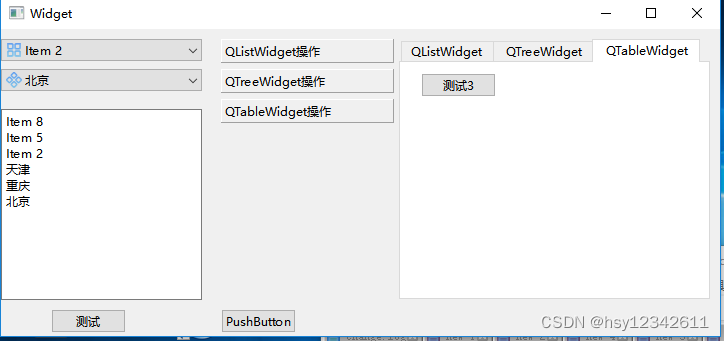






 扫一扫
扫一扫


 2869
2869

 被折叠的 条评论
为什么被折叠?
被折叠的 条评论
为什么被折叠?
 到【灌水乐园】发言





