



The first thing you may want to note is that when you import an image into unity as Texture Type = Sprite, there is a attribute "Pixels
To Units", which you will see on the sprite asset.
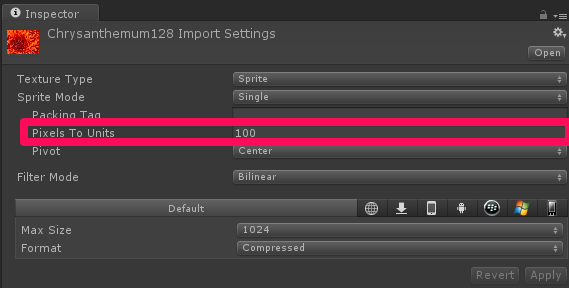
So your 128px, if left at default settings, would be 1.28 "Units" wide. This value doesn't correspond with your measuresment of 1.06 however, so I'm not sure where that comes from. It could be because the scale of your sprite object isn't uniform, or it could be because your "Pixels To Units" setting has been modified. Double check in the inspector that your input texture is actually 128x128, and also check that the Pixel to Units value is what you expect it to be.
Next, note that the "Size" of an orthographic camera corresponds to half its height.
So in the below image, the ortho camera will see the area in the white box. Size 5, means 10 units high. The picture of a flower I have in the scene is a 128 pixel wide by 96 pixel high image, imported at default settings (1 unit = 100 pixels).
Now I'm not sure what your exact use case is (i.e. perhaps this is something better solved using a GUITexture). However assuming you want to use a Sprite, and every frame you want it to be in the top left corner, and you want that sprite to always be displayed at native res, then the following code would do it. Add it to a script attached to the Sprite game object.
// Update is called once per frame
void Update () {
    float camHalfHeight = Camera.main.orthographicSize;
    float camHalfWidth = Camera.main.aspect * camHalfHeight;

    Bounds bounds = GetComponent<SpriteRenderer>().bounds;

    // Set a new vector to the top left of the scene
    Vector3 topLeftPosition = new Vector3(-camHalfWidth, camHalfHeight, 0) + Camera.main.transform.position;

    // Offset it by the size of the object
    topLeftPosition += new Vector3(bounds.size.x / 2,-bounds.size.y / 2, 0);

    transform.position = topLeftPosition;
}





 扫一扫
扫一扫


 被折叠的 条评论
为什么被折叠?
被折叠的 条评论
为什么被折叠?
 到【灌水乐园】发言





