



 本文介绍了如何在Linux环境下,将`time`命令执行的脚本运行时间记录并保存到文件中。当直接使用`> out.txt`无法达到预期效果时,提供了解决方法,强调了命令格式的细节,包括方法4到6中必须包含空格以避免报错。
1. 目标
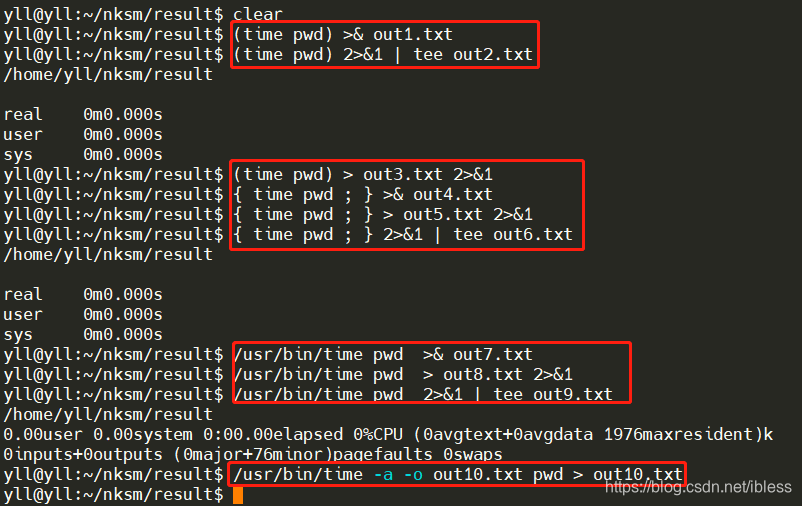
在Linux中,使用time命令可以统计一个脚本的执行时间,比如time pwd就会打印出执行pwd脚本花费的时间(见下图)。但是,当我们想将time + 目标脚本的具体执行结果输出到文件中时,使用[shell] > output.file确无法达成目标(如下图,可以看到out1.txt和out2.txt中并没有real/user/sys的值,但是显示在屏幕上了)。

2. 解决方案
具体方案如下:
# 1. 使用()将shell/bash脚本括起来
(time pwd) >& out1.txt                # method 1
(time pwd) 2>&1 | tee out2.txt		  # method 2
(time pwd) > out3.txt 2>&1			  # method 3
# 2. 使用{ ; }将shell/bash脚本括起来
{ time pwd ; } >& out4.txt			  # method 4
{ time pwd ; } > out5.txt 2>&1		  # method 5
{ time pwd ; } 2>&1 | tee out6.txt	  # method 6
# 3. 使用 /usr/bin/time指令而不是time指令,可以使用man time来查看/usr/bin/time的使用方法
/usr/bin/time pwd  >& out7.txt
/usr/bin/time pwd  > out8.txt 2>&1
/usr/bin/time pwd  2>&1 | tee out9.txt
/usr/bin/time -a -o out10.txt pwd > out10.txt
注意事项:method 4~6中{}一定要有;而且;前后一定要有空格,否则会报错
具体执行结果如下:
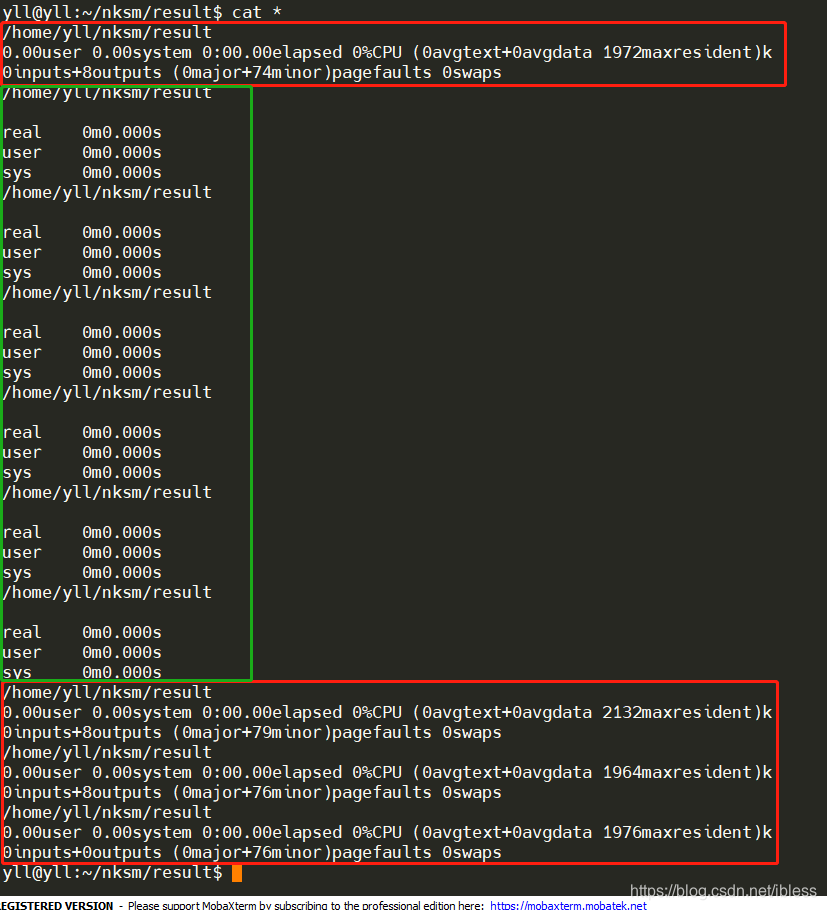
命令执行后各个文件的内容如下:
相关参考:





 扫一扫
扫一扫


 310
310

 被折叠的 条评论
为什么被折叠?
被折叠的 条评论
为什么被折叠?
 到【灌水乐园】发言





