


1.完成php多版本编译安装
目的:在一台nginx服务器上,安装两个版本的Php环境,通过在Nginx上配置不同的端口号分别接受用户的请求。演示机版本为:rocy9操作系统
hostnamectl set-hostname websrv
exec /bin/bash
[root@websrv ~]#mkdir /data/codes -p
[root@websrv ~]#cd /data/codes/
[root@websrv /data/codes]#yum clean all && yum makecache
1.1依赖包安装
[root@websrv /data/codes]#yum install -y gcc gcc-c++ make automake autoconf libtool openssl-devel libcurl-devel libxml2-devel sqlite-devel readline-devel libedit-devel libsodium-devel pkgconfig libxslt-devel libicu-devel openldap-devel postgresql-devel bzip2-devel zlib-devel perl perl-ExtUtils-MakeMaker gd-devel libjpeg-turbo-devel libpng-devel libwebp-devel freetype-devel
1.2php下载及编译安装
php官方下载地址:https://www.php.net/downloads
这里分别采用php-7.4.33和php-8.4.11
1.2.1php7.4安装
php7.4安装需要依赖openssl1.1,所以这里需要编译安装
[root@websrv /data/codes]#wget https://www.openssl.org/source/openssl-1.1.1w.tar.gz
[root@websrv /data/codes]#tar -zxf openssl-1.1.1w.tar.gz
[root@websrv /data/codes]#cd openssl-1.1.1w
[root@websrv /data/codes/openssl-1.1.1w]#./config --prefix=/usr/local/openssl11 --openssldir=/usr/local/openssl11 shared zlib
[root@websrv /data/codes/openssl-1.1.1w]#make -j$(nproc)
[root@websrv /data/codes/openssl-1.1.1w]#make install

# 更新动态链接库等操作
[root@websrv /data/codes/openssl-1.1.1w]#sh -c 'echo "/usr/local/openssl11/lib" > /etc/ld.so.conf.d/openssl11.conf'
[root@websrv /data/codes/openssl-1.1.1w]#ldconfig
[root@websrv /data/codes/openssl-1.1.1w]#export PKG_CONFIG_PATH=/usr/local/openssl11/lib/pkgconfig:$PKG_CONFIG_PATH
[root@websrv /data/codes/openssl-1.1.1w]#echo 'export PKG_CONFIG_PATH=/usr/local/openssl11/lib/pkgconfig:$PKG_CONFIG_PATH' >> ~/.bashrc
[root@websrv /data/codes/openssl-1.1.1w]#source ~/.bashrc

# 编译安装onig
[root@websrv /data/codes/openssl-1.1.1w]#cd /data/codes/
[root@websrv /data/codes]#wget https://github.com/kkos/oniguruma/archive/v6.9.4.tar.gz -O onig-6.9.4.tar.gz
[root@websrv /data/codes]#tar -zxf onig-6.9.4.tar.gz
[root@websrv /data/codes]#cd oniguruma-6.9.4/
[root@websrv /data/codes/oniguruma-6.9.4]#./autogen.sh && ./configure --prefix=/usr/local/oniguruma
[root@websrv /data/codes/oniguruma-6.9.4]#make -j$(nproc) && sudo make install
[root@websrv /data/codes/oniguruma-6.9.4]#echo "/usr/local/oniguruma/lib" | sudo tee /etc/ld.so.conf.d/oniguruma.conf
/usr/local/oniguruma/lib
[root@websrv /data/codes/oniguruma-6.9.4]#echo 'export PKG_CONFIG_PATH=/usr/local/oniguruma/lib/pkgconfig:$PKG_CONFIG_PATH' >> ~/.bashrc
[root@websrv /data/codes/oniguruma-6.9.4]#source ~/.bashrc
编译安装PHP7.4
[root@websrv /data/codes/oniguruma-6.9.4]#cd /data/codes/
[root@websrv /data/codes]#tar xf php-7.4.33.tar.gz
[root@websrv /data/codes]#cd php-7.4.33
[root@websrv /data/codes/php-7.4.33]#./configure --prefix=/usr/local/php74 --with-config-file-path=/usr/local/php74/etc --enable-mbstring --enable-mbregex --with-onig=/usr/local/oniguruma --with-curl --with-mysqli=mysqlnd --with-pdo-mysql=mysqlnd --with-gd --with-jpeg-dir --with-png-dir --with-freetype-dir --with-openssl=/usr/local/openssl11 --with-zlib --with-readline --with-libedit --without-sqlite3 --without-pdo-sqlite CPPFLAGS="-I/usr/local/oniguruma/include" LDFLAGS="-L/usr/local/oniguruma/lib -Wl,-rpath,/usr/local/oniguruma/lib" --enable-fpm --with-fpm-user=www-data --with-fpm-group=www-data
[root@websrv /data/codes/php-7.4.33]#make -j$(nproc)
[root@websrv /data/codes/php-7.4.33]#make install
[root@websrv /data/codes/php-7.4.33]#/usr/local/php74/bin/php -v
PHP 7.4.33 (cli) (built: Aug  9 2025 18:12:21) ( NTS )
Copyright (c) The PHP Group
Zend Engine v3.4.0, Copyright (c) Zend Technologies
1.2.2php8.4安装
[root@websrv /data/codes/php-7.4.33]#cd /data/codes/
[root@websrv /data/codes]#tar xf php-8.4.11.tar.gz
[root@websrv /data/codes]#cd php-8.4.11
[root@websrv /data/codes/php-8.4.11]#./configure   --prefix=/usr/local/php84   --with-config-file-path=/usr/local/php84/etc   --enable-fpm --enable-mbstring --enable-zip --enable-bcmath   --enable-pcntl --enable-ftp --enable-exif --enable-calendar   --enable-sysvmsg --enable-sysvsem --enable-sysvshm   --with-curl --with-mysqli=mysqlnd --with-pdo-mysql=mysqlnd   --with-gd --with-jpeg-dir --with-png-dir --with-freetype-dir   --with-openssl --with-zlib --with-readline --with-libedit   --enable-opcache --with-sodium --enable-fpm --with-fpm-user=www-data --with-fpm-group=www-data
[root@websrv /data/codes/php-8.4.11]#make -j$(nproc)
[root@websrv /data/codes/php-8.4.11]#make install
[root@websrv /data/codes/php-8.4.11]#/usr/local/php84/bin/php -v
PHP 8.4.11 (cli) (built: Aug  9 2025 18:21:56) (NTS)
Copyright (c) The PHP Group
Zend Engine v4.4.11, Copyright (c) Zend Technologies
1.3创建相关配置及新建services文件
创建services文件及拷贝配置文件到相关目录
# 7.4
[root@websrv ~]#cp /data/codes/php-7.4.33/php.ini-production /usr/local/php74/etc/php.ini
[root@websrv ~]#cp /usr/local/php74/etc/php-fpm.conf.default /usr/local/php74/etc/php-fpm.conf
[root@websrv ~]#cp /usr/local/php74/etc/php-fpm.d/www.conf.default /usr/local/php74/etc/php-fpm.d/www.conf
# 8.4
[root@websrv ~]#cp /data/codes/php-8.4.11/php.ini-production /usr/local/php84/etc/php.ini
[root@websrv ~]#cp /usr/local/php84/etc/php-fpm.conf.default /usr/local/php84/etc/php-fpm.conf
[root@websrv ~]#cp /usr/local/php84/etc/php-fpm.d/www.conf.default /usr/local/php84/etc/php-fpm.d/www.conf

# 修改监听端口
[root@websrv ~]#vi /usr/local/php74/etc/php-fpm.d/www.conf
listen = 127.0.0.1:9074
[root@websrv ~]#vi /usr/local/php84/etc/php-fpm.d/www.conf
listen = 127.0.0.1:9084

# 创建系统账号
[root@websrv ~]#groupadd www-data
[root@websrv ~]#useradd -r -g www-data -s /sbin/nologin www-data
# serives文件的创建
[root@websrv ~]#cat > /etc/systemd/system/php74fpm.service <<-eof
# /etc/systemd/system/php74fpm.service
[Unit]
Description=The PHP 7.4 FastCGI Process Manager
After=network.target

[Service]
Type=simple
PIDFile=/run/php74-fpm.pid
ExecStart=/usr/local/php74/sbin/php-fpm --nodaemonize --fpm-config /usr/local/php74/etc/php-fpm.conf
ExecReload=/bin/kill -USR2 $MAINPID

[Install]
WantedBy=multi-user.target
eof

[root@websrv ~]#cat > /etc/systemd/system/php84fpm.service <<-eof
# /etc/systemd/system/php84fpm.service
[Unit]
Description=The PHP 8.4 FastCGI Process Manager
After=network.target

[Service]
Type=simple
PIDFile=/run/php84-fpm.pid
ExecStart=/usr/local/php84/sbin/php-fpm --nodaemonize --fpm-config /usr/local/php84/etc/php-fpm.conf
ExecReload=/bin/kill -USR2 $MAINPID

[Install]
WantedBy=multi-user.target
eof
1.4安装nginx用于测试
[root@websrv ~]#yum install -y nginx
[root@websrv ~]#echo '<?php phpinfo(); ?>' > /usr/share/nginx/html/index.php
[root@websrv ~]#mkdir /usr/share/nginx/html/php81/
[root@websrv ~]#echo '<?php phpinfo(); ?>' > /usr/share/nginx/html/php81/index.php

# 创建nginx配置
[root@websrv ~]#cat > /etc/nginx/conf.d/php.conf <<-eof
server {
    listen 80;
    server_name 10.0.0.19;

    # 默认 PHP 7.4 处理
    location ~ \.php$ {
        fastcgi_pass 127.0.0.1:9074;
        include fastcgi_params;
        fastcgi_param SCRIPT_FILENAME $document_root$fastcgi_script_name;
    }

    # PHP 8.1 专属路由(需确保此块优先级更高)
    location ^~ /php81/ {
        location ~ \.php$ {
            fastcgi_pass 127.0.0.1:9084;
            include fastcgi_params;
            fastcgi_param SCRIPT_FILENAME $document_root$fastcgi_script_name;
        }
    }
}
eof

# 启动服务
[root@websrv ~]#systemctl daemon-reload
[root@websrv ~]#systemctl start php74fpm
[root@websrv ~]#systemctl start php84fpm
[root@websrv ~]#nginx -t
nginx: the configuration file /etc/nginx/nginx.conf syntax is ok
nginx: configuration file /etc/nginx/nginx.conf test is successful
[root@websrv ~]#systemctl start nginx
[root@websrv ~]#ss -tnul
Netid          State           Recv-Q          Send-Q                   Local Address:Port                   Peer Address:Port         Process
udp            UNCONN          0               0                            127.0.0.1:323                         0.0.0.0:*
udp            UNCONN          0               0                                [::1]:323                            [::]:*
tcp            LISTEN          0               511                          127.0.0.1:9074                        0.0.0.0:*
tcp            LISTEN          0               4096                         127.0.0.1:9084                        0.0.0.0:*
tcp            LISTEN          0               511                            0.0.0.0:80                          0.0.0.0:*
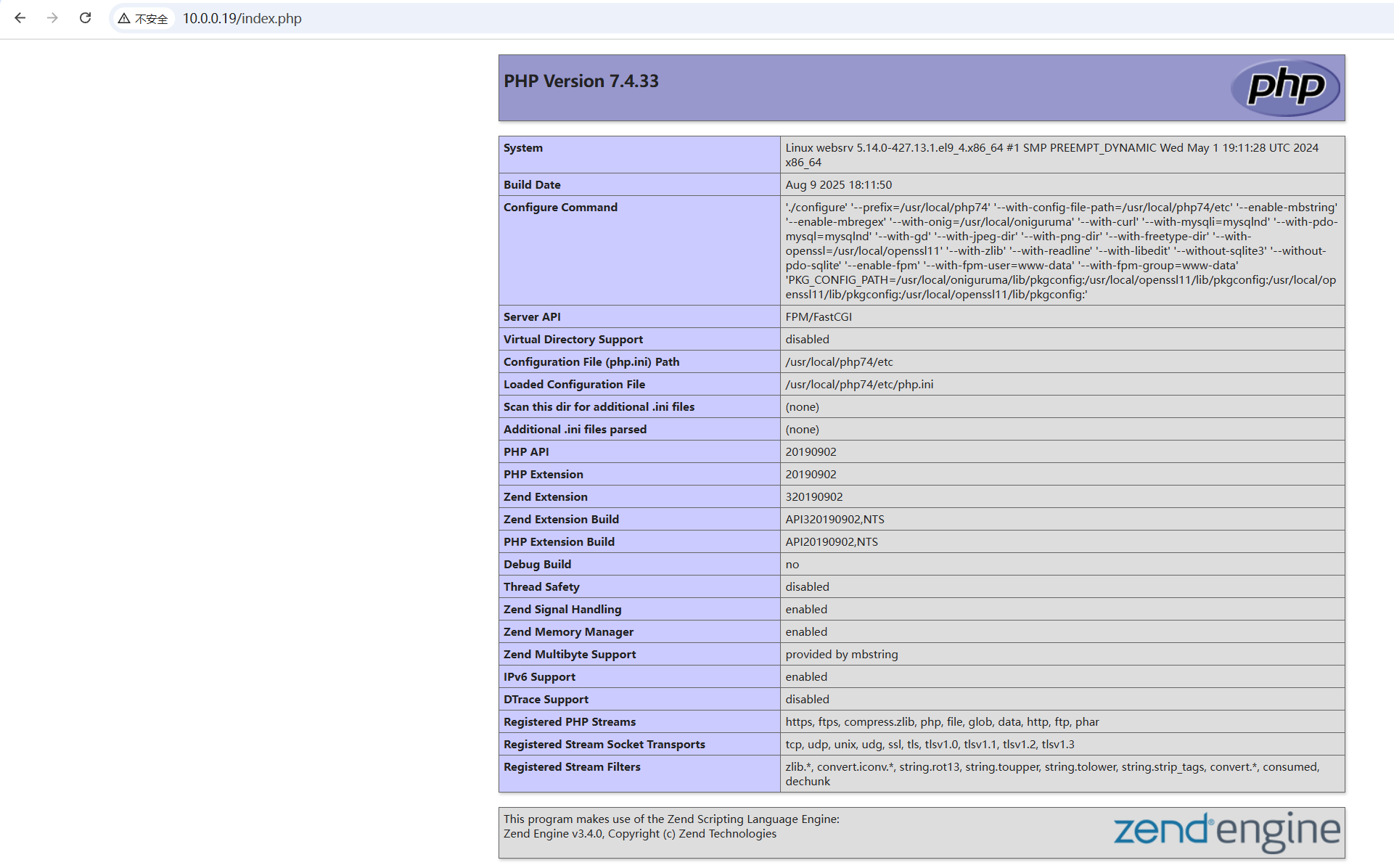
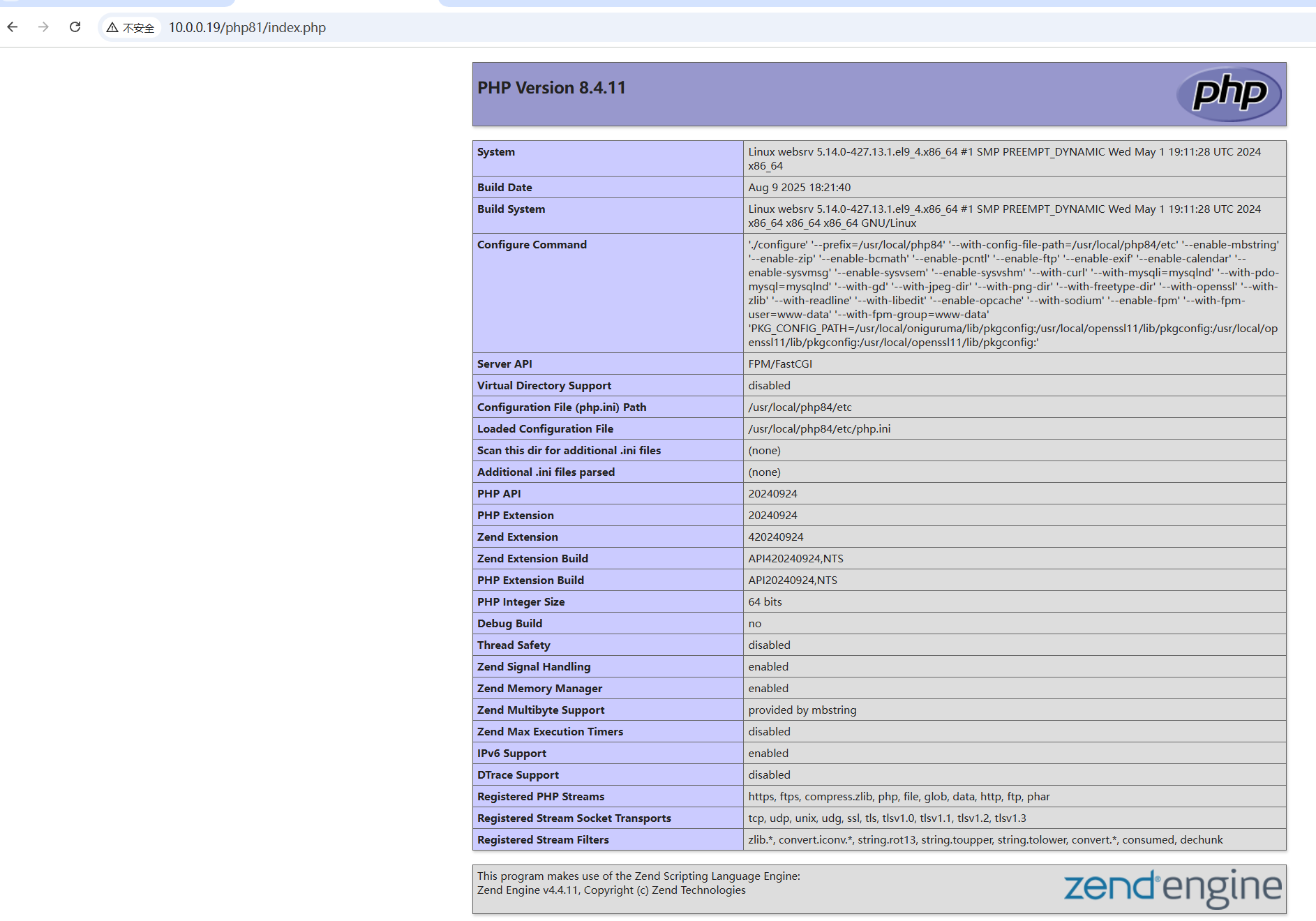
浏览器测试,分别访问:http://10.0.0.19/index.php和http://10.0.0.19/php81/index.php
2.nginx+php部署walle,尝试发布php站点
2.1安装php三方库,安装Php7.1-fpm
[root@ubuntu24040201 ~]#hostnamectl set-hostname websrv
[root@websrv ~]#exec /bin/bash
[root@websrv ~]#apt update

# 添加ondrej/php PPA(支持Ubuntu 24.04)
[root@websrv ~]#apt install -y wget curl vim unzip software-properties-common
# add不成功多add几次
[root@websrv ~]#sudo add-apt-repository ppa:ondrej/php -y
[root@websrv ~]#apt update

# 安装PHP 7.1及所需扩展,如果安装不成功,多apt update几次
[root@websrv ~]#apt install -y php7.1 php7.1-fpm php7.1-mysql php7.1-mbstring php7.1-curl php7.1-json php7.1-xml php7.1-zip php7.1-gd php7.1-opcache
# 验证PHP安装
[root@websrv ~]#php7.1 -v
PHP 7.1.33-67+ubuntu24.04.1+deb.sury.org+1 (cli) (built: Dec 24 2024 06:50:54) ( NTS )
Copyright (c) 1997-2018 The PHP Group
Zend Engine v3.1.0, Copyright (c) 1998-2018 Zend Technologies
    with Zend OPcache v7.1.33-67+ubuntu24.04.1+deb.sury.org+1, Copyright (c) 1999-2018, by Zend Technologies
2.2安装mariadb
[root@websrv ~]#apt install -y mariadb-server
# 初始化数据库
[root@websrv ~]#mysql_secure_installation
# 登录数据库,并创建walle用户及配置授权。
[root@websrv ~]#mysql -u root -p
Enter password:
Welcome to the MariaDB monitor.  Commands end with ; or \g.
Your MariaDB connection id is 31
Server version: 10.11.13-MariaDB-0ubuntu0.24.04.1 Ubuntu 24.04

Copyright (c) 2000, 2018, Oracle, MariaDB Corporation Ab and others.

Type 'help;' or '\h' for help. Type '\c' to clear the current input statement.

MariaDB [(none)]> CREATE DATABASE IF NOT EXISTS walle DEFAULT CHARACTER SET utf8mb4;
Query OK, 1 row affected (0.000 sec)

MariaDB [(none)]> CREATE USER IF NOT EXISTS 'walle'@'localhost' IDENTIFIED BY 'walle123';
Query OK, 0 rows affected (0.001 sec)

MariaDB [(none)]> GRANT ALL PRIVILEGES ON walle.* TO 'walle'@'localhost';
Query OK, 0 rows affected (0.001 sec)

MariaDB [(none)]> FLUSH PRIVILEGES;
Query OK, 0 rows affected (0.000 sec)

MariaDB [(none)]> exit;
2.3安装配置插件
# 安装composer
[root@websrv ~]#curl -sS https://getcomposer.org/installer | sudo php7.1 -- --install-dir=/usr/local/bin --filename=composer
All settings correct for using Composer
Downloading...

Composer (version 2.2.25) successfully installed to: /usr/local/bin/composer
Use it: php /usr/local/bin/composer
[root@websrv ~]#composer --version
Do not run Composer as root/super user! See https://getcomposer.org/root for details
Continue as root/super user [yes]? yes
Composer version 2.2.25 2024-12-11 11:58:02
2.4 下载walle
这里采用v1.1.1版本
https://github.com/meolu/walle-web/archive/refs/tags/v1.1.1.tar.gz
# 这里我提前下载下来放到root目录下
[root@websrv ~]#tar -xf walle-web-1.1.1.tar.gz -C /var/www/
[root@websrv ~]#cd /var/www/
[root@websrv /var/www]#mv walle-web-1.1.1/ walle
# 更改目录权限
[root@websrv /var/www]#chown -R www-data:www-data /var/www/walle
[root@websrv /var/www]#chmod -R 755 /var/www/walle
[root@websrv ~]#cd /var/www/walle
# 更改为国内源
[root@websrv /var/www/walle]#vi composer.json
{
    "name": "meolu/walle-web",
    "description": "A web deployment tool",
    "keywords": ["walle", "php deploy", "deploy web", "deploy ui"],
    "homepage": "http://www.huamanshu.com/walle-en.html",
    "type": "project",
    "license": "BSD-3-Clause",
    "minimum-stability": "stable",
    "require": {
        "php": ">=5.4.0",
        "yiisoft/yii2": ">=2.0.4",
        "yiisoft/yii2-composer": "^2.0.4",
        "yiisoft/yii2-bootstrap": "*",
        "yiisoft/yii2-swiftmailer": "*"
    },
    "require-dev": {
        "codeception/codeception": "2.1.2",
        "codeception/specify": "0.4.1",
        "codeception/verify": "0.2.7",
        "yiisoft/yii2-codeception": "*",
        "yiisoft/yii2-debug": "*",
        "yiisoft/yii2-gii": "*",
        "yiisoft/yii2-faker": "*"
    },
    "repositories": [
        {
            "type": "composer",
            "url": "https://mirrors.aliyun.com/composer/"
        },
        {
            "type": "composer",
            "url": "https://asset-packagist.cn"
        }
    ],
    "config": {
        "process-timeout": 1800
    },
    "extra": {
        "asset-installer-paths": {
            "npm-asset-library": "vendor/npm",
            "bower-asset-library": "vendor/bower"
        }
    }
}
# 清除缓存
[root@websrv /var/www/walle]#sudo -u www-data -s
www-data@websrv:~/walle$ rm -rf vendor/ composer.lock
www-data@websrv:~/walle$ composer clear-cache
Cache directory does not exist (cache-vcs-dir):
Cache directory does not exist (cache-repo-dir):
Cache directory does not exist (cache-files-dir):
Cache directory does not exist (cache-dir):
All caches cleared.
www-data@websrv:~/walle$ composer install --no-dev --optimize-autoloader

# 切换到www-data用户
[root@websrv /var/www]#sudo -u www-data -s
www-data@websrv:~$ cd walle/
www-data@websrv:~/walle$ php7.1 -v
PHP 7.1.33-67+ubuntu24.04.1+deb.sury.org+1 (cli) (built: Dec 24 2024 06:50:54) ( NTS )
Copyright (c) 1997-2018 The PHP Group
Zend Engine v3.1.0, Copyright (c) 1998-2018 Zend Technologies
    with Zend OPcache v7.1.33-67+ubuntu24.04.1+deb.sury.org+1, Copyright (c) 1999-2018, by Zend Technologies
www-data@websrv:~/walle$ composer --version
Composer version 2.2.25 2024-12-11 11:58:02

# 修改数据库连接,添加账号和密码
[root@websrv /var/www/walle]#vi config/local.php
'db' => [
            'dsn'       => 'mysql:host=localhost;dbname=walle',
            'username'  => 'walle',
            'password'  => 'walle123',
        ],
# 初始化数据库
[root@websrv /var/www/walle]#sudo -u www-data php7.1 yii walle/setup
create dir 创建目录...
................
Apply the above migrations? (yes|no) [no]:yes
................
15 migrations were applied.
Migrated up successfully.
# 查看是否有php文件
[root@websrv /var/www/walle]#ll web/index.php
-rwxr-xr-x 1 www-data www-data 387 Apr 12  2016 web/index.php*
2.5安装nginx及登录测试
[root@websrv ~]#apt install nginx
[root@websrv ~]#vi /etc/nginx/conf.d/walle.conf
server {
    listen 80;
    server_name 10.0.0.4;  # 或服务器 IP(如 10.0.0.4)
    root /var/www/walle/web;      # walle 的 web 目录
    index index.php;

    access_log /var/log/nginx/walle-access.log;
    error_log /var/log/nginx/walle-error.log;

    # 静态文件缓存
    location ~* \.(js|css|png|jpg|jpeg|gif|ico|svg)$ {
        expires 30d;
        add_header Cache-Control "public, max-age=2592000";
    }

    # 路由重写
    location / {
        try_files $uri $uri/ /index.php$is_args$args;
    }

    # PHP 解析
    location ~ \.php$ {
        try_files $uri =404;
        fastcgi_pass unix:/run/php/php7.1-fpm.sock;  # PHP 7.1 的 sock 文件
        fastcgi_param SCRIPT_FILENAME $document_root$fastcgi_script_name;
        include fastcgi_params;
    }
}

[root@websrv ~]#nginx -t
[root@websrv ~]#systemctl restart nginx php7.1-fpm
[root@websrv /var/www/walle]#ss -tnul
Netid State  Recv-Q Send-Q   Local Address:Port   Peer Address:Port Process
udp   UNCONN 0      0           127.0.0.54:53          0.0.0.0:*
udp   UNCONN 0      0        127.0.0.53%lo:53          0.0.0.0:*
tcp   LISTEN 0      4096     127.0.0.53%lo:53          0.0.0.0:*
tcp   LISTEN 0      4096        127.0.0.54:53          0.0.0.0:*
tcp   LISTEN 0      80           127.0.0.1:3306        0.0.0.0:*
tcp   LISTEN 0      511            0.0.0.0:80          0.0.0.0:*
tcp   LISTEN 0      4096                 *:22                *:*
tcp   LISTEN 0      511               [::]:80             [::]:*
测试登录,默认账号和密码都是admin


3.总结常见fastcgi相关的性能优化参数
| 参数 | 作用 | 推荐配置示例 |
|---|---|---|
| 连接控制 | ||
fastcgi_connect_timeout | 建立连接的超时时间 | fastcgi_connect_timeout 3s; |
fastcgi_send_timeout | 请求发送超时 | fastcgi_send_timeout 30s; |
fastcgi_read_timeout | 响应读取超时 | fastcgi_read_timeout 60s; |
| 缓冲区优化 | ||
fastcgi_buffers | 响应体缓冲区配置 | fastcgi_buffers 8 16k; |
fastcgi_buffer_size | 响应头缓冲区 | fastcgi_buffer_size 32k; |
fastcgi_busy_buffers_size | 活动请求缓冲区 | fastcgi_busy_buffers_size 64k; |
fastcgi_temp_file_write_size | 临时文件写入块大小 | fastcgi_temp_file_write_size 128k; |
| 缓存策略 | ||
fastcgi_cache_path | 缓存路径配置 | fastcgi_cache_path /var/cache/nginx levels=1:2 keys_zone=PHP_CACHE:100m; |
fastcgi_cache | 启用缓存 | fastcgi_cache PHP_CACHE; |
fastcgi_cache_valid | 缓存有效期 | fastcgi_cache_valid 200 302 10m; |
fastcgi_cache_use_stale | 异常时使用旧缓存 | fastcgi_cache_use_stale error timeout; |
| 请求处理 | ||
fastcgi_keep_conn | 启用连接复用 | fastcgi_keep_conn on; |
fastcgi_pass_request_headers | 转发请求头 | fastcgi_pass_request_headers on; |
fastcgi_hide_header | 隐藏敏感头信息 | fastcgi_hide_header X-Powered-By; |
| 高级配置 | ||
fastcgi_split_path_info | 路径信息分割 | fastcgi_split_path_info ^(.+\.php)(/.+)$; |
fastcgi_param | 自定义参数传递 | fastcgi_param APP_ENV production; |
4.总结Nginx安全相关的参数
# 1. 隐藏Nginx版本号
server_tokens off;

# 2. 限制请求体大小(防止大文件上传攻击)
client_max_body_size 1M;

# 3. 防止点击劫持
add_header X-Frame-Options "SAMEORIGIN";

# 4. 防止XSS攻击
add_header X-XSS-Protection "1; mode=block";

# 5. 防止内容类型嗅探
add_header X-Content-Type-Options "nosniff";

# 6. 启用HSTS(强制HTTPS)
add_header Strict-Transport-Security "max-age=31536000; includeSubDomains; preload" always;

# 7. 限制请求速率(防暴力破解/CC攻击)
limit_req_zone $binary_remote_addr zone=rate_limit:10m rate=10r/s;

server {
   location / {
       limit_req zone=rate_limit burst=20 nodelay;
   }
}

# 8. 禁止访问敏感文件
location ~* \.(htaccess|env|git|svn|project|DS_Store|bak|swp)$ {
   deny all;
   return 404;
}

# 9. 配置日志
access_log /var/log/nginx/access.log combined buffer=32k flush=5m;
error_log /var/log/nginx/error.log warn;

# 10. 关闭目录浏览
autoindex off;

# 11. 强化HTTPS配置
ssl_protocols TLSv1.2 TLSv1.3;
ssl_ciphers 'ECDHE-ECDSA-AES256-GCM-SHA384:ECDHE-RSA-AES256-GCM-SHA384';
ssl_prefer_server_ciphers on;
ssl_session_cache shared:SSL:10m;
ssl_session_timeout 10m;
ssl_stapling on;
ssl_stapling_verify on;

# 12. 防止Host头攻击
server {
   listen 80 default_server;
   server_name _;
   return 444;
}

server {
   listen 443 ssl;
   server_name example.com www.example.com;

   # 其他HTTPS配置...
}

# 13. 禁止危险HTTP方法
if ($request_method !~ ^(GET|POST|HEAD|OPTIONS)$) {
   return 444;
}
5.总结I/O模型
| I/O 模型 | 核心机制 | 优点 | 缺点 |
|---|---|---|---|
| 阻塞 I/O | 同步阻塞模型,线程挂起等待 I/O 操作完成 | 实现简单,适合单线程或低并发场景 | 高并发时资源浪费严重,线程等待导致 CPU 利用率低 |
| 非阻塞 I/O | 同步非阻塞模型,I/O 操作立即返回状态码,需主动轮询数据就绪 | 避免线程阻塞,支持高频轮询 | CPU 空转导致资源浪费,需复杂的状态管理逻辑 |
| 多路复用 I/O | 通过 select/poll/epoll 监听多个文件描述符,事件驱动 | 单线程管理多连接,减少线程切换开销 | select/poll 存在性能瓶颈,需处理复杂的多路复用逻辑 |
| epoll(Linux) | 内核级事件驱动,仅返回就绪描述符,边缘触发(ET)模式优化 | 支持万级并发连接,O(1) 时间复杂度 | 仅限 Linux 系统,需理解 ET 模式特性 |
| 异步 I/O (AIO) | 完全异步模型,内核完成操作后通知应用 | 真正零阻塞,最大化资源利用率 | 系统支持有限(Linux 依赖 io_uring),编程复杂度高 |
关键特性对比
- Nginx 的异步非阻塞实现
- 基于 epoll 的事件循环,单线程处理多连接
- 零拷贝技术(如
sendfile)减少数据复制开销 - 非阻塞 DNS 查询和异步日志写入
- epoll 的核心优势
// epoll 高效事件监听示例
int epoll_fd = epoll_create1(0);
struct epoll_event ev = {EPOLLIN, .data.fd = socket_fd};
epoll_ctl(epoll_fd, EPOLL_CTL_ADD, socket_fd, &ev);
epoll_wait(epoll_fd, events, MAX_EVENTS, -1);  // 仅返回就绪事件
6.完成nginx编译安装脚本
# 最精简版本
NGINX_VERSION=1.26.3
INSTALL_DIR=/apps/nginx
wget http://nginx.org/download/nginx-${NGINX_VERSION}.tar.gz || { echo "下载失败!";exit 20;  }
tar xf nginx-${NGINX_VERSION}.tar.gz -C /usr/local/src
yum -y install gcc openssl-devel pcre-devel
cd /usr/local/src/nginx-${NGINX_VERSION}
./configure --prefix=${INSTALL_DIR} --with-http_ssl_module --without-http_gzip_module
make -j `grep -c processor /proc/cpuinfo`&& make install
if [ $? -ne 0 ];then
    echo Install nginx is failed!
    exit 10
else
    echo "Install nginx is finished!"
fi
/apps/nginx/sbin/nginx
echo "<h1>welcome to linux world </h1>" > ${INSTALL_DIR}/html/index.html
7.完成nginx平滑升级,总结步骤
7.1安装旧版本nginx
[root@nginxsrv /usr/lib/systemd/system]#apt list nginx -a
Listing... Done
nginx/noble-updates,now 1.24.0-2ubuntu7.4 amd64 [installed]
nginx/noble-security 1.24.0-2ubuntu7.3 amd64
nginx/noble 1.24.0-2ubuntu7 amd64
# 利用apt安装软件包版本
[root@nginxsrv ~]#apt install -y nginx nginx-core
[root@nginxsrv ~]#systemctl status nginx
● nginx.service - A high performance web server and a reverse proxy server
     Loaded: loaded (/usr/lib/systemd/system/nginx.service; enabled; preset: enabled)
     Active: active (running) since Mon 2025-07-21 12:12:23 UTC; 3min 16s ago
[root@nginxsrv ~]#ps axo pid,cmd,psr |grep nginx
   2264 nginx: master process /usr/   3
   2351 nginx: worker process         1
   2352 nginx: worker process         1
   2353 nginx: worker process         3
   2354 nginx: worker process         1
# 测试网页创建
[root@nginxsrv ~]#echo '<h1 style="color:red">hello,world!</h1>' > /var/www/html/index.html
[root@nginxsrv ~]#curl localhost
<h1 style="color:red">hello,world!</h1>

7.2编译安装新版本Nginx
# 查看当前版本的信息
[root@nginxsrv ~]#nginx -v
nginx version: nginx/1.24.0 (Ubuntu)
[root@nginxsrv ~]#nginx -V
nginx version: nginx/1.24.0 (Ubuntu)
built with OpenSSL 3.0.13 30 Jan 2024
TLS SNI support enabled
configure arguments: --with-cc-opt='-g -O2 -fno-omit-frame-pointer -mno-omit-leaf-frame-pointer -ffile-prefix-map=/build/nginx-XLhrax/nginx-1.24.0=. -flto=auto -ffat-lto-objects -fstack-protector-strong -fstack-clash-protection -Wformat -Werror=format-security -fcf-protection -fdebug-prefix-map=/build/nginx-XLhrax/nginx-1.24.0=/usr/src/nginx-1.24.0-2ubuntu7.4 -fPIC -Wdate-time -D_FORTIFY_SOURCE=3' --with-ld-opt='-Wl,-Bsymbolic-functions -flto=auto -ffat-lto-objects -Wl,-z,relro -Wl,-z,now -fPIC' --prefix=/usr/share/nginx --conf-path=/etc/nginx/nginx.conf --http-log-path=/var/log/nginx/access.log --error-log-path=stderr --lock-path=/var/lock/nginx.lock --pid-path=/run/nginx.pid --modules-path=/usr/lib/nginx/modules --http-client-body-temp-path=/var/lib/nginx/body --http-fastcgi-temp-path=/var/lib/nginx/fastcgi --http-proxy-temp-path=/var/lib/nginx/proxy --http-scgi-temp-path=/var/lib/nginx/scgi --http-uwsgi-temp-path=/var/lib/nginx/uwsgi --with-compat --with-debug --with-pcre-jit --with-http_ssl_module --with-http_stub_status_module --with-http_realip_module --with-http_auth_request_module --with-http_v2_module --with-http_dav_module --with-http_slice_module --with-threads --with-http_addition_module --with-http_flv_module --with-http_gunzip_module --with-http_gzip_static_module --with-http_mp4_module --with-http_random_index_module --with-http_secure_link_module --with-http_sub_module --with-mail_ssl_module --with-stream_ssl_module --with-stream_ssl_preread_module --with-stream_realip_module --with-http_geoip_module=dynamic --with-http_image_filter_module=dynamic --with-http_perl_module=dynamic --with-http_xslt_module=dynamic --with-mail=dynamic --with-stream=dynamic --with-stream_geoip_module=dynamic
[root@nginxsrv ~]#mkdir /data/apps/nginx -p
[root@nginxsrv ~]#mkdir /data/softs;cd /data/softs
[root@nginxsrv /data/softs]#wget https://nginx.org/download/nginx-1.26.3.tar.gz
[root@nginxsrv /data/softs]#ln -s /usr/lib/x86_64-linux-gnu/libperl.so.5.38 /usr/lib/x86_64-linux-gnu/libperl.so
[root@nginxsrv /data/softs]#tar xf nginx-1.26.3.tar.gz
[root@nginxsrv /data/softs]#cd nginx-1.26.3
[root@nginxsrv /data/softs/nginx-1.26.3]#./configure --with-cc-opt='-g -O2 -fno-omit-frame-pointer -mno-omit-leaf-frame-pointer -ffile-prefix-map=/build/nginx-XLhrax/nginx-1.26.3=. -flto=auto -ffat-lto-objects -fstack-protector-strong -fstack-clash-protection -Wformat -Werror=format-security -fcf-protection -fdebug-prefix-map=/build/nginx-XLhrax/nginx-1.26.3=/usr/src/nginx-1.26.3-2ubuntu7.4 -fPIC -Wdate-time -D_FORTIFY_SOURCE=3' --with-ld-opt='-Wl,-Bsymbolic-functions -flto=auto -ffat-lto-objects -Wl,-z,relro -Wl,-z,now -fPIC' --prefix=/usr/share/nginx --conf-path=/etc/nginx/nginx.conf --http-log-path=/var/log/nginx/access.log --error-log-path=stderr --lock-path=/var/lock/nginx.lock --pid-path=/run/nginx.pid --modules-path=/usr/lib/nginx/modules --http-client-body-temp-path=/var/lib/nginx/body --http-fastcgi-temp-path=/var/lib/nginx/fastcgi --http-proxy-temp-path=/var/lib/nginx/proxy --http-scgi-temp-path=/var/lib/nginx/scgi --http-uwsgi-temp-path=/var/lib/nginx/uwsgi --with-compat --with-debug --with-pcre-jit --with-http_ssl_module --with-http_stub_status_module --with-http_realip_module --with-http_auth_request_module --with-http_v2_module --with-http_dav_module --with-http_slice_module --with-threads --with-http_addition_module --with-http_flv_module --with-http_gunzip_module --with-http_gzip_static_module --with-http_mp4_module --with-http_random_index_module --with-http_secure_link_module --with-http_sub_module --with-mail_ssl_module --with-stream_ssl_module --with-stream_ssl_preread_module --with-stream_realip_module --with-http_geoip_module=dynamic --with-http_image_filter_module=dynamic --with-http_perl_module=dynamic --with-http_xslt_module=dynamic --with-mail=dynamic --with-stream=dynamic --with-stream_geoip_module=dynamic

# 根据提示安装缺少的依赖
[root@nginxsrv /data/softs/nginx-1.26.3]#sudo apt update && sudo apt install -y build-essential libpcre3-dev libssl-dev zlib1g-dev libxml2-dev libxslt1-dev libgd-dev libgeoip-dev

# 删除当前目录,重新解压重新编译
[root@nginxsrv /data/softs/nginx-1.26.3]#cd ..
[root@nginxsrv /data/softs]#rm -rf nginx-1.26.3
[root@nginxsrv /data/softs]#tar xf nginx-1.26.3.tar.gz
[root@nginxsrv /data/softs]#cd nginx-1.26.3
[root@nginxsrv /data/softs/nginx-1.26.3]#make -j 4
[root@nginxsrv /data/softs/nginx-1.26.3]#objs/nginx -v
nginx version: nginx/1.26.3
7.3平滑升级/回滚nginx
7.3.1平滑升级
# 查看旧版本程序文件并备份
[root@nginxsrv /data/softs/nginx-1.26.3]#which nginx
/usr/sbin/nginx
[root@nginxsrv /data/softs/nginx-1.26.3]#mv /usr/sbin/nginx /usr/sbin/nginx1.24.0

# 新版本添加权限并移动
[root@nginxsrv /data/softs/nginx-1.26.3]#chmod +x objs/nginx
[root@nginxsrv /data/softs/nginx-1.26.3]#cp objs/nginx /usr/sbin/
# 查看版本信息
[root@nginxsrv /data/softs/nginx-1.26.3]#nginx -v
nginx version: nginx/1.26.3
# 查看当前开启的模块文件,为了避免后续实验,这里暴力删除
[root@nginxsrv /etc/nginx/modules-enabled]#ls
50-mod-http-geoip2.conf  50-mod-http-image-filter.conf  50-mod-http-xslt-filter.conf  50-mod-mail.conf  50-mod-stream.conf  70-mod-stream-geoip2.conf
# 检查配置文件
[root@nginxsrv /etc/nginx]#nginx -t
nginx: the configuration file /etc/nginx/nginx.conf syntax is ok
nginx: configuration file /etc/nginx/nginx.conf test is successful
# 当前提供服务的版本还是老版本
[root@nginxsrv /etc/nginx]#pstree -p |grep nginx
           |-nginx(20410)-+-nginx(20411)
           |              |-nginx(20412)
           |              |-nginx(20413)
           |              `-nginx(20414)
[root@nginxsrv /etc/nginx]#curl -I 127.1
HTTP/1.1 200 OK
Server: nginx/1.24.0 (Ubuntu)
Date: Mon, 21 Jul 2025 13:04:39 GMT
Content-Type: text/html
Content-Length: 40
Last-Modified: Mon, 21 Jul 2025 12:19:42 GMT
Connection: keep-alive
ETag: "687e305e-28"
Accept-Ranges: bytes

# 拉起新Nginx软件
# 发送-12信号或者-USR2信号
[root@nginxsrv /etc/nginx]#kill -12 20410
# 新软件master也挂在旧版本master下
[root@nginxsrv /etc/nginx]#pstree -p |grep nginx
           |-nginx(20410)-+-nginx(29839)-+-nginx(29840)
           |              |              |-nginx(29841)
           |              |              |-nginx(29842)
           |              |              `-nginx(29843)
           |              |-nginx(20411)
           |              |-nginx(20412)
           |              |-nginx(20413)
           |              `-nginx(20414)
# 查看两个pid文件
[root@nginxsrv /etc/nginx]#ls /var/run/nginx.pid*
/var/run/nginx.pid  /var/run/nginx.pid.oldbin
[root@nginxsrv /etc/nginx]#cat /var/run/nginx.pid
29839
[root@nginxsrv /etc/nginx]#cat /var/run/nginx.pid.oldbin
20410

# 此时创建虚拟机快照,方便回滚
# 创建一个下载线程,占用一个线程
[root@nginxsrv /etc/nginx]#dd if=/dev/zero of=/var/www/html/test.img bs=1M count=100
[root@nginxsrv ~]#wget --limit-rate=1024000 http://localhost/test.img
# 对旧进程发送-28信号或者-WINCH
[root@nginxsrv /etc/nginx]#kill -28 20410
[root@nginxsrv /etc/nginx]#pstree -p |grep nginx
           |-nginx(20410)-+-nginx(29839)-+-nginx(29840)
           |              |              |-nginx(29841)
           |              |              |-nginx(29842)
           |              |              `-nginx(29843)
           |              `-nginx(20411)
# 文件下载结束后,占用进程也响应结束,不会再响应新的请求
[root@nginxsrv /etc/nginx]#pstree -p |grep nginx
           |-nginx(20410)---nginx(29839)-+-nginx(29840)
           |                             |-nginx(29841)
           |                             |-nginx(29842)
           |                             `-nginx(29843)
# 此时新版本响应请求
[root@nginxsrv /etc/nginx]#nginx -v
nginx version: nginx/1.26.3
# 如果新版本测试没问题,关闭旧版本,升级完毕
# 对旧版本发送-3信号或者-QUIT
[root@nginxsrv /etc/nginx]#kill -3 20410
[root@nginxsrv /etc/nginx]#pstree -p |grep nginx
           |-nginx(29839)-+-nginx(29840)
           |              |-nginx(29841)
           |              |-nginx(29842)
           |              `-nginx(29843)
7.3.2回滚
# 如果在共存阶段,发现新版本有问题,需要回滚回旧版本,这里因为有虚拟机快照,恢复快照
[root@nginxsrv ~]#pstree -p |grep nginx
           |-nginx(20410)-+-nginx(29839)-+-nginx(29840)
           |              |              |-nginx(29841)
           |              |              |-nginx(29842)
           |              |              `-nginx(29843)
           |              |-nginx(20411)
           |              |-nginx(20412)
           |              |-nginx(20413)
           |              `-nginx(20414)
# 恢复到-28信号的状态下
[root@nginxsrv ~]#kill -28 20410
[root@nginxsrv ~]#pstree -p |grep nginx
           |-nginx(20410)---nginx(29839)-+-nginx(29840)
           |                             |-nginx(29841)
           |                             |-nginx(29842)
           |                             `-nginx(29843)
# 重新拉起旧版本master,接受新的请求
[root@nginxsrv ~]#kill -1 20410
[root@nginxsrv ~]#pstree -p |grep nginx
           |-nginx(20410)-+-nginx(29839)-+-nginx(29840)
           |              |              |-nginx(29841)
           |              |              |-nginx(29842)
           |              |              `-nginx(29843)
           |              |-nginx(30228)
           |              |-nginx(30229)
           |              |-nginx(30230)
           |              `-nginx(30231)
# 重命名旧版本文件
[root@nginxsrv ~]#mv /usr/sbin/nginx /usr/sbin/nginx1.26.3
[root@nginxsrv ~]#mv /usr/sbin/nginx1.24.0 /usr/sbin/nginx
[root@nginxsrv ~]#nginx -v
nginx version: nginx/1.24.0 (Ubuntu)
[root@nginxsrv ~]#pstree -p |grep nginx
           |-nginx(20410)-+-nginx(29839)-+-nginx(29840)
           |              |              |-nginx(29841)
           |              |              |-nginx(29842)
           |              |              `-nginx(29843)
           |              |-nginx(30228)
           |              |-nginx(30229)
           |              |-nginx(30230)
           |              `-nginx(30231)
[root@nginxsrv ~]#kill -3 29839
[root@nginxsrv ~]#pstree -p |grep nginx
           |-nginx(20410)-+-nginx(30228)
           |              |-nginx(30229)
           |              |-nginx(30230)
           |              `-nginx(30231)
8.总结nginx核心配置,并实现nginx多虚拟主机
user www-data;  # 指定 Nginx 工作进程的运行用户为 www-data(属于 www-data 组)
worker_processes auto;  # 自动根据 CPU 核心数调整工作进程数量
pid /run/nginx.pid;  # 指定 Nginx 主进程的 PID 文件路径
error_log /var/log/nginx/error.log;  # 指定错误日志的存储位置
include /etc/nginx/modules-enabled/*.conf;  # 加载所有模块配置文件(如 HTTP/2、SSL 等)
events {
        worker_connections 768;  # 每个工作进程允许的最大并发连接数
}
http {
        sendfile on;  # 启用高效文件传输模式,减少 CPU 消耗
        tcp_nopush on;  # 与 sendfile 配合,优化数据包发送
        types_hash_max_size 2048;  # MIME 类型哈希表大小,提高类型查找效率
        include /etc/nginx/mime.types;  # 加载 MIME 类型定义文件
        default_type application/octet-stream;  # 默认 MIME 类型(用于未知文件类型)
        ssl_prefer_server_ciphers on;  # SSL 优先使用服务器端密码套件(增强安全性)
        access_log /var/log/nginx/access.log;  # 访问日志存储位置
        gzip on;  # 启用 HTTP 压缩,减少传输数据量
        include /etc/nginx/conf.d/*.conf;  # 加载自定义配置片段(如性能优化)
        include /etc/nginx/sites-enabled/*;  # 加载所有站点配置文件(虚拟主机)
}
8.1基于端口的虚拟主机
# 创建测试文件夹
[root@nginxsrv ~]#mkdir /var/www/html/web{1..3}
[root@nginxsrv ~]#echo '<h1 style="color:red">web1 is runing!</h1>' > /var/www/html/web1/index.html
[root@nginxsrv ~]#echo '<h1 style="color:green">web2 is runing!</h1>' > /var/www/html/web2/index.html
[root@nginxsrv ~]#echo '<h1 style="color:blue">web3 is runing!</h1>' > /var/www/html/web3/index.html
[root@nginxsrv ~]#rm -rf /etc/nginx/sites-enabled/default

[root@nginxsrv ~]#cat /etc/nginx/conf.d/vhost.conf
server {
  listen 80;
  root /var/www/html/web1;
}
server {
  listen 81;
  root /var/www/html/web2;
}
server {
  listen 82;
  root /var/www/html/web3;
}

[root@nginxsrv ~]#curl 127.1
<h1 style="color:red">web1 is runing!</h1>
[root@nginxsrv ~]#curl 127.1:81
<h1 style="color:green">web2 is runing!</h1>
[root@nginxsrv ~]#curl 127.1:82
<h1 style="color:blue">web3 is runing!</h1>
8.2基于IP的虚拟主机
# 添加3个IP地址
[root@nginxsrv ~]#ip address add 10.0.0.5/24 dev ens33
[root@nginxsrv ~]#ip address add 10.0.0.6/24 dev ens33
[root@nginxsrv ~]#ip address add 10.0.0.7/24 dev ens33
[root@nginxsrv ~]#cat /etc/nginx/conf.d/vhost.conf
server {
  listen 10.0.0.5;
  root /var/www/html/web1;
}
server {
  listen 10.0.0.6;
  root /var/www/html/web2;
}
server {
  listen 10.0.0.7;
  root /var/www/html/web3;
}

# 测试访问
[root@nginxsrv ~]#systemctl restart nginx
[root@nginxsrv ~]#curl 10.0.0.6
<h1 style="color:green">web2 is runing!</h1>
[root@nginxsrv ~]#curl 10.0.0.5
<h1 style="color:red">web1 is runing!</h1>
[root@nginxsrv ~]#curl 10.0.0.7
<h1 style="color:blue">web3 is runing!</h1>
8.3基于域名的虚拟主机
[root@nginxsrv ~]#cat /etc/nginx/conf.d/vhost.conf
server {
  listen 80 default_server;
  server_name www.a.com;
  root /var/www/html/web1;
}
server {
  listen 80;
  server_name www.b.com;
  root /var/www/html/web2;
}
server {
  listen 80;
  server_name www.c.com;
  root /var/www/html/web3;
}
[root@nginxsrv ~]#systemctl restart nginx
# 测试访问
[root@nginxsrv ~]#curl -H "host:www.a.com" 127.1
<h1 style="color:red">web1 is runing!</h1>
[root@nginxsrv ~]#curl -H "host:www.b.com" 127.1
<h1 style="color:green">web2 is runing!</h1>
[root@nginxsrv ~]#curl -H "host:www.c.com" 127.1
<h1 style="color:blue">web3 is runing!</h1>
9.根据课程演示,完成nginx日志格式定制
# ====================== Nginx 日志配置全场景示例 ======================
# 注意:以下配置需根据实际环境调整路径和参数,部分配置需嵌套在对应块中

# ---------------------- 1. 全局日志格式定义(http块内) ----------------------
http {
    # 主日志格式(默认格式,包含基础访问信息)
    log_format  main  '$remote_addr - $remote_user [$time_local] '
                      '"$request" $status $body_bytes_sent '
                      '"$http_referer" "$http_user_agent" '
                      '$request_time $upstream_addr $upstream_response_time';

    # JSON格式日志(用于ELK/日志分析系统,需escape=json防止特殊字符破坏结构)
    log_format elk_json escape=json
        '{'
            '"@timestamp":"$time_iso8601",    # 请求时间戳(ISO8601格式)'
            '"host":"$server_addr",          # 服务器IP地址'
            '"client_ip":"$remote_addr",     # 客户端IP地址'
            '"request_method":"$request_method",  # 请求方法(GET/POST等)'
            '"request_uri":"$request_uri",    # 请求完整URI'
            '"status":$status,               # 响应状态码'
            '"body_bytes_sent":$body_bytes_sent,  # 发送给客户端的字节数'
            '"referer":"$http_referer",      # 来源页面'
            '"user_agent":"$http_user_agent",# 客户端UA'
            '"request_time":$request_time,    # 请求总耗时(秒,含上游)'
            '"upstream_response_time":"$upstream_response_time"'  # 上游服务响应时间
        '}';

    # 全局默认日志配置(使用main格式,输出到/var/log/nginx/access.log)
    access_log  /var/log/nginx/access.log  main;

    # 其他http全局配置(如server块、location块等)
    # ...
}

# ---------------------- 2. 特定虚拟主机定制日志(server块内) ----------------------
server {
    listen 80;
    server_name example.com;  # 目标域名

    # 覆盖全局日志配置:使用自定义格式(假设已定义名为custom的log_format)
    access_log  /var/log/nginx/example_access.log  custom;

    # 若需为该虚拟主机单独定义日志格式(可选,直接嵌套在server块内)
    log_format custom  '$remote_addr [$time_local] '
                       '"$request" $status '
                       '"$http_user_agent"';  # 简化版格式

    # 虚拟主机其他配置(如location块、反向代理等)
    location / {
        root  /var/www/example;
        index  index.html;
    }
}

# ---------------------- 3. 配置验证与Nginx重启(终端命令) ----------------------
# 验证Nginx配置语法是否正确(必须步骤,避免重启失败)
sudo nginx -t

# 重启Nginx使配置生效(推荐使用reload而非restart,实现优雅重启)
sudo systemctl reload nginx

# ---------------------- 4. 日志分割配置(系统级,/etc/logrotate.d/nginx) ----------------------
/var/log/nginx/*.log {
    daily           # 按天分割日志
    missingok       # 日志文件不存在时不报错
    rotate 30       # 保留最近30天的日志(根据存储空间调整)
    compress        # 分割后压缩旧日志(默认gzip)
    delaycompress   # 延迟压缩(避免当天日志被立即压缩)
    notifempty      # 空日志文件不分割
    create 0640 nginx adm  # 新日志文件权限(用户nginx,组adm)
    sharedscripts   # 共享postrotate脚本(仅执行一次)

    # 日志分割后触发Nginx重新打开日志文件(关键!否则继续写入旧文件)
    postrotate
        if [ -f /var/run/nginx.pid ]; then
            kill -USR1 $(cat /var/run/nginx.pid)  # 发送USR1信号通知Nginx
        fi
    endscript
}
10.完成基于Nginx和Python的动态站点安装配置
[root@websrv ~]#apt update
[root@websrv ~]#apt install nginx
[root@websrv ~]#apt install python3 python3-venv python3-pip
[root@websrv ~]#mkdir ~/myproject
[root@websrv ~]#cd ~/myproject
[root@websrv ~/myproject]#python3 -m venv venv
[root@websrv ~/myproject]#source venv/bin/activate
(venv) [root@websrv ~/myproject]#pip install -i https://pypi.tuna.tsinghua.edu.cn/simple flask gunicorn
(venv) [root@websrv ~/myproject]#vi ~/myproject/app.py
(venv) [root@websrv ~/myproject]#cat ~/myproject/app.py
from flask import Flask
app = Flask(__name__)

@app.route("/")
def hello():
    return "Hello, World!"


(venv) [root@websrv ~/myproject]#gunicorn -w 4 -b 127.0.0.1:8000 app:app
# 测试端口是否正常
[root@websrv ~]#curl 127.1:8000
Hello, World![root@websrv ~]#

# 编辑nginx配置
[root@websrv ~]#vi /etc/nginx/conf.d/py.conf
[root@websrv ~]#cat /etc/nginx/conf.d/py.conf
server {
    listen 80;
    server_name 10.0.0.4;

    location / {
        proxy_pass http://127.0.0.1:8000;
        proxy_set_header Host $host;
        proxy_set_header X-Real-IP $remote_addr;
        proxy_set_header X-Forwarded-For $proxy_add_x_forwarded_for;
        proxy_set_header X-Forwarded-Proto $scheme;
    }
}

[root@websrv ~]#curl 10.0.0.4
Hello, World![root@websrv ~]#






 扫一扫
扫一扫


 1236
1236

 被折叠的 条评论
为什么被折叠?
被折叠的 条评论
为什么被折叠?
 到【灌水乐园】发言





