


背景
由于博客的碎碎念功能采用读取短链接网站下的 JSON 文件形式,为了方便维护 JSON 文件,编写了一个 Java 程序来更新 API 下的 JSON 内容。
JSON 数据格式
示例 JSON 数据结构如下:
[
  {
    "date": "2024-12-10 21:33:26",
    "key": "key-1",
    "content": "测试1 <br><img src=\"https://xxx.jpg\" alt=\"测试1图片\">",
    "tags": [
      "tags1",
      "tags2"
    ]
  },
  {
    "date": "2024-12-11 22:33:26",
    "key": "key-2",
    "content": "GitHub 的 Codespaces 好慢啊,还是转本地开发好了,但又因为 .gitignore 搞得得 ZIP 下整个项目而不是 git clone,烦死。",
    "tags": [
      "codespaces",
      "github"
    ]
  }
]
date:使用new Date()生成实时时间。key:按-分割,左侧不变,右侧 ID 递增。content:用户实时输入,支持换行,输入exit结束输入。tags:支持多标签输入,exit结束输入。content是否插入图片会有额外询问,alt标签默认值为文章图片。
Java 代码实现
以下是具体实现代码,涉及网站的部分做了模糊处理。
import com.alibaba.fastjson.JSON;
import com.alibaba.fastjson.JSONObject;
import com.alibaba.fastjson.JSONArray;
import okhttp3.OkHttpClient;
import okhttp3.Request;
import okhttp3.Response;
import org.jetbrains.annotations.NotNull;

import java.io.BufferedReader;
import java.io.IOException;
import java.io.InputStreamReader;
import java.io.OutputStreamWriter;
import java.net.URL;
import java.net.URLConnection;
import java.text.SimpleDateFormat;
import java.util.*;

/**
 * @Description: TODO
 * @author: scott
 * @date: 2021年12月13日 22:26
 */
class SuisuinianUpdate {

    public static String URL = "https://shortlink.xxx.us.kg/short_api";
    public static String SUISUINIAN_URL = "https://shortlink.xxx.us.kg/suisuinian.json";
    public static SimpleDateFormat SDF = new SimpleDateFormat("yyyy-MM-dd HH:mm:ss");
    public static Scanner scanner = new Scanner(System.in);

    public static String updateSuisuinian() {

        OkHttpClient client = new OkHttpClient();
        Request request = new Request.Builder()
                .url(SUISUINIAN_URL)
                .build();

        OutputStreamWriter out = null;
        BufferedReader in = null;
        StringBuilder result = new StringBuilder("");
        try {
            List<Map<String, Object>> articles = new ArrayList<>();
            String key = "";
            // 获取碎碎念内容
            Response suisuinian = client.newCall(request).execute();
            if (suisuinian.isSuccessful() && suisuinian.body() != null) {
                String suisuinianBody = suisuinian.body().string(); // 只读取一次响应体
                // 使用 fastjson 解析 JSON 字符串
                JSONArray jsonArray = JSON.parseArray(suisuinianBody);

                // 遍历 JSON 数组,将每篇文章封装成一个 Map
                for (int i = 0; i < jsonArray.size(); i++) {
                    JSONObject articleNode = jsonArray.getJSONObject(i);
                    Map<String, Object> article = new HashMap<>();
                    article.put("date", articleNode.getString("date"));
                    article.put("key", articleNode.getString("key"));
                    key = articleNode.getString("key");
                    article.put("content", articleNode.getString("content"));

                    // 处理 tags,如果存在的话
                    if (articleNode.containsKey("tags")) {
                        List<String> tags = articleNode.getJSONArray("tags").toJavaList(String.class);
                        article.put("tags", tags);  // 将 tags 添加到 Map 中
                    }
                    articles.add(article);  // 将每篇文章加入列表
                }

                if (articles.isEmpty()) {
                    return "碎碎念内容获取为空";
                }
            } else {
                return "GET request failed. Code: " + suisuinian.code();
            }

            // 输入文章内容
            String finalContent = "";
            while (finalContent.isEmpty()) {
                System.out.print("请输入文章内容(输入 'exit' 结束): \n");
                StringBuilder contentBuilder = new StringBuilder(); // 用于拼接多行输入内容
                while (scanner.hasNextLine()) {
                    String line = scanner.nextLine();
                    if ("exit".equalsIgnoreCase(line.trim())) {
                        break;  // 如果输入 "exit" 则退出
                    }
                    contentBuilder.append(line).append("\n");
                }
                finalContent = contentBuilder.toString().trim();
                if (finalContent.isEmpty()) {
                    System.out.println("输入的文章内容不能为空,请重新输入。\n");
                }
            }
            System.out.println("您输入的文章内容是:\n" + finalContent);

            // 询问是否添加图片
            System.out.print("是否需要为文章添加图片?(输入 'y' 或 'n'): ");
            String addImage = scanner.nextLine().trim();
            if ("y".equalsIgnoreCase(addImage)) {
                System.out.println("请输入图片地址(输入 'exit' 结束):");
                StringBuilder imageHtmlBuilder = new StringBuilder(); // 用于拼接多张图片的 HTML
                boolean hasImage = false; // 标记是否输入了至少一张图片

                while (scanner.hasNextLine()) {
                    String imageUrl = scanner.nextLine().trim();
                    if ("exit".equalsIgnoreCase(imageUrl)) {
                        break;  // 输入 "exit" 停止输入图片地址
                    }
                    if (!imageUrl.isEmpty()) {
                        // 生成 HTML 图片标签
                        imageHtmlBuilder.append("<br><img src=\"")
                                .append(imageUrl)
                                .append("\" alt=\"文章图片\">");
                        hasImage = true; // 标记至少有一张图片
                    } else {
                        System.out.println("图片地址为空,请重新输入或输入 'exit' 结束。\n");
                    }
                }

                if (hasImage) {
                    // 将所有图片 HTML 代码追加到文章内容
                    finalContent += imageHtmlBuilder.toString();
                } else {
                    System.out.println("未添加任何图片。\n");
                }
            } else {
                System.out.println("跳过添加图片。\n");
            }

            // 输出最终内容
            System.out.println("您输入的文章内容是:\n" + finalContent);

            // 获取最后一条数据的 key
            String newKey = "";
            // 解析当前 key 中的数字部分
            String[] parts = key.split("-");
            if (parts.length == 2) {
                int currentKeyNumber = Integer.parseInt(parts[1]);
                int newKeyNumber = currentKeyNumber + 1;
                // 构建新的 key
                newKey = "key-" + newKeyNumber;  // 更新 key
            }

            // tag输入
            List<String> tagList = new ArrayList<>(); // 存储与 tags 相关的 key
            System.out.println("请输入分类(tag),输入 'exit' 退出:");
            while (scanner.hasNextLine()) {
                String line = scanner.nextLine().trim();
                if ("exit".equalsIgnoreCase(line)) {
                    break;
                }
                if (!line.isEmpty()) {
                    tagList.add(line); // 添加非空行
                }
            }

            //组装新数据
            String param = initNewJson(newKey, finalContent, tagList, articles);

            //初始化conn数据
            URLConnection conn = initConn();

            // 获取URLConnection对象对应的输出流
            out = new OutputStreamWriter(conn.getOutputStream(), "UTF-8");
            // 发送请求参数
            out.write(param);
            // flush输出流的缓冲
            out.flush();
            // 定义BufferedReader输入流来读取URL的响应
            in = new BufferedReader(new InputStreamReader(conn.getInputStream(), "UTF-8"));
            String line1;
            while ((line1 = in.readLine()) != null) {
                result.append(line1);
            }
        } catch (Exception e) {
            System.out.println("发送 POST 请求出现异常!" + e);
            e.printStackTrace();
        } finally {
            if (out != null) {
                try {
                    out.close();
                } catch (Exception ex) {
                }
            }
            if (in != null) {
                try {
                    in.close();
                } catch (Exception ex) {
                }
            }
        }

        return result.toString();
    }

    private static String initNewJson(String newKey, String finalContent, List<String> tagList, List<Map<String, Object>> articles) {
        // 创建新的文章 Map
        Map<String, Object> newArticle = new HashMap<>();
        newArticle.put("date", SDF.format(new Date()));
        newArticle.put("key", newKey);
        newArticle.put("content", finalContent);
        if (!tagList.isEmpty()) {
            newArticle.put("tags", tagList);
        }
        // 增加到原 list
        articles.add(newArticle);

        // 转换为 JSON 字符串并返回
        String newOrgiUrl = JSON.toJSONString(articles);

        //组装json
        Map<String, String> map = new HashMap<>();
        map.put("orgi_url", newOrgiUrl);
        map.put("short_code", "suisuinian.json");
        map.put("type", "text");
        String param = JSON.toJSONString(map);
        return param;
    }

    @NotNull
    private static URLConnection initConn() throws IOException {
        URL realUrl = new URL(URL);
        // 打开和URL之间的连接
        URLConnection conn = realUrl.openConnection();
        // 设置通用的请求属性
        conn.setRequestProperty("Content-Type", "application/json");
        conn.setRequestProperty("accept", "*/*");
        conn.setRequestProperty("Connection", "keep-alive");
        conn.setRequestProperty("user-agent", "Mozilla/5.0 (Windows NT 10.0; Win64; x64) AppleWebKit/537.36 (KHTML, like Gecko) Chrome/131.0.0.0 Safari/537.36");
        conn.setRequestProperty("accept-language", "zh-CN,zh;q=0.9");
        conn.setRequestProperty("origin", "https://shortlink.xxx.us.kg");//我的短链接网站
        conn.setRequestProperty("cache-control", "max-age=0");
        conn.setRequestProperty("sec-ch-ua", "\"Google Chrome\";v=\"131\", \"Chromium\";v=\"131\", \"Not_A Brand\";v=\"24\"");
        conn.setRequestProperty("sec-ch-ua-mobile", "?0");
        conn.setRequestProperty("sec-ch-ua-platform", "\"Windows\"");
        conn.setRequestProperty("sec-fetch-dest", "empty");
        conn.setRequestProperty("sec-fetch-mode", "cors");
        conn.setRequestProperty("sec-fetch-site", "same-origin");

        // 发送 POST 请求
        conn.setDoOutput(true);
        conn.setDoInput(true);
        return conn;
    }

    public static void main(String[] args) {
        String response = updateSuisuinian();
        Map resultMap = JSON.parseObject(response, HashMap.class);
        String shortUrl = (String) resultMap.get("short_url");
        System.out.println(shortUrl + "\n");
        System.out.println("按P键退出程序...");
        // 等待用户输入
        while (!scanner.nextLine().equalsIgnoreCase("p")) {
            // 退出程序
            System.out.println("输入错误,请按 P 键退出程序...");
        }
        scanner.close();
    }
}
代码优化点:
- 采用
try-with-resources处理资源,减少资源泄露风险。 - 逻辑拆分为多个方法,提高可读性。
- 代码风格统一,提高可维护性。
封装打包为 EXE
使用 exe4j 进行打包。
1. 构建 JAR 文件
- 在 IntelliJ IDEA 中构建 JAR 文件。
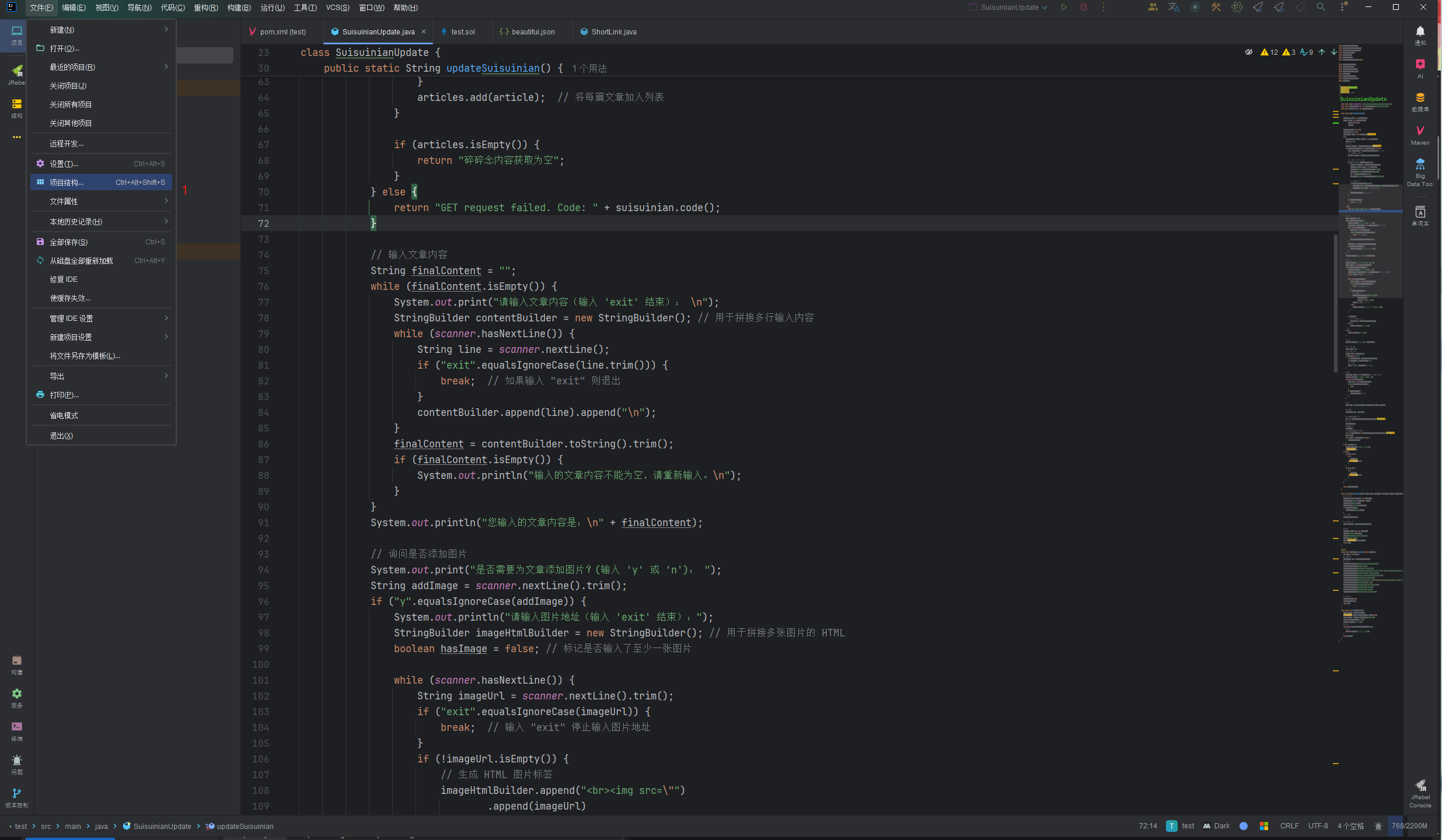
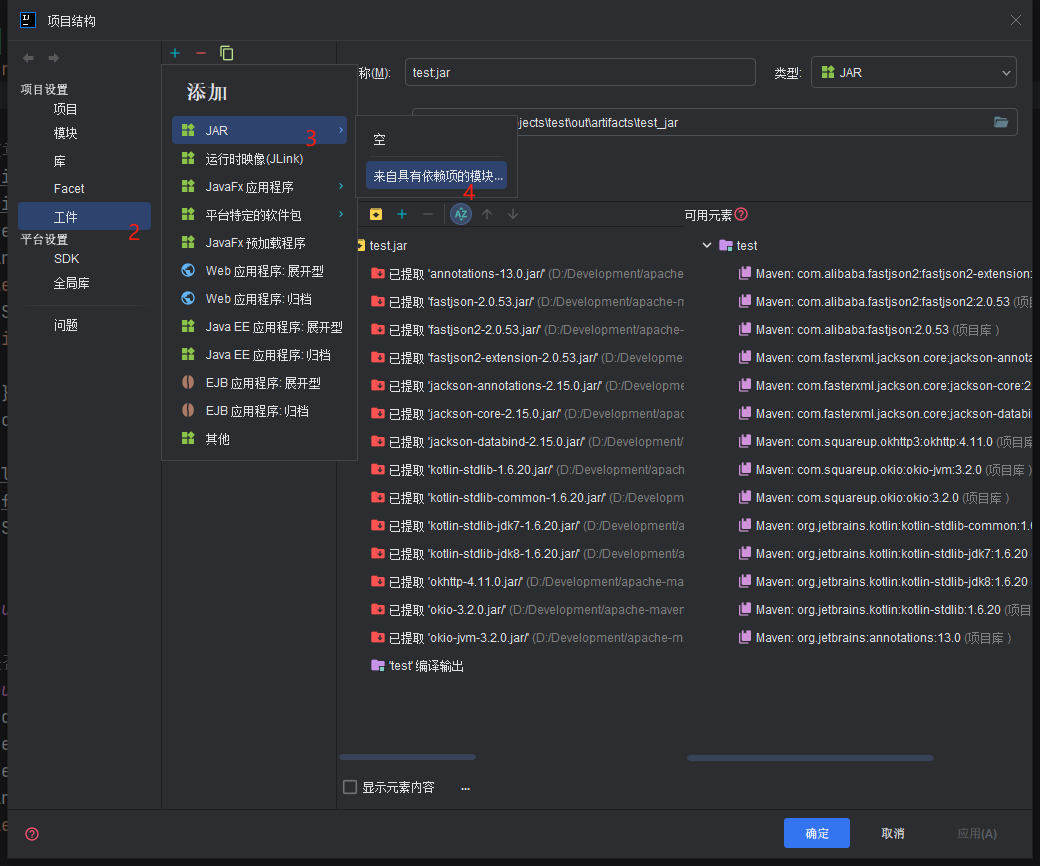
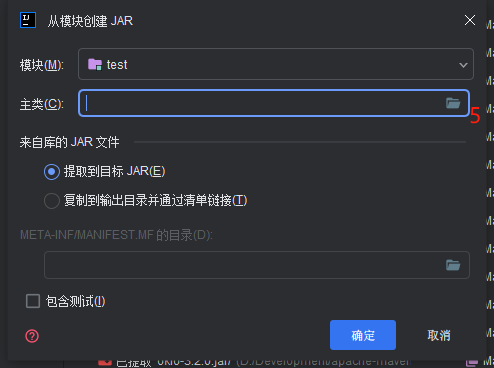
- build项目
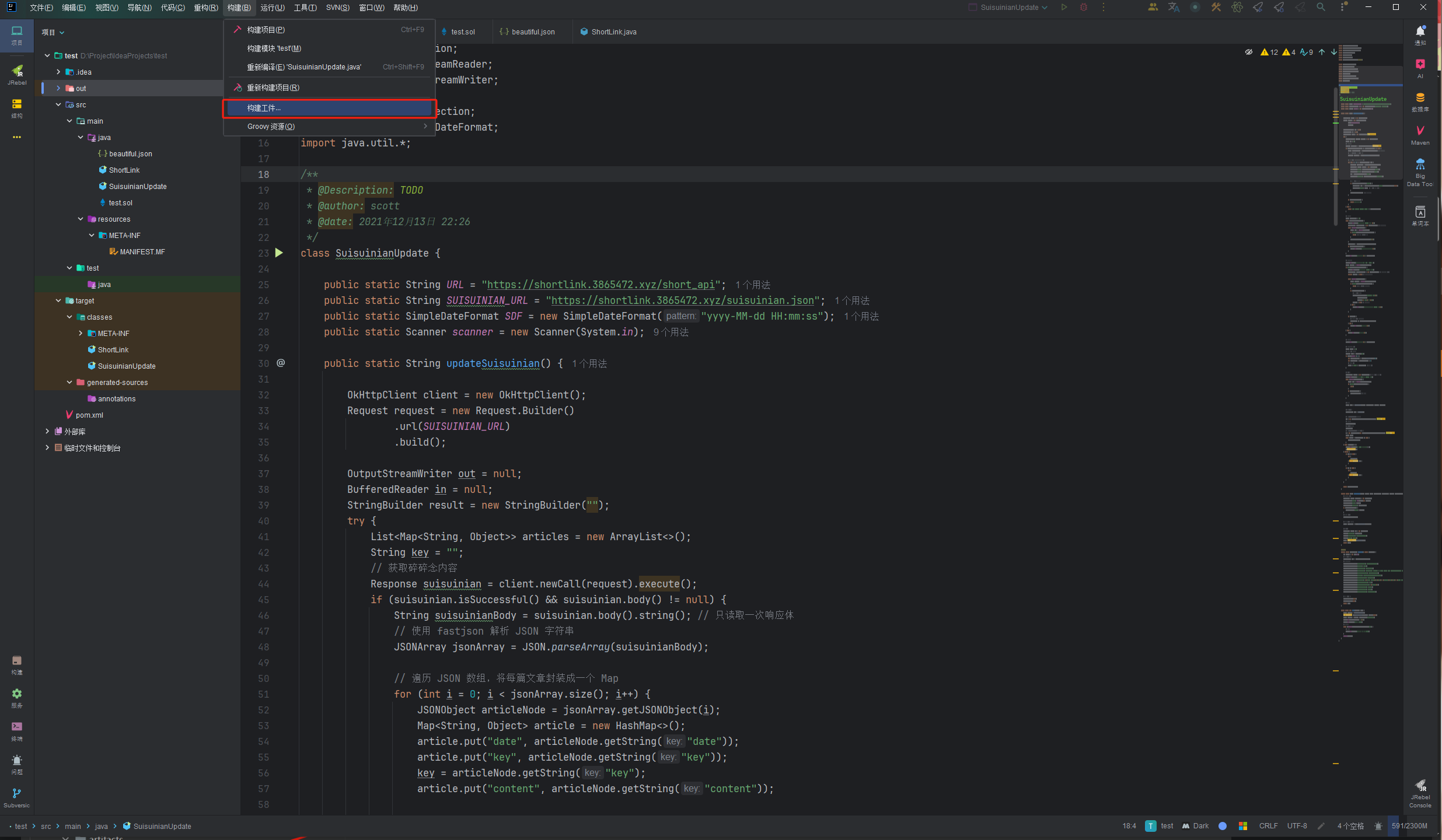
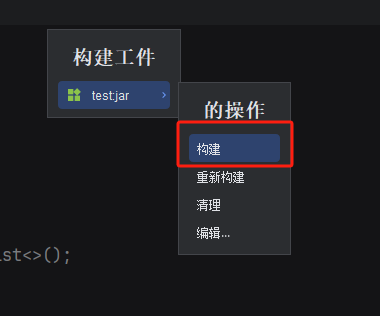
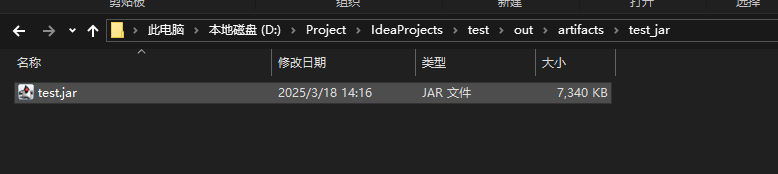
- 然后在项目目录下out\artifacts\xxx_jar\下找到jar文件。
2. 使用 exe4j 进行打包
-
选择 JAR 文件并配置 exe4j。
-
设置入口类和 JVM 选项。
-
生成 EXE 文件。
下面跟随图片操作:
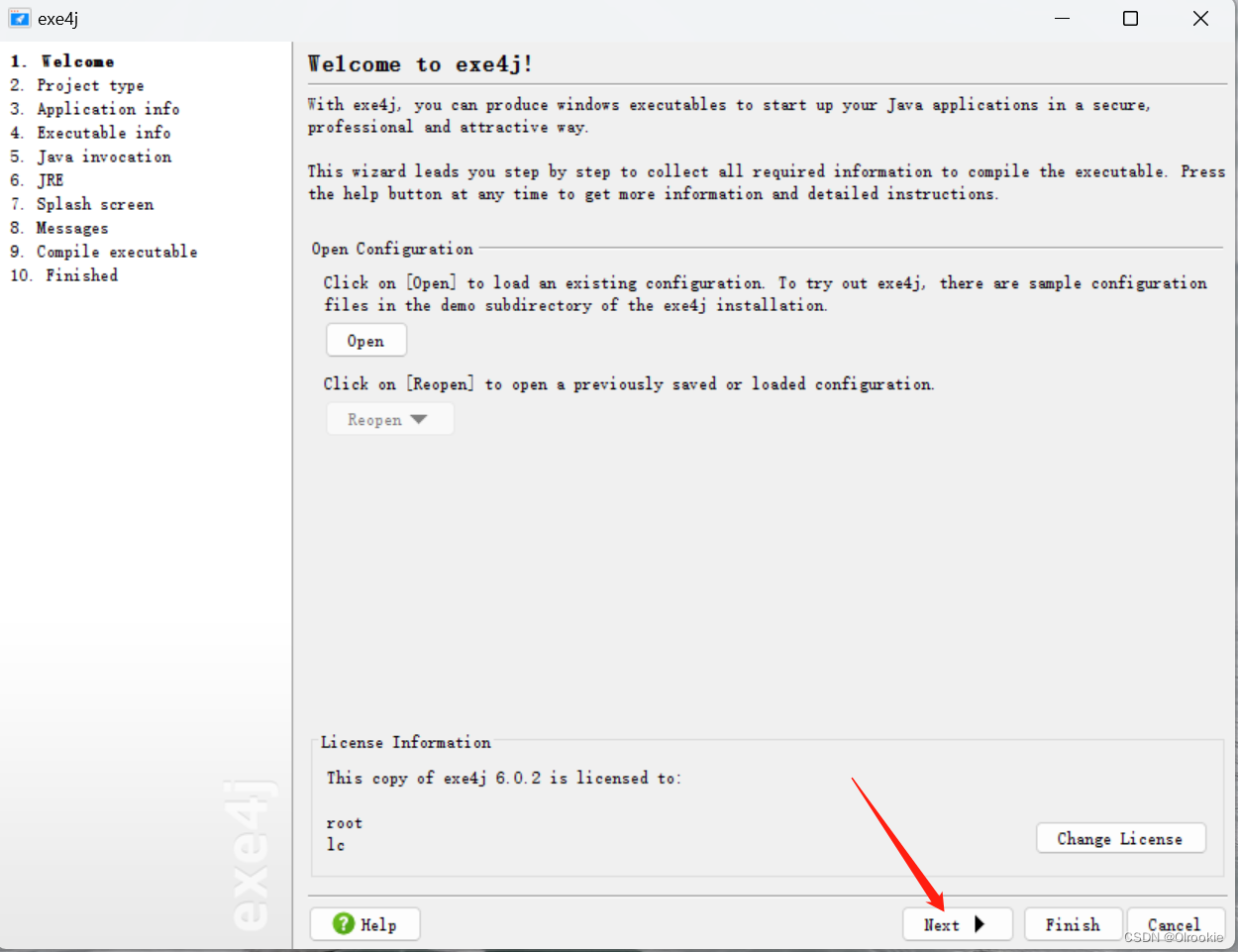
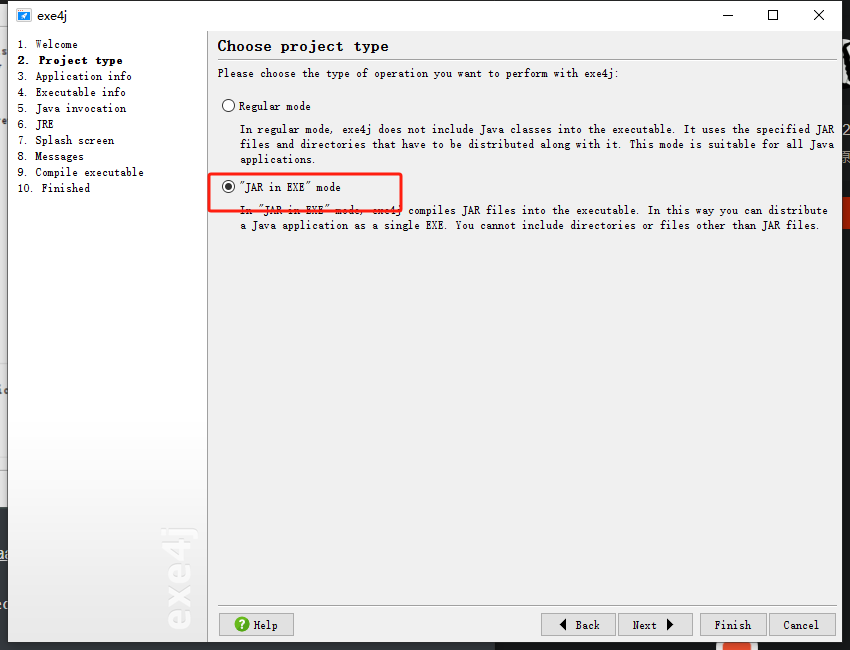
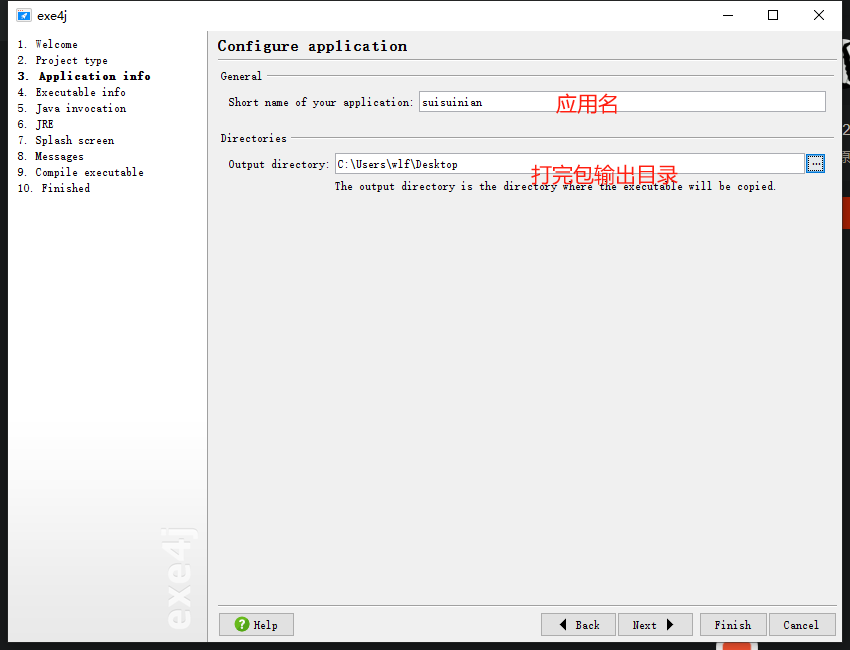
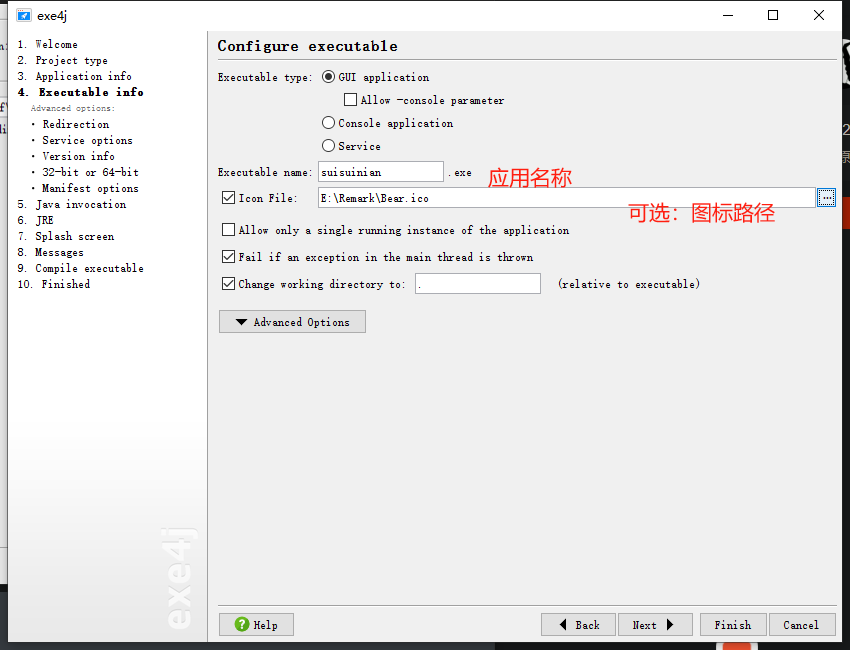
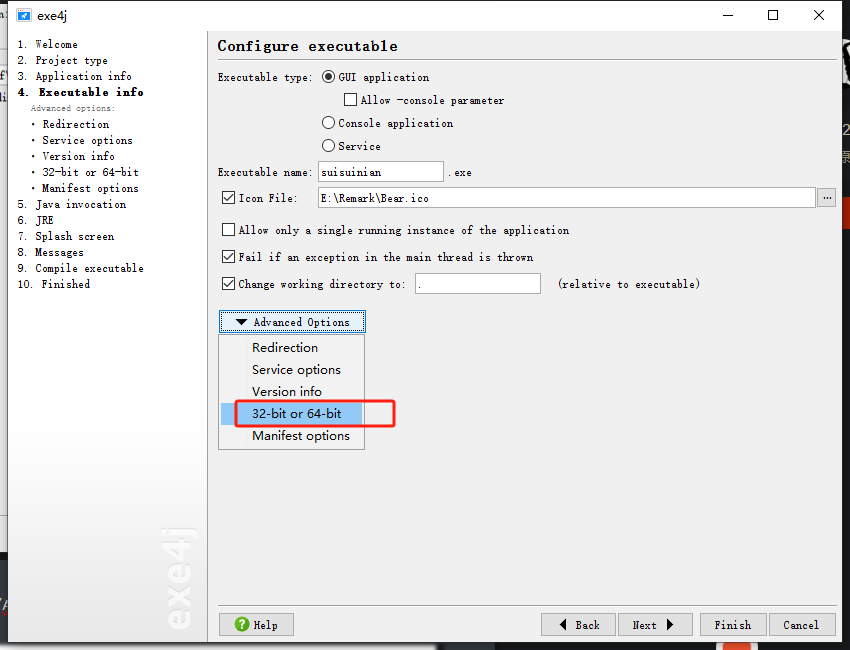
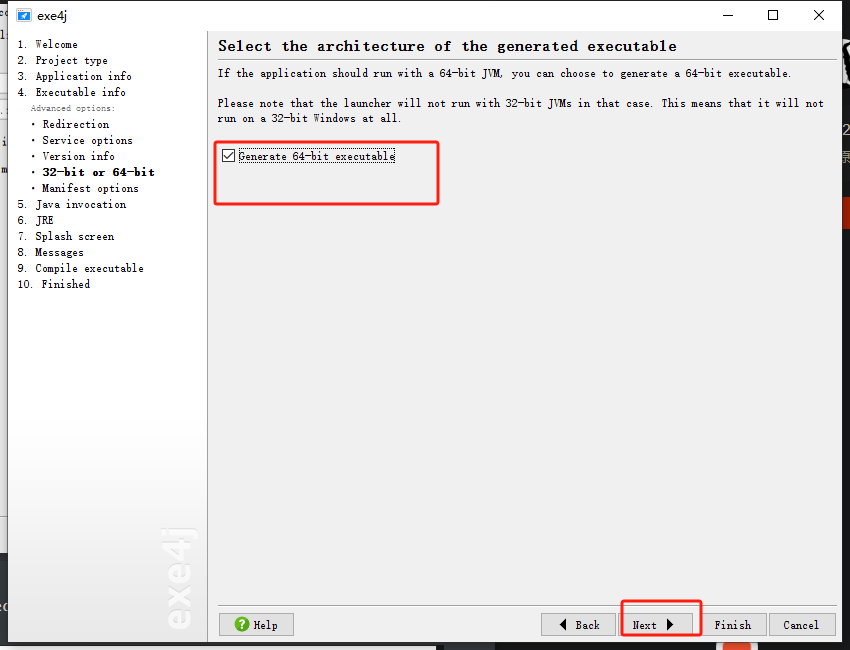
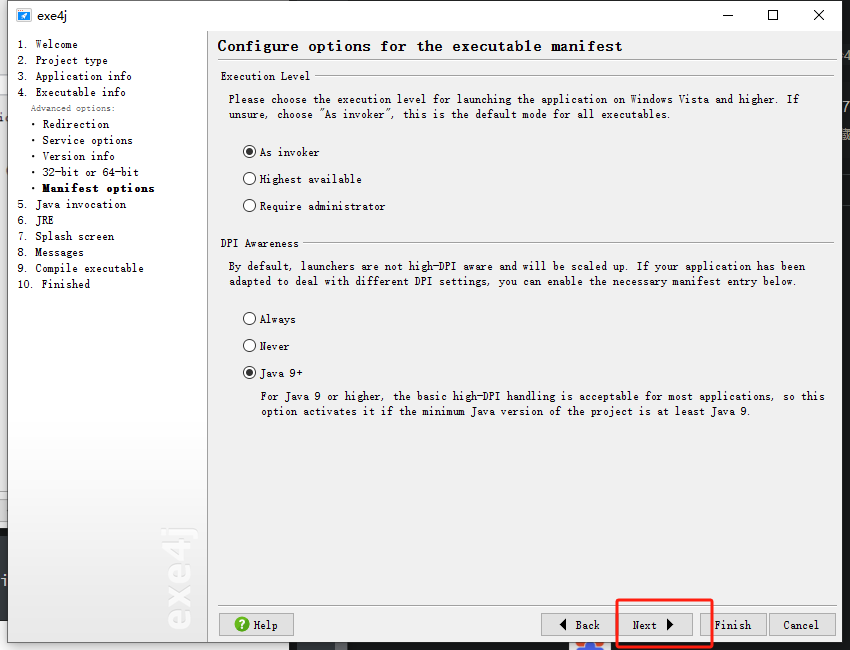
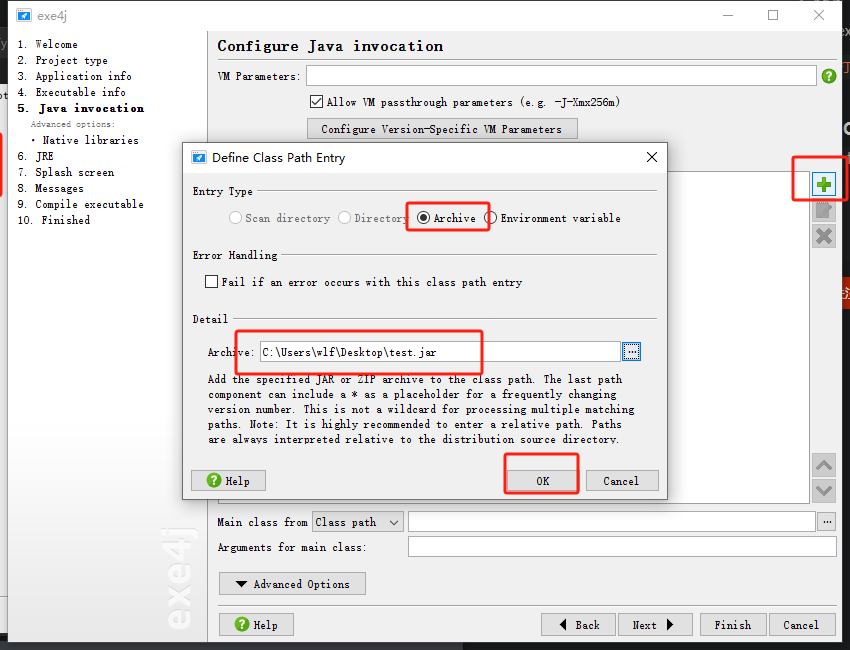
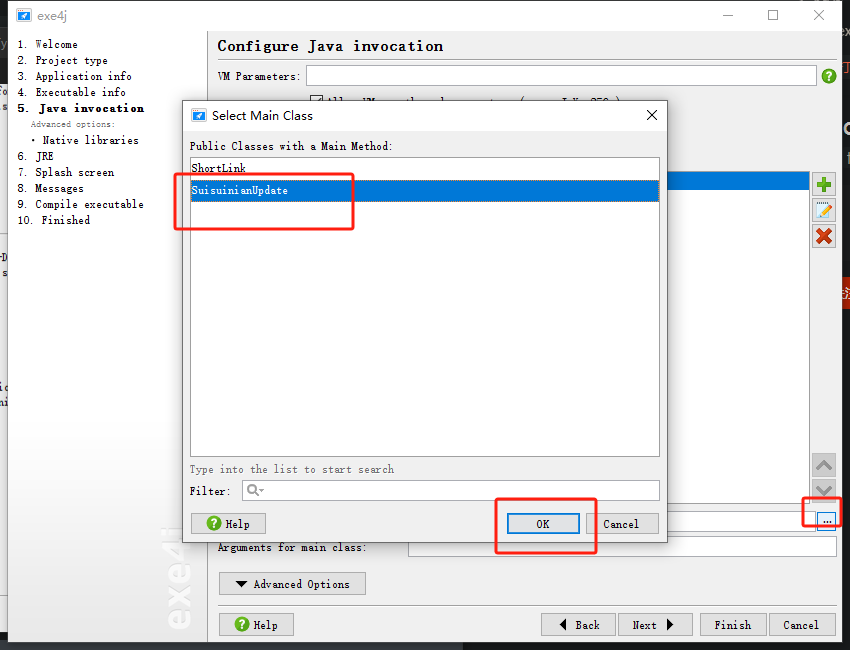
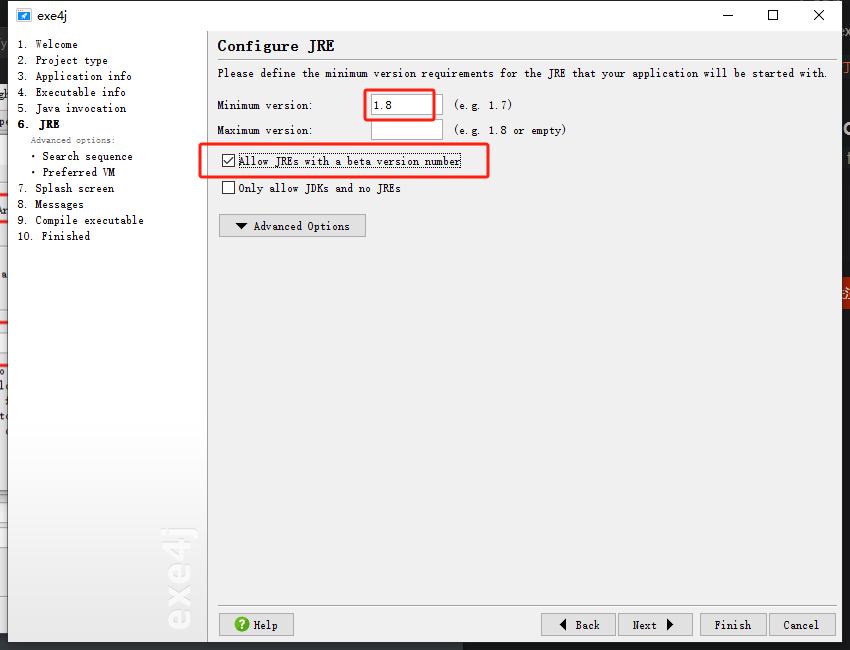
然后一路next,就完成了。





 扫一扫
扫一扫


 1万+
1万+

 被折叠的 条评论
为什么被折叠?
被折叠的 条评论
为什么被折叠?
 到【灌水乐园】发言





