



ADB Sync 深度解析:从 lunch 到 system 分区同步的完整链路
背景
我们平时如果是在公司做安卓设备类开发的话,一般我们都是修改某一个模块,比如framework.jar,services.jar,Launcher,SystemUI等,修改这些模块后我们不太可能像模拟器一样方便直接使用一个make方式,因为make方式在实体手机等设备上太慢了,一般采用是单编某个模块如make services等,然后再adb push services xxxx。
这种方式有一个比较大的痛点,就是你得非常清楚你make模块是啥,而且make模块后在ubuntu电脑上的out目录具体哪个目录下,目标手机上是哪个目录,一个字符都不可以写错。
案例:
adb push out/target/product/gemini/system/framework/services.jar /system/framework/services.jar
一旦错了字符肯定就无法成功,要么报错,要么push地方不对半天找不到原因,或者说make xxx模块会导致一堆so进行更新,自己又不知道哪些so。
所以这种make 单模块,push单模块方式有如下几个痛点:
1、不清楚目标的相关依赖,不知道push具体有哪些,需要程序员自身非常清楚模块的make后输出目标是啥,一旦make 目标会有相关的波及so依赖等情况,就很可能验证不起作用情况,浪费时间。
2、push目标路径因为可能比较长,有可能出错,一旦错误就无法生效
3、也有的版本push framework.jar时候需要push一堆相关的优化文件等
所以基于上面痛点,有vip学员朋友给马哥分享了一个很好的简单命令adb sync来解决。
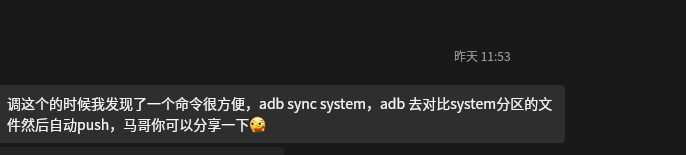
在这里再次对这个学员表示感谢。
1、实战adb sync使用
编译单目标:
. build/envsetup.sh
breakfast gemini
make framework-minus-apex
这样就编译出来了framework.jar,然后不采用常用的push方式,使用sync方式
看看核心的 adb sync 命令使用格式:
adb: usage: adb sync [-l] [-n] [-z ALGORITHM] [-Z] [-q] [PARTITION]
然后正式使用
$ adb root;adb remount
$ adb sync system
/system/: 6807 files pushed, 19 skipped. 24.9 MB/s (1617253547 bytes in 61.879s)
$ adb reboot
$ adb logcat -s Activity
--------- beginning of system
06-05 23:20:28.842  2632  2632 V Activity: onCreate 1111 com.android.settings.FallbackHome@8ef16b: null
2. adb sync 命令源码解析与分区映射
2.1 入口:CLI 命令分发(电脑adb是客户端)
当你敲下 adb sync system,代码入口在 packages/modules/adb/client/commandline.cpp:2007:
// commandline.cpp:2007-2060
} else if (!strcmp(argv[0], "sync")) {
    std::string src;
    bool list_only = false;
    bool dry_run = false;
    CompressionType compression = CompressionType::Any;
    // 解析选项: -l(list), -n(dry-run), -z(压缩), -Z(不压缩)

    if (optind == argc) {
        src = "all";              // 不传参数 = 同步所有分区
    } else if (optind + 1 == argc) {
        src = argv[optind];       // 如 "system"
    } else {
        error_exit("...");
    }

    // 硬编码的8个支持分区
    std::vector<std::string> partitions{"data",   "odm",        "oem",   "product",
                                        "system", "system_ext", "vendor"};

    bool found = false;
    for (const auto& partition : partitions) {
        if (src == "all" || src == partition) {
            std::string src_dir{product_file(partition)};   // 关键!
            if (!directory_exists(src_dir)) continue;
            found = true;
            if (!do_sync_sync(src_dir, "/" + partition, list_only, compression, dry_run)) {
                return 1;
            }
        }
    }
}
2.2 product_file():主机路径 → 设备路径的桥接
// commandline.cpp:78-84
static std::string product_file(const std::string& file) {
    const char* ANDROID_PRODUCT_OUT = getenv("ANDROID_PRODUCT_OUT");
    if (ANDROID_PRODUCT_OUT == nullptr) {
        error_exit("product directory not specified; set $ANDROID_PRODUCT_OUT");
    }
    return std::string{ANDROID_PRODUCT_OUT} + OS_PATH_SEPARATOR_STR + file;
}
这就是 lunch 设置的环境变量被用上的地方。
所以 adb sync system 最终会调用:
do_sync_sync(
    "$ANDROID_PRODUCT_OUT/system",   // 主机源目录
    "/system",                        // 设备目标目录
    ...
)
注意:不是只同步某个单独文件,而是递归遍历主机上的整个 system/ 目录树,把它和设备的 /system/ 做差异对比。
3. 核心算法:copy_local_dir_remote 的增量同步逻辑
这是 adb sync 最核心的函数,位于 packages/modules/adb/client/file_sync_client.cpp:1339。
3.1 整体流程
// file_sync_client.cpp:1339-1437
static bool copy_local_dir_remote(SyncConnection& sc, std::string lpath, std::string rpath,
                                  bool check_timestamps, bool list_only,
                                  CompressionType compression, bool dry_run) {
    sc.NewTransfer();

    ensure_trailing_separators(lpath, rpath);

    // 第一步:递归构建文件列表
    std::vector<copyinfo> file_list;
    std::vector<std::string> directory_list;
    // ...
    if (!local_build_list(sc, &file_list, &directory_list, lpath, rpath)) {
        return false;
    }
函数先是调用 local_build_list 把主机上 $ANDROID_PRODUCT_OUT/system/ 下面的所有文件(递归遍历子目录)收集成一个列表,后续的同步决策全部基于这个列表。
3.2 local_build_list:递归遍历主机目录
// file_sync_client.cpp:1279-1327
static bool local_build_list(SyncConnection& sc, std::vector<copyinfo>* file_list,
                             std::vector<std::string>* directory_list, const std::string& lpath,
                             const std::string& rpath) {
    std::vector<copyinfo> dirlist;
    std::unique_ptr<DIR, int (*)(DIR*)> dir(opendir(lpath.c_str()), closedir);

    dirent* de;
    while ((de = readdir(dir.get()))) {
        if (IsDotOrDotDot(de->d_name)) continue;

        std::string stat_path = lpath + de->d_name;
        struct stat st;
        if (lstat(stat_path.c_str(), &st) == -1) { continue; }

        copyinfo ci(lpath, rpath, de->d_name, st.st_mode);
        if (S_ISDIR(st.st_mode)) {
            dirlist.push_back(ci);           // 目录暂存,稍后递归
        } else {
            if (!should_push_file(st.st_mode)) {
                ci.skip = true;              // 跳过特殊文件(字符设备等)
            }
            ci.time = st.st_mtime;           // 记录本地 mtime
            ci.size = st.st_size;            // 记录本地 size
            file_list->push_back(ci);        // 普通文件加入列表
        }
    }
    dir.reset();

    // 递归处理子目录
    for (const copyinfo& ci : dirlist) {
        directory_list->push_back(ci.rpath);
        local_build_list(sc, file_list, directory_list, ci.lpath, ci.rpath);
    }
    return true;
}
这一步结束后,file_list 包含了整个 system/ 目录下所有文件的路径、大小、修改时间。每个文件都会生成一个 copyinfo 结构体。
3.3 copyinfo 结构体
// file_sync_client.cpp:85-105
struct copyinfo {
    std::string lpath;   // 主机上的完整路径
    std::string rpath;   // 设备上的完整路径
    time_t time;         // 本地文件 mtime
    mode_t mode;         // 文件权限
    size_t size;         // 文件大小
    bool skip;           // true = 跳过, 不推送
};
3.4 增量对比:谁来决定哪些文件要推送?(最关键的部分)
回到 copy_local_dir_remote,文件列表构建完成后,紧接着就是核心差异对比逻辑:
// file_sync_client.cpp:1399-1414
if (check_timestamps) {
    // 向设备发送所有文件的 lstat 请求
    for (const copyinfo& ci : file_list) {
        if (!sc.SendLstat(ci.rpath)) {
            sc.Error("failed to send lstat");
            return false;
        }
    }
    // 读取设备返回的 stat 信息,逐个对比
    for (copyinfo& ci : file_list) {
        struct stat st;
        if (sc.FinishStat(&st)) {
            if (st.st_size == static_cast<off_t>(ci.size) && st.st_mtime == ci.time) {
                ci.skip = true;  // <-- 大小和时间都匹配,标记为跳过!
            }
        }
    }
}
这就是增量同步的决策核心:
- 向设备批量发送
lstat请求,获取设备上每个文件的元数据 - 对比文件大小 + 修改时间戳
- 两者都匹配 →
skip = true,不传输 - 任一不匹配 → 需要传输,进入下面的推送阶段
不需要校验和(checksum),没有 MD5/SHA 计算。纯粹的 size + mtime 判等。
3.5 执行推送
// file_sync_client.cpp:1418-1431
for (const copyinfo& ci : file_list) {
    if (!ci.skip) {
        if (list_only) {
            sc.Println("would push: %s -> %s", ci.lpath.c_str(), ci.rpath.c_str());
        } else {
            if (!sync_send(sc, ci.lpath, ci.rpath, ci.time, ci.mode, false, compression, dry_run)) {
                return false;
            }
        }
    } else {
        skipped++;
    }
}
未跳过的文件逐个调用 sync_send 发送,已跳过的计入 skipped 统计。
3.6 sync_send:单个文件发送的细节
// file_sync_client.cpp:1040-1091
static bool sync_send(SyncConnection& sc, const std::string& lpath, const std::string& rpath,
                      unsigned mtime, mode_t mode, bool sync, CompressionType compression,
                      bool dry_run) {
    // 二次确认:sync 模式下再次 lstat 对比
    if (sync) {
        struct stat st;
        if (sync_lstat(sc, rpath, &st)) {
            if (st.st_mtime == static_cast<time_t>(mtime)) {
                sc.RecordFilesSkipped(1);
                return true;  // 又被跳过了
            }
        }
    }

    // 小文件 (< 64KB): 一次性读取并发送
    if (st.st_size < SYNC_DATA_MAX) {
        std::string data;
        android::base::ReadFileToString(lpath, &data, true);
        sc.SendSmallFile(rpath, mode, lpath, rpath, mtime, data.data(), data.size(), dry_run);
    } else {
        // 大文件 (>= 64KB): 分块流式传输,支持压缩
        sc.SendLargeFile(rpath, mode, lpath, rpath, mtime, compression, dry_run);
    }
    return sc.ReadAcknowledgements(sync);
}
传输策略:
- 小文件(<64KB):一次读出、一次发送
- 大文件(>=64KB):64KB 分块流式传输,可选用 Brotli / LZ4 / Zstd 压缩
4. daemon 端:设备上如何接收文件
4.1 服务入口
设备端 ADB daemon 通过下面这条路由开始处理 sync 请求(daemon/services.cpp:322):
} else if (name.starts_with("sync:")) {
    return create_service_thread("sync", file_sync_service);
}
4.2 主循环
// daemon/file_sync_service.cpp:861
void file_sync_service(unique_fd fd) {
    std::vector<char> buffer(SYNC_DATA_MAX);
    while (handle_sync_command(fd.get(), buffer)) {
    }
}
handle_sync_command() 根据协议 ID 分发到不同的处理函数。
5.3 文件接收 (handle_send_file)
// daemon/file_sync_service.cpp:347-414
static bool handle_send_file(borrowed_fd s, const char* path, uint32_t* timestamp,
                             uid_t uid, gid_t gid, uint64_t capabilities, mode_t mode,
                             CompressionType compression, bool dry_run,
                             std::vector<char>& buffer, bool do_unlink) {
    syncmsg msg;
    unique_fd fd;

    if (!dry_run) {
        // 安全审计日志
        __android_log_security_bswrite(SEC_TAG_ADB_SEND_FILE, path);

        // 创建目标文件 (O_EXCL 是原子性的)
        fd.reset(adb_open_mode(path, O_WRONLY | O_CREAT | O_EXCL | O_CLOEXEC, mode));

        // 如果父目录不存在,自动创建目录 (同时应用 fs_config 权限)
        if (fd < 0 && errno == ENOENT) {
            if (!secure_mkdirs(Dirname(path))) {
                SendSyncFailErrno(s, "secure_mkdirs failed");
                goto fail;
            }
            fd.reset(adb_open_mode(path, O_WRONLY | O_CREAT | O_EXCL | O_CLOEXEC, mode));
        }

        // 设置文件所有者
        if (fchown(fd.get(), uid, gid) == -1) { /* ... */ }

        // 恢复 SELinux 上下文
        selinux_android_restorecon(path, 0);

        // 设置文件权限 (包含 setuid 位恢复)
        fchmod(fd.get(), mode);
    }

    // 接收并写入文件数据
    if (!handle_send_file_data(s, std::move(fd), timestamp, compression)) {
        goto fail;
    }

    // 更新文件 capabilities
    if (!update_capabilities(path, capabilities)) {
        SendSyncFailErrno(s, "update_capabilities failed");
        goto fail;
    }

    // 返回 ID_OKAY 给客户端
    msg.status.id = ID_OKAY;
    msg.status.msglen = 0;
    return WriteFdExactly(s, &msg.status, sizeof(msg.status));
    // ...
}
daemon 端处理 push 时会自动:
secure_mkdirs:如果目标目录不存在,自动创建目录并按fs_config设置正确的权限和 SELinux 标签fchown:设置文件的 uid/gidselinux_android_restorecon:恢复文件的 SELinux 上下文fchmod:设置文件权限模式update_capabilities:更新文件的 Linux capabilities
这些操作确保 push 过去的文件具有正确的权限和安全标签,和 ROM 构建时完全一致。
5. 总结:完整链路回顾
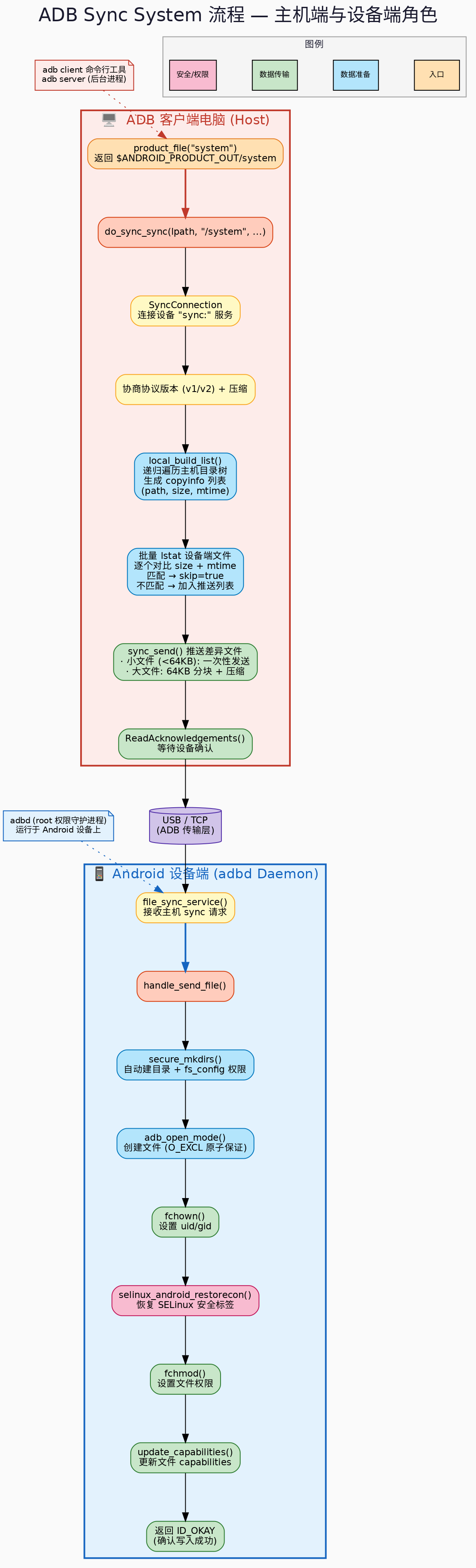 原文地址及更多安卓系统开发技巧:
https://mp.weixin.qq.com/s/oD7Kvxc3USqLEhK3odEnGA





 扫一扫
扫一扫


 290
290

 被折叠的 条评论
为什么被折叠?
被折叠的 条评论
为什么被折叠?
 到【灌水乐园】发言





