






 本文详细介绍了如何使用Struts1框架创建登录实例,包括导入jar包、配置web.xml、创建登录页面、异常类、业务处理类、Action类、页面配置以及struts-config.xml配置。通过实例,深入理解Struts1框架的使用方法。
之前写了四篇博客都是struts1框架学习之前的引子,主要就是从mvc的一个实例开始,慢慢重构出一个struts1框架雏形,通过这个雏形来引出我们要学习的struts1框架。四篇博客如下:
1、《深入浅出学习Struts1框架(一):一个简单mvc模式代码示例开始》
2、《深入浅出学习Struts1框架(二):重构MVC模式代码中跳转路径和业务逻辑》
3、 《深入浅出学习Struts1框架(三):彻底去掉TestServlet中的字符串和if-else语句块》
4、《深入浅出学习struts1框架(四):从MVC模式代码认识struts1框架》
在深入浅出学习struts1框架(四):从MVC模式代码认识struts1框架 博客中解释了框架是什么以及struts1框架的结构,通过上篇博客我们明白了框架无非就是一个应用程序的半成品,是一系列的高复用的无关业务的组件;并且通过结构图我们很明显的看到struts1是一个基于mvc的框架。

这篇博客通过一个struts1实例来看struts1框架,先来学会struts1框架是怎样使用的,随后的博客在进一步分析它的实现代码和实现原理。
在写struts1框架实例之前,希望读者能够看一下前面的四篇博客的实例代码,因为那代码是struts1框架的雏形,只要那四篇的代码看懂,那么下面的struts1框架代码也是非常容易看懂的。
Struts1框架实例—登录实例:
1、实例开始工作—导入jar包,在官网上下载struts1框架包,解压之后导入工程的:

2、之后配置web.xml(这里的具体配置方法可以参见struts1框架包中的实例文件夹webapps中的实例代码中web.xml文件的配置方法):
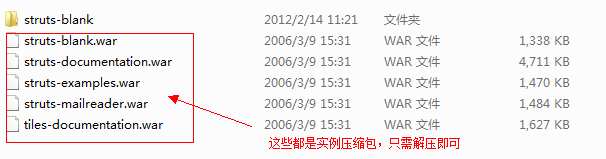
具体如下:
<?xml version="1.0" encoding="UTF-8"?>
<web-app version="2.4"
	xmlns="http://java.sun.com/xml/ns/j2ee"
	xmlns:xsi="http://www.w3.org/2001/XMLSchema-instance"
	xsi:schemaLocation="http://java.sun.com/xml/ns/j2ee
	http://java.sun.com/xml/ns/j2ee/web-app_2_4.xsd">
  <welcome-file-list>
    <welcome-file>index.jsp</welcome-file>
  </welcome-file-list>

  <servlet>
    <servlet-name>action</servlet-name>
    <servlet-class>org.apache.struts.action.ActionServlet</servlet-class>
    <init-param>
      <param-name>config</param-name>
      <param-value>/WEB-INF/struts-config.xml</param-value>
    </init-param>
    <init-param>
      <param-name>debug</param-name>
      <param-value>2</param-value>
    </init-param>
    <init-param>
      <param-name>detail</param-name>
      <param-value>2</param-value>
    </init-param>
    <load-on-startup>2</load-on-startup>
  </servlet>


  <!-- Standard Action Servlet Mapping -->
  <servlet-mapping>
    <servlet-name>action</servlet-name>
    <url-pattern>*.do</url-pattern>
  </servlet-mapping>
</web-app>
首先这个配置文件中最主要的就是做了两件的事情,一个是配置ActionServlet,一个是初始化struts-config.xml配置文件参数。如果看了我原先的四篇博客的读者一下子就能想到原先博客中的testServlet和struts-config配置文件。其实这里的ActionServlet还有struts-config和前四篇博客中testservlet、struts-config起到的是一样的作用(这里仅仅介绍如何使用struts,随后的博客在深入分析)。
3、配置完了web.xml文件,之后我们就要开始进入项目代码阶段了。
登录页面:
<%@ page language="java" contentType="text/html; charset=GB18030"
    pageEncoding="GB18030"%>
<!DOCTYPE html PUBLIC "-//W3C//DTD HTML 4.01 Transitional//EN" "http://www.w3.org/TR/html4/loose.dtd">
<html>
<head>
<meta http-equiv="Content-Type" content="text/html; charset=GB18030">
<title>Insert title here</title>
</head>
<body>
	<form action="login.do" method="post">
		用户:<input type="text" name="username"><br>
		密码:<input type="password" name="password"></br>
		<input type="submit" value="登录">
	</form>
</body>
</html>
切记那个action后面的路径一定要是.do开头的,因为我们在web.xml中配置的是*.do。这里依旧不介绍为什么随后博客会深入分析。
4、建立两个异常类,一个是用户名未找到、一个是密码错误:
①用户名未找到
public class UserNotFoundException extends RuntimeException {

	public UserNotFoundException() {
		// TODO Auto-generated constructor stub
	}

	public UserNotFoundException(String message) {
		super(message);
		// TODO Auto-generated constructor stub
	}

	public UserNotFoundException(Throwable cause) {
		super(cause);
		// TODO Auto-generated constructor stub
	}

	public UserNotFoundException(String message, Throwable cause) {
		super(message, cause);
		// TODO Auto-generated constructor stub
	}

}
②密码错误
public class PasswordErrorException extends RuntimeException {

	public PasswordErrorException() {
		// TODO Auto-generated constructor stub
	}

	public PasswordErrorException(String message) {
		super(message);
		// TODO Auto-generated constructor stub
	}

	public PasswordErrorException(Throwable cause) {
		super(cause);
		// TODO Auto-generated constructor stub
	}

	public PasswordErrorException(String message, Throwable cause) {
		super(message, cause);
		// TODO Auto-generated constructor stub
	}

}
5、业务处理类代码:
public class UserManager {

	public void login(String username, String password) {
		if (!"admin".equals(username)) {
			throw new UserNotFoundException();
		}

		if (!"admin".equals(password)) {
			throw new PasswordErrorException();
		}

	}
}
6、建立LoginActionForm类,这个类继承ActionForm类,简单说一下这个类,这个类主要是负责收集表单数据的,在这里一定要注意表单的属性必须和actionForm中的get和set方法的属性一致。这里依旧不深入解释,随后博客都会涉及到。
import org.apache.struts.action.ActionForm;

/**
 * 登录ActionForm,负责表单收集数据
 * 表单的属性必须和ActionForm中的get和set的属性一致
 * @author Administrator
 *
 */
@SuppressWarnings("serial")
public class LoginActionForm extends ActionForm {

	private String username;

	private String password;

	public String getUsername() {
		return username;
	}

	public void setUsername(String username) {
		this.username = username;
	}

	public String getPassword() {
		return password;
	}

	public void setPassword(String password) {
		this.password = password;
	}


}
7、LoginAction类的建立,这个是负责取得表单数据、调用业务逻辑以及返回转向信息。
import javax.servlet.http.HttpServletRequest;
import javax.servlet.http.HttpServletResponse;

import org.apache.struts.action.Action;
import org.apache.struts.action.ActionForm;
import org.apache.struts.action.ActionForward;
import org.apache.struts.action.ActionMapping;

/**
 * 登录Action
 * 负责取得表单数据、调用业务逻辑、返回转向信息
 *
 * @author Administrator
 *
 */
public class LoginAction extends Action {

	@Override
	public ActionForward execute(ActionMapping mapping, ActionForm form,
			HttpServletRequest request, HttpServletResponse response)
			throws Exception {


		LoginActionForm laf=(LoginActionForm)form;
		String username=laf.getUsername();
		String password=laf.getPassword();
		UserManager userManager=new UserManager();
		try{
			userManager.login(username, password);
			return mapping.findForward("success");
		}catch(UserNotFoundException e){
			e.printStackTrace();
			request.setAttribute("msg", "用户名不能找到,用户名称=["+username+"]");
		}catch(PasswordErrorException e){
			e.printStackTrace();
			request.setAttribute("msg", "密码错误");
		}
		return mapping.findForward("error");

     }
}
8、既然有转向,那么我们还要建立两个页面,一个是登录成功页面,一个登录失败页面。
①登录成功页面
<%@ page language="java" contentType="text/html; charset=GB18030"
    pageEncoding="GB18030"%>
<!DOCTYPE html PUBLIC "-//W3C//DTD HTML 4.01 Transitional//EN" "http://www.w3.org/TR/html4/loose.dtd">
<html>
<head>
<meta http-equiv="Content-Type" content="text/html; charset=GB18030">
<title>Insert title here</title>
</head>
<body>
	${loginForm.username },登录成功
</body>
</html>
②登录失败页面
<%@ page language="java" contentType="text/html; charset=GB18030"
    pageEncoding="GB18030"%>
<!DOCTYPE html PUBLIC "-//W3C//DTD HTML 4.01 Transitional//EN" "http://www.w3.org/TR/html4/loose.dtd">
<html>
<head>
<meta http-equiv="Content-Type" content="text/html; charset=GB18030">
<title>Insert title here</title>
</head>
<body>
	<%--
	<%=request.getAttribute("msg") %>
	--%>
	${msg }
</body>
</html>
9、最后要进行struts-config.xml的配置,看过原来博客的童鞋,一定对struts-config.xml配置印象深刻,原先博客中的struts-config配置文件是笔者自己写的,用dom4j读取的。而现在struts1中的这个配置文件就要用身价的标签了。而且struts1自己封装了它的读取过程,这样大大减少了我们的开发工作。
<?xml version="1.0" encoding="ISO-8859-1" ?>

<!DOCTYPE struts-config PUBLIC
          "-//Apache Software Foundation//DTD Struts Configuration 1.2//EN"
          "http://jakarta.apache.org/struts/dtds/struts-config_1_2.dtd">

<struts-config>
	<form-beans>
		<form-bean name="loginForm" type="com.bjpowernode.struts.LoginActionForm"/>
	</form-beans>

	<action-mappings>
		<action path="/login"
				type="com.bjpowernode.struts.LoginAction"
				name="loginForm"
				scope="request"
				>
			<forward name="success" path="/login_success.jsp" />
			<forward name="error" path="/login_error.jsp"/>
		</action>
	</action-mappings>
</struts-config>
经过配置之后实例就已经做完了,感兴趣童鞋可以自己手动运行一下。
这篇博客仅仅是提供了一个struts1框架的简单实例,具体分析还希望等下面的博客。在下面的博客中就要对struts1框架进行分析了,我们会看到我们在原先博客mvc实例重构中出现的截取字符串、mapping、读取配置文件的操作是如何在struts1框架中实现的,struts1框架是怎样运行的,它都给我们做了什么等等。敬请期待!!!





 扫一扫
扫一扫


--正式进入struts1框架学习,从一个实例开始&spm=1001.2101.3001.5002&articleId=7334438&d=1&t=3&u=eb970dd4fc3240e28f20e470ba2066f1)
 9436
9436

 被折叠的 条评论
为什么被折叠?
被折叠的 条评论
为什么被折叠?
 到【灌水乐园】发言





