





 本文详细介绍了静态站点与动态站点的区别,通过Apache部署静态站点的步骤,包括虚拟主机实验,以及使用LAMP架构部署Discuz论坛系统的过程,涵盖服务器配置和客户端测试。
一、简介
1.UI的转变
演变成了现在的B/S架构:(Browser/Server,浏览器/服务器模式)是WEB兴 起后的一种网络结构模式,WEB浏览器是客户端最主要的应用软件。这种模式统一 了客户端,将系统功能实现的核心部分集中到服务器上,简化了系统的开发、维护 和使用。
2.名词
HTML:Hyper Text Markup Language(超级 文本 标记 语言),一种网页语言。
网页:使用HTML,PHP,JAVA语言格式书写的文件。
主页:进去网页中显示的第一个页面,一般包含子页面超链接。
网站:由多个网页组合而成的一台网站服务器
URL:Uniform Resource Locator,统一资源定位符,是对可以从互联网上得到 的资源的位置和访问方法的一种简洁的表示,是互联网上标准资源的地址。互联网 上的每个文件都有一个唯一的URL,例如http://www.baidu.com:80/1.html或者 ftp://192.168.142.143:21/1.txt。
3.网站架构
LAMP架构:(Linux + Apache + MySQL + PHP)系统+服务器程序+数据管理软件+ 中间软件。
二、静态站点
1.Apache简介
Apache官网: www.apache.org
软件包名称:httpd
服务端口: 80/tcp(http) 443/tcp(https)
主配置文件: /etc/httpd/conf/httpd.conf
子配置文件:/etc/httpd/conf.d/*.conf
主目录:/var/www/html //网站源代码默认位置
2.安装Apache
[root@localhost ~]# yum -y install httpd         //安装
[root@localhost ~]# systemctl start httpd        //启动
[root@localhost ~]# systemctl status  httpd      //查看服务状态
[root@localhost ~]# systemctl enable httpd       //开机自启
[root@localhost ~]# systemctl stop  firewalld    //关闭防火墙
[root@localhost ~]# setenforce 0                 //关闭selinux
[root@localhost ~]# systemctl stop firewalld     //关闭防火墙
[root@localhost ~]# httpd -v                     //查看版本
Server version: Apache/2.4.6 (CentOS)
Server built:   Nov 16 2020 16:18:20
3.虚拟主机实验
1)目的
在一台物理服务器上运行多个网站,即在一个IP地址下部署多个网站。
2)配置目标
在一台服务器上实现两个网站的架设
3)环境
本次实验环境为三台服务器:
服务器:192.168.190.151
客户机:192.168.190.154
真机:192.168.190.1
4)服务器配置
www.a.org站点配置
[root@localhost ~]# mkdir /var/www/html/a.org              //网站资源存放目录
[root@localhost ~]# vim /var/www/html/a.org/index.html     //输入网页内容
	a.org a.org2020
[root@localhost ~]# vim /etc/httpd/conf.d/a.org.conf       //设置网站配置文件
<VirtualHost  *:80>                                        //某个虚拟主机(VirtualHost)
ServerName  www.a.org                                      //服务器起个名字
DocumentRoot  /var/www/html/a.org //网站的根目录,告诉机器文件在这里
</VirtualHost>
[root@localhost ~]# httpd -t                               //检测配置文件语法
AH00558: httpd: Could not reliably determine the server's fully qualified domain name, using localhost.localdomain. Set the 'ServerName' directive globally to suppress this message
Syntax OK                                                  //正确结果
[root@localhost ~]# systemctl restart httpd                //重启服务
www.b.org站点配置
[root@localhost ~]# mkdir /b.org
[root@localhost ~]# vim /b.org/index.html
b.org.org.org 2020 202020202020                       //网页内容
[root@localhost ~]# vim /etc/httpd/conf.d/b.org.conf
<VirtualHost  *:80>
ServerName  www.b.org
DocumentRoot  /b.org
</VirtualHost>
<Directory "/b.org">                                  //目录授权,仅在网站主目录非“/var/www/html”时操作
Require all granted                                   //授予允许所有的“网站”的访问的权限
</Directory>
[root@localhost ~]# httpd -t
AH00558: httpd: Could not reliably determine the server's fully qualified 		  domain name, using localhost.localdomain. Set the 'ServerName' directive 		  globally to suppress this message
Syntax OK
[root@localhost ~]# systemctl restart httpd
5)客户端配置
客户机测试,先域名解析,后测试
[root@localhost ~]# vim   /etc/hosts
192.168.190.151  www.a.org 填写web服务器的IP
192.168.190.151  www.b.org 填写web服务器的IP
[root@localhost ~]yum install -y elinks        //安装字符浏览器
[root@localhost ~]elinks http://www.b.org    //浏览测试网站
真机测试,同样先域名解析,后测试
1>打开文件:C:\Windows\System32\drivers\etc\hosts
2>在最后添加两行:
192.168.190.151 www.a.org
192.168.190.151 www.b.org
3>测试网络
win键+R键打开运行命令窗口,输入cmd进入命令行模式,然后ping
4>ping通后打开浏览器进行测试
三、动态站点(以部署一个论坛系统discuz为例)
1.LAMP架构
linux系统-网站程序apache-数据库mysql-PHP中间件
2.基础环境
[root@localhost ~]/etc/selinux/config
SELINUX=disabled
[root@localhost ~]# setenforce 0
[root@localhost ~]# systemctl stop firewalld.service
[root@localhost ~]# systemctl disable firewalld.service
3.安装LAMP
[root@localhost ~]# yum -y install httpd mariadb-server mariadb php php-mysql gd php-gd
                        //安装网站-数据库服务器-数据库客户端-中间件-中间件插件-图形库-php图形库
[root@localhost ~]# systemctl start httpd mariadb
[root@localhost ~]# systemctl enable httpd mariadb
4.安装discuz
[root@localhost~]wget http://download.comsenz.com/DiscuzX/2.5/Discuz_X2.5_SC_UTF8.zip
//下载discuz软件包
[root@apache ~]# mkdir -p /webroot/discuz                    //创建网站资源存放目录
[root@apache ~]# yum  install  -y   unzip
[root@apache ~]#unzip  Discuz_X2.5_SC_UTF8.zip               //解压
[root@apache ~]#cp -rf upload/* /webroot/discuz/             //导入discuz网站源码
[root@apache ~]#chown -R  apache.apache  /webroot/discuz/    //设置权限
[root@apache ~]# vim /etc/httpd/conf.d/discuz.conf           //设置网站配置文件
<VirtualHost *:80>
   ServerName www.discuz.com
   DocumentRoot /webroot/discuz
</VirtualHost>
<Directory "/webroot/discuz">
   Require all granted
</Directory>
[root@apache ~]# systemctl restart httpd
[root@localhost discuz]# mysql              //进入数据库
MariaDB [(none)]> create database discuz ;  //创建discuz数据库,创建数据库可以再敲一遍,可以检查是否创建成功
5.客户端测试
先添加域名解析:
192.168.190.151 www.discuz.com
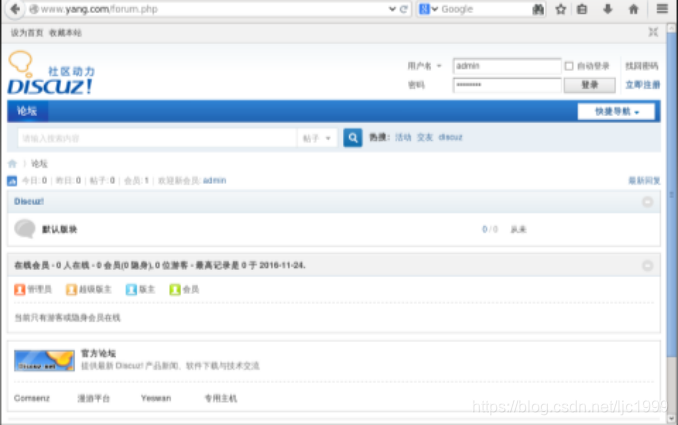
进入网站安装discuz:
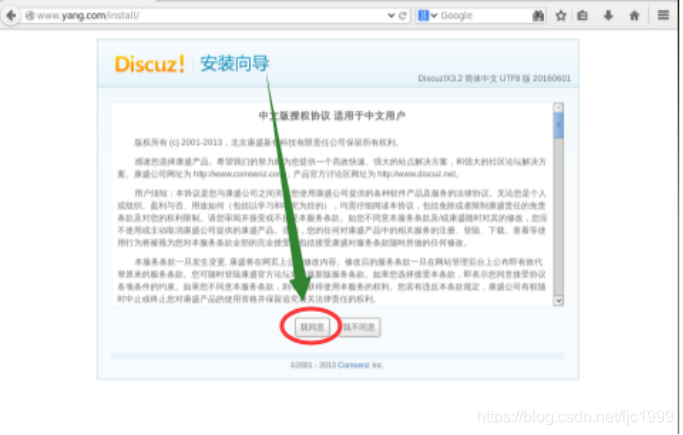
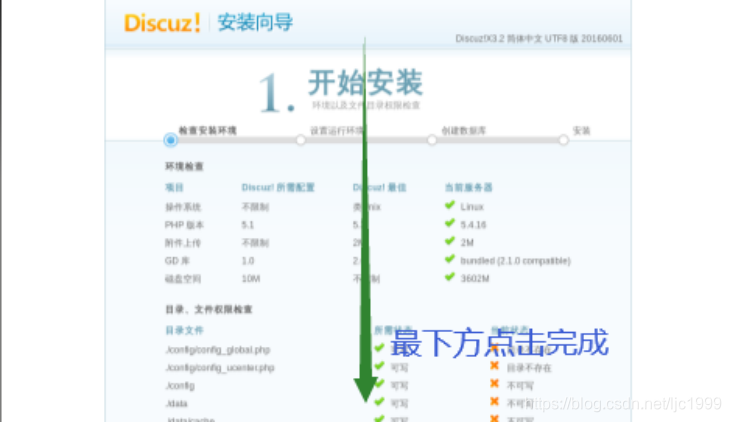
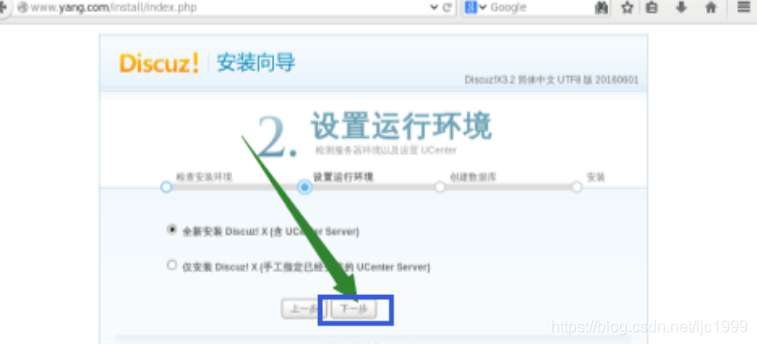
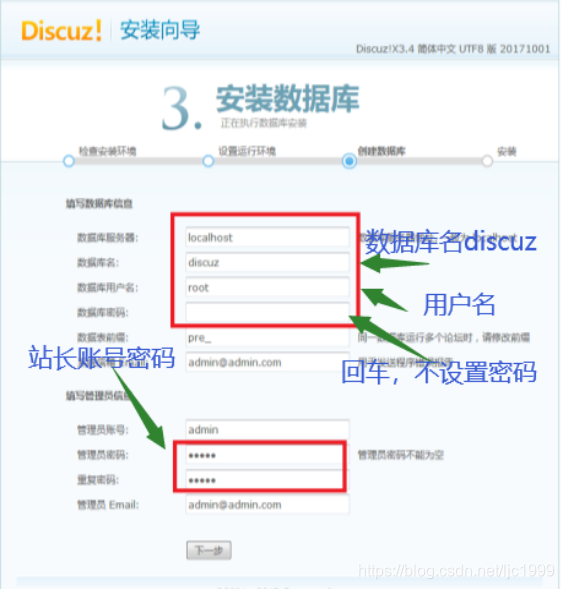

(完成,然后重新进入)





 扫一扫
扫一扫


 3257
3257

 被折叠的 条评论
为什么被折叠?
被折叠的 条评论
为什么被折叠?
 到【灌水乐园】发言





