



 本文探讨了如何减小可执行文件(EXE)和动态链接库(DLL)的大小,通过使用定制的运行时库LIBCTINY实现更精简的代码,并深入介绍了减少未使用的代码片段及优化节对齐的方法。
http://msdn.microsoft.com/msdnmag/issues/01/01/hood/default.aspx
| W |
ay back in my October 1996 column in MSJ, I addressed a question concerning the size of executable files. Back then, a simple Hello World program compiled to a 32KB executable. Two compiler versions later, the problem is only slightly better. The same program with the Visual C++® 6.0 compiler is now 28KB. In that column, I provided a replacement runtime library that lets you create very small executable programs. There were some restrictions on what situations it was useful for, but for a large number of my own programs it worked well. After living with these restrictions for quite a while, I decided it was time to fix some of them. Making these modifications also happens to provide a great opportunity to describe a little-known linker option that can be used to further reduce program size.
EXE and DLL SizeBefore jumping into the code for my replacement runtime library, it's worth taking the time to review why simple EXEs and DLLs are bigger than you might expect. Consider the canonical Hello World program:
| #include <stdio.h> void main() { printf ("Hello World!/n" ); } |
Let's compile this program for size, and generate a map file. Using the command-line Visual C++ compiler, the syntax would be:
| Cl /O1 Hello.CPP /link /MAP |
First, look at the .MAP file; a trimmed down version is shown in Figure 1. From looking at the addresses of main (0001:00000000) and of printf (0001:0000000C), you can infer that function main's code is only 0xC bytes in length. Looking at the last line of the file, the __chkstk function at address 0001:00003B10, you can also infer that there's at least 0x3B10 bytes of code in the executable. That's over 14KB of code to send Hello World to the screen.
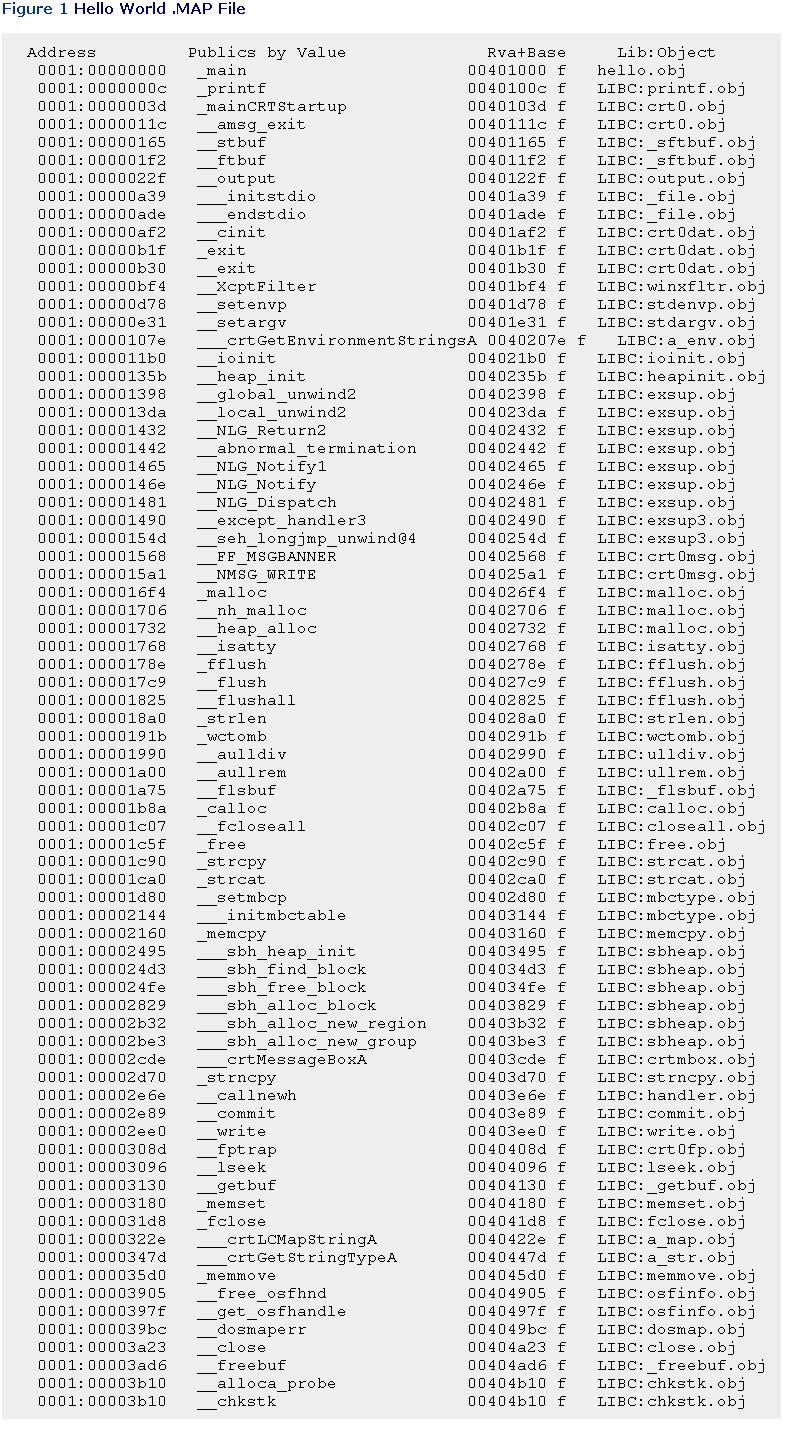 Now, start looking through some of the other .MAP file lines. Some items make sense, for example, the __initstdio function. After all, printf writes its output to a file, so some amount of underlying runtime library support routines for stdio makes sense. Likewise, it's reasonable to expect that the printf code might call strlen, so its inclusion isn't a surprise.However, take a look at some of the other functions, for instance __sbh_heap_init. This is the initialization function for the runtime library's small block heap. The Win32®-based operating systems offer up their own heap in the form of the HeapAlloc family of functions. Potential performance gains notwithstanding, the Visual C++ library could choose to use the Win32 heap APIs, but doesn't. Thus, you end up with more code than necessary in your executable.While some people might not care that the runtime library implements its own heap, there are other less defensible examples. Consider the __crtMessageBoxA function near the bottom of the map file. This function allows the runtime library to call the MessageBox API without forcing the executable to link against USER32.DLL. For a simple Hello World program, it's hard to anticipate the need to call MessageBox.Consider another example: the __crtLCMapStringA function, which does locale-dependent transformations of strings. While Microsoft is somewhat obligated to provide locale support, it's not really needed for a large number of programs. Why make programs that don't use locales pay the cost for those that do?I could continue with other examples of unneeded code, but I've made my point. A typical small program contains lots of little nuggets of code that aren't used. By themselves, they don't contribute much to the code size, but add up all the cases and you're into serious amounts of code!
What About the C++ Runtime Library DLL?Alert readers might say, "Hey Matt! Why don't you just use the DLL version of the runtime library?" In the past, I could make the argument that there was no consistently named version of the C++ runtime library DLL available on Windows® 95, Windows 98, Windows NT 3.51, Windows NT® 4.0, and so forth. Luckily, we've moved past those days, and in most cases you can rely on MSVCRT.DLL being available on your target machines.Making this switch and recompiling Hello.CPP, the resulting executable is now only 16KB. Not bad, but you can do better. More importantly, you're just shifting all of this unneeded code to someplace else (that is, to MSVCRT.DLL). In addition, when your program starts up, another DLL will have to be loaded and initialized. This initialization includes items like locale support, which you may not care about. If MSVCRT.DLL suits your needs, then by all means use it. However, I believe that using a stripped-down, statically linked runtime library still has merit.I may be tilting at windmills here, but my e-mail conversations with readers show that I'm not alone. There are people out there who want the leanest possible code. In this day of writeable CDs, DVDs, and fast Internet connections, it's easy not to worry about code size. However, the best Internet connection I can get at home is only 24Kbps. I hate wasting time downloading bloated controls for a Web page.As a matter of principle, I want my code to have as small a footprint as possible. I don't want to load any extra DLLs that I don't really need. Even if I might need a DLL, I'll try to delayload it so that I don't incur the cost of loading it until I use the DLL. Delayloading is a topic I've described in previous columns, and I strongly encourage you to become familiar with it. See Under the Hood in the December 1998 issue of MSJ for starters.
Digging DeeperNow that I've beaten up the unneeded code within the program, let's turn to the executable file itself. If you were to run DUMPBIN /HEADERS on my Hello.EXE, you'd see the following two lines in the output:
1000 section alignment |
The second line is interesting. It says that every code and data section in the executable is aligned on a 4KB (0x1000) byte boundary. Because sections are stored contiguously in a file, it's not hard to see the potential for wasting up to 4KB between the end of one section and the start of the next.If I had linked the program with a version of the linker that came before Visual C++ 6.0, I would have seen something different, as you see here:
1000 section alignment |
The key difference is that the alignment between sections is only 512 bytes (0x200). There's much less space available to waste. In Visual C++ 6.0, the linker defaults were changed to make the file alignment of sections equal to the alignment in memory. This provides a slight load-time performance improvement on Windows 9x, but makes executables bigger.Luckily, the Visual C++ linker has a way to go back to the previous behavior. The magic switch is /OPT:NOWIN98. Rebuilding Hello.CPP as before, but with the addition of this linker switch gets the executable file down to 21KB—a savings of 7KB. If I switch to linking with MSVCRT.DLL and using /OPT:NOWIN98, the executable size drops to 2560 bytes!
LIBCTINY: A Minimal Runtime LibraryNow that you understand the problem of why simple EXEs and DLLs are so large, it's time to introduce my new and improved replacement runtime library. In the October 1996 column (mentioned earlier), I created a small static .LIB file designed to replace or augment the Microsoft LIBC.LIB and LIBCMT.LIB libraries. I called this replacement runtime library LIBCTINY.LIB, since it was a very stripped-down version of Microsoft's own runtime library sources.LIBCTINY.LIB is intended for simple applications that don't require a huge amount of runtime library support. Thus, it's not suitable for MFC applications or other complicated scenarios that make extensive use of the C++ runtime. LIBCTINY's ideal target is small programs or DLLs that call some Win32 APIs and perhaps display some simple output. There are two guiding principles behind LIBCTINY.LIB. First, it replaces the standard Visual C++ startup routines with much simpler code. This simpler code doesn't refer to any of the more esoteric runtime library functions like __crtLCMapStringA. Because of this, much less extraneous code is linked into your binary. As I'll show shortly, the LIBCTINY routines perform a bare minimum of tasks before calling your WinMain, main, or DllMain routines.The second guiding principle of LIBCTINY.LIB is to implement relatively large functions like malloc or printf with code that's already in the Win32 system DLLs. Beyond the minimal startup code, most of the other LIBCTINY source files are simple implementations of standard C++ runtime library functions such as malloc, free, new, delete, printf, strupr, strlwr, and so on. Take a look at the implementation of printf in printf.cpp (see Figure 2) to get an idea of what I'm talking about.
| Figure 2 printf.cpp //==========================================
// LIBCTINY - Matt Pietrek 2001
// MSDN Magazine, January 2001
//==========================================
#include <windows.h>
#include <stdio.h>
#include <stdarg.h>
// Force the linker to include USER32.LIB
#pragma comment(linker, "/defaultlib:user32.lib")
extern "C" int __cdecl printf(const char * format, ...)
{
char szBuff[1024];
int retValue;
DWORD cbWritten;
va_list argptr;
va_start( argptr, format );
retValue = wvsprintf( szBuff, format, argptr );
va_end( argptr );
WriteFile( GetStdHandle(STD_OUTPUT_HANDLE), szBuff, retValue,
&cbWritten, 0 );
return retValue;
} |
In my original version of LIBCTINY.LIB there were two restrictions that annoyed me. First, the original version did not support DLLs. You could make tiny console and GUI executable programs, but if you wanted to create a tiny DLL, you were out of luck. Second, the original LIBCTINY did not support static C++ constructors and destructors. By this, I mean constructors and destructors declared at global scope. In the new version, I've added the basic code that implements this support. Along the way, I learned quite a bit about how the compiler and runtime library play a complicated game to make static constructors and destructors work.
The Dark Underbelly of ConstructorsWhen the compiler processes a source file that has a static constructor, it generates two things. The first is a small blob of code with a name like $E2 that calls the constructor. The second thing the compiler emits is a pointer to this blob of code. This pointer is written to a specially named section in the .OBJ called .CRT$XCU. Why the funny section name? It's a bit complicated. Let me throw another piece of data at you to help explain. If you examine the Visual C++ runtime library sources (for instance, CINITEXE.C), you'll find the following:
#pragma data_seg(".CRT$XCA") #pragma data_seg(".CRT$XCZ") |
The previous lines of code create two data segments, .CRT$XCA and .CRT$XCZ. In each segment it places a variable (__xc_a and __xc_z, respectively). Note that the segment names are very similar to the .CRT$XCU segment to which the compiler emits the constructor code pointer.
| Figure 3 initterm //==========================================
// LIBCTINY - Matt Pietrek 2001
// MSDN Magazine, January 2001
//==========================================
#include <windows.h>
#include <malloc.h>
#include "initterm.h"
#pragma data_seg(".CRT$XCA")
_PVFV __xc_a[] = { NULL };
#pragma data_seg(".CRT$XCZ")
_PVFV __xc_z[] = { NULL };
#pragma data_seg() /* reset */
#pragma comment(linker, "/merge:.CRT=.data")
typedef void (__cdecl *_PVFV)(void);
void __cdecl _initterm (
_PVFV * pfbegin,
_PVFV * pfend
)
{
/*
* walk the table of function pointers from the bottom up, until
* the end is encountered. Do not skip the first entry. The initial
* value of pfbegin points to the first valid entry. Do not try to
* execute what pfend points to. Only entries before pfend are
* valid.
*/
while ( pfbegin < pfend )
{
// if current table entry is non-NULL, call thru it.
if ( *pfbegin != NULL )
(**pfbegin)();
++pfbegin;
}
}
static _PVFV * pf_atexitlist = 0;
static unsigned max_atexitlist_entries = 0;
static unsigned cur_atexitlist_entries = 0;
void __cdecl _atexit_init(void)
{
max_atexitlist_entries = 32;
pf_atexitlist = (_PVFV *)calloc( max_atexitlist_entries,
sizeof(_PVFV*) );
}
int __cdecl atexit (_PVFV func )
{
if ( cur_atexitlist_entries < max_atexitlist_entries )
{
pf_atexitlist[cur_atexitlist_entries++] = func;
return 0;
}
return -1;
}
void __cdecl _DoExit( void )
{
if ( cur_atexitlist_entries )
{
_initterm( pf_atexitlist,
// Use ptr math to find the end of the array
pf_atexitlist + cur_atexitlist_entries );
}
} |
All things considered, getting static constructors to work in LIBCTINY was relatively easy. It was mostly a matter of defining the right data segments (specifically, .CRT$XCA and .CRT$XCZ), and calling _initterm from the correct spot in the startup code. Getting static destructors to work was a bit trickier.Unlike the function pointer array that the compiler and linker conspire to create for static constructors, the list of static destructors to call is built at runtime. To build this list, the compiler generates calls to the atexit function, which is part of the Visual C++ runtime. The atexit function takes a function pointer and adds the pointer to a first-in, last-out list. When the EXE or DLL unloads, the runtime library iterates through the list and calls each function pointer.LIBCTINY's implementation of the atexit functionality is significantly simpler than what the Visual C++ runtime library does. There are three functions and a handful of static variables for this support, which is also in initterm.cpp. The _atexit_init function simply allocates an array to hold 32 function pointers, and stores the pointer in the pf_atexitlist static variable.The atexit function checks to see if there's room in the array, and if so, adds the pointer to the end of the list. A more robust version of this code would reallocate the array to a larger size if necessary. Finally, the _DoExit function uses your friend, _initterm, to iterate through the array and call each function pointer. In an ideal world, _DoExit would iterate through the array in reverse order, mimicking the behavior of the Visual C++ runtime library implementation. However, the whole purpose of LIBCTINY is to be simple and small, rather than striving for perfect compatibility.
LIBCTINY's Minimal Startup RoutinesNow let's take a look at LIBCTINY's new support for small DLLs. As with EXEs, the trick is to make the DLL's entry point code as small as possible and omit calls to unneeded routines that bring in lots of other code. Figure 4 shows the minimal DLL startup code. When your DLL is loaded, it is this code, not your DllMain routine, that executes first.The _DllMainCRTStartup is the very first place execution begins in your DLL. In LIBCTINY's implementation, it first checks to see if the DLL is in its DLL_PROCESS_ATTACH call. If so, the code calls _atexit_init (described earlier), and _initterm to invoke any static constructors. The heart of the function is the call to DllMain, which is the routine you supply as part of your DLL's code. This DllMain call is made for all four notification types (process attach/detach, and thread attach/detach).The last thing DllMainCRTStartup does is to check if the DLL is in its DLL_PROCESS_DETACH code. If so, the code calls _DoExit. As described earlier, this causes any static destructors to be called. If you're curious about the startup code for console and GUI mode EXEs, be sure to check out CRT0TCON.CPP and CRT0TWIN.CPP, respectively. (These modules accompany the code download, found at the link at the top of this article.)One other thing worth checking out in DLLCRTO.CPP (see Figure 4) is this line near the top:
Figure 4 DLLCRTO.CPP //==========================================
// LIBCTINY - Matt Pietrek 2001
// MSDN Magazine, January 2001
// FILE: DLLCRT0.CPP
//==========================================
#include <windows.h>
#include "initterm.h"
// Force the linker to include KERNEL32.LIB
#pragma comment(linker, "/defaultlib:kernel32.lib")
// Force 512 byte section alignment in the PE file
#pragma comment(linker, "/OPT:NOWIN98")
// #pragma comment(linker, "/nodefaultlib:libc.lib")
// #pragma comment(linker, "/nodefaultlib:libcmt.lib")
// User routine DllMain is called on all notifications
extern BOOL WINAPI DllMain(
HANDLE hDllHandle,
DWORD dwReason,
LPVOID lpreserved
) ;
//
// Modified version of the Visual C++ startup code. Simplified to
// make it easier to read. Only supports ANSI programs.
//
extern "C"
BOOL WINAPI _DllMainCRTStartup(
HANDLE hDllHandle,
DWORD dwReason,
LPVOID lpreserved
)
{
if ( dwReason == DLL_PROCESS_ATTACH )
{
// set up our minimal cheezy atexit table
_atexit_init();
// Call C++ constructors
_initterm( __xc_a, __xc_z );
}
BOOL retcode = DllMain(hDllHandle, dwReason, lpreserved);
if ( dwReason == DLL_PROCESS_DETACH )
{
_DoExit();
}
return retcode ;
} |
| #pragma comment(linker, "/OPT:NOWIN98") |
Using LIBCTINY.LIB
Using LIBCTINY is very simple. All you have to do is add LIBCTINY.LIB to the linker's list of .LIB files to search. If you're using the Visual Studio® IDE, this would be in the Projects | Settings | Link tab. It doesn't matter what type of binary you're building (console EXE, GUI EXE, or DLL), since LIBCTINY.LIB contains appropriate entry point routines for each of them. Take a look at TEST.CPP in Figure 5. This program simply exercises a few of the routines that LIBCTINY.LIB implements, and includes a static constructor and destructor invocation. When I compile it normally with Visual C++ 6.0,
| Figure 5 TEST.CPP // Small test program to exercise TINYCRT. Does nothing useful
//
#include <windows.h>
#include <stdio.h>
#include <stdlib.h>
#include <string.h>
int main( int argc, char *argv[] )
{
int i;
for ( i = 0; i < argc; i++ )
{
printf( "argc: %u /'%s/'/n", i, argv[i] );
}
char * p = new char[10];
lstrcpy( p, "Hello" );
delete p;
printf( "%s/n", strlwr( "MyLowerCaseString" ) );
printf ( "strcmpi: %u/n", strcmpi( "Abc", "abc" ) );
strrchr( "foo", 'o' );
return 0;
}
// Declare a simple C++ class with a constructor
class TestClass
{
public:
TestClass(void)
{
printf( "In TestClass constructor/n" );
}
~TestClass(void)
{
printf( "In TestClass destructor/n" );
}
};
// Create a global instance of the class
TestClass g_TestClassInstance; |
| CL /O1 TEST.CPP |
the resulting executable is 32768 bytes. By simply adding LIBCTINY.LIB to the command line
| CL /O1 TEST.CPP LIBCTINY.LIB |
the resulting executable shrinks to 3072 bytes.You might be wondering about the runtime library routines that LIBCTINY doesn't implement. For instance, in TEST.CPP, there's a call to strrchr. There's no problem here because that function exists in the regular LIBC.LIB or LIBCMT.LIB that Visual C++ provides. Both LIBCTINY.LIB and LIBC.LIB implement a variety of routines. LIBCTINY's list is obviously smaller than what LIBC.LIB provides. The important thing for your purposes is that the linker finds the LIBCTINY routines first when resolving function calls, and so LIBCTINY's routines are what's used. If something isn't implemented in LIBCTINY, the linker finds it in LIBC.LIB instead.Finally, it's worth repeating that LIBCTINY isn't suitable for all purposes. For example, if your code makes use of multiple threads and relies on the runtime library's per-thread data support, then LIBCTINY isn't for you. What I do is try LIBCTINY with a prospective program. If it works, great! If not, I simply use the normal runtime library.
Metadata Article CorrectionIn my October 2000 MSDN Magazine article "Avoiding DLL Hell: Introducing Application Metadata in the Microsoft .NET Framework," I said that using the Visual C++ 6.0 #import directive causes the compiler to read in a COM type library and generate ATL-ready header files for all the interfaces contained within. While header files are generated by #import, it turns out they don't use ATL.Richard Grimes, author of Professional ATL COM Programming (Wrox Press, 1998), kindly pointed out to me that #import generates what Microsoft calls "compiler COM support classes," which are supported by the COMDEF.H header. Richard goes on to say, "There are many differences between the COM compiler support classes and the equivalent in ATL. The most important is that ATL does not use C++ exceptions. In fact, the ATL classes are more lightweight than the COM compiler support classes and so I would have preferred if Microsoft had decided to generate ATL code."I have to confess that I should have studied this more before I wrote it. My experience with ATL is limited to the wizards in Visual C++, and tweaking the resulting code. I have used #import on a few occasions, but not enough to have made the connection that the resulting code wasn't ATL. Thanks to Richard for pointing this out to me, and for giving me even more incentive to verify everything before I write about it.





 扫一扫
扫一扫


 1020
1020

 被折叠的 条评论
为什么被折叠?
被折叠的 条评论
为什么被折叠?
 到【灌水乐园】发言





